Consistent MariaDB backups with an LVM snapshot
-
Phase 0: Before you start
-
Phase 1: The origins and OS architecture
-
Phase 2: Day-to-day administration and the command builder
-
Phase 3: Enterprise infrastructure and storage
-
Phase 4: Troubleshooting step by step
-
Phase 5: Final project and career
A MySQL LVM snapshot backup freezes the database for less than a second with a read lock, takes an LVM snapshot of its data volume while the lock is held, lets the database run again and then copies the frozen snapshot at leisure. It’s how many teams back up MySQL and MariaDB servers that are too big for a nightly dump, and it works the same way on MariaDB, which is what SaatShop runs.
In Lesson 62 the pre-script made a logical dump and left the live database files alone. Here you’ll see why copying those files directly is unsafe, watch the lock block a real write, take the snapshot from inside the locked session, mount it with nouuid, and put all of it into backup-pre.sh and backup-post.sh so the nightly job from ubu01 carries a consistent copy of lv_db. Then you’ll prove it the only way that counts: by starting a scratch MariaDB on the restored files.
Where this lesson fits
Lesson 63 of 82 in Linux Administration · Phase 3: Enterprise infrastructure and storage · Before this: Lesson 62, prepare Linux for backup agents · Next: Lesson 64, Ansible for Linux admins
| Time | You need | By the end you can |
|---|---|---|
| About 80 minutes | rocky01 with SaatShop and lv_db from Lesson 56, at least 512 MiB unallocated in vg_data, and the Lesson 62 backup job, account and scripts on rocky01 and ubu01 | Hold a read lock in one session while LVM snapshots the database volume, automate it in pre and post scripts, size the snapshot, and restore the copy into a scratch MariaDB |
What it is, in one line
Lock the database in one session, take the LVM snapshot from inside that same session, release the lock, then back up the snapshot instead of the live files.
In Simple Words
The group photo at a wedding
At a wedding the photographer shouts “everybody, stay still!”, clicks once, and says “done, carry on”. Nobody stands frozen while he walks back to his studio and prints the photo; the click took one second, and the printing can take all week.
If he shouts “stay still” from one room and clicks from another after the family has already moved, the photo is a blur of half-turned heads. The lock is the shout, the LVM snapshot is the click, and they must happen together in the same moment.
Engineer's View
What MariaDB holds in memory, and the tools that freeze it
SaatShop’s tables use InnoDB, which keeps changed pages in its buffer pool and writes them to disk later, protected by the redo log (ib_logfile0). MariaDB’s own system tables in the mysql database use Aria. A copy of the files taken while the server writes can mix pages from different moments: InnoDB can often recover from that the way it recovers from a power cut, but non-transactional tables and anything copied file by file over minutes may not.
| Method | What it does | Cost while it runs |
|---|---|---|
FLUSH TABLES WITH READ LOCK | Closes open tables and takes a global read lock: no writes and no commits until UNLOCK TABLES or the end of the session. In 10.11 it uses the backup lock, so waiting writers show “Waiting for backup lock” | Every write waits while it is held, and while it waits for a long running write to finish |
BACKUP STAGE (MariaDB 10.4.1 and later) | BACKUP STAGE START, BLOCK_COMMIT, take the snapshot, BACKUP STAGE END. MariaDB recommends it over FLUSH TABLES WITH READ LOCK for snapshots | Lighter: writes to InnoDB tables can carry on until commit is blocked |
mariadb-dump --single-transaction | A logical SQL dump from one consistent InnoDB view | No lock for InnoDB tables; slow to restore for big databases |
| mariadb-backup (package mariadb-backup) | A hot physical copy that tracks the redo log while it copies, then “prepares” the copy | Short locks; restore needs the prepare step |
Two details catch everyone. The lock belongs to the client session: when the client exits, MariaDB releases it, so “lock” and “snapshot” must happen in one session. And lock_wait_timeout defaults to 86400 seconds, so a FLUSH stuck behind a long UPDATE can wait a whole day while every new write queues behind it.
The scripts in this lesson set it to 10 seconds.
An LVM snapshot of lv_db is crash-consistent on its own, because creating it suspends the device and freezes XFS. The lock makes it consistent for MariaDB as a whole: no half-finished statement, all tables flushed and closed, and the same view of every engine. When you start MariaDB on the copy, InnoDB still applies a little redo log, which is normal and fast.
How it works, step by step
Follow one nightly run on rocky01. The whole freeze lasts about as long as lvcreate takes, normally well under a second, and everything slow happens after the database is running again.
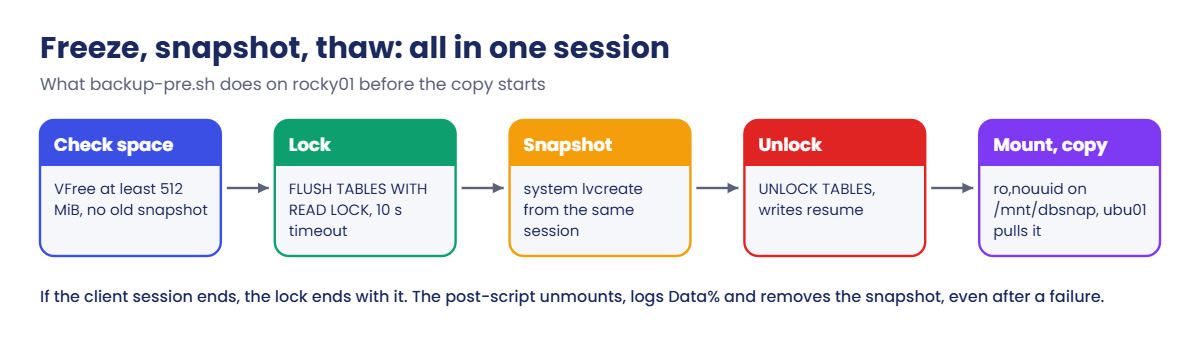
1Check that there is room for the snapshot
A classic snapshot needs unallocated extents in the volume group for its copy-on-write area (Lesson 46). The pre-script reads vg_data’s free space and refuses to start if it’s below the 512 MiB it wants, and it also refuses if a snapshot from last night is still there, because that means last night’s cleanup failed and someone must look.
2Take the lock in one session and keep it open
The script starts one mariadb client and feeds it a few lines. SET SESSION lock_wait_timeout = 10 limits the wait, then FLUSH TABLES WITH READ LOCK waits for running writes to finish, closes the tables and blocks new writes and commits. Readers carry on; SaatShop’s order page still loads, and a customer placing an order waits a moment.
The diagram below shows the order of events.
3Snapshot from inside the session
The mariadb client has a system command that runs a shell command while the session, and therefore the lock, stays open. system lvcreate --snapshot ... creates lv_db_snap, then UNLOCK TABLES lets the waiting writes through. Two quirks matter: the client splits lines at semicolons, so a system command can’t contain one, and the client ignores the command’s exit code, so the script checks with lvs afterwards that the snapshot exists.
4Copy from the snapshot, not from the live files
The snapshot is mounted read-only on /mnt/dbsnap with nouuid (it has the same XFS UUID as lv_db, Lesson 46), and the backup job copies it like any folder. MariaDB keeps writing to lv_db meanwhile, and each first write to a chunk costs a copy into the snapshot’s COW area. The post-script unmounts and removes the snapshot, and logs how full it got.
5Size the snapshot for the copy, not for the database
The snapshot doesn’t hold the database; it holds the old version of every chunk that changes while it exists. A quiet database copied in two minutes needs a few megabytes, and a busy one copied over a slow link for an hour can need gigabytes. The post-script prints the snapshot’s Data% after every run, so after a week you know the real number; size it at three to four times the worst night and keep that much free in vg_data.
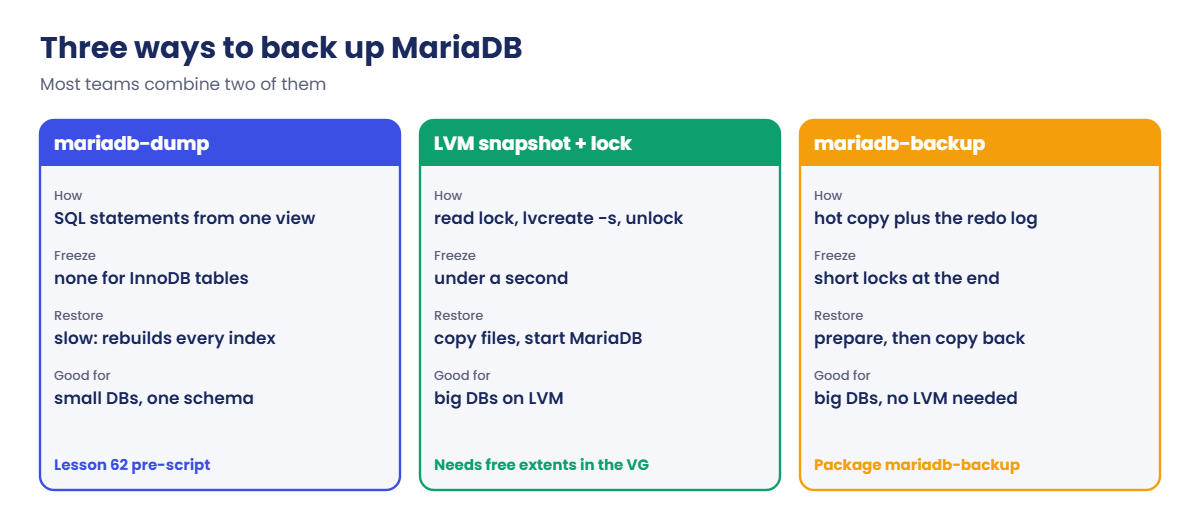
The snapshot is one of three common ways to back up a MariaDB server. The cards below compare them; most teams use two of them together, for example a nightly snapshot plus a logical dump of the important schemas.
6Lighter locks and the binary log
On MariaDB 10.4.1 and later you can swap the two lock lines for BACKUP STAGE START; and BACKUP STAGE BLOCK_COMMIT; before the snapshot and BACKUP STAGE END; after it. Writes to InnoDB tables can keep running until they try to commit, so the freeze is even shorter, and the same rule applies: one session, the snapshot from inside it. FLUSH TABLES WITH READ LOCK is still worth knowing because it works on MySQL and on every MariaDB version you’ll meet.
If the server writes a binary log (needed for replicas and point-in-time recovery), run SHOW MASTER STATUS; inside the locked session and save the file name and position with the backup. A restore then starts from the snapshot and replays the binary log from that exact point. SaatShop’s lab server has no binary log, so the scripts skip that step.
Hands-on lab: freeze SaatShop's MariaDB, snapshot lv_db and restore the copy
Before you run any command, double-check it
Read every command twice before you press Enter. Check the target: the server name, the user, the disk or device name, the path and the sizes. These commands are for learning and were tested in our lab, not on your system. At work, run the read-only commands first, follow your change process, make sure a backup exists, and ask a second person to check anything that changes or deletes data. You run them at your own risk.
Most steps run on rocky01 as student with sudo; step 6 and part of step 7 run on ubu01. Take snapshots of both VMs first (VBoxManage snapshot rocky01 take before-l63 and the same for ubu01). Step 2 needs two SSH sessions to rocky01 side by side.
1Look at the database volume and the space for a snapshot
Run this on rocky01:
sudo vgs vg_data
sudo lvs vg_data
df -h /var/lib/mysql
sudo du -sh /var/lib/mysql
sudo mariadb -e "SELECT VERSION(); SELECT COUNT(*) AS orders FROM saatshop.orders;"You should see something like this:
VG #PV #LV #SN Attr VSize VFree
vg_data 2 3 0 wz--n- 9.99g 2.24g
LV VG Attr LSize Pool Origin Data% Meta% Move Log Cpy%Sync Convert
lv_app vg_data -wi-ao---- 4.25g
lv_db vg_data -wi-ao---- 2.00g
lv_logs vg_data -wi-ao---- 1.50g
Filesystem Size Used Avail Use% Mounted on
/dev/mapper/vg_data-lv_db 2.0G 197M 1.8G 10% /var/lib/mysql
125M /var/lib/mysql
VERSION()
10.11.18-MariaDB
orders
5vg_data has 2.24 GiB unallocated after lv_app (4.25 GiB), lv_logs (1.50 GiB) and lv_db (2.00 GiB), so a 512 MiB snapshot fits with room to spare. The database itself is only about 125 MiB, most of it the 96 MiB redo log, ib_logfile0. If your VFree is below 512 MiB, look for a leftover snapshot from Lesson 46 with sudo lvs -a vg_data before you go on.
✅ Checkpoint: VFree is at least 512 MiB, lv_db is mounted on /var/lib/mysql, and SaatShop has its five orders.
2Watch the read lock block a real write
In the first session, open the MariaDB client as root and take the lock:
sudo mariadb
FLUSH TABLES WITH READ LOCK;Query OK, 0 rows affected (0.003 sec)In the second session, place an order as the app user (password Lab-Only-Pass-56). It will hang:
mariadb -u saatshop -p saatshop -e "INSERT INTO orders (customer, item, qty, amount) VALUES ('Kavya Nair', 'Brass diya set', 2, 898.00);"Back in the first session, look at what the server is doing, then let it go:
SELECT ID, USER, TIME, STATE, LEFT(INFO,40) AS INFO FROM information_schema.PROCESSLIST WHERE COMMAND = 'Query' ORDER BY ID DESC;
UNLOCK TABLES;
exitYou should see something like this:
+----+----------+------+-------------------------+------------------------------------------+
| ID | USER | TIME | STATE | INFO |
+----+----------+------+-------------------------+------------------------------------------+
| 9 | saatshop | 8 | Waiting for backup lock | INSERT INTO orders (customer, item, qty, |
| 8 | root | 0 | Filling schema table | SELECT ID, USER, TIME, STATE, LEFT(INFO, |
+----+----------+------+-------------------------+------------------------------------------+
2 rows in set (0.001 sec)
Query OK, 0 rows affected (0.000 sec)The app’s INSERT waited 8 seconds in state “Waiting for backup lock”, the name MariaDB 10.5 and later use for the global read lock. The moment you ran UNLOCK TABLES, the second session finished. Reads were never blocked.
Remove the test order so SaatShop stays at five, the number later lessons expect:
sudo mariadb -e "DELETE FROM saatshop.orders WHERE customer = 'Kavya Nair'; SELECT COUNT(*) AS orders FROM saatshop.orders;"orders
5✅ Checkpoint: You saw the INSERT in state “Waiting for backup lock” and it finished right after UNLOCK TABLES.
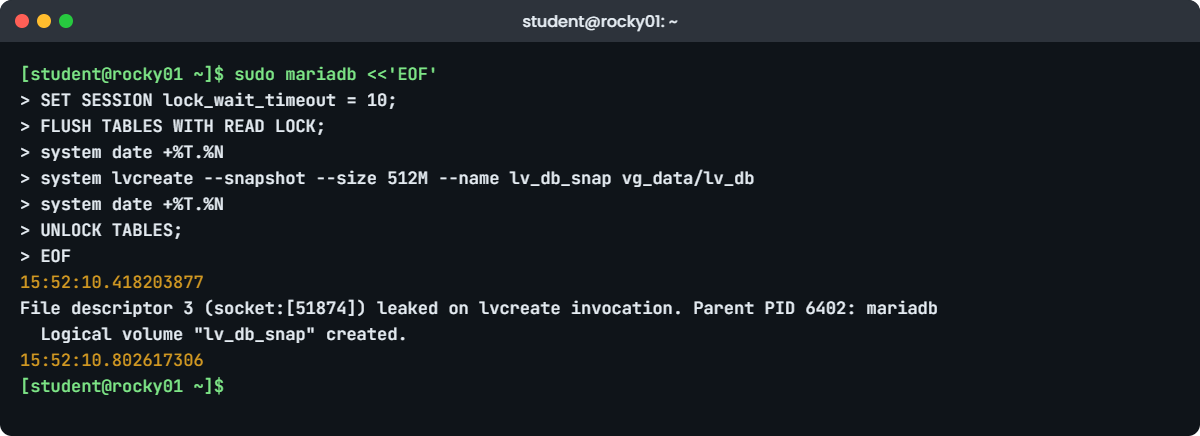
3Lock, snapshot and release in one session
Paste this whole block. Everything between the two EOF lines goes to one client session:
sudo mariadb <<'EOF'
SET SESSION lock_wait_timeout = 10;
FLUSH TABLES WITH READ LOCK;
system date +%T.%N
system lvcreate --snapshot --size 512M --name lv_db_snap vg_data/lv_db
system date +%T.%N
UNLOCK TABLES;
EOF
sudo lvs vg_dataYou should see something like this:
15:52:10.418203877
File descriptor 3 (socket:[51874]) leaked on lvcreate invocation. Parent PID 6402: mariadb
Logical volume "lv_db_snap" created.
15:52:10.802617306
LV VG Attr LSize Pool Origin Data% Meta% Move Log Cpy%Sync Convert
lv_app vg_data -wi-ao---- 4.25g
lv_db vg_data owi-aos--- 2.00g
lv_db_snap vg_data swi-a-s--- 512.00m lv_db 0.00
lv_logs vg_data -wi-ao---- 1.50gThe two timestamps show the lock was held for under 0.4 seconds, the time lvcreate needed. The “leaked” line is a harmless warning: lvcreate inherited the client’s connection to MariaDB (file descriptor 3) and LVM closes such descriptors and says so. The script version sets LVM_SUPPRESS_FD_WARNINGS=1 in front of lvcreate to keep the log clean. lv_db is now an origin (owi) and lv_db_snap is its snapshot at 0.00 percent.
✅ Checkpoint: lvs shows lv_db_snap with Attr swi-a-s---, Origin lv_db and a 512 MiB COW area.
4Mount the snapshot read-only and look inside
Run this:
sudo mkdir -p /mnt/dbsnap
sudo mount -o ro,nouuid /dev/vg_data/lv_db_snap /mnt/dbsnap
findmnt /mnt/dbsnap
sudo ls /mnt/dbsnap/saatshop
sudo umount /mnt/dbsnap
sudo lvremove -y vg_data/lv_db_snapYou should see something like this:
TARGET SOURCE FSTYPE OPTIONS
/mnt/dbsnap /dev/mapper/vg_data-lv_db_snap xfs ro,relatime,seclabel,nouuid,attr2,inode64,logbufs=8,logbsize=32k,noquota
db.opt orders.frm orders.ibd
Logical volume "lv_db_snap" successfully removed.The saatshop folder holds the table definition (orders.frm) and the InnoDB data file (orders.ibd), frozen at 15:52:10 while the live ones keep changing. Without nouuid the mount fails with the duplicate UUID error from Lesson 46. You removed the snapshot by hand this time; from now on the post-script does it.
✅ Checkpoint: sudo lvs vg_data lists only lv_app, lv_db and lv_logs again, and /mnt/dbsnap exists and is empty.
5Put the freeze into the pre and post scripts
Replace the Lesson 62 pre-script on rocky01 (paste the whole block):
sudo tee /usr/local/sbin/backup-pre.sh >/dev/null <<'EOF'
#!/bin/bash
# /usr/local/sbin/backup-pre.sh (SaatVedha Linux course, Lessons 62 and 63)
# Runs as root on rocky01 before every backup. Exit 0 = go ahead, anything else stops the job.
set -euo pipefail
META=/var/local/backup-meta
VG=vg_data
LV=lv_db
SNAP=lv_db_snap
SNAP_SIZE_MB=512 # room for the changes made while the copy runs
SNAP_MNT=/mnt/dbsnap
say() { logger -t backup-pre "$*"; echo "backup-pre: $*"; }
# 1. Only back up a healthy app, or you save a broken state
for svc in mariadb php-fpm nginx; do
if ! systemctl is-active --quiet "$svc"; then
say "FAIL: $svc is not running"
exit 2
fi
done
# 2. Save what you need to rebuild the server, not only its files
install -d -m 0700 "$META"
rpm -qa --qf '%{NAME}-%{VERSION}-%{RELEASE}.%{ARCH}\n' | sort > "$META/packages.txt"
lsblk -o NAME,SIZE,TYPE,FSTYPE,MOUNTPOINTS > "$META/lsblk.txt"
{ vgs; lvs; } > "$META/lvm.txt" 2>&1
cp /etc/fstab "$META/fstab"
# 3. A logical dump of the SaatShop database
mariadb-dump --single-transaction --routines --triggers --databases saatshop > "$META/saatshop.sql"
# 4. A consistent LVM snapshot of the whole database volume (Lesson 63)
if lvs "$VG/$SNAP" >/dev/null 2>&1; then
say "FAIL: $VG/$SNAP already exists, the last run did not clean up"
exit 3
fi
free_mb=$(vgs --noheadings --units m --nosuffix -o vg_free "$VG" | awk '{printf "%d", $1}')
if (( free_mb < SNAP_SIZE_MB )); then
say "FAIL: $VG has ${free_mb} MiB free, the snapshot needs ${SNAP_SIZE_MB} MiB"
exit 3
fi
# The read lock lives only as long as this one client session, so the snapshot
# is taken from inside the session with the client's "system" command.
if ! mariadb <<SQL
SET SESSION lock_wait_timeout = 10;
FLUSH TABLES WITH READ LOCK;
system LVM_SUPPRESS_FD_WARNINGS=1 lvcreate --snapshot --size ${SNAP_SIZE_MB}M --name $SNAP $VG/$LV
UNLOCK TABLES;
SQL
then
say "FAIL: could not lock MariaDB within 10 seconds"
exit 4
fi
# The client ignores the exit code of "system", so check the result yourself
if ! lvs "$VG/$SNAP" >/dev/null 2>&1; then
say "FAIL: snapshot $VG/$SNAP was not created"
exit 4
fi
mkdir -p "$SNAP_MNT"
mount -o ro,nouuid "/dev/$VG/$SNAP" "$SNAP_MNT"
say "OK: metadata, saatshop.sql and $SNAP (mounted on $SNAP_MNT) ready"
EOFReplace the post-script, check both, and run them by hand:
sudo tee /usr/local/sbin/backup-post.sh >/dev/null <<'EOF'
#!/bin/bash
# /usr/local/sbin/backup-post.sh (SaatVedha Linux course, Lessons 62 and 63)
# Runs as root on rocky01 after every backup attempt. $1 is "ok" or "failed".
# It must clean up even after a failed run, so it does not stop at the first error.
set -uo pipefail
META=/var/local/backup-meta
VG=vg_data
SNAP=lv_db_snap
SNAP_MNT=/mnt/dbsnap
result=${1:-unknown}
rc=0
say() { logger -t backup-post "$*"; echo "backup-post: $*"; }
# Release the database snapshot: unmount it, then remove it
if mountpoint -q "$SNAP_MNT"; then
umount "$SNAP_MNT" || { say "WARN: could not unmount $SNAP_MNT"; rc=1; }
fi
if lvs "$VG/$SNAP" >/dev/null 2>&1; then
used=$(lvs --noheadings -o data_percent "$VG/$SNAP" | tr -d ' ')
say "snapshot $SNAP was ${used}% full"
lvremove -y "$VG/$SNAP" >/dev/null || { say "WARN: could not remove $VG/$SNAP"; rc=1; }
fi
# The dump holds customer data: once it is on the backup server, don't keep a spare copy here
rm -f "$META/saatshop.sql"
date '+%F %T' > "$META/last-$result"
say "backup result recorded: $result"
exit "$rc"
EOF
sudo bash -n /usr/local/sbin/backup-pre.sh && sudo bash -n /usr/local/sbin/backup-post.sh && echo "syntax OK"
sudo /usr/local/sbin/backup-pre.sh; echo "pre exit code: $?"
findmnt -n /mnt/dbsnap
sudo /usr/local/sbin/backup-post.sh okYou should see something like this:
syntax OK
Logical volume "lv_db_snap" created.
backup-pre: OK: metadata, saatshop.sql and lv_db_snap (mounted on /mnt/dbsnap) ready
pre exit code: 0
/mnt/dbsnap /dev/mapper/vg_data-lv_db_snap xfs ro,relatime,seclabel,nouuid,attr2,inode64,logbufs=8,logbsize=32k,noquota
backup-post: snapshot lv_db_snap was 0.02% full
backup-post: backup result recorded: okThe pre-script keeps everything from Lesson 62 and adds section 4: the leftover check, the free-space check, the lock and snapshot in one here-document, a check that the snapshot exists (the client ignores the exit code of system), and the read-only mount. If FLUSH TABLES WITH READ LOCK can’t get the lock within 10 seconds, the client stops with error 1205 before lvcreate ever runs, and the script exits 4.
The post-script deliberately has no set -e: it must keep going and clean up even when one step fails. It unmounts, records how full the snapshot got, removes it, and exits 1 only if the cleanup itself failed. The file names, arguments and sudo rule are the same as in Lesson 62, so bkpsvc needs no new rights.
✅ Checkpoint: pre exits 0 with the snapshot mounted on /mnt/dbsnap, and post reports the snapshot’s Data% and records “ok”.
6Add the snapshot to the nightly job on ubu01
On ubu01, add /mnt/dbsnap to the job’s sources and run the job through systemd:
sudo sed -i 's#^SOURCES=.*#SOURCES=(/etc /srv/app /var/local/backup-meta /mnt/dbsnap)#' /usr/local/bin/backup-rocky01.sh
grep '^SOURCES' /usr/local/bin/backup-rocky01.sh
sudo systemctl start backup-rocky01.service
journalctl -u backup-rocky01.service -n 8 -o cat --no-pager
ls /srv/backup/rocky01/$(date +%F)/mnt/dbsnap/saatshop
cd /srv/backup/rocky01/$(date +%F)/mnt/dbsnap && getfattr -n user.rsync.%stat ibdata1; cdYou should see something like this:
SOURCES=(/etc /srv/app /var/local/backup-meta /mnt/dbsnap)
Starting backup-rocky01.service - Pull a backup of rocky01 into /srv/backup (SaatVedha Lesson 62)...
Logical volume "lv_db_snap" created.
backup-pre: OK: metadata, saatshop.sql and lv_db_snap (mounted on /mnt/dbsnap) ready
backup-post: snapshot lv_db_snap was 0.04% full
backup-post: backup result recorded: ok
backup-rocky01: OK: /srv/backup/rocky01/2026-10-27 (156M)
backup-rocky01.service: Deactivated successfully.
Finished backup-rocky01.service - Pull a backup of rocky01 into /srv/backup (SaatVedha Lesson 62).
db.opt orders.frm orders.ibd
# file: ibdata1
user.rsync.%stat="100660 0,0 27:27"The job is the same as in Lesson 62; only the source list grew. The snapshot lived for the length of the copy and only 0.04 percent of its 512 MiB was used, because SaatShop barely writes at night. ibdata1 arrived with its real owner saved: UID and GID 27, the mysql account on Rocky, and mode 0660. On rocky01, sudo lvs vg_data shows no snapshot, because the post-script removed it.
✅ Checkpoint: The journal shows the snapshot created and removed with “result recorded: ok”, and the saatshop folder is in tonight’s backup on ubu01.
7Restore the copy into a scratch MariaDB and prove it starts
On ubu01, send tonight’s database copy back to your home folder on rocky01 (this uses your Lesson 33 key):
rsync -a /srv/backup/rocky01/$(date +%F)/mnt/dbsnap/ rocky01:restore-test/On rocky01, put it in a folder SELinux treats like /var/lib/mysql, and start a second MariaDB on it with no network and its own socket:
sudo semanage fcontext -a -e /var/lib/mysql /var/lib/mysql-restore
sudo mkdir /var/lib/mysql-restore
sudo rsync -a --chown=mysql:mysql ~/restore-test/ /var/lib/mysql-restore/
sudo rm -f /var/lib/mysql-restore/mysql.sock
sudo restorecon -R /var/lib/mysql-restore
ls -ldZ /var/lib/mysql-restore
sudo systemd-run --unit=mariadb-restore-test --uid=mysql --gid=mysql /usr/libexec/mariadbd --no-defaults --datadir=/var/lib/mysql-restore --socket=/var/lib/mysql-restore/restore.sock --pid-file=/var/lib/mysql-restore/restore.pid --skip-networking --innodb-buffer-pool-size=64M
sleep 5; sudo journalctl -u mariadb-restore-test -o cat --no-pager | grep -E 'crash recovery|To recover|ready for'
sudo mariadb --socket=/var/lib/mysql-restore/restore.sock -t -e "SELECT COUNT(*) AS orders, MAX(id) AS last_id FROM saatshop.orders; CHECK TABLE saatshop.orders;"You should see something like this:
drwxr-xr-x. 6 mysql mysql unconfined_u:object_r:mysqld_db_t:s0 4096 Oct 27 16:21 /var/lib/mysql-restore
Running as unit: mariadb-restore-test.service; invocation ID: 3e0b7c5a91d24f6c8a1b2d9e7f406c15
2026-10-27 16:21:44 0 [Note] InnoDB: Starting crash recovery from checkpoint LSN=58103
2026-10-27 16:21:44 0 [Note] InnoDB: To recover: 12 pages
2026-10-27 16:21:44 0 [Note] /usr/libexec/mariadbd: ready for connections.
+--------+---------+
| orders | last_id |
+--------+---------+
| 5 | 5 |
+--------+---------+
+-----------------+-------+----------+----------+
| Table | Op | Msg_type | Msg_text |
+-----------------+-------+----------+----------+
| saatshop.orders | check | status | OK |
+-----------------+-------+----------+----------+The equivalence rule tells SELinux to label /var/lib/mysql-restore the same way as /var/lib/mysql, so MariaDB, confined as mysqld_t, may use it. systemd-run starts mariadbd as a temporary service, which runs it in the right SELinux domain; --no-defaults keeps it away from /etc/my.cnf.d, so it can’t collide with the real server’s port or socket. InnoDB applied a few pages of redo log, the normal “crash recovery” after any snapshot, and the table checks clean with all five orders.
Stop the scratch server and remove the copies:
sudo systemctl stop mariadb-restore-test
sudo rm -rf /var/lib/mysql-restore ~/restore-testA restore test is only finished when it’s written down. Note the date, the backup you used, how long the copy and the start took, and the row count, so next month you can compare. At work, do this on a separate server, never next to production.
✅ Checkpoint: The scratch MariaDB started, showed 5 orders with last id 5 and CHECK TABLE said OK, and the restore folders are gone again.
Break It, Then Fix It
Take a snapshot of rocky01 first (VBoxManage snapshot rocky01 take before-l63-break). The first failure gives you a backup that looks perfect and isn’t; the second gives you no backup at all.
1The lock is released before the snapshot
A colleague’s first version of the pre-script ran the lock and the snapshot as separate commands. Run the first line the same way, then place an order straight after it:
sudo mariadb -e "FLUSH TABLES WITH READ LOCK"; echo "lock exit code: $?"
mariadb -u saatshop -p saatshop -e "INSERT INTO orders (customer, item, qty, amount) VALUES ('Lock test', 'Should have waited', 1, 1.00);"
sudo mariadb -t -e "SELECT id, customer, item FROM saatshop.orders WHERE id > 5;"You’ll get this:
lock exit code: 0
Enter password:
+----+-----------+--------------------+
| id | customer | item |
+----+-----------+--------------------+
| 7 | Lock test | Should have waited |
+----+-----------+--------------------+The lock command succeeded, and the INSERT went straight through. The lock lived only as long as the first client session, a few milliseconds, and was gone before the next line ran. In his script the next line was lvcreate, so every night the snapshot was taken from a running database while the script’s log claimed it was locked.
With InnoDB alone this often restores fine, which is why the bug survives for months, but a restore can bring back half-written Aria or MyISAM tables or a set of tables from slightly different moments.
Fix: remove the test row, and keep the lock, the snapshot and the release in one session, as step 5 does.
sudo mariadb -e "DELETE FROM saatshop.orders WHERE customer = 'Lock test';"
grep -n -A4 'mariadb <<SQL' /usr/local/sbin/backup-pre.sh43:if ! mariadb <<SQL
44-SET SESSION lock_wait_timeout = 10;
45-FLUSH TABLES WITH READ LOCK;
46-system LVM_SUPPRESS_FD_WARNINGS=1 lvcreate --snapshot --size ${SNAP_SIZE_MB}M --name $SNAP $VG/$LV
47-UNLOCK TABLES;✅ Checkpoint: SaatShop has five orders again and your pre-script takes the lock and the snapshot in one here-document.
2The snapshot is too small for the night’s writes
Take a deliberately tiny 64 MiB snapshot, mount it like the job would, then load about 200 MB of data into the live database (paste the whole block):
sudo mariadb <<'EOF'
SET SESSION lock_wait_timeout = 10;
FLUSH TABLES WITH READ LOCK;
system LVM_SUPPRESS_FD_WARNINGS=1 lvcreate --snapshot --size 64M --name lv_db_snap vg_data/lv_db
UNLOCK TABLES;
EOF
sudo mount -o ro,nouuid /dev/vg_data/lv_db_snap /mnt/dbsnap
sudo mariadb saatshop -e "CREATE TABLE loadtest (id INT AUTO_INCREMENT PRIMARY KEY, pad VARCHAR(1000)) ENGINE=InnoDB; INSERT INTO loadtest (pad) SELECT REPEAT('x', 1000) FROM seq_1_to_200000;"
sudo lvs vg_data/lv_db_snap
sudo cat /mnt/dbsnap/saatshop/orders.ibd > /dev/null
sudo dmesg | grep -i 'snapshots:' | tail -n 1You’ll get this error:
Logical volume "lv_db_snap" created.
LV VG Attr LSize Pool Origin Data% Meta% Move Log Cpy%Sync Convert
lv_db_snap vg_data swi-I-s--- 64.00m lv_db 100.00
cat: /mnt/dbsnap/saatshop/orders.ibd: Input/output error
[ 9312.448120] device-mapper: snapshots: Invalidating snapshot: Unable to allocate exception.seq_1_to_200000 is MariaDB’s built-in Sequence engine, a quick way to make 200,000 rows. Those writes, plus the redo log and InnoDB’s doublewrite area, changed far more than 64 MiB of lv_db, so the COW area filled and the kernel invalidated the snapshot (the I in the Attr column). The live database is fine; the snapshot can no longer be read, so a backup job copying from it would fail with read errors halfway through.
That is the good outcome. The bad one is a job that ignores read errors and keeps a partial copy.
Fix: let the post-script clean up as it would after a failed job, drop the test table, and size the snapshot from evidence.
sudo /usr/local/sbin/backup-post.sh failed
sudo mariadb saatshop -e "DROP TABLE loadtest;"
sudo lvs vg_data
sudo journalctl -t backup-post --no-pager | grep 'full' | tail -n 3You should see something like this:
backup-post: snapshot lv_db_snap was 100.00% full
backup-post: backup result recorded: failed
LV VG Attr LSize Pool Origin Data% Meta% Move Log Cpy%Sync Convert
lv_app vg_data -wi-ao---- 4.25g
lv_db vg_data -wi-ao---- 2.00g
lv_logs vg_data -wi-ao---- 1.50g
Oct 27 16:05:12 rocky01 backup-post[7120]: snapshot lv_db_snap was 0.02% full
Oct 27 16:09:47 rocky01 backup-post[7395]: snapshot lv_db_snap was 0.04% full
Oct 27 16:41:30 rocky01 backup-post[8022]: snapshot lv_db_snap was 100.00% fullThe post-script unmounted and removed the broken snapshot without stopping at the first error, which is why it has no set -e. Those “full” lines are your sizing data: on a real server, read a week of them, take the worst night, multiply by three or four, set SNAP_SIZE_MB to that, and make sure vg_data always has that much free. If big data loads run at night, move them away from the backup window, or turn on snapshot_autoextend_threshold as in Lesson 46.
✅ Checkpoint: lvs shows no lv_db_snap, loadtest is gone (sudo mariadb saatshop -e "SHOW TABLES;" lists only orders), and you know how to read the Data% history.
This happened at work
The archive restore that came back crooked
A colleague who looked after the servers of a newspaper group in Nagpur told me this over chai after a meetup. The editorial system ran on a MySQL server with a 600 GB data volume, backed up every night at 2 a.m. with an LVM snapshot. One morning the legal team needed an article as it stood on a date three weeks back, and he restored that night’s copy onto a test server.
MySQL started, but the article table and the image table disagreed: a few hundred articles pointed to image rows that didn’t exist, and two older MyISAM tables were “marked as crashed”. He blamed the storage first, then the restore server, and spent an afternoon on both. The pre-script had the answer.
It ran mysql -e "FLUSH TABLES WITH READ LOCK" on one line and lvcreate on the next, so the lock had ended before the snapshot every night for two years, and the 2 a.m. snapshot often landed in the middle of the late edition’s bulk image import.
They rewrote the script so the lock, the snapshot and the release of the lock ran in one client session, with lock_wait_timeout at 10 seconds because a 1 a.m. report query once held the lock queue for eleven minutes in testing. They moved the two MyISAM tables to InnoDB, and they started a monthly restore test that compares row counts and runs CHECK TABLE on a scratch server. The article for the legal team came from a dump of a single schema they kept for other reasons, three days later than it should have.
Common mistakes and troubleshooting
| Mistake | What happens | What to do instead |
|---|---|---|
Lock in one mariadb -e, lvcreate in the next command | The lock ends with the first session; the snapshot is of a running database | Lock, system lvcreate and UNLOCK TABLES in one client session |
Leaving lock_wait_timeout at its default | The FLUSH waits up to 86400 seconds behind a long write while all new writes queue | SET SESSION lock_wait_timeout = 10 and let the backup fail instead |
Trusting the client to report a failed system command | The client ignores the exit code; the script carries on without a snapshot | Check with lvs vg/snap after the session |
| Sizing the snapshot by habit | It fills during the copy, becomes invalid and the copy fails | Log Data% every night and size from the worst night, times three or four |
Mounting the XFS snapshot without nouuid | “wrong fs type, bad superblock” and a duplicate UUID in dmesg | Mount with -o ro,nouuid |
| A post-script that stops at its first error | A failed umount leaves the snapshot behind and tomorrow’s pre-script refuses to run | No set -e in cleanup; try every step and report |
| Never starting MariaDB on a restored copy | You learn about a bad backup during an outage | Restore into a scratch instance on a schedule and record the result |
Interview questions
Click a question to open it. Each one is written the way an interviewer would ask it. Under it you will see why they ask it and one way you could answer, in your own words.
Fresher level
1. Why can’t you back up a running MariaDB server by copying /var/lib/mysql with cp?
Why they ask this: A basic check that you understand that a database keeps changes in memory and writes files over time.
How you might answer: While it runs, MariaDB keeps changed pages in memory and writes them to the data files and the redo log over time, so a copy that takes minutes mixes pieces of the files from different moments. InnoDB might recover from it like after a crash, but tables can disagree and non-transactional tables can be damaged.
To copy the files safely I either stop the server, or freeze it with a lock and take an LVM snapshot in that instant, or use a tool like mariadb-dump or mariadb-backup that knows how to get a consistent copy.
2. What does FLUSH TABLES WITH READ LOCK do, and how is the lock released?
Why they ask this: They want the effect on reads and writes and the session rule.
How you might answer: It closes all open tables and takes a global read lock, so reads continue but writes and commits wait. In MariaDB 10.11 waiting writers show “Waiting for backup lock” in the process list.
It’s released by UNLOCK TABLES or when the session that took it ends. That second part is why the snapshot must be taken from inside the same session, for example with the client’s system command.
2–5 years experience
3. Walk me through an LVM snapshot backup of a MariaDB server with the shortest possible freeze.
Why they ask this: They’re looking for the exact order, the sizing, and what happens after the lock is released.
How you might answer: I check that the volume group has free extents for the snapshot and that no old snapshot exists. Then in one mariadb session I set lock_wait_timeout to about 10 seconds, run FLUSH TABLES WITH READ LOCK, run lvcreate -s through the client’s system command, and UNLOCK TABLES, which is under a second. If there’s a binary log I record SHOW MASTER STATUS inside the lock.
After that I check the snapshot exists, mount it read-only with nouuid, copy it to backup storage, then unmount and lvremove it in a post-script that runs even on failure. I log the snapshot’s Data% to size it properly, and I test restores by starting a scratch instance on the copy.
4. The backup’s FLUSH TABLES WITH READ LOCK has been running for five minutes and the application can’t save anything. What is happening and what do you do?
Why they ask this: A real incident: they want you to recognise the lock queue and act safely.
How you might answer: FLUSH TABLES WITH READ LOCK is waiting for a long running write, a big UPDATE or ALTER, to finish, and while it waits it blocks every new write behind it, so the app looks frozen. In the process list I’d see the FLUSH and many sessions in “Waiting for backup lock”.
The quick fix is to kill the backup session’s FLUSH, not the user’s query, and the app recovers at once. Then I’d set lock_wait_timeout in the backup session so it gives up after seconds, move the backup away from batch jobs, or switch to BACKUP STAGE, which blocks much less.
Senior level
5. For a 2 TB MariaDB database, would you use mariadb-dump, mariadb-backup or LVM snapshots? Justify it.
Why they ask this: Seniors should compare restore time, load, consistency and operational risk, not only backup speed.
How you might answer: A logical dump of 2 TB takes hours to make and much longer to restore, because every index is rebuilt, so I’d keep dumps only for small schemas and portability. For the full server I’d pick mariadb-backup or snapshots, both physical, so restore time is close to copy time.
Snapshots give the shortest freeze and fit when the data sits on LVM or a SAN with snapshots, but they need free extents and careful sizing on busy nights. mariadb-backup needs no special storage and handles the redo log itself. Often I’d run mariadb-backup on a replica, keep binary logs for point-in-time recovery, and test restores of both regularly.
6. How would you design backup and recovery for a MariaDB primary with two replicas and a 15-minute recovery point objective?
Why they ask this: They want a design: where backups run, binary logs, retention, and tested recovery steps.
How you might answer: A 15-minute RPO means a nightly backup alone isn’t enough, so binary logs become part of the backup: I’d ship them off the server every few minutes. The full backup, a snapshot or mariadb-backup, runs on a replica so the primary isn’t touched, and records the binary log position at the moment of the copy.
Recovery is then restore the full copy and replay binary logs up to the minute before the problem. I’d write that as a runbook, rehearse it on a schedule with timings, keep backups off-site and immutable against ransomware, and monitor backup age, binlog shipping lag and replica health.
Quick quiz
Q1. A script runs mariadb -e "FLUSH TABLES WITH READ LOCK" and then lvcreate -s ... as the next command. What is wrong?
- Nothing, the lock stays until
UNLOCK TABLES - The lock ended when that client session exited, so the snapshot is of a running database
- lvcreate cannot snapshot a mounted volume
- FLUSH needs SUPER privilege
Show answer
B — The global read lock belongs to the session that took it and is released when that session ends.
Q2. In MariaDB 10.11, what state does a write show while a global read lock is held?
- Locked
- Waiting for table metadata lock
- Waiting for backup lock
- Sleep
Show answer
C — Since 10.5 the read lock uses the backup lock, so waiting writers show “Waiting for backup lock”.
Q3. Why does the pre-script check lvs vg_data/lv_db_snap after the mariadb session?
- To refresh the LVM cache
- Because the mariadb client ignores the exit code of a system command
- Because lvcreate prints nothing
- To measure Data%
Show answer
B — A failed system command doesn’t fail the session, so the script has to verify the snapshot itself.
Q4. What decides how big the LVM snapshot of lv_db must be?
- The size of the database
- The size of lv_db
- How much data changes on lv_db while the snapshot exists
- The size of the backup server disk
Show answer
C — The COW area only stores old copies of chunks that change during the snapshot’s life.
Q5. What does lock_wait_timeout = 10 protect against?
- A snapshot that is too small
- The FLUSH waiting a very long time behind a long write while all new writes queue
- Slow rsync
- InnoDB crash recovery
Show answer
B — The default is 86400 seconds; with 10 the backup gives up quickly and the app keeps working.
Quick recap
- Copying live MariaDB files is unsafe; freeze the database for a moment, snapshot the volume, then copy the snapshot.
- The read lock lives only as long as its client session: lock,
system lvcreateandUNLOCK TABLESmust run in one session. - Set
lock_wait_timeoutso a stuck FLUSH fails in seconds, and check the snapshot with lvs because the client ignores system’s exit code. - Mount XFS snapshots with
-o ro,nouuid, and let a post-script withoutset -eunmount and remove them every time. - Size the snapshot from logged Data% and keep that much free in the volume group.
- Prove the backup by starting a scratch MariaDB on the restored files; BACKUP STAGE and mariadb-backup are the lighter alternatives.
Next lesson
Lesson 64: Ansible for Linux admins → You’ll install Ansible on ubu01, build an inventory of rocky01 and kafka01, run ad-hoc commands, and write a playbook for users, packages and services that changes nothing the second time it runs.
Further reading: MySQL LVM snapshot backup
Want to go deeper into MySQL LVM snapshot backup? Read MariaDB’s pages on FLUSH, BACKUP STAGE, storage snapshots and BACKUP STAGE and mariadb-backup; the lvcreate(8) man page; and the RHEL 10 guide to configuring and managing logical volumes. You can also see the full plan for this course on the Linux Administration course page.
