Static routes disappear after a reboot: make them persistent

A Linux static route persistent across reboots has to live in the network configuration (a NetworkManager profile on Rocky, a netplan file on Ubuntu), because a route added with ip route add lives only in the kernel’s memory. The ticket usually reads “partner network unreachable since the patch weekend”, and the route that “was working for months” turns out to have existed only since someone typed it during an incident.

Lesson 31 showed the basic case on rocky01: a route added with ip vanished at reboot and nmcli fixed it. Here you learn to find runtime-only routes before a reboot does it for you, make routes persistent on both rocky01 and ubu01, prove them with a reboot and a small check script, and fix the two errors that catch people next: “Nexthop has invalid gateway” and an old route-eth0 file that Rocky 10 silently ignores.

Where this lesson fits

Lesson 69 of 82 in Linux Administration · Phase 4: Troubleshooting step by step · Before this: Lesson 68, a custom systemd service fails to start · Next: Lesson 70, server stuck in emergency mode

TimeYou needBy the end you can
About 70 minutesrocky01 and ubu01 with SSH sessions as student, their VirtualBox console windows as a fallback, Lessons 31, 32 and 48 doneTell runtime routes from configured ones, make routes persistent with nmcli and netplan, prove them after a reboot, and fix invalid-gateway and legacy route-file problems

What it is, in one line

A route is persistent only if it is written in the network configuration that runs at boot; anything added with ip route add is gone after the next reboot, link bounce or network service restart.

In Simple Words

The chalk arrow and the painted sign

In a big hospital, a ward boy draws a chalk arrow on the floor during a busy night: “X-ray this way, use the back corridor”. Everyone follows it and it works. In the morning the cleaners mop the floor and the arrow is gone, and the night’s shortcut goes with it.

The painted signs on the walls stay, because facilities put them in the building plan. If the shortcut matters, someone has to add it to the plan, not draw a better arrow.

ip route add is the chalk arrow, a reboot is the mop, and the NetworkManager profile or netplan file is the building plan.

Engineer's View

Where a route comes from, and how to tell

The kernel keeps one routing table that everything uses, and every route in it carries a protocol tag that says who added it. ip route prints that tag as “proto”, except for the default one, “boot”, which it hides. So a route with no proto word on a NetworkManager or networkd server was almost always typed by a person or a script, and ip route show proto boot lists those routes and nothing else.

proto in ip routeWho added itSurvives a reboot?
kernelThe kernel, for the subnet of an address on the interfaceYes, as long as the address is configured
staticNetworkManager or systemd-networkd, from the profile or netplan fileYes, it is rebuilt from the config at boot
dhcpThe DHCP client, from the leaseYes, if DHCP gives it again
(nothing shown) = bootip route add by hand or from a scriptNo. Also lost when the link goes down
SystemWhere persistent routes liveCommand
Rocky / RHEL 9 and 10NetworkManager profile, keyfile in /etc/NetworkManager/system-connections, lines route1=, route2=…nmcli connection modify NAME +ipv4.routes "DEST GW [METRIC]"
RHEL 7 and 8 (and 9 with the ifcfg plugin)/etc/sysconfig/network-scripts/route-IFACEEdit the file; on RHEL 9 move it to a keyfile with nmcli connection migrate
RHEL 10 / Rocky 10Keyfiles only: ifcfg support was removed, so route-IFACE files are never readRewrite them as nmcli routes
Ubuntu 26.04netplan YAML, a routes: list with to, via, metric, on-link, tablenetplan try, then netplan apply

When two routes match a destination, the kernel takes the longest prefix first and then the lowest metric. A route added by hand has metric 0, so it beats a configured route to the same network until it disappears. Policy routing (ip rule, separate tables) is the next level up, set with ipv4.routing-rules in nmcli or routing-policy: in netplan, and it is lost the same way when added by hand.

How it works, step by step

Here is the life of a route from the moment someone needs it until the next reboot.

1A route goes into the kernel table

Whether you type ip route add or NetworkManager applies a profile, the result is the same kind of entry in the same table, sent to the kernel over netlink. The kernel checks one thing straight away: the next hop must be reachable on a connected network of the interface the route uses, or it refuses with “Nexthop has invalid gateway”.

2Traffic uses it the moment it exists

The next packet for that network follows the new route, so the problem looks fixed and the ticket gets closed. Nothing on disk has changed. The diagram below shows the two places a route can come from and the events that wipe the runtime one.

Linux static route persistent: runtime routes versus routes rebuilt from configuration at boot

3Events that empty the runtime table

A reboot starts with an empty table. So does any moment the interface goes down or loses its address: a cable or VM link flap, nmcli connection up re-activating the profile, or on Ubuntu a restart of systemd-networkd, which removes routes it didn’t create because its ManageForeignRoutes= setting is yes by default.

4At boot, only configuration comes back

NetworkManager reads every keyfile and adds the routeN= lines of each active profile, tagged proto static. On Ubuntu, netplan turns the YAML into /run/systemd/network/10-netplan-*.network files with [Route] sections, and networkd adds those. Anything else, including a route file in a format the system no longer reads, isn’t there.

5Check what the kernel will do

ip route get ADDRESS asks the kernel which route, gateway, interface and source address it would use for one destination, which is more honest than reading the table by eye. Combine it with the proto tag and you know whether today’s working path will still be there after the next reboot. The picture below compares the four ways routes are set on the systems you’ll meet.

Linux static route persistent: nmcli, netplan, route-IFACE files and ip route add compared

6Prove it with a reboot you planned

The only real test of persistence is a reboot, done when you choose, with the console open, and followed by the same checks. At work that means a test reboot before go-live and a route check in every post-patching health check, so a missing route is found by you at 6 a.m. instead of by a partner at 9.

If the server can’t be rebooted, nmcli connection up NAME (Rocky) or sudo netplan apply (Ubuntu) rebuilds routes from the config, which tests most of it. Both briefly disturb the network on that interface, so use the console, not SSH over the same link.

Hands-on lab: find runtime routes and make 10.70.0.0/16 persistent on both VMs

Before you run any command, double-check it

Read every command twice before you press Enter. Check the target: the server name, the user, the disk or device name, the path and the sizes. These commands are for learning and were tested in our lab, not on your system. At work, run the read-only commands first, follow your change process, make sure a backup exists, and ask a second person to check anything that changes or deletes data. You run them at your own risk.

You’ll add one practice route, 10.70.0.0/16 via 10.10.10.1, on both VMs: first the quick runtime way, so you learn to spot it, then the persistent way, proved with a reboot. In the lab the next hop is the same NAT gateway as the default route, so traffic doesn’t change path; at work it would be a separate router to a partner or a backup network. The 10.50.0.0/16 routes from Lessons 31 and 32 stay as they are.

Take snapshots first (VBoxManage snapshot rocky01 take before-l69 and the same for ubu01).

1Read where each route on rocky01 came from

Run this on rocky01:

ip route
ip route show proto boot | wc -l

You should see something like this:

default via 10.10.10.1 dev enp0s3 proto static metric 100
10.10.10.0/24 dev enp0s3 proto kernel scope link src 10.10.10.11 metric 100
10.10.20.0/24 dev enp0s8 proto kernel scope link src 10.10.20.11 metric 101
10.10.30.0/24 dev bond0 proto kernel scope link src 10.10.30.11 metric 300
10.50.0.0/16 via 10.10.10.1 dev enp0s3 proto static metric 100
0

Every line has a proto word. The two kernel routes on enp0s8 and bond0 come from the storage network of Lesson 48 and the bond of Lesson 31, and the default and 10.50.0.0/16 routes come from the enp0s3 profile, tagged static by NetworkManager. Zero lines for proto boot means nobody has added anything by hand since the last boot.

✅ Checkpoint: Every route shows a proto word and the proto boot count is 0.

2Add a route the incident way and catch it

Run this:

sudo ip route add 10.70.0.0/16 via 10.10.10.1
ip route show 10.70.0.0/16
ip route show proto boot
ip -d route show 10.70.0.0/16

You should see this:

10.70.0.0/16 via 10.10.10.1 dev enp0s3
unicast 10.70.0.0/16 via 10.10.10.1 dev enp0s3 proto boot scope global

The route works right now, and it’s the only line with no proto word, which is how you spot it in a long table. ip -d (details) prints the hidden tag: proto boot. It also has no metric, which means metric 0, the strongest possible, so it will keep winning over any configured copy you add next.

✅ Checkpoint: ip route show proto boot lists one route, 10.70.0.0/16.

3Make it persistent with nmcli

Add it to the enp0s3 profile with metric 50, then remove the runtime copy and apply:

sudo nmcli connection modify enp0s3 +ipv4.routes "10.70.0.0/16 10.10.10.1 50"
sudo ip route del 10.70.0.0/16
sudo nmcli device reapply enp0s3
ip route show 10.70.0.0/16
nmcli -g ipv4.routes connection show enp0s3
sudo grep '^route' /etc/NetworkManager/system-connections/enp0s3.nmconnection

You should see something like this:

Connection successfully reapplied to device 'enp0s3'.
10.70.0.0/16 via 10.10.10.1 dev enp0s3 proto static metric 50
10.50.0.0/16 10.10.10.1, 10.70.0.0/16 10.10.10.1 50
route1=10.50.0.0/16,10.10.10.1
route2=10.70.0.0/16,10.10.10.1,50

The third number in the nmcli route is the metric, stored as the third field of route2=. Deleting the hand-made copy matters: had you left it, ip route show 10.70.0.0/16 would list two routes and the kernel would keep using the metric 0 one, so your check after the reboot would be testing the wrong thing.

✅ Checkpoint: One 10.70.0.0/16 route, tagged proto static metric 50, and a route2= line in the keyfile.

4Write a route check you can run after every reboot

Paste this whole block:

mkdir -p ~/lab69
cat > ~/lab69/route-check.sh <<'EOF'
#!/bin/bash
# route-check.sh: check that each route this server needs is in the kernel and will survive a reboot.
# SaatVedha Linux Administration, Lesson 69. Each line of the list: destination next-hop
LIST=${1:-$HOME/lab69/routes.txt}
fail=0
while read -r dest want; do
    [[ -z $dest || $dest == \#* ]] && continue
    line=$(ip -4 route show exact "$dest" | head -n 1)
    got=$(awk '{for (i = 1; i < NF; i++) if ($i == "via") { print $(i + 1); exit }}' <<< "$line")
    if [[ -z $line ]]; then
        echo "FAIL  $dest is missing, traffic falls back to the default route"; fail=1
    elif [[ $got != "$want" ]]; then
        echo "FAIL  $dest goes via ${got:-no gateway}, expected $want"; fail=1
    elif [[ $line != *proto* ]]; then
        echo "WARN  $dest via $got is runtime only (proto boot), a reboot will remove it"; fail=1
    else
        echo "OK    $dest via $got"
    fi
done < "$LIST"
exit "$fail"
EOF
chmod +x ~/lab69/route-check.sh
printf '# destination   next-hop\n10.50.0.0/16 10.10.10.1\n10.70.0.0/16 10.10.10.1\n' > ~/lab69/routes.txt
~/lab69/route-check.sh; echo "exit=$?"

You should see this:

OK    10.50.0.0/16 via 10.10.10.1
OK    10.70.0.0/16 via 10.10.10.1
exit=0

For each destination in routes.txt, the script asks for that exact route with ip -4 route show exact, checks the next hop, and flags a route with no proto word as runtime only. A plain ip route get wouldn’t do here, because in the lab the default route uses the same gateway and would hide a missing route. At work you’d keep routes.txt in your configuration repository and run the script from the post-patching checklist or monitoring.

✅ Checkpoint: Both routes print OK and the exit code is 0.
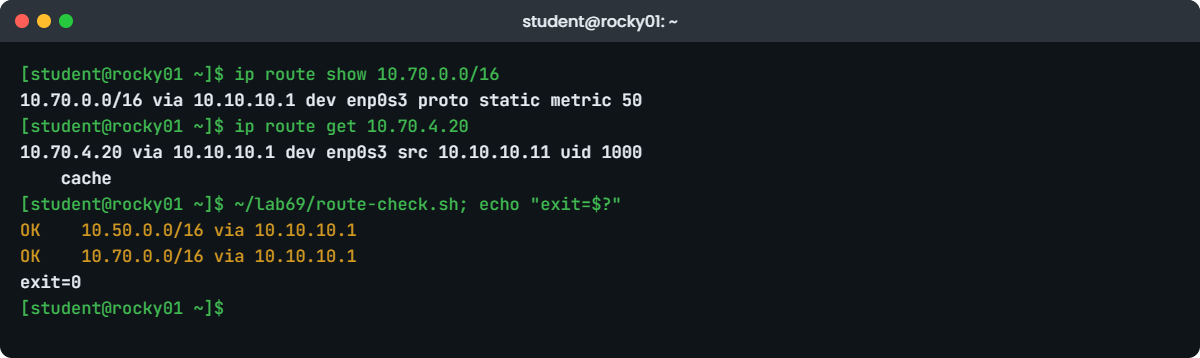
Linux static route persistent lab: route-check.sh after a reboot of rocky01
Example output from rocky01 after a reboot: the 10.70.0.0/16 route came back from the keyfile.

5Reboot rocky01 and prove it

Run this, wait a minute, then log in again:

sudo systemctl reboot

After the reboot, run this:

ip route show 10.70.0.0/16
ip route get 10.70.4.20
~/lab69/route-check.sh; echo "exit=$?"

You should see something like this:

10.70.0.0/16 via 10.10.10.1 dev enp0s3 proto static metric 50
10.70.4.20 via 10.10.10.1 dev enp0s3 src 10.10.10.11 uid 1000
    cache
OK    10.50.0.0/16 via 10.10.10.1
OK    10.70.0.0/16 via 10.10.10.1
exit=0

The route came back from the keyfile at boot. ip route get shows the full decision: the gateway, the interface, the source address the server will use and your UID, because you asked as student. The “cache” line only means the answer came from the kernel’s route lookup; there is no separate cache to clear on modern kernels.

✅ Checkpoint: After the reboot, route-check.sh prints two OK lines on rocky01.

6Add the same route on ubu01 with netplan

On ubu01, back up the file, then write it with the new route (the rest is the Lesson 32 file):

sudo cp /etc/netplan/50-cloud-init.yaml /root/50-cloud-init.yaml.l69
sudo tee /etc/netplan/50-cloud-init.yaml > /dev/null <<'EOF'
network:
  version: 2
  ethernets:
    enp0s3:
      dhcp4: false
      addresses:
        - 10.10.10.21/24
      routes:
        - to: default
          via: 10.10.10.1
        - to: 10.50.0.0/16
          via: 10.10.10.1
        - to: 10.70.0.0/16
          via: 10.10.10.1
          metric: 50
      nameservers:
        search: [saatlab.test]
        addresses: [10.10.10.1]
EOF
sudo netplan generate && sudo grep -A3 '10.70' /run/systemd/network/10-netplan-enp0s3.network

You should see this:

Destination=10.70.0.0/16
Gateway=10.10.10.1
Metric=50

netplan generate checks the YAML and writes the networkd file without touching the network yet. Each item under routes: becomes a [Route] section; metric: becomes Metric=. tee kept the file’s mode 600, so netplan doesn’t warn about permissions. Your 60-storage.yaml from Lesson 48 is a separate file and isn’t affected.

✅ Checkpoint: The generated .network file has a [Route] for 10.70.0.0/16 with Metric=50.

7Apply with netplan try and prove it after a reboot

Run this, then press Enter when the countdown starts:

sudo netplan try

You should see something like this:

Do you want to keep these settings?


Press ENTER before the timeout to accept the new configuration


Changes will revert in 112 seconds
Configuration accepted.

Copy the check script from rocky01, reboot ubu01 and check:

mkdir -p ~/lab69
scp rocky01:lab69/route-check.sh rocky01:lab69/routes.txt ~/lab69/
sudo systemctl reboot

After the reboot:

ip route show proto static
~/lab69/route-check.sh; echo "exit=$?"

You should see something like this:

default via 10.10.10.1 dev enp0s3 proto static
10.50.0.0/16 via 10.10.10.1 dev enp0s3 proto static
10.70.0.0/16 via 10.10.10.1 dev enp0s3 proto static metric 50
OK    10.50.0.0/16 via 10.10.10.1
OK    10.70.0.0/16 via 10.10.10.1
exit=0

scp uses the student key from Lesson 33, so no password is asked. networkd tags its routes proto static too, so the same script works on both distributions without a change. That’s the point of checking the kernel instead of the config files: the files differ, the table doesn’t.

✅ Checkpoint: ubu01 shows 10.70.0.0/16 proto static metric 50 after the reboot and the script exits with 0.

Break It, Then Fix It

Snapshot both VMs first (VBoxManage snapshot rocky01 take before-l69-break and the same for ubu01). Keep the VirtualBox console windows open; none of these steps should cut SSH, but the console is your way back if one does.

1A hand-added route vanishes on Ubuntu without any reboot

On ubu01, add a route the quick way, then restart the network service, as a routine change or a package update does:

sudo ip route add 10.90.0.0/16 via 10.10.10.1
ip route show 10.90.0.0/16
sudo systemctl restart systemd-networkd
sleep 3
ip route show 10.90.0.0/16 | wc -l

You’ll get this:

10.90.0.0/16 via 10.10.10.1 dev enp0s3
0

The route didn’t survive a service restart, never mind a reboot. systemd-networkd treats routes it didn’t configure as foreign and removes them when it sets up the link again, which is the default (ManageForeignRoutes=yes in networkd.conf). An unattended-upgrades run that updates systemd can do this at 6 a.m. with no reboot at all.

Fix: put it in the YAML. On a real server you’d add it under routes: as in lab step 6 and run sudo netplan try. Here, check the route-check script sees the difference first:

echo '10.90.0.0/16 10.10.10.1' >> ~/lab69/routes.txt
~/lab69/route-check.sh; echo "exit=$?"
sed -i '/^10.90.0.0/d' ~/lab69/routes.txt
OK    10.50.0.0/16 via 10.10.10.1
OK    10.70.0.0/16 via 10.10.10.1
FAIL  10.90.0.0/16 is missing, traffic falls back to the default route
exit=1

Don’t switch ManageForeignRoutes= off to keep hand-made routes alive. It hides the real problem, and the routes still disappear at the next reboot.

✅ Checkpoint: You can explain why the 10.90.0.0/16 route disappeared without a reboot, and routes.txt is back to two lines.

2“Nexthop has invalid gateway”

On rocky01, a ticket says “add 10.80.0.0/16 via 10.10.20.1 on the main interface”. Try it:

sudo ip route add 10.80.0.0/16 via 10.10.20.1 dev enp0s3

You’ll get this error:

Error: Nexthop has invalid gateway.

10.10.20.1 is on the storage network, which is connected to enp0s8, not enp0s3. The kernel will only accept a next hop it can reach directly on the interface the route uses, and on enp0s3 the only connected network is 10.10.10.0/24. The same message appears for a typo in the gateway, a gateway from another site’s notes, or a gateway on an interface that is down.

nmcli doesn’t check this when you edit the profile. Put it on the wrong profile and see what happens:

sudo nmcli connection modify enp0s3 +ipv4.routes "10.80.0.0/16 10.10.20.1"; echo "modify exit=$?"
sudo nmcli device reapply enp0s3
ip route show 10.80.0.0/16 | wc -l
sudo journalctl -u NetworkManager -b --no-pager | grep -i 'invalid gateway' | tail -n 1

You should see something like this:

modify exit=0
Connection successfully reapplied to device 'enp0s3'.
0
Oct 27 15:42:09 rocky01 NetworkManager[812]: <warn>  [1793095929.4410] platform-linux: do-add-ip4-route[10.80.0.0/16 via 10.10.20.1 dev 2 metric 100 mss 0 rt-src user]: failure 101 (Network is unreachable - Nexthop has invalid gateway)

The profile happily stored the route, and the kernel refused it each time NetworkManager tried to add it, so the route is in the keyfile but not in the table. Depending on the NetworkManager version the reapply may report this as an error or only log it, so always check the table, not the command’s exit code. dev 2 in the log is enp0s3’s interface index.

Fix: take the route off enp0s3 and put it on the profile whose network holds the gateway, the storage profile from Lesson 48.

sudo nmcli connection modify enp0s3 -ipv4.routes "10.80.0.0/16 10.10.20.1"
sudo nmcli connection modify storage +ipv4.routes "10.80.0.0/16 10.10.20.1"
sudo nmcli device reapply enp0s3
sudo nmcli device reapply enp0s8
ip route show 10.80.0.0/16

You should see something like this:

Connection successfully reapplied to device 'enp0s3'.
Connection successfully reapplied to device 'enp0s8'.
10.80.0.0/16 via 10.10.20.1 dev enp0s8 proto static metric 101

When a provider gives you a gateway outside your subnet that is still on the same wire (some cloud and hosting networks do), the route needs the onlink flag: onlink=true as a route attribute in nmcli, or on-link: true in netplan. Use it only when the provider’s documentation says so; on a normal LAN it hides a wrong gateway.

✅ Checkpoint: 10.80.0.0/16 is in the table via enp0s8, and nmcli -g ipv4.routes connection show enp0s3 no longer lists it.

3An old route-enp0s3 file that Rocky 10 ignores

A migration copies a RHEL 7 server’s route file across, and the new server is restarted:

sudo mkdir -p /etc/sysconfig/network-scripts
echo '10.60.0.0/16 via 10.10.10.1 dev enp0s3' | sudo tee /etc/sysconfig/network-scripts/route-enp0s3
sudo nmcli connection reload
nmcli -g ipv4.routes connection show enp0s3
ip route show 10.60.0.0/16 | wc -l
rpm -q NetworkManager-initscripts-ifcfg-rh

You’ll get this, with no error anywhere:

10.60.0.0/16 via 10.10.10.1 dev enp0s3
10.50.0.0/16 10.10.10.1, 10.70.0.0/16 10.10.10.1 50
0
package NetworkManager-initscripts-ifcfg-rh is not installed

The file looks right, and on RHEL 7 or 8 this exact line would have worked. RHEL 10 removed ifcfg support from NetworkManager entirely, so nothing reads /etc/sysconfig/network-scripts any more, nothing adds 10.60.0.0/16 to any profile, and nothing warns you either. A reboot gives the same result.

On RHEL 9 the plugin was still there but deprecated, which is why servers built from old templates keep “working” until the jump to 10.

Fix: translate each line into an nmcli route on the right profile, then remove the dead file so nobody trusts it again.

sudo nmcli connection modify enp0s3 +ipv4.routes "10.60.0.0/16 10.10.10.1"
sudo nmcli device reapply enp0s3
ip route show 10.60.0.0/16
sudo rm -r /etc/sysconfig/network-scripts

You should see something like this:

Connection successfully reapplied to device 'enp0s3'.
10.60.0.0/16 via 10.10.10.1 dev enp0s3 proto static metric 100

Moving a RHEL 9 server to 10? Run nmcli connection migrate on RHEL 9 first. It converts ifcfg profiles, routes included, into keyfiles, and you can check the result before the upgrade.

✅ Checkpoint: 10.60.0.0/16 is in the table with proto static and /etc/sysconfig/network-scripts is gone.

4Clean up

On rocky01, remove the practice routes and keep 10.50.0.0/16:

sudo nmcli connection modify enp0s3 -ipv4.routes "10.70.0.0/16 10.10.10.1 50" -ipv4.routes "10.60.0.0/16 10.10.10.1"
sudo nmcli connection modify storage -ipv4.routes "10.80.0.0/16 10.10.20.1"
sudo nmcli device reapply enp0s3
sudo nmcli device reapply enp0s8
nmcli -g ipv4.routes connection show enp0s3
nmcli -g ipv4.routes connection show storage | wc -c

You should see something like this:

Connection successfully reapplied to device 'enp0s3'.
Connection successfully reapplied to device 'enp0s8'.
10.50.0.0/16 10.10.10.1
1

On ubu01, put the Lesson 32 file back:

sudo cp /root/50-cloud-init.yaml.l69 /etc/netplan/50-cloud-init.yaml
sudo netplan apply
ip route show 10.70.0.0/16 | wc -l
0

✅ Checkpoint: rocky01 lists only the 10.50.0.0/16 route in the enp0s3 profile, ubu01 has no 10.70.0.0/16 route, and ~/lab69 stays on both for later lessons.

This happened at work

The prescriptions that waited for Monday

I was the Linux on-call for an online pharmacy in London the weekend this happened. Our order servers sent each prescription to a partner’s dispensing system over a private link, 10.200.0.0/16 through a router at 10.20.4.254. A month earlier we had rebuilt those servers on RHEL 10, from a build template the team had used since RHEL 7.

Sunday at 6 a.m. the monthly patching rebooted them. By 7, the queue of prescriptions waiting for dispatch was in the hundreds and the pharmacists on the early shift were phoning the partner. The app team restarted the dispatch service twice, and the network team spent half an hour on the partner’s firewall logs, which showed nothing arriving at all.

ip route get 10.200.1.15 on the first server showed the traffic leaving through the default gateway to the internet. The template still dropped a route-ens192 file into /etc/sysconfig/network-scripts, and it was there on disk, looking perfect, but RHEL 10 never reads it. On go-live night someone had added the route with ip route add “for now”, and that route had lasted until the first reboot.

I added it to the NetworkManager profile with nmcli, reapplied, and the queue drained in twelve minutes.

On Monday we took the route files out of the template and replaced them with nmcli commands in the build role, added a route check like the one in this lesson to the post-patch health check, and made a test reboot part of every go-live. The partner link has had one outage since, and it was theirs.

Common mistakes and troubleshooting

MistakeWhat happensWhat to do instead
ip route add during an incident and closing the ticketWorks until the next reboot, link flap or networkd restartAdd it to the profile or netplan file in the same change, then check ip route show proto boot
Leaving the runtime copy after adding the persistent oneThe metric 0 copy wins, so your test proves nothing until the rebootDelete the runtime route, then reapply and test
Copying route-eth0 files to Rocky or RHEL 10Silently ignored: no error, no routeUse nmcli connection modify NAME +ipv4.routes; on RHEL 9 run nmcli connection migrate before upgrading
Writing via in an nmcli routenmcli rejects it with “The valid syntax is”Destination, then next hop, then metric: “10.70.0.0/16 10.10.10.1 50”
Putting a route on the wrong interface’s profileKernel refuses it with “Nexthop has invalid gateway”; nmcli still saves itPut it on the profile whose subnet holds the gateway, and check ip route show
Trusting the config file instead of the kernelA file that isn’t read, or a route that failed, looks fineCheck with ip route get and ip -4 route show exact after every change and reboot
netplan apply over SSH on the interface you’re usingA mistake cuts your sessionUse netplan try and keep the console open

Interview questions

Click a question to open it. Each one is written the way an interviewer would ask it. Under it you will see why they ask it and one way you could answer, in your own words.

Fresher level

1. You added a static route with ip route add and it vanished after a reboot. Why, and how do you make it permanent?

Why they ask this: A basic question that tells them whether you know the difference between runtime state and configuration.

How you might answer: ip route add only changes the kernel’s table in memory, and the table is rebuilt from configuration at every boot. On Rocky or RHEL I add it to the NetworkManager profile with nmcli connection modify enp0s3 +ipv4.routes "10.70.0.0/16 10.10.10.1" and reapply; on Ubuntu I add it under routes: in the netplan file and run netplan try.

Then I check ip route show for proto static and, when I can, prove it with a planned reboot.

2. How can you tell, before a reboot, which routes on a server were added by hand?

Why they ask this: They want to see if you know the protocol field rather than guessing from memory.

How you might answer: Routes added by NetworkManager or networkd show proto static, DHCP routes show proto dhcp and subnet routes proto kernel. A route typed with ip route add has protocol boot, which ip route hides, so it’s the one with no proto word.

ip route show proto boot lists those, and I treat anything it prints as a route that will be lost at the next reboot.

2–5 years experience

3. nmcli accepted a new route, but ip route doesn’t show it. Where do you look?

Why they ask this: A real troubleshooting case: the profile and the kernel can disagree.

How you might answer: First whether the profile was applied at all, with nmcli device reapply or connection up. Then whether the gateway is reachable on that interface: the kernel refuses a next hop outside the interface’s connected networks with “Nexthop has invalid gateway”, and NetworkManager logs that in its journal.

The fix is usually to move the route to the profile whose subnet holds the gateway, or to correct a typo in the gateway. I’d only use onlink=true if the provider documents it.

4. A RHEL 7 server is being rebuilt on RHEL 10. What happens to its route-eth0 files, and how do you plan the migration?

Why they ask this: They want to know if you’re aware of the ifcfg removal in RHEL 10 and can plan around it.

How you might answer: RHEL 10 has no ifcfg support, so route-IFACE files are never read and nothing warns you; the routes just aren’t there. I’d list every route on the old server with ip route and the route files, write them as nmcli routes in the build automation, and remove the old files so nobody trusts them.

For in-place paths through RHEL 9, nmcli connection migrate converts ifcfg profiles to keyfiles first. Either way I’d finish with a test reboot and a route check against the expected list.

Senior level

5. How would you make sure a patch reboot never again breaks a partner route on 300 servers?

Why they ask this: Seniors should think about prevention, automation and detection, not just the fix.

How you might answer: Routes would be defined in one place, an Ansible role or similar, that writes nmcli or netplan config, never typed by hand. The expected routes per server group live next to it, and a post-reboot check runs ip -4 route show exact for each and alerts on missing or proto boot routes.

I’d also add a check for runtime-only routes to the monitoring before reboots, so a “temporary” route gets made permanent or removed during office hours, and make a test reboot part of every new build.

6. When would you use policy routing instead of a static route, and what changes in how you make it persistent?

Why they ask this: They’re checking depth: multi-homed servers, return paths and asymmetric routing.

How you might answer: When the path should depend on the source address or interface, not only the destination. A typical case is a server with a management and a service network where replies must leave through the interface they came in on, otherwise a stateful firewall drops them.

The rules and the extra tables are just as runtime-only as routes when added with ip rule and ip route add table. I’d persist them with ipv4.routing-rules and route attributes like table= in nmcli, or routing-policy: and table: in netplan, and check them with ip rule after a reboot.

Quick quiz

Q1. Which command lists only routes that were added by hand with ip route add?

  1. ip route show proto static
  2. ip route show proto boot
  3. ip route show table local
  4. nmcli -g ipv4.routes
Show answer

B — Manual routes get protocol boot, which ip route hides in its normal output.

Q2. Where does a persistent static route live on Rocky Linux 10?

  1. /etc/sysconfig/network-scripts/route-enp0s3
  2. /etc/sysconfig/static-routes
  3. In the NetworkManager keyfile, as route1=, route2= lines
  4. /etc/netplan
Show answer

C — RHEL 10 reads only keyfiles; ifcfg route files are ignored.

Q3. ip route add 10.80.0.0/16 via 10.10.20.1 dev enp0s3 fails with “Nexthop has invalid gateway”. Why?

  1. The gateway is not reachable on a network connected to enp0s3
  2. The route already exists
  3. You forgot sudo
  4. The metric is missing
Show answer

A — The kernel only accepts a next hop on the interface’s connected networks, unless onlink is set.

Q4. On Ubuntu, a route added with ip route add vanished without a reboot. What is the likely cause?

  1. netplan try timed out
  2. systemd-networkd was restarted and removed the foreign route
  3. The route expired after 10 minutes
  4. AppArmor removed it
Show answer

B — networkd removes routes it didn’t configure (ManageForeignRoutes=yes) when it sets a link up again.

Q5. You added a route with nmcli but left the hand-added copy. Which one does the kernel use?

  1. The nmcli one, because it is newer
  2. The hand-added one, because metric 0 beats a higher metric
  3. Both, alternating
  4. Neither
Show answer

B — For the same prefix the lowest metric wins, and a manual route has metric 0.

Quick recap

  • ip route add changes only the running kernel table; a reboot, link flap or networkd restart removes it.
  • Spot runtime routes before they bite: ip route show proto boot lists the ones with no proto word.
  • Rocky / RHEL 10: nmcli connection modify NAME +ipv4.routes "DEST GW METRIC" and reapply. Old route-IFACE files are ignored.
  • Ubuntu: add the route under routes: in the netplan file, then netplan generate and netplan try.
  • “Nexthop has invalid gateway” means the gateway isn’t on that interface’s networks: use the right profile, onlink only if documented.
  • Prove persistence with a planned reboot and a check against an expected list, using ip -4 route show exact or ip route get.

Next lesson

Lesson 70: Server stuck in emergency mode → You’ll see why a missing disk in fstab stops the boot, get a root shell on Rocky and on Ubuntu (where root is locked), and fix fstab with nofail and x-systemd.device-timeout.

Further reading: Linux static route persistent

Want to go deeper into Linux static route persistent? Read Red Hat’s Configuring static routes in RHEL 10, the netplan YAML reference (routes, metric, on-link, table), ip-route(8) and the ManageForeignRoutes= setting in networkd.conf(5). You can also see the full plan for this course on the Linux Administration course page.

Scroll to Top

This website uses cookies

We use a few cookies to keep this site working. If you allow it, we also use Google Analytics to count visits so we can improve our lessons. You can accept all, deny the optional ones, or choose what to allow.