Special permissions: SUID, SGID, sticky bit and chattr
-
Phase 0: Before you start
-
Phase 1: The origins and OS architecture
-
Phase 2: Day-to-day administration and the command builder
-
Phase 3: Enterprise infrastructure and storage
-
Phase 4: Troubleshooting step by step
-
Phase 5: Final project and career
Linux special permissions are three extra bits that sit in front of the normal rwx: SUID, SGID and the sticky bit. They change who a program runs as, which group new files in a folder get, and who may delete files in a shared folder. Next to them, chattr lets you lock a file so that even root has to clear the lock before changing it.
You meet these every day without noticing: passwd works because of SUID, /tmp is safe to share because of the sticky bit, and team folders stay tidy because of SGID. In this lesson you’ll see each one work, finish the /srv/projects folder from Lesson 17 with SGID, and learn the one command every security audit asks for: a list of all SUID files.
Where this lesson fits
Lesson 18 of 82 in Linux Administration · Phase 1: The origins and OS architecture · Before this: Lesson 17, file permissions and ownership · Next: Lesson 19, Access Control Lists (ACLs)
| Time | You need | By the end you can |
|---|---|---|
| About 60 minutes | rocky01 with priya, arjun, webteam and /srv/projects (mode 770) from Lessons 15 and 17. Two SSH sessions to rocky01 for step 2. | Spot and explain s, S, t and T in ls output, set SGID on a team folder, find every SUID file, and use chattr +i and +a safely |
What it is, in one line
Linux special permissions are the SUID, SGID and sticky bits, which change who a program runs as, which group new files inherit and who may delete in a shared folder, plus chattr flags that lock a file even against root.
In Simple Words
Rules in a PG hostel
In a paying-guest hostel you can’t walk into the warden’s office and change the register yourself. You fill a slip, the warden’s assistant takes it in and writes your new phone number for you, and only your own line. That’s how passwd works: it carries the warden’s authority for one small job.
The kitchen has a shared fridge. Anyone can put a box in it, but you may only take out your own box, never your roommate’s. Each floor also has a common cupboard where anything kept inside is automatically labelled with the floor number, whoever puts it there.
And the original lease agreement sits in a sealed cover. Even the owner has to break the seal on purpose before changing a word, so nobody alters it by accident.
Engineer's View
The extra bits and the file attributes
The mode of a file has 12 bits. The top three are the special bits, written as a fourth octal digit in front of the usual three. ls shows them in the place of an x: lowercase when the x underneath is set, uppercase when it isn’t (which usually means a mistake).
| Bit | Octal | ls shows | On a program | On a directory |
|---|---|---|---|---|
| SUID | 4000 | -rwsr-xr-x | Runs with the file owner’s UID (often root) | No effect on Linux |
| SGID | 2000 | -rwxr-sr-x | Runs with the file’s group | New files and folders get the folder’s group; new subfolders get SGID too |
| Sticky | 1000 | drwxrwxrwt | No effect on Linux | Only the file’s owner, the folder’s owner or root may delete or rename a file |
The kernel ignores SUID and SGID on scripts (anything starting with #!), because a script can be swapped or influenced through its environment between the check and the run. It also ignores them on file systems mounted with nosuid, which is why hardened servers mount /tmp, /home and USB disks that way.
One trap: GNU chmod keeps SUID and SGID on a directory when you give it a three-digit mode, so chmod 770 on an SGID folder leaves the s in place. Use chmod g-s or a five-digit chmod 00770 to clear it.
| Attribute | Set with | What it does | Typical use |
|---|---|---|---|
| i (immutable) | chattr +i file | No writes, no delete, no rename, no chmod, no new links, even for root | A config file that automation must not touch |
| a (append only) | chattr +a file | Data can only be added at the end; no overwrite, no delete | Audit or security logs |
Attributes are stored by the file system (ext4 and XFS both support i and a) and checked before the normal permissions. Only root can set or clear them, and lsattr shows them. They don’t appear in ls -l at all, which is why they confuse people.
How it works, step by step
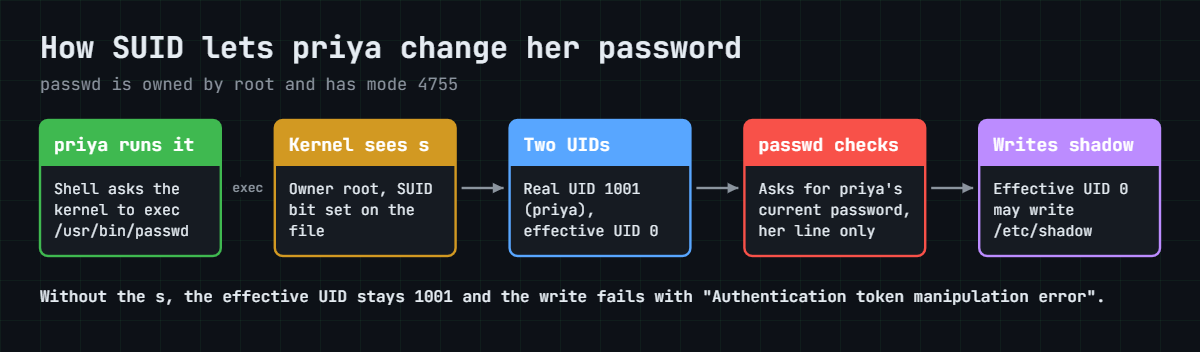
Start with the most famous SUID program. Your password lives in /etc/shadow, which only root can write, yet any user can run passwd and change it. The diagram below shows how.
1priya starts passwd
Her shell asks the kernel to run /usr/bin/passwd. The kernel sees the file is owned by root and has the SUID bit set.
2The process gets two identities
The real UID stays 1001 (priya), so the program knows who called it. The effective UID becomes 0 (root), and that’s the one the kernel checks when the program opens /etc/shadow. passwd itself then makes sure priya can change only her own line, after she types her current password.
3SGID on a folder fixes the group of new files
In Lesson 17, priya’s new file in /srv/projects came out with group priya, so arjun couldn’t edit it until she ran chgrp. With SGID on the folder, the kernel gives every new file and folder created inside it the folder’s group (webteam) instead of the creator’s primary group.
4The sticky bit guards deletes
Deleting a file only needs w and x on the folder, so in a folder everyone can write to, anyone could delete anyone’s files. With the sticky bit set, the kernel adds one more check before an unlink or rename: you must own the file or the folder, or be root. That’s why /tmp is drwxrwxrwt.
5chattr locks sit in front of everything
Before the kernel looks at owners and rwx bits, the file system checks its own flags. With i set, the answer is “Operation not permitted” for every change, even from root, until someone runs chattr -i. With a set, writes are allowed only if they append.
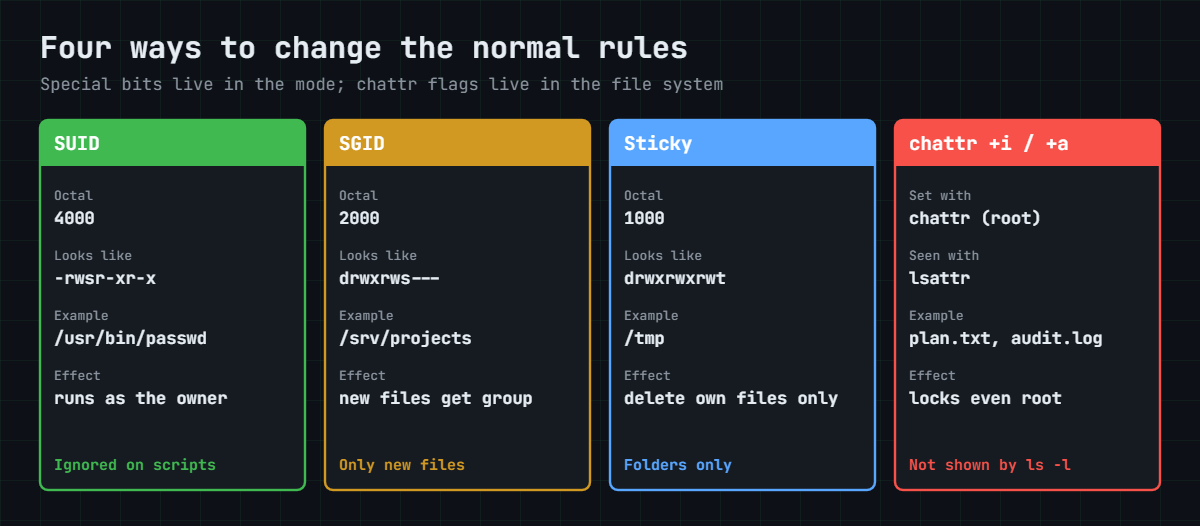
The cards below put all four side by side: the octal value, how each looks in ls or lsattr, a real example from your servers, and what it changes.
Because a SUID-root program runs as root, a bug in it can hand root to any user. That’s why auditors always ask for the list, and why a new SUID file nobody can explain is a red flag. You find them with find:
| Command | Finds |
|---|---|
find / -xdev -perm -4000 -type f | Files with SUID set (the minus means “at least these bits”) |
find / -xdev -perm -2000 -type f | Files with SGID set |
find / -xdev -perm /6000 -type f | Files with SUID or SGID (the slash means “any of these bits”) |
find / -xdev -perm -1000 -type d | Folders with the sticky bit |
The habit that matters is a baseline: save the list on a fresh build, then compare it after patching or during an incident. On Rocky, rpm -Vf /usr/bin/passwd also tells you if a packaged file’s mode no longer matches the package. Some programs have moved from SUID to file capabilities, which give one narrow root power instead of all of them; getcap -r /usr 2>/dev/null lists those.
Hands-on lab: SUID, SGID, sticky and chattr on rocky01
Before you run any command, double-check it
Read every command twice before you press Enter. Check the target: the server name, the user, the disk or device name, the path and the sizes. These commands are for learning and were tested in our lab, not on your system. At work, run the read-only commands first, follow your change process, make sure a backup exists, and ask a second person to check anything that changes or deletes data. You run them at your own risk.
Everything happens on rocky01. You’ll look at SUID on a real program, save a SUID baseline, add SGID to /srv/projects, build a sticky drop folder and try both chattr locks. Take a snapshot first; Break It touches /usr/bin/passwd.
As in Lesson 17, sudo -iu priya opens a shell as priya and exit returns to student. On ubu01 everything works the same, except that /etc/shadow is -rw-r----- with group shadow, the SUID list is a little different (sudo on Ubuntu 26.04 is sudo-rs), and lsattr on ext4 also shows an e (extents) flag.
1Find the SUID bit on passwd
Run this:
ls -l /usr/bin/passwd /etc/shadowYou should see something like this:
-rwsr-xr-x. 1 root root 32656 Jun 18 14:07 /usr/bin/passwd
----------. 1 root root 1061 Oct 27 09:12 /etc/shadowThe s in the owner’s x place is SUID, and the file belongs to root. /etc/shadow has no rights at all for anyone, so only a process running as root can change it.
✅ Checkpoint: You can point at the s in the passwd line and say whose identity the program borrows.
2Watch passwd run as root
In your first SSH session, start passwd as priya and leave it waiting at the password prompt:
sudo -iu priya
passwdIn a second SSH session as student, run this:
ps -o user,ruser,pid,cmd -C passwdYou should see something like this:
USER RUSER PID CMD
root priya 2214 passwdUSER is the effective user (root) and RUSER is the real user (priya). That pair is SUID in one line. Go back to the first session, press Ctrl+C to cancel without changing anything, and type exit.
✅ Checkpoint: ps shows root under USER and priya under RUSER for the same PID.
3Save a baseline of SUID and SGID files
Run this:
sudo find / -xdev -perm /6000 -type f -printf '%M %u:%g %p\n' 2>/dev/null | sort -k3 | sudo tee /root/suid-baseline.txtYou should see something like this:
-rwsr-xr-x root:root /usr/bin/chage
-rwsr-xr-x root:root /usr/bin/crontab
-rwsr-xr-x root:root /usr/bin/gpasswd
-rwsr-xr-x root:root /usr/bin/mount
-rwsr-xr-x root:root /usr/bin/newgrp
-rwsr-xr-x root:root /usr/bin/passwd
-rwsr-xr-x root:root /usr/bin/pkexec
-rwsr-xr-x root:root /usr/bin/su
---s--x--x root:root /usr/bin/sudo
-rwsr-xr-x root:root /usr/bin/umount
-rwxr-sr-x root:tty /usr/bin/write
-rwsr-xr-x root:root /usr/lib/polkit-1/polkit-agent-helper-1
-r-xr-sr-x root:ssh_keys /usr/libexec/openssh/ssh-keysign
-rwsr-xr-x root:root /usr/sbin/grub2-set-bootflag
-rwsr-xr-x root:root /usr/sbin/pam_timestamp_check
-rwsr-xr-x root:root /usr/sbin/unix_chkpwdYour list will differ a little depending on installed packages, and that’s the point of keeping your own. Every line should belong to a package you recognise. -xdev keeps find on the root file system, so it doesn’t wander into /proc or network mounts. Notice that sudo on Rocky is ---s--x--x: everyone may run it but nobody may read it.
✅ Checkpoint: /root/suid-baseline.txt exists and you can explain at least three of the lines.
4Give /srv/projects the SGID bit
First see the problem. Run this:
sudo -iu priya
echo "budget v1" > /srv/projects/budget.txt
ls -l /srv/projects
exitYou should see something like this:
total 8
-rw-r--r--. 1 priya priya 10 Oct 27 11:05 budget.txt
-rw-rw-r--. 1 priya webteam 50 Oct 27 10:23 plan.txtbudget.txt got priya’s private group again. Now set SGID on the folder:
sudo chmod g+s /srv/projects
ls -ld /srv/projects
stat -c '%a %A %n' /srv/projectsdrwxrws---. 2 root webteam 40 Oct 27 11:06 /srv/projects
2770 drwxrws--- /srv/projectsCreate a file and a folder as priya, and fix the old file:
sudo -iu priya
echo "timeline v1" > /srv/projects/timeline.txt
mkdir /srv/projects/design
chgrp webteam /srv/projects/budget.txt
exit
ls -l /srv/projectsYou should see something like this:
total 12
-rw-r--r--. 1 priya webteam 10 Oct 27 11:05 budget.txt
drwxr-sr-x. 2 priya webteam 6 Oct 27 11:07 design
-rw-rw-r--. 1 priya webteam 50 Oct 27 10:23 plan.txt
-rw-r--r--. 1 priya webteam 12 Oct 27 11:07 timeline.txttimeline.txt and design got webteam without any chgrp, and design even carries the s itself, so the rule keeps working all the way down. SGID only affects new files: budget.txt needed the chgrp, and a file moved in with mv keeps its old group. The folder is now 2770, as the shared lab plan says.
✅ Checkpoint: ls -ld /srv/projects shows drwxrws--- and timeline.txt belongs to webteam.
5Make a drop folder with the sticky bit
Run this:
sudo mkdir /srv/dropbox
sudo chmod 1777 /srv/dropbox
ls -ld /srv/dropbox /tmpYou should see something like this:
drwxrwxrwt. 2 root root 6 Oct 27 11:10 /srv/dropbox
drwxrwxrwt. 9 root root 200 Oct 27 11:10 /tmppriya drops a file, then arjun tries to delete it:
sudo -iu priya
echo "priya notes" > /srv/dropbox/priya-notes.txt
ls -l /srv/dropbox
exit
sudo -iu arjun
rm -f /srv/dropbox/priya-notes.txt
exittotal 4
-rw-r--r--. 1 priya priya 12 Oct 27 11:11 priya-notes.txtYou’ll get this error:
rm: cannot remove '/srv/dropbox/priya-notes.txt': Operation not permittedThe folder gives everyone w, which normally means everyone may delete anything inside. The t in the last place stops that: arjun can add his own files but can’t remove priya’s, even with -f.
✅ Checkpoint: arjun gets “Operation not permitted” and priya-notes.txt is still there.
6Lock a file with chattr +i
Run this:
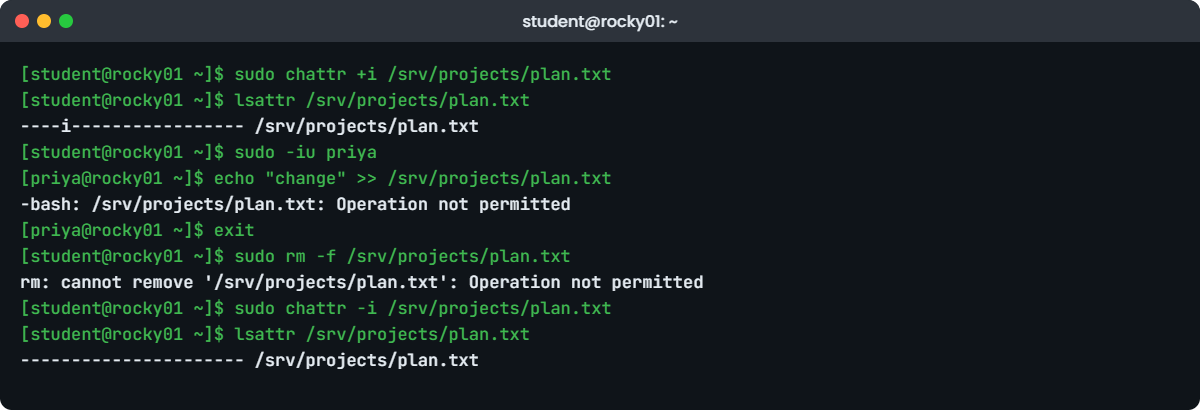
sudo chattr +i /srv/projects/plan.txt
lsattr /srv/projects/plan.txt
sudo -iu priya
echo "change" >> /srv/projects/plan.txt
exitYou should see something like this:
----i----------------- /srv/projects/plan.txt-bash: /srv/projects/plan.txt: Operation not permittedEven root is refused:
sudo rm -f /srv/projects/plan.txt
sudo chmod 600 /srv/projects/plan.txtrm: cannot remove '/srv/projects/plan.txt': Operation not permitted
chmod: changing permissions of '/srv/projects/plan.txt': Operation not permittedRemove the lock:
sudo chattr -i /srv/projects/plan.txt
lsattr /srv/projects/plan.txt---------------------- /srv/projects/plan.txtThe rwx bits never changed: priya still owns the file and the group still has rw-. The i flag sat in front of all of it. If chattr is missing on a minimal install, it comes in the e2fsprogs package on both Rocky and Ubuntu.
✅ Checkpoint: lsattr showed an i, both priya and root were refused, and the i is gone now.
7Make an append-only log with chattr +a
Run this:
sudo touch /srv/projects/audit.log
sudo chattr +a /srv/projects/audit.log
echo "10:05 priya opened plan.txt" | sudo tee -a /srv/projects/audit.log
lsattr /srv/projects/audit.logYou should see something like this:
-----a---------------- /srv/projects/audit.log
10:05 priya opened plan.txtNow try to overwrite it and delete it, then look at what survived:
echo "10:06 nothing happened" | sudo tee /srv/projects/audit.log
sudo rm -f /srv/projects/audit.log
sudo cat /srv/projects/audit.logYou’ll get this:
tee: /srv/projects/audit.log: Operation not permitted
10:06 nothing happened
rm: cannot remove '/srv/projects/audit.log': Operation not permitted
10:05 priya opened plan.txttee -a appends, so it worked; plain tee tries to truncate the file first, so it failed (tee still prints its input on screen, which is the “10:06” line). This is how you protect a log from someone covering their tracks. Remember that log rotation needs to move or truncate the file, so a rotated log with +a needs a rotation script that removes the flag first.
✅ Checkpoint: The overwrite and the delete both failed and the 10:05 line is still in the file.
8Clean up and check the result
Run this:
sudo chattr -a /srv/projects/audit.log
sudo rm /srv/projects/audit.log
sudo rm -r /srv/dropbox
ls -ld /srv/projects
ls -l /srv/projects
sudo lsattr /srv/projectsYou should see something like this:
drwxrws---. 3 root webteam 89 Oct 27 11:20 /srv/projects
total 16
-rw-r--r--. 1 priya webteam 10 Oct 27 11:05 budget.txt
-rwxr-xr-x. 1 priya priya 62 Oct 27 10:26 deploy.sh
drwxr-sr-x. 2 priya webteam 6 Oct 27 11:07 design
-rw-rw-r--. 1 priya webteam 50 Oct 27 10:23 plan.txt
-rw-r--r--. 1 priya webteam 12 Oct 27 11:07 timeline.txtThe last command prints a line of dashes for each item, which means no attributes are left behind. /srv/projects is now root:webteam with mode 2770, ready for the ACLs in Lesson 19.
✅ Checkpoint: /srv/projects is drwxrws---, every file inside has group webteam except deploy.sh, and lsattr shows no flags.
Break It, Then Fix It
Three failures you’ll meet on real servers. Take a snapshot of rocky01 before the first one, because it changes a system program.
1Strip SUID from passwd
Run this as student:
sudo chmod u-s /usr/bin/passwd
ls -l /usr/bin/passwd
sudo -iu priya passwdType priya’s current password and a new one. You’ll get something like this:
-rwxr-xr-x. 1 root root 32656 Jun 18 14:07 /usr/bin/passwd
Changing password for priya.
Current password:
New password:
Retype new password:
passwd: Authentication token manipulation error
passwd: password unchangedWithout SUID, passwd runs as priya, so it can’t write /etc/shadow. The message talks about an “authentication token”, which sends people chasing PAM settings, when the cause is one missing bit. This happens after an over-eager hardening script, or after someone copies binaries without -p.
Your baseline from the lab catches it at once:
sudo find / -xdev -perm /6000 -type f -printf '%M %u:%g %p\n' 2>/dev/null | sort -k3 | sudo diff /root/suid-baseline.txt -6d5
< -rwsr-xr-x root:root /usr/bin/passwdFix: put the bit back and check it against the package.
sudo chmod 4755 /usr/bin/passwd
ls -l /usr/bin/passwd
rpm -Vf /usr/bin/passwd-rwsr-xr-x. 1 root root 32656 Jun 18 14:07 /usr/bin/passwdNo output from rpm -V means the file matches the package again. On Ubuntu, sudo apt reinstall passwd restores the packaged mode.
✅ Checkpoint: passwd shows -rwsr-xr-x again and the diff against your baseline prints nothing.
2Turn x into S on the team folder
Someone wants “no executables” in the team folder and runs this:
sudo chmod 2660 /srv/projects
ls -ld /srv/projects
sudo -iu arjun
ls /srv/projects
cd /srv/projects
exitYou’ll get something like this:
drw-rwS---. 3 root webteam 89 Oct 27 11:32 /srv/projects
ls: cannot access '/srv/projects/budget.txt': Permission denied
ls: cannot access '/srv/projects/deploy.sh': Permission denied
ls: cannot access '/srv/projects/design': Permission denied
ls: cannot access '/srv/projects/plan.txt': Permission denied
ls: cannot access '/srv/projects/timeline.txt': Permission denied
budget.txt deploy.sh design plan.txt timeline.txt
-bash: cd: /srv/projects: Permission deniedThe capital S says “SGID is set but the group has no x”. arjun can still read the names (r), with an error for each one, but can’t enter the folder or open anything in it, so the whole team is locked out. Capital S or T in a listing is nearly always a mistake.
Fix: folders need x.
sudo chmod 2770 /srv/projects
ls -ld /srv/projectsdrwxrws---. 3 root webteam 89 Oct 27 11:32 /srv/projects✅ Checkpoint: The folder shows a lowercase s again and arjun can cd into it.
3Try to remove SGID with chmod 770
Run this, then look at the result:
sudo chmod 770 /srv/projects
ls -ld /srv/projectsYou’ll get this:
drwxrws---. 3 root webteam 89 Oct 27 11:34 /srv/projectsNo error, and the s is still there. GNU chmod deliberately keeps SUID and SGID on directories when you give a three-digit mode, so a runbook that says “set it to 770” silently does nothing to that bit. It bites people both ways: they think they removed SGID, or they think a script reset everything to a clean state.
Fix: be explicit. To clear it you’d use either of these:
sudo chmod g-s /srv/projects
sudo chmod 00770 /srv/projectsFor the lab you want SGID kept, so put it back and check:
sudo chmod 2770 /srv/projects
stat -c '%a %A %n' /srv/projects2770 drwxrws--- /srv/projects✅ Checkpoint: stat shows 2770 for /srv/projects.
This happened at work
The DNS change that six servers ignored
One of our on-call engineers was supporting an auto parts plant in Kuala Lumpur when the network team moved the plant’s DNS servers on a Saturday. By Monday’s first shift, six of the forty Linux servers behind the production-line software still pointed at the old addresses, and label printing on two lines stopped when the old DNS servers were switched off.
The Ansible job that pushed the new DNS settings had reported “Operation not permitted” on those same six. The first guesses were SELinux and a full disk, and an hour went on both. Someone then logged in as root and tried to edit the file by hand, and root was refused too.
lsattr /etc/resolv.conf showed an i. Two years earlier a contractor had made the file immutable so NetworkManager would stop overwriting his DNS entries, and it was never written down. Nothing in ls -l hinted at it.
They cleared the flag, set DNS the supported way with nmcli on each connection, and confirmed the lines printed again. Then the team added a check to their monthly audit, sudo lsattr -R /etc 2>/dev/null | awk '$1 ~ /i/', and a rule that any chattr on a server goes in the ticket with the reason.
Common mistakes and troubleshooting
| Mistake | What happens | What to do instead |
|---|---|---|
| Setting SUID on a shell script to “run it as root” | Nothing: the kernel ignores SUID on scripts, and the attempt is a warning sign in an audit | Give the user a narrow sudo rule for that script (Lesson 16) |
| Copying binaries without keeping modes | SUID is lost and tools like passwd fail with confusing errors | Reinstall the package, or use cp -p or rsync -a |
Expecting chmod 770 to clear SGID on a folder | The s stays, because GNU chmod keeps it for directories | Use chmod g-s or chmod 00770 |
| A world-writable shared folder without the sticky bit | Any user can delete other users’ files | Use 1777 for public drop folders, or a group folder like 2770 |
| Using chattr +i as a permanent fix and not writing it down | Updates, config tools and colleagues fail with “Operation not permitted” years later | Fix the tool that overwrites the file, and record any chattr in the ticket |
| Never checking the SUID list | A planted SUID copy of bash gives root to anyone who finds it | Keep a baseline from a clean build and diff it after changes and incidents |
Interview questions
Click a question to open it. Each one is written the way an interviewer would ask it. Under it you will see why they ask it and one way you could answer, in your own words.
Fresher level
1. Why can a normal user change their own password when /etc/shadow is only writable by root?
Why they ask this: They want to see that you know what SUID is and can explain it with a real program.
How you might answer: Because /usr/bin/passwd is owned by root and has the SUID bit, so it runs with root’s effective UID while the real UID stays the user’s. That lets it write /etc/shadow, and passwd itself checks the real UID so a user can only change their own entry.
2. What does the t at the end of drwxrwxrwt on /tmp mean?
Why they ask this: This checks the sticky bit and whether you understand why a shared folder needs it.
How you might answer: It’s the sticky bit. Everyone can create files in /tmp, but only a file’s owner, the folder’s owner or root can delete or rename it. Without it, any user could delete anyone else’s temporary files.
2–5 years experience
3. Your team folder keeps getting files with the wrong group and people get Permission denied. How do you fix it for good?
Why they ask this: They want SGID on directories, plus the awareness that it only affects new files.
How you might answer: I’d set the folder’s group to the team group and add SGID with chmod 2770, so every new file and subfolder inherits the team group. Then I’d fix the existing files once with chgrp -R.
I’d also tell people that files moved in with mv keep their old group, and check the users’ umask so new files are group-writable, like 002 or 007.
4. As root you try to edit a file and get “Operation not permitted”. What would you check?
Why they ask this: This tests whether you know about file attributes and read-only mounts, beyond rwx.
How you might answer: Root ignores rwx, so I’d look at things that apply to root too. First lsattr on the file for i or a, then findmnt to see if the file system is mounted read-only, and then SELinux denials in the audit log.
If it’s an i flag I’d find out who set it and why before clearing it, because someone may be relying on it.
Senior level
5. How would you find and control SUID files across a few hundred servers?
Why they ask this: They want a repeatable process: inventory, baseline, alerting and hardening, not a one-off find.
How you might answer: I’d collect find / -xdev -perm /6000 -type f with owner and mode from every server through Ansible or our monitoring agent, and compare it to a baseline per OS build. Anything new and not owned by a package gets an alert and a ticket.
On top of that I’d mount /tmp, /home and removable media with nosuid, remove SUID from tools we don’t need, and use rpm -Va or a file integrity tool so changed modes on packaged files are caught too.
6. When would you use chattr +a, and what can go wrong with it?
Why they ask this: They want a real use case and the operational cost, which shows experience.
How you might answer: I’d use +a on security or audit logs so that even a compromised admin account can’t quietly rewrite history; it can only add lines. The catch is rotation: logrotate needs to rename or truncate the file, so the rotation has to clear the flag and set it again on the new file.
It also only protects against people on that server. For real tamper resistance I’d still ship the logs to a central system as they’re written.
Quick quiz
Q1. What does SUID do to a program like /usr/bin/passwd?
- Makes it run faster
- Makes it run with the file owner’s UID
- Lets only root run it
- Makes it read-only
Show answer
B — The process gets the owner’s effective UID (root here) while the real UID stays the caller’s.
Q2. You run chmod g+s on /srv/projects. What happens to new files created inside it?
- They become executable
- They get the folder’s group
- They get root as owner
- They can’t be deleted
Show answer
B — SGID on a folder makes new files and subfolders inherit the folder’s group.
Q3. A folder shows drwxrwxrwt. Who can delete priya’s file inside it?
- Any user
- Only members of root’s group
- priya, the folder’s owner and root
- Nobody
Show answer
C — The sticky bit limits delete and rename to the file owner, the folder owner and root.
Q4. What does a capital S in drw-rwS--- tell you?
- SGID is set and the group has x
- SGID is set but the group has no x
- The folder is immutable
- SELinux is enforcing
Show answer
B — Uppercase means the special bit is set without the x underneath, usually a mistake on folders.
Q5. Which command shows that a file has the immutable flag?
- ls -l
- stat -c %a
- lsattr
- getfacl
Show answer
C — Attributes like i and a don’t show in ls or stat; lsattr shows them.
Quick recap
- SUID (4000) runs a program as its owner, SGID (2000) runs it as its group or, on a folder, hands the folder’s group to new files, and the sticky bit (1000) limits who can delete in a shared folder.
- Lowercase s or t means the x underneath is set; uppercase S or T means it isn’t, which is usually a mistake.
- The kernel ignores SUID and SGID on scripts and on nosuid mounts.
- Keep a SUID/SGID baseline with
find / -xdev -perm /6000 -type fand diff it after changes. chattr +iandchattr +astop changes even by root;lsattris the only place you’ll see them.- /srv/projects is now root:webteam with mode 2770.
Next lesson
Lesson 19: Access Control Lists (setfacl, getfacl, default ACLs, the mask) → You’ll give arjun read-only access to /srv/projects/reports without touching the group, and see why the ACL mask sometimes takes rights away.
Further reading: Linux special permissions
Want to go deeper into Linux special permissions? Read the man pages for chmod (the SETUID AND SETGID BITS and RESTRICTED DELETION sections), chattr, inode(7) for how the bits are stored, and capabilities(7). The RHEL 10 documentation covers the Rocky side.
You can also see the full plan for this course on the Linux Administration course page.
