Linux networking basics: addresses, routes, names and DNS

Linux networking basics come down to a handful of questions you ask in order every time a server “can’t reach” something: is the network card up, does it have the right address, which route will the packet take, does the next hop answer, and does the name turn into the right IP. The ip command, hostnamectl, /etc/hosts, resolv.conf, ping, tracepath and dig answer all of them in a few minutes.

In Lesson 23 you checked which ports are listening. Here you go one layer down, to addresses, routes, neighbours and names, on both rocky01 and ubu01. Almost everything in this lesson only reads; Lessons 31 and 32 make permanent changes with nmcli and netplan.

Where this lesson fits

Lesson 30 of 82 in Linux Administration · Phase 2: Day-to-day administration and the command builder · Before this: Lesson 29, logging with journald, rsyslog and logrotate · Next: Lesson 31, static IP, routes and bonds with nmcli

TimeYou needBy the end you can
About 60 minutesrocky01 and ubu01 from Lesson 2, both running, with the /etc/hosts block from Lesson 2 on eachRead a server’s addresses, routes and ARP table, explain how a name becomes an IP on Rocky and on Ubuntu, and find a wrong gateway or broken DNS in minutes

What it is, in one line

Linux networking basics means checking, in order, that the card is up with the right address, that a route exists to the target, that the next hop answers, and that the name resolves to the right IP.

In Simple Words

Sending a parcel from your colony

Your house has an address, and so does every house on your street. If you want to give something to a neighbour on the same street, you walk over and hand it in, as long as you know which door is theirs. For anything outside the street, you take it to the local post office and let them carry it further.

When you only know a person’s name, you first check your own phone diary, and only if they aren’t in it do you call directory enquiry and ask. If your diary has an old address for someone, you’ll keep going to the wrong house, however correct the directory is.

The house address is the IP, the street is the subnet, the post office is the default gateway, knowing the door is ARP, the diary is /etc/hosts and directory enquiry is DNS.

Engineer's View

The tools, and who owns each setting

The ip command from iproute2 reads and changes what the kernel is using right now. Changes made with ip are lost at reboot, because the permanent settings live in NetworkManager on Rocky and in netplan on Ubuntu. The old ifconfig, route and netstat from net-tools are not installed on either distribution by default, and they don’t show everything (secondary addresses, policy routes), so learn the ip forms.

QuestionCommandWhat to look for
Is the card up?ip -br linkUP, and LOWER_UP inside the flags means the cable (or virtual cable) is connected
Which address?ip -br addrThe address and prefix, such as 10.10.10.11/24
Which route?ip route, ip route get IPdefault via the gateway; route get shows the one route the kernel will use
Does the next hop answer?ip neighREACHABLE or STALE is fine; FAILED or INCOMPLETE means no ARP reply
What is my name?hostnamectlStatic hostname, kept in /etc/hostname
How is a name looked up?getent hosts NAMESame path as real programs: /etc/nsswitch.conf, /etc/hosts, then DNS
What does DNS say?dig NAME, host NAMEAsks the DNS server directly; skips /etc/hosts on Rocky, but not through Ubuntu’s stub
Can I reach it, and by which path?ping, tracepathReplies and time; tracepath lists the routers on the way and the path MTU
Rocky Linux 10Ubuntu 26.04
Who configures the networkNetworkManager, keyfiles in /etc/NetworkManager/system-connections (Lesson 31)netplan YAML in /etc/netplan, applied by systemd-networkd (Lesson 32)
/etc/resolv.confA plain file written by NetworkManager with the real DNS serverA symlink to the systemd-resolved stub: nameserver 127.0.0.53
dig and hostPackage bind-utils, not in a minimal installPackage bind9-dnsutils, usually already installed on Server
tracepathIn iputils, installedIn iputils-tracepath, usually installed
tracerouteSeparate package tracerouteSeparate package traceroute

How it works, step by step

Here is what happens when rocky01 runs ping ubu01, from the name to the wire. The diagram below shows the same order as a checklist, which is how you troubleshoot it too.

1The program turns the name into an IP

ping calls the C library, which reads /etc/nsswitch.conf. The hosts: line says “files” first, so /etc/hosts is checked, and it has 10.10.10.21 for ubu01 from Lesson 2. DNS is only asked when the files have no answer.

2The card must be up and have an address

Linux sends packets only out of an interface that is UP and has an address in a usable subnet. rocky01’s enp0s3 has 10.10.10.11/24, so it considers 10.10.10.0 to 10.10.10.255 its own street.

Linux networking basics checklist: link, address, route, neighbour and name

3The kernel picks a route

The routing table is checked for the most specific match, the longest prefix. 10.10.10.21 matches the connected route 10.10.10.0/24 dev enp0s3, so the packet goes straight out on the wire. For 1.1.1.1 only default (0.0.0.0/0) matches, so the packet goes to the gateway 10.10.10.1. ip route get shows you that decision for any address.

4ARP finds the next hop’s MAC address

On an Ethernet network, packets are delivered to a MAC address. The kernel asks “who has 10.10.10.21?” with an ARP broadcast, ubu01 answers with 08:00:27:5e:7d:21, and the answer is kept in the neighbour table that ip neigh shows. For an off-subnet target, the ARP question is about the gateway, never the far server.

5DNS answers what /etc/hosts doesn’t

For a name that isn’t in /etc/hosts, the library sends a query to the server in /etc/resolv.conf. On rocky01 that file lists 10.10.10.1 directly. On ubu01 it lists 127.0.0.53, the local systemd-resolved stub, which caches answers and forwards to 10.10.10.1 itself; resolvectl status shows the real upstream server.

dig and host don’t use that library path. They read resolv.conf for a server and ask it directly, so on rocky01 they never see /etc/hosts. On ubu01 that server is the systemd-resolved stub at 127.0.0.53, which does answer from /etc/hosts, so there dig can show a stale hosts line too (Lesson 76). When dig and the application disagree, getent hosts tells you what the application gets.

The picture below shows both paths on both distributions.

Linux networking basics: how a name is resolved on Rocky Linux and on Ubuntu

6Test the path, then the service

ping sends ICMP echo requests. A reply proves the route and the far host are fine, but many firewalls drop ICMP, so no reply doesn’t prove the host is down. tracepath (no root needed) and traceroute list each router on the way, which tells you where packets stop.

Once the path is fine, test the port the application uses (nc -zv HOST PORT or curl, Lesson 23), and look at the listening side with ss -tlnp. Work bottom up and stop at the first check that fails; that layer is where the problem is.

Hands-on lab: read the network on rocky01 and ubu01 layer by layer

Before you run any command, double-check it

Read every command twice before you press Enter. Check the target: the server name, the user, the disk or device name, the path and the sizes. These commands are for learning and were tested in our lab, not on your system. At work, run the read-only commands first, follow your change process, make sure a backup exists, and ask a second person to check anything that changes or deletes data. You run them at your own risk.

Steps 1 to 5 and 7 run on rocky01, step 6 on both VMs. Only step 4 changes anything, and it puts the old host name back at the end. Run the commands as student; the ip commands that only read don’t need sudo.

1Read the network cards and their addresses

Run this on rocky01:

ip -br link
ip -br addr
ip addr show enp0s3

You should see something like this:

lo               UNKNOWN        00:00:00:00:00:00 <LOOPBACK,UP,LOWER_UP>
enp0s3           UP             08:00:27:3b:9c:11 <BROADCAST,MULTICAST,UP,LOWER_UP>
lo               UNKNOWN        127.0.0.1/8 ::1/128
enp0s3           UP             10.10.10.11/24 fe80::a00:27ff:fe3b:9c11/64
2: enp0s3: <BROADCAST,MULTICAST,UP,LOWER_UP> mtu 1500 qdisc fq_codel state UP group default qlen 1000
    link/ether 08:00:27:3b:9c:11 brd ff:ff:ff:ff:ff:ff
    inet 10.10.10.11/24 brd 10.10.10.255 scope global noprefixroute enp0s3
       valid_lft forever preferred_lft forever
    inet6 fe80::a00:27ff:fe3b:9c11/64 scope link noprefixroute
       valid_lft forever preferred_lft forever

The brief form (-br) gives one line per card. In the flags, UP means the interface is switched on and LOWER_UP means there is a link, the cable is in. The full form adds the MTU (1500 bytes), the MAC address after link/ether, the broadcast address, and scope global for an address other machines can reach.

noprefixroute tells you NetworkManager manages this address and adds the subnet route itself. The fe80:: address is an IPv6 link-local address every card makes for itself; you can ignore it in this lab.

✅ Checkpoint: enp0s3 is UP with LOWER_UP and has 10.10.10.11/24.
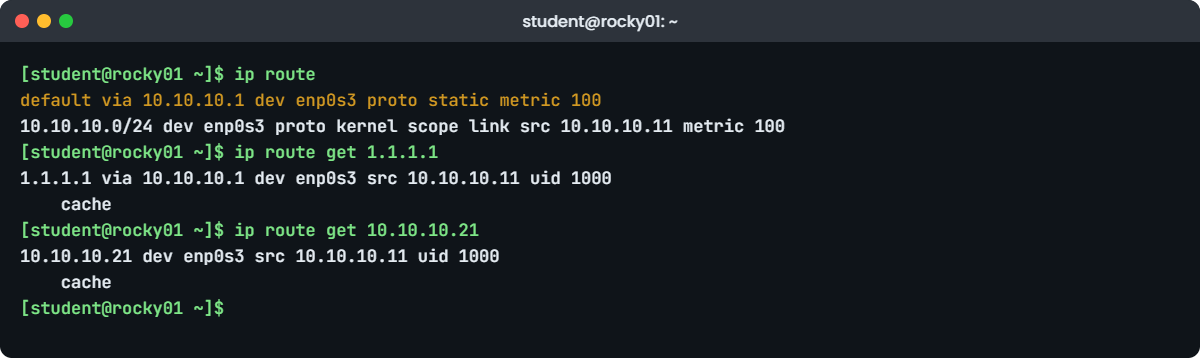
Linux networking basics lab: ip route and ip route get on rocky01
Example output: ip route and ip route get on rocky01.

2Read the routing table and ask which route wins

Run this on rocky01:

ip route
ip route get 1.1.1.1
ip route get 10.10.10.21

You should see something like this:

default via 10.10.10.1 dev enp0s3 proto static metric 100
10.10.10.0/24 dev enp0s3 proto kernel scope link src 10.10.10.11 metric 100
1.1.1.1 via 10.10.10.1 dev enp0s3 src 10.10.10.11 uid 1000
    cache
10.10.10.21 dev enp0s3 src 10.10.10.11 uid 1000
    cache

Two routes: the default route through 10.10.10.1 for everything else, set statically (proto static), and the connected route for the local subnet, added because of the address (proto kernel). The metric (100) decides between routes of the same prefix length; lower wins.

ip route get shows the kernel’s real decision. For 1.1.1.1 it goes via 10.10.10.1, for ubu01 there is no “via”, which means it is delivered directly on the subnet. The src field is the address rocky01 will use as sender, which matters on servers with several addresses.

✅ Checkpoint: You can say which gateway rocky01 uses for the internet and why ubu01 needs none.

3Ping a neighbour and read the ARP table

Run this on rocky01:

ping -c 2 ubu01
ip neigh

You should see something like this:

PING ubu01.saatlab.test (10.10.10.21) 56(84) bytes of data.
64 bytes from ubu01.saatlab.test (10.10.10.21): icmp_seq=1 ttl=64 time=0.612 ms
64 bytes from ubu01.saatlab.test (10.10.10.21): icmp_seq=2 ttl=64 time=0.498 ms

--- ubu01.saatlab.test ping statistics ---
2 packets transmitted, 2 received, 0% packet loss, time 1002ms
rtt min/avg/max/mdev = 0.498/0.555/0.612/0.057 ms
10.10.10.21 dev enp0s3 lladdr 08:00:27:5e:7d:21 REACHABLE
10.10.10.1 dev enp0s3 lladdr 52:54:00:12:35:00 STALE

ping printed ubu01.saatlab.test because that is the first name on its line in /etc/hosts. -c 2 stops after two packets; without it ping runs until Ctrl+C. ttl=64 means the reply crossed no router, and time is the round trip.

The neighbour table now holds ubu01’s MAC address (it matches the 08:00:27:5e:7d:21 you saw on ubu01 in Lesson 2) and the gateway’s. REACHABLE was confirmed in the last few seconds; STALE was valid earlier and will be checked again the next time it is used. FAILED or INCOMPLETE is the state to worry about.

✅ Checkpoint: ip neigh shows 10.10.10.21 with lladdr 08:00:27:5e:7d:21.

4Check and change the host name

Run this on rocky01:

hostnamectl | grep -E 'Static hostname|Icon name|Virtualization|Operating System|Kernel|Hardware Model'
hostname -f

You should see something like this:

 Static hostname: rocky01
       Icon name: computer-vm
  Virtualization: oracle
Operating System: Rocky Linux 10.2 (Red Quartz)
          Kernel: Linux 6.12.0-211.16.1.el10_2.0.1.x86_64
  Hardware Model: VirtualBox
rocky01.saatlab.test

The static host name is stored in /etc/hostname and set at boot. hostname -f looks the short name up through /etc/hosts and prints the full name, which is what many applications and monitoring agents report. Now change the name and put it back:

sudo hostnamectl set-hostname rocky01-test
cat /etc/hostname; hostnamectl hostname
sudo hostnamectl set-hostname rocky01

You should see this:

rocky01-test
rocky01-test
rocky01

hostnamectl changed the running name and the file in one step, so it survives a reboot. Your prompt still says rocky01 until you log in again, because bash read the name at login. The plain hostname NEWNAME command changes only the running name and is gone after a reboot, so don’t use it for real changes.

✅ Checkpoint: hostnamectl hostname prints rocky01 again.

5Follow a name through /etc/hosts and nsswitch.conf

Run this on rocky01:

grep -v '^#' /etc/hosts
grep '^hosts:' /etc/nsswitch.conf
getent hosts ubu01 kafka01

You should see something like this:

127.0.0.1   localhost localhost.localdomain localhost4 localhost4.localdomain4
::1         localhost localhost.localdomain localhost6 localhost6.localdomain6
10.10.10.11  rocky01.saatlab.test  rocky01
10.10.10.21  ubu01.saatlab.test    ubu01
10.10.10.31  kafka01.saatlab.test  kafka01
10.10.10.40  ad01.saatlab.test     ad01
hosts:      files dns myhostname
10.10.10.21     ubu01.saatlab.test ubu01
10.10.10.31     kafka01.saatlab.test kafka01

“files dns myhostname” means /etc/hosts first, then DNS, then a systemd module that always resolves the machine’s own name. getent asks the same way ping, ssh and dnf do, so it is the honest test of what a program will get. kafka01 resolves even though that VM doesn’t exist yet (Lesson 58 creates it): the name lookup and the machine being alive are separate questions.

✅ Checkpoint: getent returns 10.10.10.21 for ubu01 and 10.10.10.31 for kafka01.

6See who answers DNS on each distribution

Run this on rocky01:

cat /etc/resolv.conf

You should see something like this:

# Generated by NetworkManager
search saatlab.test
nameserver 10.10.10.1

Then run this on ubu01:

ls -l /etc/resolv.conf
grep -v '^#' /etc/resolv.conf
resolvectl status enp0s3

You should see something like this:

lrwxrwxrwx 1 root root 39 Oct 20 10:12 /etc/resolv.conf -> ../run/systemd/resolve/stub-resolv.conf

nameserver 127.0.0.53
options edns0 trust-ad
search saatlab.test
Link 2 (enp0s3)
    Current Scopes: DNS
         Protocols: +DefaultRoute -LLMNR -mDNS -DNSOverTLS DNSSEC=no/unsupported
Current DNS Server: 10.10.10.1
       DNS Servers: 10.10.10.1
        DNS Domain: saatlab.test

On rocky01, NetworkManager wrote the file from the connection settings, and the search line means a short name like ubu01 is also tried as ubu01.saatlab.test. On ubu01, resolv.conf is a symlink to the stub file: programs ask 127.0.0.53, and systemd-resolved forwards to 10.10.10.1, which you only see with resolvectl.

In both cases, editing /etc/resolv.conf by hand is the wrong fix. NetworkManager rewrites it the next time the connection comes up, and on Ubuntu you’d be replacing a symlink. DNS servers belong in the nmcli connection or the netplan file (Lessons 31 and 32).

✅ Checkpoint: You can name the DNS server each VM uses in the end: 10.10.10.1 on both, through the stub on ubu01.

7Test the path with ping, tracepath and dig

Install dig on rocky01 if needed, then run:

sudo dnf install -y bind-utils
dig one.one.one.one

You should see something like this:

; <<>> DiG 9.18.33-RH <<>> one.one.one.one
;; global options: +cmd
;; Got answer:
;; ->>HEADER<<- opcode: QUERY, status: NOERROR, id: 41872
;; flags: qr rd ra; QUERY: 1, ANSWER: 2, AUTHORITY: 0, ADDITIONAL: 1

;; OPT PSEUDOSECTION:
; EDNS: version: 0, flags:; udp: 1232
;; QUESTION SECTION:
;one.one.one.one.		IN	A

;; ANSWER SECTION:
one.one.one.one.	243	IN	A	1.1.1.1
one.one.one.one.	243	IN	A	1.0.0.1

;; Query time: 18 msec
;; SERVER: 10.10.10.1#53(10.10.10.1) (UDP)
;; WHEN: Tue Oct 27 12:41:09 IST 2026
;; MSG SIZE  rcvd: 76

status NOERROR and two A records in the ANSWER SECTION mean DNS works. The SERVER line confirms who answered (VirtualBox’s DNS proxy at 10.10.10.1), and the 243 is the TTL, the seconds a resolver may cache this answer. On ubu01, dig is usually already there and its SERVER line shows 127.0.0.53, the stub.

Now compare dig with getent for a lab name:

dig +short one.one.one.one
dig +short ubu01.saatlab.test
getent hosts ubu01.saatlab.test
tracepath -n 10.10.10.21

You should see something like this:

1.1.1.1
1.0.0.1
10.10.10.21     ubu01.saatlab.test ubu01
 1?: [LOCALHOST]                      pmtu 1500
 1:  10.10.10.21                                           0.612ms reached
 1:  10.10.10.21                                           0.433ms reached
     Resume: pmtu 1500 hops 1 back 1

The second dig printed nothing: ubu01.saatlab.test exists only in /etc/hosts, which dig never reads, while getent found it. tracepath to ubu01 shows one hop and a path MTU of 1500. Try tracepath -n 1.1.1.1 too; through VirtualBox’s NAT you may see the first hop and then “no reply” lines, because the NAT engine doesn’t pass every router’s reply back. On a real network each router answers in turn and the last one that answers shows you where traffic stops.

✅ Checkpoint: dig resolves one.one.one.one through 10.10.10.1, and you can explain why dig finds nothing for ubu01.saatlab.test while getent does.

Break It, Then Fix It

Take a snapshot of rocky01 first (VBoxManage snapshot rocky01 take before-l30 on the laptop) and do this section in the VirtualBox console window of rocky01, so a network mistake can’t cut off your session. Every change here is made with tools that don’t survive a reboot, which is also your last resort fix.

1A wrong default gateway

Point the default route at an address that doesn’t exist, then test:

sudo ip route replace default via 10.10.10.254 dev enp0s3
ping -c 4 1.1.1.1
ping -c 1 10.10.10.21 | tail -n 2

You’ll get this:

PING 1.1.1.1 (1.1.1.1) 56(84) bytes of data.
From 10.10.10.11 icmp_seq=1 Destination Host Unreachable
From 10.10.10.11 icmp_seq=2 Destination Host Unreachable
From 10.10.10.11 icmp_seq=3 Destination Host Unreachable
From 10.10.10.11 icmp_seq=4 Destination Host Unreachable

--- 1.1.1.1 ping statistics ---
4 packets transmitted, 0 received, +4 errors, 100% packet loss, time 3065ms
pipe 4
1 packets transmitted, 1 received, 0% packet loss, time 0ms
rtt min/avg/max/mdev = 0.541/0.541/0.541/0.000 ms

The “Destination Host Unreachable” comes from rocky01 itself (From 10.10.10.11): it couldn’t even hand the packet to a gateway. The local subnet still works, which is the classic sign of a routing problem rather than a dead card. Two commands show the cause:

ip route get 1.1.1.1
ip neigh show 10.10.10.254
1.1.1.1 via 10.10.10.254 dev enp0s3 src 10.10.10.11 uid 1000
    cache
10.10.10.254 dev enp0s3 FAILED

The route points at 10.10.10.254, and ARP for that address FAILED, because nothing on the subnet has it. At work this happens when someone types the gateway wrong, or when the network team moves the gateway to a new address and a server’s config isn’t updated.

Fix: put the right gateway back (the permanent value is still correct in NetworkManager).

sudo ip route replace default via 10.10.10.1 dev enp0s3
ip route | head -n 1
ping -c 2 1.1.1.1 | tail -n 2

✅ Checkpoint: ip route shows default via 10.10.10.1 and ping to 1.1.1.1 gets replies.

2DNS that doesn’t answer

Save resolv.conf, point it at a server that doesn’t exist, then test:

sudo cp /etc/resolv.conf /root/resolv.conf.l30
echo "nameserver 10.10.10.99" | sudo tee /etc/resolv.conf
ping -c 1 one.one.one.one
ping -c 1 1.1.1.1 | tail -n 2
getent hosts ubu01
dig one.one.one.one

You’ll get something like this (the first command waits about 10 seconds):

nameserver 10.10.10.99
ping: one.one.one.one: Temporary failure in name resolution
1 packets transmitted, 1 received, 0% packet loss, time 0ms
rtt min/avg/max/mdev = 18.204/18.204/18.204/0.000 ms
10.10.10.21     ubu01.saatlab.test ubu01
;; communications error to 10.10.10.99#53: timed out

; <<>> DiG 9.18.33-RH <<>> one.one.one.one
;; global options: +cmd
;; no servers could be reached

This is the shape of every DNS outage: the IP works, the name doesn’t, and names in /etc/hosts still work, which confuses people (“ubu01 is fine, so DNS is fine”). “Temporary failure” means the server didn’t answer at all. If a server answers but doesn’t know the name, you get “Name or service not known” instead, and dig shows status NXDOMAIN.

Fix: put the file back. Bringing the connection up again also rewrites it from NetworkManager’s settings.

sudo cp /root/resolv.conf.l30 /etc/resolv.conf
sudo nmcli connection up enp0s3
cat /etc/resolv.conf
getent hosts one.one.one.one

The nmcli connection up line is the point to remember: NetworkManager owns this file, so your hand edit would have been undone at the next reconnect or reboot anyway. The right place to change DNS servers is the connection itself, which is Lesson 31.

✅ Checkpoint: resolv.conf says nameserver 10.10.10.1 and getent returns addresses for one.one.one.one.

3An old line at the top of /etc/hosts

Add a wrong entry for ubu01 as the first line, then ping:

sudo cp /etc/hosts /root/hosts.l30
sudo sed -i '1i 10.10.10.12  ubu01.saatlab.test  ubu01' /etc/hosts
ping -c 2 ubu01
grep -n ubu01 /etc/hosts

You’ll get something like this:

PING ubu01.saatlab.test (10.10.10.12) 56(84) bytes of data.
From 10.10.10.11 icmp_seq=1 Destination Host Unreachable
From 10.10.10.11 icmp_seq=2 Destination Host Unreachable

--- ubu01.saatlab.test ping statistics ---
2 packets transmitted, 0 received, +2 errors, 100% packet loss, time 1024ms
pipe 2
1:10.10.10.12  ubu01.saatlab.test  ubu01
8:10.10.10.21  ubu01.saatlab.test    ubu01

ping went to 10.10.10.12 because the first matching line in /etc/hosts wins. The correct line is still in the file, so a quick grep for ubu01 looks fine unless you notice there are two. getent hosts ubu01 may even list both addresses (Rocky and Ubuntu set multi on in /etc/host.conf), but programs connect to the first.

Fix: restore the saved copy and check there is one line per name.

sudo cp /root/hosts.l30 /etc/hosts
grep -c ubu01 /etc/hosts
ping -c 1 ubu01 | head -n 1

✅ Checkpoint: grep -c ubu01 /etc/hosts prints 1 and ping goes to 10.10.10.21.

This happened at work

DNS was right, and the bookings still failed

The on-call engineer on my team got this call on the first morning of a long festival weekend, at an online travel agency in Madurai. Around 6:30 a.m., when the early rush of bus and flight bookings started, about half the payment confirmations were failing with a connection timeout to one airline partner’s API.

The developers had already checked the obvious thing. dig on the app servers returned the partner’s new addresses, and the partner’s status page said all green, so the first theory was a firewall change on the partner’s side and an email had gone out blaming them. He noticed that only two of the four app servers were failing and ran getent hosts with the API name on each. The two bad ones returned an address from an old range.

Both had a line for the partner’s API at the top of /etc/hosts, added eight months earlier during a DNS outage as a “temporary” workaround and never removed. The partner had moved to new addresses on Friday night with plenty of notice; DNS had followed, and dig, which never reads /etc/hosts, kept saying everything was fine. Removing the two lines fixed it in a minute, after about forty minutes of failed bookings and one awkward apology email to the partner.

The team changed two things. /etc/hosts on every server is now managed by Ansible and may contain only the standard local entries, so any extra line is reverted and reported. And the runbook’s first DNS step became getent hosts NAME on the failing server, with dig used only to ask what DNS itself says.

Common mistakes and troubleshooting

MistakeWhat happensWhat to do instead
Looking for ifconfig or route on a new serverCommand not found, or output that hides secondary addressesUse ip -br addr, ip route, ip neigh
Testing a name with dig when the app is failingdig skips nsswitch (and on Rocky /etc/hosts), so it can say “fine” while the app gets another IPTest with getent hosts NAME, then dig to see what DNS says
Editing /etc/resolv.conf by handNetworkManager rewrites it on Rocky; on Ubuntu you break the stub symlinkSet DNS in the nmcli connection or the netplan file
Calling a host “down” because ping gets no replyMany firewalls drop ICMP, so you chase the wrong problemTest the real port with nc -zv or curl and check the route with ip route get
Setting the name with hostname newnameThe old name comes back after a rebootUse sudo hostnamectl set-hostname newname
Fixing a route or address with ip and calling it doneIt is gone after the next reboot or reconnectMake the change in NetworkManager or netplan (Lessons 31 and 32)
Leaving “temporary” lines in /etc/hostsMonths later a service moves and only some servers breakAvoid them, or manage /etc/hosts with configuration management

Interview questions

Click a question to open it. Each one is written the way an interviewer would ask it. Under it you will see why they ask it and one way you could answer, in your own words.

Fresher level

1. How do you find a Linux server’s IP address, default gateway and DNS server?

Why they ask this: A basic check that you know the modern commands and where each value comes from.

How you might answer: I’d run ip -br addr for the addresses and ip route for the default gateway, which is the “default via” line. For DNS I’d look at /etc/resolv.conf.

On Ubuntu that file shows 127.0.0.53, the systemd-resolved stub, so I’d run resolvectl status to see the real upstream server. On Rocky, nmcli device show enp0s3 also lists the DNS servers NetworkManager set.

2. A server can ping 1.1.1.1 but not google.com. What’s your next step?

Why they ask this: They want to see you separate routing from name resolution in a logical order.

How you might answer: Pinging the IP proves the route and gateway work, so the problem is name resolution. I’d run getent hosts google.com and read the error: “Temporary failure” means the DNS server didn’t answer, “Name or service not known” means it answered with no record.

Then I’d check which server is configured in resolv.conf or resolvectl, and query it directly with dig @SERVER google.com to see whether that server is reachable and working.

2–5 years experience

3. dig returns the correct IP, but the application still connects to an old one. What could cause that?

Why they ask this: This checks whether you know that dig and the C library resolver take different paths.

How you might answer: dig asks the DNS server directly and ignores /etc/hosts and nsswitch.conf, while the application goes through the library, so I’d first run getent hosts NAME on the same server. An old line in /etc/hosts is the most common cause.

Other causes are a local cache such as systemd-resolved (I’d flush it with resolvectl flush-caches) or the application caching the address itself, which Java does by default, so it may need a restart.

4. Walk me through what happens when you ping another server on the same subnet, down to the wire.

Why they ask this: They’re checking that you understand routing and ARP, not only commands.

How you might answer: The name is resolved through nsswitch, /etc/hosts first, then DNS. The kernel looks up the routing table, finds the connected route for the /24, so no gateway is involved, and needs the target’s MAC address.

It sends an ARP broadcast asking who has that IP, stores the reply in the neighbour table that ip neigh shows, and then sends the ICMP echo request in an Ethernet frame to that MAC. For a host on another subnet the only difference is that ARP is for the gateway’s MAC.

Senior level

5. A server can reach everything except one remote subnet, 10.50.0.0/16. How do you narrow it down?

Why they ask this: Seniors should talk about route selection, asymmetric paths and the other side, not only ping.

How you might answer: I’d start with ip route get 10.50.1.10 to see which route and source address the kernel picks; a more specific route or a second interface often sends that traffic somewhere unexpected. Then tracepath to see where packets stop and whether the path MTU drops.

If the outbound path is right, I’d suspect the return path: the remote side may not have a route back to our subnet, or replies come back on another interface and reverse path filtering drops them. A tcpdump on our interface tells me quickly whether replies arrive at all.

6. How would you standardise name resolution across a few hundred Linux servers?

Why they ask this: They want design thinking: ownership of files, caching, search domains and how to avoid drift.

How you might answer: I’d let one tool own resolv.conf on each distribution, NetworkManager on RHEL and systemd-resolved with netplan on Ubuntu, and set DNS servers and search domains only through those configs, pushed by Ansible. /etc/hosts would hold only localhost and the machine itself.

I’d use at least two DNS servers in different failure domains, keep search domains short to avoid slow lookups, and add a monitoring check that runs getent for a few critical names from every server, so drift or a bad cache shows up before an application does.

Quick quiz

Q1. Which command shows the one route the kernel will use to reach 1.1.1.1?

  1. ip route list
  2. ip route get 1.1.1.1
  3. ip neigh 1.1.1.1
  4. ping -r 1.1.1.1
Show answer

B — ip route get runs the real route lookup and prints the gateway, interface and source address.

Q2. Why can dig ubu01.saatlab.test return nothing while ping ubu01 works?

  1. dig needs root
  2. The name is only in /etc/hosts, and dig asks the DNS server directly
  3. ping uses a different DNS server
  4. dig only resolves IPv6
Show answer

B — dig skips nsswitch.conf and /etc/hosts. getent shows what programs get.

Q3. On Ubuntu 26.04, /etc/resolv.conf says nameserver 127.0.0.53. What is that?

  1. A typo
  2. The local systemd-resolved stub, which forwards to the real servers
  3. A public DNS service
  4. The default gateway
Show answer

B — Run resolvectl status to see the upstream DNS servers behind the stub.

Q4. ping shows “From 10.10.10.11 icmp_seq=1 Destination Host Unreachable” for an internet address. What is the most likely cause?

  1. DNS is broken
  2. The remote host is down
  3. rocky01 can’t reach its gateway, so the route or gateway address is wrong
  4. The firewall blocks ICMP on the remote host
Show answer

C — The message comes from rocky01 itself; check ip route get and ip neigh for the gateway.

Q5. Which command changes the host name so it survives a reboot?

  1. hostname rocky02
  2. sudo hostnamectl set-hostname rocky02
  3. echo rocky02 > /proc/sys/kernel/hostname
  4. ip link set name rocky02
Show answer

B — hostnamectl updates the running name and /etc/hostname together.

Quick recap

  • Linux networking basics: check link, address, route, neighbour and name, in that order, and stop at the first failure.
  • ip -br link, ip -br addr, ip route get IP and ip neigh answer the first four.
  • Programs resolve names through nsswitch.conf: /etc/hosts first, then DNS. Test what they get with getent hosts; dig asks DNS only.
  • Rocky: resolv.conf is written by NetworkManager. Ubuntu: it points to the systemd-resolved stub 127.0.0.53, and resolvectl shows the real server.
  • Set the name with hostnamectl set-hostname; changes made with ip are temporary until you make them in nmcli or netplan.

Next lesson

Lesson 31: Static IP, routes and bonds with nmcli → You’ll read and change NetworkManager connections on rocky01, add a static route that survives a reboot, and build an active-backup bond on two new network cards.

Further reading: Linux networking basics

Want to go deeper into Linux networking basics? Read the man7.org pages for ip-address(8), ip-route(8), hostnamectl(1), nsswitch.conf(5), resolv.conf(5) and systemd-resolved(8), and the BIND 9 dig manual. You can also see the full plan for this course on the undefined course page.

Scroll to Top

This website uses cookies

We use a few cookies to keep this site working. If you allow it, we also use Google Analytics to count visits so we can improve our lessons. You can accept all, deny the optional ones, or choose what to allow.