sudo and root access: visudo, sudoers.d and sudo-rs

Linux sudo configuration decides who may run which commands as root, and it’s the line between “the web team can restart Nginx” and “anyone on the web team can read every password hash on the box”. Done well, people get the few commands their job needs, each command is logged against their own name, and nobody shares the root password.

In this lesson you’ll compare su and sudo, read the default rules on Rocky Linux and Ubuntu, give the webteam group from Lesson 15 a narrow rule in /etc/sudoers.d/webteam, test it, find it in the logs and then break it twice on purpose. You’ll also see what changes on Ubuntu 26.04, where sudo is now sudo-rs, a rewrite in Rust.

Where this lesson fits

Lesson 16 of 82 in Linux Administration · Phase 1: The origins and OS architecture · Before this: Lesson 15, users and groups · Next: Lesson 17, file permissions

TimeYou needBy the end you can
About 60 minutesrocky01 and ubu01 with priya, arjun and webteam from Lesson 15Write and test a least-privilege sudo rule with visudo, read sudo logs on both distributions, and explain what sudo-rs changes

What it is, in one line

sudo lets a named user run a specific command as root after proving who they are, following rules in /etc/sudoers that you always edit with visudo.

In Simple Words

The bank locker and the branch manager

At a bank, the locker room has a master key. The branch manager doesn’t hand that key to every clerk. When a customer needs their locker, a clerk signs the register, the manager checks the clerk’s name against the list of people allowed into the locker room, and the clerk opens only that one locker.

Giving out the master key is su: whoever holds it can open everything and the register only says “someone used the key”. The register with names, allowed lockers and a signature for every visit is sudo.

Engineer's View

How sudo decides

sudo is a setuid-root program. When you run it, it reads the policy in /etc/sudoers plus every file in /etc/sudoers.d/, asks for your own password through PAM, checks whether your user or one of your groups may run that exact command as the target user, writes a log line and then runs the command. After a successful password it remembers you for a few minutes (15 by default) on that terminal.

susudo
Password askedThe target user’s (root’s) passwordYour own password
What you getA full shell as that userOne command (or a shell with sudo -i, if allowed)
Who did whatThe log only says someone became rootEvery command is logged with your name, terminal and folder
Taking access awayChange the root password and tell everyoneRemove one line or one group membership
On UbuntuRoot has no password, so su - failsThe normal way to get admin rights

A rule has the shape who where=(as_whom) what. For example %wheel ALL=(ALL) ALL means members of wheel, on any host, as any user, may run any command. A % in front means a group, Cmnd_Alias gives a list of commands a name, and tags like NOPASSWD: change how a rule behaves.

Rocky Linux 10Ubuntu Server 26.04
sudo programsudo 1.9 (the classic C sudo)sudo-rs 0.2.13 (Rust), classic sudo also installed as sudo.ws
Admin group in /etc/sudoers%wheel ALL=(ALL) ALL%sudo ALL=(ALL:ALL) ALL
Root accountHas a password if you set one in the installerLocked, no password
Log file (via rsyslog)/var/log/secure/var/log/auth.log
Journaljournalctl -t sudojournalctl -t sudo
Password prompt[sudo] password for priya:[sudo: authenticate] Password: with asterisks as you type

Files in /etc/sudoers.d are read in name order, and sudo skips any file whose name contains a dot or ends with ~. That rule exists so editor backups and package leftovers never become live rules, and it’s why webteam.conf would be silently ignored.

How it works, step by step

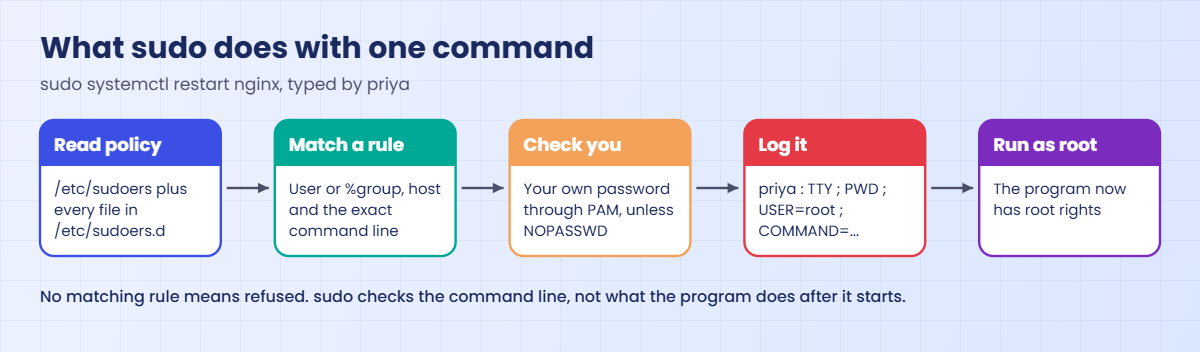
A lot happens between pressing Enter on sudo systemctl restart nginx and the command running, and the diagram below follows that path.

1sudo reads the policy

It parses /etc/sudoers and then the included folder. If a file has a syntax error, sudo prints it and ignores what it can’t understand, so a broken file can quietly remove someone’s rights. If the main file is unreadable, nobody gets anything.

2It finds a matching rule

It looks for a line that matches your user or one of your groups, the host and the exact command with its arguments. Classic sudo uses the last matching rule. sudo-rs on Ubuntu refuses straight away when nothing matches, before it even asks for a password.

Linux sudo configuration: how sudo checks a command

3It checks who you are

Unless the rule says NOPASSWD:, PAM asks for your password. Three wrong tries and sudo gives up and logs the failure.

4It logs and runs the command

sudo writes a line to syslog (and so to the journal) with your user, terminal, working folder, target user and the full command, then runs the command with a clean environment and the safe secure_path. The program itself runs as root, so whatever that program can do, you can now do.

5The program does the rest

That last point is where most sudo mistakes live. sudo checks the command you asked for, not what the command does after it starts. An editor, a pager or a script can open a shell, and that shell is root.

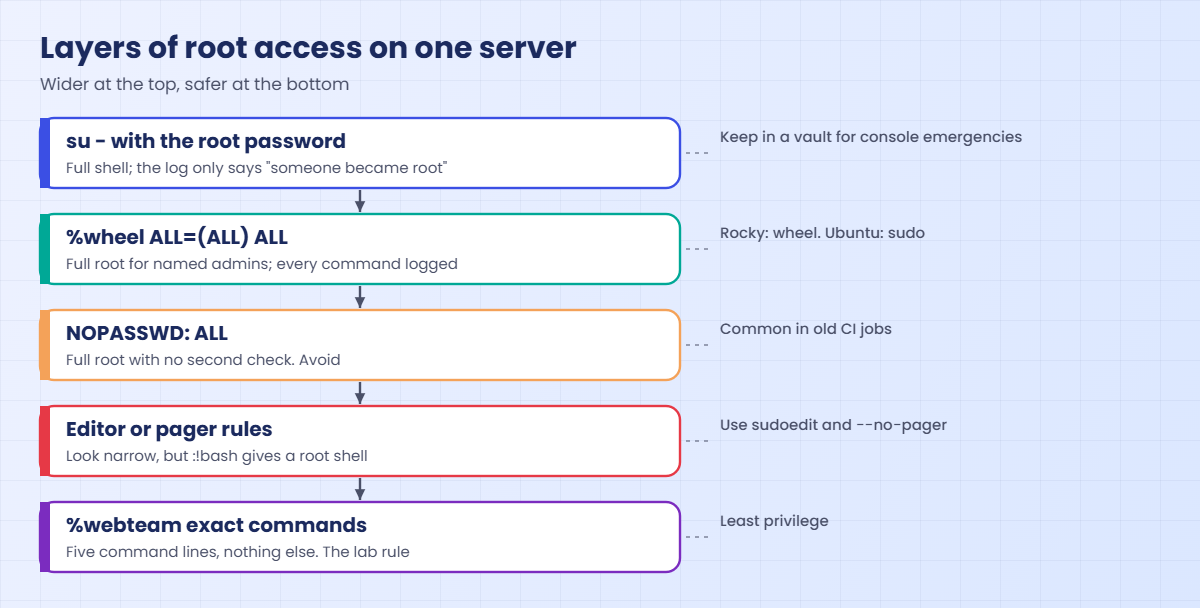
The picture below shows how the rights are layered on a typical server, from full root down to a narrow rule like the one you’re about to write.

Linux sudo configuration: layers of root access from su to a narrow rule

Rules belong in files under /etc/sudoers.d, one file per team or purpose, created with visudo -f. That way a package update never overwrites them, Ansible can manage each file on its own, and removing a team’s rights is one file delete.

Write commands with full paths and with the exact arguments you want to allow. /usr/bin/systemctl restart nginx allows one action. /usr/bin/systemctl with no arguments allows every systemctl action, including stopping SSH or editing unit files.

Hands-on lab: a least-privilege sudo rule for webteam

Before you run any command, double-check it

Read every command twice before you press Enter. Check the target: the server name, the user, the disk or device name, the path and the sizes. These commands are for learning and were tested in our lab, not on your system. At work, run the read-only commands first, follow your change process, make sure a backup exists, and ask a second person to check anything that changes or deletes data. You run them at your own risk.

Steps 1 to 7 run on rocky01, logged in as student. Step 8 repeats the rule on ubu01 and step 9 looks at what sudo-rs does differently. Keep a second terminal open with sudo -i running while you work, so that if you lock yourself out of sudo you still have a root shell to fix it.

1See what sudo allows you

Run this:

whoami
sudo whoami
sudo -l | tail -n 2

You should see something like this:

student
[sudo] password for student:
root
User student may run the following commands on rocky01:
    (ALL) ALL

sudo -l lists your own rights, and the first lines (cut here with tail) show the Defaults that apply. student gets (ALL) ALL through the wheel group. sudo asked for student’s own password, not root’s.

✅ Checkpoint: sudo whoami prints root and sudo -l shows (ALL) ALL.

2Read the default rules

Run this:

sudo grep -E '^(root|%|@include|#include)' /etc/sudoers

You should see something like this:

root	ALL=(ALL) 	ALL
%wheel	ALL=(ALL)	ALL
#includedir /etc/sudoers.d

The wheel line is why student has full rights. The last line pulls in every file in /etc/sudoers.d, and despite the # it is not a comment: #includedir is the old spelling of @includedir, which newer files (and Ubuntu) use. Your file may show either one.

✅ Checkpoint: You can point to the line that gives wheel its rights and the line that reads /etc/sudoers.d.

3Compare su and sudo

Run this, typing the root password you set in the installer:

su -
whoami; pwd
exit

You should see something like this:

Password:
root
/root
logout

su - gave you a full root login shell with root’s home and environment, and the log only says that student became root. That’s why teams keep the root password in a vault for emergencies (Lesson 70 uses it on the console) and use sudo for daily work. The same command on ubu01 fails with su: Authentication failure, because Ubuntu’s root has no password at all.

✅ Checkpoint: You got a root prompt with su and left it with exit.

4Write the webteam rule with visudo

Run this:

sudo visudo -f /etc/sudoers.d/webteam

In the editor, paste this whole block, then save and quit (:wq in vi):

# /etc/sudoers.d/webteam  (SaatVedha Linux course, Lesson 16)
# webteam may check, restart and reload nginx and read its logs. Nothing else.
Cmnd_Alias WEB_SVC  = /usr/bin/systemctl status nginx --no-pager, \
                      /usr/bin/systemctl restart nginx, \
                      /usr/bin/systemctl reload nginx
Cmnd_Alias WEB_LOGS = /usr/bin/journalctl -u nginx --no-pager -n 100, \
                      /usr/bin/journalctl -u nginx --no-pager --since today
%webteam ALL=(root) WEB_SVC, WEB_LOGS

Then set the file mode and check the whole policy:

sudo chmod 0440 /etc/sudoers.d/webteam
sudo visudo -c
sudo ls -l /etc/sudoers.d/webteam

You should see something like this:

/etc/sudoers: parsed OK
/etc/sudoers.d/webteam: parsed OK
-r--r-----. 1 root root 507 Oct 27 11:48 /etc/sudoers.d/webteam

visudo edits a temporary copy, checks the syntax and only then saves. A new file it creates can come out as mode 640, while sudo expects 440 (read-only for root and group root) and visudo -c reports “bad permissions” for anything else, so set it yourself. The two aliases group the allowed commands, and the last line grants them to the webteam group as root.

Every command has its full path and exact arguments, and --no-pager is there on purpose: without it systemctl and journalctl can open less, and a pager is one key away from a shell.

✅ Checkpoint: visudo -c says parsed OK for both files and ls shows mode 440 (-r--r-----).

5Check what priya can do, without logging in as her

Run this:

sudo -l -U priya

You should see something like this (the Matching Defaults lines are cut here):

User priya may run the following commands on rocky01:
    (root) /usr/bin/systemctl status nginx --no-pager, /usr/bin/systemctl
        restart nginx, /usr/bin/systemctl reload nginx, /usr/bin/journalctl -u
        nginx --no-pager -n 100, /usr/bin/journalctl -u nginx --no-pager
        --since today

-U lets an admin read anyone’s rights. Do this after every sudo change, because it shows how sudo understood your file, which isn’t always what you meant. arjun gets the same list through the same group.

✅ Checkpoint: priya’s list shows the three systemctl commands and the two journalctl commands, and nothing else.
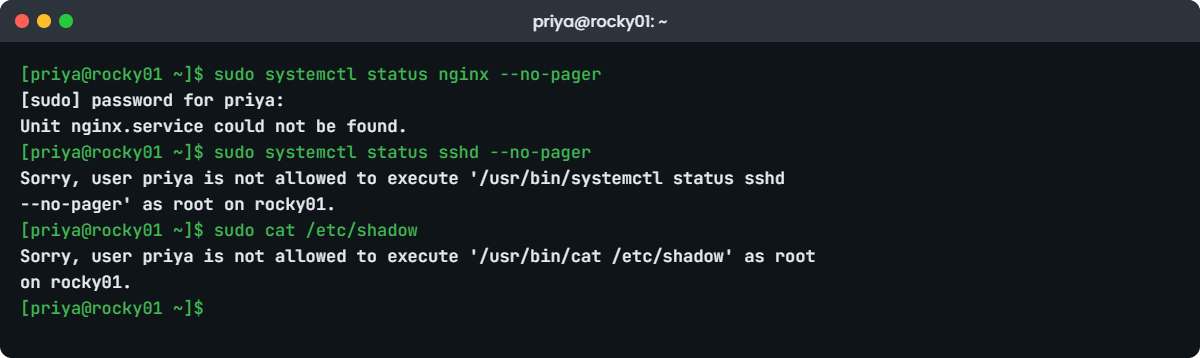
Linux sudo configuration lab: priya tests the webteam rule on rocky01
Example output from rocky01: one allowed and two refused sudo commands

6Test as priya

Switch to priya (her password from Lesson 15), then run:

su - priya
sudo systemctl status nginx --no-pager
sudo systemctl status sshd --no-pager
sudo cat /etc/shadow
exit

You should see something like this:

[sudo] password for priya:
Unit nginx.service could not be found.
Sorry, user priya is not allowed to execute '/usr/bin/systemctl status sshd --no-pager' as root on rocky01.
Sorry, user priya is not allowed to execute '/usr/bin/cat /etc/shadow' as root on rocky01.

The first command was allowed (Nginx isn’t installed until Lesson 56, so systemctl has nothing to show, which is fine). The same command for sshd was refused because the argument is different, and reading /etc/shadow was refused. Allowed means the exact command line in the rule, not “anything starting with systemctl”.

✅ Checkpoint: One command was allowed and two were refused with “is not allowed to execute”.

7Find priya’s commands in the logs

Back as student, run this:

sudo journalctl -t sudo --since "10 min ago" --no-pager | grep priya
sudo grep 'priya :' /var/log/secure | tail -n 2

You should see something like this:

Oct 27 11:52:10 rocky01 sudo[2304]:    priya : TTY=pts/1 ; PWD=/home/priya ; USER=root ; COMMAND=/usr/bin/systemctl status nginx --no-pager
Oct 27 11:52:10 rocky01 sudo[2304]: pam_unix(sudo:session): session opened for user root(uid=0) by priya(uid=1001)
Oct 27 11:52:31 rocky01 sudo[2311]:    priya : command not allowed ; TTY=pts/1 ; PWD=/home/priya ; USER=root ; COMMAND=/usr/bin/systemctl status sshd --no-pager
Oct 27 11:52:44 rocky01 sudo[2318]:    priya : command not allowed ; TTY=pts/1 ; PWD=/home/priya ; USER=root ; COMMAND=/usr/bin/cat /etc/shadow
Oct 27 11:52:31 rocky01 sudo[2311]:    priya : command not allowed ; TTY=pts/1 ; PWD=/home/priya ; USER=root ; COMMAND=/usr/bin/systemctl status sshd --no-pager
Oct 27 11:52:44 rocky01 sudo[2318]:    priya : command not allowed ; TTY=pts/1 ; PWD=/home/priya ; USER=root ; COMMAND=/usr/bin/cat /etc/shadow

Every attempt is there with the user, terminal, folder and the full command, and refused ones say “command not allowed”. The journal is the reliable place on both distributions. /var/log/secure exists when rsyslog is installed, which it is on a standard Rocky server; if it’s missing on yours, use the journal.

✅ Checkpoint: You can see the allowed status command and the two refused attempts, all under priya’s name.

8Same rule on ubu01, with sudo-rs

On ubu01, as student, run this (set priya’s password when asked, then paste the same rule from step 4 into visudo):

sudo --version
sudo passwd priya
sudo visudo -f /etc/sudoers.d/webteam
sudo chmod 0440 /etc/sudoers.d/webteam
sudo visudo -c
sudo -l -U priya

You should see something like this:

sudo-rs 0.2.13-0ubuntu1.2
[sudo: authenticate] Password: *********
New password:
Retype new password:
passwd: password updated successfully
/etc/sudoers: parsed OK
User priya may run the following commands on ubu01:
    (root) /usr/bin/systemctl status nginx --no-pager, /usr/bin/systemctl restart nginx, /usr/bin/systemctl reload nginx, /usr/bin/journalctl -u nginx --no-pager -n 100, /usr/bin/journalctl -u nginx --no-pager --since today

The rule file is identical and it works the same way. The small differences are sudo-rs ones: the password prompt shows asterisks, visudo -c prints only the main file (it still checks the included files and names any file with an error), and sudo -l prints one long line.

Now test as priya and read the log:

su - priya
sudo cat /etc/shadow
sudo systemctl status nginx --no-pager
exit
sudo grep 'priya :' /var/log/auth.log | tail -n 1

You should see something like this:

sudo: I'm sorry priya. I'm afraid I can't do that
[sudo: authenticate] Password: *********
Unit nginx.service could not be found.
2026-10-27T12:05:44.118302+05:30 ubu01 sudo: priya : TTY=/dev/pts/1 ; PWD=/home/priya ; USER=root ; COMMAND=/usr/bin/systemctl status nginx --no-pager

sudo-rs refused the shadow file before asking for a password, with a message borrowed from a famous film computer. In our tests sudo-rs 0.2.13 logged allowed commands and failed passwords, but not a refused command like the cat above, so don’t build an alert on “command not allowed” lines on Ubuntu 26.04 without testing it on your version. The auth.log line uses the RFC 3339 timestamp from Lesson 14, and the TTY is written as /dev/pts/1.

✅ Checkpoint: On ubu01, priya can run the status command and is refused for /etc/shadow.

9Know what sudo-rs does differently

On ubu01, run this:

update-alternatives --display sudo | head -n 3
ls -l /usr/bin/sudo.ws /usr/sbin/visudo.ws

You should see something like this:

sudo - auto mode
  link best version is /usr/lib/cargo/bin/sudo
  link currently points to /usr/lib/cargo/bin/sudo
-rwsr-xr-x 1 root root 282080 Mar 13  2026 /usr/bin/sudo.ws
-rwxr-xr-x 1 root root 199456 Mar 13  2026 /usr/sbin/visudo.ws

sudo, sudoedit and visudo are alternatives links pointing at sudo-rs, and the classic sudo is still installed as sudo.ws. Most rules written for classic sudo work unchanged, but these are the differences that show up at work:

FeatureClassic sudo (Rocky, and sudo.ws)sudo-rs on Ubuntu 26.04
Wildcards in argumentsAllowed anywhere (and often abused)Only a final * meaning “any further arguments”; anything else is a visudo error
Defaults requiretty, Defaults logfile=Supported“unknown setting”: visudo rejects them, sudo warns and ignores them
Loggingsyslog, optional own log file, I/O logging and sudoreplaysyslog only, no I/O logging or sudoreplay
Password feedbackOff unless Defaults pwfeedbackOn (asterisks); turn off with Defaults !pwfeedback
Rules from LDAP (sudoers.ldap)SupportedNot supported (AD groups named in a sudoers file still work, Lesson 54)
Mail to admins on failuresSupportedNot supported

If an application needs classic sudo, sudo update-alternatives --set sudo /usr/bin/sudo.ws switches back and sudo update-alternatives --auto sudo returns to sudo-rs. Canonical recommends staying on sudo-rs, so treat this as a temporary workaround and write it in the change record.

✅ Checkpoint: You can name two things that work in classic sudo but not in sudo-rs, and how to switch between them.

Break It, Then Fix It

Take a snapshot of rocky01 first (“before-l16-break”) and keep your sudo -i root shell open in the second terminal. Both failures below are real ways teams lose or leak root access.

1A syntax error that visudo would have caught

Make a “quick fix” with sed, which skips visudo’s check and drops a comma:

sudo sed -i 's/WEB_SVC, WEB_LOGS/WEB_SVC WEB_LOGS/' /etc/sudoers.d/webteam

Now, as priya, run the command she’s allowed to run:

su - priya
sudo systemctl status nginx --no-pager
exit

You’ll get this error:

/etc/sudoers.d/webteam:8:29: syntax error
%webteam ALL=(root) WEB_SVC WEB_LOGS
                            ^~~~~~~~
[sudo] password for priya:
priya is not in the sudoers file.

sudo found the error, ignored the broken line and carried on, so priya has lost all her rights while everything else works. If the same mistake were in /etc/sudoers itself, it could take away the wheel rule too, and on Ubuntu, with no root password, the only way back would be the GRUB recovery entry.

Fix: always check, and repair the file through visudo:

sudo visudo -c
sudo visudo -f /etc/sudoers.d/webteam

visudo -c points at the problem:

/etc/sudoers.d/webteam:8:29: syntax error
%webteam ALL=(root) WEB_SVC WEB_LOGS
                            ^~~~~~~~

Put the comma back on line 8 and save. If you save a file with a mistake inside visudo, it doesn’t write it. It asks What now?, where e edits again, x exits without saving and Q saves anyway (never do that).

On ubu01 the same check prints syntax error: garbage at end of line and visudo: invalid sudoers file.

✅ Checkpoint: sudo visudo -c says parsed OK again and sudo -l -U priya shows her five commands.

2A rule that is wider than it looks

Give webteam permission to edit the login message, the way many tickets ask for it:

echo '%webteam ALL=(root) /usr/bin/vi /etc/motd' | sudo EDITOR='tee' visudo -f /etc/sudoers.d/webteam-motd >/dev/null
sudo chmod 0440 /etc/sudoers.d/webteam-motd
su - priya
sudo vi /etc/motd

Inside vi, type this and press Enter:

:!id

You’ll see:

uid=0(root) gid=0(root) groups=0(root) context=unconfined_u:unconfined_r:unconfined_t:s0-s0:c0.c1023

Press ENTER or type command to continue

Setting EDITOR to tee makes visudo take the rule from the pipe, while still checking it before saving. The rule looked like “edit one file”, but vi runs as root and can start any program, so priya now has a full root shell one :!bash away. sudo logged only COMMAND=/usr/bin/vi /etc/motd. Editors, pagers (less, more, man), find -exec, tar, awk and any script the user can write to all behave the same way.

NOPASSWD: ALL is the same problem in its loudest form.

Fix: quit vi (:q!), exit priya, and use sudoedit, which edits a copy as the user and writes it back as root:

echo '%webteam ALL=(root) sudoedit /etc/motd' | sudo EDITOR='tee' visudo -f /etc/sudoers.d/webteam-motd >/dev/null
sudo visudo -c
su - priya
sudoedit /etc/motd

Type :!id inside the editor again. You should see something like this:

uid=1001(priya) gid=1001(priya) groups=1001(priya),2001(webteam) context=unconfined_u:unconfined_r:unconfined_t:s0-s0:c0.c1023

Now the editor runs as priya and only the saved file goes back as root. Quit the editor, exit priya, and remove the practice rule so webteam keeps only the Nginx rights later lessons expect.

sudo rm /etc/sudoers.d/webteam-motd
sudo visudo -c

✅ Checkpoint: The shell escape shows priya, not root, and /etc/sudoers.d holds only webteam (plus any files your distribution put there).

3A file sudo never reads

Rename the rule file the way many people name config files:

sudo mv /etc/sudoers.d/webteam /etc/sudoers.d/webteam.conf
sudo visudo -c
sudo -l -U priya

You’ll get:

/etc/sudoers: parsed OK
User priya is not allowed to run sudo on rocky01.

No error at all. Files with a dot in the name are skipped by @includedir, so visudo doesn’t even list it and priya has nothing.

Fix: use a name without dots:

sudo mv /etc/sudoers.d/webteam.conf /etc/sudoers.d/webteam
sudo visudo -c

✅ Checkpoint: visudo -c lists /etc/sudoers.d/webteam again and priya’s five commands are back.

This happened at work

The root shell that never showed up in the logs

The on-call engineer on my old team in Visakhapatnam found this one at 2 a.m., two days before a big mock test on the online coaching platform we ran. Disk usage on the main app server had dropped by 40 GB in a few minutes, and the cache folder that thousands of students’ video sessions depended on was empty.

The sudo log showed nothing useful, only a support engineer running sudo vim /etc/coachapp/app.conf about ten minutes earlier, which was allowed and had been in the sudoers file for years. Root’s shell history told the rest: from inside vim he had typed :!bash and then rm -rf on the cache folder, because a student had complained about a stale video and he had no other way to clear it.

There was no bad intent, and the cache rebuilt itself by morning, slowly. But nobody had ever thought of that vim rule as “root for the support team”, and the audit trail had a ten-minute hole in it.

The team replaced every editor rule with sudoedit, wrote a small script for clearing one course’s cache safely and gave support a sudo rule for that script only, with the script owned by root and not writable by anyone else. They also removed the last two NOPASSWD: ALL lines, left over from an old deployment job, and started sending the auth logs to the central log server so a root shell can’t clean up after itself.

Common mistakes and troubleshooting

MistakeWhat happensWhat to do instead
Editing /etc/sudoers or a sudoers.d file with vim, nano or sedA typo silently removes rights, or locks admins outAlways use visudo or visudo -f, then visudo -c
Allowing an editor, pager or interpreter with sudoShell escapes give a full root shell with no further loggingUse sudoedit for files, --no-pager for systemctl and journalctl, root-owned scripts for tasks
Granting a command with no arguments, like /usr/bin/systemctlThe user can stop sshd, mask units or edit service filesList the exact command lines, as in the webteam rule
NOPASSWD: ALL for a person or a CI userAnyone with their session or key is root with no second checkKeep passwords on; use NOPASSWD only for one narrow command a job needs
Naming the file webteam.conf or webteam~sudo skips it without any messageUse names with no dots, for example 10-webteam
Sharing the root password instead of sudoLogs can’t say who did what, and leavers still know the passwordNamed accounts with sudo rules; root password in a vault for console emergencies
Porting old rules to Ubuntu 26.04 without testingsudo-rs rejects mid-argument wildcards, requiretty and logfileRun visudo -c on ubu01 and fix each “unknown setting” or wildcard error

Interview questions

Click a question to open it. Each one is written the way an interviewer would ask it. Under it you will see why they ask it and one way you could answer, in your own words.

Fresher level

1. What’s the difference between su and sudo, and why do most companies prefer sudo?

Why they ask this: A basic but telling question. They want to hear about whose password is used, logging and taking access away.

How you might answer: su switches to another user, usually root, using that user’s password, and gives you a full shell. sudo runs one command as root using my own password, after checking a rule, and logs it with my name.

Companies prefer sudo because nobody has to share the root password, every command is traceable to a person, and removing access means removing one rule or group instead of changing the root password everywhere.

2. Why should you always use visudo instead of editing /etc/sudoers directly?

Why they ask this: They’re checking that you understand the risk of a broken sudoers file and the safety net visudo gives.

How you might answer: visudo locks the file, lets me edit a temporary copy and checks the syntax before it saves. If I make a mistake it asks what to do instead of writing a broken file.

A broken file can silently remove rights or lock out every admin, and on Ubuntu, where root has no password, getting back means a recovery boot. I also run visudo -c after any change made by a tool like Ansible.

2–5 years experience

3. A developer asks for sudo on vim so they can edit an Nginx config. What do you do?

Why they ask this: This checks whether you know about shell escapes and the sudoedit alternative, and whether you can say yes safely.

How you might answer: I wouldn’t give sudo on vim, because :!bash inside it gives a full root shell that sudo never logs. I’d give a sudoedit rule for that one file, like %webteam ALL=(root) sudoedit /etc/nginx/nginx.conf, so the editor runs as them and only the saved file is written as root.

I’d pair it with a rule for nginx -t and systemctl reload nginx so they can test and apply the change themselves.

4. Your team is moving servers to Ubuntu 26.04. What would you check in your existing sudo rules?

Why they ask this: They want to know if you’re aware of sudo-rs and how you’d test a migration rather than hope.

How you might answer: Ubuntu 26.04 uses sudo-rs, so I’d copy our sudoers.d files to a test VM and run visudo -c. sudo-rs rejects wildcards in the middle of arguments and settings like requiretty and logfile, and it has no I/O logging, so any rule or audit process that depends on those needs changing.

I’d also check that our log alerts still match, because the log lines differ slightly, for example the TTY is written as /dev/pts/1. Switching back to sudo.ws with update-alternatives is possible, but only as a short-term workaround.

Senior level

5. How would you design sudo access for a team of 40 admins across 500 servers?

Why they ask this: This is about central identity, least privilege and keeping it manageable, not sudoers syntax.

How you might answer: I’d give people named accounts from AD or FreeIPA and map AD groups to roles, like web-ops or db-ops, each with its own file in /etc/sudoers.d deployed by Ansible from Git, so every change is reviewed. Full root would go to a small group only, and day-to-day roles would get the exact commands they need.

All sudo logs would go to a central log server with alerts on unusual use, and we’d review the rules every quarter, removing anything nobody has used.

6. In an audit you find a service account with NOPASSWD: ALL. Walk me through how you fix it without breaking production.

Why they ask this: They want a careful, evidence-based change, not “delete the line”.

How you might answer: First I’d find out what the account runs as root, by searching the sudo logs for its name over the last few weeks. That gives me the real list of commands, which is usually small.

I’d write a new rule with only those commands, test it on a staging server with the same job, then deploy it through the change process and watch the logs for refused commands for a few days. Only then would I remove the old line.

Quick quiz

Q1. Which password does sudo ask for by default?

  1. root’s password
  2. The target user’s password
  3. Your own password
  4. No password
Show answer

C — sudo checks who you are with your own password, then checks the rules.

Q2. Why does a file named /etc/sudoers.d/webteam.conf have no effect?

  1. Files must end in .sudo
  2. sudo skips files whose names contain a dot
  3. The file must be in /etc/sudoers
  4. Only root can read it
Show answer

B — @includedir skips names with a dot or ending in ~, so the rule is silently ignored.

Q3. Which rule lets webteam edit /etc/motd without getting a root shell?

  1. %webteam ALL=(root) /usr/bin/vi /etc/motd
  2. %webteam ALL=(root) sudoedit /etc/motd
  3. %webteam ALL=(root) NOPASSWD: ALL
  4. %webteam ALL=(root) /usr/bin/less /etc/motd
Show answer

B — sudoedit runs the editor as the user and writes the file back as root.

Q4. On Ubuntu 26.04, which statement about sudo-rs is true?

  1. It reads rules from LDAP
  2. It supports Defaults logfile
  3. It rejects wildcards in the middle of command arguments
  4. It has no visudo
Show answer

C — Only a final * is allowed; logfile and LDAP sudoers are not supported, and it ships its own visudo.

Q5. Where do you find sudo log lines on Rocky Linux 10?

  1. /var/log/sudo only
  2. journalctl -t sudo, and /var/log/secure when rsyslog is installed
  3. /var/log/auth.log
  4. Nowhere, sudo doesn’t log
Show answer

B — On Ubuntu the rsyslog file is /var/log/auth.log instead.

Quick recap

  • Linux sudo configuration gives named users exact commands as root, using their own password, with every command logged.
  • Rocky’s admin group is wheel, Ubuntu’s is sudo, and Ubuntu’s root has no password, so su fails there.
  • Put rules in /etc/sudoers.d (names without dots), always through visudo -f, and check with visudo -c and sudo -l -U user.
  • Allow exact command lines. Editors, pagers and NOPASSWD: ALL hand out root; use sudoedit and --no-pager.
  • Logs: journalctl -t sudo on both, plus /var/log/secure (Rocky) or /var/log/auth.log (Ubuntu).
  • Ubuntu 26.04 runs sudo-rs: fewer options, no mid-argument wildcards, no I/O logging, asterisks at the password prompt, and sudo.ws still available.

Next lesson

Lesson 17: File permissions and ownership → You’ll read rwx permissions, use chmod, chown and umask, and build the /srv/projects folder that webteam will share.

Further reading: Linux sudo configuration

Want to go deeper into Linux sudo configuration? Read the sudoers manual on sudo.ws, Red Hat’s RHEL 10 documentation on managing sudo access, the Ubuntu Server documentation, and Canonical’s announcement of sudo-rs as the default, which lists what it does not support. You can also see the full plan for this course on the Linux Administration course page.

Scroll to Top

This website uses cookies

We use a few cookies to keep this site working. If you allow it, we also use Google Analytics to count visits so we can improve our lessons. You can accept all, deny the optional ones, or choose what to allow.