Linux architecture: hardware, kernel, shell and user space
-
Phase 0: Before you start
-
Phase 1: The origins and OS architecture
-
Phase 2: Day-to-day administration and the command builder
-
Phase 3: Enterprise infrastructure and storage
-
Phase 4: Troubleshooting step by step
-
Phase 5: Final project and career
Linux architecture is the way a Linux system is built in layers: the hardware at the bottom, the kernel that controls it, and on top the shell and every program you run, which can only reach the hardware by asking the kernel through system calls. Once you see those layers, error messages stop looking random, because you can tell which layer said no.
In this lesson you’ll follow one small command from your keyboard down to the disk and back. You’ll watch it talk to the kernel with strace, list the kernel modules (drivers) loaded on your VMs, load and unload one safely, and peek at the libraries a program needs before it can even start.
Where this lesson fits
Lesson 8 of 82 in Linux Administration · Phase 1: The origins and OS architecture · Before this: Lesson 7, the Linux family tree · Next: Lesson 9, the Linux boot process
| Time | You need | By the end you can |
|---|---|---|
| About 60 minutes | rocky01 and ubu01 from Lesson 2, logged in as student over SSH | Explain user space, kernel space and system calls, read strace output, and manage kernel modules with lsmod, modinfo and modprobe |
What it is, in one line
Linux is built in layers: programs and the shell live in user space, the kernel sits between them and the hardware, and system calls are the only door between the two.
In Simple Words
The bank counter
Think of an old-style bank branch. You stand in the hall with your passbook, but you can’t walk into the strong room and pick up cash yourself. You fill a slip, hand it over the counter, and the cashier checks your signature and balance, goes inside, and comes back with the money or with a polite “insufficient balance”.
The cashier also has specialists behind him: one person who knows the locker room, another who handles the cheque-clearing machine. When a new machine arrives, the bank trains one more specialist instead of rebuilding the branch.
In Linux, your programs are the customers in the hall, the kernel is the cashier with the strong room, the slips are system calls and the specialists are kernel modules.
Engineer's View
The layers, from metal to prompt
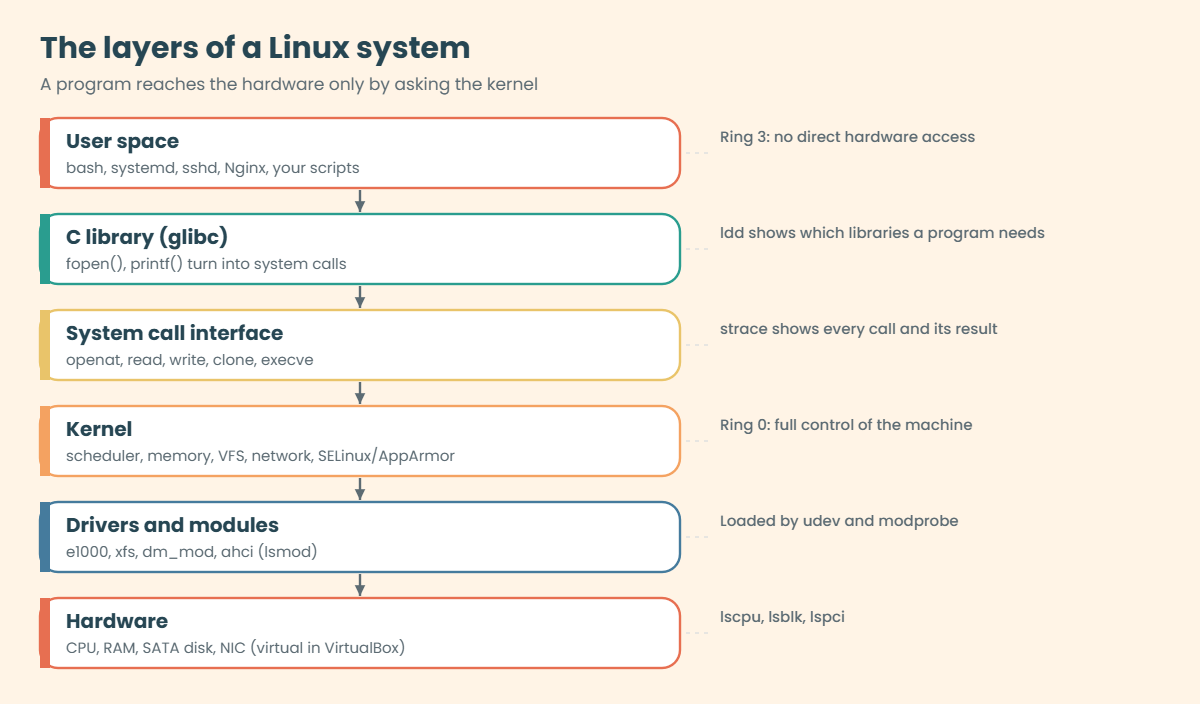
The CPU itself enforces the split. Kernel code runs in a privileged mode (ring 0 on x86) where it can touch memory, disks and network cards directly. Everything else runs in user mode (ring 3), where any attempt to touch hardware directly is stopped by the CPU, so the program has to ask the kernel.
| Layer | What lives there | How you see it on rocky01 or ubu01 |
|---|---|---|
| Hardware | CPU, RAM, disks, network cards (virtual ones in VirtualBox) | lscpu, lsblk, lspci |
| Kernel | Process scheduler, memory manager, virtual file system (VFS) and file systems, network stack, security checks (SELinux on Rocky, AppArmor on Ubuntu), device drivers | uname -r, dmesg, /proc and /sys |
| Kernel modules | Drivers and features loaded into the running kernel when needed: e1000 for the VirtualBox NIC, xfs for Rocky’s file systems | lsmod, modinfo, modprobe |
| System call interface | A few hundred numbered entry points: openat, read, write, clone, execve and so on | strace |
| C library (glibc) | Friendly functions like fopen() and printf() that end up making system calls for the program | ldd |
| User space | The shell (bash), systemd, sshd, Nginx, your scripts. Each runs as a process with its own memory | ps, top, pstree |
Linux is a monolithic kernel, which means the drivers run inside the kernel’s own memory, with full power. That’s fast, but a bad driver can crash the whole machine (a kernel panic). Modules soften this a bit: they’re still part of the kernel once loaded, but they don’t have to be compiled in, so the same kernel package works on a laptop, a VirtualBox VM and a 4-socket server.
Modules live under /lib/modules/$(uname -r)/. Rocky compresses them as .ko.xz and Ubuntu as .ko.zst. Some drivers are built into the kernel instead of being modules (Ubuntu builds ext4 in, for example), and those never show up in lsmod.
How it works, step by step
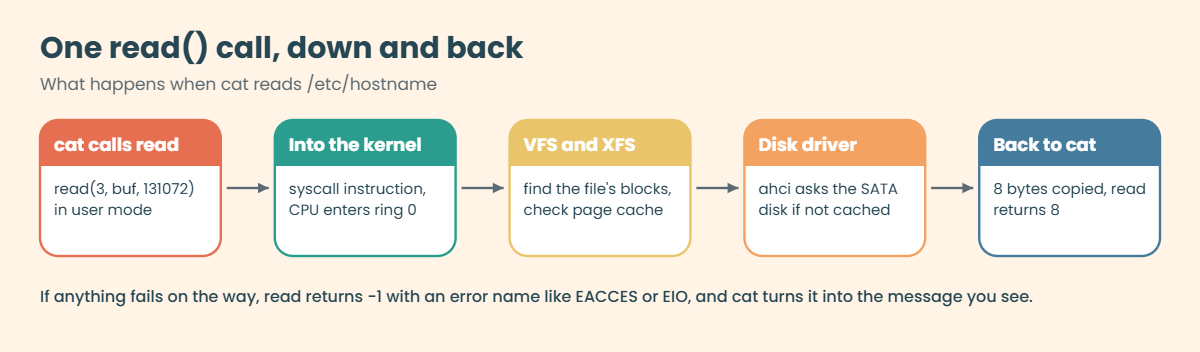
Follow one plain command, cat /etc/hostname, through every layer. The diagram after these steps shows the layers it passes through.
1You type, the shell reads
bash is a normal user-space program. It reads your line, splits it into words, expands anything like * or $HOME, and decides what cat is. If it’s a builtin such as cd, bash does the work itself.
Otherwise it searches the folders in $PATH and finds /usr/bin/cat.
2The shell makes a child and swaps in the program
bash asks the kernel for a copy of itself with the clone system call (the classic name is fork). The child then calls execve, which replaces its memory with the cat program, while the parent bash waits with wait4. Every external command you have ever run started this way.
3The loader brings in libraries
cat is a small program that relies on the C library. Before main() runs, the dynamic loader (ld-linux-x86-64.so.2) opens libc.so.6 and maps it into memory. Those are system calls too, which is why strace shows a dozen lines before cat even touches your file.
4cat asks the kernel for the file
cat calls openat with the path. The CPU switches to kernel mode, and the kernel walks the path through the VFS, checks permissions (and SELinux or AppArmor), and hands back a small number called a file descriptor, usually 3. If you weren’t allowed, it returns an error code such as EACCES instead.
5Read, write, close, exit
cat calls read on descriptor 3. The kernel asks the XFS or ext4 code, which asks the disk driver, which talks to the virtual SATA controller, and the bytes come back up into cat’s memory. cat then calls write on descriptor 1 (your terminal), then close and exit_group. bash wakes up and prints the prompt again.
Every one of those trips across the counter looks the same. The diagram below follows one read call from cat down to the disk and back.
Two numbers matter when you read strace output later. A system call that worked returns 0 or a positive number (a descriptor, a byte count). One that failed returns -1 and an error name, like ENOENT (no such file), EACCES (permission denied) or EPERM (operation not permitted), and the message your program prints is usually that name turned into words.
Kernel modules fit into this picture as extra code the kernel loads into itself. When udev sees a new device (your VirtualBox NIC, a USB disk, a SAN LUN), it reads the device’s ID and runs modprobe for the matching driver, and modprobe uses the dependency list built by depmod to load anything that driver needs first. You rarely load modules by hand, but you’ll check them often when a disk or NIC doesn’t show up.
Hands-on lab: watch a command talk to the kernel
Before you run any command, double-check it
Read every command twice before you press Enter. Check the target: the server name, the user, the disk or device name, the path and the sizes. These commands are for learning and were tested in our lab, not on your system. At work, run the read-only commands first, follow your change process, make sure a backup exists, and ask a second person to check anything that changes or deletes data. You run them at your own risk.
Everything here is read-only except loading and unloading the harmless dummy network driver, and installing strace. Work on rocky01 unless a step says ubu01; where the two differ, both are shown.
1Which kernel are you running?
Run this on both VMs:
uname -srmYou should see something like this:
[student@rocky01 ~]$ uname -srm
Linux 6.12.0-211.16.1.el10_2.0.1.x86_64 x86_64
student@ubu01:~$ uname -srm
Linux 7.0.0-15-generic x86_64The kernel name, its exact release and the CPU architecture. Rocky 10.2 runs a 6.12 kernel with a long Red Hat build number, and Ubuntu 26.04 runs 7.0. Same Linux idea, different kernel versions, which is why a driver or a tuning tip from one doesn’t always apply to the other.
✅ Checkpoint: You can read out the kernel release on each VM.
2Is it the shell or a program?
Run this:
type cd pwd catYou should see this:
cd is a shell builtin
pwd is a shell builtin
cat is /usr/bin/catBuiltins run inside bash, with no new process. Everything else is a file on disk that bash has to start through the kernel. That difference explains why cd can’t be a separate program: a child process can’t change its parent’s directory.
✅ Checkpoint: You can name one builtin and one external command.
3Install strace and count system calls
Install it (Rocky first, Ubuntu usually has it already):
| On Rocky Linux / RHEL | On Ubuntu |
|---|---|
| |
Then run this:
strace -c cat /etc/hostnameYou should see something like this:
rocky01
% time seconds usecs/call calls errors syscall
------ ----------- ----------- --------- --------- ----------------
19.40 0.000077 25 3 mprotect
17.88 0.000071 71 1 rseq
11.34 0.000045 9 5 close
11.08 0.000044 11 4 brk
6.80 0.000027 9 3 read
6.80 0.000027 6 4 fstat
6.55 0.000026 26 1 munmap
5.04 0.000020 20 1 write
4.53 0.000018 6 3 openat
3.53 0.000014 14 1 fadvise64
0.00 0.000000 0 8 mmap
0.00 0.000000 0 1 1 access
0.00 0.000000 0 1 execve
------ ----------- ----------- --------- --------- ----------------
100.00 0.000397 9 43 1 totalFirst you see cat’s normal output, then strace’s summary, written to the terminal on stderr. A program that prints one word needed about 40 trips into the kernel. Most of them (mmap, mprotect, brk) are the loader setting up memory, and only a few touch your file.
The one failed access call is the loader checking for an optional file, which is normal.
✅ Checkpoint: Your summary ends with a total line, and you can find openat, read and write in it.

4Watch cat open, read and write
Run this:
strace -e trace=openat,read,write,close cat /etc/hostname > /dev/nullYou should see something like this:
openat(AT_FDCWD, "/etc/ld.so.cache", O_RDONLY|O_CLOEXEC) = 3
close(3) = 0
openat(AT_FDCWD, "/lib64/libc.so.6", O_RDONLY|O_CLOEXEC) = 3
read(3, "\177ELF\2\1\1\3\0\0\0\0\0\0\0\0\3\0>\0\1\0\0\0\220\243\2\0\0\0\0\0"..., 832) = 832
close(3) = 0
openat(AT_FDCWD, "/etc/hostname", O_RDONLY) = 3
read(3, "rocky01\n", 131072) = 8
write(1, "rocky01\n", 8) = 8
read(3, "", 131072) = 0
close(3) = 0
close(1) = 0
close(2) = 0
+++ exited with 0 +++Each line is call(arguments) = result. The kernel gave /etc/hostname descriptor 3, the first read returned 8 bytes, write sent them to descriptor 1 (the redirect pointed it at /dev/null, so nothing printed), and the second read returned 0, which means end of file. You may see one or two extra openat lines for locale files depending on your language settings.
✅ Checkpoint: You can point at the openat line for /etc/hostname and say which descriptor it got.
5See the shell fork and exec
Run this:
strace -f -e trace=execve,clone,wait4,exit_group bash -c 'ls /boot > /dev/null'You should see something like this:
execve("/usr/bin/bash", ["bash", "-c", "ls /boot > /dev/null"], 0x7ffd30746838 /* 24 vars */) = 0
clone(child_stack=NULL, flags=CLONE_CHILD_CLEARTID|CLONE_CHILD_SETTID|SIGCHLD, child_tidptr=0x7fc66c415a10) = 2318
strace: Process 2318 attached
[pid 2317] wait4(-1, <unfinished ...>
[pid 2318] execve("/usr/bin/ls", ["ls", "/boot"], 0x557ecbec1010 /* 24 vars */) = 0
[pid 2318] exit_group(0) = ?
[pid 2318] +++ exited with 0 +++
<... wait4 resumed>[{WIFEXITED(s) && WEXITSTATUS(s) == 0}], 0, NULL) = 2318
--- SIGCHLD {si_signo=SIGCHLD, si_code=CLD_EXITED, si_pid=2318, si_uid=1000, si_status=0, si_utime=0, si_stime=0} ---
exit_group(0) = ?
+++ exited with 0 +++This is step 2 of “How it works”, live. bash (PID 2317) calls clone and gets child 2318, the child calls execve to become ls, the parent waits in wait4, and when the child exits, the kernel sends SIGCHLD and bash collects the exit status 0. The -f option tells strace to follow child processes too.
✅ Checkpoint: You can find the clone line, the child’s execve line and the wait4 that collects it.
6Which modules are loaded?
Run this on rocky01:
lsmod | grep -E '^(xfs|e1000|dm_mod) '
lsmod | tail -n +2 | wc -lYou should see something like this:
xfs 3510272 2
e1000 180224 0
dm_mod 249856 11 dm_log,dm_mirror
67lsmod reads /proc/modules. The columns are the module name, its size in memory in bytes, and how many things use it right now, followed by which other modules depend on it. xfs is used by 2 mounted file systems (/ and /boot), e1000 drives your VirtualBox NIC, and dm_mod is device-mapper, which LVM needs. The count says rocky01 has about 67 modules loaded.
✅ Checkpoint: You found xfs and e1000 in lsmod on rocky01.
7Ask a module about itself
Run this on rocky01:
modinfo e1000 | grep -E '^(filename|license|description|depends|intree|vermagic)'You should see something like this:
filename: /lib/modules/6.12.0-211.16.1.el10_2.0.1.x86_64/kernel/drivers/net/ethernet/intel/e1000/e1000.ko.xz
license: GPL v2
description: Intel(R) PRO/1000 Network Driver
depends:
intree: Y
vermagic: 6.12.0-211.16.1.el10_2.0.1.x86_64 SMP preempt mod_unload modversions The file lives under /lib/modules for this exact kernel, compressed with xz. “intree: Y” means it ships with the kernel source, and vermagic must match the running kernel or the module won’t load. Red Hat lists e1000 as unmaintained hardware in RHEL 10: it works in your lab VM, but on real servers you’d pick a supported NIC and driver.
Run modinfo -p e1000 to see the parameters you could pass it.
Now on ubu01, look for ext4:
lsmod | grep ext4
modinfo ext4 | head -n 5You should see no lsmod line, and then something like this:
name: ext4
filename: (builtin)
license: GPL
file: fs/ext4/ext4
description: Fourth Extended Filesystem“(builtin)” means Ubuntu compiled ext4 into the kernel image itself, so it’s always there and never appears in lsmod. When someone says “the module isn’t loaded” about a built-in driver, this is how you prove otherwise.
✅ Checkpoint: You can explain why ext4 is missing from lsmod on ubu01 but still works.
8Load and unload a module safely
Paste this whole block on rocky01 or ubu01:
sudo modprobe dummy
lsmod | grep dummy
ip -br link show type dummyYou should see something like this:
dummy 12288 0
dummy0 DOWN 6e:3c:91:0a:d4:57 <BROADCAST,NOARP> The dummy driver creates a fake network interface that throws away whatever you send it, which makes it a safe module to practise on. modprobe found it, loaded it and the kernel created dummy0. Now remove it:
sudo modprobe -r dummy
ip -br link show type dummyThe second command now prints nothing, because the interface went away with its driver. Use modprobe rather than the older insmod and rmmod, because modprobe handles dependencies for you.
✅ Checkpoint: dummy0 appeared after modprobe and disappeared after modprobe -r.
9What does a program need to start?
Run this on rocky01:
ldd /usr/bin/bash
file /usr/bin/bash /usr/bin/lddYou should see something like this:
linux-vdso.so.1 (0x00007ffd4b5f2000)
libtinfo.so.6 => /lib64/libtinfo.so.6 (0x00007f3a1c600000)
libc.so.6 => /lib64/libc.so.6 (0x00007f3a1c200000)
/lib64/ld-linux-x86-64.so.2 (0x00007f3a1c8b3000)
/usr/bin/bash: ELF 64-bit LSB pie executable, x86-64, version 1 (SYSV), dynamically linked, interpreter /lib64/ld-linux-x86-64.so.2, BuildID[sha1]=2f77b36371c214e11670c7d9d92727e9a49f626b, for GNU/Linux 3.2.0, stripped
/usr/bin/ldd: Bourne-Again shell script, ASCII text executablebash needs two shared libraries plus the loader itself. linux-vdso.so.1 isn’t a file on disk at all: the kernel maps it into every process so a few calls (like reading the time) don’t need a full trip into the kernel. file looks at the first bytes to tell you what a file is, and here it shows bash is a compiled ELF program while ldd is a bash script.
On ubu01, try:
file /usr/bin/lsYou should see:
/usr/bin/ls: symbolic link to ../lib/cargo/bin/coreutils/lsUbuntu 26.04 uses the Rust rewrite of coreutils for most basic commands, so ls is a link into one multi-call program. You type the same commands, and Lesson 11 shows where that matters.
Never run ldd on a program you don’t trust. For some binaries ldd ends up running the program to find its libraries. Use objdump -p FILE | grep NEEDED on unknown files instead.
✅ Checkpoint: You can name the libraries bash needs and say what file reported for each path.
10Peek at the kernel’s own windows
Paste this whole block on rocky01:
cat /proc/loadavg
cat /proc/sys/kernel/osrelease
cat /sys/class/net/enp0s3/operstate
cat /sys/class/net/enp0s3/addressYou should see something like this:
0.02 0.04 0.01 1/187 2342
6.12.0-211.16.1.el10_2.0.1.x86_64
up
08:00:27:3a:11:0bNone of these are real files on disk. /proc and /sys are views the kernel builds the moment you read them: the load average and process counts, the kernel release, and your NIC’s state and MAC address straight from the driver. Lesson 10 walks through both folders properly.
✅ Checkpoint: You read four live values from the kernel without running any special tool.
Break It, Then Fix It
Three mistakes people make in their first month with these tools. The second one needs a VM where you don’t mind a red error, which is any lab VM.
1Attach strace to a running process without sudo
Run this as student:
strace -p 1You’ll get this error:
strace: attach: ptrace(PTRACE_SEIZE, 1): Operation not permittedAttaching to another process uses the ptrace system call, and the kernel only lets you trace processes you own (on Ubuntu, Yama tightens this further to your own child processes). PID 1 is systemd, owned by root, so the kernel refuses with EPERM.
Fix: use sudo, and keep it short. Press Ctrl+C after a few seconds:
sudo strace -p 1 -e trace=epoll_waitstrace slows the traced process down a lot, so on production you attach for seconds, not minutes, and you prefer -c summaries over printing every call.
✅ Checkpoint: With sudo, strace attaches and shows calls until you press Ctrl+C.
2Try to unload a module that’s in use
Run this on rocky01:
sudo modprobe -r xfsYou’ll get this error:
modprobe: FATAL: Module xfs is in use.Your root file system is XFS, so the kernel won’t let the driver go while anything is mounted with it (the “Used by” count was 2). That safety check is a good thing: the alternative would be a crashed server. On ubu01 the same idea gives a different message, because ext4 isn’t a module at all:
sudo modprobe -r ext4modprobe: FATAL: Module ext4 is builtin.Fix: check before you remove. Look at the Used by column, and only unload modules nothing depends on:
lsmod | grep -E "^(xfs|dummy) "✅ Checkpoint: You can explain why xfs can’t be unloaded on rocky01 and ext4 can’t be unloaded on ubu01.
3Get the module name wrong
Run this:
modinfo e1001You’ll get this error:
modinfo: ERROR: Module e1001 not found.modinfo and modprobe only know module names that exist for the running kernel. Typos are common, and so is mixing up the product name (“Intel PRO/1000”) with the module name (e1000), or a module from another kernel version.
Fix: find the real name from the loaded list or from the module folder:
lsmod | grep -i e100
ls /lib/modules/$(uname -r)/kernel/drivers/net/ethernet/intel/✅ Checkpoint: You found the correct name e1000 and modinfo works with it.
This happened at work
The order screen that froze at 9:15
My team lead tells this one whenever a junior says strace is only for developers. He was at an online stockbroker in Chandigarh, and one Monday the order confirmation service on a Linux VM started lagging right at market open, 9:15 a.m. Orders went through, but confirmations reached the app 3 to 4 seconds late, and the support desk phones lit up.
The first theory was CPU, but top showed the process at 20 percent and the box mostly idle. Someone restarted the service, which helped for ten minutes and then the lag came back as volume picked up. Nothing useful was in the application log either.
He ran sudo strace -c -f -p on the service for ten seconds and pressed Ctrl+C. One line jumped out: fsync was taking more than 80 percent of the time in system calls. A new audit-logging library, deployed the Friday before, called fsync after each line it wrote, and each fsync waited for the shared virtual disk to confirm the write.
The developers switched the audit logger to batch its writes and fsync once a second, which the compliance team accepted, and the audit log moved to its own disk. The team also wrote “strace -c for 10 seconds” into the slow-app runbook, with a warning in bold to never leave strace attached during market hours.
Common mistakes and troubleshooting
| Mistake | What happens | What to do instead |
|---|---|---|
| Leaving strace attached to a busy production process | The process slows down badly while it’s traced, and users notice | Attach for a few seconds, prefer strace -c, and detach with Ctrl+C |
| Reading strace’s ENOENT lines as the real error | You chase a “missing file” that the loader was only checking for | Look for the failing call just before the program prints its error and exits |
Using rmmod or modprobe -r on a driver in use | You get “in use”, or worse, you unload the NIC driver your SSH session runs on | Check the Used by column first and work from the VM console for network drivers |
| Assuming a driver is missing because lsmod doesn’t list it | You open a ticket for something built into the kernel | Check modinfo NAME for filename: (builtin) |
| Running ldd on an unknown binary | The binary may run with your privileges | Use objdump -p FILE | grep NEEDED instead |
| Copying a .ko file from another server | It fails to load because vermagic doesn’t match the running kernel | Install the driver package built for your exact kernel release |
Interview questions
Click a question to open it. Each one is written the way an interviewer would ask it. Under it you will see why they ask it and one way you could answer, in your own words.
Fresher level
1. In simple words, what’s the difference between user space and kernel space?
Why they ask this: They want to see that you understand why programs can’t touch hardware directly. A clear, short answer matters more than jargon here.
How you might answer: User space is where normal programs run, like bash, sshd or Nginx, each with its own memory and no direct access to hardware. Kernel space is where the kernel runs with full privileges and controls the CPU, memory, disks and network.
A program crosses from one to the other with a system call, for example openat to open a file or write to send data, and the kernel checks permissions before it does anything.
2. What is a kernel module, and how do you check whether one is loaded?
Why they ask this: This checks basic driver handling, which comes up whenever a NIC or disk doesn’t appear. They want commands, not theory.
How you might answer: A kernel module is a piece of kernel code, usually a driver, that can be loaded into the running kernel without a reboot. They live under /lib/modules/$(uname -r).
I check with lsmod | grep NAME, get details with modinfo NAME, and load or remove one with modprobe and modprobe -r. If lsmod shows nothing, I check modinfo for “(builtin)” before saying it’s missing.
2–5 years experience
3. An application fails with “Permission denied” but the logs don’t say which file. How would you find it?
Why they ask this: They’re looking for practical use of strace and an understanding that errors come back from system calls.
How you might answer: I’d reproduce it under strace, either by starting the command with strace -f -e trace=openat,execve or by attaching with sudo strace -f -p PID for a few seconds. Then I look for a call returning -1 EACCES, which shows the exact path the kernel refused.
From there I check the permissions and ownership on that path, and on Rocky the SELinux context too, since SELinux denials also come back as EACCES.
4. You run modprobe -r on a module and get “Module is in use”. What do you do?
Why they ask this: They want to see caution and an understanding of module dependencies, not someone who reaches for force options.
How you might answer: I check lsmod for the Used by count and the list of dependent modules, then find what’s holding it: a mounted file system for xfs, an active interface for a NIC driver, or a device-mapper device for dm_mod.
I stop or unmount that user first, then remove dependent modules before the main one. I would never use rmmod with the force option on production, because that can crash the kernel.
Senior level
5. Why is Linux called a monolithic kernel, and what does that mean for stability on servers you run?
Why they ask this: A senior should connect architecture to operational risk: driver quality, vendor support and crash handling.
How you might answer: All drivers and kernel subsystems run in the same privileged address space, so a bug in one driver can panic the whole server. Modules make it flexible to load drivers, but once loaded they have the same power as the rest of the kernel.
So on production I stick to in-tree, vendor-supported drivers, avoid unmaintained hardware like e1000 on RHEL 10, keep kdump configured to capture crash dumps, and test kernel and driver updates on non-production first.
6. A process uses 100 percent of one CPU but its own log is quiet. Walk me through finding out what it’s doing.
Why they ask this: They want a layered approach: user space versus kernel time, then system calls, then deeper tools only if needed.
How you might answer: I start with top or pidstat to see whether the time is user or system. If it’s system time, I attach sudo strace -c -f -p PID for ten seconds to see which system calls dominate, for example a tight loop of failing reads or polls.
If it’s user time, strace won’t show much, so I move to perf top -p PID or a stack dump, and I bring the developers in with the evidence instead of just restarting the process.
Quick quiz
Q1. What is the only way a normal program can read a file from disk?
- It reads the disk directly
- It asks the kernel with system calls such as openat and read
- It asks the shell to read it
- It reads /proc/disk
Show answer
B — User-space programs can’t touch hardware. They ask the kernel with system calls, and the kernel checks permissions first.
Q2. In strace output, what does openat(...) = -1 EACCES (Permission denied) mean?
- The file doesn’t exist
- The kernel refused because of permissions
- strace failed
- The disk is full
Show answer
B — A system call returns -1 plus an error name when it fails. EACCES is permission denied, ENOENT is no such file.
Q3. Why does lsmod | grep ext4 show nothing on ubu01 even though / is ext4?
- ext4 isn’t installed
- ext4 is built into the Ubuntu kernel, not a module
- lsmod needs sudo
- ext4 runs in user space
Show answer
B — modinfo ext4 reports filename: (builtin). Built-in drivers never appear in lsmod.
Q4. Which command loads a module together with the modules it depends on?
- insmod
- modinfo
- modprobe
- depmod
Show answer
C — modprobe uses the dependency list from depmod. insmod loads one file and doesn’t resolve dependencies.
Q5. What does bash do to run an external command like ls?
- It reads ls into its own memory
- It calls clone to make a child, and the child calls execve to become ls
- It asks systemd to start ls
- It sends ls to the kernel as text
Show answer
B — You saw clone, execve and wait4 in the strace -f output in lab step 5.
Quick recap
- Linux is layered: hardware, the kernel (with its modules), the system call interface, the C library, and user space with the shell and your programs.
- Programs reach the kernel only through system calls, and
straceshows you every one, with results and error names like ENOENT and EACCES. - The shell runs external commands with clone, execve and wait4, while builtins like
cdrun inside bash. - Kernel modules live in
/lib/modules/$(uname -r); check them withlsmodandmodinfo, and load or remove them withmodprobeandmodprobe -r. - Built-in drivers (ext4 on Ubuntu) never appear in lsmod, and modules in use (xfs on Rocky) can’t be removed.
Next lesson
Lesson 9: The Linux boot process → You’ll follow rocky01 and ubu01 from the power button through UEFI, GRUB2, the kernel and initramfs to systemd, and time each stage with systemd-analyze.
Further reading: Linux architecture
Want to go deeper into Linux architecture? Read the man pages for syscalls(2), strace(1) and modprobe(8), and Red Hat’s guide to managing, monitoring and updating the kernel in RHEL 10. You can also see the full plan for this course on the Linux Administration course page.
