Linux interview questions and RHCSA prep
-
Phase 0: Before you start
-
Phase 1: The origins and OS architecture
-
Phase 2: Day-to-day administration and the command builder
-
Phase 3: Enterprise infrastructure and storage
-
Phase 4: Troubleshooting step by step
-
Phase 5: Final project and career
This lesson collects Linux interview questions from every part of the course, grouped by topic and by level, each with the reason an interviewer asks it and one way to answer from your own lab work. It also prepares you for the RHCSA exam (EX200), Red Hat’s hands-on certification, which is now based on RHEL 10.
Interviews and the RHCSA test the same thing from two sides: can you explain what you did, and can you do it again on a live system without help. So after the question bank you’ll do a practical round on rocky01 against the clock, check that your work survives a reboot, and see which lesson of this course covers each current exam objective.
Where this lesson fits
Lesson 82 of 82 in Linux Administration · Phase 5: Final project and career · Before this: Lesson 81, the final project
| Time | You need | By the end you can |
|---|---|---|
| About 3 hours, including a 2-hour practical round | rocky01 as Lesson 81 left it, with about 1 GiB unallocated in vg_data | Answer common Linux interview questions at three levels with your own examples, finish a timed RHCSA-style practical round, and plan your exam revision by objective |
What it is, in one line
Linux interview questions check whether you can explain and repeat real admin work; the RHCSA checks the same skills hands-on, on RHEL 10, with every change required to survive a reboot.
In Simple Words
The driving test at the RTO
At the RTO, the inspector doesn’t ask you to define a clutch. He sits next to you and says “take it round the figure of eight, then reverse into that bay”, and he watches whether your foot goes to the brake before the car rolls back. A friend who memorised the rule book and never drove fails in two minutes.
A good interview is the inspector asking you to describe the drive, and the RHCSA is the drive itself.
Engineer's View
What each round checks, and what Red Hat says about EX200
| Round | What it looks like | What they’re checking |
|---|---|---|
| Screening call | Ten quick questions: permissions, ports, ps, df | That the basics are automatic, not looked up |
| Technical deep-dive | “Walk me through” one topic, with follow-ups | Depth: you know why, not only which command |
| Practical | A broken VM or a task list, shared screen | Order of work: read-only checks first, then one change |
| Scenario | “The site is down at 2 a.m., go” | Calm method, layer by layer, and communication |
| Senior or design | “How would you run this for 500 servers?” | Automation, standards, risk, people |
On its EX200 exam page, Red Hat says the exam is performance-based, based on Red Hat Enterprise Linux 10, has no internet access, and that you may not bring notes or books, while the documentation that ships with the product is available for most exams. It also says configurations must persist after a reboot without intervention. Duration, scoring, booking and retake rules change from time to time, so read the exam page and Red Hat’s Certification Program Guide before you book, not a blog post.
Rocky Linux 10 is built from the same sources as RHEL 10, so everything in the practical round behaves the same. What Rocky can’t give you is the Red Hat subscription side, such as registering with the Red Hat CDN; read about that in the RHEL documentation.
How it works, step by step
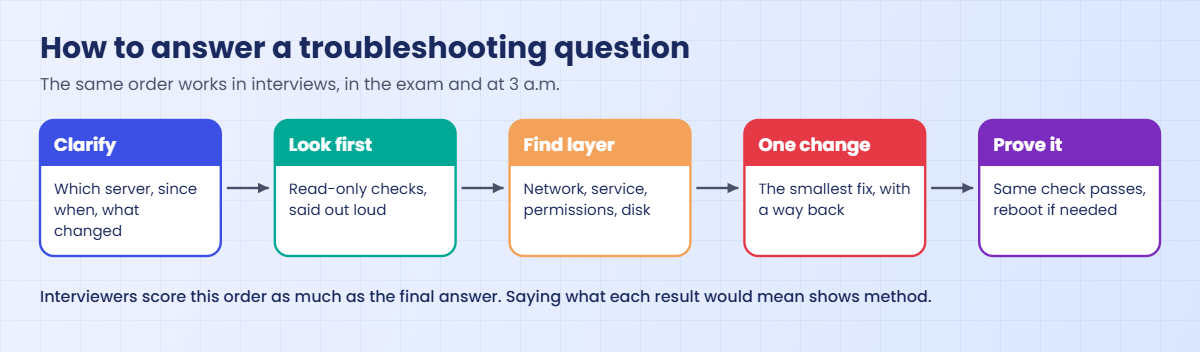
Most technical questions, spoken or hands-on, reward the same order of work, and the diagram below shows it.
1Clarify before you answer
Repeat the problem in one line and ask what you’d ask at work: which server, since when, what changed. In a practical, read every task first, because a later task often depends on an earlier one (the user before the folder it owns).
2Say the read-only checks out loud
Interviewers want to hear df -h before rm. Name the command, what you expect to see, and what each answer would mean. That shows a method even when you don’t know the final cause.
3Use your own examples
Answer from your lab: “In my lab, an fstab line without nofail sent rocky01 to emergency mode, and I fixed it from the console.” One real example beats three definitions, and every lesson in this course gave you at least one.
4Make every change persistent, then prove it
In the exam and at work, a change that disappears at reboot didn’t happen. Prefer the tool that writes the config (nmcli, firewall-cmd --permanent, semanage, systemctl enable, fstab by UUID), then reboot and check.
5Map the exam to what you already know
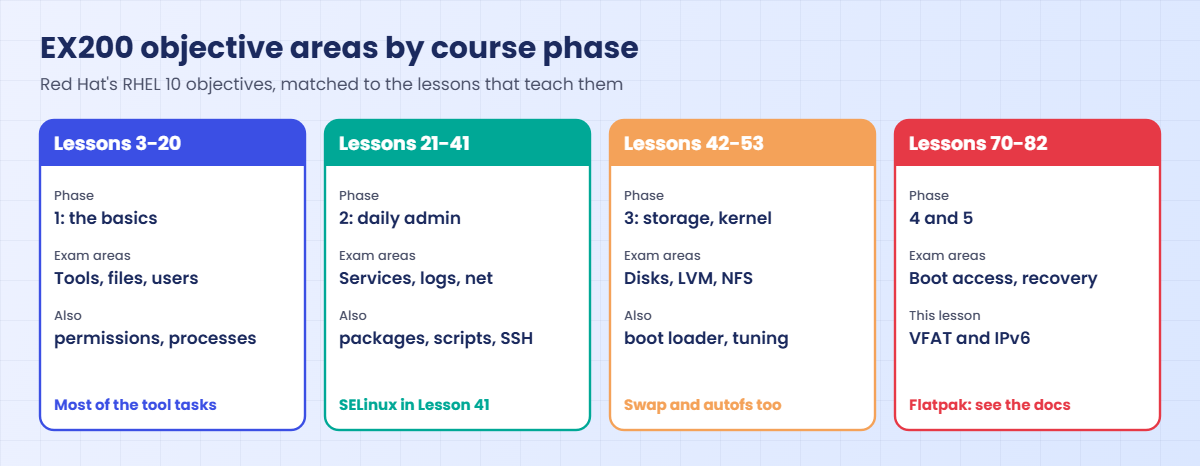
Red Hat lists the current EX200 objectives in ten areas. Each row below names the lessons of this course that teach them. The picture after the table groups them by course phase.
| Objective area (EX200, RHEL 10) | Objectives in short | Lessons |
|---|---|---|
| Understand and use essential tools | Shell, redirection, grep and regex, SSH, switching users, tar with gzip and bzip2, editing files, files and folders, hard and soft links, ugo/rwx, man, info and /usr/share/doc | 3, 11-14, 16, 17, 33, 37 |
| Manage software | RPM repositories, install and remove RPMs, Flatpak repositories and packages | 35, 77; Flatpak is not covered (see Further reading) |
| Create simple shell scripts | if and test, loops, $1 and $2, using command output | 38, 39 |
| Operate running systems | Boot, reboot, targets, interrupting the boot, CPU and memory hogs, nice, tuning profiles, logs and journals, preserving journals, network services, secure file transfer | 9, 20, 22, 24, 26, 29, 33, 51, 71 |
| Configure local storage | GPT partitions, PVs, VGs, LVs, mounting by UUID or label, adding partitions, LVs and swap safely | 42-45 |
| Create and configure file systems | VFAT, ext4 and XFS, NFS, autofs, extending LVs, fixing permission problems | 43, 45, 47, 17-19; VFAT in the practical round below |
| Deploy, configure and maintain | at, cron and timers, services at boot, default target, time client, installing from repositories or files, the boot loader | 9, 26-28, 35, 40, 50 |
| Manage basic networking | IPv4 and IPv6 addresses, name resolution, network services at boot, firewalld | 30, 31, 34, 76; IPv6 in the practical round |
| Manage users and groups | Users, passwords and ageing, groups, privileged access | 15, 16, 55 |
| Manage security | firewalld, default permissions (umask), SSH keys, SELinux modes, contexts, restoring contexts, port labels, booleans | 17, 33, 34, 41, 56, 72 |
Read the full wording on Red Hat’s page; it changes between RHEL versions (RHEL 10 added Flatpak, for example), so check it again in the month you book.
6Work through the question bank
Click a question to open it. Try your own answer first, out loud, then read why they ask it and one way to answer. The level in brackets is the experience the question usually targets, not a limit.
Files, the shell and text
What’s the difference between a hard link and a soft link, and what happens to each when you delete the original? (Fresher)
Why they ask this: It checks whether you understand inodes rather than only the ln command.
How you might answer: A hard link is another name for the same inode, so the data stays until the last name is removed; ls -li shows both names with one inode number. A soft link stores a path, so it breaks when the target goes, and only soft links can point across file systems or at folders.
How would you show only the lines with “error” in a log, ignoring case, and count them? (Fresher)
Why they ask this: A quick check that grep is automatic for you.
How you might answer: I’d run grep -i error app.log to see them and grep -ic error app.log to count. For system logs I’d rather use journalctl -p err -b, which filters by priority, not by a word that might also appear in normal messages.
A script works when you run it but fails from cron. What do you check? (2–5 years)
Why they ask this: This is one of the most common real problems, and they want the environment difference.
How you might answer: Cron runs with a tiny PATH and no profile, so I use full paths in the script and send its output to a log with >> /var/log/job.log 2>&1. I also check that a % in the crontab line is escaped, the file is executable, and on RHEL that the script has a proper label if it lives in a custom folder.
What’s the difference between cmd > file 2>&1 and cmd 2>&1 > file? (2–5 years)
Why they ask this: It tests whether you understand redirection order, which breaks real scripts.
How you might answer: The shell applies redirections left to right. In the first, stdout goes to the file and then stderr is pointed where stdout now goes, so both land in the file; in the second, stderr is pointed at the terminal first, so only stdout reaches the file.
When do you stop writing shell scripts and move to Python or Ansible? (Senior)
Why they ask this: They want judgement about tools and maintainability.
How you might answer: When the logic needs data structures, real error handling, or the same change on many servers. Short glue stays in bash with set -euo pipefail and shellcheck; anything that configures a fleet goes into Ansible so it’s idempotent and reviewed in Git.
Users, permissions and sudo
What does chmod 2770 on a folder mean? (Fresher)
Why they ask this: A practical permissions question with the special bit as the twist.
How you might answer: The owner and group get read, write and execute, others get nothing, and the 2 is setgid, so new files inside get the folder’s group. That’s how /srv/projects worked for webteam in my lab.
Where are password hashes stored, and who can read that file? (Fresher)
Why they ask this: They want /etc/shadow and why it’s separate from /etc/passwd.
How you might answer: In /etc/shadow, which only root can read; /etc/passwd is readable by everyone and only has an x in the password field. shadow also holds the ageing values that chage -l shows.
A user is in the right group but still gets Permission denied on a shared folder. Walk me through it. (2–5 years)
Why they ask this: They’re checking that you know the less obvious layers.
How you might answer: First I check whether the group was added after they logged in, because membership applies at the next login (id in their session against id user). Then the execute bit on every parent folder, the ACL mask with getfacl (look for #effective), the SELinux label with ls -Z, and chattr flags.
How do you remove a leaver’s access properly? (2–5 years)
Why they ask this: It shows whether you think beyond passwords.
How you might answer: I lock the account with usermod -L and set chage -E 0 so SSH keys stop working too, remove their key from authorized_keys, check crontab -l -u user and running processes, and end their sessions. Their files I find with find / -xdev -user user and hand to the manager before anything is deleted.
How would you let a support team restart one service without giving them root? (Senior)
Why they ask this: Least privilege, done in a way that is safe and auditable.
How you might answer: A file in /etc/sudoers.d made with visudo -f, allowing the exact command line, like /usr/bin/systemctl restart nginx, for their group. No editors, pagers or wildcards, logs sent to the central server, and the file deployed by Ansible so it can be reviewed.
Processes, services and boot
What’s the difference between systemctl enable and systemctl start? (Fresher)
Why they ask this: A basic question that many people answer half right.
How you might answer: start runs the service now; enable creates the links so it starts at boot. systemctl enable --now does both, and is-enabled and is-active check each part.
How do you find what is using the most CPU right now? (Fresher)
Why they ask this: They want a real command and a sense of what “now” means.
How you might answer: I’d compare uptime with nproc, then take top -b -n 2 -d 1 -o %CPU and read the second snapshot, because ps shows CPU averaged over the life of the process.
Your custom service fails with status=203/EXEC. What do you check? (2–5 years)
Why they ask this: They’re checking systematic triage of a common systemd failure.
How you might answer: 203 means systemd couldn’t execute the program. I check the ExecStart path, the execute bit, the shebang line, a noexec mount, and on RHEL the SELinux label, which restorecon -v fixes for scripts copied from a home folder.
A server keeps booting into the graphical target. How do you make it boot to the console by default? (2–5 years)
Why they ask this: A direct RHCSA-style task.
How you might answer: I’d run systemctl set-default multi-user.target and check with systemctl get-default. To switch once without changing the default, systemctl isolate multi-user.target, or add systemd.unit=multi-user.target at the GRUB prompt.
Nobody knows the root password of a RHEL server. How do you get in? (Senior)
Why they ask this: Recovery knowledge plus the security thinking around it.
How you might answer: With console access I’d add rd.break at GRUB, remount /sysroot read-write, chroot, set the password and touch /.autorelabel so SELinux relabels on the next boot. Then the new password goes into the vault, and I’d ask why it was lost, because anyone with console access can do the same.
Storage and file systems
What are a PV, a VG and an LV? (Fresher)
Why they ask this: The three LVM layers, said clearly.
How you might answer: A physical volume is a disk or partition prepared for LVM, a volume group pools one or more PVs, and logical volumes are cut from that pool and carry the file systems. I can add a disk to the VG and grow an LV without unmounting it.
Why mount by UUID in /etc/fstab instead of /dev/sdb1? (Fresher)
Why they ask this: They want to know you’ve met device names changing.
How you might answer: Device names depend on the order disks are found, so after a reboot or a new disk sdb can become sdc. A UUID belongs to the file system itself, which blkid shows.
How do you add 10 GB to a mounted XFS volume on LVM with no downtime? (2–5 years)
Why they ask this: The full online-growth sequence, and the XFS limit.
How you might answer: Add or grow the disk, rescan the SCSI bus, then pvcreate and vgextend (or pvresize), and lvextend -r -L +10G, which grows the file system too. XFS can grow online but never shrink.
A server went into emergency mode after a disk was added to fstab. What happened? (2–5 years)
Why they ask this: A very common outage, and whether you can fix it from the console.
How you might answer: The device didn’t appear at boot and the line had no nofail, so systemd stopped. On the console I’d log in as root, correct the line or add nofail, run systemctl daemon-reload and mount -a, and continue; from then on I’d run findmnt --verify before every reboot.
When would you choose ext4 over XFS? (Senior)
Why they ask this: Trade-offs, not loyalty.
How you might answer: XFS is RHEL’s default and handles large files and parallel writes well, but it can’t shrink. I’d pick ext4 when a volume may need to shrink offline, for small boot or appliance volumes, or to match Ubuntu defaults in a mixed team.
Networking, SSH and the firewall
How do you find a server’s IP address, default gateway and DNS server? (Fresher)
Why they ask this: Basic network inventory with current tools.
How you might answer: I’d use ip -br address, ip route for the default gateway, and resolvectl status on Ubuntu or nmcli device show and /etc/resolv.conf on RHEL.
What do ssh-keygen and ssh-copy-id each do? (Fresher)
Why they ask this: Key-based login, an RHCSA objective.
How you might answer: ssh-keygen creates the key pair in ~/.ssh, ideally ed25519 with a passphrase; ssh-copy-id appends the public key to the server’s authorized_keys with the right permissions. After that, password logins can be switched off.
A static route disappears after every reboot. Why, and how do you fix it? (2–5 years)
Why they ask this: Persistence, and knowing that RHEL 10 has no route files.
How you might answer: It was added with ip route add, which lives only in memory. On RHEL 10 I’d put it in the profile with nmcli connection modify CON +ipv4.routes "NET GW", and on Ubuntu under routes in the netplan YAML, then reboot to prove it.
ping by IP works, ping by name fails. What do you check? (2–5 years)
Why they ask this: Name resolution order, not only DNS.
How you might answer: I’d run getent hosts name, which follows nsswitch.conf, then look at /etc/hosts and the DNS servers in resolv.conf or resolvectl, and query DNS directly with dig. If getent and dig disagree, /etc/hosts is usually the reason.
How would you harden SSH on 300 servers without locking anyone out? (Senior)
Why they ask this: Safe rollout matters as much as the settings.
How you might answer: A drop-in like 00-hardening.conf with keys only and no root login, checked with sshd -t and sshd -T, pushed by Ansible to a small group first. I keep an existing session open, test a new login before closing it, and make sure console access works.
Security and SELinux
What are SELinux’s modes, and how do you switch between them? (Fresher)
Why they ask this: A basic RHCSA objective.
How you might answer: Enforcing blocks and logs, permissive only logs. setenforce 0 or 1 switches until reboot, and SELINUX= in /etc/selinux/config sets the mode at boot. On RHEL 9 and 10, turning SELinux fully off needs the selinux=0 boot option, and you almost never should.
A web server can’t read a file whose permissions look fine. What do you check first? (Fresher)
Why they ask this: They want ls -Z and the audit log before setenforce.
How you might answer: I’d compare the file’s label with ls -Z to a working file, and read ausearch -m AVC -ts recent. A file moved from a home folder keeps its old label, and restorecon -v fixes it.
Nginx must listen on port 8089 on RHEL. Besides its config, what else must change? (2–5 years)
Why they ask this: Two layers people forget.
How you might answer: SELinux must allow the port with semanage port -a -t http_port_t -p tcp 8089, and firewalld must open it with firewall-cmd --permanent --add-port=8089/tcp and a reload.
What’s the difference between chcon and semanage fcontext plus restorecon? (2–5 years)
Why they ask this: Temporary versus permanent labels.
How you might answer: chcon changes the label on the file now, but a relabel or restorecon puts the policy’s label back. semanage fcontext writes a rule into the policy, and restorecon applies it, so the label survives.
An audit finds SELinux disabled on 40 servers “because the app needed it”. How do you turn it back on? (Senior)
Why they ask this: A careful plan, not “just enable it”.
How you might answer: I’d switch one server to permissive first, which needs a full relabel after being disabled, run the app through a normal week and collect denials with ausearch and audit2why. Most fixes are labels, booleans or port types; anything left becomes a small reviewed module. Then enforcing, one group of servers at a time.
Hands-on lab: a timed RHCSA-style practical round on rocky01
Before you run any command, double-check it
Read every command twice before you press Enter. Check the target: the server name, the user, the disk or device name, the path and the sizes. These commands are for learning and were tested in our lab, not on your system. At work, run the read-only commands first, follow your change process, make sure a backup exists, and ask a second person to check anything that changes or deletes data. You run them at your own risk.
This is a practice round in the RHCSA style: short tasks, done with the tools that make them persistent, checked at the end after a reboot. Set a timer for two hours for steps 2 to 8 (my suggestion, not the exam’s timing), and try each task from memory before you look at the commands. Work on rocky01 as student, and at the very end restore the snapshot so the course state stays as Lesson 81 left it.
1Take a snapshot and get the tools ready
On the laptop, with rocky01 shut down:
VBoxManage snapshot rocky01 take before-l82Start rocky01, then run this:
sudo vgs vg_data
sudo dnf install -y dosfstools at
sudo systemctl enable --now atd
command -v mkfs.vfat atYou should see something like this:
VG #PV #LV #SN Attr VSize VFree
vg_data 2 3 0 wz--n- 9.99g 2.24g
Created symlink '/etc/systemd/system/multi-user.target.wants/atd.service' → '/usr/lib/systemd/system/atd.service'.
/usr/sbin/mkfs.vfat
/usr/bin/atThe round uses about 1.2 GiB of vg_data. dosfstools gives you mkfs.vfat and at gives you one-off jobs; both may already be installed, in which case dnf says so and the symlink line doesn’t appear.
✅ Checkpoint: The snapshot exists, vg_data has at least 1.2 GiB free, and both commands are found.
2Users, a group, ageing and a sudo rule
Tasks: group exams with GID 4001; user nisha (UID 4101) and user vikram (UID 4102, no login shell), both in exams; nisha’s password must change every 60 days with 7 days’ warning; members of exams may restart chronyd as root, nothing else.
sudo groupadd -g 4001 exams
sudo useradd -u 4101 -G exams -c "Nisha Pillai" nisha
sudo useradd -u 4102 -G exams -s /sbin/nologin vikram
sudo passwd nisha
sudo chage -M 60 -W 7 nisha
echo '%exams ALL=(root) /usr/bin/systemctl restart chronyd' | sudo EDITOR='tee' visudo -f /etc/sudoers.d/exams >/dev/null
sudo chmod 0440 /etc/sudoers.d/exams
id nisha; id vikram
sudo chage -l nisha | grep -E 'Maximum|warning'
sudo -l -U nisha | tail -n 1You should see something like this:
uid=4101(nisha) gid=4101(nisha) groups=4101(nisha),4001(exams)
uid=4102(vikram) gid=4102(vikram) groups=4102(vikram),4001(exams)
Maximum number of days between password change : 60
Number of days of warning before password expires : 7
(root) /usr/bin/systemctl restart chronydThe password for nisha must meet the Lesson 55 rules on rocky01 (14 characters, all four character classes). The sudo rule went through visudo, which checked it before saving, the same trick as Lesson 16.
✅ Checkpoint: Both users are in exams, nisha’s maximum is 60 days and her sudo list has one command.
3A shared folder with setgid and an ACL
Task: /srv/exams owned by group exams, members can create files that stay in the group, others have no access, and arjun can read (now and for new files).
sudo mkdir -p /srv/exams
sudo chown root:exams /srv/exams
sudo chmod 2770 /srv/exams
sudo setfacl -m u:arjun:rx /srv/exams
sudo setfacl -d -m u:arjun:rx /srv/exams
ls -ld /srv/exams
getfacl -p /srv/exams | grep arjunYou should see something like this:
drwxrws---+ 2 root exams 6 Oct 27 14:12 /srv/exams
user:arjun:r-x
default:user:arjun:r-xThe s in the group position is setgid and the + means an ACL is present. The default entry is copied onto new files, so arjun can read what nisha writes there next week.
✅ Checkpoint: ls shows drwxrws---+ with group exams, and getfacl shows both arjun lines.

4Storage: three new volumes, mounted at boot
Tasks: lv_exam 512 MiB XFS on /exam by UUID; lv_vfat 128 MiB VFAT with label EXAMFAT on /exam-vfat by label; lv_swap2 256 MiB as extra swap by UUID. Back up fstab first.
sudo cp /etc/fstab /root/fstab.l82
sudo lvcreate -n lv_exam -L 512M vg_data && sudo mkfs.xfs -q /dev/vg_data/lv_exam
sudo lvcreate -n lv_vfat -L 128M vg_data && sudo mkfs.vfat -n EXAMFAT /dev/vg_data/lv_vfat
sudo lvcreate -n lv_swap2 -L 256M vg_data && sudo mkswap /dev/vg_data/lv_swap2
sudo mkdir -p /exam /exam-vfat
echo "UUID=$(sudo blkid -s UUID -o value /dev/vg_data/lv_exam) /exam xfs defaults 0 0" | sudo tee -a /etc/fstab
echo "LABEL=EXAMFAT /exam-vfat vfat defaults 0 0" | sudo tee -a /etc/fstab
echo "UUID=$(sudo blkid -s UUID -o value /dev/vg_data/lv_swap2) none swap defaults 0 0" | sudo tee -a /etc/fstab
sudo systemctl daemon-reload
sudo mount -a && sudo swapon -a
sudo findmnt --verify | tail -n 1
df -hT /exam; findmnt -n -o SOURCE,FSTYPE /exam-vfat; swapon --showYou should see something like this (lvcreate lines cut):
mkfs.fat 4.2 (2021-01-31)
Setting up swapspace version 1, size = 256 MiB (268431360 bytes)
no label, UUID=4e2a9c71-0b3d-4f58-a6e2-91c7d05b8f34
UUID=8d61f2a4-3c9e-4b17-b0d5-6a2e9f1c7e03 /exam xfs defaults 0 0
LABEL=EXAMFAT /exam-vfat vfat defaults 0 0
UUID=4e2a9c71-0b3d-4f58-a6e2-91c7d05b8f34 none swap defaults 0 0
0 parse errors, 0 errors, 0 warnings
Filesystem Type Size Used Avail Use% Mounted on
/dev/mapper/vg_data-lv_exam xfs 448M 35M 414M 8% /exam
/dev/mapper/vg_data-lv_vfat vfat
NAME TYPE SIZE USED PRIO
/dev/dm-1 partition 2G 12M -2
/dev/dm-7 partition 256M 0B -3Use the UUID of the logical volume itself, never of the disk under it (Break It shows why). XFS keeps part of a small volume for its log, so 512 MiB shows as 448M. swapon --show lists the installer’s swap and the new one.
✅ Checkpoint: findmnt --verify reports 0 errors, /exam and /exam-vfat are mounted, and swapon shows two swap areas.
5Grow a volume and write a small script
Tasks: grow lv_exam by 256 MiB without unmounting it; write /usr/local/bin/exam-users.sh that prints the UID and groups of each user name it gets, or “missing”.
sudo lvextend -r -L +256M vg_data/lv_exam >/dev/null
df -h /exam | tail -n 1
cat > ~/exam-users.sh <<'EOF'
#!/bin/bash
# exam-users.sh: print the UID and groups of each user named (Lesson 82)
if [[ $# -eq 0 ]]; then
echo "usage: $0 USER..." >&2
exit 1
fi
for u in "$@"; do
if id "$u" >/dev/null 2>&1; then
echo "$u: uid=$(id -u "$u") groups=$(id -Gn "$u" | tr ' ' ',')"
else
echo "$u: missing"
fi
done
EOF
bash -n ~/exam-users.sh && sudo install -m 0755 ~/exam-users.sh /usr/local/bin/
exam-users.sh nisha vikram meenaYou should see something like this:
/dev/mapper/vg_data-lv_exam 704M 40M 665M 6% /exam
nisha: uid=4101 groups=nisha,exams
vikram: uid=4102 groups=vikram,exams
meena: missing-r grew XFS in the same command. The script uses an if with test, a for loop over "$@" and command output inside a string, which covers the four scripting objectives in a dozen lines (meena was removed in Lesson 47).
✅ Checkpoint: /exam shows 704M and the script prints two users and one “missing”.
6Schedules, the boot target, tuning and the journal
Tasks: nisha runs date every 10 minutes into ~/date.log; a one-off job in one minute; the server boots to the console; the recommended tuning profile is active; the journal is kept across reboots.
echo '*/10 * * * * /usr/bin/date >> /home/nisha/date.log' | sudo crontab -u nisha -
sudo crontab -l -u nisha
echo 'touch /var/tmp/at-ran' | at now + 1 minute
systemctl get-default
tuned-adm recommend; tuned-adm active
grep -h '^Storage' /etc/systemd/journald.conf.d/*.confYou should see something like this:
*/10 * * * * /usr/bin/date >> /home/nisha/date.log
warning: commands will be executed using /bin/sh
job 1 at Tue Oct 27 14:31:00 2026
multi-user.target
virtual-guest
Current active profile: virtual-guest
Storage=persistentThe boot target, the tuning profile and the journal were already right from earlier lessons; in an exam you’d check them the same way and change them only if needed (systemctl set-default, tuned-adm profile, a journald drop-in with Storage=persistent). A minute later, /var/tmp/at-ran exists.
✅ Checkpoint: crontab shows nisha’s line, atq showed job 1, and the target, profile and Storage line are as shown.
7SELinux, the firewall and a label to restore
Tasks: allow web servers to use TCP 8089 in SELinux and the firewall; let web servers use NFS files (persistently); fix the label of a page moved from your home folder.
sudo semanage port -a -t http_port_t -p tcp 8089
sudo semanage port -l | grep '^http_port_t'
sudo firewall-cmd --permanent --add-port=8089/tcp && sudo firewall-cmd --reload
sudo setsebool -P httpd_use_nfs on; getsebool httpd_use_nfs
echo '<p>exam</p>' > ~/exam.html && sudo mv ~/exam.html /srv/app/saatshop/
sudo restorecon -v /srv/app/saatshop/exam.htmlYou should see something like this:
http_port_t tcp 8089, 80, 81, 443, 488, 8008, 8009, 8443, 9000
success
success
httpd_use_nfs --> on
Relabeled /srv/app/saatshop/exam.html from unconfined_u:object_r:user_home_t:s0 to unconfined_u:object_r:httpd_sys_content_t:s0Your own port appears first in the list. -P writes the boolean into the policy so it survives reboot; without it, the reboot in step 9 would quietly switch it off. restorecon fixed the label mv carried along, as in Lesson 56.
✅ Checkpoint: 8089 is in http_port_t and in the firewall, httpd_use_nfs is on, and exam.html has httpd_sys_content_t.
8An IPv6 address and a name for it
Task: give enp0s3 the fixed address fd00:10:10:10::11/64 and make rocky01-v6.saatlab.test resolve to it. Run this from the VirtualBox console, because reactivating the connection can drop SSH:
sudo nmcli connection modify enp0s3 ipv6.method manual ipv6.addresses fd00:10:10:10::11/64
sudo nmcli connection up enp0s3
echo 'fd00:10:10:10::11 rocky01-v6.saatlab.test' | sudo tee -a /etc/hosts
ip -6 -br address show enp0s3
getent hosts rocky01-v6.saatlab.testYou should see something like this:
Connection successfully activated (D-Bus active path: /org/freedesktop/NetworkManager/ActiveConnection/9)
fd00:10:10:10::11 rocky01-v6.saatlab.test
enp0s3 UP fd00:10:10:10::11/64 fe80::a00:27ff:fe4c:110b/64
fd00:10:10:10::11 rocky01-v6.saatlab.testfd00::/8 is the unique local range, the IPv6 cousin of 10.0.0.0/8, so it’s safe in a lab. The setting lives in the connection profile, so it comes back after the reboot.
✅ Checkpoint: ip shows the fd00 address on enp0s3 and getent resolves the new name.
9Reboot, prove it all persisted, then restore
Reboot, log in again, and run the whole check:
sudo systemctl reboot
findmnt -n -o TARGET,FSTYPE /exam; findmnt -n -o TARGET,FSTYPE /exam-vfat
swapon --show=NAME,SIZE --noheadings
sudo firewall-cmd --list-ports; getsebool httpd_use_nfs
ip -6 -br address show enp0s3 | awk '{print $3}'
sudo -l -U nisha | tail -n 1; ls /var/tmp/at-ranYou should see something like this:
/exam xfs
/exam-vfat vfat
/dev/dm-1 2G
/dev/dm-7 256M
8080/tcp 8089/tcp 10050/tcp 10051/tcp
httpd_use_nfs --> on
fd00:10:10:10::11/64
(root) /usr/bin/systemctl restart chronyd
/var/tmp/at-ranEverything came back, and the file from the one-off at job is there, so that job ran once and is gone from the queue (atq is empty). Anything missing here would cost marks in the exam. When you’re happy, shut down and go back to the course state on the laptop:
VBoxManage snapshot rocky01 restore before-l82
VBoxManage snapshot rocky01 delete before-l82✅ Checkpoint: Every check passed after the reboot, and rocky01 is back at before-l82.
Break It, Then Fix It
Two classic ways to lose marks in a practical: a change that only lived in memory, and an fstab line that points at the wrong thing. Do these before you restore the snapshot in step 9, or take the snapshot again first.
1A rule that vanishes at the next reload
Open a port without --permanent, then reload, which is what a reboot does to firewalld:
sudo firewall-cmd --add-port=8090/tcp
sudo firewall-cmd --list-ports
sudo firewall-cmd --reload
sudo firewall-cmd --list-portsYou’ll get this:
success
8080/tcp 8089/tcp 10050/tcp 10051/tcp 8090/tcp
success
8080/tcp 8089/tcp 10050/tcp 10051/tcpThe rule worked until the reload, so a quick test passed and the task still fails. The same trap catches ip addr add, ip route add, hostname newname, setsebool without -P, sysctl -w and a mount with no fstab line.
Fix: write it permanently and reload, or copy the running rules to the permanent ones.
sudo firewall-cmd --permanent --add-port=8090/tcp && sudo firewall-cmd --reload
sudo firewall-cmd --list-ports
sudo firewall-cmd --permanent --remove-port=8090/tcp && sudo firewall-cmd --reload✅ Checkpoint: 8090/tcp survived the reload once it was permanent, and you removed it again.
2Mounting by the disk’s UUID instead of the volume’s
Someone runs blkid on the disk instead of the volume and copies that UUID:
sudo blkid /dev/sdb
sudo mkdir -p /exam2
echo "UUID=$(sudo blkid -s UUID -o value /dev/sdb) /exam2 xfs defaults 0 0" | sudo tee -a /etc/fstab
sudo systemctl daemon-reload
sudo mount -aYou’ll get something like this:
/dev/sdb: UUID="Xb2c4D-9fQe-1kLm-7NpR-s3Tu-v5Wx-Yz8aB0" TYPE="LVM2_member"
UUID=Xb2c4D-9fQe-1kLm-7NpR-s3Tu-v5Wx-Yz8aB0 /exam2 xfs defaults 0 0
mount: /exam2: /dev/sdb already mounted or mount point busy.
dmesg(1) may have more information after failed mount system call.TYPE=”LVM2_member” was the warning: sdb is a physical volume, not a file system, and its UUID has LVM’s dashed format, not the shape of a file system UUID. The kernel refused because LVM already holds sdb for vg_data’s volumes; on a PV that isn’t in use the error reads “wrong fs type, bad option, bad superblock” instead. If you rebooted now, rocky01 would stop in emergency mode, because the line has no nofail.
Fix: remove the bad line and use the logical volume’s UUID when you need one.
sudo sed -i '\#/exam2#d' /etc/fstab
sudo rmdir /exam2
sudo systemctl daemon-reload
sudo findmnt --verify | tail -n 1
sudo blkid /dev/vg_data/lv_exam✅ Checkpoint: fstab has no /exam2 line, findmnt --verify reports 0 errors, and blkid on the LV shows TYPE=”xfs”.
This happened at work
The candidate who froze at 3 a.m.
A colleague of mine runs hiring for the platform team of a weather data company in Nairobi. The company sells forecasts to airlines and farm co-operatives, and the model output has to be ready by 5 a.m. every day. A few years ago they hired an engineer who had answered every interview question perfectly, including LVM, systemd and SELinux, with tidy definitions.
His third week on call, the ingest server stopped pulling satellite and station data at 3 a.m. because the data volume was full of temporary GRIB files from a stuck job. He knew the theory and couldn’t start: he searched the web for twenty minutes, then restarted the ingest service twice, which made it worse by adding more partial files. The senior who picked up the escalation ran df -h, du -xh --max-depth=1 and lsof +L1, killed the stuck job and cleared its files, and the forecasts went out at 5:40 instead of 5:00.
Nobody blamed the new engineer; the interview had tested the wrong thing. The team added a 45-minute practical round: a broken VM with a full disk, an SELinux label and a dead service, shared screen, and the candidate talks while they work. They score the order of work more than the fix: read-only checks first, one change at a time, and saying out loud what they’re thinking.
My colleague says the best candidates since then weren’t always the ones with certificates. They were the ones who had built something at home, broken it and fixed it, and could tell the story. That’s what Lessons 81 and 82 are for.
Common mistakes and troubleshooting
| Mistake | What happens | What to do instead |
|---|---|---|
| Answering with definitions only | You sound like a book, and follow-ups expose it | Add one example from your own lab for every answer |
| Jumping to a fix in a scenario question | The interviewer hears guessing | Say the read-only checks first and what each result would mean |
| Runtime-only changes in a practical | The task works until the reboot, then fails | --permanent, setsebool -P, nmcli profiles, fstab, enable |
| Never rebooting during practice | Persistence mistakes show up only in the exam | Reboot before you call a practice round done, and check every task |
| Studying from an old objective list | Time spent on removed topics, new ones missed | Read the current EX200 page in the month you book |
| Claiming tools you’ve never run | One follow-up question and the trust is gone | Say what you’ve used and how you’d learn the rest |
Interview questions
Click a question to open it. Each one is written the way an interviewer would ask it. Under it you will see why they ask it and one way you could answer, in your own words.
Fresher level
1. What’s the difference between a process and a service, and how do you check each?
Why they ask this: A basic question that shows whether you think in systemd terms.
How you might answer: A process is any running program with a PID; a service is a unit systemd manages, which starts one or more processes and restarts or stops them for you. I check processes with ps or pgrep -a and services with systemctl status and journalctl -u.
If a process belongs to a service, I stop it with systemctl, not kill, or systemd may just start it again.
2. How would you find out why a server rebooted last night?
Why they ask this: They’re checking that you know where the evidence lives.
How you might answer: I’d start with last -x | head for the reboot time, then read the end of the previous boot with journalctl -b -1 -e, which works when the journal is persistent. A clean shutdown shows systemd stopping units; a sudden end with nothing points at power, the hypervisor or a kernel panic.
Then I’d check the hypervisor events and, if kdump is set up, /var/crash.
2–5 years experience
3. Tell me about an incident you handled. What did you check first, and why?
Why they ask this: They want a structured story with your own actions and what changed afterwards.
How you might answer: In my lab, SaatShop’s health check timed out for every client while Nginx showed as active. I read the main Nginx error log first, saw accept4 failing with “Too many open files”, and found a drop-in limiting the workers to 64 files.
I removed it, reloaded systemd, restarted Nginx and ran the check again. The lesson I took was that “active” doesn’t mean “accepting connections”, so my check now tests the real URL.
4. How do you make sure a change survives a reboot?
Why they ask this: A practical habit that matters at work and in the RHCSA.
How you might answer: I use the tool that writes the configuration, not the one that changes memory: nmcli profiles, firewall-cmd --permanent, setsebool -P, fstab by UUID with findmnt --verify, and systemctl enable.
For anything that matters I reboot a test server and check each change, because a reboot is the only real proof.
Senior level
5. If you were hiring for your team, how would you test a candidate’s Linux skills?
Why they ask this: Seniors get asked to interview others; they want judgement about what predicts good work.
How you might answer: I’d do a short conversation about something they built, then a practical round on a broken VM with three faults, where they talk while they work. I score the order of work: read-only checks first, one change at a time, and checking the result.
Certificates help as a signal, but how someone handles a full disk at 3 a.m. matters more than definitions.
6. You join a team that does everything by hand. What do you automate first?
Why they ask this: They want priorities based on risk and frequency, not tools for their own sake.
How you might answer: First the things that hurt most when done wrong or forgotten: a health check that runs on a timer, backups with a tested restore, and user creation and removal. Then the build of a new server in Ansible, so every server starts the same.
I’d keep it small and visible, and show the team the time saved, so they help instead of resisting.
Quick quiz
Q1. Which firewall command survives a reboot?
firewall-cmd --add-port=8089/tcpfirewall-cmd --permanent --add-port=8089/tcpand a reloadnft add rule ...by handiptables -A INPUT ...
Show answer
B — Without --permanent the rule lives only in the running firewall.
Q2. blkid shows TYPE=”LVM2_member” for /dev/sdb. What does that tell you?
- sdb holds an XFS file system
- sdb is an LVM physical volume, so its UUID doesn’t belong in fstab
- sdb is damaged
- sdb is swap
Show answer
B — Mount the logical volume by its own UUID or label instead.
Q3. What makes an SELinux boolean change persistent?
setenforce 1setsebool -Prestorecon -Rchcon
Show answer
B — -P writes it into the policy; without it the value resets at boot.
Q4. On what does Red Hat say the current EX200 exam is based?
- RHEL 8
- RHEL 9
- RHEL 10
- Any Linux distribution
Show answer
C — The EX200 page says the exam is based on Red Hat Enterprise Linux 10.
Q5. In a scenario question about a slow server, what should you say first?
- Restart the application
- Read-only checks such as uptime, free -h and top
- Reboot the server
- Add more RAM
Show answer
B — Interviewers listen for a method that looks before it changes anything.
Quick recap
- Linux interview questions reward a method: clarify, read-only checks, find the layer, one change, prove it.
- Answer from your own lab: every lesson in this course gave you a story you can tell.
- The RHCSA (EX200) is hands-on, based on RHEL 10, and requires every change to persist after a reboot.
- The practical round covered users, ACLs, LVM, VFAT, swap, scripts, schedules, SELinux, firewalld and IPv6, all checked after a reboot.
- Check the current objectives on Red Hat’s page in the month you book; Flatpak is the one area this course doesn’t teach.
What’s next
You’ve reached the end of the Linux Administration course. Go back to the Linux Administration course page to revisit any lesson, repeat the final project with break-saatshop.sh random until every scenario feels easy, and keep your commands cheat sheet close.
Further reading: Linux interview questions
Want to go deeper into Linux interview questions? Read Red Hat’s EX200 exam page for the current objectives and policies, the RHEL 10 documentation for every objective area, and the Flatpak project’s Using Flatpak guide for the one objective this course doesn’t cover. You can also see the full plan for this course on the Linux Administration course page.
