Text processing: grep, cut, sort, uniq, tr, sed and awk
-
Phase 0: Before you start
-
Phase 1: The origins and OS architecture
-
Phase 2: Day-to-day administration and the command builder
-
Phase 3: Enterprise infrastructure and storage
-
Phase 4: Troubleshooting step by step
-
Phase 5: Final project and career
Linux text processing means pulling answers out of plain text files with small commands: which IP is hammering the login page, how many orders failed, which value in a config file needs to change. On a Linux server almost everything is text (logs, configs, CSV exports, command output), so the admin who can slice text quickly finds the cause while others are still scrolling.
In Lesson 13 you joined commands with pipes. Here you learn the seven tools that do the real work inside those pipes, on a small web log and an orders file that you create yourself, so every number in this lesson is one you can check.
Where this lesson fits
Lesson 14 of 82 in Linux Administration · Phase 1: The origins and OS architecture · Before this: Lesson 13, pipes and redirection · Next: Lesson 15, users and groups
| Time | You need | By the end you can |
|---|---|---|
| About 60 minutes | ubu01 or rocky01 from Lesson 2 (any Linux shell works, the tools are the same) | Answer real questions from a log file and a CSV file with grep, cut, sort, uniq, tr, sed and awk, and edit a file safely with sed -i and a backup |
What it is, in one line
Linux text processing is the habit of answering questions about logs and data files by chaining small tools that each filter, cut, count or change lines of text.
In Simple Words
Sorting the vegetables at a sabzi stall
Picture a vegetable seller at the end of the day with one big heap of everything that came off the truck. First he picks out only the tomatoes, then he throws away the bruised ones, then he lines them up by size and counts how many of each size he has, and finally he writes the total on a slate.
Nobody does all of that in one move. Each step is small and simple, and the heap gets smaller and cleaner after every step. The text tools work the same way on a log file: one picks lines, one picks columns, one sorts, one counts, and the result at the end is a short answer you can paste into a ticket.
Engineer's View
The seven tools and what each one is for
All seven read lines from a file or from a pipe and write lines to the screen, so you can put them in any order. On Rocky Linux and Ubuntu they come from GNU packages (grep, coreutils for cut, sort, uniq, tr and wc, sed, and gawk or mawk for awk), which is why the same commands work on both.
| Tool | Job | Options you’ll use most |
|---|---|---|
| grep | Keeps the lines that match a pattern | -i ignore case, -v invert, -c count, -n line numbers, -E extended regex, -r search a folder, -w whole word |
| cut | Keeps chosen columns from each line | -d delimiter (one character), -f field numbers, -c character positions |
| sort | Puts lines in order | -n numeric, -r reverse, -t separator, -k5,5 sort on field 5 only, -u unique |
| uniq | Merges identical lines that sit next to each other | -c count them, -d show only repeated lines |
| tr | Swaps or deletes single characters | tr 'a-z' 'A-Z', tr ',' ' ', tr -d '\r' (removes Windows line endings) |
| wc | Counts lines, words and bytes | -l lines only |
| sed | Edits a stream of lines: substitute, print or delete | s/old/new/, -n with p, -i.bak edit the file and keep a backup |
| awk | Splits each line into fields and lets you test and add them up | -F, separator, $1 $9 NF NR, conditions, END block for totals |
grep and sed use regular expressions. Plain grep and sed understand basic regex, where ( ) | + ? are ordinary characters unless you put a backslash in front. With grep -E (and sed -E) they become special, which is usually what you want when you write '(401|500)'.
On Rocky Linux the awk command is GNU awk (gawk). On Ubuntu it can point to mawk or gawk, depending on what is installed, and readlink -f /usr/bin/awk tells you which. Everything in this lesson gives the same result on both.
How it works, step by step
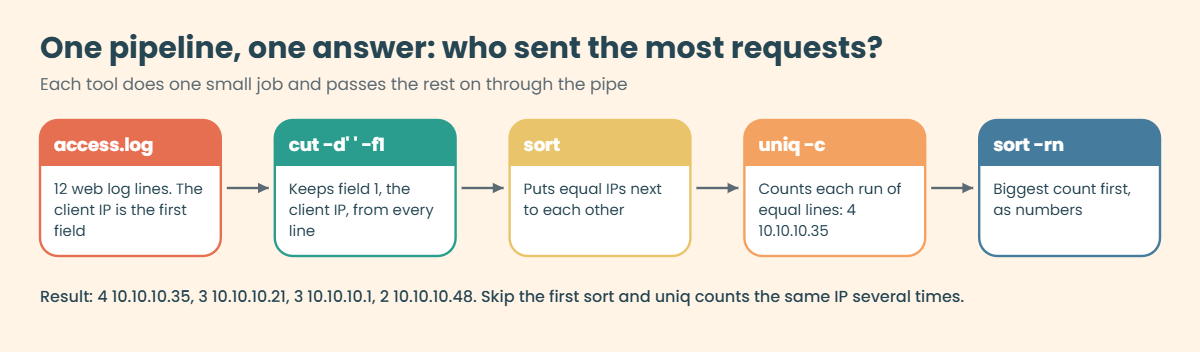
Every text question at work follows the same shape: narrow the lines, narrow the columns, then group, count or calculate. The diagram below shows one real pipeline from the lab, the one that tells you which client IP sent the most requests.
1Pick the lines you care about
grep reads each line and prints it only if the pattern matches. Add -v to throw matching lines away instead, which is how you drop noise such as health checks before you count anything.
2Pick the columns you care about
cut keeps fields split by one fixed character, such as the comma in a CSV or the space in a web log. When the separator is messy (several spaces, tabs) use awk instead, because awk treats any run of spaces and tabs as one separator.
3Group and count
sort brings identical lines together and uniq -c counts each run of identical neighbours. uniq never looks further than the line above, so it always comes after sort. A final sort -rn puts the biggest count on top.
4Change the text
tr works on single characters (commas to spaces, lower case to upper case). sed works on whole lines and patterns: replace a word, print lines 2 to 4, or edit a config file in place with a backup copy.
5Calculate with awk
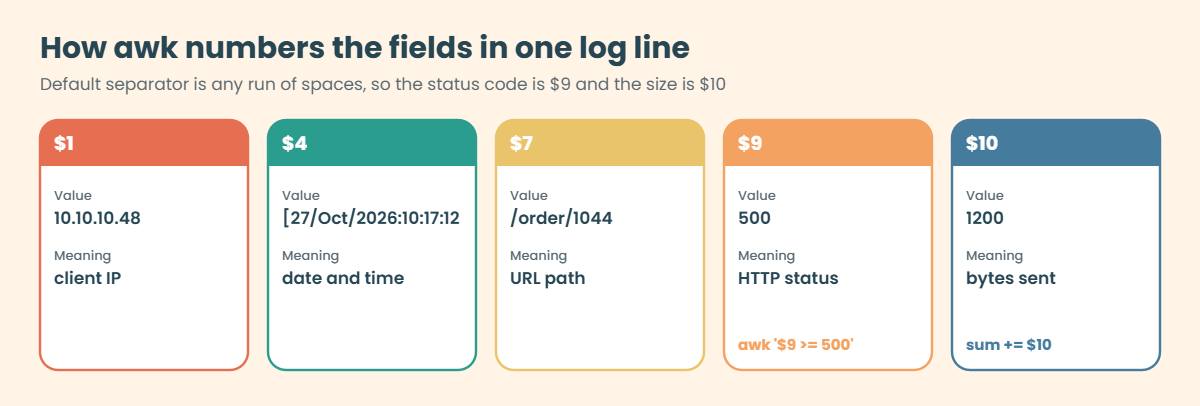
An awk program is a list of pattern {action} pairs. For every line, awk splits the text into fields called $1, $2 and so on, checks the pattern, and runs the action when it matches. NR is the line number, NF the number of fields, and the END block runs once after the last line, which is where totals get printed.
The picture below shows how awk numbers the fields in one line of the practice web log. Once you know the status code is $9 and the bytes are $10, most log questions become one short awk command.
Always wrap grep, sed and awk patterns in single quotes. Inside double quotes the shell would replace $9 with an empty shell variable before awk ever sees it, and the command would quietly do the wrong thing.
Field numbers depend on the log format. Ubuntu 24.04 and 26.04 write /var/log/syslog with an RFC 3339 timestamp such as 2026-10-27T10:17:12+05:30, which is one field, so the host name is $2. Rocky’s /var/log/messages still uses the older Oct 27 10:17:12 host style, where the host is $4.
A script written for one breaks on the other, so print a sample line with field numbers before you trust any $N.
For one-off questions on files up to a few gigabytes these tools are fast enough, and they are there on every server, even a minimal install with no Python. When a job grows into many steps and you start saving intermediate files, that’s the time to move it into a script (Lessons 38 and 39).
Hands-on lab: answer real questions from a web log and an orders file
Before you run any command, double-check it
Read every command twice before you press Enter. Check the target: the server name, the user, the disk or device name, the path and the sizes. These commands are for learning and were tested in our lab, not on your system. At work, run the read-only commands first, follow your change process, make sure a backup exists, and ask a second person to check anything that changes or deletes data. You run them at your own risk.
You’ll work in a folder called ~/lab14 as the student user, so nothing here touches the system. The three files are a web server access log in the usual Nginx format, an orders export from a food delivery app and a small application log with RFC 3339 timestamps. Every output below was produced from these exact files, so yours should match line for line.
1Create the practice files
Paste this whole block:
mkdir -p ~/lab14/app && cd ~/lab14
cat > access.log <<'EOF'
10.10.10.1 - - [27/Oct/2026:10:15:01 +0530] "GET /index.html HTTP/1.1" 200 5120 "-" "curl/8.5.0"
10.10.10.21 - - [27/Oct/2026:10:15:04 +0530] "GET /menu HTTP/1.1" 200 2048 "-" "Mozilla/5.0"
10.10.10.35 - - [27/Oct/2026:10:15:09 +0530] "POST /login HTTP/1.1" 401 312 "-" "Mozilla/5.0"
10.10.10.35 - - [27/Oct/2026:10:15:11 +0530] "POST /login HTTP/1.1" 401 312 "-" "Mozilla/5.0"
10.10.10.21 - - [27/Oct/2026:10:16:02 +0530] "GET /order/1043 HTTP/1.1" 200 1890 "-" "Mozilla/5.0"
10.10.10.35 - - [27/Oct/2026:10:16:05 +0530] "POST /login HTTP/1.1" 401 312 "-" "Mozilla/5.0"
10.10.10.1 - - [27/Oct/2026:10:16:30 +0530] "GET /healthz HTTP/1.1" 200 2 "-" "curl/8.5.0"
10.10.10.48 - - [27/Oct/2026:10:17:12 +0530] "GET /order/1044 HTTP/1.1" 500 1200 "-" "Mozilla/5.0"
10.10.10.48 - - [27/Oct/2026:10:17:15 +0530] "GET /order/1044 HTTP/1.1" 500 1200 "-" "Mozilla/5.0"
10.10.10.21 - - [27/Oct/2026:10:18:40 +0530] "GET /Menu HTTP/1.1" 404 153 "-" "Mozilla/5.0"
10.10.10.1 - - [27/Oct/2026:10:19:00 +0530] "GET /healthz HTTP/1.1" 200 2 "-" "curl/8.5.0"
10.10.10.35 - - [27/Oct/2026:10:19:22 +0530] "POST /login HTTP/1.1" 200 640 "-" "Mozilla/5.0"
EOF
cat > orders.csv <<'EOF'
order_id,city,restaurant,items,amount,status
1041,Mumbai,Chai Point,2,180,delivered
1042,Pune,Biryani House,1,320,delivered
1043,Mumbai,Dosa Corner,3,240,delivered
1044,Mumbai,Biryani House,2,640,failed
1045,Thane,Chai Point,1,90,cancelled
1046,Pune,Dosa Corner,4,360,delivered
1047,Mumbai,Biryani House,1,320,delivered
1048,Thane,Pizza Street,2,560,delivered
EOF
cat > app/app.log <<'EOF'
2026-10-27T10:17:12+05:30 ubu01 saatfood[2214]: ERROR order 1044: payment gateway timeout after 30s
2026-10-27T10:17:15+05:30 ubu01 saatfood[2214]: ERROR order 1044: payment gateway timeout after 30s
2026-10-27T10:18:02+05:30 ubu01 saatfood[2214]: WARN retry queue length 12
2026-10-27T10:19:22+05:30 ubu01 saatfood[2214]: INFO user login ok for 10.10.10.35
EOF
wc -l access.log orders.csv app/app.logYou should see this:
12 access.log
9 orders.csv
4 app/app.log
25 totalThe <<'EOF' part is a here-document: the shell feeds every line up to EOF into the file. The quotes around EOF stop the shell from touching anything inside, which matters for log lines full of quotes and brackets.
✅ Checkpoint: wc shows 12, 9 and 4 lines, 25 in total.
2Find lines with grep
Run this:
grep 401 access.log
grep -c 401 access.log
grep -n ' 500 ' access.log
grep -i menu access.logYou should see this:
10.10.10.35 - - [27/Oct/2026:10:15:09 +0530] "POST /login HTTP/1.1" 401 312 "-" "Mozilla/5.0"
10.10.10.35 - - [27/Oct/2026:10:15:11 +0530] "POST /login HTTP/1.1" 401 312 "-" "Mozilla/5.0"
10.10.10.35 - - [27/Oct/2026:10:16:05 +0530] "POST /login HTTP/1.1" 401 312 "-" "Mozilla/5.0"
3
8:10.10.10.48 - - [27/Oct/2026:10:17:12 +0530] "GET /order/1044 HTTP/1.1" 500 1200 "-" "Mozilla/5.0"
9:10.10.10.48 - - [27/Oct/2026:10:17:15 +0530] "GET /order/1044 HTTP/1.1" 500 1200 "-" "Mozilla/5.0"
10.10.10.21 - - [27/Oct/2026:10:15:04 +0530] "GET /menu HTTP/1.1" 200 2048 "-" "Mozilla/5.0"
10.10.10.21 - - [27/Oct/2026:10:18:40 +0530] "GET /Menu HTTP/1.1" 404 153 "-" "Mozilla/5.0"Three failed logins from one IP, two server errors on lines 8 and 9, and two menu requests where the capital M version got a 404. -c gives only the count, -n adds the line number (handy when you open the file in vim next), and -i ignores case. The spaces around 500 stop grep from matching numbers such as 1500.
✅ Checkpoint: You get three 401 lines, the count 3, lines 8 and 9 for the 500s and two menu lines.
3Throw lines away, match several patterns, search a folder
Run this:
grep -v healthz access.log | wc -l
grep -E '" (401|404|500) ' access.log
grep -rn -i timeout .You should see this:
10
10.10.10.35 - - [27/Oct/2026:10:15:09 +0530] "POST /login HTTP/1.1" 401 312 "-" "Mozilla/5.0"
10.10.10.35 - - [27/Oct/2026:10:15:11 +0530] "POST /login HTTP/1.1" 401 312 "-" "Mozilla/5.0"
10.10.10.35 - - [27/Oct/2026:10:16:05 +0530] "POST /login HTTP/1.1" 401 312 "-" "Mozilla/5.0"
10.10.10.48 - - [27/Oct/2026:10:17:12 +0530] "GET /order/1044 HTTP/1.1" 500 1200 "-" "Mozilla/5.0"
10.10.10.48 - - [27/Oct/2026:10:17:15 +0530] "GET /order/1044 HTTP/1.1" 500 1200 "-" "Mozilla/5.0"
10.10.10.21 - - [27/Oct/2026:10:18:40 +0530] "GET /Menu HTTP/1.1" 404 153 "-" "Mozilla/5.0"
./app/app.log:1:2026-10-27T10:17:12+05:30 ubu01 saatfood[2214]: ERROR order 1044: payment gateway timeout after 30s
./app/app.log:2:2026-10-27T10:17:15+05:30 ubu01 saatfood[2214]: ERROR order 1044: payment gateway timeout after 30s-v removed the two health checks, leaving 10 real requests. -E turns on extended regex so (401|404|500) means "any of these", and the " in front anchors it to the status position. -r searched every file under the current folder and found the cause behind those 500s: the payment gateway timed out.
✅ Checkpoint: You can connect the two 500 errors on /order/1044 with the two timeout lines in app/app.log.
4Count who hits the server most
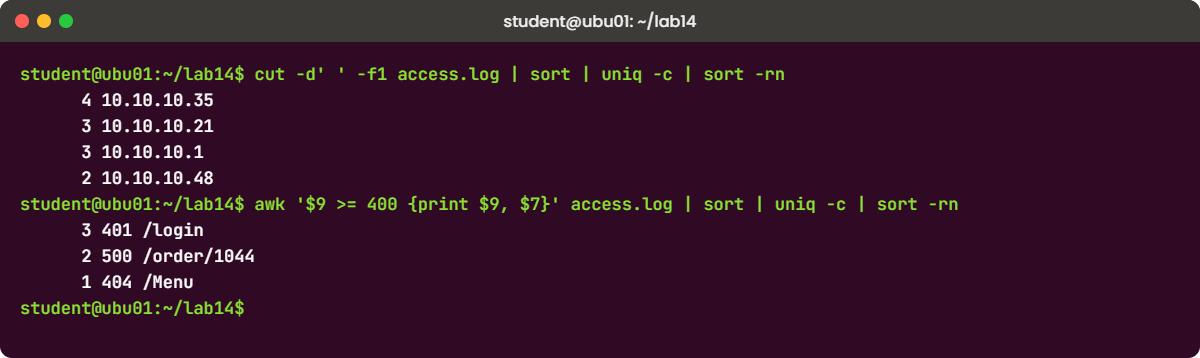
Run this:
cut -d' ' -f1 access.log | sort | uniq -c | sort -rnYou should see this:
4 10.10.10.35
3 10.10.10.21
3 10.10.10.1
2 10.10.10.48Read it left to right: take field 1 (the IP), sort so equal IPs sit together, count each group, then sort the counts biggest first. This four-tool pipeline is probably the one you'll type most in your career, for IPs, URLs, error codes or user names. Two IPs have 3 requests each, and their order between themselves can differ on another system, which is fine.
✅ Checkpoint: 10.10.10.35 is on top with 4 requests.
5Cut and sort a CSV by numbers
Run this:
cut -d, -f2,5 orders.csv | head -n 4
tail -n +2 orders.csv | sort -t, -k5,5 -nr | head -n 3You should see this:
city,amount
Mumbai,180
Pune,320
Mumbai,240
1044,Mumbai,Biryani House,2,640,failed
1048,Thane,Pizza Street,2,560,delivered
1046,Pune,Dosa Corner,4,360,delivered-d, tells cut the separator is a comma. In the second command tail -n +2 skips the header line, -t, gives sort the same separator, -k5,5 sorts on field 5 only, -n compares as numbers and -r puts the largest first. The biggest order of the day is the one that failed, which is worth a question to the payments team.
✅ Checkpoint: The top three amounts are 640, 560 and 360.
6Change characters with tr and count with wc
Run this:
head -n 3 orders.csv | tr ',' ' '
cut -d, -f3 orders.csv | tail -n +2 | tr 'a-z' 'A-Z' | sort | uniq -c
wc access.log
wc -l < orders.csvYou should see this:
order_id city restaurant items amount status
1041 Mumbai Chai Point 2 180 delivered
1042 Pune Biryani House 1 320 delivered
3 BIRYANI HOUSE
2 CHAI POINT
2 DOSA CORNER
1 PIZZA STREET
12 144 1137 access.log
9tr swaps one set of characters for another, so commas became spaces and lower case became upper case. Plain wc prints lines, words and bytes. When you feed the file with < instead of naming it, wc prints only the number, which is what you want inside a script.
✅ Checkpoint: You see 3 orders for Biryani House and wc reports 9 lines in orders.csv (8 orders plus the header).
7Print and replace with sed, then edit a file safely
Run this:
sed -n '2,4p' orders.csv
sed -n '/failed/p' orders.csv
sed 's/Biryani House/Biryani Ghar/' orders.csv | grep Biryani
grep -c 'Biryani House' orders.csvYou should see this:
1041,Mumbai,Chai Point,2,180,delivered
1042,Pune,Biryani House,1,320,delivered
1043,Mumbai,Dosa Corner,3,240,delivered
1044,Mumbai,Biryani House,2,640,failed
1042,Pune,Biryani Ghar,1,320,delivered
1044,Mumbai,Biryani Ghar,2,640,failed
1047,Mumbai,Biryani Ghar,1,320,delivered
3-n switches off sed's normal printing, so only the lines you mark with p appear: lines 2 to 4, then any line containing "failed". The substitution changed the output on screen, but the last grep proves the file itself still says Biryani House.
Now change the file for real, keeping a backup:
sed -i.bak 's/,cancelled$/,refunded/' orders.csv
ls orders.csv*
diff orders.csv.bak orders.csvYou should see this:
orders.csv
orders.csv.bak
6c6
< 1045,Thane,Chai Point,1,90,cancelled
---
> 1045,Thane,Chai Point,1,90,refunded-i.bak edits the file in place and saves the original as orders.csv.bak first (no space between -i and .bak). The $ anchors the pattern to the end of the line, and diff shows the one line that changed. Get into this habit for every config file on a server.
✅ Checkpoint: orders.csv.bak exists and diff shows only line 6 changed from cancelled to refunded.
8Pick fields, filter and add up with awk
Run this:
awk -F, 'NR > 1 && $5 > 300 {print $1, $3, $5}' orders.csv
awk -F, '$6 == "delivered" {sum += $5; n++} END {print n, "delivered orders, Rs", sum}' orders.csv
awk -F, 'NR > 1 {total[$2] += $5} END {for (c in total) print c, total[c]}' orders.csv | sort -k2,2 -nrYou should see this:
1042 Biryani House 320
1044 Biryani House 640
1046 Dosa Corner 360
1047 Biryani House 320
1048 Pizza Street 560
6 delivered orders, Rs 1980
Mumbai 1380
Pune 680
Thane 650The first command prints order, restaurant and amount for orders above Rs 300, and NR > 1 skips the header. The second adds field 5 only on delivered lines and prints the total once, in the END block. The third keeps a running total per city in an array, which is awk's way of doing a "group by".
✅ Checkpoint: Delivered orders add up to Rs 1980 and Mumbai has the highest city total, 1380.
9Answer an incident question in one line
Run this:
awk '$9 >= 400 {print $9, $7}' access.log | sort | uniq -c | sort -rn
awk '{print $2, $4}' app/app.log | sort | uniq -cYou should see this:
3 401 /login
2 500 /order/1044
1 404 /Menu
2 ubu01 ERROR
1 ubu01 INFO
1 ubu01 WARNThe first line is the summary you'd paste into an incident ticket: every failed request grouped by status and URL. The second reads the app log, where the RFC 3339 timestamp is a single field, so the host is $2 and the level is $4.
On a real server you'd point the same commands at /var/log/nginx/access.log (Lesson 56 sets up Nginx) and add sudo when the file isn't readable by your user. Keep ~/lab14 for the Break-It section below.
✅ Checkpoint: You can say in one sentence what went wrong on this server: 3 failed logins from one IP and 2 payment timeouts on order 1044.
Break It, Then Fix It
These four mistakes don’t crash anything. They give you a wrong number with a straight face, which is how bad conclusions end up in incident reports. Run them in ~/lab14.
1Count status 200 with a plain grep
Run this:
grep -c 200 access.logYou’ll get:
8The log has only 6 requests with status 200. grep matches the text “200” anywhere in the line, so the two 500 lines with 1200 bytes were counted too. It also matches dates like 2026 if you search for “202”.
Fix: compare the status field itself with awk, or at least match a whole word.
awk '$9 == 200' access.log | wc -l
grep -w -c 200 access.logBoth print:
6
6✅ Checkpoint: You get 6 and can explain where the extra 2 came from.
2Use uniq without sort
Run this:
cut -d' ' -f1 access.log | uniq -c | head -n 5You’ll get:
1 10.10.10.1
1 10.10.10.21
2 10.10.10.35
1 10.10.10.21
1 10.10.10.35The same IP shows up several times with small counts, because uniq only merges a line with the one right above it. The totals look believable, so this one is easy to miss.
Fix: always sort before uniq.
cut -d' ' -f1 access.log | sort | uniq -c | sort -rn✅ Checkpoint: Each IP appears once, with 4, 3, 3 and 2.
3Put slashes inside a sed pattern
Create a small config file and try to change a path:
printf 'LOG_DIR=/var/log/saatfood\nDATA_DIR=/var/lib/saatfood\n' > app.conf
sed 's//var/log//srv/logs/' app.confYou’ll get this error:
sed: -e expression #1, char 8: unknown option to `s'sed uses the slash to separate pattern, replacement and options, so the slashes in the path end the pattern early and sed reads the rest as unknown options. You can escape every slash, but there’s an easier way: the character right after s becomes the separator, whatever it is.
Fix: use a different separator.
sed 's|/var/log|/srv/logs|' app.confYou should see this:
LOG_DIR=/srv/logs/saatfood
DATA_DIR=/var/lib/saatfood✅ Checkpoint: Only LOG_DIR changed, and the file on disk is untouched because you didn’t use -i.
4Forget the separator in awk
Run this:
awk '$6 == "delivered" {sum += $5} END {print "Delivered total:", sum}' orders.csv.bakYou’ll get:
Delivered total: No error, only an empty total. Without -F, awk splits on spaces, so a line like 1044,Mumbai,Biryani House,2,640,failed has only two fields and $6 is always empty. Nothing matched, so sum was never set.
Fix: tell awk the separator, and check the field count when a result looks odd.
awk -F, '{print NF}' orders.csv.bak | sort -u
awk -F, '$6 == "delivered" {sum += $5} END {print "Delivered total:", sum}' orders.csv.bakYou should see this:
6
Delivered total: 1980✅ Checkpoint: Every line has 6 fields and the total is 1980. You can delete ~/lab14 when you’re done, or keep it for practice.
This happened at work
The 500 errors that weren’t there
I was on call for a food delivery app in Mumbai when this happened. It was a Friday around 8:40 p.m., the busiest half hour of the week, and the support team pinged our channel saying customers couldn’t place orders. A developer who had shipped a release that afternoon logged in to one of the web servers and ran grep 500 access.log | wc -l.
The number was over 9,000 for the last hour, and within minutes people were talking about rolling the release back in the middle of dinner rush. Before anyone pressed the button, I ran the same question with awk on the status field: awk '$9 >= 500' access.log | wc -l. That gave 212.
The grep had matched “500” inside response sizes, order numbers and even the Rs 500 coupon code in the URLs.
The 212 real errors were all on one URL, the payment callback, and grep -r timeout in the app logs showed the payment gateway timing out after 30 seconds. The gateway provider confirmed a problem on their side ten minutes later. Rolling back our release would have cost us twenty minutes of downtime and fixed nothing.
After that night we put the standard one-liners in the incident runbook, each one written against fields ($9 for status, $7 for the URL) with a note on which log format it expects. We also added a rule that nobody quotes a number from grep in an incident channel without saying what the pattern was.
Common mistakes and troubleshooting
| Mistake | What happens | What to do instead |
|---|---|---|
Counting with a loose grep pattern like grep 500 | Matches sizes, IDs and dates, so the count is too high | Compare the field with awk ($9 == 500), or use -w and anchors |
| Running uniq without sort first | The same value appears several times with small counts | Use sort | uniq -c | sort -rn |
Sorting numbers without -n | 90 lands after 640 because sort compares text character by character | Use sort -n and -k5,5 to name the field |
Using sed -i with no backup on a config file | One wrong pattern and the original is gone | Use -i.bak, check with diff, then remove the backup |
| Putting awk code in double quotes | The shell swaps $5 for an empty variable and awk runs something else | Always use single quotes around awk and sed programs |
| Reusing an awk script across distributions without checking fields | On Ubuntu syslog the RFC 3339 timestamp is one field, so $4 is a different column than on Rocky | Print one line with field numbers first and adjust |
| Forgetting the CSV header | Header text shows up in sorts and counts, or breaks a numeric test | Skip it with tail -n +2 or NR > 1 in awk |
Interview questions
Click a question to open it. Each one is written the way an interviewer would ask it. Under it you will see why they ask it and one way you could answer, in your own words.
Fresher level
1. What is the difference between grep, sed and awk, and when would you pick each one?
Why they ask this: They want to see that you know these are different tools and not three names for “search”. Clear, practical examples matter more than definitions.
How you might answer: I use grep when I only need to find or count lines, for example grep -c 401 access.log. I reach for sed when I need to change text, like replacing a path in a config file with sed -i.bak so I keep a backup.
awk is for when the line has columns and I need to filter on a field or do maths, for example awk '$9 >= 500' to count server errors or summing an amount column in a CSV.
2. How would you find the top five IP addresses in an Nginx access log?
Why they ask this: This is a classic hands-on check. They’re listening for the sort, uniq, sort pattern and whether you know why sort comes first.
How you might answer: I’d run cut -d' ' -f1 access.log | sort | uniq -c | sort -rn | head -n 5. cut takes the first field, which is the client IP, and sort puts equal IPs next to each other.
uniq -c then counts each group, and the second sort with -rn puts the highest count on top. Without the first sort uniq would only merge neighbours and the counts would be wrong.
2–5 years experience
3. A teammate says there were 9,000 errors last hour because grep 500 returned that many lines. How do you check that claim?
Why they ask this: They want to see healthy suspicion of numbers and an understanding of how grep matches substrings. It also shows whether you stay calm during an incident.
How you might answer: I’d first look at a few of the matched lines, because grep 500 also matches byte counts, order IDs and URLs that contain 500. Then I’d count on the status field only, with awk '$9 >= 500' access.log | wc -l.
If the real count is still high, I’d group it by URL with awk '$9 >= 500 {print $7}' | sort | uniq -c | sort -rn to see whether one endpoint is responsible before anyone talks about a rollback.
4. You need to change one setting in the same config file on 40 servers. How would you use sed safely?
Why they ask this: They’re checking change discipline: backups, a dry run and verification, not only sed syntax.
How you might answer: I’d test the expression first without -i on one server and compare the output with diff, so I see what will change. Then I’d run it with -i.bak, anchor the pattern with ^ so it only hits the line I mean, and check the result with grep or diff against the backup.
For 40 servers I wouldn’t loop over SSH by hand. I’d use Ansible’s lineinfile or replace module, which does the same edit, reports what changed and can run in check mode first.
Senior level
5. Your team’s log-parsing scripts broke after an Ubuntu upgrade. What would you suspect, and how would you stop it happening again?
Why they ask this: They want to know if you’ve met real format changes, such as the RFC 3339 syslog timestamps, and whether you think about long-term fixes.
How you might answer: I’d suspect the log format first. Newer Ubuntu releases write syslog with an RFC 3339 timestamp that is one field, so a script using $4 for the host now reads the wrong column. I’d print a sample line with field numbers and compare with an old one.
To make it last, I’d stop parsing positions where I can: use journalctl -o json or -o short-iso for system logs, ask app teams for a structured format, and put a small test file with known output next to each script.
6. When do you stop using grep and awk pipelines and switch to something else?
Why they ask this: This checks judgement: knowing the limits of a tool is a senior skill. They want concrete signs, not a preference.
How you might answer: For a quick question on a few gigabytes of logs, a pipeline is fine and it’s available on every server. I switch when the logic needs several passes, state across files, proper CSV with quoted commas, or when the same report is needed every day.
At that point I write a script with tests, or I send the logs to a central system like Loki or Elasticsearch so people can query them without logging in to production servers at all.
Quick quiz
Q1. Which command counts the lines in access.log that do NOT contain “healthz”?
grep -c healthz access.loggrep -v healthz access.log | wc -lgrep -i healthz access.log | wc -lgrep -n healthz access.log
Show answer
B — -v inverts the match, and wc -l counts what is left (10 in the lab).
Q2. Why must sort come before uniq -c?
- uniq only reads sorted files and fails otherwise
- uniq only merges identical lines that sit next to each other
- sort removes the header line
- uniq -c needs numbers
Show answer
B — uniq compares each line only with the line above it, so equal values must be next to each other first.
Q3. What does sort -t, -k5,5 -nr do to orders.csv?
- Sorts by column 5 as text, smallest first
- Sorts by column 5 as numbers, largest first
- Removes duplicate rows in column 5
- Sorts every column in reverse
Show answer
B — -t, sets the separator, -k5,5 picks field 5, -n compares numbers and -r reverses.
Q4. What does sed -i.bak 's/old/new/' app.conf leave on disk?
- Only app.conf with the change
- app.conf with the change and app.conf.bak with the original
- app.conf.bak with the change
- Nothing, sed only prints to the screen
Show answer
B — sed saves the original as app.conf.bak before writing the changed app.conf.
Q5. Your awk command on a CSV prints an empty total with no error. What is the most likely cause?
- awk can’t add numbers
- The file is too large
- You forgot
-F,, so awk split on spaces and the field was empty - You used single quotes
Show answer
C — Without -F, a CSV line has one or two fields, so $5 and $6 are empty.
Quick recap
- Linux text processing follows one shape: pick the lines, pick the columns, then group, count or calculate.
grepfinds lines (-i -v -c -n -E -r -w),cutandawkpick fields,trswaps characters andwccounts.sort | uniq -c | sort -rnis the counting pipeline, and sort always comes before uniq.sed -nwithpprints chosen lines,s|old|new|replaces, and-i.bakedits in place with a backup.- awk tests and adds up fields (
awk -F, '$6 == "delivered" {sum += $5} END {print sum}'). Check field numbers first, because Ubuntu’s RFC 3339 timestamps shift them.
Next lesson
Lesson 15: Users and groups → You’ll create the lab users priya and arjun, the webteam group and a service account, and read what useradd writes into /etc/passwd, /etc/shadow and /etc/group (with awk and cut, now that you know them).
Further reading: Linux text processing
Want to go deeper into Linux text processing? Read the GNU grep manual, the GNU sed manual, the GNU awk user’s guide and the coreutils pages for sort, cut and uniq on man7.org. You can also see the full plan for this course on the Linux Administration course page.
