

Before you run any command, double-check it
Read every command twice before you press Enter. Check the target: the server name, the user, the disk or device name, the path and the sizes. These commands are for learning and were tested in our lab, not on your system. At work, run the read-only commands first, follow your change process, make sure a backup exists, and ask a second person to check anything that changes or deletes data. You run them at your own risk.
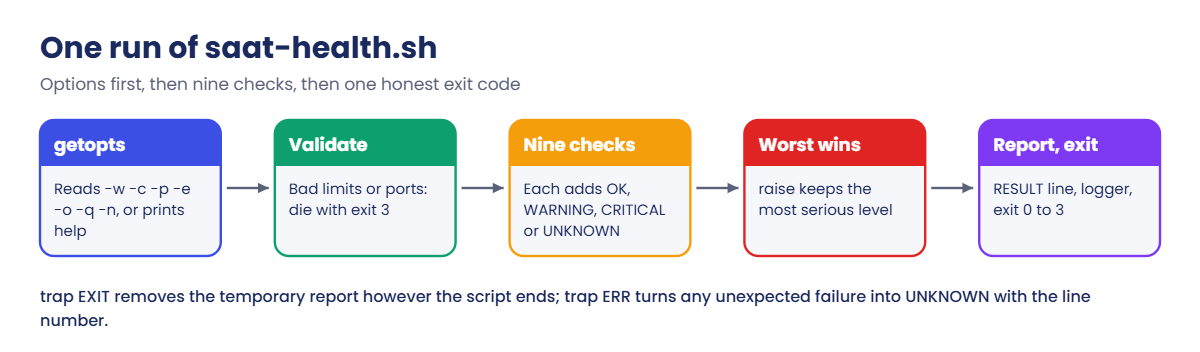
You’ll work as student in ~/lab39 on rocky01, and only two steps change the system: step 5 may install ShellCheck, and step 7 installs saat-health.sh in /usr/local/bin. Steps 1 to 4 show each building block on its own with a tiny script; step 5 puts them together. Start with mkdir -p ~/lab39 && cd ~/lab39.
1See what set -euo pipefail changes
Run these one at a time at the prompt:
bash -c 'false; echo "still running"'
bash -e -c 'false; echo "still running"'; echo "exit $?"
bash -c 'echo "folder: $NO_SUCH_VAR/tmp"'
bash -u -c 'echo "folder: $NO_SUCH_VAR/tmp"'
bash -c 'grep ERROR /var/log/nothing.log | wc -l; echo "pipeline status: $?"'
bash -o pipefail -c 'grep ERROR /var/log/nothing.log | wc -l; echo "pipeline status: $?"'
You should see this:
still running
exit 1
folder: /tmp
bash: line 1: NO_SUCH_VAR: unbound variable
grep: /var/log/nothing.log: No such file or directory
0
pipeline status: 0
grep: /var/log/nothing.log: No such file or directory
0
pipeline status: 2
Without -e, bash shrugs off the failed command and carries on. Without -u, a typo in a variable name turns $NO_SUCH_VAR/tmp into /tmp, which is how rm -rf "$DIR/" accidents happen. Without pipefail, the pipeline reports the status of wc (0) and hides grep’s error (2).
In a script you switch all three on with one line, set -euo pipefail.
✅ Checkpoint: You saw the script stop with -e, the unbound variable error with -u, and status 2 with pipefail.
2Write functions with local variables and return codes
Paste this whole block:
cat > functions.sh <<'EOF'
#!/bin/bash
# functions.sh: functions, local variables and return codes
set -euo pipefail

# pct_used MOUNT: print how full a mount point is, as a plain number
pct_used() {
    local mnt=$1
    df --output=pcent "$mnt" | tail -n 1 | tr -d ' %'
}

# is_up HOST: return 0 if HOST answers one ping, 1 if it doesn't
is_up() {
    local host=$1
    if ping -c 1 -W 1 "$host" >/dev/null 2>&1; then
        return 0
    fi
    return 1
}

where="outside"
show_scope() {
    local where="inside"
    echo "in the function, where=$where"
}

show_scope
echo "after the function, where=$where"
echo "/ is $(pct_used /)% used"
for h in ubu01 kafka01; do
    if is_up "$h"; then
        echo "$h is up"
    else
        echo "$h is down (is_up returned $?)"
    fi
done
EOF
chmod +x functions.sh
./functions.sh
You should see something like this:
in the function, where=inside
after the function, where=outside
/ is 12% used
ubu01 is up
kafka01 is down (is_up returned 1)
The local where inside show_scope is a separate variable, so the outer where keeps its value. pct_used hands its answer back by printing it, and is_up hands back only a status with return. A failing test inside if doesn’t trigger set -e, which is why you test commands with if instead of running them bare.
✅ Checkpoint: The outer variable still says outside, and kafka01 is reported down with return code 1.
3Log with timestamps and logger
Paste this whole block:
cat > log-demo.sh <<'EOF'
#!/bin/bash
# log-demo.sh: one log function, two places the message ends up
set -euo pipefail

# log LEVEL MESSAGE: timestamped line on stderr and a copy in the system log
log() {
    local level=$1
    shift
    printf '%s [%s] %s\n' "$(date '+%F %T')" "$level" "$*" >&2
    logger -t lab39 -p "user.${level,,}" -- "$*"
}

log INFO "starting checks on $(hostname -s)"
log WARNING "/boot is 31% full"
log ERR "port 3306 is not listening"
EOF
chmod +x log-demo.sh
./log-demo.sh
You should see something like this:
2026-10-27 11:12:40 [INFO] starting checks on rocky01
2026-10-27 11:12:40 [WARNING] /boot is 31% full
2026-10-27 11:12:40 [ERR] port 3306 is not listening
Now read the same messages from the journal:
journalctl -t lab39 --no-pager
journalctl -t lab39 -p warning --no-pager
You should see something like this:
Oct 27 11:12:40 rocky01 lab39[2611]: starting checks on rocky01
Oct 27 11:12:40 rocky01 lab39[2612]: /boot is 31% full
Oct 27 11:12:40 rocky01 lab39[2613]: port 3306 is not listening
Oct 27 11:12:40 rocky01 lab39[2612]: /boot is 31% full
Oct 27 11:12:40 rocky01 lab39[2613]: port 3306 is not listening
The date '+%F %T' timestamp makes the screen output sortable, and >&2 keeps log lines out of anything a caller captures from standard output. ${level,,} lowercases the level so it becomes a syslog priority (info, warning, err). The second journalctl shows only warning and worse, which is how you filter a noisy script. The number in brackets is the PID of each logger process.
✅ Checkpoint: journalctl -t lab39 shows three lines, and -p warning shows two.
4Clean up with trap, even after Ctrl+C
Paste this whole block:
cat > trap-demo.sh <<'EOF'
#!/bin/bash
# trap-demo.sh: a temporary folder that is removed however the script ends
set -euo pipefail
work=$(mktemp -d)
trap 'echo "cleanup: removing $work"; rm -rf "$work"' EXIT

echo "working in $work"
date '+%F %T' > "$work/report.txt"
ls "$work"
sleep "${1:-0}"
echo "finished normally"
EOF
chmod +x trap-demo.sh
./trap-demo.sh
You should see something like this:
working in /tmp/tmp.V7LOFdYQ17
report.txt
finished normally
cleanup: removing /tmp/tmp.V7LOFdYQ17
Now give it 30 seconds of work and press Ctrl+C while it waits, then check the exit code and the folder (use the name your run printed):
./trap-demo.sh 30
echo "exit code: $?"
ls -d /tmp/tmp.bToLrVp67W
You should see something like this:
working in /tmp/tmp.bToLrVp67W
report.txt
^Ccleanup: removing /tmp/tmp.bToLrVp67W
exit code: 130
ls: cannot access '/tmp/tmp.bToLrVp67W': No such file or directory
mktemp -d creates a folder with a random name that nobody else can guess, and the EXIT trap removes it on a normal end and after Ctrl+C alike. Exit code 130 is 128 plus 2, the number of SIGINT, which is how bash reports “stopped by a signal”. The trap is written in single quotes so $work is expanded when the trap runs, not when it’s set.
✅ Checkpoint: Both runs print the cleanup line, and the folder is gone after Ctrl+C.
5Write saat-health.sh and check it
Paste this whole block (it’s long, so copy all of it):
cat > saat-health.sh <<'EOF'
#!/bin/bash
# saat-health.sh: the nine read-only checks from Lesson 1, with limits and exit codes.
# SaatVedha Linux Administration, Lesson 39. Installed as /usr/local/bin/saat-health.sh
# Exit codes (the Nagios plugin convention, also read by Icinga and Checkmk):
#   0 OK, 1 WARNING, 2 CRITICAL, 3 UNKNOWN (the script could not check something)
set -Eeuo pipefail

readonly PROG=saat-health
readonly VERSION=1.0

# Default limits. Options below change the common ones.
DISK_WARN=80      # % used on any local file system
DISK_CRIT=90
MEM_WARN=15       # % of RAM still available
MEM_CRIT=5
LOAD_WARN=1.0     # 5-minute load average per CPU
LOAD_CRIT=2.0
TOP_WARN=50       # % of RAM held by the single biggest process
ERR_WARN=10       # error messages in the journal in the last hour
PORTS=22          # TCP ports that must be listening, comma separated
OUTFILE=""
QUIET=0
USE_SYSLOG=1

STATUS=0
N_CRIT=0
N_WARN=0
N_UNK=0
TMP=""

usage() {
    cat <<EOF_USAGE
Usage: $PROG [-w PCT] [-c PCT] [-p PORTS] [-e N] [-o FILE] [-q] [-n] [-h]
Runs nine read-only health checks and exits with
0 OK, 1 WARNING, 2 CRITICAL or 3 UNKNOWN.

  -w PCT    disk use warning limit in % (default $DISK_WARN)
  -c PCT    disk use critical limit in % (default $DISK_CRIT)
  -p PORTS  TCP ports that must be listening, comma separated (default $PORTS)
  -e N      error messages in the last hour before a warning (default $ERR_WARN)
  -o FILE   also save the report to FILE
  -q        quiet: print only the RESULT line
  -n        do not send the result to syslog
  -h        show this help
EOF_USAGE
}

# fail MESSAGE: explain on stderr and exit UNKNOWN
fail() {
    printf '%s %s: %s\n' "$(date '+%F %T')" "$PROG" "$*" >&2
    exit 3
}

# Remove the temporary report however the script ends, and turn any
# unexpected failure into UNKNOWN (exit 3) instead of a silent exit 1.
trap 'rm -f "$TMP"' EXIT
trap 'fail "unexpected error on line $LINENO (exit code $?)"' ERR

have() {
    command -v "$1" >/dev/null 2>&1
}

# raise CODE: keep the worst result. CRITICAL beats WARNING, WARNING beats UNKNOWN.
raise() {
    case "$1" in
        2) STATUS=2 ;;
        1) if [ "$STATUS" -ne 2 ]; then STATUS=1; fi ;;
        3) if [ "$STATUS" -eq 0 ]; then STATUS=3; fi ;;
    esac
}

# result LEVEL CHECK MESSAGE: add one line to the report and remember the level
result() {
    local level=$1 check=$2 msg=$3
    case "$level" in
        WARNING)  N_WARN=$((N_WARN + 1)); raise 1 ;;
        CRITICAL) N_CRIT=$((N_CRIT + 1)); raise 2 ;;
        UNKNOWN)  N_UNK=$((N_UNK + 1));   raise 3 ;;
    esac
    printf '%-8s %-8s %s\n' "$level" "$check" "$msg" >> "$TMP"
}

# above VALUE LIMIT: true if VALUE >= LIMIT, works with decimals like 0.35
above() {
    awk -v v="$1" -v l="$2" 'BEGIN { exit !(v >= l) }'
}

meminfo() {
    awk -v k="$1:" '$1 == k { print $2 }' /proc/meminfo
}

check_identity() {
    local os
    os=$(awk -F= '$1 == "PRETTY_NAME" { gsub(/"/, "", $2); print $2 }' /etc/os-release)
    result INFO host "$(uname -n), kernel $(uname -r)"
    result INFO os "${os:-unknown}"
}

check_load() {
    local load5 cpus per msg
    read -r _ load5 _ < /proc/loadavg
    cpus=$(nproc)
    per=$(awk -v l="$load5" -v c="$cpus" 'BEGIN { printf "%.2f", l / c }')
    msg="5-min load $load5 on $cpus CPUs ($per per CPU), $(uptime -p)"
    if above "$per" "$LOAD_CRIT"; then
        result CRITICAL load "$msg"
    elif above "$per" "$LOAD_WARN"; then
        result WARNING load "$msg"
    else
        result OK load "$msg"
    fi
}

check_disk() {
    local out mnt pct n=0 worst=0 worst_mnt="" over=""
    if ! out=$(df -l --output=target,pcent -x tmpfs -x devtmpfs -x efivarfs -x squashfs -x overlay 2>/dev/null); then
        result UNKNOWN disk "df found no local file systems to check"
        return 0
    fi
    while read -r mnt pct; do
        pct=${pct%\%}
        n=$((n + 1))
        if [ "$pct" -gt "$worst" ]; then
            worst=$pct
            worst_mnt=$mnt
        fi
        if [ "$pct" -ge "$DISK_WARN" ]; then
            over="$over $mnt ${pct}%"
        fi
    done < <(printf '%s\n' "$out" | tail -n +2)

    if [ "$worst" -ge "$DISK_CRIT" ]; then
        result CRITICAL disk "at or over ${DISK_CRIT}%:$over"
    elif [ "$worst" -ge "$DISK_WARN" ]; then
        result WARNING disk "at or over ${DISK_WARN}%:$over"
    else
        result OK disk "$n file systems below ${DISK_WARN}% (fullest: $worst_mnt at ${worst}%)"
    fi
}

check_memory() {
    local total avail stotal sfree pct spct=0 msg
    total=$(meminfo MemTotal)
    avail=$(meminfo MemAvailable)
    stotal=$(meminfo SwapTotal)
    sfree=$(meminfo SwapFree)
    pct=$((avail * 100 / total))
    if [ "$stotal" -gt 0 ]; then
        spct=$(( (stotal - sfree) * 100 / stotal ))
    fi
    msg="${pct}% of RAM available ($((avail / 1024)) of $((total / 1024)) MiB), swap ${spct}% used"
    if [ "$pct" -lt "$MEM_CRIT" ]; then
        result CRITICAL memory "$msg"
    elif [ "$pct" -lt "$MEM_WARN" ]; then
        result WARNING memory "$msg"
    else
        result OK memory "$msg"
    fi
}

check_top() {
    local rss comm total pct msg
    read -r rss comm < <(ps -eo rss=,comm= --sort=-rss | awk 'NR == 1')
    total=$(meminfo MemTotal)
    pct=$((rss * 100 / total))
    msg="biggest process: $comm, $((rss / 1024)) MiB (${pct}% of RAM)"
    if [ "$pct" -ge "$TOP_WARN" ]; then
        result WARNING top "$msg"
    else
        result OK top "$msg"
    fi
}

check_ports() {
    local port ports missing="" found=""
    if ! have ss; then
        result UNKNOWN ports "ss not found (package iproute2)"
        return 0
    fi
    IFS=, read -r -a ports <<< "$PORTS"
    for port in "${ports[@]}"; do
        if [ -n "$(ss -Htln "sport = :$port")" ]; then
            found="$found $port"
        else
            missing="$missing $port"
        fi
    done
    if [ -n "$missing" ]; then
        result CRITICAL ports "not listening:$missing"
    else
        result OK ports "listening:$found"
    fi
}

check_services() {
    local out n names
    if ! have systemctl || ! out=$(systemctl --failed --no-legend --plain 2>/dev/null); then
        result UNKNOWN services "systemctl did not answer (is systemd running?)"
        return 0
    fi
    if [ -z "$out" ]; then
        result OK services "no failed units"
        return 0
    fi
    n=$(printf '%s\n' "$out" | wc -l)
    names=$(printf '%s\n' "$out" | awk '{ print $1 }' | paste -sd ' ' -)
    result WARNING services "$n failed: $names"
}

check_errors() {
    local n
    if ! have journalctl || ! n=$(journalctl -q -p err --since "1 hour ago" --no-pager -o cat 2>/dev/null | wc -l); then
        result UNKNOWN errors "could not read the journal"
        return 0
    fi
    if [ "$n" -ge "$ERR_WARN" ]; then
        result WARNING errors "$n error messages in the last hour (limit $ERR_WARN)"
    else
        result OK errors "$n error messages in the last hour"
    fi
}

# ---- main ----
while getopts ':w:c:p:e:o:qnh' opt; do
    case "$opt" in
        w) DISK_WARN=$OPTARG ;;
        c) DISK_CRIT=$OPTARG ;;
        p) PORTS=$OPTARG ;;
        e) ERR_WARN=$OPTARG ;;
        o) OUTFILE=$OPTARG ;;
        q) QUIET=1 ;;
        n) USE_SYSLOG=0 ;;
        h) usage; exit 0 ;;
        :) echo "$PROG: option -$OPTARG needs a value" >&2; usage >&2; exit 3 ;;
        *) echo "$PROG: unknown option -$OPTARG" >&2; usage >&2; exit 3 ;;
    esac
done
shift $((OPTIND - 1))

for n in "$DISK_WARN" "$DISK_CRIT" "$ERR_WARN"; do
    [[ $n =~ ^[0-9]+$ ]] || fail "limits must be whole numbers, got '$n'"
done
[ "$DISK_WARN" -lt "$DISK_CRIT" ] || fail "-w ($DISK_WARN) must be lower than -c ($DISK_CRIT)"
[[ $PORTS =~ ^[0-9]+(,[0-9]+)*$ ]] || fail "ports must look like 22 or 22,80,443, got '$PORTS'"

TMP=$(mktemp "/tmp/$PROG.XXXXXX")
HEADER="$PROG $VERSION on $(uname -n) at $(date '+%F %T %Z')"

check_identity
check_load
check_disk
check_memory
check_top
check_ports
check_services
check_errors

case "$STATUS" in
    0) word=OK;       prio=notice ;;
    1) word=WARNING;  prio=warning ;;
    2) word=CRITICAL; prio=crit ;;
    *) word=UNKNOWN;  prio=err ;;
esac
summary="RESULT: $word ($N_CRIT critical, $N_WARN warning, $N_UNK unknown)"

report() {
    echo "$HEADER"
    cat "$TMP"
    echo "$summary"
}

if [ "$QUIET" -eq 1 ]; then
    echo "$summary"
else
    report
fi
if [ -n "$OUTFILE" ]; then
    report > "$OUTFILE"
fi
if [ "$USE_SYSLOG" -eq 1 ] && have logger; then
    logger -t "$PROG" -p "user.$prio" -- "$summary" || echo "$PROG: could not write to syslog" >&2
fi

exit "$STATUS"
EOF
chmod +x saat-health.sh
bash -n saat-health.sh && echo "syntax ok"
You should see this:
syntax okRead it top to bottom once. The limits are plain variables near the top, each check is a function that ends in result, the traps sit right after fail, and the main part at the bottom parses options, validates them, runs the eight check functions (identity covers the first two of Lesson 1’s nine) and prints the report. Notice what it avoids: no ((n++)), no grep -c that could fail on zero matches, and no | head that could end a pipeline early under pipefail.
Now run shellcheck. On rocky01 it comes from EPEL:
sudo dnf install -y epel-release
sudo dnf install -y ShellCheck
shellcheck saat-health.sh && echo "shellcheck: no warnings"
You should see this at the end:
shellcheck: no warningsIf your company doesn’t allow EPEL, copy the file to ubu01 with scp (Lesson 33), install shellcheck there with sudo apt install -y shellcheck and check it on ubu01. The script was checked with shellcheck 0.9 and 0.11 and both are silent.
✅ Checkpoint: bash -n says syntax ok and shellcheck prints no warnings.
6Try the options and the help text
Run this:
./saat-health.sh -h
./saat-health.sh -x; echo "exit $?"
./saat-health.sh -w 95 -c 90; echo "exit $?"
You should see something like this:
Usage: saat-health [-w PCT] [-c PCT] [-p PORTS] [-e N] [-o FILE] [-q] [-n] [-h]
Runs nine read-only health checks and exits with
0 OK, 1 WARNING, 2 CRITICAL or 3 UNKNOWN.

  -w PCT    disk use warning limit in % (default 80)
  -c PCT    disk use critical limit in % (default 90)
  -p PORTS  TCP ports that must be listening, comma separated (default 22)
  -e N      error messages in the last hour before a warning (default 10)
  -o FILE   also save the report to FILE
  -q        quiet: print only the RESULT line
  -n        do not send the result to syslog
  -h        show this help
saat-health: unknown option -x
Usage: saat-health [-w PCT] [-c PCT] [-p PORTS] [-e N] [-o FILE] [-q] [-n] [-h]
Runs nine read-only health checks and exits with
0 OK, 1 WARNING, 2 CRITICAL or 3 UNKNOWN.

  -w PCT    disk use warning limit in % (default 80)
  -c PCT    disk use critical limit in % (default 90)
  -p PORTS  TCP ports that must be listening, comma separated (default 22)
  -e N      error messages in the last hour before a warning (default 10)
  -o FILE   also save the report to FILE
  -q        quiet: print only the RESULT line
  -n        do not send the result to syslog
  -h        show this help
exit 3
2026-10-27 11:18:22 saat-health: -w (95) must be lower than -c (90)
exit 3
-h prints the here-document and exits 0. An unknown option or a missing value prints a short reason plus the help on standard error and exits 3, because a monitor that calls the script wrongly hasn’t learned anything about the server. The same goes for limits that make no sense, caught by fail before any check runs.
✅ Checkpoint: The bad option and the bad limits both end with exit 3.
7Install it and run it
Install it with root as owner, then run it with sudo:
sudo install -o root -g root -m 0755 saat-health.sh /usr/local/bin/saat-health.sh
ls -lZ /usr/local/bin/saat-health.sh
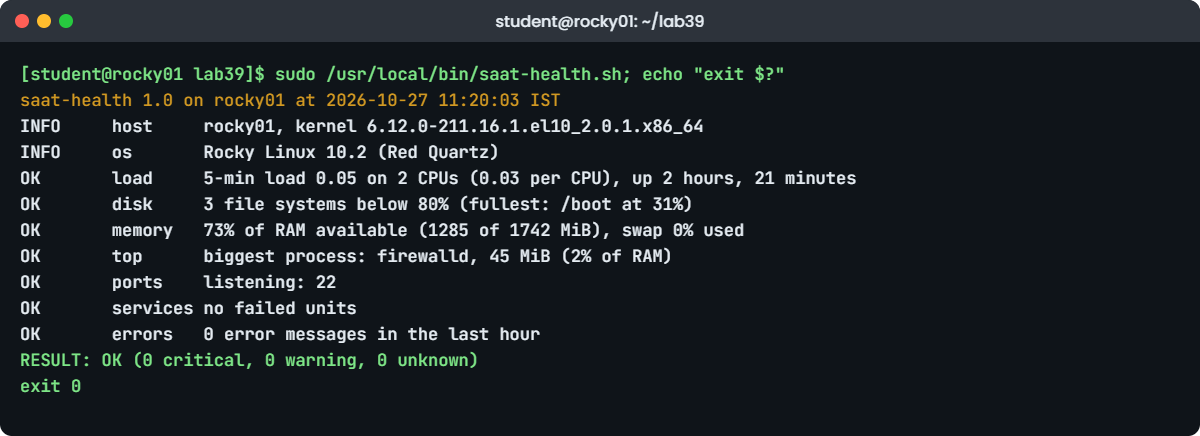
sudo /usr/local/bin/saat-health.sh; echo "exit $?"
You should see something like this:
-rwxr-xr-x. 1 root root unconfined_u:object_r:bin_t:s0 8528 Oct 27 11:19 /usr/local/bin/saat-health.sh
saat-health 1.0 on rocky01 at 2026-10-27 11:20:03 IST
INFO     host     rocky01, kernel 6.12.0-211.16.1.el10_2.0.1.x86_64
INFO     os       Rocky Linux 10.2 (Red Quartz)
OK       load     5-min load 0.05 on 2 CPUs (0.03 per CPU), up 2 hours, 21 minutes
OK       disk     3 file systems below 80% (fullest: /boot at 31%)
OK       memory   73% of RAM available (1285 of 1742 MiB), swap 0% used
OK       top      biggest process: firewalld, 45 MiB (2% of RAM)
OK       ports    listening: 22
OK       services no failed units
OK       errors   0 error messages in the last hour
RESULT: OK (0 critical, 0 warning, 0 unknown)
exit 0
install copies the file and sets owner and mode in one go. Because it creates a new file, the file gets the SELinux label of its new folder, bin_t. mv from your home folder would keep the home label, and a systemd service could then fail to run it (Lessons 41 and 68 cover that). The full path after sudo works whatever sudo’s secure_path contains.
Read the report like Lesson 1’s checks: load is low, every file system is under 80 percent, three quarters of the RAM is available, firewalld is the biggest process, sshd is listening, no unit has failed and the journal is quiet. Run as root so the error count sees every message.
✅ Checkpoint: The report ends with RESULT: OK and the exit code is 0.
8Push it past its limits
Lower the disk limit, then ask for a port nothing listens on:
sudo /usr/local/bin/saat-health.sh -w 10 -c 95; echo "exit $?"
sudo /usr/local/bin/saat-health.sh -q -p 22,3306; echo "exit $?"
You should see something like this:
saat-health 1.0 on rocky01 at 2026-10-27 11:21:40 IST
INFO     host     rocky01, kernel 6.12.0-211.16.1.el10_2.0.1.x86_64
INFO     os       Rocky Linux 10.2 (Red Quartz)
OK       load     5-min load 0.05 on 2 CPUs (0.03 per CPU), up 2 hours, 23 minutes
WARNING  disk     at or over 10%: / 12% /boot 31%
OK       memory   73% of RAM available (1285 of 1742 MiB), swap 0% used
OK       top      biggest process: firewalld, 45 MiB (2% of RAM)
OK       ports    listening: 22
OK       services no failed units
OK       errors   0 error messages in the last hour
RESULT: WARNING (0 critical, 1 warning, 0 unknown)
exit 1
RESULT: CRITICAL (1 critical, 0 warning, 0 unknown)
exit 2
Now make a unit fail on purpose, check, and clean up:
sudo systemd-run --unit=saat-test /usr/bin/false
sudo /usr/local/bin/saat-health.sh | grep -E 'services|RESULT'
sudo systemctl reset-failed saat-test.service
You should see something like this:
Running as unit: saat-test.service; invocation ID: 6c1f3a9e2d7b4e8f9a0c1b2d3e4f5a6b
WARNING  services 1 failed: saat-test.service
RESULT: WARNING (0 critical, 1 warning, 0 unknown)
systemd-run starts a throwaway service that runs false, which exits 1, so the unit lands in the failed state and the services check sees it. reset-failed clears it again. MariaDB arrives in Lesson 56, and then -p 22,3306 becomes a real check rather than a test.
✅ Checkpoint: You saw exit codes 1 and 2, and the failed saat-test unit turned the result into WARNING.
9Read the result the way a monitor does
Run this:
sudo /usr/local/bin/saat-health.sh -q -n; rc=$?
case $rc in
    0) echo "green" ;;
    1) echo "yellow" ;;
    2) echo "red" ;;
    *) echo "grey: the check itself failed" ;;
esac
journalctl -t saat-health -n 4 --no-pager
You should see something like this:
RESULT: OK (0 critical, 0 warning, 0 unknown)
green
Oct 27 11:20:03 rocky01 saat-health[2690]: RESULT: OK (0 critical, 0 warning, 0 unknown)
Oct 27 11:21:40 rocky01 saat-health[2742]: RESULT: WARNING (0 critical, 1 warning, 0 unknown)
Oct 27 11:21:52 rocky01 saat-health[2779]: RESULT: CRITICAL (1 critical, 0 warning, 0 unknown)
Oct 27 11:22:31 rocky01 saat-health[2815]: RESULT: WARNING (0 critical, 1 warning, 0 unknown)
That case statement is what every monitoring system does with a check: it only looks at the exit code, and keeps the text for the human. -n kept this run out of the log, so the journal shows the four earlier runs, each with its own priority. To keep a copy for a ticket, add -o ~/health-$(date +%F).txt; to run it every hour, wrap it in a service and timer the way Lesson 27 did for disk-report.sh.
✅ Checkpoint: You can turn any exit code from saat-health.sh into green, yellow, red or grey, and you found its runs in the journal.