Unix roots: Bell Labs, 1969

Unix history starts in 1969 at Bell Labs in New Jersey, where Ken Thompson and Dennis Ritchie built a small operating system on a computer nobody else wanted. Almost everything you type on rocky01 and ubu01 (the shell, pipes, man pages, files under /dev, even the $ in your prompt) comes from ideas they and their colleagues had in the next ten years.

This lesson tells that story in plain words: the PDP-7, the C rewrite, the split into BSD and System V, the “Unix wars”, POSIX and the Unix philosophy. Then you’ll find each of those ideas still working on your two lab servers, because history you can run is history you remember.

Where this lesson fits

Lesson 4 of 82 in Linux Administration · Phase 1: The origins and OS architecture · Before this: Lesson 3, the terminal and getting help · Next: Lesson 5, the GNU Project

TimeYou needBy the end you can
About 50 minutesrocky01 and ubu01 from Lesson 2Explain where Unix came from and why Linux behaves like Unix, and show five Unix ideas at work on a Linux server

What it is, in one line

Unix is the operating system Ken Thompson and Dennis Ritchie started at Bell Labs in 1969, and Linux is a later, separately written system that follows the same design and the same POSIX rules.

In Simple Words

A family recipe that spread across India

Picture a grandmother in one house who works out a very good way to make sambar: a few simple steps, each done well, that anyone can follow. Her children copy the recipe by hand and take it to new cities when they marry.

One branch of the family in Bengaluru adds its own touches, another branch in Mumbai sells it in packets under a brand name, and soon the cousins argue about whose version is the real one. Finally the family writes down a common card: whatever else you change, these steps and ingredients must stay the same. Years later a neighbour who never saw the original recipe cooks from that card alone, and the result tastes the same.

Unix is the grandmother’s recipe, BSD and System V are the two branches, POSIX is the common card and Linux is the neighbour.

Engineer's View

The timeline that matters for an admin

YearWhat happenedWhy you still feel it
1969Bell Labs leaves the Multics project. Ken Thompson writes a file system, processes, a shell and small tools on a spare DEC PDP-7, with Dennis Ritchie and othersFiles, processes and a shell as a normal program are still the core of every Linux server
1970Brian Kernighan suggests the name Unix, a pun on Multics. The team gets a PDP-11 by promising a text-processing system for the patent departmentText tools (roff became man page formatting) are why man pages look the way they do
1971First Edition Unix manual (3 November 1971)The manual format: NAME, SYNOPSIS, DESCRIPTION, still used today
1973Pipes arrive in the Third Edition (February), suggested by Doug McIlroy. The kernel is rewritten in C for the Fourth Edition (November)The | you use daily. C made Unix portable to other machines
1974 to 1979The Unix paper in Communications of the ACM (1974). AT&T licenses the source cheaply to universities. Seventh Edition (1979) brings the Bourne shell/bin/sh, environment variables and the shell syntax bash still accepts
1978 to 1983Berkeley ships 1BSD (1978), later vi and csh. 4.2BSD (1983) adds TCP/IP and sockets. AT&T sells System V (1983)The networking calls every server uses come from BSD
1988 to 1994The “Unix wars” between vendors. POSIX.1 published (1988). System V Release 4 merges SysV, BSD and SunOS (1989). AT&T’s lawsuit against BSD (1992 to 1994)One standard that Linux, macOS and commercial Unix all follow
TodayAIX, Solaris and HP-UX still run in banks and telecoms. The UNIX trademark belongs to The Open Group, and macOS is a certified UNIX. POSIX.1-2024 is the current editionYou’ll meet these systems at work, and your Linux skills carry over

A few facts to get right in interviews. Unix was written in assembly first and in C only from 1973, and C itself grew out of Thompson’s earlier language B. Linux contains no Unix source code at all: it was written from scratch in 1991 and behaves like Unix because it follows the same interfaces.

The word POSIX was suggested by Richard Stallman, whom you’ll meet in Lesson 5.

How it works, step by step

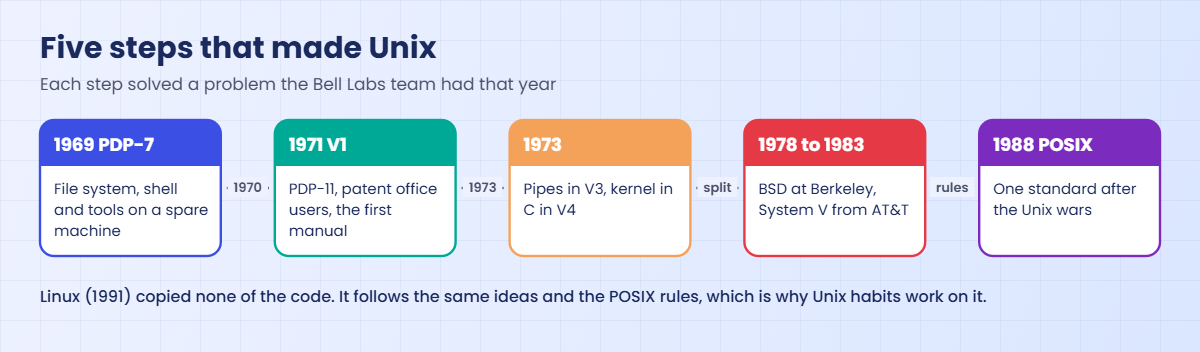
Unix grew in small steps, and each step solved a real problem the team had that year. The diagram below shows the five steps that matter most for you.

1A small system on a spare machine (1969)

Bell Labs had spent years on Multics, a large shared operating system built with MIT and General Electric, and pulled out in 1969. Thompson, Ritchie and a few others missed the comfortable way of working Multics had given them, so Thompson built something smaller on a little-used PDP-7. The first design already had the idea of special files for devices, which is why your disks are still /dev/sda.

2A real machine and real users (1970 to 1971)

To get a PDP-11, the team promised a document preparation system for the patent department. The patent staff became the first real users, the First Edition manual appeared in November 1971, and the habit of documenting every command in a manual page started there.

Unix history timeline: PDP-7 in 1969, First Edition 1971, C and pipes 1973, BSD and System V, POSIX 1988

3Pipes and C (1973)

Doug McIlroy had been asking for a way to connect programs “like a garden hose”. In 1973 Thompson added the pipe, and in one night, as the story goes, the team updated their tools to read standard input and write standard output. That same year the kernel was rewritten in Ritchie’s new language C, so moving Unix to a new computer meant changing the compiler and a small machine-specific part, not rewriting everything.

4Universities get the source (1974 to 1979)

Because of a 1956 legal agreement with the US government, AT&T wasn’t allowed to sell computer products, so it licensed Unix with full source code to universities for a small fee. A whole generation of students learned operating systems by reading the Unix source, and the University of California at Berkeley started shipping its own additions.

5The split: BSD and System V (1978 to 1989)

Berkeley’s BSD added virtual memory, the vi editor, the C shell and, in 4.2BSD (1983), TCP/IP networking with the sockets interface. After the AT&T breakup in 1984, AT&T sold Unix commercially as System V. Vendors built on one or the other: SunOS on BSD, AIX and HP-UX on System V, and every vendor added its own changes so that scripts and programs stopped moving cleanly between them.

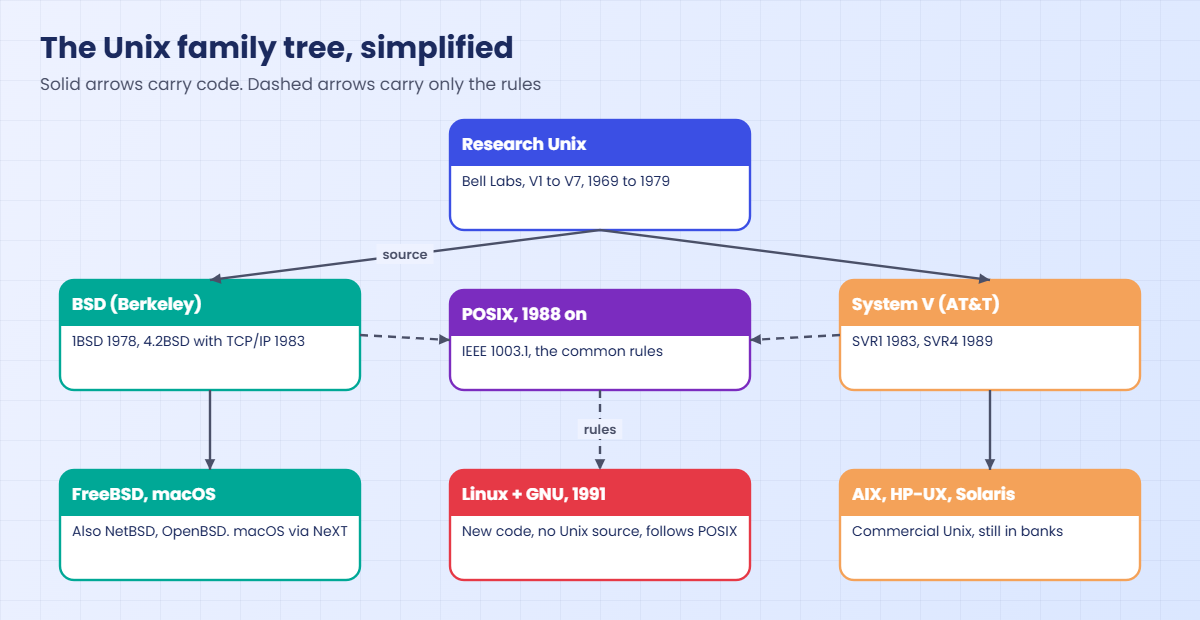
The family tree underneath shows how the branches relate, and where Linux fits: a separate line that copies the behaviour through POSIX, not the code.

Unix history family tree: Research Unix, BSD, System V, POSIX and Linux plus GNU

6The Unix wars and the peace treaty (1988 onward)

In 1988 AT&T and Sun teamed up on System V Release 4 (released 1989), and rival vendors led by IBM, DEC and HP formed the Open Software Foundation to build their own Unix. Customers were tired of the fight and wanted one set of rules. That set became POSIX: IEEE 1003.1 in 1988 for the system interface, POSIX.2 in 1992 for the shell and utilities, and later the Single UNIX Specification that decides who may use the UNIX name.

Then AT&T’s Unix company sued the makers of a BSD-based system in 1992. The case was settled in early 1994, but for those two years nobody knew whether BSD could be shared freely, and that was the time when a student’s new kernel in Finland was gaining helpers (Lesson 6).

7The Unix philosophy

McIlroy summed up the way of working in 1978, and people still repeat it: make each program do one thing well, expect the output of every program to become the input of another, and use plain text as the common language between them. Add “everything is a file”, short silent output when all is well and small tools you combine with pipes, and you have the reason a Linux admin can answer new questions with old commands.

Hands-on lab: find Unix ideas at work on rocky01 and ubu01

Before you run any command, double-check it

Read every command twice before you press Enter. Check the target: the server name, the user, the disk or device name, the path and the sizes. These commands are for learning and were tested in our lab, not on your system. At work, run the read-only commands first, follow your change process, make sure a backup exists, and ask a second person to check anything that changes or deletes data. You run them at your own risk.

This lab is safe on both VMs: you only read system information and create two small files in a new folder, ~/lab04. Each step shows one Unix idea from the story above, still at work in 2026.

1Ask the system what it is

Run this on rocky01, then on ubu01:

uname -s -r -o

You should see something like this on rocky01:

Linux 6.12.0-211.16.1.el10_2.0.1.x86_64 GNU/Linux

And on ubu01:

Linux 7.0.0-15-generic GNU/Linux

uname (Unix name) has been around since the System V days, and scripts still use it to ask “which system am I on?”. The kernel name is Linux, the second field is the kernel version, and the operating system is reported as GNU/Linux, which is the GNU tools plus the Linux kernel you’ll study in Lessons 5 and 6. On macOS or FreeBSD the same command prints Darwin or FreeBSD.

✅ Checkpoint: You can read the kernel name, kernel version and OS name from uname on both VMs.

2Ask which POSIX rules it follows

Run this on rocky01:

getconf _POSIX_VERSION
getconf POSIX2_VERSION
getconf ARG_MAX
getconf LONG_BIT

You should see something like this:

200809
200809
2097152
64

getconf is itself a POSIX tool. 200809 means the C library follows POSIX.1-2008 (a newer library may report a later date), and POSIX2_VERSION is the version of the shell and utilities part. ARG_MAX is the longest command line, in bytes, a program can be started with, which is why a huge rm * can fail with “Argument list too long”. LONG_BIT 64 tells you it’s a 64-bit system.

✅ Checkpoint: getconf returns a six-digit POSIX date on both VMs.

3See “everything is a file”

Run this on rocky01:

ls -l /dev/null /dev/sda
cat /proc/sys/kernel/hostname
echo "this goes nowhere" > /dev/null; echo "exit=$?"

You should see something like this:

crw-rw-rw-. 1 root root 1, 3 Oct 27 10:01 /dev/null
brw-rw----. 1 root disk 8, 0 Oct 27 10:01 /dev/sda
rocky01
exit=0

The first letter of each ls line is the file type: c is a character device and b is a block device, and the two numbers (1, 3 and 8, 0) tell the kernel which driver and which device. Your whole disk is a file you could read with cat, and the host name is a file the kernel makes up on the spot under /proc. That design started on the PDP-7 in 1969, and you’ll use it constantly in Lessons 10 and 42.

✅ Checkpoint: You can tell a character device from a block device in ls -l, and you read the host name from a file.
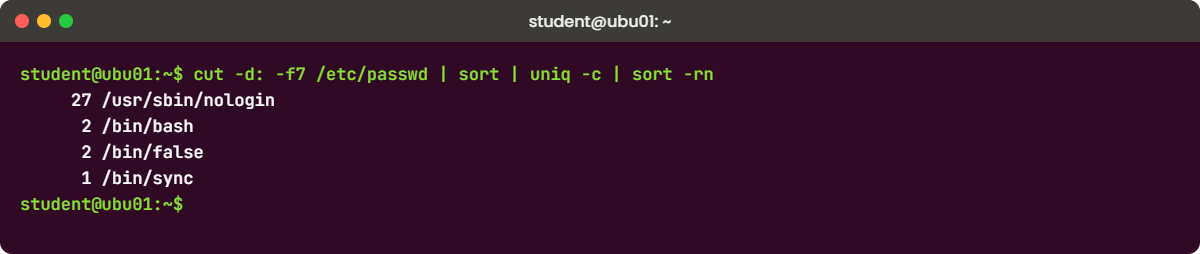
Unix history lab on ubu01: cut, sort and uniq joined by pipes count login shells
Example output from ubu01: four small tools joined by pipes count the login shells in /etc/passwd

4Join small tools with pipes

Question: which login shells do the accounts on ubu01 use, and how many of each? No single command answers that, but four small ones do.

Run this on ubu01:

cut -d: -f7 /etc/passwd | sort | uniq -c | sort -rn

You should see something like this:

     27 /usr/sbin/nologin
      2 /bin/bash
      2 /bin/false
      1 /bin/sync

cut takes the seventh field of every line, sort groups equal lines together, uniq -c counts each group and sort -rn puts the biggest number first. None of these tools knows anything about users or shells, which is the point: each does one small job on plain text. The accounts with nologin or false are service accounts that must never get an interactive shell.

✅ Checkpoint: You know how many accounts on ubu01 use /bin/bash.

5Read the family history in the man pages

Section 2 man pages describe system calls, and their HISTORY part says where each call came from. Rocky has these pages after the standard group from Lesson 2 (or sudo dnf install -y man-pages). On Ubuntu they are in a separate package, sudo apt install -y manpages-dev.

Run this on rocky01:

man 2 fork | grep -A1 '^HISTORY'
man 2 select | grep -A2 '^HISTORY'

You should see something like this:

HISTORY
       POSIX.1-2001, SVr4, 4.3BSD.
HISTORY
       select()
              POSIX.1-2001, 4.4BSD (first appeared in 4.2BSD).

fork, which creates every process on your server, is listed in SVr4 and 4.3BSD, both branches of the family, and in POSIX.1-2001. select, used by network servers to wait on many connections, “first appeared in 4.2BSD”, the Berkeley release that brought TCP/IP. Try man 7 standards for the full list of names (V7, 4.2BSD, SVr4, POSIX.1) with dates.

✅ Checkpoint: You found the BSD and System V names in the HISTORY part of two man pages.

6Edit a file the 1969 way, with ed

ed was the editor Thompson wrote for the first Unix, before screens could show a whole page. It still ships with Linux, and its one-letter commands live on in sed and vim. It isn’t always installed, so add it first.

Run this on rocky01 (on ubu01 use sudo apt install -y ed):

sudo dnf install -y ed
mkdir -p ~/lab04 && cd ~/lab04
printf '%s\n' a 'Unix started on a PDP-7 in 1969.' . 'w unix.txt' q | ed

You should see this:

33

Each line of the printf is one ed command: a (append), the text, a single dot to end the text, w to write the file and q to quit. ed answers only with the number of bytes it wrote. Now open the file and change it interactively:

Run this, then type the four lines after it one by one:

ed unix.txt
,p
s/1969/1969 at Bell Labs/
,p
w
q

You should see this:

33
Unix started on a PDP-7 in 1969.
Unix started on a PDP-7 in 1969 at Bell Labs.
46

,p prints every line, s/old/new/ is the same substitute you’ll use in sed and vim, and w reports 46 bytes. If ed only shows a ?, that’s ed telling you something went wrong. Break It 3 shows how to get the reason.

✅ Checkpoint: cat ~/lab04/unix.txt prints the line that ends “at Bell Labs.”

7Find out which shell /bin/sh is

Run this on both VMs:

ls -l /bin/sh

You should see something like this on rocky01:

lrwxrwxrwx. 1 root root 4 Aug 12 09:14 /bin/sh -> bash

And on ubu01:

lrwxrwxrwx 1 root root 4 Apr  8 14:20 /bin/sh -> dash

/bin/sh is the name every Unix has used for the system shell since the Bourne shell in 1979. On Rocky it points to bash, and on Ubuntu to dash, a small, fast shell that accepts POSIX syntax and little else. Scripts that start with #!/bin/sh should only use POSIX features, and the Break-It lab shows what happens when they don’t.

✅ Checkpoint: You know what /bin/sh points to on each VM.

Break It, Then Fix It

Each of these breaks shows a Unix idea from the lesson the hard way. They all stay inside ~/lab04, so no snapshot is needed.

1Forget that uniq only looks at neighbours

Run this on either VM:

cd ~/lab04
printf 'web\ndb\nweb\napp\nweb\ndb\n' > roles.txt
uniq -c roles.txt

You’ll get this:

      1 web
      1 db
      1 web
      1 app
      1 web
      1 db

No error, only a wrong answer. uniq follows the small-tool rule strictly: it only merges lines that are next to each other, because that’s the cheapest job it can do well. Sorting is a different job, done by a different tool.

Fix: sort first, then count, then sort by the count.

sort roles.txt | uniq -c | sort -rn

You should see this:

      3 web
      2 db
      1 app

✅ Checkpoint: You get 3 web, 2 db, 1 app.

2Use bash-only syntax in a /bin/sh script

Paste this whole block on ubu01:

cd ~/lab04
cat > check.sh <<'EOF'
#!/bin/sh
name="ubu01"
if [[ $name == ubu* ]]; then
  echo "This is an Ubuntu box"
fi
EOF
sh check.sh; echo "exit=$?"

You’ll get this:

check.sh: 3: [[: not found
exit=0

[[ ]] is a bash extension, not POSIX, and dash doesn’t know it. The test fails as “command not found”, the if is false, the message never prints, and the script still exits 0 because the last command that ran was the if itself. On rocky01 the same script works, because /bin/sh is bash there, which is how scripts written on RHEL break when they move to Ubuntu.

Fix: use the POSIX form, which works in every shell.

cat > check.sh <<'EOF'
#!/bin/sh
name="ubu01"
case $name in
  ubu*) echo "This is an Ubuntu box" ;;
esac
EOF
sh check.sh

You should see this:

This is an Ubuntu box

The other honest fix is to keep the bash syntax and change the first line to #!/bin/bash, then run the script as bash check.sh or ./check.sh, never as sh check.sh.

✅ Checkpoint: sh check.sh prints “This is an Ubuntu box” on ubu01.

3Get a ? from ed

Run this, then type the two lines after it:

ed ~/lab04/unix.txt
d
q

You’ll get this:

46
?

You deleted the only line, then tried to quit without saving, and ed refused with a single question mark. That terse style is the “silence is golden” side of the Unix philosophy taken to the extreme. Type h and ed explains its last ?:

Warning: buffer modified

Fix: quit without saving with a capital Q (or save first with w if you meant the change).

Q

Check the file is untouched with cat ~/lab04/unix.txt. The same habit of “type h when you see a bare ?” works in ed and saves you from guessing.

✅ Checkpoint: ed quit with Q and unix.txt still contains the Bell Labs line.

This happened at work

The lab reports that stopped after the migration

A colleague of mine, Hetal, was on the Linux team of a hospital chain in Vadodara when they moved the last jobs off an old AIX server. One of them was a nightly script that collected pathology results and pushed them to the doctors’ portal. It had run for eleven years and moved to a new Ubuntu server on a Saturday.

On Monday morning ward doctors started calling: Sunday’s blood reports weren’t in the portal. The team first looked at the SFTP connection to the portal, then at the firewall, and both were fine. Cron’s mail for the job had gone to a local mailbox nobody read, so there was no error in sight.

Hetal ran the script by hand with the same command as the cron line, sh export_reports.sh, and got “[[: not found” and “function: not found”. The script had been written for ksh on AIX with ksh-only syntax, and on AIX it ran fine, but on Ubuntu sh means dash. Half the tests silently came out false, the file list was empty, and the script uploaded nothing and exited 0.

The quick fix was the right first line, #!/bin/bash, a few syntax changes and a cron line that runs the script directly. The lasting changes were bigger: every migrated script now goes through shellcheck, cron output goes to a log that monitoring reads, and the script itself checks that it uploaded at least one file and exits non-zero if not.

Common mistakes and troubleshooting

MistakeWhat happensWhat to do instead
Saying Linux is a version of Unix with Unix code insideWrong in an interview, and confusing when licensing questions come upSay Linux is Unix-like: written from scratch, following POSIX, with no Unix source code
Assuming /bin/sh is bash everywhereScripts work on Rocky and fail silently on Ubuntu, where /bin/sh is dashUse POSIX syntax in #!/bin/sh scripts, or start the script with #!/bin/bash and run it directly
Using uniq without sortCounts are split across groups and look plausible but wrongAlways sort | uniq -c, then sort -rn for the biggest first
Moving scripts from AIX, HP-UX or Solaris without testingOptions like ps -ef columns, df output and echo flags differ, and jobs break quietlyRun them by hand on the new server, check exit codes and output, and run shellcheck
Mixing up dates in interviewsYou lose credibility on easy questionsRemember four: 1969 PDP-7, 1973 C rewrite and pipes, 1983 System V and 4.2BSD, 1988 POSIX
Ignoring a bare ? or a silent toolYou assume success when the tool refused, because Unix tools stay quietCheck the exit code, and in ed type h to see the reason

Interview questions

Click a question to open it. Each one is written the way an interviewer would ask it. Under it you will see why they ask it and one way you could answer, in your own words.

Fresher level

1. Is Linux Unix? How would you explain the difference to a friend who isn’t technical?

Why they ask this: They want to see that you know the history well enough not to repeat the common myth, and can explain it simply.

How you might answer: Linux isn’t Unix in the legal or code sense. Unix was written at Bell Labs from 1969, and Linux was written from scratch in 1991 without any Unix code.

But Linux follows the same design and the POSIX standard, so commands, files and scripts work the same way. I’d say it’s like a new car built by a different company that still has the steering wheel, pedals and gear pattern you already know.

2. What do people mean by the Unix philosophy, and can you show it with a command you’d use at work?

Why they ask this: They’re checking whether you understand why small tools and pipes matter, not only that you’ve heard the phrase.

How you might answer: It means each tool does one small job well, tools work together through pipes, and plain text is the common format. Everything is a file is part of the same thinking.

For example, to see which shells accounts use I’d run cut -d: -f7 /etc/passwd | sort | uniq -c | sort -rn. Four tools that know nothing about users answer a question none of them could answer alone.

2–5 years experience

3. A script that worked on RHEL fails on Ubuntu with “[[: not found”. What’s going on and how do you fix it properly?

Why they ask this: This tests whether you understand /bin/sh differences between distributions, which come straight from the BSD and System V history of shells.

How you might answer: On RHEL /bin/sh is bash, so bash syntax like [[ works even when the script says #!/bin/sh. On Ubuntu /bin/sh is dash, which only supports POSIX syntax.

I’d either rewrite the bash parts in POSIX form, like case or [ ], or change the first line to #!/bin/bash and make sure cron runs the script directly, not through sh. Then I’d run shellcheck on it and check that it exits non-zero when it fails.

4. You’re migrating jobs from an old AIX or Solaris server to Linux. What Unix differences would you check for?

Why they ask this: They want practical migration experience: what breaks between Unix flavours and Linux.

How you might answer: I’d look at the shell first, since AIX scripts are often ksh, then at commands whose output or options differ, like ps, df, echo and awk. Paths are different too, for example tools under /usr/ucb or /opt on the old system.

I’d run each job by hand on the new server, compare its output with the old one, and add checks so a silent failure becomes a non-zero exit code that monitoring can see.

Senior level

5. Why did POSIX matter so much, and does it still matter when almost everything runs on Linux?

Why they ask this: This is about understanding standards as a business tool, which senior engineers need when they choose platforms and write portable automation.

How you might answer: In the 1980s every vendor had its own Unix, and customers were paying to rewrite software for each one. POSIX gave a common set of system calls, shell syntax and utilities, so code and scripts could move, and it’s the reason Linux could run Unix software from day one.

It still matters for us because we run Linux next to AIX, macOS laptops and BusyBox in containers. If our scripts stay POSIX where possible, they run in all of those without surprises.

6. Some people say the Unix philosophy is dead because of systemd and big tools. What’s your view as an admin?

Why they ask this: They want a balanced, experienced opinion, not a rant, and to see that you connect history to today’s tools.

How you might answer: I think the ideas still guide daily work even when some tools are big. systemd is one large project, but journalctl still prints text I can pipe into grep and awk, and units are small text files.

What I keep from the philosophy is the habit: small scripts that do one job, plain text config in version control, and tools that exit non-zero when they fail, so they can be joined safely.

Quick quiz

Q1. Where and when did Unix start?

  1. MIT in 1965
  2. Bell Labs in 1969
  3. Berkeley in 1977
  4. Helsinki in 1991
Show answer

B — Ken Thompson, with Dennis Ritchie and others, started Unix at Bell Labs on a PDP-7 in 1969.

Q2. What changed in 1973?

  1. Unix got a graphical desktop
  2. The kernel was rewritten in C, and pipes arrived
  3. POSIX was published
  4. Linux was released
Show answer

B — Pipes came in the Third Edition and the C kernel in the Fourth Edition, both in 1973.

Q3. Which Unix branch first shipped TCP/IP with sockets?

  1. System V Release 2
  2. 4.2BSD
  3. Seventh Edition
  4. Xenix
Show answer

B — 4.2BSD from Berkeley (1983) brought TCP/IP and the sockets interface.

Q4. What is POSIX?

  1. A Linux distribution
  2. A family of IEEE standards for Unix-like systems
  3. The first Unix editor
  4. A BSD licence
Show answer

B — POSIX.1 (1988) defines the system interface and POSIX.2 the shell and utilities. Linux follows them.

Q5. On Ubuntu, sh check.sh fails with “[[: not found”. Why?

  1. The file isn’t executable
  2. /bin/sh is dash, which doesn’t support [[
  3. bash isn’t installed
  4. The script needs sudo
Show answer

B — dash supports POSIX syntax only. Use POSIX tests or run the script with bash.

Quick recap

  • Unix began at Bell Labs in 1969 with Ken Thompson and Dennis Ritchie, on a PDP-7. Pipes and the C rewrite came in 1973.
  • It split into BSD (Berkeley, TCP/IP and sockets in 4.2BSD) and System V (AT&T), and vendor versions fought the “Unix wars” of the late 1980s.
  • POSIX (1988 onward) is the common rulebook. Linux was written from scratch and follows it, which is why Unix habits work on Linux.
  • The Unix philosophy: small tools that do one thing well, joined by pipes, with plain text and “everything is a file”.
  • You saw it live: uname, getconf, /dev files, sort | uniq -c, man page HISTORY sections, ed, and /bin/sh being bash on Rocky but dash on Ubuntu.

Next lesson

Lesson 5: The GNU Project and Richard Stallman → You’ll see how Richard Stallman’s GNU Project from 1983 built the compiler, shell and tools you use every day, and why it was still missing a kernel.

Further reading: Unix history

Want to go deeper into Unix history? Read Dennis Ritchie’s own account, The Evolution of the Unix Time-sharing System, the standards(7) man page on man7.org for the V7, BSD, System V and POSIX names, and the POSIX.1-2024 base specifications from The Open Group. You can also see the full plan for this course on the Linux Administration course page.

Scroll to Top

This website uses cookies

We use a few cookies to keep this site working. If you allow it, we also use Google Analytics to count visits so we can improve our lessons. You can accept all, deny the optional ones, or choose what to allow.