Apache Kafka on Linux with KRaft: a three-node cluster
-
Phase 0: Before you start
-
Phase 1: The origins and OS architecture
-
Phase 2: Day-to-day administration and the command builder
-
Phase 3: Enterprise infrastructure and storage
-
Phase 4: Troubleshooting step by step
-
Phase 5: Final project and career
A Kafka KRaft setup is how every new Apache Kafka cluster is built today. Kafka 4.0, released on 18 March 2025, removed ZooKeeper completely, so the cluster now keeps its own metadata in a small group of controller nodes that agree with each other using the Raft protocol. For a Linux admin, Kafka is a Java service with heavy needs: its own user, fast data disks, a sensible heap, many open files and a firewall that knows its ports.
In this lesson you’ll build the kafka01 VM, install Kafka 4.4.0 (released 22 October 2026) with Java 21 in /opt/kafka, and run three KRaft nodes on that one VM as a systemd template unit with a LimitNOFILE drop-in. You’ll format the storage with one cluster ID, check the controller quorum, create a topic, send and read messages, and stop a node to watch the cluster carry on. Lessons 59 and 60 build on this cluster.
Where this lesson fits
Lesson 58 of 82 in Linux Administration · Phase 3: Enterprise infrastructure and storage · Before this: Lesson 57, containers with Podman and Docker · Next: Lesson 59, ZooKeeper quorums for older Kafka clusters
| Time | You need | By the end you can |
|---|---|---|
| About 2 hours (including building kafka01) | A laptop with 8 GB RAM or more (kafka01 needs 4 GB, so shut down rocky01 or ubu01 while you work), the Rocky 10.2 ISO from Lesson 2, ubu01 for the SSH key and a test from outside | Install Kafka 4.x from the official tarball, run a three-node KRaft cluster under systemd, read the quorum status, and fix unformatted storage and a too-low open-files limit |
What it is, in one line
Kafka in KRaft mode is a set of Java processes where a few nodes act as controllers that agree on the cluster’s metadata by majority vote, and the brokers store and serve the messages, all set up with one cluster ID and run by you as systemd services.
In Simple Words
The housing society committee
Your housing society has a committee of three: chairman, secretary and treasurer. Any decision, like who may park where, needs two signatures in the minute book. If the treasurer is away at a wedding in Udaipur, the other two still sign and life goes on, and when she comes back she reads the minute book and catches up.
If two of them are away, nothing new can be approved until one returns, however urgent it is. Meanwhile the security guards at the gates keep doing their work: they log every visitor and parcel in their registers, following the last rules the committee agreed.
The committee is Kafka’s controller quorum, the minute book is the metadata log, and the guards with their registers are the brokers storing messages.
Engineer's View
Kafka 4.x, KRaft and what the OS has to give it
Every Kafka process has a process.roles setting: broker (stores partitions and serves clients), controller (keeps the cluster metadata) or both, called combined mode. The controllers write all metadata, such as topics, partitions, leaders and broker registrations, to an internal log called __cluster_metadata, and they elect one active controller with Raft. A change is committed when a majority of controllers has it: 2 of 3, or 3 of 5.
| Fact | Value in this lesson |
|---|---|
| ZooKeeper | Removed in Kafka 4.0. 3.9 is the last release that can migrate a ZooKeeper cluster (Lesson 59) |
| Kafka version | 4.4.0 for Scala 2.13 (kafka_2.13-4.4.0.tgz); the 4.3 and 4.2 lines still get bug-fix releases |
| Java | Brokers need Java 17 or newer; we use java-21-openjdk-headless from AppStream |
| Quorum style | Dynamic: controller.quorum.bootstrap.servers plus --initial-controllers at format time. The older static controller.quorum.voters still works |
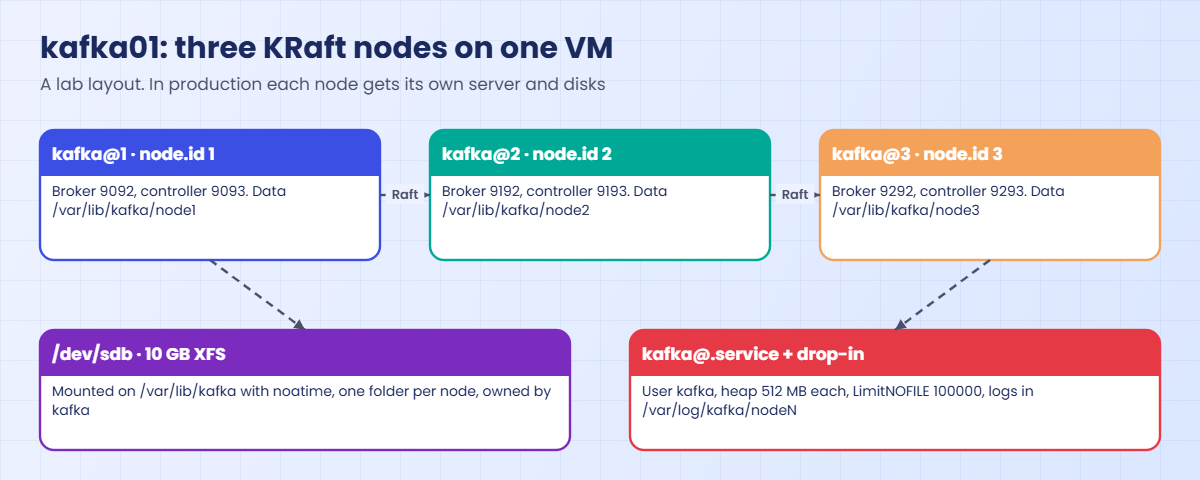
| Layout | Three combined nodes (broker + controller) on kafka01, node.id 1, 2 and 3 |
| Ports | node1 9092/9093, node2 9192/9193, node3 9292/9293 (broker/controller) |
| Data | /var/lib/kafka/node1..3 on a 10 GB XFS disk; logs in /var/log/kafka/node1..3 |
Three nodes on one VM is a lab trick that lets you see a real quorum on a laptop. It gives no protection against losing the VM, and Kafka’s own docs say combined mode belongs in development, not in critical production, where controllers and brokers run on separate servers. From the OS, every node needs RAM for its heap and far more for the page cache, because Kafka reads recent messages from cache.
It also needs thousands of file descriptors (each log segment and each client connection holds one), a fast file system (XFS or ext4), and the right ports open.
systemd starts services with an open-files limit of 1024 (soft) and 524288 (hard). HotSpot Java normally raises its own soft limit to the hard limit at start, so the real trouble comes when somebody writes a low LimitNOFILE= in a unit, which sets both. That’s why you set the value Kafka needs on purpose, in a drop-in, and check it in /proc.
How it works, step by step
Follow the cluster from an empty disk to the first message.
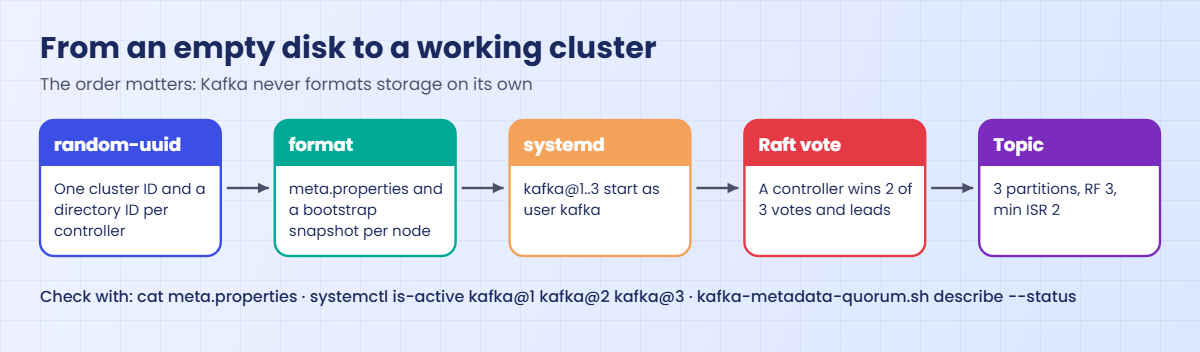
1One cluster ID and a directory ID per controller
kafka-storage.sh random-uuid makes a 22-character ID. You make one for the cluster and one for each controller’s metadata folder. The cluster ID ties every node to the same cluster, so a node formatted with a different ID refuses to join.
2Format writes meta.properties and a bootstrap snapshot
kafka-storage.sh format writes meta.properties (cluster.id, node.id, directory.id) into each data folder. On controllers it also writes a first snapshot of the metadata log, with the feature versions and the list of initial voters from --initial-controllers. Kafka never formats a folder on its own at start, so a missing format shows up as a clear error instead of an empty new cluster.
The diagram below shows the whole sequence.
3The controllers elect a leader
When the nodes start, each controller reads the voter list and asks for votes. The first one to get two of the three becomes the leader for that epoch, and the others become followers that fetch the metadata log from it. Each broker then registers with the controllers and gets the metadata it needs.
4Topics, partitions, leaders and ISR
A topic is split into partitions, and each partition is copied to replication.factor brokers. One copy is the leader that takes writes; followers copy from it, and the ones that are caught up form the in-sync replica set (ISR). With acks=all a producer only gets a success once every ISR member has the message, and min.insync.replicas=2 refuses writes when fewer than two copies are in sync.
5Why three, and what one VM can’t give you
A quorum of three survives one controller down; five survive two. Four is no better than three, because a majority of four is still three. The same maths applies to the data: RF 3 with min ISR 2 keeps accepting writes with one broker down and refuses them, safely, with two down.
The picture below shows how the three nodes share kafka01 in this lab: one disk, one unit file, three instances.
6The Linux side: user, disk, unit, limits, firewall
Kafka runs as an unprivileged kafka user that owns only its data and log folders. The program in /opt/kafka stays owned by root, so a compromised broker can’t change its own code. One template unit, kafka@.service, serves all three nodes: %i in the file becomes 1, 2 or 3.
Settings that apply to every node, like the open-files limit, go in a drop-in folder kafka@.service.d, so a package or script never overwrites them.
Stop nodes with systemctl, which sends SIGTERM to the Java process so the broker shuts down cleanly. Don’t point ExecStop= at kafka-server-stop.sh: without its --node-id option it signals every Kafka process on the machine, which here is all three nodes. Only the broker ports need opening in firewalld, because the three controllers talk to each other inside the VM; on real separate servers you’d open the controller ports between them too.
Hands-on lab: a three-node KRaft cluster on kafka01
Before you run any command, double-check it
Read every command twice before you press Enter. Check the target: the server name, the user, the disk or device name, the path and the sizes. These commands are for learning and were tested in our lab, not on your system. At work, run the read-only commands first, follow your change process, make sure a backup exists, and ask a second person to check anything that changes or deletes data. You run them at your own risk.
Step 1 runs on the laptop and in the VirtualBox console, the rest on kafka01 as student over SSH (from ubu01 or the laptop on port 2231). kafka01 needs 4 GB of RAM, so on an 8 GB laptop keep only kafka01 and one other VM running.
1Build kafka01 with a data disk
On the laptop (PowerShell or a terminal; adjust the paths on macOS and Linux), create the VM the same way as rocky01 in Lesson 2, plus a 10 GB second disk:
VBoxManage createvm --name=kafka01 --ostype=RedHat_64 --basefolder="C:\Lab\Linux" --register
VBoxManage modifyvm kafka01 --memory=4096 --cpus=2 --firmware=efi --graphicscontroller=vmsvga --vram=16 --audio-enabled=off --nic1=natnetwork --nat-network1=LinuxLab --nic-type1=82540EM
VBoxManage createmedium disk --filename="C:\Lab\Linux\kafka01\kafka01.vdi" --size=20480 --format=VDI
VBoxManage createmedium disk --filename="C:\Lab\Linux\kafka01\kafka01-data.vdi" --size=10240 --format=VDI
VBoxManage storagectl kafka01 --name=SATA --add=sata --controller=IntelAhci --portcount=4
VBoxManage storageattach kafka01 --storagectl=SATA --port=0 --device=0 --type=hdd --medium="C:\Lab\Linux\kafka01\kafka01.vdi"
VBoxManage storageattach kafka01 --storagectl=SATA --port=1 --device=0 --type=hdd --medium="C:\Lab\Linux\kafka01\kafka01-data.vdi"
VBoxManage storagectl kafka01 --name=IDE --add=ide
VBoxManage storageattach kafka01 --storagectl=IDE --port=1 --device=0 --type=dvddrive --medium="C:\Lab\Linux\ISO\Rocky-10.2-x86_64-minimal.iso"
VBoxManage startvm kafka01 --type=guiIn the installer, repeat Lesson 2 with three changes: hostname kafka01.saatlab.test, IPv4 10.10.10.31/24 (gateway and DNS 10.10.10.1), and under Installation Destination tick only the 20 GB disk, so the 10 GB disk stays empty for Kafka. Create student (administrator) and set the root password as before.
After the first boot, from ubu01, copy your key in while password logins still work, then apply the Lesson 33 hardening on kafka01:
ssh-copy-id student@10.10.10.31
ssh student@10.10.10.31
printf 'PasswordAuthentication no\nPermitRootLogin no\n' | sudo tee /etc/ssh/sshd_config.d/00-saat-hardening.conf
sudo sshd -t && sudo systemctl reload sshd
printf '10.10.10.11 rocky01.saatlab.test rocky01\n10.10.10.21 ubu01.saatlab.test ubu01\n10.10.10.40 ad01.saatlab.test ad01\n' | sudo tee -a /etc/hosts
sudo dnf -y updateAdd kafka01 to /etc/hosts on rocky01 and ubu01 too if Lesson 2 didn’t already list it. Take a snapshot now (VBoxManage snapshot kafka01 take base), so you can always start Kafka again from a clean OS.
✅ Checkpoint: From ubu01, ssh student@10.10.10.31 hostname prints kafka01 without asking for a password.
2Prepare the data disk
On kafka01, find the empty disk and give Kafka an XFS file system on it:
lsblk -o NAME,SIZE,TYPE,MOUNTPOINTS /dev/sdb
sudo mkfs.xfs -L kafkadata /dev/sdb
sudo mkdir -p /var/lib/kafka
UUID=$(sudo blkid -s UUID -o value /dev/sdb)
echo "UUID=$UUID /var/lib/kafka xfs defaults,noatime 0 0" | sudo tee -a /etc/fstab
sudo systemctl daemon-reload
sudo mount -a
df -h /var/lib/kafkaYou should see something like this (mkfs.xfs output cut):
NAME SIZE TYPE MOUNTPOINTS
sdb 10G disk
UUID=8e3b6f21-4c7a-4d9e-b1f5-0a2c7d6e9b43 /var/lib/kafka xfs defaults,noatime 0 0
Filesystem Size Used Avail Use% Mounted on
/dev/sdb 10G 228M 9.8G 3% /var/lib/kafkaKafka uses the whole disk, so no partition table or LVM is needed here; at work, data disks for brokers are often whole LUNs like this one. noatime stops the kernel writing an access time on every read, which matters for a service that reads its files all day. Check that sdb is the 10 GB disk before you run mkfs.
✅ Checkpoint: df shows a 10G XFS file system mounted on /var/lib/kafka.
3Install Java 21 and create the kafka user
Run this:
sudo dnf install -y java-21-openjdk-headless tar
java -version
sudo useradd --system --home-dir /var/lib/kafka --no-create-home --shell /usr/sbin/nologin kafka
sudo mkdir -p /var/lib/kafka/node{1,2,3} /var/log/kafka/node{1,2,3}
sudo chown -R kafka:kafka /var/lib/kafka /var/log/kafka
sudo chmod 750 /var/lib/kafka /var/log/kafka
id kafkaYou should see something like this:
openjdk version "21.0.12" 2026-07-21 LTS
OpenJDK Runtime Environment (Red_Hat-21.0.12.0.7-1) (build 21.0.12+7-LTS)
OpenJDK 64-Bit Server VM (Red_Hat-21.0.12.0.7-1) (build 21.0.12+7-LTS, mixed mode, sharing)
uid=991(kafka) gid=991(kafka) groups=991(kafka)The headless package has the Java runtime without desktop libraries, which is all a server needs. kafka is a system account (UID below 1000) that can’t log in, owns its data and log folders and nothing else. Your Java patch and build numbers may differ from the ones shown.
✅ Checkpoint: java -version prints version 21 and id kafka shows a system UID.
4Download Kafka 4.4.0, check it and unpack it
Run this:
cd /tmp
curl -fLO https://downloads.apache.org/kafka/4.4.0/kafka_2.13-4.4.0.tgz
curl -fLO https://downloads.apache.org/kafka/4.4.0/kafka_2.13-4.4.0.tgz.sha512
EXPECTED=$(sed 's/.*://' kafka_2.13-4.4.0.tgz.sha512 | tr -d ' \n' | tr 'A-F' 'a-f' | grep -oE '^[0-9a-f]{128}')
ACTUAL=$(sha512sum kafka_2.13-4.4.0.tgz | cut -d' ' -f1)
[ "$EXPECTED" = "$ACTUAL" ] && echo "SHA512 OK" || echo "SHA512 MISMATCH, do not use this file"
sudo tar -xzf kafka_2.13-4.4.0.tgz -C /opt
sudo chown -R root:root /opt/kafka_2.13-4.4.0
sudo ln -sfn /opt/kafka_2.13-4.4.0 /opt/kafka
/opt/kafka/bin/kafka-topics.sh --versionYou should see something like this (curl progress cut):
SHA512 OK
4.4.0The .sha512 file from Apache lists the hash in upper-case groups after the file name, so the sed, tr and grep line turns it into the plain form sha512sum prints, and works for either layout. Never install a tarball whose hash doesn’t match. When 4.4.0 moves off downloads.apache.org after newer releases, the same path works under archive.apache.org/dist/kafka/.
The /opt/kafka link lets a later upgrade unpack the new version next to this one and switch the link, with the configs safe in /etc/kafka.
✅ Checkpoint: The hash check printed SHA512 OK and kafka-topics.sh reports 4.4.0.
5Write the three node configs
Paste this whole block:
sudo mkdir -p /etc/kafka
for n in 1 2 3; do
port=$((9092 + (n - 1) * 100))
cport=$((port + 1))
sudo tee /etc/kafka/node$n.properties >/dev/null <<EOT
# /etc/kafka/node$n.properties (SaatVedha Linux course, Lesson 58)
process.roles=broker,controller
node.id=$n
controller.quorum.bootstrap.servers=10.10.10.31:9093,10.10.10.31:9193,10.10.10.31:9293
listeners=PLAINTEXT://10.10.10.31:$port,CONTROLLER://10.10.10.31:$cport
advertised.listeners=PLAINTEXT://10.10.10.31:$port,CONTROLLER://10.10.10.31:$cport
controller.listener.names=CONTROLLER
inter.broker.listener.name=PLAINTEXT
listener.security.protocol.map=CONTROLLER:PLAINTEXT,PLAINTEXT:PLAINTEXT
log.dirs=/var/lib/kafka/node$n
num.partitions=3
default.replication.factor=3
min.insync.replicas=2
offsets.topic.replication.factor=3
transaction.state.log.replication.factor=3
transaction.state.log.min.isr=2
share.coordinator.state.topic.replication.factor=3
share.coordinator.state.topic.min.isr=2
log.retention.hours=168
EOT
done
grep -H -E '^(node.id|listeners|log.dirs)=' /etc/kafka/node*.propertiesYou should see this:
/etc/kafka/node1.properties:node.id=1
/etc/kafka/node1.properties:listeners=PLAINTEXT://10.10.10.31:9092,CONTROLLER://10.10.10.31:9093
/etc/kafka/node1.properties:log.dirs=/var/lib/kafka/node1
/etc/kafka/node2.properties:node.id=2
/etc/kafka/node2.properties:listeners=PLAINTEXT://10.10.10.31:9192,CONTROLLER://10.10.10.31:9193
/etc/kafka/node2.properties:log.dirs=/var/lib/kafka/node2
/etc/kafka/node3.properties:node.id=3
/etc/kafka/node3.properties:listeners=PLAINTEXT://10.10.10.31:9292,CONTROLLER://10.10.10.31:9293
/etc/kafka/node3.properties:log.dirs=/var/lib/kafka/node3The three files differ only in node.id, ports and data folder. controller.quorum.bootstrap.servers tells every node where to find the controllers. The replication settings make every new topic, and Kafka’s internal topics for consumer offsets, transactions and share groups, keep three copies and demand two in sync. With a single data folder, log.dirs also holds the metadata log.
✅ Checkpoint: grep shows three different node.id values, ports 9092, 9192 and 9292, and three data folders.
6Format the storage with one cluster ID
Make the IDs, save them, and format each node as the kafka user:
CID=$(/opt/kafka/bin/kafka-storage.sh random-uuid)
D1=$(/opt/kafka/bin/kafka-storage.sh random-uuid)
D2=$(/opt/kafka/bin/kafka-storage.sh random-uuid)
D3=$(/opt/kafka/bin/kafka-storage.sh random-uuid)
echo "CID=$CID D1=$D1 D2=$D2 D3=$D3" | sudo tee /etc/kafka/cluster-ids.txt
IC="1@10.10.10.31:9093:$D1,2@10.10.10.31:9193:$D2,3@10.10.10.31:9293:$D3"
for n in 1 2 3; do
sudo -u kafka /opt/kafka/bin/kafka-storage.sh format --cluster-id "$CID" \
--initial-controllers "$IC" --config /etc/kafka/node$n.properties | grep Formatting
done
sudo cat /var/lib/kafka/node1/meta.propertiesYou should see something like this:
CID=tWqVaTLwEZAWWJeKqq3YEA D1=Mz7Gk7FKW-cAtnd_1_7EHQ D2=V5cGMZqTstCz2wdi4SMFZw D3=3Kh8DnGlNkHX9xXMHwJD0w
Formatting dynamic metadata voter directory /var/lib/kafka/node1 with metadata.version 4.4-IV2.
Formatting dynamic metadata voter directory /var/lib/kafka/node2 with metadata.version 4.4-IV2.
Formatting dynamic metadata voter directory /var/lib/kafka/node3 with metadata.version 4.4-IV2.
#
#Tue Oct 27 13:22:41 IST 2026
cluster.id=tWqVaTLwEZAWWJeKqq3YEA
directory.id=Mz7Gk7FKW-cAtnd_1_7EHQ
node.id=1
version=1Your IDs will differ. Each format also prints a long “Bootstrap metadata” line, which the grep hides. The --initial-controllers value must be identical on all three: node ID @ host : controller port : directory ID.
“dynamic metadata voter directory” means each node starts as a voter in a dynamic quorum, which you can later grow or shrink with kafka-metadata-quorum.sh add-controller and remove-controller. Keep /etc/kafka/cluster-ids.txt: Lessons 59 and 60 and any rebuild of a node need the same cluster ID.
✅ Checkpoint: Three “Formatting dynamic metadata voter directory” lines appeared and node1’s meta.properties shows your cluster ID and node.id=1.
7Create the systemd template unit and the LimitNOFILE drop-in
Paste this whole block:
sudo tee /etc/systemd/system/kafka@.service >/dev/null <<'EOF'
# /etc/systemd/system/kafka@.service (SaatVedha Linux course, Lesson 58)
[Unit]
Description=Apache Kafka KRaft node %i
Documentation=https://kafka.apache.org/documentation/
Wants=network-online.target
After=network-online.target
RequiresMountsFor=/var/lib/kafka
[Service]
Type=simple
User=kafka
Group=kafka
Environment="KAFKA_HEAP_OPTS=-Xms512m -Xmx512m"
Environment="LOG_DIR=/var/log/kafka/node%i"
ExecStart=/opt/kafka/bin/kafka-server-start.sh /etc/kafka/node%i.properties
SuccessExitStatus=143
TimeoutStopSec=120
Restart=on-failure
RestartSec=10
[Install]
WantedBy=multi-user.target
EOF
sudo mkdir -p /etc/systemd/system/kafka@.service.d
printf '[Service]\nLimitNOFILE=100000\n' | sudo tee /etc/systemd/system/kafka@.service.d/10-limits.conf
sudo systemctl daemon-reload
systemd-analyze verify kafka@1.service && echo "unit OK"
systemctl show kafka@1 -p LimitNOFILEYou should see something like this:
[Service]
LimitNOFILE=100000
unit OK
LimitNOFILE=100000%i became 1 for kafka@1: its log folder is node1 and its config node1.properties. KAFKA_HEAP_OPTS replaces Kafka’s default 1 GB heap with 512 MB per node, which three nodes need to fit in 4 GB with room for the page cache; production brokers usually run 4 to 8 GB of heap and leave the rest of the RAM to the cache. LOG_DIR gives each node its own server.log, because three nodes writing one file would be unreadable.
SuccessExitStatus=143 tells systemd that a Java process ending on SIGTERM (128 + 15) stopped normally. systemctl edit kafka@.service would make the same kind of drop-in, named override.conf.
✅ Checkpoint: systemd-analyze verify prints nothing before “unit OK” and systemctl show reports LimitNOFILE=100000.
8Start the three nodes and check the quorum
Run this:
sudo systemctl enable --now kafka@1 kafka@2 kafka@3
systemctl is-active kafka@1 kafka@2 kafka@3
grep 'open files' /proc/$(systemctl show -p MainPID --value kafka@1)/limits
/opt/kafka/bin/kafka-metadata-quorum.sh --bootstrap-server 10.10.10.31:9092 describe --statusYou should see something like this:
Created symlink '/etc/systemd/system/multi-user.target.wants/kafka@1.service' → '/etc/systemd/system/kafka@.service'.
Created symlink '/etc/systemd/system/multi-user.target.wants/kafka@2.service' → '/etc/systemd/system/kafka@.service'.
Created symlink '/etc/systemd/system/multi-user.target.wants/kafka@3.service' → '/etc/systemd/system/kafka@.service'.
active
active
active
Max open files 100000 100000 files
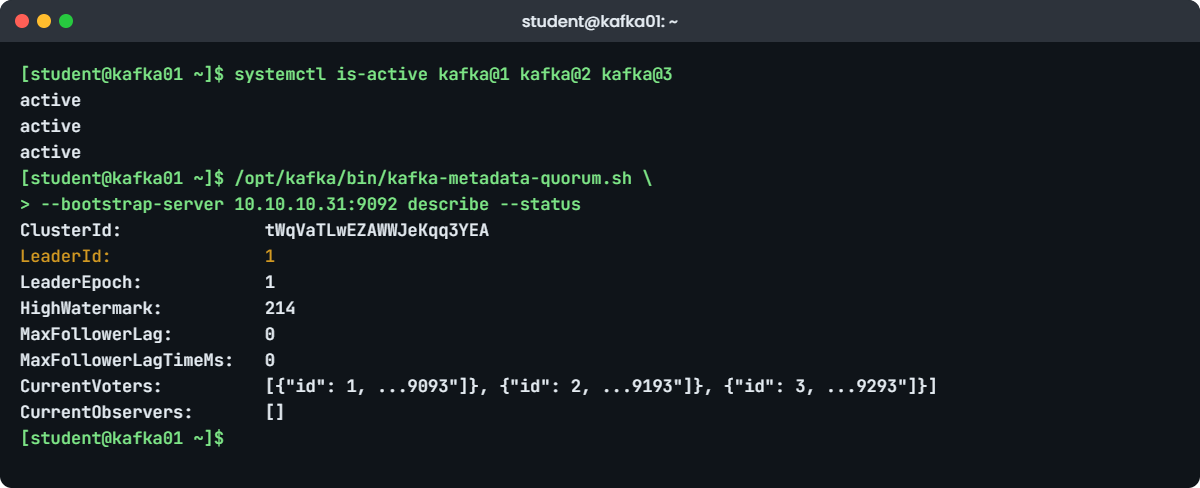
ClusterId: tWqVaTLwEZAWWJeKqq3YEA
LeaderId: 1
LeaderEpoch: 1
HighWatermark: 214
MaxFollowerLag: 0
MaxFollowerLagTimeMs: 0
CurrentVoters: [{"id": 1, "directoryId": "Mz7Gk7FKW-cAtnd_1_7EHQ", "endpoints": ["CONTROLLER://10.10.10.31:9093"]}, {"id": 2, "directoryId": "V5cGMZqTstCz2wdi4SMFZw", "endpoints": ["CONTROLLER://10.10.10.31:9193"]}, {"id": 3, "directoryId": "3Kh8DnGlNkHX9xXMHwJD0w", "endpoints": ["CONTROLLER://10.10.10.31:9293"]}]
CurrentObservers: []Node 1 is the leader in epoch 1 and the high watermark, the last metadata record committed by a majority, is 214. Three voters are listed with their directory IDs and endpoints, and there are no observers because every broker here is also a voter. The /proc line confirms the running Java process got the limit from the drop-in.
Now look at each voter’s progress:
/opt/kafka/bin/kafka-metadata-quorum.sh --bootstrap-server 10.10.10.31:9092 describe --replication --human-readableYou should see something like this:
NodeId DirectoryId LogEndOffset Lag LastFetchTimestamp LastCaughtUpTimestamp Status
1 Mz7Gk7FKW-cAtnd_1_7EHQ 214 0 2 ms ago 2 ms ago Leader
2 V5cGMZqTstCz2wdi4SMFZw 214 0 187 ms ago 187 ms ago Follower
3 3Kh8DnGlNkHX9xXMHwJD0w 214 0 186 ms ago 186 ms ago FollowerLag 0 for every node means the followers have the whole metadata log. A controller whose lag keeps growing, or whose last fetch is many seconds old, is down or cut off, and this is the first command to run when a cluster acts strangely. Watch sudo journalctl -u kafka@2 -f or /var/log/kafka/node2/server.log for one node’s own messages.
✅ Checkpoint: All three units are active, open files is 100000, and describe --status shows a LeaderId and three CurrentVoters.
9Open the broker ports, create a topic, send and read
Open only the three broker ports:
sudo firewall-cmd --permanent --add-port={9092,9192,9292}/tcp
sudo firewall-cmd --reload
sudo firewall-cmd --list-portssuccess
success
9092/tcp 9192/tcp 9292/tcpCreate a topic for SaatShop order events and look at it:
B=10.10.10.31:9092
/opt/kafka/bin/kafka-topics.sh --bootstrap-server $B --create --topic saatshop-orders \
--partitions 3 --replication-factor 3 --config min.insync.replicas=2
/opt/kafka/bin/kafka-topics.sh --bootstrap-server $B --describe --topic saatshop-ordersYou should see something like this:
Created topic saatshop-orders.
Topic: saatshop-orders TopicId: 8Qm2c0yFRcS6n1d3kq2Vbw PartitionCount: 3 ReplicationFactor: 3 Configs: min.insync.replicas=2
Topic: saatshop-orders Partition: 0 Leader: 2 Replicas: 2,3,1 Isr: 2,3,1 Elr: LastKnownElr:
Topic: saatshop-orders Partition: 1 Leader: 3 Replicas: 3,1,2 Isr: 3,1,2 Elr: LastKnownElr:
Topic: saatshop-orders Partition: 2 Leader: 1 Replicas: 1,2,3 Isr: 1,2,3 Elr: LastKnownElr: Each partition has its leader on a different node (2, 3 and 1), so the write load is spread, and all three replicas are in sync. Elr and LastKnownElr (eligible leader replicas) stay empty while the ISR is healthy. Now send three events and read them back:
printf 'order-1001 placed\norder-1002 placed\norder-1003 paid\n' | \
/opt/kafka/bin/kafka-console-producer.sh --bootstrap-server $B --topic saatshop-orders
/opt/kafka/bin/kafka-console-consumer.sh --bootstrap-server $B --topic saatshop-orders \
--from-beginning --max-messages 3You should see something like this:
order-1001 placed
order-1002 placed
order-1003 paid
Processed a total of 3 messagesKafka keeps order only inside a partition. These three went into one partition together, so they came back in order; with keys or many producers, events for one order stay in order only if they share a key. On ubu01, timeout 3 bash -c '</dev/tcp/10.10.10.31/9092' && echo open should print “open”, proving the firewall lets clients in.
✅ Checkpoint: The consumer printed your three events and “Processed a total of 3 messages”, and port 9092 is open from ubu01.
10Lose a node and watch the cluster carry on
Stop node 3, then check the quorum and the topic:
sudo systemctl stop kafka@3
/opt/kafka/bin/kafka-metadata-quorum.sh --bootstrap-server $B describe --status | grep -E 'LeaderId|MaxFollowerLag:'
/opt/kafka/bin/kafka-topics.sh --bootstrap-server $B --describe --topic saatshop-orders | grep Partition:
echo 'order-1004 placed' | /opt/kafka/bin/kafka-console-producer.sh --bootstrap-server $B \
--topic saatshop-orders --command-property acks=all && echo "write accepted"You should see something like this (Elr columns cut):
LeaderId: 1
MaxFollowerLag: 41
Topic: saatshop-orders Partition: 0 Leader: 2 Replicas: 2,3,1 Isr: 2,1
Topic: saatshop-orders Partition: 1 Leader: 1 Replicas: 3,1,2 Isr: 1,2
Topic: saatshop-orders Partition: 2 Leader: 1 Replicas: 1,2,3 Isr: 1,2
write acceptedTwo of three controllers are still a majority, so the leader stayed and node 3 falls behind (MaxFollowerLag grows). Partition 1 lost its leader and node 1 took over from the replica list; every ISR now has two members, which still meets min.insync.replicas=2, so the acks=all write was accepted. Stop a second node and two things would change: the controllers would lose their majority, and producers using acks=all would get NOT_ENOUGH_REPLICAS errors.
Don’t do that now; start node 3 again and check it catches up:
sudo systemctl start kafka@3
sleep 20
/opt/kafka/bin/kafka-topics.sh --bootstrap-server $B --describe --topic saatshop-orders | grep -c 'Isr: [123],[123],[123]'3✅ Checkpoint: With node 3 stopped the write was accepted, and after the restart all three partitions are back to three in-sync replicas.
Break It, Then Fix It
Take a snapshot of kafka01 first (VBoxManage snapshot kafka01 take before-l58-break). Every command runs on kafka01 as student. Set the bootstrap variable again in a new shell: B=10.10.10.31:9092.
1Run the format command again on a live cluster
A runbook says “format the storage”, and someone runs it on a node that is already in service, first without the quorum option:
source <(sudo cat /etc/kafka/cluster-ids.txt)
sudo -u kafka /opt/kafka/bin/kafka-storage.sh format --cluster-id "$CID" --config /etc/kafka/node1.propertiesYou’ll get this error:
Because controller.quorum.voters is not set on this controller, you must specify one of the following: --standalone, --initial-controllers, or --no-initial-controllers.They “fix” it by adding the option:
IC="1@10.10.10.31:9093:$D1,2@10.10.10.31:9193:$D2,3@10.10.10.31:9293:$D3"
sudo -u kafka /opt/kafka/bin/kafka-storage.sh format --cluster-id "$CID" --initial-controllers "$IC" --config /etc/kafka/node1.propertiesYou’ll get this error:
Log directory /var/lib/kafka/node1 is already formatted. Use --ignore-formatted to ignore this directory and format the others.Both refusals are Kafka protecting you. The first says a controller in a dynamic quorum must be told how the quorum starts. The second refuses to touch a folder that already has meta.properties, so a careless format can never wipe a running node. --ignore-formatted only skips formatted folders; it doesn’t overwrite them.
Fix: nothing to repair. Format is for new, empty folders only; check a node with the info command instead.
sudo -u kafka /opt/kafka/bin/kafka-storage.sh info --config /etc/kafka/node1.propertiesYou should see something like this:
Found log directory:
/var/lib/kafka/node1
Found metadata: {cluster.id=tWqVaTLwEZAWWJeKqq3YEA, directory.id=Mz7Gk7FKW-cAtnd_1_7EHQ, node.id=1, version=1}✅ Checkpoint: kafka@1 is still active and describe --status still shows three voters.
2A node whose data folder is empty
Pretend node 3’s disk was replaced: move its folder aside and give it an empty one.
sudo systemctl stop kafka@3
sudo mv /var/lib/kafka/node3 /var/lib/kafka/node3.old
sudo -u kafka mkdir /var/lib/kafka/node3
sudo systemctl start kafka@3
sleep 15
systemctl is-active kafka@3
sudo journalctl -u kafka@3 -n 60 --no-pager | grep -E 'Exiting|meta.properties|Failed with' | tail -n 3You’ll get this error:
activating
Oct 27 14:05:11 kafka01 kafka-server-start.sh[6214]: [2026-10-27 14:05:11,902] ERROR Exiting Kafka due to fatal exception (kafka.Kafka$)
Oct 27 14:05:11 kafka01 kafka-server-start.sh[6214]: java.lang.RuntimeException: No `meta.properties` found in /var/lib/kafka/node3 (have you run `kafka-storage.sh` to format the directory?)
Oct 27 14:05:12 kafka01 systemd[1]: kafka@3.service: Failed with result 'exit-code'.Kafka never formats a folder by itself, so the node exits at once, and with Restart=on-failure systemd tries again every 10 seconds (“activating” means it is between attempts). The cluster keeps working on two nodes. On a real replaced disk you would format the new folder with the same cluster ID and --no-initial-controllers, then use kafka-metadata-quorum.sh to remove the old voter and add the new one, because the new folder gets a new directory ID.
Here the old data still exists, so put it back.
Fix: restore the folder and start the node.
sudo systemctl stop kafka@3
sudo rmdir /var/lib/kafka/node3
sudo mv /var/lib/kafka/node3.old /var/lib/kafka/node3
sudo systemctl start kafka@3
sleep 20
/opt/kafka/bin/kafka-metadata-quorum.sh --bootstrap-server $B describe --replication --human-readable | grep -E '^3 'You should see something like this:
3 3Kh8DnGlNkHX9xXMHwJD0w 1032 0 211 ms ago 211 ms ago Follower✅ Checkpoint: Node 3 is a Follower again with lag 0.
3An open-files limit that is far too low
Someone copies an old unit with a small limit, as an instance drop-in for node 2. Count node 2’s open files first:
sudo ls /proc/$(systemctl show -p MainPID --value kafka@2)/fd | wc -l
sudo mkdir -p /etc/systemd/system/kafka@2.service.d
printf '[Service]\nLimitNOFILE=400\n' | sudo tee /etc/systemd/system/kafka@2.service.d/20-lowfiles.conf >/dev/null
sudo systemctl daemon-reload
sudo systemctl restart kafka@2
systemctl show kafka@2 -p LimitNOFILEYou should see something like this:
263
LimitNOFILE=400Node 2 holds 263 files today: about a hundred JAR files, the segments of its partitions (including the 50 partitions of __consumer_offsets that the console consumer created) and its network sockets. 400 looks like plenty. Now a team creates a topic with many partitions:
/opt/kafka/bin/kafka-topics.sh --bootstrap-server $B --create --topic loadtest --partitions 300 --replication-factor 3
sleep 20
systemctl status kafka@2 --no-pager | grep Active:
sudo grep -E 'Too many open files|Shutdown broker' /var/log/kafka/node2/server.log | tail -n 2You’ll get this error:
Created topic loadtest.
Active: activating (auto-restart) (Result: exit-code) since Tue 2026-10-27 14:21:37 IST; 4s ago
[2026-10-27 14:21:36,118] ERROR Error while creating log for loadtest-187 in dir /var/lib/kafka/node2 (org.apache.kafka.storage.internals.log.LogDirFailureChannel)
[2026-10-27 14:21:36,240] ERROR Shutdown broker because the metadata log dir /var/lib/kafka/node2 has failed (kafka.server.ReplicaManager)Each new partition needs at least one more open file, and at 400 the kernel said no (“Too many open files” follows the first line in the full log). Kafka treats a failing data folder as a broken disk; because this folder also holds the metadata log, the broker halts, systemd restarts it, and it fails again while loading 300 more partitions. The limit was the only problem: there is plenty of disk and memory.
Fix: remove the low drop-in, restart, check the limit, and delete the test topic.
sudo rm /etc/systemd/system/kafka@2.service.d/20-lowfiles.conf
sudo rmdir /etc/systemd/system/kafka@2.service.d
sudo systemctl daemon-reload
sudo systemctl restart kafka@2
sleep 30
grep 'open files' /proc/$(systemctl show -p MainPID --value kafka@2)/limits
sudo ls /proc/$(systemctl show -p MainPID --value kafka@2)/fd | wc -l
/opt/kafka/bin/kafka-topics.sh --bootstrap-server $B --delete --topic loadtestYou should see something like this:
Max open files 100000 100000 files
583With 300 more partitions node 2 now holds about 580 files, well past the old 400. Watch that number in monitoring (Lesson 61 does it with Zabbix) and alert long before it nears the limit.
✅ Checkpoint: kafka@2 is active, its limit is 100000 again, and loadtest no longer appears in kafka-topics.sh --list.
This happened at work
The festival week when the trucks went quiet
A colleague of mine ran the Kafka platform for a fleet tracking company in Jaipur, the kind that gets a GPS ping from every truck every ten seconds. A week before Diwali, with freight at its yearly peak, the live map for their biggest customer froze for whole regions at a time. On-call found two of the six brokers restarting in a loop, every few minutes.
The brokers had moved from an old init script to systemd a month earlier. The first idea was memory, so the heap went from 6 GB to 8 GB on one broker; it made no difference. The second was the classic Kafka fix of raising nofile in /etc/security/limits.conf for the kafka user, which also made no difference.
That file is read by PAM at login, and a systemd service never logs in.
server.log had “Too many open files” right before every crash. cat /proc/PID/limits on a broker showed 4096, which came from LimitNOFILE=4096 in a unit file copied from a wiki page written for a much smaller cluster. It had been fine in September; then each new customer region added topics with 24 partitions, the busy brokers crossed 4096 files during the festival load, and the crash loop moved partition leadership around until the live map lost data for minutes at a time.
They put LimitNOFILE=100000 in a drop-in managed by Ansible, restarted the brokers one at a time, and added two graphs: open file descriptors per broker against its limit, and partitions per broker. Partition counts for new topics now go through a short review, so “let’s add more partitions” stopped being a casual request.
Common mistakes and troubleshooting
| Mistake | What happens | What to do instead |
|---|---|---|
| Raising nofile in /etc/security/limits.conf for a systemd service | No effect; the service never goes through PAM | Set LimitNOFILE= in a drop-in and check /proc/PID/limits |
| Formatting each node with its own random cluster ID | Nodes refuse to join each other with a cluster ID mismatch | Make one ID, save it, use it for every node |
| Using kafka-server-stop.sh as ExecStop with several nodes on one host | Stopping one node kills all of them | Let systemd send SIGTERM; set SuccessExitStatus=143 |
| Leaving the default 1 GB heap on a small VM, or giving the heap all the RAM | Swapping, or no page cache, and slow consumers | Small fixed heap (-Xms = -Xmx), leave most RAM to the page cache |
| Running two or four controllers | Two can’t survive one failure; four survive only one, like three | Use 3 controllers, or 5 for large clusters |
| Opening controller ports to clients, or forgetting broker ports | Needless exposure, or clients that can’t connect | Open broker ports to clients; controller ports only between controllers |
| Unpacking Kafka in a home folder and pointing systemd at it | Wrong owner and SELinux label; the service may fail with 203/EXEC | Unpack into /opt as root, run as the kafka user |
Interview questions
Click a question to open it. Each one is written the way an interviewer would ask it. Under it you will see why they ask it and one way you could answer, in your own words.
Fresher level
1. What is KRaft, and why did Kafka drop ZooKeeper?
Why they ask this: A basic question about the architecture change every new cluster is built on.
How you might answer: KRaft is Kafka’s own Raft-based metadata quorum: a few controller nodes keep topics, partitions and broker registrations in an internal log and elect a leader by majority. Before, that metadata lived in a separate ZooKeeper ensemble.
Dropping ZooKeeper means one system to install, secure and monitor instead of two, faster controller failover and support for far more partitions. Kafka 4.0 removed ZooKeeper completely, and 3.9 is the last version that can migrate an old cluster.
2. Why do Kafka clusters usually have three controllers, not two or four?
Why they ask this: They want to see that you understand majority quorums.
How you might answer: A change needs a majority of controllers. With three, the majority is two, so one can fail. With two, the majority is still two, so losing either one stops all metadata changes.
Four needs three for a majority, so it also survives only one failure, with an extra machine to run. That’s why it’s three for most clusters and five when you want to survive two failures.
2–5 years experience
3. Walk me through how you would run Kafka as a service on RHEL.
Why they ask this: They’re checking the Linux side: users, systemd, limits, disks and the firewall, not only Kafka configs.
How you might answer: I’d install the official tarball in /opt with a version folder and a symlink, run it as a system user called kafka, and put configs in /etc/kafka. Data goes on its own XFS file system mounted with noatime. The service is a systemd unit, a template like kafka@.service if several nodes share a host, with a fixed heap in KAFKA_HEAP_OPTS and LimitNOFILE=100000 in a drop-in.
I’d open only the listener ports in firewalld, and check the result with systemctl, /proc/PID/limits and kafka-metadata-quorum.sh describe --status.
4. A broker keeps restarting and server.log says “Too many open files”. What do you do?
Why they ask this: A practical troubleshooting question about OS limits under a Java service.
How you might answer: I’d confirm the limit the running process has with cat /proc/PID/limits, and count what it uses with ls /proc/PID/fd | wc -l. Then I’d find where the limit comes from with systemctl show kafka -p LimitNOFILE and systemctl cat kafka, because limits.conf doesn’t apply to services.
I’d raise it in a drop-in to something like 100000, restart the brokers one by one, and look at why it was reached, often a jump in partition count, then add a graph of open files against the limit.
Senior level
5. How would you design a production KRaft cluster for a company that can’t lose order events?
Why they ask this: Seniors should cover roles, failure domains, replication settings and operations.
How you might answer: I’d run three dedicated controllers and at least three brokers, each on separate servers in separate racks or availability zones, never combined mode. Topics for order events get replication factor 3, min.insync.replicas=2 and producers with acks=all and idempotence, so a write is only confirmed when two copies have it.
Brokers get their own data disks, a modest heap and lots of page cache, and I’d monitor under-replicated partitions, ISR shrink rates, controller lag and disk usage. Upgrades and restarts go one broker at a time, waiting for the ISR to recover in between.
6. You inherit a Kafka 3.6 cluster still running on ZooKeeper. How do you plan the move to Kafka 4.x?
Why they ask this: They want to know you understand the bridge release and the order of steps, and that you plan for rollback.
How you might answer: Kafka 4.x can’t run with ZooKeeper, so the path is first upgrade to 3.9, the bridge release, then migrate the metadata to KRaft controllers while ZooKeeper is still there, move the brokers to KRaft mode, and finalise the migration. Only after that do I upgrade to 4.x.
Before starting I’d check client and tool versions, take metadata backups, rehearse the whole thing on a copy of the cluster, and keep the rollback window open until finalisation, because after that you can’t go back to ZooKeeper. Lesson 59 covers that migration.
Quick quiz
Q1. Which Kafka release removed ZooKeeper completely?
- 3.5
- 3.9
- 4.0
- 4.4
Show answer
C — Kafka 4.0 (March 2025) is KRaft-only; 3.9 is the last release that can migrate from ZooKeeper.
Q2. How many controller failures can a quorum of three survive?
- None
- One
- Two
- Three
Show answer
B — A majority of three is two, so one controller can be down.
Q3. A node logs “No meta.properties found in /var/lib/kafka/node3”. What does it mean?
- The disk is full
- The folder was never formatted with kafka-storage.sh for this cluster
- Java is missing
- The firewall is closed
Show answer
B — Kafka never formats storage itself; run format with the same cluster ID.
Q4. Why doesn’t raising nofile in /etc/security/limits.conf help a Kafka systemd service?
- Kafka ignores limits
- limits.conf is applied by PAM at login, and services don’t log in
- It needs a reboot
- It only works for root
Show answer
B — Use LimitNOFILE= in the unit or a drop-in.
Q5. A topic has RF 3 and min.insync.replicas=2. Two brokers are down. What happens to acks=all producers?
- Writes succeed slowly
- Writes fail with NOT_ENOUGH_REPLICAS
- Data is written to one copy
- The topic is deleted
Show answer
B — Only one replica is in sync, fewer than the minimum of two, so Kafka refuses the write.
Quick recap
- Kafka 4.x is KRaft-only: controllers keep the metadata log and elect a leader by majority, so use 3 (or 5) of them.
- Make one cluster ID and format every node with it; with a dynamic quorum, pass the same
--initial-controllersto every controller. - Run Kafka from /opt/kafka as a kafka system user, data on its own XFS disk, configs in /etc/kafka.
- One template unit kafka@.service serves several nodes; heap in KAFKA_HEAP_OPTS,
LimitNOFILE=100000in a drop-in, checked in /proc. - Check health with
kafka-metadata-quorum.sh describe --statusand--replication, and topics withkafka-topics.sh --describe. - RF 3 with min ISR 2 and acks=all keeps writing with one broker down and safely refuses writes with two down.
Next lesson
Lesson 59: ZooKeeper quorums for older Kafka clusters → You’ll run a three-member ZooKeeper ensemble with Kafka 3.9 on kafka01, read its four-letter-word status, break the quorum on purpose and walk through the migration to KRaft.
Further reading: Kafka KRaft setup
Want to go deeper into Kafka KRaft setup? Read the Kafka 4.4 quickstart, the KRaft operations page (provisioning nodes, dynamic quorums, debugging), the downloads page with checksums for each release, and the release announcements for what changed in each 4.x version. You can also see the full plan for this course on the Linux Administration course page.
