iSCSI and multipath on Linux

Linux multipath is how a server keeps using a SAN disk when one of the cables, switches or network paths to it fails. The storage array presents one LUN, the server sees it once per path, and device-mapper multipath folds those copies back into one safe device. On real servers the paths are Fibre Channel or iSCSI; in this lesson you build the iSCSI version on your laptop with two networks.

ubu01 becomes an iSCSI target with targetcli, rocky01 logs in to it over two separate networks, and you pull one path out while writing to the disk. If you work with DS8000, PowerMax, Pure or any other array, this is the Linux half of every LUN request you’ll ever raise.

Where this lesson fits

Lesson 48 of 82 in Linux Administration · Phase 3: Enterprise infrastructure and storage · Before this: Lesson 47, NFS and autofs · Next: Lesson 49, kernel patching

TimeYou needBy the end you can
About 90 minutesubu01 and rocky01 powered off for step 1, then running; VirtualBox on the laptop; about 2 GB free on ubu01Build an iSCSI target with an ACL and two portals, log in from two paths, set up multipath, survive a path failure and find FC WWPNs on a real server

What it is, in one line

Multipath combines the several routes from a server to one SAN disk into a single device that keeps working when a route fails.

In Simple Words

Two roads to the same dairy

A milk van leaves the village every morning for the dairy in town. There are two roads: the highway and the old road past the temple. Both reach the same dairy gate, and the driver uses whichever one is open; when the highway is blocked by a lorry, he takes the old road and the milk still arrives on time.

The dairy is the storage array, the two roads are the two paths, and the driver who knows both roads lead to the same gate is multipath. A new driver who thinks there are two different dairies would deliver half the milk to each and make a mess, which is what happens when you use one path’s disk directly.

Engineer's View

iSCSI and multipath words you’ll hear on every SAN call

iSCSI carries SCSI commands inside TCP, normally on port 3260, so a server can use a remote LUN over an ordinary Ethernet network. Fibre Channel does the same job on its own network of HBAs and FC switches. On the Linux side both end up as SCSI disks (/dev/sdX), one per path, and multipath works the same way for both.

WordMeaningIn this lab
TargetThe storage side that offers LUNsLIO in the ubu01 kernel, configured with targetcli
InitiatorThe server side that uses LUNsrocky01, with iscsi-initiator-utils (iscsid, iscsiadm)
IQNiSCSI name: iqn.YYYY-MM.reversed-domain:labeliqn.2026-10.test.saatlab:ubu01.lun0 and iqn.2026-10.test.saatlab:rocky01
PortalIP address and port where the target listens10.10.10.21:3260 and 10.10.20.21:3260
TPGTarget portal group: the portals, LUNs and ACLs of a targettpg1
BackstoreWhat really holds the data on the targeta 2 GiB file, /srv/iscsi/lun0.img
ACLWhich initiator IQNs may log in and which LUNs they seeonly rocky01’s IQN, mapped to LUN 0
WWIDThe LUN’s unique ID from SCSI page 0x83, the same on every path36001405a91c4e2b7d3f84c6e5b0d2f17
WWPNFC only: the world wide port name of an HBA port, used for zoning and maskingno FC in VirtualBox; read it from /sys/class/fc_host on real servers

On rocky01, multipath is device-mapper-multipath. multipathd watches every path with a checker, and /etc/multipath.conf plus a built-in table of array models decide how paths are grouped, how I/O is spread and what happens when all paths are down. With user_friendly_names yes the device is called mpatha, mpathb and so on, and /etc/multipath/bindings remembers which name belongs to which WWID.

Ubuntu stores the target configuration in /etc/rtslib-fb-target/saveconfig.json and restores it at boot; RHEL keeps it in /etc/target/ with the target service. Either way, a change made in targetcli and not saved is gone after a reboot.

How it works, step by step

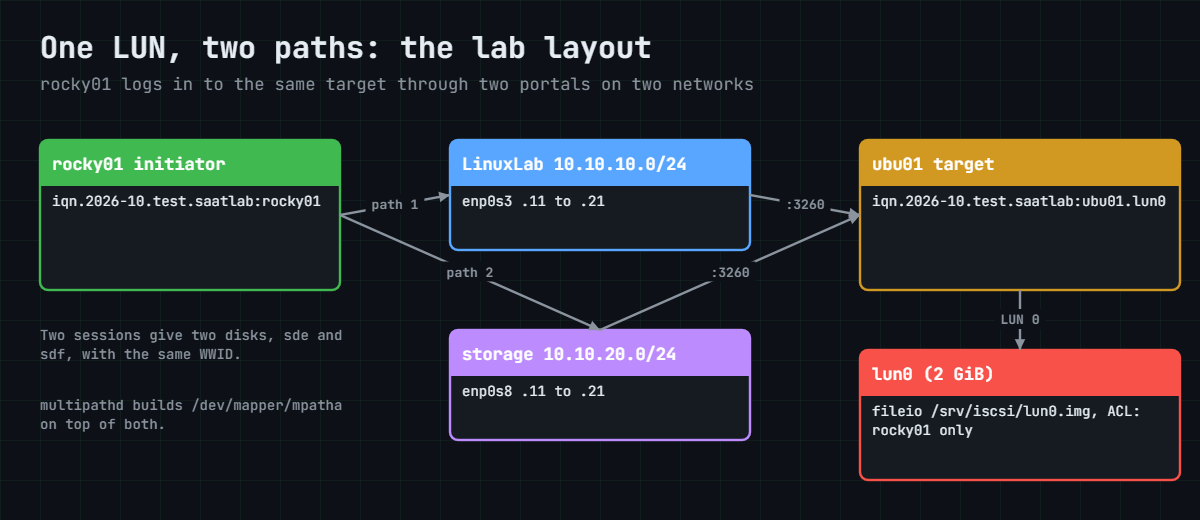
The target side is a chain of small objects, and each one points at the next. Build them in this order and the tree in targetcli reads top to bottom like the diagram below.

1A backstore holds the bytes

The fileio backstore is a file on ubu01’s disk that LIO presents as a block device. On a real array this is a volume in a pool; on a Linux target you can also use a whole disk or an LV with the block backstore, which is faster.

2A target, a LUN, an ACL and portals

The target gets an IQN and a portal group. The backstore becomes LUN 0 in that group, an ACL lets one initiator IQN in and maps LUN 0 to it, and portals say which IP addresses answer on port 3260. Two portals on two networks give rocky01 two independent paths to the same LUN.

Linux multipath lab layout: rocky01 reaches the ubu01 iSCSI target over two networks

3Discovery asks “what do you have?”

iscsiadm -m discovery -t sendtargets -p 10.10.10.21 connects to one portal and asks for its targets. LIO answers with every portal in the group, so one discovery finds both paths, and iscsiadm saves each as a node record under /var/lib/iscsi/nodes/.

4Login makes a session, and a session makes a disk

Logging in to both node records opens two TCP connections, one per portal, and each session becomes a SCSI host on rocky01. The kernel scans each host, finds LUN 0 and creates a disk: sde through 10.10.10.21 and sdf through 10.10.20.21. They are the same 2 GiB, the same WWID and the same data.

5multipath folds the paths into one device

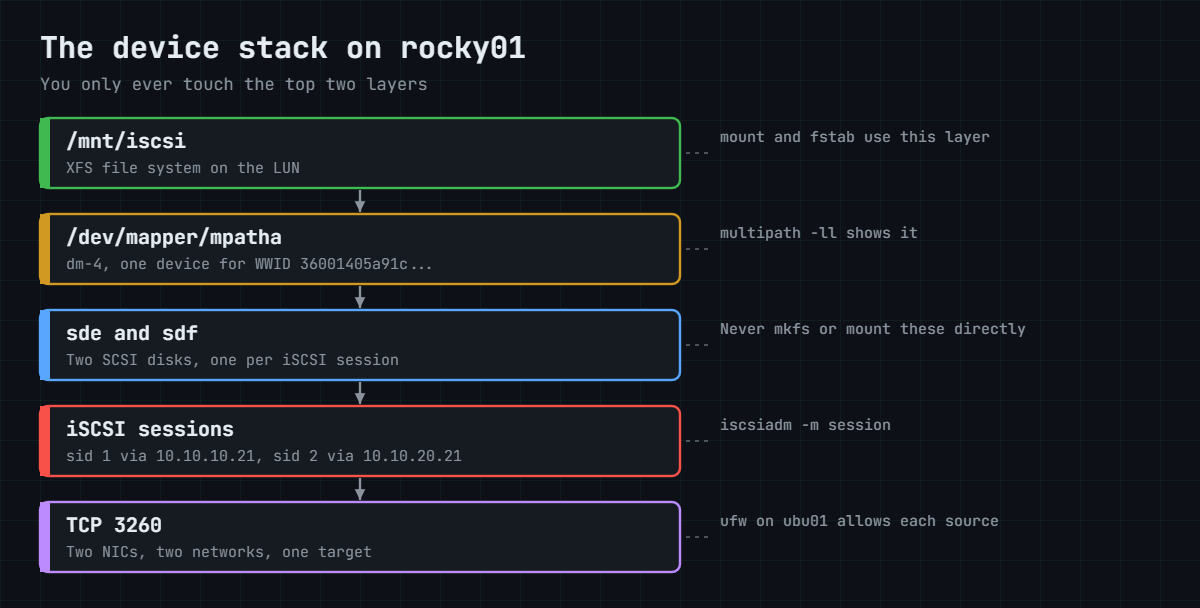
multipathd reads each new disk’s WWID. When two disks report the same WWID, it builds a device-mapper device on top of them, /dev/mapper/mpatha (dm-4 on rocky01), and claims sde and sdf so nothing else can open them. Your file system goes on mpatha, and multipathd moves I/O between the paths as they fail and return.

The stack below is what rocky01 looks like at the end of the lab, from the folder you use down to the two TCP connections.

Linux multipath device stack: XFS on mpatha on top of sde and sdf and two iSCSI sessions

With Fibre Channel nothing in that stack changes except the bottom layer. Each HBA port has a WWPN, the SAN team zones it on the FC switches so it can reach the array’s ports, and the storage team masks the LUN to a host group that lists your WWPNs (the same job as the ACL here). Linux shows each HBA under /sys/class/fc_host/hostN, and the WWPN is in its port_name file.

The SaatVedha courses on SAN storage, Fibre Channel fundamentals, Brocade FC switches and the IBM DS8000 cover the array and switch side, and the DS8000, Brocade and Cisco MDS tabs of the Command Builder build those commands.

Timing is where multipath earns its keep. For iSCSI, multipathd sets the session’s recovery timeout to its fast_io_fail_tmo (5 seconds), so a dead path is failed quickly instead of after iscsid’s default 120 seconds. For LIO targets the built-in table also sets no_path_retry 12: if every path is down, I/O is queued for 12 checker rounds (about a minute) before applications see errors, which rides out a short outage.

Two real paths must not share a single point of failure. Here they use different NICs and different VirtualBox networks; at work they use different switches or fabrics, and both portals on one network would give you two names for one road.

Hands-on lab: an iSCSI LUN on two paths, and a path failure you survive

Before you run any command, double-check it

Read every command twice before you press Enter. Check the target: the server name, the user, the disk or device name, the path and the sizes. These commands are for learning and were tested in our lab, not on your system. At work, run the read-only commands first, follow your change process, make sure a backup exists, and ask a second person to check anything that changes or deletes data. You run them at your own risk.

Step 1 runs on the laptop with both VMs shut down. Steps 2 to 4 set up the network and the target, and from step 5 on you work on rocky01. Remember that rocky01 already has three local 5 GB disks (sdb, sdc and sdd from Lessons 42 to 45), so the iSCSI disks arrive as sde and sdf; read your own names from the output.

1Add the storage network to both VMs

Shut down both VMs, then run this on the laptop (PowerShell or a terminal):

VBoxManage modifyvm rocky01 --nic2=intnet --intnet2=storage --nic-type2=82540EM
VBoxManage modifyvm ubu01 --nic2=intnet --intnet2=storage --nic-type2=82540EM
VBoxManage showvminfo rocky01 --machinereadable | grep -E '^(nic2|intnet2)='

You should see something like this:

nic2="intnet"
intnet2="storage"

An Internal Network is a private switch inside VirtualBox that only the VMs plugged into it can see, with no DHCP and no way out. On Windows, replace the grep with findstr /B "nic2= intnet2=". Adapter 2 shows up in Linux as enp0s8.

Start both VMs again.

✅ Checkpoint: showvminfo shows nic2 as intnet on the network “storage” for rocky01 (check ubu01 the same way).

2Give each VM an address on 10.10.20.0/24

On rocky01:

sudo nmcli connection add type ethernet con-name storage ifname enp0s8 ipv4.method manual ipv4.addresses 10.10.20.11/24 ipv6.method disabled
sudo nmcli connection up storage
ip -br addr show enp0s8

You should see something like this:

Connection 'storage' (6f0b3e2a-9c41-4d8e-b5a7-2e1c9d4f8a63) successfully added.
Connection successfully activated (D-Bus active path: /org/freedesktop/NetworkManager/ActiveConnection/6)
enp0s8           UP             10.10.20.11/24

If nmcli connection show also lists a “Wired connection 1” on enp0s8, delete it with sudo nmcli connection delete "Wired connection 1", as in Lesson 31. No gateway on this profile: the storage network is a dead end on purpose.

On ubu01, paste this whole block:

sudo tee /etc/netplan/60-storage.yaml >/dev/null <<'EOF'
network:
  version: 2
  ethernets:
    enp0s8:
      dhcp4: false
      addresses:
        - 10.10.20.21/24
EOF
sudo chmod 600 /etc/netplan/60-storage.yaml
sudo netplan apply
ip -br addr show enp0s8
enp0s8           UP             10.10.20.21/24 fe80::a00:27ff:fe5c:1e2a/64

Then test from rocky01:

ping -c 2 10.10.20.21
PING 10.10.20.21 (10.10.20.21) 56(84) bytes of data.
64 bytes from 10.10.20.21: icmp_seq=1 ttl=64 time=0.612 ms
64 bytes from 10.10.20.21: icmp_seq=2 ttl=64 time=0.498 ms

--- 10.10.20.21 ping statistics ---
2 packets transmitted, 2 received, 0% packet loss, time 1002ms
rtt min/avg/max/mdev = 0.498/0.555/0.612/0.057 ms

✅ Checkpoint: rocky01 reaches ubu01 on 10.10.20.21 through enp0s8.

3Build the target with targetcli

Paste this whole block on ubu01:

sudo apt install -y targetcli-fb
sudo mkdir -p /srv/iscsi
sudo targetcli /backstores/fileio create name=lun0 file_or_dev=/srv/iscsi/lun0.img size=2G
sudo targetcli /iscsi create iqn.2026-10.test.saatlab:ubu01.lun0
sudo targetcli /iscsi/iqn.2026-10.test.saatlab:ubu01.lun0/tpg1/luns create /backstores/fileio/lun0
sudo targetcli /iscsi/iqn.2026-10.test.saatlab:ubu01.lun0/tpg1/acls create iqn.2026-10.test.saatlab:rocky01
sudo targetcli /iscsi/iqn.2026-10.test.saatlab:ubu01.lun0/tpg1/portals delete 0.0.0.0 3260
sudo targetcli /iscsi/iqn.2026-10.test.saatlab:ubu01.lun0/tpg1/portals create 10.10.10.21 3260
sudo targetcli /iscsi/iqn.2026-10.test.saatlab:ubu01.lun0/tpg1/portals create 10.10.20.21 3260
sudo targetcli saveconfig

After the apt lines you should see something like this:

Created fileio lun0 with size 2147483648
Created target iqn.2026-10.test.saatlab:ubu01.lun0.
Created TPG 1.
Global pref auto_add_default_portal=true
Created default portal listening on all IPs (0.0.0.0), port 3260.
Created LUN 0.
Created Node ACL for iqn.2026-10.test.saatlab:rocky01
Created mapped LUN 0.
Deleted network portal 0.0.0.0:3260
Using default IP port 3260
Created network portal 10.10.10.21:3260.
Using default IP port 3260
Created network portal 10.10.20.21:3260.
Configuration saved to /etc/rtslib-fb-target/saveconfig.json

Each line builds one object from the diagram: the 2 GiB file (sparse, so it uses almost no space until rocky01 writes), the target and its portal group, LUN 0, the ACL (which picked up LUN 0 automatically), and two portals in place of the default one that listens on every address. Run as one-line commands like this, targetcli does not save on exit, so the last line matters.

✅ Checkpoint: The output ends with “Configuration saved to” and names both portals.

4Check the tree and open port 3260

Run this on ubu01:

sudo targetcli ls
sudo ufw allow from 10.10.10.11 to any port 3260 proto tcp
sudo ufw allow from 10.10.20.11 to any port 3260 proto tcp
sudo ufw status numbered

You should see something like this:

o- / ............................................................................. [...]
  o- backstores .................................................................. [...]
  | o- block ...................................................... [Storage Objects: 0]
  | o- fileio ..................................................... [Storage Objects: 1]
  | | o- lun0 ...................... [/srv/iscsi/lun0.img (2.0GiB) write-back activated]
  | |   o- alua ....................................................... [ALUA Groups: 1]
  | |     o- default_tg_pt_gp ........................... [ALUA state: Active/optimized]
  | o- pscsi ...................................................... [Storage Objects: 0]
  | o- ramdisk .................................................... [Storage Objects: 0]
  o- iscsi ................................................................ [Targets: 1]
  | o- iqn.2026-10.test.saatlab:ubu01.lun0 ................................... [TPGs: 1]
  |   o- tpg1 ................................................... [no-gen-acls, no-auth]
  |     o- acls .............................................................. [ACLs: 1]
  |     | o- iqn.2026-10.test.saatlab:rocky01 ......................... [Mapped LUNs: 1]
  |     |   o- mapped_lun0 ..................................... [lun0 fileio/lun0 (rw)]
  |     o- luns .............................................................. [LUNs: 1]
  |     | o- lun0 ............... [fileio/lun0 (/srv/iscsi/lun0.img) (default_tg_pt_gp)]
  |     o- portals ........................................................ [Portals: 2]
  |       o- 10.10.10.21:3260 ..................................................... [OK]
  |       o- 10.10.20.21:3260 ..................................................... [OK]
  o- loopback ............................................................. [Targets: 0]
  o- vhost ................................................................ [Targets: 0]
  o- xen-pvscsi ........................................................... [Targets: 0]
Rule added
Rule added
Status: active

     To                         Action      From
     --                         ------      ----
[ 1] OpenSSH                    ALLOW IN    Anywhere
[ 2] 514/tcp                    ALLOW IN    10.10.10.11
[ 3] 2049/tcp                   ALLOW IN    10.10.10.0/24
[ 4] 3260/tcp                   ALLOW IN    10.10.10.11
[ 5] 3260/tcp                   ALLOW IN    10.10.20.11
[ 6] OpenSSH (v6)               ALLOW IN    Anywhere (v6)

Read the tree from the top: one fileio object, one target, an ACL for rocky01 with one mapped LUN, and two portals marked OK. ufw allows 3260 only from rocky01’s two addresses, one rule per path, next to the NFS rule from Lesson 47.

✅ Checkpoint: targetcli ls shows ACLs: 1, LUNs: 1, Portals: 2, and ufw has two 3260/tcp rules.

5Name the initiator and discover the target

Run this on rocky01:

sudo dnf install -y iscsi-initiator-utils device-mapper-multipath
echo 'InitiatorName=iqn.2026-10.test.saatlab:rocky01' | sudo tee /etc/iscsi/initiatorname.iscsi
sudo systemctl restart iscsid
systemctl is-active iscsid
sudo iscsiadm -m discovery -t sendtargets -p 10.10.10.21

You should see something like this:

InitiatorName=iqn.2026-10.test.saatlab:rocky01
active
10.10.10.21:3260,1 iqn.2026-10.test.saatlab:ubu01.lun0
10.10.20.21:3260,1 iqn.2026-10.test.saatlab:ubu01.lun0

The package wrote a random IQN into initiatorname.iscsi; you replace it with the one the ACL expects, and iscsid only reads the file when it starts. Discovery through one portal returned both, so iscsiadm now has two node records for the same target.

✅ Checkpoint: Discovery lists the target on 10.10.10.21 and on 10.10.20.21.

6Log in on both paths

Run this on rocky01:

sudo iscsiadm -m node -T iqn.2026-10.test.saatlab:ubu01.lun0 --login
sudo iscsiadm -m session
lsblk -o NAME,SIZE,TYPE,TRAN,VENDOR,MODEL /dev/sde /dev/sdf
sudo /usr/lib/udev/scsi_id -g -u -d /dev/sde
sudo /usr/lib/udev/scsi_id -g -u -d /dev/sdf

You should see something like this:

Logging in to [iface: default, target: iqn.2026-10.test.saatlab:ubu01.lun0, portal: 10.10.10.21,3260] (multiple)
Logging in to [iface: default, target: iqn.2026-10.test.saatlab:ubu01.lun0, portal: 10.10.20.21,3260] (multiple)
Login to [iface: default, target: iqn.2026-10.test.saatlab:ubu01.lun0, portal: 10.10.10.21,3260] successful.
Login to [iface: default, target: iqn.2026-10.test.saatlab:ubu01.lun0, portal: 10.10.20.21,3260] successful.
tcp: [1] 10.10.10.21:3260,1 iqn.2026-10.test.saatlab:ubu01.lun0 (non-flash)
tcp: [2] 10.10.20.21:3260,1 iqn.2026-10.test.saatlab:ubu01.lun0 (non-flash)
NAME SIZE TYPE TRAN  VENDOR  MODEL
sde    2G disk iscsi LIO-ORG lun0
sdf    2G disk iscsi LIO-ORG lun0
36001405a91c4e2b7d3f84c6e5b0d2f17

Two sessions, two disks, and both report the same WWID: 3, then 6001405 (LIO’s vendor prefix), then the LUN’s serial. Right now nothing stops a program from writing to sde and another from writing to sdf, each thinking it owns a separate disk. That is why the next step comes before any mkfs.

✅ Checkpoint: sde and sdf are both 2G LIO-ORG lun0 disks and scsi_id prints the same WWID for both.
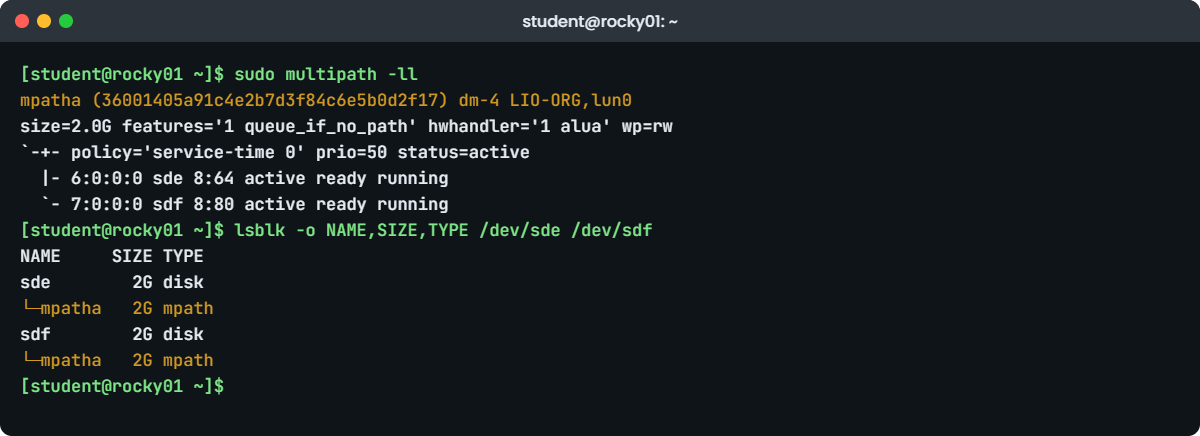
Linux multipath lab: multipath -ll showing mpatha with two active paths on rocky01
Example multipath -ll output on rocky01: one LUN, two iSCSI paths

7Turn on multipath

Run this on rocky01:

sudo mpathconf --enable --with_multipathd y
grep -v '^#' /etc/multipath.conf | grep -v '^$'
sudo multipath -ll

You should see something like this:

defaults {
	user_friendly_names yes
	find_multipaths yes
	enable_foreign "^$"
}
blacklist_exceptions {
        property "(SCSI_IDENT_|ID_WWN)"
}
mpatha (36001405a91c4e2b7d3f84c6e5b0d2f17) dm-4 LIO-ORG,lun0
size=2.0G features='1 queue_if_no_path' hwhandler='1 alua' wp=rw
`-+- policy='service-time 0' prio=50 status=active
  |- 6:0:0:0 sde 8:64 active ready running
  `- 7:0:0:0 sdf 8:80 active ready running

mpathconf wrote a small multipath.conf and started multipathd, which found two paths with one WWID and built mpatha on dm-4. Read the second line: hwhandler='1 alua' and queue_if_no_path come from the built-in settings for LIO-ORG. Both paths sit in one group with priority 50 (ALUA active/optimized), so I/O uses both.

The local disks sdb to sdd have one path each, and find_multipaths yes leaves them alone.

Now see how the pieces fit:

lsblk -o NAME,SIZE,TYPE /dev/sde /dev/sdf
grep -v '^#' /etc/multipath/bindings
NAME     SIZE TYPE
sde        2G disk
└─mpatha   2G mpath
sdf        2G disk
└─mpatha   2G mpath
mpatha 36001405a91c4e2b7d3f84c6e5b0d2f17

✅ Checkpoint: multipath -ll shows mpatha with sde and sdf both “active ready running”.

8Make a file system on the multipath device

Run this on rocky01:

sudo mkfs.xfs -q /dev/mapper/mpatha
sudo mkdir -p /mnt/iscsi
sudo mount /dev/mapper/mpatha /mnt/iscsi
echo "written while both paths were up" | sudo tee /mnt/iscsi/hello.txt >/dev/null
df -h /mnt/iscsi
cat /mnt/iscsi/hello.txt

You should see something like this:

Filesystem          Size  Used Avail Use% Mounted on
/dev/mapper/mpatha  2.0G   79M  1.9G   4% /mnt/iscsi
written while both paths were up

The file system lives on the LUN, and you reach it only through /dev/mapper/mpatha. For a permanent mount you would add /dev/mapper/mpatha /mnt/iscsi xfs _netdev,nofail 0 0 to fstab; this lab leaves it out so rocky01 boots cleanly when ubu01 is off.

✅ Checkpoint: df shows /dev/mapper/mpatha mounted on /mnt/iscsi.

9Pull one path while you write

Run this on rocky01:

sudo nmcli connection down storage
sleep 15
sudo multipath -ll

You should see something like this:

mpatha (36001405a91c4e2b7d3f84c6e5b0d2f17) dm-4 LIO-ORG,lun0
size=2.0G features='1 queue_if_no_path' hwhandler='1 alua' wp=rw
`-+- policy='service-time 0' prio=50 status=active
  |- 6:0:0:0 sde 8:64 active ready running
  `- 7:0:0:0 sdf 8:80 failed faulty running

The storage path is gone and multipathd marked sdf “failed faulty”. Now prove the disk still works, and read what the kernel said:

sudo dd if=/dev/zero of=/mnt/iscsi/test.bin bs=1M count=100 oflag=direct status=none
ls -lh /mnt/iscsi/test.bin
sudo journalctl -b --since "5 min ago" --no-pager | grep -E 'recovery timed out|Failing path|remaining active'
-rw-r--r--. 1 root root 100M Oct 27 12:31 /mnt/iscsi/test.bin
Oct 27 12:30:41 rocky01 kernel: session2: session recovery timed out after 5 secs
Oct 27 12:30:41 rocky01 kernel: device-mapper: multipath: 253:4: Failing path 8:80.
Oct 27 12:30:41 rocky01 multipathd[2391]: mpatha: remaining active paths: 1

Five seconds after the link dropped, the iSCSI session gave up recovering, device-mapper failed path 8:80 (sdf) and the 100 MB write went down sde. Bring the path back and give iscsid a few seconds to log in again:

sudo nmcli connection up storage
sleep 20
sudo multipath -ll

✅ Checkpoint: After the path returns, multipath -ll shows both sde and sdf “active ready running” again, and test.bin is 100M.

10Where FC WWPNs live

Run this on rocky01:

ls /sys/class/fc_host
cat /sys/class/iscsi_session/session*/targetname
cat /sys/class/iscsi_session/session1/initiatorname

You should see something like this:

ls: cannot access '/sys/class/fc_host': No such file or directory
iqn.2026-10.test.saatlab:ubu01.lun0
iqn.2026-10.test.saatlab:rocky01

VirtualBox has no Fibre Channel HBAs, so the fc_host class doesn’t exist on rocky01. The iSCSI sessions keep their names in the same kind of sysfs folder. On a real server with two FC ports, the storage team asks for the WWPNs, and you read them like this:

cat /sys/class/fc_host/host*/port_name
cat /sys/class/fc_host/host*/port_state

On a server with a dual-port FC HBA you’d see something like:

0x10000090fa8b2c4e
0x10000090fa8b2c4f
Online
Online

Give the WWPNs with the colons the storage team expects (10:00:00:90:fa:8b:2c:4e). After they zone and mask a new LUN, you scan for it as in Lesson 45 (echo "- - -" | sudo tee /sys/class/scsi_host/hostN/scan) and check multipath -ll before using it.

✅ Checkpoint: You can say which file holds a WWPN and what the storage team does with it.

11Leave it tidy

Run this on rocky01:

sudo umount /mnt/iscsi
sudo iscsiadm -m node -T iqn.2026-10.test.saatlab:ubu01.lun0 --logout
sudo iscsiadm -m node -T iqn.2026-10.test.saatlab:ubu01.lun0 -o update -n node.startup -v manual
sudo multipath -ll

You should see something like this (and nothing from multipath -ll):

Logging out of session [sid: 1, target: iqn.2026-10.test.saatlab:ubu01.lun0, portal: 10.10.10.21,3260]
Logging out of session [sid: 2, target: iqn.2026-10.test.saatlab:ubu01.lun0, portal: 10.10.20.21,3260]
Logout of [sid: 1, target: iqn.2026-10.test.saatlab:ubu01.lun0, portal: 10.10.10.21,3260] successful.
Logout of [sid: 2, target: iqn.2026-10.test.saatlab:ubu01.lun0, portal: 10.10.20.21,3260] successful.

The LUN keeps its XFS file system and files on ubu01. The node records stay on rocky01 but no longer log in at boot, so rocky01 starts normally when ubu01 is off. To use the disk again: sudo iscsiadm -m node -T iqn.2026-10.test.saatlab:ubu01.lun0 --login, then mount /dev/mapper/mpatha.

✅ Checkpoint: No iSCSI sessions are left (iscsiadm -m session says “No active sessions”) and multipath -ll prints nothing.

Break It, Then Fix It

Take a snapshot of both VMs (“before-l48-break”). Both failures are ones you’ll meet on real SAN hosts, usually during a migration when people are tired.

1A typo in the initiator name

On rocky01, change the name by one character, restart iscsid and log in:

sudo sed -i 's/rocky01$/rocky1/' /etc/iscsi/initiatorname.iscsi
cat /etc/iscsi/initiatorname.iscsi
sudo systemctl restart iscsid
sudo iscsiadm -m node -T iqn.2026-10.test.saatlab:ubu01.lun0 --login

You’ll get this:

InitiatorName=iqn.2026-10.test.saatlab:rocky1
Logging in to [iface: default, target: iqn.2026-10.test.saatlab:ubu01.lun0, portal: 10.10.10.21,3260] (multiple)
Logging in to [iface: default, target: iqn.2026-10.test.saatlab:ubu01.lun0, portal: 10.10.20.21,3260] (multiple)
iscsiadm: Could not login to [iface: default, target: iqn.2026-10.test.saatlab:ubu01.lun0, portal: 10.10.10.21,3260].
iscsiadm: initiator reported error (24 - iSCSI login failed due to authorization failure)
iscsiadm: Could not login to [iface: default, target: iqn.2026-10.test.saatlab:ubu01.lun0, portal: 10.10.20.21,3260].
iscsiadm: initiator reported error (24 - iSCSI login failed due to authorization failure)
iscsiadm: Could not log into all portals

And on ubu01, sudo dmesg | tail -n 4 says:

[ 5321.402118] iSCSI Initiator Node: iqn.2026-10.test.saatlab:rocky1 is not authorized to access iSCSI target portal group: 1.
[ 5321.402156] iSCSI Login negotiation failed.
[ 5321.409873] iSCSI Initiator Node: iqn.2026-10.test.saatlab:rocky1 is not authorized to access iSCSI target portal group: 1.
[ 5321.409901] iSCSI Login negotiation failed.

The network is fine (the TCP connection and discovery work) and the target exists; it is the ACL that said no. The target log names the IQN it received, which is the fastest way to settle a “your side or my side” argument. The same error appears when you edit the file correctly but forget to restart iscsid, because iscsid keeps the old name in memory.

Fix: put the right name back, restart iscsid, log in again:

sudo sed -i 's/rocky1$/rocky01/' /etc/iscsi/initiatorname.iscsi
sudo systemctl restart iscsid
sudo iscsiadm -m node -T iqn.2026-10.test.saatlab:ubu01.lun0 --login
sudo multipath -ll | head -n 1
mpatha (36001405a91c4e2b7d3f84c6e5b0d2f17) dm-4 LIO-ORG,lun0

✅ Checkpoint: Both logins succeed and mpatha is back with the same name, thanks to the bindings file.

2Format a path instead of the multipath device

lsblk shows sdf as a 2G disk with nothing mounted, so someone tries to use it. On rocky01:

sudo mkfs.xfs -f /dev/sdf
sudo mount /dev/sde /mnt/iscsi

You’ll get these errors:

mkfs.xfs: cannot open /dev/sdf: Device or resource busy
mount: /mnt/iscsi: /dev/sde already mounted or mount point busy.
       dmesg(1) may have more information after failed mount system call.

multipathd holds sde and sdf open for mpatha, so the kernel refuses anyone else. This error is the good outcome. If multipath had been off (before step 7, or on a server where someone disabled it), mkfs would have worked on one path, wiping the LUN under a live mpatha on another host, or leaving you with a file system that vanishes when that one path fails.

Fix: always work on the multipath device, and check what a disk belongs to before touching it:

lsblk -o NAME,TYPE,MOUNTPOINTS /dev/sdf
sudo mount /dev/mapper/mpatha /mnt/iscsi
cat /mnt/iscsi/hello.txt
NAME     TYPE  MOUNTPOINTS
sdf      disk
└─mpatha mpath /mnt/iscsi
written while both paths were up

✅ Checkpoint: Your data is intact on /dev/mapper/mpatha, and lsblk shows sdf as a member of mpatha.

Tidy up as at the end of the lab:

sudo umount /mnt/iscsi
sudo iscsiadm -m node -T iqn.2026-10.test.saatlab:ubu01.lun0 --logout

✅ Checkpoint: iscsiadm -m session reports “No active sessions” and initiatorname.iscsi says rocky01.

This happened at work

Two paths on paper, one in real life

My team lead tells this one from a dairy cooperative in Kuala Lumpur, where the ERP server takes milk collection readings from hundreds of village centres before dawn. The storage team had a planned firmware upgrade on SAN fabric A at 2 a.m., and every host had been checked: multipath -ll showed two healthy paths on all of them. At 2:12 the ERP database crashed with I/O errors on its data volume.

The first hour went on the switch. The storage team rolled the firmware back, the database team restarted the instance twice, and someone opened a priority case with the array vendor, who found nothing wrong. multipath still showed mpathb with one path failed and one path active, so the LUN was clearly reachable.

Then he ran findmnt /u02. The database file system was mounted from /dev/sdc, not from mpathb. Months earlier, during an urgent expansion, someone had created the file system and the fstab line while only fabric A was zoned, and used the disk name lsblk showed.

When fabric B was added later, multipath built mpathb on top, but the mount on sdc was already in place and stayed there. Fabric A going down took the only path that mount used.

They stopped the database, unmounted sdc, mounted the volume through mpathb with an alias set by WWID in multipath.conf, and the database recovered from its logs. The change list now has a host check before any fabric work: a small script that flags every mounted /dev/sd* device that also belongs to a multipath map.

Common mistakes and troubleshooting

MistakeWhat happensWhat to do instead
Making a file system or an fstab line on /dev/sdXThe volume depends on one path, and disk names can change at the next bootUse /dev/mapper/mpathX or an alias set by WWID
Changing initiatorname.iscsi without restarting iscsidLogin still fails with authorization failure (error 24)Run sudo systemctl restart iscsid after every change to the file
Forgetting targetcli saveconfig after one-line commandsThe target loses the change at the next reboot or service restartSave after each change, then check with targetcli ls
Leaving the default 0.0.0.0 portalThe target answers on every interface, including ones users can reachDelete it and create portals only on the storage networks
Two portals on the same network or switchmultipath shows two paths, but one failure takes bothPut the paths on separate NICs, switches or fabrics
Logging in before multipath is enabled and then formatting a diskA file system on one path, outside multipathEnable multipath first, or check multipath -ll before mkfs
Ignoring a “failed faulty” path for weeksYou find out it was dead during the next outageAlert on multipathd show paths or the number of active paths per map

Interview questions

Click a question to open it. Each one is written the way an interviewer would ask it. Under it you will see why they ask it and one way you could answer, in your own words.

Fresher level

1. What is the difference between an iSCSI target and an initiator, and what is an IQN?

Why they ask this: A basic check that you know which side is which and how iSCSI names things.

How you might answer: The target is the storage side that offers LUNs, and the initiator is the server that logs in and uses them. On Linux the initiator is iscsid with iscsiadm, and a Linux target is LIO, which you configure with targetcli.

An IQN is the iSCSI name of either side, in the form iqn.YYYY-MM.reversed-domain:label, for example iqn.2026-10.test.saatlab:rocky01. The target’s ACL lists the initiator IQNs that are allowed in.

2. A server shows the same 2 GB LUN as two disks, sde and sdf. Why, and which one do you use?

Why they ask this: They want to hear that each path creates a disk and that you never use the path devices directly.

How you might answer: Each path to the LUN, here each iSCSI session, gives the kernel its own SCSI disk, so two paths mean two disks with the same WWID. I’d confirm it with scsi_id -g -u -d on both.

I use neither. multipath combines them into /dev/mapper/mpatha, and that is the device for mkfs, mount and fstab, so I/O moves to the other path if one fails.

2–5 years experience

3. An initiator gets “authorization failure” when it logs in. Walk me through what you’d check on both sides.

Why they ask this: They’re checking a methodical approach across the server and the target, not guesses.

How you might answer: On the initiator I’d read /etc/iscsi/initiatorname.iscsi and make sure iscsid was restarted after it last changed, because iscsid only reads it at start. Discovery working tells me the network and port are fine.

On the target I’d look at the ACL list in targetcli and at dmesg, which names the IQN that tried to log in. In my experience it’s nearly always a typo or a server rebuilt with a new random IQN, and CHAP settings are the next thing to compare.

4. How do you find a Linux server’s FC WWPNs for the storage team, and what do they do with them?

Why they ask this: A very common request in SAN environments. They want the sysfs path and an understanding of zoning and masking.

How you might answer: I read /sys/class/fc_host/host*/port_name for each HBA port, and check port_state to see they’re Online. systool -c fc_host -v gives more detail if sysfsutils is installed.

The SAN team zones each WWPN with the array ports on its fabric, and the storage team adds the WWPNs to a host group so the LUN is masked to this server only. Then I rescan the SCSI hosts and check multipath -ll for the expected number of paths.

Senior level

5. The storage team will upgrade firmware on one SAN fabric tonight. What do you check on your Linux hosts before and after?

Why they ask this: Senior admins protect their servers during other teams’ changes. They want concrete checks and an understanding of what can still go wrong.

How you might answer: Before, I’d check that every map in multipath -ll has the expected number of active paths, split across both fabrics, and that nothing is mounted from a /dev/sd device that belongs to a map. I’d also look at no_path_retry and queue settings so I know what applications will see if paths drop.

During and after, I’d watch multipathd show paths and the journal for failing and reinstated paths, and confirm every path came back before the second fabric is touched. Any host with a single path gets fixed first or the change waits.

6. A multipath map had one path failed for weeks and nobody noticed. How would you stop that happening again?

Why they ask this: Design and operations thinking: monitoring, standards and ownership.

How you might answer: I’d add monitoring that counts active paths per map and alerts when it’s below the standard, from multipathd show maps or a small script in Zabbix (Lesson 61). Failed path messages in the journal should raise a ticket too.

I’d also standardise multipath.conf with aliases by WWID so maps have meaningful names, and add a post-build and post-change check that every LUN has the expected paths on both fabrics or both networks.

Quick quiz

Q1. Which TCP port does iSCSI use by default?

  1. 2049
  2. 3260
  3. 445
  4. 8443
Show answer

B — iSCSI targets listen on TCP 3260 by default; that is the port you open in ufw or firewalld.

Q2. Discovery through 10.10.10.21 returned two portals. Why?

  1. iscsiadm guessed the second one
  2. The target reports every portal in its portal group
  3. ubu01 has two targets
  4. multipath added it
Show answer

B — A SendTargets reply lists all portals of the target portal group, so one discovery finds both paths.

Q3. What tells multipath that sde and sdf are the same LUN?

  1. They have the same size
  2. They have the same WWID
  3. They were found at the same time
  4. They have the same /dev name
Show answer

B — multipath groups paths by WWID, the unique ID the LUN reports on every path.

Q4. Login fails with “authorization failure” right after you edited initiatorname.iscsi correctly. What did you forget?

  1. saveconfig on the target
  2. To restart iscsid
  3. To run mpathconf
  4. To open port 2049
Show answer

B — iscsid reads the initiator name when it starts, so it still presents the old one.

Q5. Which device should go in fstab for a multipathed LUN?

  1. /dev/sde
  2. /dev/sdf
  3. /dev/mapper/mpatha with _netdev
  4. /dev/dm-4
Show answer

C — The mpath device (or its alias) survives a path failure and stable naming; dm-N numbers and sdX names can change.

Quick recap

  • Linux multipath turns several paths to one LUN (one disk per path) into one device, /dev/mapper/mpathX, grouped by WWID.
  • An iSCSI target is a chain: backstore, target IQN with a portal group, LUN, ACL for the initiator IQN, and portals. Save it with targetcli saveconfig.
  • On the initiator: set the IQN in /etc/iscsi/initiatorname.iscsi, restart iscsid, discover with iscsiadm -m discovery -t st, log in with -m node --login.
  • mpathconf --enable --with_multipathd y and multipath -ll set up and show the maps; a pulled path shows as “failed faulty” while I/O carries on.
  • Fibre Channel works the same on Linux; read HBA WWPNs from /sys/class/fc_host/host*/port_name for zoning and masking.

Next lesson

Lesson 49: Kernel patching → You’ll update the kernel on Rocky and Ubuntu, read GRUB’s list with grubby, check whether a reboot is needed, boot the previous kernel on purpose and see where live patching fits.

Further reading: Linux multipath

Want to go deeper into Linux multipath? See the multipath-tools project (multipath.conf and multipathd documentation), the open-iscsi README, targetcli-fb, Red Hat’s RHEL 10 documentation on storage devices and device mapper multipath, and the kernel SCSI documentation. You can also see the full plan for this course on the Linux Administration course page.

Scroll to Top

This website uses cookies

We use a few cookies to keep this site working. If you allow it, we also use Google Analytics to count visits so we can improve our lessons. You can accept all, deny the optional ones, or choose what to allow.