Users and groups: useradd, passwd, chage and the account files

Linux user management is the everyday work of creating accounts, putting them in the right groups, setting password rules, locking people out when they leave and creating service accounts that programs run as. It sounds like clerical work, but every permission on the server is checked against a user and a group, so a wrong UID or a missing group shows up later as “permission denied” or, worse, as access somebody shouldn’t have.

In this lesson you’ll create the users the rest of the course depends on (priya, arjun, the webteam group and the appsvc service account) and read what each command writes into /etc/passwd, /etc/shadow and /etc/group. You’ll also see where Rocky Linux and Ubuntu behave differently, because that difference catches people on their first week.

Where this lesson fits

Lesson 15 of 82 in Linux Administration · Phase 1: The origins and OS architecture · Before this: Lesson 14, text processing · Next: Lesson 16, sudo and root access

TimeYou needBy the end you can
About 60 minutesrocky01 from Lesson 2, logged in as student (ubu01 for the Ubuntu comparison)Create users, groups and a service account, read the three account files field by field, set password ageing, and lock an account safely

What it is, in one line

Linux user management means controlling who can log in, which groups they belong to and how their passwords age, through a few commands that edit /etc/passwd, /etc/shadow and /etc/group.

In Simple Words

The register at the society gate

Most housing societies in India have a register at the gate. Every family has a flat number, every resident’s name is written against it, and there are separate lists for the gym members and the parking committee. The watchman doesn’t care about your face, he checks the flat number in the register.

The maid and the milkman get a pass too, but theirs only opens the service gate and can’t be used to enter the clubhouse. When a tenant moves out, the secretary strikes the name off, and if the flat number is given to a new family before the old tenant’s parking sticker is taken back, there’s trouble.

Linux works the same way: the flat number is the UID, the committees are groups and the milkman’s pass is a service account with no login shell.

Engineer's View

What the system actually stores

The kernel knows users only as numbers. A user ID (UID) and a primary group ID (GID) are stamped on every process and every file, and names are looked up in three text files when a human needs to read them. That’s why a file whose owner was deleted shows a bare number in ls -l.

FileWho can read itOne line looks likeFields
/etc/passwdEveryone (mode 644)priya:x:1001:1001:Priya Nair:/home/priya:/bin/bashname, x (password is in shadow), UID, primary GID, comment (GECOS), home, login shell
/etc/shadowroot onlypriya:$y$j9T$...:20753:0:99999:7:::name, password hash, last change (days since 1 Jan 1970), min days, max days, warn days, inactive days, account expiry, reserved
/etc/groupEveryonewebteam:x:2001:priya,arjungroup name, x, GID, members who have it as a supplementary group
/etc/gshadowroot onlywebteam:!::priya,arjungroup password (rarely used), group admins, members

Every user has one primary group (the GID in passwd, normally a private group with the same name) and any number of supplementary groups (listed in /etc/group). On both distributions UIDs from 1000 up are for people and lower numbers are for the system, but the details differ:

Rocky Linux 10Ubuntu Server 26.04
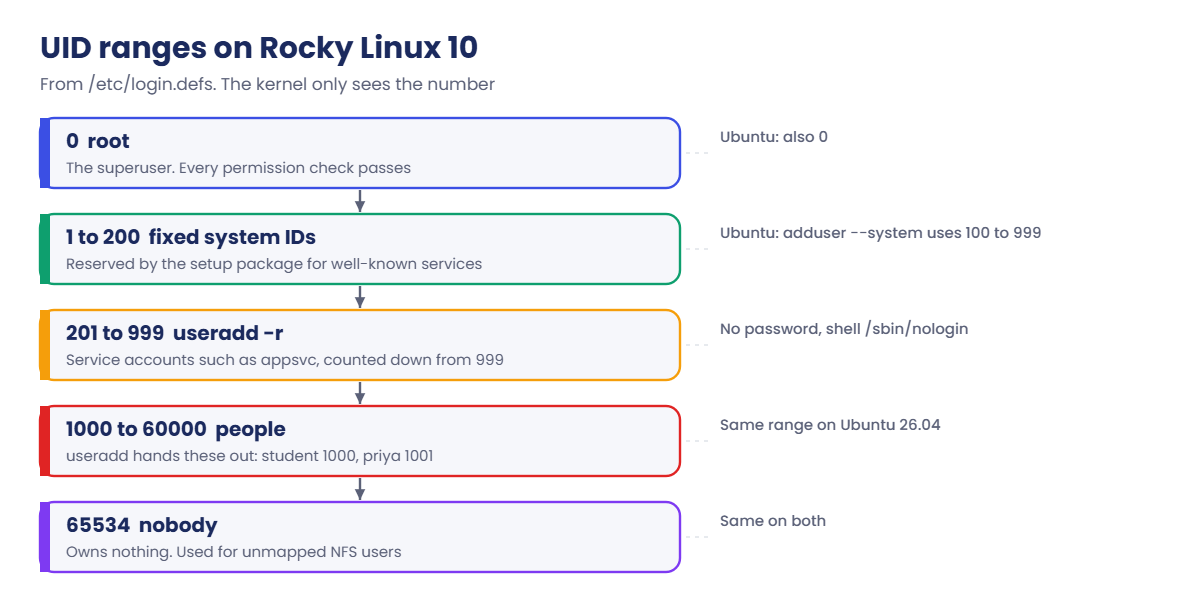
Human UIDs (/etc/login.defs)1000 to 600001000 to 60000
System UIDs for useradd -r201 to 999 (0 to 200 are fixed IDs reserved by the setup package)up to 999 (adduser uses 100 to 999)
useradd priya with no optionsCreates /home/priya (mode 700), shell /bin/bashNo home directory, shell /bin/sh
Friendly front endnone, use useraddadduser (asks for a password, creates home, shell /bin/bash, home mode 750)
Admin group for sudowheel (GID 10)sudo (GID 27)
Password hash in /etc/shadowset by the PAM config (SHA-512 $6$ or yescrypt $y$)yescrypt $y$

Because the defaults differ, write useradd -m -s /bin/bash in scripts and runbooks. It does the same thing on both, and nobody has to remember which distribution they’re on.

How it works, step by step

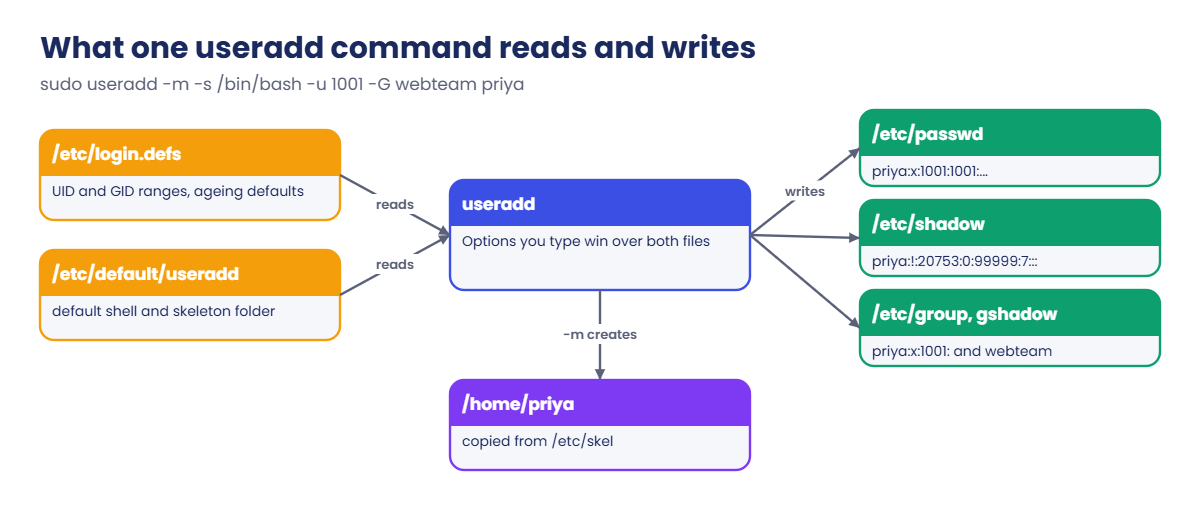
When you run useradd, it reads its defaults, picks numbers, writes four files and builds a home folder. The diagram below follows one command from start to finish.

1useradd reads the rules

It looks at /etc/login.defs for the UID and GID ranges, the password ageing defaults and whether to create a home, and at /etc/default/useradd for the default shell and skeleton folder. Any option you type wins over both files.

2It picks a UID and a group

Without -u it takes the next free UID above the highest one in use, inside UID_MIN and UID_MAX. With USERGROUPS_ENAB set (the default on both), it also creates a private group with the same name and number.

Linux user management: what useradd reads and writes

3It writes the account files

A line goes into /etc/passwd and /etc/shadow (with ! as the password, which means “no password yet, can’t log in with one”), and lines into /etc/group and /etc/gshadow. The tools lock these files while they write, which is why you use them and not a text editor. If you must edit by hand, use vipw and vigr.

4It builds the home folder

With -m (or CREATE_HOME yes on Rocky), it copies everything from /etc/skel into the new home, so every user starts with the same .bashrc and .bash_profile.

5You set the password and the rules

passwd stores a hash in /etc/shadow, chage sets how long it lasts, and usermod changes groups, shell or lock state later. userdel -r removes the account and its home, but not files the user owned elsewhere on the disk.

The UID number decides what kind of account it is. The picture below shows the ranges on Rocky Linux 10 and what lives in each one.

Linux user management: UID ranges on Rocky Linux 10

Group changes reach a user only at the next login, because the group list is copied into the login session when it starts. If priya is already logged in when you add her to webteam, she needs to log out and in again, or start a new shell with newgrp webteam for a quick test.

In companies with more than a handful of servers, people usually don’t get local accounts at all. Their users and groups come from Active Directory or FreeIPA through SSSD (Lesson 54), and local accounts are kept for service users and an emergency admin. The commands in this lesson still matter, because the same files, ranges and group rules apply underneath.

Hands-on lab: create the course users, groups and a service account

Before you run any command, double-check it

Read every command twice before you press Enter. Check the target: the server name, the user, the disk or device name, the path and the sizes. These commands are for learning and were tested in our lab, not on your system. At work, run the read-only commands first, follow your change process, make sure a backup exists, and ask a second person to check anything that changes or deletes data. You run them at your own risk.

Do this lab on rocky01 as student, who has sudo through the wheel group. Later lessons use these exact names and numbers (Lesson 16 gives webteam sudo rights, Lessons 17 to 19 build a shared folder for it), so type them as shown. Step 9 repeats the important part on ubu01.

1Look at your own account first

Run this:

id student
getent passwd student
getent group wheel

You should see something like this:

uid=1000(student) gid=1000(student) groups=1000(student),10(wheel)
student:x:1000:1000:student:/home/student:/bin/bash
wheel:x:10:student

id shows the numbers the kernel uses. getent reads the account databases the same way the system does, so it also finds users that come from a directory such as AD, which a plain grep /etc/passwd would miss. The installer put student in wheel because you ticked “Make this user administrator”.

✅ Checkpoint: student has UID 1000 and is a member of wheel.

2Read the defaults useradd will use

Run this:

grep -E '^(SYS_)?(UID|GID)_(MIN|MAX)' /etc/login.defs
useradd -D

You should see something like this:

UID_MIN                  1000
UID_MAX                 60000
SYS_UID_MIN               201
SYS_UID_MAX               999
GID_MIN                  1000
GID_MAX                 60000
SYS_GID_MIN               201
SYS_GID_MAX               999
GROUP=100
HOME=/home
INACTIVE=-1
EXPIRE=
SHELL=/bin/bash
SKEL=/etc/skel
CREATE_MAIL_SPOOL=yes
LOG_INIT=yes

People get 1000 to 60000 and useradd -r picks system accounts from 201 to 999, counting down from the top. useradd -D shows the rest of the defaults, including the bash shell. On ubu01 the SYS_ lines are commented out (the built-in defaults apply) and useradd -D says SHELL=/bin/sh.

✅ Checkpoint: You can name the first UID a new human user will get on rocky01.

3Create the webteam group with a fixed GID

Run this:

sudo groupadd -g 2001 webteam
getent group webteam

You should see this:

webteam:x:2001:

A fixed GID matters as soon as more than one server shares files, for example over NFS in Lesson 47, because the number travels with the file and must mean the same group everywhere. 2001 sits safely above the range useradd hands out for private groups on a small lab.

✅ Checkpoint: getent shows webteam with GID 2001 and no members yet.
Linux user management lab: priya, arjun and webteam on rocky01
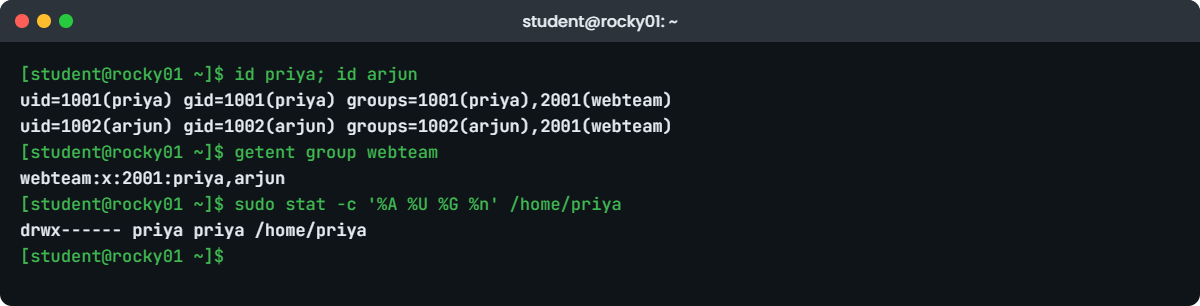
Example output from rocky01: the lab users and the webteam group

4Create priya and arjun

Run this:

sudo useradd -m -s /bin/bash -u 1001 -c "Priya Nair" -G webteam priya
sudo useradd -m -s /bin/bash -u 1002 -c "Arjun Rao" -G webteam arjun
id priya; id arjun
getent group webteam
sudo stat -c '%A %U %G %n' /home/priya

You should see something like this:

uid=1001(priya) gid=1001(priya) groups=1001(priya),2001(webteam)
uid=1002(arjun) gid=1002(arjun) groups=1002(arjun),2001(webteam)
webteam:x:2001:priya,arjun
drwx------ priya priya /home/priya

-m makes the home folder, -s sets the shell, -u fixes the UID, -c is the full name and -G adds supplementary groups. Each user also got a private primary group with the same number. Rocky makes home folders mode 700 (only the owner gets in), while on ubu01 the same folder is drwxr-x--- (mode 750).

✅ Checkpoint: priya is UID 1001, arjun is UID 1002 and both appear on the webteam line.

5Set a password and read /etc/shadow

Run this, and type a password for priya twice when asked:

sudo passwd priya
sudo grep -E '^(priya|arjun):' /etc/shadow | awk -F: '{print $1, substr($2,1,4) "...", $3, $4, $5, $6}'

You should see something like this:

New password:
Retype new password:
passwd: password updated successfully
priya $6$r... 20753 0 99999 7
arjun !... 20753 0 99999 7

The awk from Lesson 14 hides the hash and prints the useful fields. 20753 is the date of the last change counted in days since 1 January 1970 (27 October 2026), then come the minimum days (0), maximum days (99999, never expires) and warning days (7). arjun still has !, so he can’t log in with a password yet. The first characters of the hash name the algorithm: $6$ is SHA-512 and $y$ is yescrypt, which ubu01 uses.

Rocky Linux and RHEL 10 take passwd from the same shadow-utils package as Ubuntu, so the messages match. On RHEL 9 and older, passwd was a separate package and says “all authentication tokens updated successfully” instead.

✅ Checkpoint: priya has a hash in field 2 and arjun still shows !.

6Give arjun a password policy

Run this:

sudo passwd arjun
sudo chage -M 90 -m 1 -W 14 arjun
sudo chage -d 0 arjun
sudo chage -l arjun

You should see this (after the passwd prompts):

Last password change					: password must be changed
Password expires					: password must be changed
Password inactive					: password must be changed
Account expires						: never
Minimum number of days between password change		: 1
Maximum number of days between password change		: 90
Number of days of warning before password expires	: 14

-M 90 makes the password last 90 days, -m 1 stops him changing it again within a day (so he can’t cycle back to an old one), and -W 14 warns him two weeks ahead. -d 0 sets the last change to day zero, which forces a new password at his next login. That’s how you hand over a temporary password safely.

✅ Checkpoint: chage -l shows 1, 90 and 14, and “password must be changed”.

7Lock an account and open it again

Run this:

sudo usermod -L priya
sudo passwd -S priya
sudo usermod -U priya
sudo passwd -S priya

You should see something like this:

priya L 2026-10-27 0 99999 7 -1
priya P 2026-10-27 0 99999 7 -1

-L puts a ! in front of the hash so no password can match, and passwd -S shows L for locked or P for a usable password. A locked password doesn’t stop SSH key logins, so when someone leaves, also expire the account with sudo chage -E 0 priya (or set the shell to /sbin/nologin), then remove keys and sudo rights.

✅ Checkpoint: passwd -S showed L, then P again after usermod -U.

8Create the appsvc service account

Run this:

sudo useradd -r -s /sbin/nologin -c "SaatShop app service" appsvc
getent passwd appsvc
sudo su - appsvc

You should see something like this:

appsvc:x:991:991:SaatShop app service:/home/appsvc:/sbin/nologin
su: warning: cannot change directory to /home/appsvc: No such file or directory
This account is currently not available.

-r takes a UID from the system range (yours may be a little different), creates no home folder (hence the warning) and sets no password ageing. The nologin shell prints that message and exits, so even someone with the password, or root using su, can’t get an interactive shell as appsvc. A service started by systemd as User=appsvc still runs fine, which you’ll do in Lesson 27.

✅ Checkpoint: appsvc has a UID below 1000 and su refuses to give a shell.

9Do the same on ubu01, and meet adduser

On ubu01, run this:

sudo groupadd -g 2001 webteam
sudo useradd -m -s /bin/bash -u 1001 -c "Priya Nair" -G webteam priya
sudo useradd -m -s /bin/bash -u 1002 -c "Arjun Rao" -G webteam arjun
sudo useradd -r -s /usr/sbin/nologin -c "SaatShop app service" appsvc
getent group webteam sudo

You should see something like this:

webteam:x:2001:priya,arjun
sudo:x:27:student

The same commands work because you named every option. Ubuntu’s admin group is sudo, not wheel. Ubuntu also ships adduser, a friendlier Perl wrapper that asks for a password and the full name, creates a home with mode 750 and sets bash, so sudo adduser kiran is one interactive step.

Use it by hand if you like, but keep useradd with explicit options in scripts, because adduser doesn’t exist on Rocky.

✅ Checkpoint: On ubu01, webteam has GID 2001 with priya and arjun, and priya and arjun have the same UIDs as on rocky01.

Break It, Then Fix It

Take a VirtualBox snapshot of rocky01 first (Machine, Take Snapshot, name it “before-l15-break”). These are the account mistakes that cause real tickets.

1Forget -a in usermod -G

Add priya to the wheel group the wrong way:

sudo usermod -G wheel priya
id priya

You’ll get:

uid=1001(priya) gid=1001(priya) groups=1001(priya),10(wheel)

No error, but webteam has gone. -G on its own replaces the whole supplementary group list with what you typed. On a real server this is how someone loses access to the app folder on a Friday evening, and nobody connects it to the “small” change made an hour earlier.

Fix: set the list back, and from now on always use -aG (append):

sudo usermod -G webteam priya
id priya
uid=1001(priya) gid=1001(priya) groups=1001(priya),2001(webteam)

priya should not be in wheel in this lab, so the fix removes it as well. To add a group without touching the others, the form is sudo usermod -aG wheel priya, and sudo gpasswd -d priya wheel removes a single group.

✅ Checkpoint: priya is back to priya and webteam only.

2Reuse a UID or mistype a group

Run this:

sudo useradd -m -u 1001 kiran
sudo usermod -aG webtem arjun

You’ll get these errors:

useradd: UID 1001 is not unique
usermod: group 'webtem' does not exist

useradd refuses a UID that’s taken, which protects you here, but the bigger danger is the next step: a UID freed by userdel and later given to someone new. They silently inherit every file the old user left behind.

Fix: check before you pick a number, and spell the group from getent:

getent passwd 1001
getent group webteam

✅ Checkpoint: getent passwd 1001 shows priya, so you know 1001 is taken.

3Delete a user who is still running something

Start a process as arjun, then try to delete him:

sudo -u arjun sleep 600 &
sudo userdel -r arjun

You’ll get something like this:

userdel: user arjun is currently used by process 2817

userdel won’t remove an account with live processes, because those processes would keep running under a UID that no longer has a name. Don’t reach for -f. In real life you lock the account, stop the processes, look for files outside the home, and only then delete.

Fix: stop the process and keep arjun (later lessons need him):

sudo pkill -u arjun
id arjun
sudo find / -xdev -uid 1002 -not -path '/home/arjun*' 2>/dev/null

You should see something like this:

uid=1002(arjun) gid=1002(arjun) groups=1002(arjun),2001(webteam)
/var/spool/mail/arjun

The only file arjun owns outside his home is his mail spool, which Rocky’s useradd creates and userdel -r removes with the home. Anything else in that list (a report in /srv, a script in /opt) would stay behind with a bare UID, so this is the check you run before a real deletion.

✅ Checkpoint: arjun still exists, has no running processes and owns nothing outside his home and mail spool.

4On ubu01: useradd without -m

On ubu01, run this:

sudo useradd tempuser
getent passwd tempuser
sudo su - tempuser -c pwd

You’ll get:

tempuser:x:1003:1003::/home/tempuser:/bin/sh
su: warning: cannot change directory to /home/tempuser: No such file or directory
/home/student

On Ubuntu, plain useradd writes a home path into /etc/passwd but never creates it, and the shell is /bin/sh with no history or tab completion worth having. su leaves the user in whatever folder you were in, and an SSH login lands in / with the same complaint. The same command on rocky01 would have worked, which is exactly why mixed teams get bitten.

Fix: remove it and create users with explicit options:

sudo userdel tempuser
sudo useradd -m -s /bin/bash tempuser
sudo su - tempuser -c pwd
sudo userdel -r tempuser

You should see:

/home/tempuser
userdel: tempuser mail spool (/var/mail/tempuser) not found

The userdel message is harmless: Ubuntu doesn’t create mail spools for new users, so there was nothing to remove.

✅ Checkpoint: With -m and -s the user lands in /home/tempuser, and tempuser is removed again at the end.

This happened at work

The new joiner who could read the old payroll file

My team lead tells this one whenever someone asks why we never delete accounts in a hurry. She was running Linux operations for a ride-hailing company in Kochi, and on a Monday in March a new data analyst raised a ticket: she could open a folder of driver payout reports that her manager said she shouldn’t even know about.

The first guess was a bad permission on the folder, so someone ran chmod on it, but the files were already rw------- and owned by her. That made no sense until ls -ln showed the owner as UID 1007. The analyst who had left in January had been UID 1007, his account was removed with userdel -r, which cleaned his home but not the reports he had kept in /srv/reports, and the next useradd handed out the lowest free number above the rest, which happened to be 1007 again.

The fix that day was quick: the files went to the finance team’s service account with chown. The process change took longer. Leavers are now locked with usermod -L and chage -E 0 on day one, their files are found with find / -xdev -uid and handed over, and the account is deleted only after 90 days.

UIDs are now assigned from a central directory and never reused, so a number always means one person.

Common mistakes and troubleshooting

MistakeWhat happensWhat to do instead
usermod -G group user without -aThe user is removed from every other supplementary groupUse usermod -aG, and check with id after
Plain useradd name on UbuntuNo home folder and /bin/sh as the shellUse useradd -m -s /bin/bash on every distribution
Editing /etc/passwd or /etc/shadow with vim directlyA typo or a clash with another tool can break every loginUse the commands, or vipw and vigr which lock the files
Deleting a leaver straight awayFiles outside the home keep a bare UID that the next new user may inheritLock first, find and hand over files, delete later, never reuse UIDs
Only locking the password when someone leavesSSH keys and running cron jobs still workAlso chage -E 0, remove keys and sudo rules, check crontab
Expecting group changes to work at onceThe logged-in user still gets “permission denied”Ask them to log out and in, or test with newgrp or sudo -u user id
Giving a service account a real shell and passwordAnyone who learns the password gets an interactive loginUse useradd -r -s /sbin/nologin and no password

Interview questions

Click a question to open it. Each one is written the way an interviewer would ask it. Under it you will see why they ask it and one way you could answer, in your own words.

Fresher level

1. What is stored in /etc/passwd and what is stored in /etc/shadow, and why are they separate?

Why they ask this: They want to see that you know the fields and the security reason for the split, not only the file names.

How you might answer: /etc/passwd has the user name, UID, primary GID, comment, home folder and shell, and everyone can read it because programs like ls need to turn UIDs into names. The password hash and the ageing fields live in /etc/shadow, which only root can read.

Long ago the hash was in passwd, and anyone could copy it and try to crack it offline, which is why it moved out.

2. A new developer joins the web team. Walk me through creating their account on a Rocky server.

Why they ask this: This checks whether you know the full routine (groups, password handover, policy), not only one command.

How you might answer: I’d check the name and UID are free with getent passwd, then run useradd -m -s /bin/bash -c "Full Name" -G webteam username. I’d set a temporary password with passwd and run chage -d 0 so they must change it at first login.

Then I’d confirm with id username that webteam is listed, and if they need admin rights I’d add a specific sudo rule rather than putting them in wheel.

2–5 years experience

3. Someone ran usermod -G docker on a user and now that user can’t reach the app folder. What happened and how do you fix it?

Why they ask this: A very common real incident. They want to hear that you know -G replaces the list and how to find the missing groups.

How you might answer: Without -a, usermod -G replaces all supplementary groups, so the user lost whatever group owns the app folder. I’d check the folder’s group with ls -ld, compare with id user, and look at a backup of /etc/group or another server to see the old membership.

Then I’d add them back with usermod -aG for each group and ask them to log in again so the session picks it up.

4. How do you offboard an engineer who leaves today, on servers with local accounts?

Why they ask this: They’re checking that you think beyond the password: keys, cron, sudo and owned files.

How you might answer: On day one I’d lock the password with usermod -L, expire the account with chage -E 0, remove their authorized_keys and sudo rules, and check crontab -l -u and running processes. That stops access without losing anything.

Then I’d find their files with find / -xdev -uid, hand them over to the team, and delete the account after the agreed retention period. I wouldn’t let that UID be reused.

Senior level

5. Your company has 300 Linux servers with local accounts and UIDs that don’t match across servers. What problems do you expect and what would you change?

Why they ask this: This is about scale and design. They want to hear about NFS ownership, audits and central identity.

How you might answer: The first problem is shared storage: on NFS the UID travels with the file, so UID 1005 can be priya on one server and someone else on another. Offboarding also becomes a hunt across 300 machines, and audits can’t say who had access where.

I’d move people to a central directory, AD or FreeIPA through SSSD, with UIDs coming from there, and keep only service accounts and one emergency admin local, managed by Ansible so they’re identical everywhere.

6. Why do system accounts have UIDs below 1000, and does the number itself protect anything?

Why they ask this: A deeper check: they want to see you separate convention from security.

How you might answer: The range is a convention from /etc/login.defs. Tools use it to hide system accounts from login screens and to keep packages from clashing with people, and on Rocky the low IDs up to 200 are fixed for well-known services.

The number gives no protection by itself. What makes appsvc safe is no password, a nologin shell, no sudo rights and file permissions that give it only what the service needs.

Quick quiz

Q1. Which file holds the password hash?

  1. /etc/passwd
  2. /etc/shadow
  3. /etc/group
  4. /etc/login.defs
Show answer

B — /etc/shadow is readable only by root and holds the hash plus the ageing fields.

Q2. What does usermod -aG webteam arjun do?

  1. Replaces arjun’s groups with webteam
  2. Adds webteam to arjun’s supplementary groups and keeps the others
  3. Changes arjun’s primary group
  4. Creates the webteam group
Show answer

B — -a appends. Without it, -G replaces the whole list.

Q3. On Ubuntu 26.04, what does plain useradd kiran give you?

  1. A home folder and bash
  2. No home folder and /bin/sh
  3. A system account
  4. An error
Show answer

B — Ubuntu’s useradd only creates a home with -m, and its default shell is /bin/sh.

Q4. Which command forces arjun to choose a new password at his next login?

  1. passwd -l arjun
  2. chage -M 0 arjun
  3. chage -d 0 arjun
  4. usermod -U arjun
Show answer

C — Setting the last change to day 0 marks the password as expired straight away.

Q5. Which group gives admin rights through sudo by default on Rocky Linux and on Ubuntu?

  1. root on both
  2. wheel on Rocky, sudo on Ubuntu
  3. sudo on Rocky, wheel on Ubuntu
  4. admin on both
Show answer

B — Rocky’s sudoers allows %wheel and Ubuntu’s allows %sudo. Lesson 16 shows the rules.

Quick recap

  • Linux user management comes down to three files: /etc/passwd (who), /etc/shadow (password and ageing), /etc/group (memberships).
  • People get UIDs from 1000, system accounts below 1000. Rocky’s useradd -r uses 201 to 999.
  • Write useradd -m -s /bin/bash everywhere, because Rocky and Ubuntu have different defaults. On Ubuntu, adduser is the interactive alternative.
  • Use usermod -aG, never plain -G, and remember group changes need a new login.
  • chage sets password ageing, usermod -L and chage -E 0 lock people out, and service accounts get -r -s /sbin/nologin.
  • The lab created priya (1001), arjun (1002), webteam (2001) and appsvc on rocky01 and ubu01.

Next lesson

Lesson 16: sudo and root access → You’ll give webteam a narrow sudo rule in /etc/sudoers.d/webteam, check it with visudo, read the sudo logs and see what changes with sudo-rs on Ubuntu 26.04.

Further reading: Linux user management

Want to go deeper into Linux user management? Read Red Hat’s RHEL 10 documentation on managing users and groups, the Ubuntu Server guide on user management, and the man pages for useradd, shadow, chage and login.defs. You can also see the full plan for this course on the Linux Administration course page.

Scroll to Top

This website uses cookies

We use a few cookies to keep this site working. If you allow it, we also use Google Analytics to count visits so we can improve our lessons. You can accept all, deny the optional ones, or choose what to allow.