Linus Torvalds and the Linux kernel

This lesson covers Linux kernel history, from a student’s hobby project in Helsinki in 1991 to the kernel inside almost every server, phone and cloud VM you’ll touch at work. You’ll see why Linus Torvalds wrote it, how it met the GNU tools from Lesson 5, and why one licence decision in 1992 made it possible for thousands of companies to work on the same code.

Then we get practical. Kernel version strings look like noise until someone explains them, and after this lesson you’ll read 6.12.0-211.16.1.el10_2.0.1.x86_64 and 7.0.0-15-generic as easily as a date. In the lab you’ll find out exactly which kernel rocky01 and ubu01 run, where it lives and how it was started.

Where this lesson fits

Lesson 6 of 82 in Linux Administration · Phase 1: The origins and OS architecture · Before this: Lesson 5, the GNU Project · Next: Lesson 7, the Linux family tree

TimeYou needBy the end you can
About 50 minutesrocky01 and ubu01 from Lesson 2, logged in as student over SSHExplain where Linux came from, read any kernel version string and check the running kernel, its packages, a driver and its boot options

What it is, in one line

The Linux kernel is the core of the operating system that Linus Torvalds started in 1991 and released under the GPL in 1992, and it now runs on everything from phones to the world’s fastest supercomputers.

In Simple Words

The engine for a car that was nearly finished

Picture a group of mechanics who spent eight years building a car. The seats, the steering, the dashboard, the wheels and the paint are all done and tested, but the engine they designed keeps getting stuck on the workbench.

Then a student in another country builds a small, simple engine for his own use and tells everyone they can have the drawings for free, as long as they share their own improvements. It fits the car. People start driving, and thousands of mechanics around the world start improving that engine together.

The car is GNU from Lesson 5, and the student’s engine is the Linux kernel.

Engineer's View

From a newsgroup post to a release every nine weeks

In 1991 Linus Torvalds was a 21-year-old computer science student at the University of Helsinki with a new PC built around an Intel 80386. He was using Minix, a small teaching operating system that Andrew Tanenbaum published with his textbook in 1987. Minix came with source code, but its licence limited changes and redistribution, so it couldn’t grow into a community project.

WhenWhat happened
25 Aug 1991Torvalds posts to the comp.os.minix newsgroup that he’s writing a free operating system for 386 PCs, calling it “just a hobby” that won’t be as big as GNU
17 Sep 1991Version 0.01 goes up on an FTP server. It already runs GNU Bash 1.08 and GCC 1.40. Torvalds wanted to call it Freax; the FTP admin, Ari Lemmke, named the folder “linux”
5 Jan 1992The 0.12 release notes announce a switch to the GNU GPL, in force from 1 February 1992. The first licence had banned charging money for copies
29 Jan 1992Tanenbaum posts “LINUX is obsolete”, arguing that a monolithic kernel is the wrong design. The debate is still famous
14 Mar 1994Linux 1.0 is released
2011 onwardsFrom 3.0 the first number changes only when the second gets large, not because of big features. 7.0 came out on 12 April 2026

The kernel is licensed GPL-2.0 only, without the “or later” wording most GNU programs use, so it did not move to GPLv3 in 2007. Torvalds and many kernel developers disagreed with parts of GPLv3, and with thousands of copyright holders the licence can’t realistically change now.

Today a new mainline kernel comes out about every nine to ten weeks. After each release there’s a two-week merge window for new features, then a weekly release candidate (rc1, rc2 and so on, usually up to rc7 or rc8) that only takes fixes. On 27 October 2026 the newest mainline release is 7.3, out on 18 October.

KindWhat it isExample (Oct 2026)
MainlineTorvalds’ tree, where new features land7.3, and 7.4-rc in progress
StableBug-fix updates to the latest release, usually supported for a few months7.3.x
Longterm (LTS)One release a year kept alive for years with fixes only6.18 and 6.12 (to Dec 2028), 6.6, 6.1, 5.15, 5.10
Distribution kernelA vendor picks a base and maintains it for the life of the release, adding fixes and backported featuresRHEL 10: 6.12.0-211 (to 2035). Ubuntu 26.04: 7.0.0

That last row matters most at work. Upstream stopped fixing 7.0 in June 2026, but Canonical maintains its own 7.0 kernel for the whole life of Ubuntu 26.04. RHEL 10 stays on a 6.12 base for ten years while Red Hat backports fixes and new hardware support into it, which is why a “6.12” RHEL kernel can contain code written years after 6.12 came out.

How it works, step by step

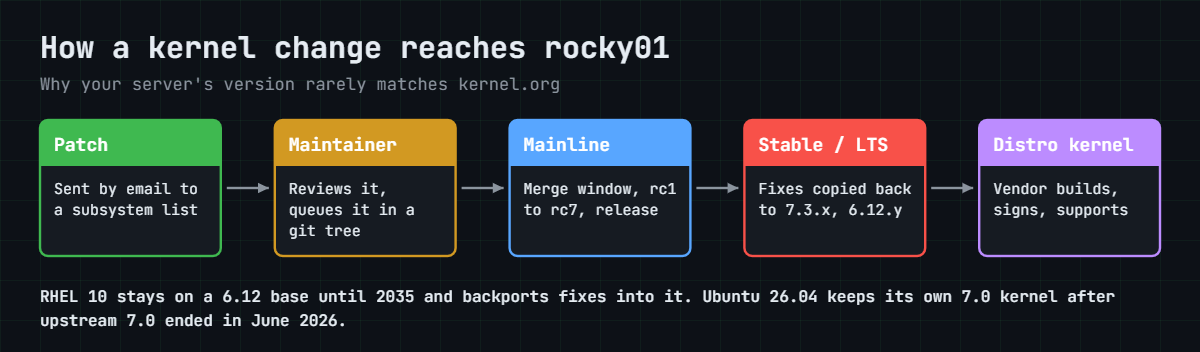
Before we read version strings, follow one kernel change from a developer’s laptop to rocky01. The diagram below is that journey, and it explains why your server’s kernel number rarely matches the newest one on kernel.org.

1A developer sends a patch

Changes go by email to the mailing list of the subsystem they touch, such as networking or the XFS file system. The subsystem maintainer reviews them and collects the good ones in their own git tree.

2Linus merges, then the rc weeks begin

During the two-week merge window Torvalds pulls the maintainers’ trees into mainline. Then the weekly release candidates only take fixes, and when the regressions are under control he tags the release, such as 7.3.

Linux kernel history today: how a patch travels from a developer to your server

3Stable and longterm maintainers take over

Greg Kroah-Hartman, Sasha Levin and the stable team copy fixes that landed in mainline back into recent releases (7.3.1, 7.3.2 and so on) and into the longterm branches. They don’t add features, only fixes that are already in mainline.

4The distribution builds its own kernel

Red Hat, Canonical, SUSE and the others pick a base version, add their own patches, configure it for their hardware list and sign it for Secure Boot. Then they keep it going for the life of the release, pulling in security fixes and selected features.

5You install it, and it starts at the next boot

dnf update or apt upgrade puts the new kernel next to the old one in /boot, and GRUB starts it at the next reboot. Until then uname -r still shows the old one, which surprises a lot of people after patching (Lesson 49 covers kernel updates properly).

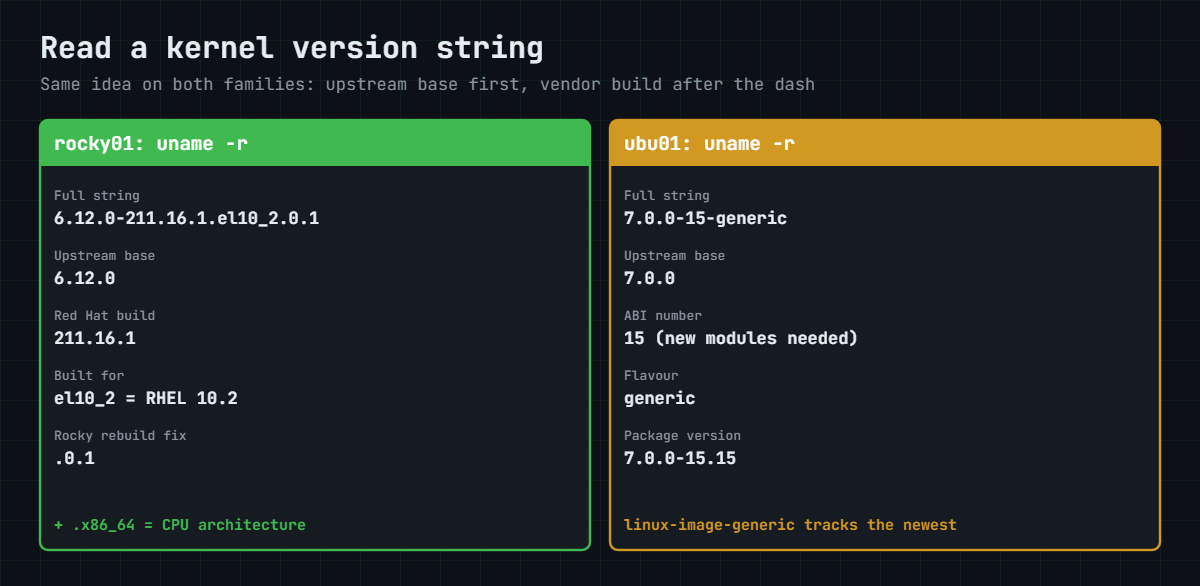
The picture underneath splits the two version strings you’ll see in this course into their parts. Once you know the pattern you can read any RHEL family or Ubuntu kernel.

Linux kernel history in a version string: reading Rocky and Ubuntu uname -r

Every distribution family has its own pattern, but they all start with the upstream base. On RHEL and its rebuilds the part after the dash is Red Hat’s build number, and el10_2 means “built for RHEL 10.2”. Rocky adds .0.1 when it had to patch a package after rebuilding it.

On Ubuntu, -15 is the ABI number (it changes when modules from the old kernel can’t be loaded into the new one) and -generic is the flavour, with others such as -lowlatency or cloud-specific ones.

A word on naming before you go to the lab. The FSF asks people to call the whole system GNU/Linux, because the kernel is one piece and the GNU tools are a large part of the rest, and Debian uses that name. Torvalds and most of the industry say Linux, and Red Hat and Canonical use “Linux” in their product names.

In interviews it’s enough to know why both names exist and to use the one your team uses.

Hands-on lab: read the kernel on rocky01 and ubu01

Before you run any command, double-check it

Read every command twice before you press Enter. Check the target: the server name, the user, the disk or device name, the path and the sizes. These commands are for learning and were tested in our lab, not on your system. At work, run the read-only commands first, follow your change process, make sure a backup exists, and ask a second person to check anything that changes or deletes data. You run them at your own risk.

Everything in this lab is read-only. You’ll ask both servers which kernel they run, who built it, which package it came from, which driver runs your network card and which options the kernel was started with. These are the first things a support engineer from Red Hat or Canonical will ask you for when you open a case.

Log in to both VMs: ssh -p 2211 student@127.0.0.1 for rocky01 and ssh -p 2221 student@127.0.0.1 for ubu01. If you’ve already installed updates, your build numbers will be higher than the ones shown here, and that’s fine.

Linux kernel history lab: uname and /proc/version output on Rocky Linux 10
Example output from rocky01 (Rocky Linux 10.2). Your build numbers may be newer.

1Which kernel is running?

Run this on both servers:

uname -r
uname -a

On rocky01 you should see something like this:

6.12.0-211.16.1.el10_2.0.1.x86_64
Linux rocky01 6.12.0-211.16.1.el10_2.0.1.x86_64 #1 SMP PREEMPT_DYNAMIC Thu Jun  4 11:22:31 UTC 2026 x86_64 GNU/Linux

On ubu01:

7.0.0-15-generic
Linux ubu01 7.0.0-15-generic #15-Ubuntu SMP PREEMPT_DYNAMIC Wed Apr 22 16:06:43 UTC 2026 x86_64 GNU/Linux

uname -r (kernel release) is the one you’ll type most, in tickets, in vendor support matrices and in paths like /lib/modules/$(uname -r). uname -a adds the hostname, the build number and date, the CPU architecture and “GNU/Linux” as the operating system name, a small nod to Lesson 5.

✅ Checkpoint: You can read the upstream base version (6.12 or 7.0) from your own uname -r.

2Who built it, and with what?

Run this on both servers:

cat /proc/version

On rocky01 you should see something like this:

Linux version 6.12.0-211.16.1.el10_2.0.1.x86_64 (mockbuild@iad1-prod-build001.bld.equ.rockylinux.org) (gcc (GCC) 14.3.1 20250617 (Red Hat 14.3.1-2), GNU ld version 2.41-58.el10) #1 SMP PREEMPT_DYNAMIC Thu Jun  4 11:22:31 UTC 2026

On ubu01:

Linux version 7.0.0-15-generic (buildd@lcy02-amd64-048) (x86_64-linux-gnu-gcc (Ubuntu 15.2.0-16ubuntu1) 15.2.0, GNU ld (GNU Binutils for Ubuntu) 2.46) #15-Ubuntu SMP PREEMPT_DYNAMIC Wed Apr 22 16:06:43 UTC 2026

/proc isn’t a folder on disk. It’s a window into the running kernel, and you’ll explore it in Lesson 10. This file shows the build machine and the GCC and binutils versions that compiled the kernel: GNU tools again.

Red Hat style builds come from a “mockbuild” user, and Ubuntu’s from Launchpad’s “buildd” machines.

✅ Checkpoint: You can name the compiler version that built the kernel on each server.

3Which package gave you the kernel?

Run this on rocky01:

rpm -q kernel
ls /boot | grep vmlinuz

You should see something like this:

kernel-6.12.0-211.16.1.el10_2.0.1.x86_64
vmlinuz-0-rescue-8c1f2e7a4b9d4f6e9a2c3b1d5e7f9a0c
vmlinuz-6.12.0-211.16.1.el10_2.0.1.x86_64

The kernel package pulls in kernel-core (the kernel file and the basic drivers) and kernel-modules. The kernel itself is the compressed file vmlinuz-<version> in /boot. The “0-rescue” one is a generic rescue kernel made at install time with the drivers for any hardware.

Now ubu01:

dpkg -l 'linux-image*' | grep '^ii'
ls /boot | grep vmlinuz

You should see something like this:

ii  linux-image-7.0.0-15-generic          7.0.0-15.15  amd64        Signed kernel image generic
ii  linux-image-generic                   7.0.0-15.15  amd64        Generic Linux kernel image
vmlinuz
vmlinuz-7.0.0-15-generic

On Ubuntu, linux-image-generic is a meta package that always points to the newest generic kernel, and /boot/vmlinuz is a symbolic link to the current one. RHEL keeps up to three kernels by default and Ubuntu usually two, so you can boot the previous one if a new kernel misbehaves.

✅ Checkpoint: You found the kernel package and the vmlinuz file for the running kernel on both servers.

4Which driver runs your network card?

Run this on both servers:

lsmod | grep e1000
modinfo e1000 | grep -E '^(filename|license|description|vermagic)'

On rocky01 you should see something like this:

e1000                 196608  0
filename:       /lib/modules/6.12.0-211.16.1.el10_2.0.1.x86_64/kernel/drivers/net/ethernet/intel/e1000/e1000.ko.xz
license:        GPL v2
description:    Intel(R) PRO/1000 Network Driver
vermagic:       6.12.0-211.16.1.el10_2.0.1.x86_64 SMP preempt mod_unload modversions

On ubu01:

e1000                 196608  0
filename:       /lib/modules/7.0.0-15-generic/kernel/drivers/net/ethernet/intel/e1000/e1000.ko.zst
license:        GPL v2
description:    Intel(R) PRO/1000 Network Driver
vermagic:       7.0.0-15-generic SMP preempt mod_unload modversions

VirtualBox’s default network adapter, the Intel PRO/1000 MT Desktop, uses the e1000 driver. It’s a kernel module: a piece of the kernel kept in a separate file under /lib/modules/$(uname -r) and loaded only when the hardware is found. RHEL compresses modules with xz and Ubuntu with zstd.

The vermagic line ties the module to one exact kernel build, so modules can’t be shared between kernels.

RHEL 10 lists e1000 as an “unmaintained” driver: it still works but is no longer tested and may be dropped in RHEL 11. You can see the warning on rocky01 with sudo dmesg | grep -i unmaintained:
[ 2.418734] Warning: Unmaintained driver is detected: e1000_init_module

✅ Checkpoint: You can say which file the e1000 driver was loaded from on rocky01.

5How was the kernel started?

Run this on both servers:

cat /proc/cmdline

On rocky01 you should see something like this:

BOOT_IMAGE=(hd0,gpt2)/vmlinuz-6.12.0-211.16.1.el10_2.0.1.x86_64 root=/dev/mapper/rl-root ro crashkernel=2G-64G:256M,64G-:512M resume=/dev/mapper/rl-swap rd.lvm.lv=rl/root rd.lvm.lv=rl/swap rhgb quiet

On ubu01:

BOOT_IMAGE=/vmlinuz-7.0.0-15-generic root=/dev/mapper/ubuntu--vg-ubuntu--lv ro

These are the options GRUB handed to the kernel. root= says where the root file system is, ro mounts it read-only until the file system check is done, rd.lvm.lv= tells the initramfs which LVM volumes to activate, crashkernel= reserves memory for kdump (Lesson 79) and rhgb quiet hides most boot messages. You’ll change these options safely in Lessons 9 and 50.

✅ Checkpoint: You can point to the root= option on both servers and say which disk volume it names.

6Built in or loadable?

Run this on ubu01:

modinfo ext4 | head -n 5
grep -E '/(ext4|xfs)\.ko' /lib/modules/$(uname -r)/modules.builtin

You should see this:

name:           ext4
filename:       (builtin)
license:        GPL
file:           fs/ext4/ext4
description:    Fourth Extended Filesystem
kernel/fs/ext4/ext4.ko

Ubuntu builds the ext4 driver into the kernel file itself, because its root file system is ext4 and must be readable before any module can load. XFS is only a module there. On rocky01 the opposite choice was made: XFS is the default file system, so check modinfo xfs | head -n 2 there yourself.

Distributions make these choices in the kernel configuration, which you can read in /boot/config-$(uname -r).

✅ Checkpoint: You can name one driver that is built in and one that is a loadable module on ubu01.

Break It, Then Fix It

Three mistakes people really make with kernels and versions. None of them changes your VMs.

1Load a module that doesn’t exist

Run this on ubu01 (note the typo):

sudo modprobe e1000x

You’ll get this error:

modprobe: FATAL: Module e1000x not found in directory /lib/modules/7.0.0-15-generic

modprobe only looks in the folder for the running kernel. You’ll see the same error with a correct name when a module was installed for a different kernel, for example a vendor driver built before the last kernel update and a reboot.

Fix: find the right name first, then check it’s there for this kernel:

find /lib/modules/$(uname -r) -name 'e1000*'
modinfo -n e1000

✅ Checkpoint: modinfo -n prints a path inside /lib/modules/7.0.0-15-generic.

2Compare kernel versions as text

Paste this whole block on rocky01, then on ubu01:

cat > ~/kcheck.sh <<'EOF'
#!/bin/bash
need="6.9"
have="$(uname -r)"
if [[ "$have" > "$need" ]]; then
  echo "Kernel $have is new enough"
else
  echo "Kernel $have is older than $need, stopping" >&2
  exit 1
fi
EOF
bash ~/kcheck.sh

rocky01 says:

Kernel 6.12.0-211.16.1.el10_2.0.1.x86_64 is older than 6.9, stopping

ubu01 says:

Kernel 7.0.0-15-generic is new enough

Inside [[ ]], > compares text one character at a time. “6.1” and “6.9” share the first two characters and then “1” sorts before “9”, so 6.12 counts as older than 6.9. Install scripts from vendors have shipped with this exact bug.

Fix: let sort -V compare the parts as version numbers:

cat > ~/kcheck.sh <<'EOF'
#!/bin/bash
need="6.9"
have="$(uname -r)"
oldest="$(printf '%s\n' "$need" "$have" | sort -V | head -n 1)"
if [ "$oldest" = "$need" ]; then
  echo "Kernel $have is new enough"
else
  echo "Kernel $have is older than $need, stopping" >&2
  exit 1
fi
EOF
bash ~/kcheck.sh

rocky01 now says:

Kernel 6.12.0-211.16.1.el10_2.0.1.x86_64 is new enough

✅ Checkpoint: Both servers report a new enough kernel.

3Try to unload a driver that is built in

Run this on ubu01:

sudo modprobe -r ext4

You’ll get this error:

modprobe: FATAL: Module ext4 is builtin.

Built-in code is part of the kernel file, so it can’t be unloaded, and options for it can’t be set in /etc/modprobe.d either. They go on the kernel command line instead, as ext4.<option>=<value>.

Fix: check how a driver is built before you plan a change around it:

modinfo -F filename ext4
grep -w ext4 /lib/modules/$(uname -r)/modules.builtin

✅ Checkpoint: modinfo prints (builtin) for ext4 on ubu01, and you know its options belong on the kernel command line.

This happened at work

The sale-day agent that wouldn’t start

My team lead tells this one about a fashion e-commerce site in Delhi, three days before their biggest festive sale. The security team had asked for all 40 web servers to be patched, so the night shift ran dnf update and rebooted them in batches. Every server came back, the site worked and everyone went home.

The next morning the security dashboard showed half the fleet as “agent offline”. The first guess was a network rule blocking the agent’s cloud console, so a ticket went to the network team, who found nothing wrong. Someone else restarted the agent service on two servers, and it failed again within seconds.

The answer was in journalctl -u for the agent: its kernel module refused to load because the vendor had only certified the previous RHEL kernel build. uname -r showed the new kernel, and the module’s vermagic named the old one. The servers that still worked were simply the ones the night shift hadn’t rebooted yet.

They booted the patched servers back into the previous kernel with grubby, which takes a minute per server, and the agents came straight up. After the sale they added two rules: kernels get updated in staging first and checked against the vendor’s support list, and exclude=kernel* stays in the production dnf.conf until that check passes. Lesson 49 walks you through both.

Common mistakes and troubleshooting

MistakeWhat happensWhat to do instead
Thinking uname -r changes right after a kernel updateYou tell the security team the server is patched when the old kernel is still runningReboot (or plan one), then check uname -r against rpm -q kernel or dpkg -l 'linux-image*'
Comparing a distribution kernel with kernel.org numbers“6.12 is old” leads to pointless upgrade requests, while RHEL’s 6.12 has years of backported fixesCheck the vendor’s errata and CVE pages for your exact build, not the upstream number
Comparing versions as plain text in scripts6.12 is treated as older than 6.9Use sort -V or the package manager’s own comparison
Copying modules between kernelsThe module refuses to load (version magic mismatch)Install drivers from packages built for that kernel, or use DKMS / akmods which rebuild them
Saying “Linux” when you mean the whole distribution in a support caseThe vendor asks again for the kernel version, distribution and releaseGive all three: cat /etc/os-release, uname -r and cat /proc/cmdline
Removing the old kernel straight after an updateNo way back if the new one breaks a driverKeep at least one older kernel until the new one has run cleanly for a while

Interview questions

Click a question to open it. Each one is written the way an interviewer would ask it. Under it you will see why they ask it and one way you could answer, in your own words.

Fresher level

1. How do you check which kernel a Linux server is running, and how would you read the result?

Why they ask this: A basic but very common question. They want the command and some sign that you understand what the parts of the string mean.

How you might answer: I run uname -r. On a Rocky 10 server that gives something like 6.12.0-211.16.1.el10_2.0.1.x86_64: 6.12.0 is the upstream base, 211.16.1 is Red Hat’s build, el10_2 means RHEL 10.2, and x86_64 is the architecture.

On Ubuntu 26.04 it’s 7.0.0-15-generic: upstream 7.0.0, ABI number 15 and the generic flavour. For more detail I’d also read /proc/version.

2. Who created Linux, and how is it different from GNU?

Why they ask this: They’re checking the basic history and whether you know the kernel is only one part of the system.

How you might answer: Linus Torvalds started Linux in 1991 as a student in Helsinki and released version 0.01 that September. It’s the kernel: it manages the CPU, memory, devices and processes.

GNU is Richard Stallman’s project from 1983 that wrote most of the tools around it, like bash, gcc and glibc. A distribution combines the Linux kernel with GNU and other software, which is why some people call it GNU/Linux.

2–5 years experience

3. You patched a server, but the vulnerability scanner still reports the old kernel. What’s going on and what do you do?

Why they ask this: A real everyday situation. They want to hear that installing a kernel isn’t the same as running it, and that you’d check before rebooting.

How you might answer: Most likely the new kernel is installed but the server hasn’t rebooted, so uname -r still shows the old build. I’d compare it with rpm -q kernel and check that GRUB’s default entry points to the new one with grubby --default-kernel.

Then I’d schedule a reboot through the change process. If the server can’t reboot soon, I’d ask whether live patching (kpatch on RHEL or Livepatch on Ubuntu) covers that CVE.

4. Explain mainline, stable and longterm kernels, and where a RHEL or Ubuntu kernel fits.

Why they ask this: This checks whether you understand where the server’s kernel really comes from and who supports it.

How you might answer: Mainline is Linus’s tree, with a new release about every nine or ten weeks. Stable releases add bug fixes to the latest version for a few months, and longterm branches like 6.12 and 6.18 get fixes for several years.

A distribution kernel is the vendor’s own branch of one of those. RHEL 10 is based on 6.12 but Red Hat maintains it until 2035 and backports features, so I check Red Hat’s errata for fixes, not kernel.org.

Senior level

5. A third-party agent’s kernel module fails to load after every kernel update. How would you make this sustainable across a fleet?

Why they ask this: Senior admins own patching policy. They want vendor management, testing order and tooling, not a one-off fix.

How you might answer: First I’d confirm it with journalctl -u <agent> and modinfo to see the vermagic mismatch. Then I’d get the vendor’s support matrix and, if they offer it, a DKMS or kABI-compatible module that survives minor kernel updates.

For the fleet I’d stage kernel updates: test servers first, then a small production group, with an automated check that the agent is running after reboot. Until a kernel is certified, it stays excluded in dnf or held with apt-mark hold on Ubuntu.

6. Why did Linux win over Minix and the GNU Hurd, and what can you take from that when choosing technology?

Why they ask this: They want judgement and the ability to connect history to decisions you’d make for a team.

How you might answer: Minix had a restrictive licence and was meant for teaching, and the Hurd had a cleaner design that took too long to work. Linux worked early, used the GNU tools that already existed, and switched to the GPL in 1992, so anyone could contribute and companies could build on it safely.

When I choose tools for a team I look for the same things: it works today, the licence lets us use it the way we need, and there’s a healthy community or vendor behind it.

Quick quiz

Q1. When was Linux 0.01 released?

  1. 25 August 1991
  2. 17 September 1991
  3. 5 January 1992
  4. 14 March 1994
Show answer

B — Torvalds announced the project on 25 August 1991 and released 0.01 on 17 September 1991. 1.0 came in March 1994.

Q2. Which licence does the Linux kernel use?

  1. GPL version 3 or later
  2. GPL version 2 only
  3. MIT
  4. Its own non-commercial licence
Show answer

B — Linux moved to the GPL in 1992 and is GPL-2.0 only, so it did not move to GPLv3.

Q3. On rocky01, uname -r shows 6.12.0-211.16.1.el10_2.0.1.x86_64. What does el10_2 tell you?

  1. The kernel is 10.2 years old
  2. It was built for RHEL 10.2
  3. It is the second Rocky rebuild
  4. It is the 10th longterm kernel
Show answer

B — el10_2 is the RHEL 10.2 tag. 6.12.0 is the upstream base and 211.16.1 is the build number.

Q4. You ran dnf update and a new kernel was installed. What does uname -r show before a reboot?

  1. The new kernel
  2. The old, still running kernel
  3. Both kernels
  4. Nothing until you reboot
Show answer

B — uname reports the running kernel. The new one starts only when the server boots into it.

Q5. Which file shows the options GRUB passed to the running kernel?

  1. /etc/default/grub
  2. /proc/version
  3. /proc/cmdline
  4. /boot/config-$(uname -r)
Show answer

C — /proc/cmdline shows the live boot options. /etc/default/grub is where you change them for the next boot.

Quick recap

  • Linus Torvalds announced Linux on comp.os.minix on 25 August 1991 and released 0.01 on 17 September 1991. It moved to the GPL (version 2 only) in February 1992.
  • Linux is the kernel. Together with GNU and other software it makes a distribution, which is why the FSF says GNU/Linux.
  • Mainline gets a release about every nine to ten weeks, stable adds fixes for months, longterm for years, and distributions maintain their own kernels for the life of a release.
  • RHEL 10 and Rocky 10 run a 6.12 based kernel (6.12.0-211.x.el10_2), Ubuntu 26.04 runs 7.0 (7.0.0-NN-generic).
  • Your kernel toolkit: uname -r, /proc/version, rpm -q kernel or dpkg -l 'linux-image*', lsmod, modinfo and /proc/cmdline.

Next lesson

Lesson 7: The Linux family tree → You’ll meet the Red Hat, Debian, SUSE and Arch families, learn their release cycles and support dates, and compare rocky01 and ubu01 side by side.

Further reading: Linux kernel history

Want to go deeper into Linux kernel history? See the kernel.org releases page for the current longterm list, the kernel’s own guide to how the development process works, Red Hat’s RHEL 10 kernel notes and Ubuntu’s kernel lifecycle. You can also see the full plan for this course on the Linux Administration course page.

Scroll to Top

This website uses cookies

We use a few cookies to keep this site working. If you allow it, we also use Google Analytics to count visits so we can improve our lessons. You can accept all, deny the optional ones, or choose what to allow.