Major OS upgrades: Leapp, do-release-upgrade and a rollback plan
-
Phase 0: Before you start
-
Phase 1: The origins and OS architecture
-
Phase 2: Day-to-day administration and the command builder
-
Phase 3: Enterprise infrastructure and storage
-
Phase 4: Troubleshooting step by step
-
Phase 5: Final project and career
A Linux OS upgrade to a new major version, such as RHEL 9 to 10 or Ubuntu 24.04 to 26.04, replaces almost every package on the server in one go: the kernel, systemd, the C library and the libraries your applications link against. It’s the biggest single change most admins make to a server all year, so most of the work is in the checks before it and in the plan for getting back if it goes wrong.
You’ll learn the supported paths as they stand in October 2026: Leapp for RHEL, why Rocky Linux tells you to reinstall, and do-release-upgrade for Ubuntu. Your lab VMs already run Rocky 10.2 and Ubuntu 26.04, so the main lab is a full readiness check, baseline and rollback plan on them, and the real upgrade runs on a throwaway Ubuntu 24.04 VM that you delete afterwards.
Where this lesson fits
Lesson 52 of 82 in Linux Administration · Phase 3: Enterprise infrastructure and storage · Before this: Lesson 51, kernel tuning with sysctl and limits · Next: Lesson 53, Linux performance monitoring
| Time | You need | By the end you can |
|---|---|---|
| About 45 minutes for the checks, plus about 75 minutes for the optional upgrade on a throwaway VM | rocky01 and ubu01; for the optional part, the Ubuntu Server 24.04 ISO and about 25 GB free on the laptop; a Red Hat Developer account only if you want to try Leapp | Check a server is ready for a major upgrade, save a baseline, write a rollback plan, run do-release-upgrade safely and explain the RHEL and Rocky paths |
What it is, in one line
A major upgrade swaps the whole operating system in place, so you check everything first, take a snapshot or backup you have tested, and only then run Leapp or do-release-upgrade.
In Simple Words
Rebuilding the house you live in
Imagine your family decides to rebuild the house on the same plot, while still living in it. Before the masons start, you photograph every room, check which furniture won’t fit through the new doors, return the neighbour’s ladder, and keep the keys to a relative’s flat in case the work runs late and you need somewhere to sleep.
Nobody would knock down a wall first and then start thinking about where the family sleeps tonight. The photographs, the list of things that won’t fit and the spare flat are what make the rebuild safe, not the masons.
The photographs are your baseline, the furniture that won’t fit is what the pre-upgrade report finds, the borrowed ladder is a third-party repository, and the spare flat is your snapshot.
Engineer's View
Supported paths as of October 2026
| From and to | Tool | Status | Notes |
|---|---|---|---|
| RHEL 9.8 to RHEL 10.2 | Leapp (package leapp-upgrade) | Supported by Red Hat | The other listed path is 9.6 EUS to 10.0 EUS. A LiveMode option for 9.8 to 10.2 is a Technology Preview. The table changes with each minor release, so check it before every upgrade |
| RHEL 8 to RHEL 10 | None direct | Not supported | Two upgrades, 8.10 to 9 and then 9 to 10 |
| Rocky 9 to Rocky 10 | None official | Not supported by Rocky | Rocky’s release notes say to do a fresh install. The ELevate project’s November 2025 update names only AlmaLinux and CentOS Stream as its long-term paths, so don’t plan production work on it |
| Ubuntu 24.04 to 26.04 | do-release-upgrade | Offered since 29 September 2026, after the 26.04.1 point release | Needs Prompt=lts; third-party sources are switched off during the upgrade |
| Ubuntu 22.04 to 26.04 | None direct | Not supported | LTS to the next LTS only: 22.04 to 24.04, then 24.04 to 26.04 |
Each new major version changes things your scripts and applications rely on. RHEL 10 needs an x86-64-v3 CPU (Leapp checks this), has no ifcfg files or network-scripts, and packages signed with RSA/SHA-1 block the upgrade until you replace them. Ubuntu 26.04 brings kernel 7.0, sudo-rs as sudo, Rust coreutils as the default ls, cp and friends, dracut instead of initramfs-tools (Lesson 50), and OpenSSH 10, which no longer accepts DSA keys.
Neither tool has an undo button. Once Leapp reboots into its upgrade environment, or do-release-upgrade starts installing, the way back is a snapshot or a restore you prepared before, which is why the rollback plan comes before the upgrade command in this lesson.
How it works, step by step
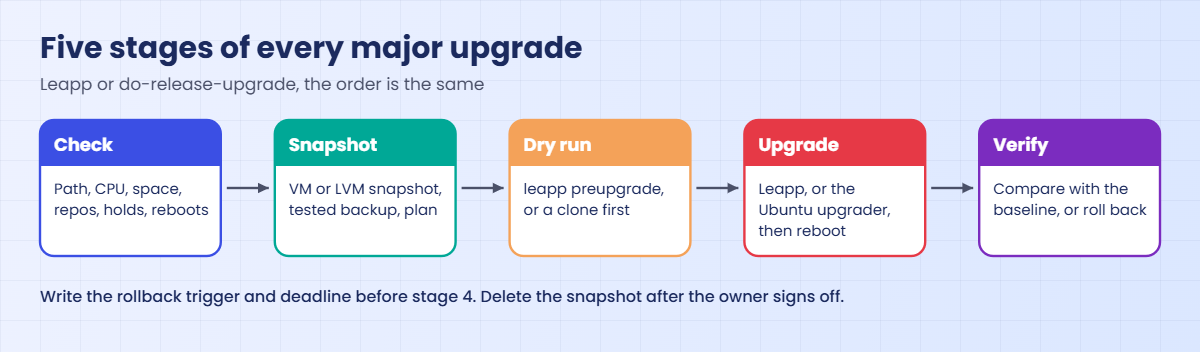
Every major upgrade at work, whatever the tool, follows the same five stages shown in the diagram after these steps.
1Decide: upgrade in place or rebuild
An in-place upgrade keeps the hostname, IP addresses, data and configuration, which is why teams like it for servers that are hard to rebuild. A rebuild means a new VM on the new version, built with automation (Lesson 64), then the data copied over and the name or IP switched. It’s the only path for Rocky 9 to 10, and many teams prefer it anyway for VMs that are already built by code.
2Check the server and the path
Confirm the path is supported for your exact minor version, the CPU meets the new baseline, /boot, / and /var have room, every package comes from a repository the upgrade knows, nothing is held or version-locked, no reboot is pending, and the application vendor supports the new version. Then save a baseline of what the server looks like today.
3What Leapp does on RHEL
leapp preupgrade runs a set of small checks called actors, collects facts and writes a report to /var/log/leapp/leapp-report.txt (and .json), plus an answer file for any question it needs you to answer. Every finding has a risk level (high, medium, low, info), and an inhibitor stops the upgrade until you fix it. leapp upgrade then downloads the RHEL 10 packages, builds a special initramfs, reboots into it, installs everything there and reboots into RHEL 10.
4What do-release-upgrade does on Ubuntu
It downloads the upgrader for the new release, rewrites your sources from noble to resolute, switches off third-party entries by adding Enabled: no, calculates the changes and shows you a summary to confirm. It runs inside GNU screen, and over SSH it offers a spare sshd on port 1022, both so that a dropped connection doesn’t leave you blind halfway through.
5Plan the way back before you go
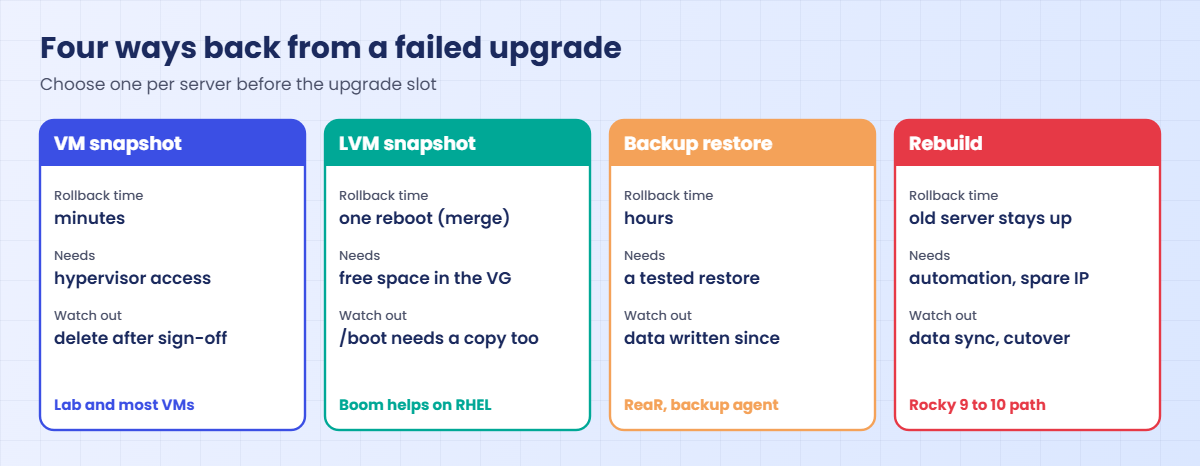
Choose the rollback method, write down the trigger (“any app check fails, or not healthy by 04:00”) and the steps, and test that the backup can be restored. Snapshots are for the upgrade window only: VM and LVM snapshots slow writes down the longer they live, so delete them once the owner signs off.
The picture below compares the four ways back. Pick one per server before the upgrade slot, not during it.
6Verify against the baseline
After the upgrade, compare running services, listening ports, mounts and the application’s own health check with the baseline you saved. On RHEL, set SELinux back to enforcing (Leapp leaves it permissive), remove leftover el9 packages and check that GRUB’s default is the new kernel. On Ubuntu, re-enable third-party sources only once the vendor publishes packages for 26.04, and run apt autoremove when you’re happy.
Keep the snapshot until the application owner has seen a full business cycle, often one day or one batch run, then delete it and close the change.
Hands-on lab: check, baseline and snapshot before a major upgrade
Before you run any command, double-check it
Read every command twice before you press Enter. Check the target: the server name, the user, the disk or device name, the path and the sizes. These commands are for learning and were tested in our lab, not on your system. At work, run the read-only commands first, follow your change process, make sure a backup exists, and ask a second person to check anything that changes or deletes data. You run them at your own risk.
Part A, steps 1 to 6, runs on rocky01 and ubu01 and changes nothing except a baseline folder in /root and a VirtualBox snapshot. Part B, steps 7 to 9, is optional and runs on a new throwaway VM called ubu24 that you build from the Ubuntu Server 24.04 ISO and delete at the end. Step 10 is optional too and needs a Red Hat Developer account.
On an 8 GB laptop, shut rocky01 down before you start ubu24.
1Write down what you run, to the minor version
Run this on both VMs:
grep -E '^(NAME|VERSION)=' /etc/os-release
uname -rYou should see this on rocky01:
NAME="Rocky Linux"
VERSION="10.2 (Red Quartz)"
6.12.0-211.16.1.el10_2.0.1.x86_64And on ubu01:
NAME="Ubuntu"
VERSION="26.04.1 LTS (Resolute Raccoon)"
7.0.0-15-genericThe supported-paths table works on exact minor versions, so “RHEL 9” isn’t enough; you need “9.8”. Paste these lines into the change ticket before anything else.
✅ Checkpoint: You have the exact version and kernel of both VMs written down.
2Ask each system what upgrade it is offered
On ubu01:
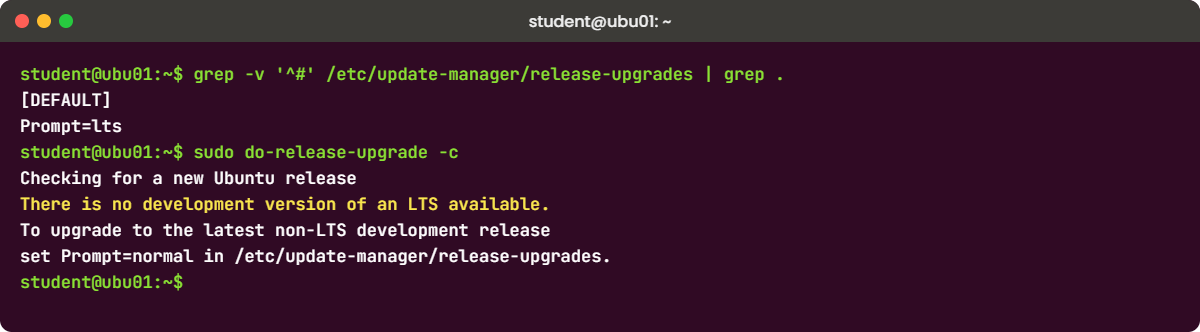
grep -v '^#' /etc/update-manager/release-upgrades | grep .
sudo do-release-upgrade -cYou should see this:
[DEFAULT]
Prompt=lts
Checking for a new Ubuntu release
There is no development version of an LTS available.
To upgrade to the latest non-LTS development release
set Prompt=normal in /etc/update-manager/release-upgrades.Prompt=lts means “offer me only the next LTS”, and 26.04 is the newest LTS, so there is nothing to offer. The message about a non-LTS release refers to 26.10, a nine-month release you wouldn’t put on a server. On a 24.04 server today, the same command offers 26.04.1.
On rocky01:
cat /etc/rocky-release
dnf repolistYou should see something like this:
Rocky Linux release 10.2 (Red Quartz)
repo id repo name
appstream Rocky Linux 10 - AppStream
baseos Rocky Linux 10 - BaseOS
extras Rocky Linux 10 - ExtrasRocky’s repositories are for “10”, so 10.2 to 10.3 arrives as a normal dnf update (Lesson 35). There is no command that offers Rocky 11 or takes a Rocky 9 server to 10; that path is a rebuild.
✅ Checkpoint: ubu01 says no LTS is available beyond 26.04, and you can explain why rocky01 has no major upgrade command.
3Check free space where the upgrade needs it
Run this on both VMs:
df -h / /boot /varYou should see something like this on rocky01:
Filesystem Size Used Avail Use% Mounted on
/dev/mapper/rl-root 17G 3.1G 14G 19% /
/dev/sda2 1.9G 418M 1.5G 22% /boot
/dev/mapper/rl-root 17G 3.1G 14G 19% /And on ubu01:
Filesystem Size Used Avail Use% Mounted on
/dev/mapper/ubuntu--vg-ubuntu--lv 8.8G 4.6G 3.8G 55% /
/dev/sda2 2.0G 198M 1.6G 11% /boot
/dev/mapper/ubuntu--vg-ubuntu--lv 8.8G 4.6G 3.8G 55% //var appears as / because it isn’t a separate file system on these VMs. An upgrade downloads several hundred MB to 2 GB of packages into /var and puts a new kernel and initramfs in /boot. A /boot that’s more than half full is the classic reason an upgrade stops halfway; remove old kernels first (Lesson 49).
✅ Checkpoint: Each VM has at least 3 GB free on / and more than 300 MB free on /boot.
4Find packages and repositories that aren’t from your distribution
On ubu01:
ls /etc/apt/sources.list.d/
grep -h '^URIs' /etc/apt/sources.list.d/*.sources
apt-mark showhold
apt list --installed 2>/dev/null | grep -c ',local]'You should see something like this:
ubuntu.sources
URIs: http://archive.ubuntu.com/ubuntu/
URIs: http://security.ubuntu.com/ubuntu/
0Only Ubuntu’s own archive and security mirrors, no held packages (showhold printed nothing) and zero packages marked local, which is how apt labels an installed package that no configured repository provides. Any other URI is a third-party repository you must check with its vendor before the upgrade.
On rocky01:
sudo dnf repoquery --installed --qf '%{from_repo}' | sort | uniq -cYou should see something like this:
318 anaconda
46 appstream
21 baseosEach installed package is counted by the repository it came from; anaconda means “installed from the ISO”. Anything else, such as epel or a vendor repo, needs a version for the target release before you upgrade. At work also run dnf versionlock list if the versionlock plugin is installed, because Red Hat’s preparation steps ask you to clear locks first.
✅ Checkpoint: You can list every repository each VM uses and confirm there are no held or locked packages.
5Save a baseline you can compare against later
Paste this whole block on both VMs:
sudo tee /usr/local/sbin/preupgrade-baseline.sh >/dev/null <<'EOF'
#!/bin/bash
# preupgrade-baseline.sh: save what this server looks like before a major upgrade (Lesson 52)
# Run it as root: once before the upgrade, once after, then compare the two folders with diff.
set -u
out="/root/baseline-$(hostname -s)-$(date +%Y%m%d-%H%M)"
mkdir -p "$out" && cd "$out" || exit 1
cat /etc/os-release > os-release.txt
uname -r > kernel.txt
systemctl list-units --type=service --state=running --no-legend --plain > services-running.txt 2>&1
systemctl list-unit-files --type=service --state=enabled --no-legend > services-enabled.txt 2>&1
systemctl --failed --no-legend --plain > services-failed.txt 2>&1
ss -tulpn > ports.txt 2>&1
findmnt --real > mounts.txt 2>&1
df -hT > df.txt 2>&1
ip -br addr > ip-addr.txt 2>&1
ip route > ip-route.txt 2>&1
if [ -f /etc/debian_version ]; then
dpkg-query -W -f '${Package} ${Version}\n' | sort > packages.txt
else
rpm -qa | sort > packages.txt
fi
crontab -l > root-crontab.txt 2>&1
tar -czf etc.tar.gz -C / etc 2>/dev/null
echo "Baseline saved in $out"
ls "$out"
EOF
sudo chmod 755 /usr/local/sbin/preupgrade-baseline.sh
sudo /usr/local/sbin/preupgrade-baseline.shYou should see something like this on rocky01:
Baseline saved in /root/baseline-rocky01-20261027-1142
df.txt
etc.tar.gz
ip-addr.txt
ip-route.txt
kernel.txt
mounts.txt
os-release.txt
packages.txt
ports.txt
root-crontab.txt
services-enabled.txt
services-failed.txt
services-running.txtThirteen small files that answer “what did this server look like before?”: running and enabled services, failed units, listening ports, mounts, disk use, addresses, routes, every package with its version, root’s crontab and a copy of /etc. Copy the folder off the server too (scp to the laptop), because a rollback by snapshot restores the old folder with everything else.
✅ Checkpoint: /root/baseline-rocky01-DATE and /root/baseline-ubu01-DATE exist with 13 files each.
6Take a snapshot and write the rollback plan
On the laptop (PowerShell or a terminal):
VBoxManage snapshot ubu01 take before-upgrade --description "Lesson 52 rollback point"
VBoxManage snapshot ubu01 listYou should see something like this:
0%...10%...20%...30%...40%...50%...60%...70%...80%...90%...100%
Snapshot taken. UUID: 6c1d2e8a-4f3b-4a7e-9b0c-2d5e8f1a7c34
Name: base (UUID: 0a9b3c4d-1e2f-4a5b-8c6d-7e8f9a0b1c2d)
Name: before-upgrade (UUID: 6c1d2e8a-4f3b-4a7e-9b0c-2d5e8f1a7c34) *The star marks the current state. A snapshot of a running VM takes a few seconds; for databases at work, stop the application first or use the backup tool’s own method (Lesson 63), so the snapshot holds consistent data.
Now copy this template into a file and fill in the blanks for ubu01:
Upgrade and rollback plan
Server: ubu01 (10.10.10.21), lab NFS and iSCSI server
From / to: Ubuntu 26.04.1 LTS -> next LTS (practice plan)
Approved slot: Sat 02:00-05:00 IST, change ticket ________
Backup: ID ________, restore tested on ________
Snapshot: VirtualBox "before-upgrade", taken at ________
Baseline: /root/baseline-ubu01-<date>, copied to the laptop
Go/no-go checks: space OK, no held packages, no pending reboot,
no third-party repos without a new-version build,
vendor supports the new version
Rollback trigger: any application check fails, or not healthy by 04:00
Rollback steps: power off, restore snapshot "before-upgrade",
start, run the health check, tell the app owner
After success: keep the snapshot 3 days, then delete it
Contacts: app owner ________, DBA ________, network ________The trigger and the deadline are the most important lines. Decide them while you’re calm, so that at 04:00 the call is “the plan says roll back” rather than “one more try”. Keep the snapshot until Lesson 53, then delete it.
✅ Checkpoint: ubu01 has a snapshot called before-upgrade and you have a filled-in plan with a rollback trigger and deadline.
7Optional: build the throwaway Ubuntu 24.04 VM
In VirtualBox create a VM called ubu24 (2 vCPU, 2048 MB, 20 GB disk, NIC on the LinuxLab NAT Network) from the Ubuntu Server 24.04 ISO. In the installer give it 10.10.10.29/24, gateway and DNS 10.10.10.1, user student, and tick OpenSSH server. When it boots, take a snapshot before you update it, update it, then take another:
On the laptop, then inside ubu24, then on the laptop again:
VBoxManage snapshot ubu24 take fresh-install
sudo apt update && sudo apt full-upgrade -y
[ -f /var/run/reboot-required ] && sudo reboot
VBoxManage snapshot ubu24 take updatedThe fresh-install snapshot is for the Break-It part. Lesson 33’s SSH hardening isn’t on this VM, so password logins over SSH still work; that’s fine for a VM that lives for one evening.
[Add your screenshot here]: the Ubuntu Server 24.04 installer network screen with 10.10.10.29/24 set on the NIC.
✅ Checkpoint: lsb_release -ds on ubu24 shows Ubuntu 24.04 with the latest point release, and both snapshots exist.
8Optional: run do-release-upgrade over SSH, the safe way
From ubu01, copy the baseline script across, save a baseline and check the offer:
scp /usr/local/sbin/preupgrade-baseline.sh student@10.10.10.29:
ssh student@10.10.10.29
sudo install -m 755 preupgrade-baseline.sh /usr/local/sbin/
sudo preupgrade-baseline.sh
sudo do-release-upgrade -cThe last command should print:
Checking for a new Ubuntu release
New release '26.04.1 LTS' available.
Run 'do-release-upgrade' to upgrade to it.Start the upgrade:
sudo do-release-upgradeBecause you’re on SSH, it asks this first (answer y):
Continue running under SSH?
This session appears to be running under ssh. It is not recommended
to perform a upgrade over ssh currently because in case of failure it
is harder to recover.
If you continue, an additional ssh daemon will be started at port
'1022'.
Do you want to continue?
Continue [yN]The spare sshd on port 1022 is your second door if the main one breaks during the upgrade. ubu24 has no firewall enabled, but on a server where ufw is on, as on ubu01 since Lesson 34, open it first with sudo ufw allow 1022/tcp and remove the rule afterwards. If your SSH session drops, log in again and run sudo do-release-upgrade once more: it finds the running GNU screen session and reattaches to it.
After it calculates the changes you’ll see something like this; read it, then answer y:
Do you want to start the upgrade?
6 installed packages are no longer supported by Canonical. You can
still get support from the community.
12 packages are going to be removed. 148 new packages are going to be
installed. 702 packages are going to be upgraded.
You have to download a total of 812 M. This download will take about
2 minutes with your connection.
Installing the upgrade can take several hours. Once the download has
finished, the process cannot be canceled.
Continue [yN] Details [d]Press d to see the package list if anything looks odd. Later it asks whether to keep or replace config files you changed (keep yours unless you know why the new one is better), whether to remove obsolete packages, and finally to restart. The whole run takes 20 to 60 minutes on a laptop.
✅ Checkpoint: ubu24 restarts on its own at the end of the upgrade.
9Optional: verify against the baseline, then delete the VM
Log in to ubu24 again and run:
lsb_release -ds
uname -r
systemctl --failed --no-legend | wc -l
sudo preupgrade-baseline.sh >/dev/null
sudo sh -c 'diff /root/baseline-ubu24-*/services-running.txt'
grep -l '^Enabled: no' /etc/apt/sources.list.d/*.sourcesYou should see something like this for the first three commands:
Ubuntu 26.04.1 LTS
7.0.0-15-generic
0The glob matches the before and after folders, so diff compares the running services: lines starting with < ran before and don't now. On a fresh VM the list is short; on a real server every line is a question for the application owner. The last grep lists sources the upgrader switched off, which is none here and is where you'd look for a vendor's repo on a real server.
When you’re done, on the laptop:
VBoxManage controlvm ubu24 poweroff
VBoxManage unregistervm ubu24 --delete✅ Checkpoint: ubu24 reported 26.04.1 with zero failed units, and it no longer appears in VirtualBox.
10Optional: a Leapp pre-upgrade report on RHEL 9.8
This needs a no-cost Red Hat Developer subscription and a throwaway RHEL 9.8 VM (call it rhel98, 10.10.10.28, 2 GB RAM). The commands follow Red Hat’s RHEL 9 to 10 guide; check the current guide for the leapp package versions it expects.
On rhel98, as root or with sudo:
sudo subscription-manager register
sudo subscription-manager repos --enable rhel-9-for-x86_64-baseos-rpms --enable rhel-9-for-x86_64-appstream-rpms
sudo subscription-manager release --set 9.8
sudo dnf install -y leapp-upgrade
sudo dnf update -y && sudo reboot
sudo leapp preupgrade --target 10.2You should see something like this at the end:
============================================================
REPORT OVERVIEW
============================================================
Reports summary:
Errors: 0
Inhibitors: 0
HIGH severity reports: 1
MEDIUM severity reports: 1
LOW severity reports: 3
INFO severity reports: 4
Before continuing, review the full report below for details about discovered problems and possible remediation instructions:
A report has been generated at /var/log/leapp/leapp-report.txt
A report has been generated at /var/log/leapp/leapp-report.json
============================================================
END OF REPORT OVERVIEW
============================================================
Answerfile has been generated at /var/log/leapp/answerfileZero inhibitors means Leapp would let you continue. Read every high and medium finding in leapp-report.txt anyway, because each one comes with a remediation hint, and check /var/log/leapp/answerfile for questions. Stop here; leapp upgrade --target 10.2 is the step that changes the VM, and it’s yours to try on a throwaway VM with a snapshot.
✅ Checkpoint: leapp-report.txt exists and you can name the risk level of each finding.
Break It, Then Fix It
These failures use ubu24 from steps 7 to 9, so build it before you start, and restore its fresh-install snapshot first (Machine, Snapshots, Restore). If you skipped the throwaway VM, read along; the messages are the ones the upgrade tools print.
1A held package stops the upgrade before it starts
On the fresh-install snapshot of ubu24, list some pending updates and hold the first package you see:
sudo apt update
apt list --upgradable 2>/dev/null | head -n 4
sudo apt-mark hold openssl
sudo apt full-upgrade -y
sudo do-release-upgradeYou’ll get this error:
Checking for a new Ubuntu release
Please install all available updates for your release before upgrading.Use whichever package your list shows if openssl isn’t in it. do-release-upgrade refuses to start while any update for the current release is still waiting (it ignores phased updates), and a held package with a newer version waiting is one of them. At work, holds are often left behind by someone who “pinned the kernel for a week” two years ago, or by a vendor’s install script.
Fix: find every hold, ask why it’s there, release it and finish the updates:
apt-mark showhold
sudo apt-mark unhold openssl
sudo apt full-upgrade -y
sudo do-release-upgrade✅ Checkpoint: apt-mark showhold prints nothing. Don’t worry if do-release-upgrade still refuses; that’s the next failure.
2A pending reboot blocks it too
If the full-upgrade above installed a new kernel, do-release-upgrade now says this:
Checking for a new Ubuntu release
You have not rebooted after updating a package which requires a reboot. Please reboot before upgrading.The upgrader reads /var/run/reboot-required.pkgs, and a new kernel or C library listed there means you’re still running old code. Upgrading in that state can leave drivers built for the wrong kernel, so it stops.
Fix: check, reboot, check again:
cat /var/run/reboot-required
sudo reboot
sudo do-release-upgrade -cAfter the reboot, the last command should print:
Checking for a new Ubuntu release
New release '26.04.1 LTS' available.
Run 'do-release-upgrade' to upgrade to it.✅ Checkpoint: do-release-upgrade -c offers 26.04.1 again. Restore the “updated” snapshot or delete ubu24 when you’re done.
3Read along: Leapp has the same rule
On a RHEL 9.8 VM, update packages (a new kernel arrives) and run the report without rebooting:
sudo dnf update -y
sudo leapp preupgrade --target 10.2
sudo grep -A3 'inhibitor' /var/log/leapp/leapp-report.txtYou’ll get something like this:
Risk Factor: high (inhibitor)
Title: Newest installed kernel not in use
Summary: To ensure a stable upgrade, the machine needs to be booted into the latest installed kernel.An inhibitor is a hard stop: leapp upgrade refuses to run until it’s gone. Third-party packages show up in the same report as “Packages not signed by Red Hat”, and any package signed with RSA/SHA-1 becomes an inhibitor for RHEL 10, so vendor agents are where most real upgrades get stuck.
Fix: reboot into the newest kernel and run the report again:
sudo reboot
sudo leapp preupgrade --target 10.2✅ Checkpoint: You can explain why both tools refuse to start with a pending reboot, and where Leapp lists inhibitors.
This happened at work
Four servers, one rollback
A colleague of mine looks after the flight information systems at an international airport in Nairobi, the servers that feed every departure board and gate screen. In March this year his team upgraded the four RHEL 9.6 middleware VMs behind those screens to RHEL 10.0 with Leapp, in the quietest window the airport has, between 01:30 and 04:30, before the first morning bank of departures.
Weeks earlier they had run leapp preupgrade on a clone and hit an inhibitor: the display vendor’s controller package was signed with RSA/SHA-1. The first idea was to remove the package on the clone with rpm -e --nodeps and reinstall it after the upgrade. The upgrade went through, and every test screen in the lab went blank, because the vendor’s old build wouldn’t install on RHEL 10 at all.
They waited two weeks for a RHEL 10 build signed with SHA-256 instead.
On the night they snapshotted all four VMs, saved baselines, and wrote the trigger on the whiteboard: any screen check failing at 03:45 means roll back. Three servers came up clean. On the fourth the display service failed after SELinux went back to enforcing, with AVC denials on a folder under /opt that the vendor had created with the wrong label.
At 03:40 they were still reading audit logs, and he made the call the plan already made for him: restore the snapshot. It took six minutes, and the boards never went dark.
They fixed the label on the clone during the week, wrote it into the vendor runbook, and upgraded the fourth server the following Tuesday. What he took from it was simple: test on a clone until the report is clean and the app works, and decide the rollback deadline before you start, because at 03:40 nobody makes good decisions.
Common mistakes and troubleshooting
| Mistake | What happens | What to do instead |
|---|---|---|
| Starting without checking the exact source minor version | Leapp refuses, or you run an unsupported path | Check the supported-paths table for your exact version (9.8 to 10.2 today) and update to that minor first |
| Upgrading with third-party repos and vendor agents untested | The upgrade is blocked, or the agent breaks afterwards | List repos and foreign packages, and get the vendor’s build for the new version first |
| No snapshot or untested backup | A failed upgrade becomes a rebuild from scratch | Snapshot or tested restore, plus a written rollback trigger and deadline |
| Running do-release-upgrade over SSH with ufw on and no plan | If the session drops you can’t get back in to finish | Open 1022/tcp for the spare sshd, use the console where possible, rerun to reattach to screen |
| Setting Prompt=normal on a server | You’re offered a nine-month release like 26.10 | Keep Prompt=lts on servers |
| Trying an in-place upgrade of Rocky 9 to 10 in production | No supported tool; you own every problem | Rebuild on Rocky 10 with automation and migrate the data |
| Keeping the upgrade snapshot for weeks | Writes slow down and the snapshot chain grows | Delete it once the owner signs off, usually after a few days |
Interview questions
Click a question to open it. Each one is written the way an interviewer would ask it. Under it you will see why they ask it and one way you could answer, in your own words.
Fresher level
1. What’s the difference between a minor update and a major upgrade on RHEL or Ubuntu?
Why they ask this: They want to see that you know which one is routine patching and which one needs a project.
How you might answer: A minor update stays inside the same major version, such as RHEL 10.1 to 10.2 or the Ubuntu 26.04 point releases, and arrives through the normal dnf update or apt full-upgrade. Applications keep the same libraries and ABI.
A major upgrade, such as RHEL 9 to 10 or Ubuntu 24.04 to 26.04, replaces the whole OS and needs its own tool, Leapp or do-release-upgrade, plus pre-checks, a snapshot and a rollback plan.
2. What would you check before running do-release-upgrade on a server?
Why they ask this: A practical checklist question. They’re listening for space, repos, holds and a way back.
How you might answer: I’d check free space on /, /boot and /var, run apt-mark showhold and look for third-party sources, make sure all updates are installed and no reboot is pending, and confirm the application supports the new release.
Then I’d save a baseline of services and ports, take a snapshot or check the backup, and keep console access. If I’m on SSH and ufw is on, I’d open port 1022 for the spare sshd before starting.
2–5 years experience
3. leapp preupgrade shows an inhibitor. What does that mean and how do you deal with it?
Why they ask this: They want to know you read the report properly instead of forcing the upgrade.
How you might answer: An inhibitor is a finding that stops leapp upgrade from running until it’s fixed. I read it in /var/log/leapp/leapp-report.txt, where each entry has a title, summary and remediation, and I check the answer file for questions that need a yes or no.
Common ones are a pending reboot into a newer kernel, missing answers, removed drivers or packages signed with SHA-1. I fix the cause, run preupgrade again until there are no inhibitors, and also work through the high and medium findings before the real run.
4. Your company runs Rocky Linux 9 and wants Rocky 10 by March. How would you plan it?
Why they ask this: This checks whether you know Rocky has no supported in-place path and can plan a rebuild.
How you might answer: Rocky doesn’t support in-place major upgrades and says to install fresh, so I’d plan a rebuild per server. First I’d check every server’s CPU for x86-64-v3, since Rocky 10 needs it, and every application’s support for EL10.
Then I’d build Rocky 10 VMs with Ansible, migrate data with rsync or the application’s own replication, test, and switch DNS or the IP in a short window, keeping the old server shut down but intact for a week as the rollback.
Senior level
5. Walk me through a rollback plan for upgrading a database server in place.
Why they ask this: Seniors should cover consistency of data, a clear trigger and who decides, not only “take a snapshot”.
How you might answer: Before the upgrade I’d take a consistent backup with the database’s own tool and test that it restores, then stop the database and snapshot the VM, so the snapshot holds clean data files. I’d save a baseline and write down the go/no-go checks, the rollback trigger and the deadline, and who makes the call.
If the trigger is hit, we power off, restore the snapshot, start it and run the app checks. The hard part is data written after the upgrade started, so I’d keep the application stopped or read-only during the window, or agree with the business that anything written in that time can be lost.
6. You have 400 RHEL 9 servers. How would you decide between in-place upgrades and rebuilding?
Why they ask this: They want a reasoned strategy by server type, with risk and effort considered.
How you might answer: I’d group servers by how they’re built. Anything already built by Ansible or images, web and app tiers for example, I’d rebuild on RHEL 10, because it’s cleaner and the rollback is the old server.
Servers that are hard to rebuild, such as databases with large local data or old vendor appliances, I’d upgrade in place with Leapp, after a clone test and with snapshots. I’d run leapp preupgrade across the whole estate first through Ansible to find inhibitors early and size the work.
Quick quiz
Q1. Which in-place path does Red Hat support for RHEL 10.2 as of October 2026?
- RHEL 8.10 to 10.2
- RHEL 9.8 to 10.2
- RHEL 9.0 to 10.2
- Any RHEL 9 minor to 10.2
Show answer
B — The supported-paths table lists 9.8 to 10.2 (and 9.6 EUS to 10.0 EUS). There is no direct path from RHEL 8.
Q2. What is Rocky Linux’s position on upgrading Rocky 9 to Rocky 10 in place?
- Use leapp upgrade
- Use dnf system-upgrade
- It isn’t supported; do a fresh install
- Use do-release-upgrade
Show answer
C — Rocky’s release notes say major upgrades aren’t supported and recommend a fresh install.
Q3. do-release-upgrade prints “Please install all available updates for your release before upgrading.” What is a likely cause?
- No internet access
- A held package with an update waiting
- Prompt=lts is set
- The disk is full
Show answer
B — Held packages keep updates pending, and the upgrader refuses to start until none are waiting.
Q4. Why does do-release-upgrade start a second sshd on port 1022 when you run it over SSH?
- To speed up downloads
- As a spare way in if the main sshd breaks during the upgrade
- Because port 22 is closed during upgrades
- To copy files between releases
Show answer
B — It’s a recovery door. With a firewall on, you must open 1022/tcp yourself.
Q5. In a Leapp report, what does an inhibitor mean?
- Information only
- A low-risk warning
- A problem that stops leapp upgrade until it is fixed
- A package that will be removed
Show answer
C — Inhibitors block the upgrade; high, medium, low and info findings don’t, but you should still read them.
Quick recap
- A Linux OS upgrade replaces the whole OS, so the work is in the pre-checks, the baseline and the rollback plan.
- RHEL uses Leapp:
leapp preupgrade --target 10.2writes /var/log/leapp/leapp-report.txt, and inhibitors must be fixed beforeleapp upgrade. - Supported RHEL paths today: 9.8 to 10.2 and 9.6 EUS to 10.0 EUS; Rocky 9 to 10 is a rebuild.
- Ubuntu uses
do-release-upgradewith Prompt=lts; 24.04 to 26.04 has been offered since 26.04.1. - Check space, repos, holds and pending reboots, save a baseline, snapshot, and write the rollback trigger and deadline first.
- After the upgrade, compare with the baseline, re-enable repos carefully, and delete the snapshot once the owner signs off.
Next lesson
Lesson 53: Performance basics: CPU, memory, disk and network → You’ll read load average against CPU count, use vmstat, iostat and sar, generate load with stress-ng, and learn to tell a busy CPU from a server waiting on its disks.
Further reading: Linux OS upgrade
Want to go deeper into Linux OS upgrade? Read Red Hat’s Upgrading from RHEL 9 to RHEL 10 (supported paths, preparation and known issues), the Rocky Linux 10 release notes, Canonical’s guide to upgrading an Ubuntu Server release and the Ubuntu 26.04 release notes. You can also see the full plan for this course on the Linux Administration course page.
