Kafka security: SSL keystores, truststores and SASL
-
Phase 0: Before you start
-
Phase 1: The origins and OS architecture
-
Phase 2: Day-to-day administration and the command builder
-
Phase 3: Enterprise infrastructure and storage
-
Phase 4: Troubleshooting step by step
-
Phase 5: Final project and career
A Kafka SSL SASL setup does two jobs: TLS encrypts the traffic and proves to every client that it is talking to your brokers, and SASL makes every client prove who it is before Kafka will serve it. The Lesson 58 cluster does neither, so anyone who can reach port 9092 can read every SaatShop order event in plain text, and plenty of internal clusters at work still run exactly like that.
In this lesson you’ll build a small lab CA with keytool from Java 21, give each of the three nodes on kafka01 its own PKCS12 keystore with the right subject alternative names, create SCRAM-SHA-512 users, and move the running cluster to SASL_SSL in three rolling restarts. You’ll test the TLS side from ubu01 with openssl s_client, write client config files, and check certificate expiry the way monitoring will in Lesson 61.
Where this lesson fits
Lesson 60 of 82 in Linux Administration · Phase 3: Enterprise infrastructure and storage · Before this: Lesson 59, ZooKeeper quorums for older Kafka clusters · Next: Lesson 61, monitoring with Zabbix
| Time | You need | By the end you can |
|---|---|---|
| About 2 hours | kafka01 with the Lesson 58 cluster running (Lesson 59 started it again), ubu01 for the outside test | Create a CA, keystores and a truststore with keytool, switch a running KRaft cluster to SASL_SSL with SCRAM, write client properties, and fix handshake and truststore errors |
What it is, in one line
Kafka security puts TLS on a listener so the traffic is encrypted and the brokers prove who they are with certificates, then adds SASL so every client logs in with its own username and password before Kafka serves a single message.
In Simple Words
The gas cylinder delivery
When the LPG cylinder arrives, you look at the delivery man’s ID card before you open the door fully. The card must carry your agency’s stamp, and it must name the agency that serves your area, not some other one across the city. The cylinder itself comes with an unbroken seal, so you know nobody opened it on the way.
Then it’s his turn to check you. He asks for the delivery code that came to your phone, because the agency wants proof that the cylinder goes to the customer who booked it, not to whoever answered the bell.
The ID card is the broker’s certificate, the agency stamp is the CA in your truststore, the seal is TLS encryption, and the delivery code is the SASL login.
Engineer's View
TLS, SASL and the files Kafka needs
Every Kafka listener has a security protocol, set in listener.security.protocol.map. TLS gives encryption and server identity; SASL adds a login. Most companies use SASL_SSL for clients, and the inter-broker listener follows the same choice.
| Protocol | Encrypted | Client proves identity with |
|---|---|---|
| PLAINTEXT | No | Nothing |
| SSL | Yes | Nothing, or its own certificate (mutual TLS, ssl.client.auth=required) |
| SASL_PLAINTEXT | No | A SASL login, sent over an unencrypted connection |
| SASL_SSL | Yes | A SASL login inside TLS (this lesson) |
| Piece | What it holds | In this lab |
|---|---|---|
| CA | The key that signs certificates | ~/kafka-ssl/ca.p12 for student; at work this is the company PKI, never a broker |
| Keystore | A node’s private key and its signed certificate chain | /etc/kafka/ssl/node1.keystore.p12 to node3, PKCS12 |
| Truststore | The CA certificates you trust | /etc/kafka/ssl/kafka.truststore.p12, a copy in ~/kafka-client |
| SAN | The names and IPs the certificate is valid for | DNS:kafka01.saatlab.test, DNS:kafka01, IP:10.10.10.31 |
| SCRAM users | Salted password hashes in the KRaft metadata log | admin (brokers and admin tools), saatshop-app (the application) |
SASL mechanisms in Kafka are PLAIN (password checked against a list on the broker), SCRAM-SHA-256 and SCRAM-SHA-512 (salted hashes stored in the cluster metadata, password never sent), GSSAPI (Kerberos, common where Active Directory rules) and OAUTHBEARER (tokens from an identity provider). Java 21’s keytool creates PKCS12 stores by default with 3072-bit RSA keys and SHA384withRSA signatures; Kafka’s own config still defaults ssl.keystore.type to JKS, so you set PKCS12 yourself. Kafka’s docs describe the method used here for a running cluster: open the secure port, move clients, move broker-to-broker traffic, then close the plain port, one rolling restart each.
How it works, step by step
Start from the certificate and follow a client all the way to its first request.
1A CA signs one certificate per node
You create a CA once and use it to sign a certificate for every node. A client that trusts the CA trusts every certificate it signed, so adding a broker never means touching clients. Each certificate lists in its subject alternative names (SAN) every hostname and IP a client might use for that node; the CN alone is no longer checked by modern TLS clients, Java included.
2Keystore on the server, truststore on both sides
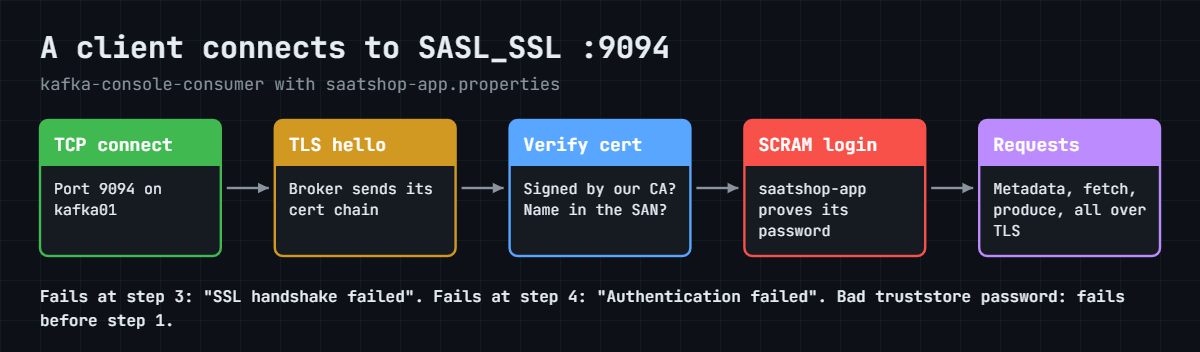
A keystore holds a private key and the certificate chain that goes with it, so only the brokers need one (or clients too, for mutual TLS). A truststore holds only certificates you trust, here the CA, and both brokers and clients need it: brokers because they are clients of each other on the inter-broker listener. The diagram below shows what happens on the wire when a client connects to the new port.
3The TLS handshake and hostname verification
The broker sends its certificate chain. The client checks two things: that the chain ends at a CA in its truststore, and that the name it connected to is in the SAN. Kafka clients do the second check by default (ssl.endpoint.identification.algorithm=https), which means the bootstrap name, and every advertised listener name, must appear in the certificate.
If either check fails, the client logs “SSL handshake failed” and gives up.
4SCRAM: a login without sending the password
With SCRAM, the server stores a salt, an iteration count and two keys derived from the password, never the password itself. During login the client and broker exchange random values and proofs, so even someone who could read the exchange couldn’t reuse it. In KRaft the credentials live in the metadata log: you create them with kafka-configs.sh on a running cluster, or with kafka-storage.sh format --add-scram when you build a new one and the brokers need a user before they can start.
5Listeners, advertised listeners and the protocol map
listeners is where a node binds, advertised.listeners is what it tells clients to connect to, and listener.security.protocol.map gives each listener name its protocol. Here every node binds SASL_SSL on 10.10.10.31 but advertises kafka01.saatlab.test, the name in the certificate. inter.broker.listener.name picks the listener brokers use to replicate, with sasl.mechanism.inter.broker.protocol and a listener.name.sasl_ssl.scram-sha-512.sasl.jaas.config line giving the brokers their own login.
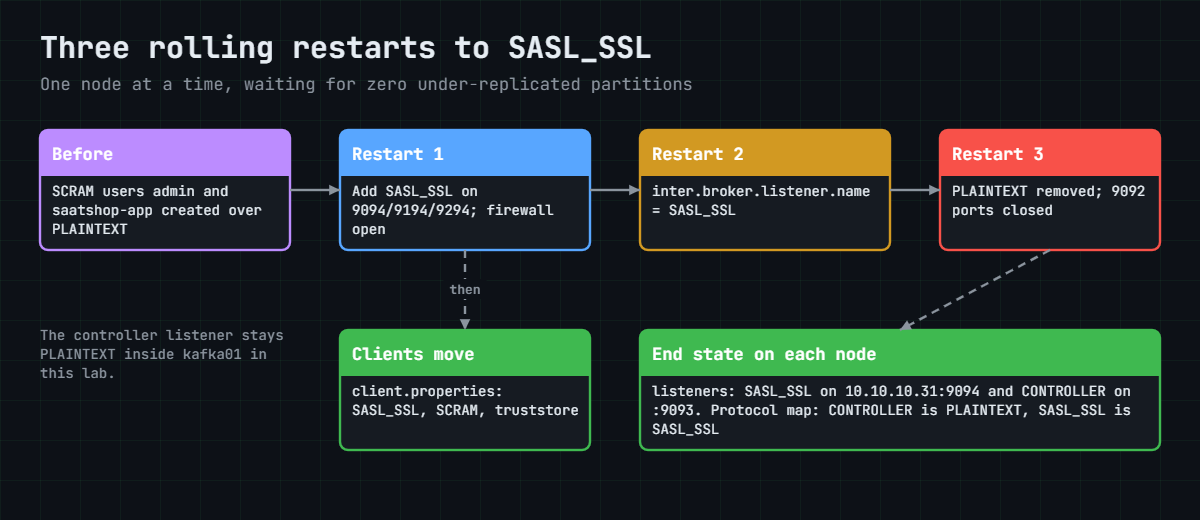
Changing all of that in one restart would leave half the cluster unable to talk to the other half. The picture below shows the three rolling restarts you’ll do, each one safe on its own.
6Passwords, file permissions and renewals
The node configs now contain keystore passwords and the admin SCRAM password, so they become root:kafka 0640, and the keystores sit in a 0750 folder. At work, Kafka’s config providers (FileConfigProvider, DirectoryConfigProvider) let you keep secrets in separate files or a vault, so the main config can be shared and versioned. The controller listener stays PLAINTEXT in this lab because it never leaves kafka01; on separate servers you’d protect it with TLS and a firewall, because the controllers hold the SCRAM credentials.
Certificates expire, and an expired broker certificate stops clients and replication at the same moment. Track the “until” date of every keystore, renew well before it, and use Kafka’s dynamic update of listener.name.sasl_ssl.ssl.keystore.location to load a renewed keystore without a restart. Authentication alone lets any valid user read any topic; the next step at work is an authorizer with ACLs, so saatshop-app can only touch its own topics.
Hands-on lab: move the kafka01 cluster to SASL_SSL with SCRAM
Before you run any command, double-check it
Read every command twice before you press Enter. Check the target: the server name, the user, the disk or device name, the path and the sizes. These commands are for learning and were tested in our lab, not on your system. At work, run the read-only commands first, follow your change process, make sure a backup exists, and ask a second person to check anything that changes or deletes data. You run them at your own risk.
Steps 1 to 6 and 8 to 10 run on kafka01 as student; step 7 runs on ubu01. The cluster keeps serving the whole time, so leave a consumer running in a second window if you want to watch it. Take a snapshot first: VBoxManage snapshot kafka01 take before-l60.
1Check the cluster and give kafka01 its own name
The certificates will carry kafka01.saatlab.test, so kafka01 must resolve its own name:
systemctl is-active kafka@1 kafka@2 kafka@3
grep -q 'kafka01.saatlab.test' /etc/hosts || echo '10.10.10.31 kafka01.saatlab.test kafka01' | sudo tee -a /etc/hosts
getent hosts kafka01.saatlab.test
mkdir -p ~/kafka-ssl ~/kafka-client
chmod 700 ~/kafka-ssl ~/kafka-clientYou should see something like this:
active
active
active
10.10.10.31 kafka01.saatlab.test kafka01
10.10.10.31 kafka01.saatlab.test kafka01Lesson 58 gave kafka01 entries for the other VMs but not for itself, so the line is added once (the grep stops it being added twice). ubu01 and rocky01 already know kafka01.saatlab.test from Lesson 2. ~/kafka-ssl will hold the CA, which is the most sensitive file in this lesson, so it gets mode 700.
✅ Checkpoint: All three nodes are active and getent hosts kafka01.saatlab.test prints 10.10.10.31.
2Create a lab certificate authority
Run this:
cd ~/kafka-ssl
P=Lab-Only-Pass-60
keytool -genkeypair -alias saatlab-ca -keyalg RSA -validity 3650 \
-dname "CN=SaatLab Kafka CA,O=SaatVedha Lab,C=IN" -ext bc:c \
-keystore ca.p12 -storetype PKCS12 -storepass "$P"
keytool -exportcert -rfc -alias saatlab-ca -keystore ca.p12 -storepass "$P" -file ca.crt
openssl x509 -in ca.crt -noout -subject -enddateYou should see something like this:
Generating 3,072 bit RSA key pair and self-signed certificate (SHA384withRSA) with a validity of 3,650 days
for: CN=SaatLab Kafka CA, O=SaatVedha Lab, C=IN
Certificate stored in file <ca.crt>
subject=C = IN, O = SaatVedha Lab, CN = SaatLab Kafka CA
notAfter=Oct 24 05:34:25 2036 GMT-ext bc:c marks the certificate as a CA (basic constraints, critical), which is what lets it sign others. ca.p12 holds the CA’s private key, and anyone with it can mint certificates your clients will trust, so at work it never sits on a broker. ca.crt is the public half that goes into every truststore. Lab-Only-Pass-60 is a lab password; real store passwords come from your secrets manager.
✅ Checkpoint: ca.crt exists and openssl shows the subject “SaatLab Kafka CA” with an end date ten years away.
3Give each node a keystore with the right names
Create a key pair per node, sign it with the CA, and install the signed chain. Paste this whole block:
cd ~/kafka-ssl
P=Lab-Only-Pass-60
SAN="SAN=DNS:kafka01.saatlab.test,DNS:kafka01,IP:10.10.10.31"
for n in 1 2 3; do
keytool -genkeypair -alias node$n -keyalg RSA -validity 730 \
-dname "CN=kafka01.saatlab.test,OU=node$n,O=SaatVedha Lab,C=IN" -ext "$SAN" \
-keystore node$n.keystore.p12 -storetype PKCS12 -storepass "$P"
keytool -certreq -alias node$n -keystore node$n.keystore.p12 -storepass "$P" -file node$n.csr
keytool -gencert -alias saatlab-ca -keystore ca.p12 -storepass "$P" -infile node$n.csr \
-outfile node$n.crt -rfc -validity 730 -ext "$SAN" \
-ext KU=digitalSignature,keyEncipherment -ext EKU=serverAuth,clientAuth
keytool -importcert -alias saatlab-ca -file ca.crt -keystore node$n.keystore.p12 -storepass "$P" -noprompt
keytool -importcert -alias node$n -file node$n.crt -keystore node$n.keystore.p12 -storepass "$P"
done
keytool -list -v -alias node1 -keystore node1.keystore.p12 -storepass "$P" | grep -E 'chain length|Owner|Issuer|until|DNSName|IPAddress'You should see something like this (the first block repeats for node2 and node3):
Generating 3,072 bit RSA key pair and self-signed certificate (SHA384withRSA) with a validity of 730 days
for: CN=kafka01.saatlab.test, OU=node1, O=SaatVedha Lab, C=IN
Certificate was added to keystore
Certificate reply was installed in keystore
Certificate chain length: 2
Owner: CN=kafka01.saatlab.test, OU=node1, O=SaatVedha Lab, C=IN
Issuer: CN=SaatLab Kafka CA, O=SaatVedha Lab, C=IN
Valid from: Tue Oct 27 11:05:14 IST 2026 until: Thu Oct 26 11:05:14 IST 2028
DNSName: kafka01.saatlab.test
DNSName: kafka01
IPAddress: 10.10.10.31
Owner: CN=SaatLab Kafka CA, O=SaatVedha Lab, C=IN
Issuer: CN=SaatLab Kafka CA, O=SaatVedha Lab, C=IN
Valid from: Tue Oct 27 11:04:25 IST 2026 until: Fri Oct 24 11:04:25 IST 2036genkeypair made a key and a temporary self-signed certificate, certreq turned it into a signing request, and gencert signed it with the CA. The SAN is passed again to gencert because keytool doesn’t copy extensions from the request on its own. Importing the CA first lets keytool build the chain, so “Certificate reply was installed” replaces the self-signed certificate with a chain of length 2: node, then CA.
All three nodes share one VM, so they carry the same names; on separate brokers each SAN would list that broker’s own name and IP.
✅ Checkpoint: The node1 listing shows chain length 2, issuer SaatLab Kafka CA, and the two DNS names plus the IP address.
4Build the truststore and install the files
Run this:
keytool -importcert -alias saatlab-ca -file ca.crt -keystore kafka.truststore.p12 \
-storetype PKCS12 -storepass "$P" -noprompt
sudo install -d -o root -g kafka -m 750 /etc/kafka/ssl
sudo install -o root -g kafka -m 640 node1.keystore.p12 node2.keystore.p12 node3.keystore.p12 \
kafka.truststore.p12 /etc/kafka/ssl/
install -m 600 kafka.truststore.p12 ca.crt ~/kafka-client/
sudo ls -l /etc/kafka/sslYou should see something like this:
Certificate was added to keystore
total 24
-rw-r-----. 1 root kafka 1462 Oct 27 11:07 kafka.truststore.p12
-rw-r-----. 1 root kafka 6038 Oct 27 11:07 node1.keystore.p12
-rw-r-----. 1 root kafka 6038 Oct 27 11:07 node2.keystore.p12
-rw-r-----. 1 root kafka 6038 Oct 27 11:07 node3.keystore.p12The kafka user can read the stores through its group but can’t change them, and other users can’t read them at all. install sets owner, group and mode in one go, which is less error-prone than cp followed by chown and chmod. The CA key stays behind in ~/kafka-ssl.
✅ Checkpoint: sudo ls -l /etc/kafka/ssl shows four files, all owned by root, group kafka, with mode -rw-r-----.
5Create the SCRAM users while PLAINTEXT still works
The brokers will log in to each other as admin, so that user must exist before any broker needs it:
B=10.10.10.31:9092,10.10.10.31:9192,10.10.10.31:9292
/opt/kafka/bin/kafka-configs.sh --bootstrap-server $B --alter --entity-type users --entity-name admin \
--add-config 'SCRAM-SHA-512=[password=Lab-Only-Pass-60-admin]'
/opt/kafka/bin/kafka-configs.sh --bootstrap-server $B --alter --entity-type users --entity-name saatshop-app \
--add-config 'SCRAM-SHA-512=[password=Lab-Only-Pass-60-app]'
/opt/kafka/bin/kafka-configs.sh --bootstrap-server $B --describe --entity-type usersYou should see this:
Completed updating config for user admin.
Completed updating config for user saatshop-app.
SCRAM credential configs for user-principal 'admin' are SCRAM-SHA-512=iterations=4096
SCRAM credential configs for user-principal 'saatshop-app' are SCRAM-SHA-512=iterations=4096Only the salt, the iteration count (4096 is the default and the minimum) and the derived keys are stored in the metadata log; describe never shows a password because Kafka doesn’t have it. Bootstrap lists all three nodes, so the tools keep working while any one of them restarts.
✅ Checkpoint: describe lists SCRAM-SHA-512 credentials for admin and saatshop-app.
6Rolling restart 1: open SASL_SSL next to PLAINTEXT
Rewrite the three configs with a SASL_SSL listener on 9094, 9194 and 9294 (inter-broker traffic stays PLAINTEXT for now). Paste this whole block:
for n in 1 2 3; do
port=$((9092 + (n - 1) * 100))
cport=$((port + 1))
sport=$((port + 2))
sudo tee /etc/kafka/node$n.properties >/dev/null <<EOT
# /etc/kafka/node$n.properties (SaatVedha Linux course, Lessons 58 and 60)
process.roles=broker,controller
node.id=$n
controller.quorum.bootstrap.servers=10.10.10.31:9093,10.10.10.31:9193,10.10.10.31:9293
listeners=PLAINTEXT://10.10.10.31:$port,SASL_SSL://10.10.10.31:$sport,CONTROLLER://10.10.10.31:$cport
advertised.listeners=PLAINTEXT://10.10.10.31:$port,SASL_SSL://kafka01.saatlab.test:$sport,CONTROLLER://10.10.10.31:$cport
controller.listener.names=CONTROLLER
inter.broker.listener.name=PLAINTEXT
listener.security.protocol.map=CONTROLLER:PLAINTEXT,PLAINTEXT:PLAINTEXT,SASL_SSL:SASL_SSL
sasl.mechanism.inter.broker.protocol=SCRAM-SHA-512
listener.name.sasl_ssl.sasl.enabled.mechanisms=SCRAM-SHA-512
listener.name.sasl_ssl.scram-sha-512.sasl.jaas.config=org.apache.kafka.common.security.scram.ScramLoginModule required username="admin" password="Lab-Only-Pass-60-admin";
ssl.keystore.type=PKCS12
ssl.keystore.location=/etc/kafka/ssl/node$n.keystore.p12
ssl.keystore.password=Lab-Only-Pass-60
ssl.key.password=Lab-Only-Pass-60
ssl.truststore.type=PKCS12
ssl.truststore.location=/etc/kafka/ssl/kafka.truststore.p12
ssl.truststore.password=Lab-Only-Pass-60
log.dirs=/var/lib/kafka/node$n
num.partitions=3
default.replication.factor=3
min.insync.replicas=2
offsets.topic.replication.factor=3
transaction.state.log.replication.factor=3
transaction.state.log.min.isr=2
share.coordinator.state.topic.replication.factor=3
share.coordinator.state.topic.min.isr=2
log.retention.hours=168
EOT
done
sudo chown root:kafka /etc/kafka/node*.properties
sudo chmod 640 /etc/kafka/node*.properties
sudo grep -h '^listeners=' /etc/kafka/node*.propertiesYou should see this:
listeners=PLAINTEXT://10.10.10.31:9092,SASL_SSL://10.10.10.31:9094,CONTROLLER://10.10.10.31:9093
listeners=PLAINTEXT://10.10.10.31:9192,SASL_SSL://10.10.10.31:9194,CONTROLLER://10.10.10.31:9193
listeners=PLAINTEXT://10.10.10.31:9292,SASL_SSL://10.10.10.31:9294,CONTROLLER://10.10.10.31:9293Open the new ports, define a small function that restarts one node at a time and waits for replication to catch up, and use it:
sudo firewall-cmd --permanent --add-port={9094,9194,9294}/tcp
sudo firewall-cmd --reload
roll() {
# usage: roll BOOTSTRAP [extra kafka-topics options]
local bs=$1; shift
for n in 1 2 3; do
sudo systemctl restart "kafka@$n"
sleep 15
until systemctl is-active --quiet "kafka@$n" && [ -z "$(/opt/kafka/bin/kafka-topics.sh \
--bootstrap-server "$bs" "$@" --describe --under-replicated-partitions 2>&1)" ]; do
sleep 5
done
echo "kafka@$n is back and nothing is under-replicated"
done
}
roll "$B"
ss -ltn | grep -c -E ':(9094|9194|9294) 'You should see something like this (it takes a few minutes):
success
success
kafka@1 is back and nothing is under-replicated
kafka@2 is back and nothing is under-replicated
kafka@3 is back and nothing is under-replicated
3The function restarts a node, waits until the unit is active and --under-replicated-partitions prints nothing, and only then moves on, which is the rule for any rolling restart. sasl.mechanism.inter.broker.protocol is already set but does nothing until the inter-broker listener changes in step 9. If you open a new shell later, paste the roll function again and set B (step 5) or S (step 9) before you use it. If a node doesn’t come back, sudo journalctl -u kafka@1 -n 50 usually names the keystore or password at fault.
✅ Checkpoint: roll printed three “is back” lines and three SASL_SSL ports are listening.
7Test the TLS listener from ubu01
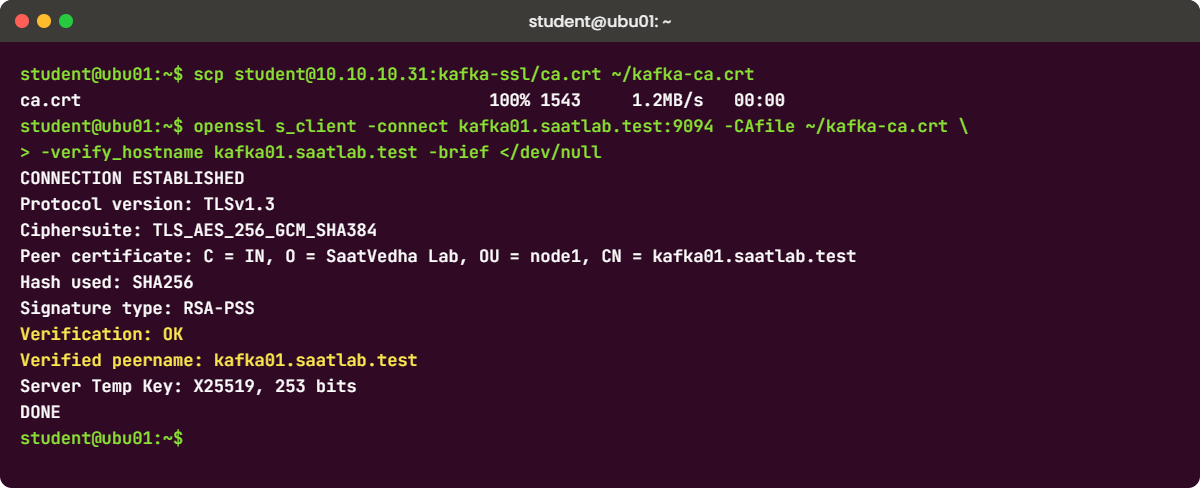
On ubu01, fetch the CA certificate and connect the way any client would:
scp student@10.10.10.31:kafka-ssl/ca.crt ~/kafka-ca.crt
openssl s_client -connect kafka01.saatlab.test:9094 -CAfile ~/kafka-ca.crt -verify_hostname kafka01.saatlab.test -brief </dev/nullYou should see something like this:
CONNECTION ESTABLISHED
Protocol version: TLSv1.3
Ciphersuite: TLS_AES_256_GCM_SHA384
Peer certificate: C = IN, O = SaatVedha Lab, OU = node1, CN = kafka01.saatlab.test
Hash used: SHA256
Signature type: RSA-PSS
Verification: OK
Verified peername: kafka01.saatlab.test
Server Temp Key: X25519, 253 bits
DONE“Verification: OK” and “Verified peername” are the two checks a Kafka client makes: the chain ends at your CA and the name is in the SAN. The broker and Java 21 picked TLS 1.3, Kafka’s default. openssl can’t do the SASL part, so this proves TLS only, and it’s the quickest test when a client team says “SSL doesn’t work”. Newer OpenSSL releases word a few of these lines differently; look for the Verification line.
✅ Checkpoint: openssl prints Verification: OK and Verified peername: kafka01.saatlab.test.
8Write client configs and send events over SASL_SSL
Back on kafka01, create one config file per user and use the application user:
cat > ~/kafka-client/admin.properties <<'EOF'
security.protocol=SASL_SSL
sasl.mechanism=SCRAM-SHA-512
sasl.jaas.config=org.apache.kafka.common.security.scram.ScramLoginModule required username="admin" password="Lab-Only-Pass-60-admin";
ssl.truststore.type=PKCS12
ssl.truststore.location=/home/student/kafka-client/kafka.truststore.p12
ssl.truststore.password=Lab-Only-Pass-60
EOF
sed -e 's/username="admin"/username="saatshop-app"/' -e 's/Lab-Only-Pass-60-admin/Lab-Only-Pass-60-app/' \
~/kafka-client/admin.properties > ~/kafka-client/saatshop-app.properties
chmod 600 ~/kafka-client/*.properties
S=kafka01.saatlab.test:9094,kafka01.saatlab.test:9194,kafka01.saatlab.test:9294
APP=~/kafka-client/saatshop-app.properties
printf 'order-2001 placed\norder-2002 paid\n' | /opt/kafka/bin/kafka-console-producer.sh \
--bootstrap-server $S --topic saatshop-orders --command-config $APP
/opt/kafka/bin/kafka-console-consumer.sh --bootstrap-server $S --topic saatshop-orders \
--from-beginning --max-messages 6 --command-config $APPYou should see something like this (your order of lines may differ):
order-1001 placed
order-1002 placed
order-1003 paid
order-2001 placed
order-2002 paid
order-1004 placed
Processed a total of 6 messagesThe four events from Lesson 58 and the two new ones came back over an encrypted, authenticated connection. Kafka keeps order only inside a partition, so lines from different partitions can interleave. The truststore here is PKCS12; for non-Java clients, or to skip the store password, ssl.truststore.type=PEM with ssl.truststore.location pointing at ca.crt works too.
Without an authorizer, saatshop-app could read any topic; ACLs are the next step at work.
✅ Checkpoint: The consumer printed six events and “Processed a total of 6 messages” using saatshop-app.properties.
9Rolling restarts 2 and 3: brokers on SASL_SSL, PLAINTEXT closed
Move replication to SASL_SSL, roll, then remove PLAINTEXT, roll again and close the old ports:
S=kafka01.saatlab.test:9094,kafka01.saatlab.test:9194,kafka01.saatlab.test:9294
A=~/kafka-client/admin.properties
sudo sed -i 's/^inter.broker.listener.name=PLAINTEXT$/inter.broker.listener.name=SASL_SSL/' /etc/kafka/node*.properties
roll "$S" --command-config "$A"
sudo sed -i -E -e 's#PLAINTEXT://10\.10\.10\.31:9[0-9]92,##' -e 's#,PLAINTEXT:PLAINTEXT##' /etc/kafka/node*.properties
roll "$S" --command-config "$A"
sudo firewall-cmd --permanent --remove-port={9092,9192,9292}/tcp
sudo firewall-cmd --reload
sudo firewall-cmd --list-ports
sudo grep -E '^(listeners|advertised.listeners|inter.broker.listener.name|listener.security.protocol.map)=' /etc/kafka/node1.properties
/opt/kafka/bin/kafka-metadata-quorum.sh --bootstrap-server $S --command-config $A describe --status | grep -E 'LeaderId|MaxFollowerLag:'You should see something like this:
kafka@1 is back and nothing is under-replicated
kafka@2 is back and nothing is under-replicated
kafka@3 is back and nothing is under-replicated
kafka@1 is back and nothing is under-replicated
kafka@2 is back and nothing is under-replicated
kafka@3 is back and nothing is under-replicated
success
success
9094/tcp 9194/tcp 9294/tcp
listeners=SASL_SSL://10.10.10.31:9094,CONTROLLER://10.10.10.31:9093
advertised.listeners=SASL_SSL://kafka01.saatlab.test:9094,CONTROLLER://10.10.10.31:9093
inter.broker.listener.name=SASL_SSL
listener.security.protocol.map=CONTROLLER:PLAINTEXT,SASL_SSL:SASL_SSL
LeaderId: 3
MaxFollowerLag: 0During restart 2 every node still had both listeners, so a node replicating over SASL_SSL could reach nodes that hadn’t switched yet. Restart 3 could only begin once nothing used PLAINTEXT. The sed in the middle removes the PLAINTEXT entry from listeners, advertised.listeners and the protocol map in one pass.
From now on every Kafka command on this cluster needs --bootstrap-server with the SASL_SSL addresses and --command-config with a client file, including the Lesson 58 health checks.
✅ Checkpoint: Only 9094, 9194 and 9294 are open, node1 lists SASL_SSL and CONTROLLER only, and the quorum shows a leader with MaxFollowerLag 0.
10Check when the certificates expire
Read the end date from each keystore, and from the live listener the way a monitoring check would:
for f in /etc/kafka/ssl/node*.keystore.p12; do
printf '%s ' "$f"
sudo keytool -list -v -keystore "$f" -storepass Lab-Only-Pass-60 | grep -m1 'until:' | sed 's/.*until: //'
done
echo | openssl s_client -connect kafka01.saatlab.test:9094 2>/dev/null | openssl x509 -noout -enddate -checkend $((30*24*3600))
echo "exit code $?"You should see something like this:
/etc/kafka/ssl/node1.keystore.p12 Thu Oct 26 11:05:14 IST 2028
/etc/kafka/ssl/node2.keystore.p12 Thu Oct 26 11:05:16 IST 2028
/etc/kafka/ssl/node3.keystore.p12 Thu Oct 26 11:05:18 IST 2028
notAfter=Oct 26 05:35:14 2028 GMT
Certificate will not expire
exit code 0-checkend 2592000 asks “will this expire in the next 30 days?” and answers with exit code 0 (no) or 1 (yes, renew now), which makes it easy to wrap in a monitoring item. keytool reads the file, so it also catches a renewed keystore that was never loaded; openssl reads what the broker is serving right now. Check both after every renewal.
✅ Checkpoint: All three keystores end in October 2028, and the live check prints “Certificate will not expire” with exit code 0.
Break It, Then Fix It
Take a snapshot first (VBoxManage snapshot kafka01 take before-l60-break). Both failures are on the client side, so the cluster keeps running throughout. In a new shell, set the variables again: S=kafka01.saatlab.test:9094,kafka01.saatlab.test:9194,kafka01.saatlab.test:9294.
1A name that is not in the certificate
A load balancer is planned, so someone adds the alias kafka.saatlab.test and points tools at it:
echo '10.10.10.31 kafka.saatlab.test' | sudo tee -a /etc/hosts
/opt/kafka/bin/kafka-topics.sh --bootstrap-server kafka.saatlab.test:9094 \
--command-config ~/kafka-client/admin.properties --list 2>&1 | grep -E 'ERROR|Error|Caused' | head -n 4
openssl s_client -connect kafka.saatlab.test:9094 -CAfile ~/kafka-client/ca.crt \
-verify_hostname kafka.saatlab.test -brief </dev/null 2>&1 | grep -i 'verif'You’ll get this error:
[2026-10-27 12:02:31,447] ERROR [AdminClient clientId=adminclient-1] Connection to node -1 (kafka.saatlab.test/10.10.10.31:9094) failed authentication due to: SSL handshake failed (org.apache.kafka.clients.NetworkClient)
Error while executing topic command : SSL handshake failed
[2026-10-27 12:02:31,466] ERROR org.apache.kafka.common.errors.SslAuthenticationException: SSL handshake failed
Caused by: javax.net.ssl.SSLHandshakeException: (certificate_unknown) No subject alternative DNS name matching kafka.saatlab.test found.
verify error:num=62:hostname mismatch
Verification error: hostname mismatchThe certificate is valid and trusted, but it was issued for kafka01.saatlab.test, kafka01 and 10.10.10.31, and the client asked for kafka.saatlab.test. Java’s message says so, and openssl agrees with “hostname mismatch”. Never “fix” this by setting ssl.endpoint.identification.algorithm to an empty value: that turns off the very check that stops someone else’s server from posing as your broker.
Fix: use a name the certificate carries. If the alias must exist (a real load balancer), reissue the node certificates with it added to the SAN and roll the cluster. In the lab, remove the alias:
sudo sed -i '/^10\.10\.10\.31 kafka\.saatlab\.test$/d' /etc/hosts
/opt/kafka/bin/kafka-topics.sh --bootstrap-server $S --command-config ~/kafka-client/admin.properties --list__consumer_offsets
saatshop-orders✅ Checkpoint: The topic list comes back through kafka01.saatlab.test and /etc/hosts no longer has the alias.
2The wrong truststore password
A developer copies the client file and mistypes one character of the store password:
sed -i 's/^ssl.truststore.password=.*/ssl.truststore.password=Lab-Only-Pass-06/' ~/kafka-client/saatshop-app.properties
/opt/kafka/bin/kafka-console-consumer.sh --bootstrap-server $S --topic saatshop-orders --max-messages 1 \
--command-config ~/kafka-client/saatshop-app.properties 2>&1 | grep -E 'ERROR|Caused by|^org' | head -n 5You’ll get this error:
[2026-10-27 12:09:55,118] ERROR Unknown error when running consumer: (org.apache.kafka.tools.consumer.ConsoleConsumer)
org.apache.kafka.common.KafkaException: Failed to construct kafka consumer
Caused by: org.apache.kafka.common.KafkaException: org.apache.kafka.common.KafkaException: Failed to load SSL keystore /home/student/kafka-client/kafka.truststore.p12 of type PKCS12
Caused by: org.apache.kafka.common.KafkaException: Failed to load SSL keystore /home/student/kafka-client/kafka.truststore.p12 of type PKCS12
Caused by: java.io.IOException: keystore password was incorrectThe client fails before it even connects, because Java can’t open the PKCS12 file without the right password. The message says “keystore” although the file is a truststore, because Kafka loads both with the same code; read the path, not the word. You can prove it outside Kafka in a second with keytool.
Fix: confirm which password opens the file, then put it back in the config.
keytool -list -keystore ~/kafka-client/kafka.truststore.p12 -storepass Lab-Only-Pass-06 2>&1 | head -n 1
keytool -list -keystore ~/kafka-client/kafka.truststore.p12 -storepass Lab-Only-Pass-60 | grep trustedCertEntry
sed -i 's/^ssl.truststore.password=.*/ssl.truststore.password=Lab-Only-Pass-60/' ~/kafka-client/saatshop-app.properties
/opt/kafka/bin/kafka-console-consumer.sh --bootstrap-server $S --topic saatshop-orders --from-beginning \
--max-messages 1 --command-config ~/kafka-client/saatshop-app.propertiesYou should see something like this:
keytool error: java.io.IOException: keystore password was incorrect
saatlab-ca, Oct 27, 2026, trustedCertEntry,
order-1001 placed
Processed a total of 1 messages✅ Checkpoint: keytool opens the truststore with Lab-Only-Pass-60 and the consumer reads a message again.
This happened at work
The Monday the chargers went offline
I was on the platform team at an EV charging network in Madurai when this happened. Every charger sent session events (plug in, start, stop, energy used) through a gateway into Kafka over SASL_SSL, and the app showed a charger as available only when its events were flowing. At 6:10 on a Monday morning, the app marked every charger in Madurai and Tirunelveli offline, right when taxi drivers started their first charge of the day.
The gateway logs were full of “SSL handshake failed”. The first idea was a bad gateway release, so the team rolled it back, then restarted the gateway pods, and then one broker; nothing changed, and that broker came back with under-replicated partitions because its peers couldn’t talk to it either. I ran openssl s_client against a broker and piped it into openssl x509 -noout -enddate, and the notAfter date was the previous night, 23:40.
The broker certificates had been issued two years earlier by a contractor, valid for 730 days, and nobody had written the date down anywhere. Inter-broker traffic used the same listener, so the expiry broke replication as well as clients. We signed new certificates from the internal CA with the same SANs, rolled them out broker by broker, and the chargers were back by 8:20.
Afterwards every keystore’s expiry date went into monitoring with a warning at 30 days and an alarm at 7, renewals became a quarterly runbook that uses Kafka’s dynamic keystore update instead of restarts, and the CA key moved off the shared admin server into the company’s PKI.
Common mistakes and troubleshooting
| Mistake | What happens | What to do instead |
|---|---|---|
Turning off hostname checks with an empty ssl.endpoint.identification.algorithm | The error goes away, and so does protection against a fake broker | Put every name clients use in the SAN and reissue |
| Certificates with a CN but no SAN | Java and modern clients reject them with “No subject alternative DNS name” | Always add -ext SAN=DNS:...,IP:... to the request and when signing |
| Keeping the CA key on a broker or in git | Anyone who gets it can mint trusted certificates | Keep the CA in the company PKI or offline; brokers get only their keystore |
| Node configs with passwords left at mode 0644 | Every local user can read keystore and SCRAM passwords | root:kafka 0640, or config providers that read secrets from protected files |
| Switching listeners, inter-broker protocol and closing PLAINTEXT in one restart | Nodes can’t reach each other; partitions go under-replicated or offline | Three rolling restarts: open, move inter-broker, close |
| SCRAM on SASL_PLAINTEXT | The exchange can be captured and attacked offline | Use SCRAM only inside TLS: SASL_SSL |
| No record of certificate expiry dates | Clients and replication fail together on one night | Monitor keytool or openssl -checkend, renew 30 days ahead |
Interview questions
Click a question to open it. Each one is written the way an interviewer would ask it. Under it you will see why they ask it and one way you could answer, in your own words.
Fresher level
1. What is the difference between a keystore and a truststore in Kafka?
Why they ask this: A basic TLS question; they want to see you know which side needs which file.
How you might answer: A keystore holds a private key and its signed certificate chain, so it proves who you are; every broker needs one. A truststore holds the CA certificates you trust, so it lets you check the other side.
Clients need a truststore to verify brokers, and brokers need one too because they connect to each other. With mutual TLS, clients also get a keystore.
2. A listener map says CONTROLLER:PLAINTEXT,SASL_SSL:SASL_SSL. What does that tell you?
Why they ask this: They want to check you can read a broker config and know the four security protocols.
How you might answer: It maps listener names to security protocols. The CONTROLLER listener is unencrypted with no login, and the listener named SASL_SSL uses TLS for encryption and SASL for client logins.
Which port each one uses is in listeners, and which name clients are told to use is in advertised.listeners. If inter.broker.listener.name is SASL_SSL, replication between brokers is encrypted and authenticated too.
2–5 years experience
3. After a DNS change, clients get “SSL handshake failed”. How do you troubleshoot it?
Why they ask this: A practical TLS debugging question: they want a method, not guesses.
How you might answer: First I read the full client error, because the cause line names it: for example “No subject alternative DNS name matching” or a PKIX path or validity error. Then I run openssl s_client -connect host:port -CAfile ca.crt -verify_hostname host from the client’s machine, which shows the chain, the verification result and the expiry date.
If the new name isn’t in the SAN, the fix is a reissued certificate with that name, rolled out broker by broker; I never disable hostname verification. If the date is the problem, it’s an expired or not-yet-valid certificate, or a wrong clock on one side.
4. How would you move a running PLAINTEXT cluster to SASL_SSL without downtime?
Why they ask this: They want the phased method and the ordering details that keep replication alive.
How you might answer: I create the SCRAM users first, including the one the brokers will use, while PLAINTEXT still works. Then I do a rolling restart that adds a SASL_SSL listener on new ports, open those ports, and move clients to them with a client.properties file.
The second rolling restart switches inter.broker.listener.name to SASL_SSL, and the third removes PLAINTEXT from listeners, advertised.listeners and the protocol map before I close the old ports. Between nodes I wait for under-replicated partitions to reach zero.
Senior level
5. Certificates on 60 brokers expire in three weeks. How do you plan the renewal?
Why they ask this: Seniors should think about risk, automation and avoiding mass restarts.
How you might answer: I’d issue new certificates from the same CA with the same SANs, so clients need no change, and build new keystores per broker. Kafka can load a new keystore through a dynamic update of listener.name.<listener>.ssl.keystore.location, so I’d roll the change broker by broker without restarts, checking each one with openssl before moving on.
For the inter-broker listener Kafka checks that the new keystore is trusted, which is a useful safety net. After that I’d put every expiry date into monitoring with 30-day warnings and make renewal a scheduled job, so it never becomes an emergency again.
6. SCRAM, mutual TLS or OAUTHBEARER for a company with hundreds of client applications: how do you choose?
Why they ask this: They want trade-offs: identity source, rotation, tooling and who operates it.
How you might answer: SCRAM is simple and needs nothing outside Kafka, but every application gets a password that someone has to store and rotate, and the credentials live in Kafka’s metadata. Mutual TLS ties identity to certificates, which works well if a PKI already issues them automatically, but revocation and renewal need care.
With hundreds of apps and a central identity provider, I’d lean to OAUTHBEARER, so apps use short-lived tokens and access follows the company’s existing identities. Whatever I pick, I’d still use TLS on every listener and ACLs per application.
Quick quiz
Q1. Which file must every Kafka broker have so it can prove its identity over TLS?
- A truststore
- A keystore with its private key and signed certificate
- The CA private key
- client.properties
Show answer
B — The keystore holds the key and chain; the truststore only holds trusted CA certificates.
Q2. A client connects to kafka.saatlab.test but the certificate SAN lists only kafka01.saatlab.test. What happens?
- It works but logs a warning
- SSL handshake failed: no subject alternative DNS name matching
- It falls back to PLAINTEXT
- SASL login fails
Show answer
B — Hostname verification is on by default in Kafka clients.
Q3. Where does a KRaft cluster store SCRAM credentials?
- In server.properties
- In a JAAS file on each broker
- In the metadata log, created with kafka-configs.sh or kafka-storage.sh
- In the truststore
Show answer
C — Salted credentials live in the cluster metadata; brokers only hold their own login in the JAAS config.
Q4. What does the second rolling restart change in the method used in this lesson?
- Adds the SASL_SSL listener
- Switches inter.broker.listener.name to SASL_SSL
- Removes PLAINTEXT
- Creates the SCRAM users
Show answer
B — Restart 1 opens the secure port, 2 moves replication, 3 closes PLAINTEXT.
Q5. openssl x509 -checkend 2592000 returns exit code 1. What does it mean?
- The certificate is valid for 30 more days
- The certificate expires within the next 30 days
- The certificate is self-signed
- The file is not a certificate
Show answer
B — Exit 1 means it will expire within the given number of seconds; renew now.
Quick recap
- TLS encrypts and proves the broker’s identity; SASL makes every client log in. Use SASL_SSL, never SCRAM over plain text.
- One CA signs a certificate per node; the SAN must list every name and IP clients use; brokers get a PKCS12 keystore, everyone gets a truststore.
- Create SCRAM users with
kafka-configs.sh(orkafka-storage.sh format --add-scramon a new cluster) before brokers need them. - Secure a running cluster in three rolling restarts: open SASL_SSL, move inter-broker traffic, close PLAINTEXT and its firewall ports.
- Test TLS with openssl s_client -verify_hostname, keep configs at 0640, and monitor certificate expiry with -checkend.
Next lesson
Lesson 61: Monitoring with Zabbix: agent 2, server and HA proxies → You’ll install a Zabbix server on ubu01, two proxies in a proxy group, and agent 2 on all three VMs, then watch Kafka on kafka01 and break the proxy setup on purpose.
Further reading: Kafka SSL SASL
Want to go deeper into Kafka SSL SASL? Read the Kafka 4.4 security docs: encryption and authentication using SSL, authentication using SASL (SCRAM credentials with kafka-configs and kafka-storage), adding security to a running cluster, and Oracle’s keytool reference for Java 21. You can also see the full plan for this course on the Linux Administration course page.
