“Too many open files”: find the cause and fix it
-
Phase 0: Before you start
-
Phase 1: The origins and OS architecture
-
Phase 2: Day-to-day administration and the command builder
-
Phase 3: Enterprise infrastructure and storage
-
Phase 4: Troubleshooting step by step
-
Phase 5: Final project and career
Too many open files is the error a Linux program gets when it asks for one more file descriptor than its limit allows. The message is the same for real files, network connections, pipes and inotify watches, so it shows up as failed logins on a web server, a Kafka broker that stops, a Java app throwing IOException, or tail -f quietly falling back to polling.
Lesson 51 showed where the limit is set and why limits.conf doesn’t reach a systemd service. This lesson is the troubleshooting side: you’ll reproduce the error, measure a running process against its limit, tell a real need from a file handle leak with lsof, buy time with prlimit, and fix the Nginx and inotify versions of the same error.
Where this lesson fits
Lesson 75 of 82 in Linux Administration · Phase 4: Troubleshooting step by step · Before this: Lesson 74, out of memory and the OOM killer · Next: Lesson 76, DNS and name resolution problems
| Time | You need | By the end you can |
|---|---|---|
| About 70 minutes | rocky01 with the appsvc account (Lesson 15) and Nginx serving SaatShop (Lesson 56), ubu01 to send test traffic, and a snapshot of rocky01 | Read any process’s open files against its limit, find what is holding them, raise a limit live or permanently in the right place, and recognise the Nginx and inotify variants |
What it is, in one line
“Too many open files” (EMFILE, errno 24) means one process has used every file descriptor its soft RLIMIT_NOFILE allows, so you check its count against its limit and then decide whether it needs more or is leaking.
In Simple Words
Tokens at the temple shoe stand
At a busy temple, the shoe stand gives you a numbered token for every pair you leave. One counter has 1,024 tokens on its board. A family that leaves shoes and collects them on the way out never causes trouble, however many people come.
Now picture a tour group whose guide hands over shoes all day but forgets to collect them. By afternoon every token is out, and the next person is told “no tokens left”, even though half the pairs belong to people who went home long ago. Printing more tokens only delays the same afternoon.
The tokens are file descriptors, the board is the process’s open-files limit, and the forgetful guide is a program that opens files or connections and never closes them.
Engineer's View
Two limits, two error numbers, and how each program says it
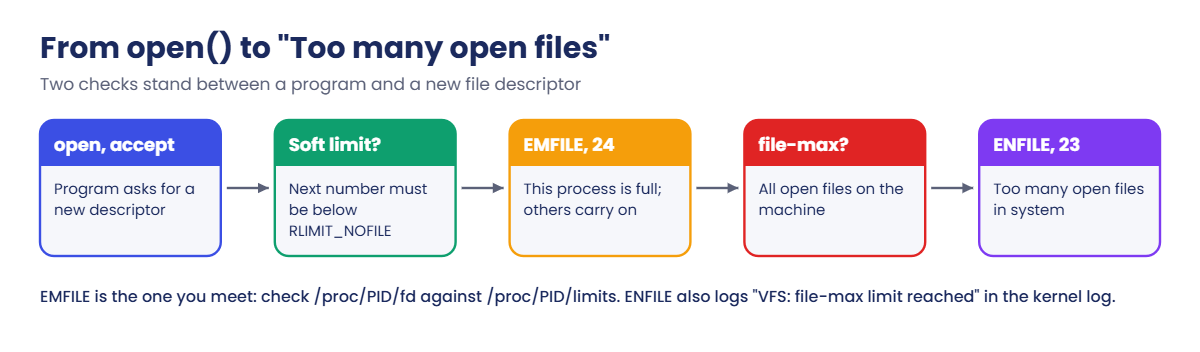
Every open file, socket, pipe, epoll or inotify instance takes one slot in the process’s file descriptor table, numbered from 0. The kernel always hands out the lowest free number, and refuses with EMFILE when that number would reach the soft RLIMIT_NOFILE. A second, rarer error, ENFILE, means the whole system’s file table (fs.file-max) is full.
| Limit | Scope | Default on Rocky 10 and Ubuntu 26.04 | Error when hit |
|---|---|---|---|
Soft RLIMIT_NOFILE | One process | 1024 for shells and services | EMFILE, errno 24, “Too many open files” |
Hard RLIMIT_NOFILE | One process, ceiling for the soft value | 524288 (systemd’s DefaultLimitNOFILE=1024:524288) | Raising the soft value above it fails |
fs.nr_open | Highest value any hard limit may have | 1073741816 (raised by systemd at boot) | Setting LimitNOFILE above it fails |
fs.file-max | All open files on the machine | 9223372036854775807 (raised by systemd) | ENFILE, errno 23, “Too many open files in system”, kernel logs “VFS: file-max limit … reached” |
fs.inotify.max_user_instances | Per user, not per process | 128 | EMFILE from inotify_init, so tools print “Too many open files” |
nofile is a per-process limit even when it’s written against a user name in limits.conf: every process of that user gets its own allowance, there is no shared pool. The inotify limit is the odd one out, because it counts instances across all processes of one user.
| Software | What the error looks like |
|---|---|
| Python | OSError: [Errno 24] Too many open files |
| Java, Kafka, Elasticsearch | java.io.IOException: Too many open files (or SocketException), often followed by the broker or node shutting down |
| Nginx | accept4() failed (24: Too many open files) and socket() failed (24: Too many open files) while connecting to upstream |
| tail -f (GNU coreutils) | tail: inotify cannot be used, reverting to polling: Too many open files |
| strace of any program | = -1 EMFILE (Too many open files) |
How it works, step by step
When a program opens something, the kernel runs two checks before it hands out a descriptor. The diagram after these steps shows them in order.
1The program asks for a descriptor
open(), socket(), accept(), pipe() and inotify_init() all need a new slot. The kernel looks for the lowest free number in that process’s table.
2The per-process check
If that number would reach the soft RLIMIT_NOFILE, the call fails with EMFILE. Nothing else on the machine is affected; other processes carry on, which is why one service can be “down” while the server looks healthy.
3The system-wide check
The kernel also counts every open file on the machine against fs.file-max and fails with ENFILE when that table is full. With systemd raising file-max to the largest possible value, you’ll almost never see this on Rocky 10 or Ubuntu 26.04, but older or container hosts can still hit it.
4The program decides what to do with the error
Some crash (Kafka shuts down the broker), some log and carry on (Nginx stops accepting for half a second, a web app returns 500s), and some fall back quietly (tail -f polls). That choice is why the symptom looks so different from one program to the next.
5Limits come from the process that started it
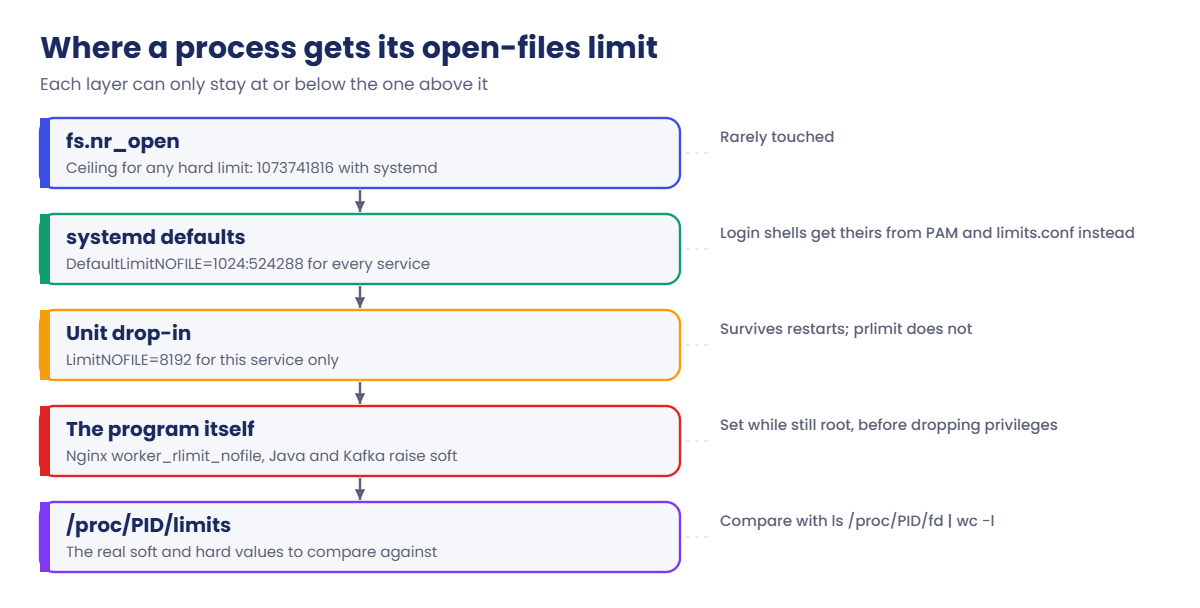
A child copies its parent’s limits. A service gets them from systemd and its unit (LimitNOFILE=), a login shell from PAM, and some programs then raise their own soft limit up to the hard one, as Nginx does with worker_rlimit_nofile. The picture below shows the layers, from the kernel’s ceiling down to the number you compare against.
6Count, compare, then identify
Three numbers settle almost every case: how many descriptors the process holds (ls /proc/PID/fd | wc -l), its soft limit (/proc/PID/limits), and whether the count is steady or climbing. A steady count near the limit means the limit is too small for the work. A count that climbs with time and never falls is a leak, and a bigger limit only moves the outage to a later date.
To see what the descriptors are, lsof lists them with type and name, and for sockets ss -tanp shows the state. Thousands of the same file, or thousands of sockets in CLOSE_WAIT, point straight at the code that forgot to close them.
Hands-on lab: catch a file handle leak and fix open-file limits on rocky01
Before you run any command, double-check it
Read every command twice before you press Enter. Check the target: the server name, the user, the disk or device name, the path and the sizes. These commands are for learning and were tested in our lab, not on your system. At work, run the read-only commands first, follow your change process, make sure a backup exists, and ask a second person to check anything that changes or deletes data. You run them at your own risk.
Take a snapshot of rocky01 first (VBoxManage snapshot rocky01 take before-l75 on the laptop). Steps 1 to 8 run on rocky01 as student, with sudo where shown; ubu01 joins in the Break-It part. Make a folder with mkdir -p ~/lab75 and check that lsof is there (sudo dnf install -y lsof strace adds it and strace if not).
1Make the error happen in your own shell
Create a script that opens files until it can’t, and run it in a subshell with a soft limit of 256:
cat > ~/lab75/fd-eater.py <<'EOF'
#!/usr/bin/python3
# fd-eater.py: opens files until the kernel says no (Lesson 75)
import resource
soft, hard = resource.getrlimit(resource.RLIMIT_NOFILE)
print(f"soft limit {soft}, hard limit {hard}", flush=True)
held = []
while True:
held.append(open("/etc/hostname"))
EOF
(ulimit -Sn 256; python3 ~/lab75/fd-eater.py)You should see something like this:
soft limit 256, hard limit 524288
Traceback (most recent call last):
File "/home/student/lab75/fd-eater.py", line 8, in <module>
OSError: [Errno 24] Too many open files: '/etc/hostname'The brackets run the command in a subshell, so your login shell keeps its own limit. Notice the traceback has no source line under “line 8”: Python needs a free descriptor to open its own script and print that line, and there wasn’t one left. Now look one layer lower, at the system call that failed:
(ulimit -Sn 64; strace -e trace=openat python3 ~/lab75/fd-eater.py 2>&1 | grep -m1 -B1 EMFILE)You should see this:
openat(AT_FDCWD, "/etc/hostname", O_RDONLY|O_CLOEXEC) = 63
openat(AT_FDCWD, "/etc/hostname", O_RDONLY|O_CLOEXEC) = -1 EMFILE (Too many open files)Descriptor 63 was the last one allowed under a limit of 64 (0 to 63), and the next openat() returned EMFILE. Every language’s “Too many open files” message is this one kernel error with different words around it.
✅ Checkpoint: You saw Errno 24 from Python and EMFILE from strace, and ulimit -Sn in your own shell still prints 1024.
2Look at the whole system first
Create a script that compares each process’s open descriptors with its soft limit, then run it with sudo so it can read every process:
cat > ~/lab75/fdtop.sh <<'EOF'
#!/bin/bash
# fdtop.sh: open files per process against its soft limit (Lesson 75)
n=$1
[ -n "$n" ] || n=8
printf '%6s %7s %5s %7s %s\n' FDS LIMIT USE% PID COMMAND
for d in /proc/[0-9]*; do
lim=$(awk '/^Max open files/ {print $4}' "$d/limits" 2>/dev/null)
[ -n "$lim" ] || continue
fds=$(find "$d/fd" -mindepth 1 2>/dev/null | wc -l)
pct=0
[ "$lim" = unlimited ] || pct=$((fds * 100 / lim))
printf '%6s %7s %4s%% %7s %s\n' "$fds" "$lim" "$pct" "$(basename "$d")" "$(cat "$d/comm" 2>/dev/null)"
done | sort -k3,3nr -k1,1nr | head -n "$n"
EOF
chmod +x ~/lab75/fdtop.sh
cat /proc/sys/fs/file-nr
sysctl fs.file-max fs.nr_open
sudo ~/lab75/fdtop.sh 6You should see something like this:
1408 0 9223372036854775807
fs.file-max = 9223372036854775807
fs.nr_open = 1073741816
FDS LIMIT USE% PID COMMAND
31 1024 3% 868 NetworkManager
14 1024 1% 812 firewalld
13 1024 1% 790 polkitd
12 1024 1% 1046 tuned
118 524288 0% 1 systemd
74 524288 0% 612 systemd-journalfile-nr has three numbers: open file handles on the whole machine (1408), a field that is always 0 on current kernels, and file-max. 1408 against nine quintillion means ENFILE is not your problem. fdtop.sh sorts by how full each process is; on a quiet rocky01 nothing is above a few percent, and services such as NetworkManager run with the default soft limit of 1024.
✅ Checkpoint: file-nr shows a small first number and no process in fdtop.sh is above 10 percent.
3Start a service that leaks file handles
Create a pretend billing API that opens a rates file on every request and never closes it (paste this whole block):
sudo mkdir -p /var/lib/saat-leaky
echo 'code,rate' | sudo tee /var/lib/saat-leaky/rates.csv
sudo tee /usr/local/bin/saat-leaky.py >/dev/null <<'EOF'
#!/usr/bin/python3
# saat-leaky.py: a pretend billing API that forgets to close a file on every request (Lesson 75)
import time
DATA = "/var/lib/saat-leaky/rates.csv"
forgotten = [] # the bug: every request keeps its file object, so nothing is closed
n = 0
while True:
n += 1
try:
f = open(DATA)
f.readline()
forgotten.append(f)
if n % 200 == 0:
print(f"request {n}: ok", flush=True)
except OSError as e:
if n % 200 == 0:
print(f"request {n}: ERROR {e}", flush=True)
time.sleep(0.05)
EOF
sudo chmod 755 /usr/local/bin/saat-leaky.py
printf '[Unit]\nDescription=Leaky billing API (Lesson 75)\n[Service]\nUser=appsvc\nExecStart=/usr/local/bin/saat-leaky.py\n' | sudo tee /etc/systemd/system/saat-leaky.service >/dev/null
sudo systemctl daemon-reload
sudo systemctl start saat-leaky
PID=$(systemctl show -p MainPID --value saat-leaky)
for i in 1 2 3; do echo "$(date +%T) $(sudo ls /proc/$PID/fd | wc -l)"; sleep 10; doneYou should see something like this:
code,rate
11:20:05 63
11:20:15 258
11:20:25 453About 20 requests a second, and the count grows by nearly 200 every 10 seconds without ever falling. That straight climbing line is the signature of a leak. A busy but healthy service goes up and down with traffic; this one only goes up.
Keep the PID variable in this shell for the next steps.
✅ Checkpoint: The descriptor count rises by roughly 200 per 10 seconds.
4See what the handles are with lsof
Run this:
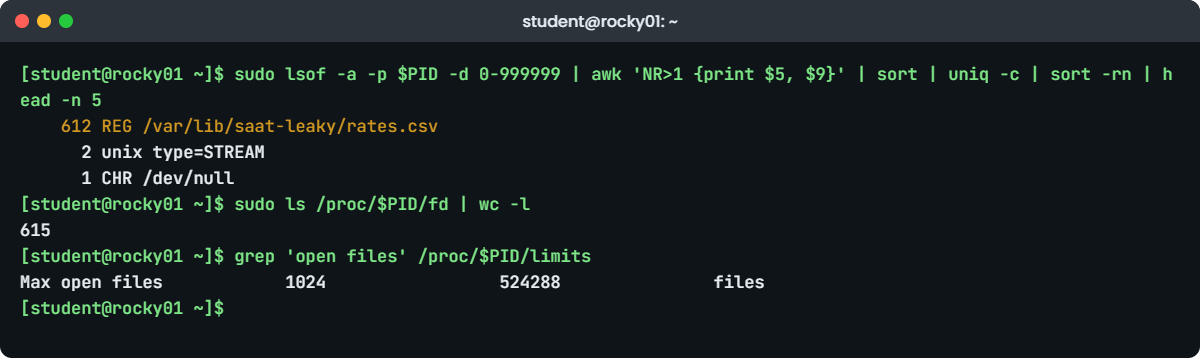
sudo lsof -a -p $PID -d 0-999999 | awk 'NR>1 {print $5, $9}' | sort | uniq -c | sort -rn | head -n 5
sudo lsof -p $PID | wc -l
sudo ls /proc/$PID/fd | wc -lYou should see something like this:
612 REG /var/lib/saat-leaky/rates.csv
2 unix type=STREAM
1 CHR /dev/null
655
615-a -p $PID -d 0-999999 means “this PID AND only numbered descriptors”. Without the -d filter lsof also lists the working directory, the program file and every memory-mapped library, which is why the plain count (655, including the header) is higher than /proc/PID/fd (615). TYPE and NAME grouped together give the answer in one line: hundreds of copies of the same rates.csv, plus stdin (/dev/null) and the two journal sockets for stdout and stderr.
✅ Checkpoint: lsof shows one file name with a count in the hundreds.
5Watch it hit the wall
Wait until about a minute has passed since the start, then run:
sudo journalctl -u saat-leaky -o cat --no-pager | tail -n 4
systemctl status saat-leaky --no-pager | grep Active:
sudo ~/lab75/fdtop.sh 2You should see something like this:
request 800: ok
request 1000: ok
request 1200: ERROR [Errno 24] Too many open files: '/var/lib/saat-leaky/rates.csv'
request 1400: ERROR [Errno 24] Too many open files: '/var/lib/saat-leaky/rates.csv'
Active: active (running) since Tue 2026-10-27 11:20:02 IST; 1min 12s ago
FDS LIMIT USE% PID COMMAND
1024 1024 100% 2534 saat-leaky.py
31 1024 3% 868 NetworkManagerThe service is still “active (running)”, every request now fails, and fdtop.sh shows it at 1024 of 1024. This half-dead state is common at work: systemd sees a running process, a simple port check passes, and only the users and the application log know something is wrong.
✅ Checkpoint: The journal shows Errno 24 and fdtop.sh shows saat-leaky.py at 100 percent.
6Buy time with prlimit, without a restart
Raise the soft limit of the running process to 4096:
sudo prlimit --pid $PID --nofile=4096:524288
sudo prlimit --pid $PID --nofile
grep 'open files' /proc/$PID/limits
sleep 20; sudo journalctl -u saat-leaky -o cat --no-pager | tail -n 2You should see something like this:
RESOURCE DESCRIPTION SOFT HARD UNITS
NOFILE max number of open files 4096 524288 files
Max open files 4096 524288 files
request 1600: ok
request 1800: okprlimit (util-linux) changes the limits of a running process, the same way ulimit does for your shell. Requests succeed again at once, which makes it a useful emergency lever when a restart would hurt. It’s also gone at the next restart, it doesn’t help programs that read their limit only at startup, and here it buys about two and a half minutes, because the leak keeps going at 20 handles a second.
✅ Checkpoint: /proc/$PID/limits shows 4096 and the journal says ok again.
7Fix the leak, and set a limit you chose
Install the fixed code, give the service its own limit with a drop-in, restart and measure again:
sudo tee /usr/local/bin/saat-leaky.py >/dev/null <<'EOF'
#!/usr/bin/python3
# saat-leaky.py, fixed: the with block closes the file after every request (Lesson 75)
import time
DATA = "/var/lib/saat-leaky/rates.csv"
n = 0
while True:
n += 1
try:
with open(DATA) as f:
f.readline()
if n % 200 == 0:
print(f"request {n}: ok", flush=True)
except OSError as e:
if n % 200 == 0:
print(f"request {n}: ERROR {e}", flush=True)
time.sleep(0.05)
EOF
printf '[Service]\nLimitNOFILE=8192\n' | sudo systemctl edit --stdin saat-leaky
sudo systemctl restart saat-leaky
systemctl show saat-leaky -p LimitNOFILE -p LimitNOFILESoft
PID=$(systemctl show -p MainPID --value saat-leaky)
grep 'open files' /proc/$PID/limits
for i in 1 2 3; do echo "$(date +%T) $(sudo ls /proc/$PID/fd | wc -l)"; sleep 10; doneYou should see something like this:
LimitNOFILE=8192
LimitNOFILESoft=8192
Max open files 8192 8192 files
11:31:40 3
11:31:50 3
11:32:00 3The with block closes the file at the end of every request, so the count stays at 3 (stdin, stdout, stderr) however long it runs. The drop-in sets 8192 for soft and hard, sized for a real API that might hold a few thousand connections at peak, and it survives restarts and reboots, unlike prlimit. For the full story of where LimitNOFILE comes from, see Lesson 51.
Try it yourself: build the LimitNOFILE drop-in for any service in the Command Builder.
✅ Checkpoint: The count stays flat at 3 and /proc/PID/limits shows 8192 in both columns.
8Check how Nginx gets its limit
Read the Nginx settings that matter and the limits its worker processes have:
grep -nE '^(user|worker_processes|worker_rlimit_nofile|error_log)|worker_connections' /etc/nginx/nginx.conf
for p in $(pgrep -f 'nginx: worker'); do grep 'open files' /proc/$p/limits; done
systemctl show nginx -p LimitNOFILE -p LimitNOFILESoftYou should see something like this:
5:user nginx;
6:worker_processes auto;
7:error_log /var/log/nginx/error.log;
14: worker_connections 1024;
Max open files 1024 524288 files
LimitNOFILE=524288
LimitNOFILESoft=1024Two workers (one per vCPU), each allowed 1024 connections and each with a soft limit of 1024 descriptors, inherited from systemd’s default. A worker also needs descriptors for log files, the listening sockets and, when it proxies, a second socket per request to the backend. So worker_connections 1024 with a limit of 1024 is already tight, and raising worker_connections alone makes it worse.
The Break-It section shows what happens and the Nginx way to fix it, worker_rlimit_nofile.
✅ Checkpoint: You can say how many workers Nginx runs on rocky01 and that each has a soft limit of 1024.
Break It, Then Fix It
Both failures come from real tickets. Keep your snapshot from the lab, and make a backup of the Nginx config first: sudo cp /etc/nginx/nginx.conf /root/nginx.conf.l75.
1Raise worker_connections and nothing else
On rocky01, make the change most people make after seeing “worker_connections are not enough”:
sudo sed -i 's/worker_connections 1024;/worker_connections 4096;/' /etc/nginx/nginx.conf
sudo nginx -t
sudo systemctl reload nginxYou’ll get this, with no warning at all:
nginx: the configuration file /etc/nginx/nginx.conf syntax is ok
nginx: configuration file /etc/nginx/nginx.conf test is successfulOn ubu01, open 2200 idle connections to rocky01 and hold them for 30 seconds:
mkdir -p ~/lab75
cat > ~/lab75/conns.py <<'EOF'
#!/usr/bin/python3
# conns.py: opens N idle connections to a web server and holds them for 30 seconds (Lesson 75)
import resource
import socket
import sys
import time
host, want = sys.argv[1], int(sys.argv[2])
hard = resource.getrlimit(resource.RLIMIT_NOFILE)[1]
resource.setrlimit(resource.RLIMIT_NOFILE, (want + 100, hard))
socks = []
try:
for _ in range(want):
socks.append(socket.create_connection((host, 80), timeout=10))
except OSError as e:
print(f"stopped after {len(socks)} connections: {e}", flush=True)
print(f"holding {len(socks)} connections to {host}", flush=True)
time.sleep(30)
EOF
python3 ~/lab75/conns.py 10.10.10.11 2200While it holds them, on rocky01 run:
sudo cat /var/log/nginx/*error.log | grep -c 'Too many open files'
sudo grep -h 'Too many open files' /var/log/nginx/*error.log | tail -n 2You’ll get something like this:
holding 2200 connections to 10.10.10.11
11
2026/10/27 12:10:41 [crit] 2361#2361: accept4() failed (24: Too many open files)
2026/10/27 12:10:41 [crit] 2362#2362: accept4() failed (24: Too many open files)Each worker now believes it may take 4096 connections, but its soft limit is still 1024, so at about 1,010 connections accept4() fails with errno 24 and real users get timeouts. Nginx does notice the mismatch at start-up, but it logs “worker_connections exceed open file resource limit” at warn level, and the default error_log /var/log/nginx/error.log; only keeps error and above, so the warning is thrown away. Which error log the accept lines land in depends on the default server for port 80, hence the wildcard.
Fix: let Nginx raise its own workers’ limit with worker_rlimit_nofile, then repeat the test.
sudo sed -i 's/^worker_processes auto;/worker_processes auto;\nworker_rlimit_nofile 8192;/' /etc/nginx/nginx.conf
sudo nginx -t && sudo systemctl reload nginx
for p in $(pgrep -f 'nginx: worker'); do grep 'open files' /proc/$p/limits; doneYou should see something like this:
nginx: the configuration file /etc/nginx/nginx.conf syntax is ok
nginx: configuration file /etc/nginx/nginx.conf test is successful
Max open files 8192 8192 files
Max open files 8192 8192 filesNginx workers call setrlimit() while they still run as root, before switching to the nginx user, so worker_rlimit_nofile works even above the hard limit the service got from systemd, and a reload is enough. Run conns.py again from ubu01: the count of “Too many open files” lines stays where it was. Keep worker_rlimit_nofile at least twice worker_connections when Nginx proxies, because each request then holds two sockets.
Put the original config back:
sudo cp /root/nginx.conf.l75 /etc/nginx/nginx.conf
sudo nginx -t && sudo systemctl reload nginx✅ Checkpoint: After the fix both workers show 8192, a second run of conns.py adds no new errors, and the original nginx.conf is back.
2“Too many open files” from tail -f, with only a few files open
On rocky01, start a program that uses up your inotify instances, then follow a log the usual way:
cat > ~/lab75/ino-eater.py <<'EOF'
#!/usr/bin/python3
# ino-eater.py: creates inotify instances until the per-user limit, then holds them (Lesson 75)
import ctypes
import os
import time
libc = ctypes.CDLL("libc.so.6", use_errno=True)
held = []
while True:
fd = libc.inotify_init1(0)
if fd < 0:
err = os.strerror(ctypes.get_errno())
print(f"ino-eater: holding {len(held)} inotify instances, the next one failed: {err}", flush=True)
break
held.append(fd)
time.sleep(600)
EOF
python3 ~/lab75/ino-eater.py &
sleep 2
echo "app started" > ~/lab75/app.log
tail -f ~/lab75/app.logYou’ll get this (press Ctrl+C to stop tail):
ino-eater: holding 124 inotify instances, the next one failed: Too many open files
app started
tail: inotify cannot be used, reverting to polling: Too many open filestail opened one file and still got “Too many open files”. The limit it hit is fs.inotify.max_user_instances, 128 per user across all processes, and ino-eater took the 124 that your user manager and session didn’t already have. tail falls back to checking the file every second; journalctl -f, IDE file watchers and config reloaders fail or fall back in the same way. Find who holds them:
sysctl fs.inotify.max_user_instances
find /proc/[0-9]*/fd -lname 'anon_inode:inotify' 2>/dev/null | cut -d/ -f3 | sort | uniq -c | sort -rn | head -n 3You should see something like this:
fs.inotify.max_user_instances = 128
124 3605
2 1838
1 1841Each inotify instance shows up in /proc/PID/fd as a link to anon_inode:inotify, so counting those per PID points at 3605, ino-eater. Run the same find with sudo on a real server to see every user’s processes.
Fix: stop the leaking program first. If the use is genuine (many containers, a busy log shipper), raise the per-user limit in a sysctl drop-in.
printf 'fs.inotify.max_user_instances = 512\n' | sudo tee /etc/sysctl.d/90-inotify.conf
sudo sysctl -p /etc/sysctl.d/90-inotify.conf
timeout 3 tail -f ~/lab75/app.logYou should see this:
fs.inotify.max_user_instances = 512
app startedNo fallback message this time, even with ino-eater still running. Now clean up everything from this lesson on rocky01, and remove ~/lab75 on ubu01 too if you like:
kill %1
sudo rm /etc/sysctl.d/90-inotify.conf
sudo sysctl -w fs.inotify.max_user_instances=128
sudo systemctl stop saat-leaky
sudo rm -r /etc/systemd/system/saat-leaky.service /etc/systemd/system/saat-leaky.service.d /usr/local/bin/saat-leaky.py /var/lib/saat-leaky
sudo systemctl daemon-reload✅ Checkpoint: tail -f runs without the polling message after the fix, and the test service, drop-in and sysctl file are gone.
This happened at work
The claims service that failed every Thursday
I was on the support rota for a hospital billing vendor in Kochi when this one ran for a month. Our Java claims service sent insurance claims from about forty hospitals to the insurers’ APIs, and every five or six days it started throwing “java.io.IOException: Too many open files”. Claims queued up, the hospitals’ billing desks called, and a restart fixed it until the next time, which somehow always seemed to be a Thursday.
The first fix, from a colleague who had read about it online, was to raise LimitNOFILE in the unit from 65536 to 1048576. The failures stopped, everyone relaxed, and five weeks later it came back worse: by then the service held over 900,000 descriptors, the JVM’s garbage collection pauses had grown, and the server took several minutes to recover after the restart.
This time we measured before restarting. ls /proc/PID/fd | wc -l every hour had been climbing in a straight line since the last restart, and ss -tanp state close-wait | wc -l said nearly all of them were TCP sockets in CLOSE_WAIT to one insurer’s API. CLOSE_WAIT means the other side had closed the connection and our code never closed its end. That insurer returned an error page on rejected claims, and the error branch in our code skipped closing the HTTP response, so every rejected claim leaked one socket.
Thursdays were the insurer’s busiest rejection days.
The developers fixed the error branch to close the response in a finally block, and the count stayed flat at a few hundred from that release on. We set LimitNOFILE back to 65536 so a future leak would show up in days instead of weeks, and added a monitoring item for open descriptors against the soft limit, with an alert at 70 percent and a trend graph, which turned out to be far more useful than the alert.
Common mistakes and troubleshooting
| Mistake | What happens | What to do instead |
|---|---|---|
| Raising the limit without looking at the count over time | A leak fails later and bigger, sometimes with a slow recovery | Graph ls /proc/PID/fd | wc -l; flat means size the limit, climbing means fix the leak |
Checking ulimit -n in your shell | You see your shell’s limit, not the service’s | Read /proc/PID/limits of the running process |
Counting with plain lsof -p PID | wc -l | Libraries, cwd and the program file inflate the number | Use /proc/PID/fd, or lsof -a -p PID -d 0-999999 |
| Raising worker_connections in Nginx only | Workers stay at 1024 and accept4() fails with errno 24; nginx -t stays silent | Add worker_rlimit_nofile, about twice worker_connections when proxying |
| Treating prlimit as the fix | The old limit returns at the next restart | Use it to buy time, then a LimitNOFILE drop-in and the code fix |
Setting LimitNOFILE=infinity “to be safe” | The process gets about a billion; leaks go unnoticed and some programs slow down looping over all possible descriptors | Pick a number from measured peak use with headroom |
| Blaming the open-files limit for a tail -f or journalctl -f message | You raise nofile and nothing changes | Check fs.inotify.max_user_instances and who holds anon_inode:inotify |
Interview questions
Click a question to open it. Each one is written the way an interviewer would ask it. Under it you will see why they ask it and one way you could answer, in your own words.
Fresher level
1. An application log says “Too many open files”. What would you check first?
Why they ask this: They want to see you go to the running process and compare two numbers before changing anything.
How you might answer: I’d find the PID and compare how many descriptors it holds, ls /proc/PID/fd | wc -l, with its soft limit in /proc/PID/limits. If the count is at the limit, that’s the cause.
Then I’d check whether the count is steady or climbing over a few minutes, and use lsof -a -p PID -d 0-999999 to see what the descriptors are, before deciding to raise the limit or chase a leak.
2. What’s the difference between the soft and hard nofile limits, and which one causes the error?
Why they ask this: A basic check on limits, which every later answer depends on.
How you might answer: The soft limit is the one the kernel enforces; when the next descriptor number would reach it, the call fails with EMFILE, errno 24. The hard limit is the ceiling a process may raise its soft limit to without root.
On Rocky and Ubuntu services start at 1024 soft and 524288 hard. Programs like Nginx raise their own soft limit, and for a service I set both with LimitNOFILE in a drop-in.
2–5 years experience
3. How do you tell a file descriptor leak from a service that needs a higher limit?
Why they ask this: They’re listening for measurement over time and for knowing what a leak looks like in lsof or ss.
How you might answer: I record the descriptor count over time. A real need goes up and down with traffic and levels off; a leak climbs in a straight line and never falls, even at night. lsof grouped by name usually shows the leak as thousands of the same file, or ss shows thousands of sockets in CLOSE_WAIT.
For a real need I set LimitNOFILE from the measured peak with headroom. For a leak I raise the limit only to buy time, schedule restarts if needed, and get the developers the evidence so they can fix the code.
4. Nginx logs “accept4() failed (24: Too many open files)” after someone raised worker_connections. Explain and fix.
Why they ask this: A classic real-world case: they want to hear about worker limits, not limits.conf.
How you might answer: Each worker still has the soft limit it inherited, 1024 by default, so raising worker_connections lets it try to accept more connections than it can open descriptors for. The start-up warning about it is logged at warn level, which the default error_log drops.
I’d add worker_rlimit_nofile in the main context, about twice worker_connections if Nginx proxies, run nginx -t, reload, and check the workers’ /proc/PID/limits. The workers set it themselves before dropping root, so the unit’s LimitNOFILE doesn’t have to change.
Senior level
5. A Java service needed restarting every few days for “Too many open files”. Someone proposes LimitNOFILE=1048576. What do you say?
Why they ask this: Seniors should push back on hiding a leak and propose measurement and monitoring.
How you might answer: I’d ask for the descriptor count history first. If it climbs steadily between restarts, a bigger limit only stretches the interval and makes the eventual failure larger, with more memory used for descriptor tables and slower recovery.
I’d look at what is leaking with lsof and ss -tanp state close-wait, get the code fixed, and keep a limit sized to real peak use so a regression is caught early. Monitoring of descriptors against the soft limit, with a trend graph, goes in at the same time.
6. How would you monitor open files across a fleet so you hear about problems before users do?
Why they ask this: They want a practical design: what to measure, thresholds, and the less obvious limits.
How you might answer: Per important service I’d collect the descriptor count and the soft limit from /proc, alert at around 70 percent, and keep the history to spot steady climbs. Zabbix and Prometheus exporters both expose process open-file counts.
At host level I’d watch the first field of /proc/sys/fs/file-nr, inotify instances per user on hosts with many containers or log shippers, and grep logs for errno 24 strings from Nginx, Java and Python, because the error often appears in a log before any metric crosses a line.
Quick quiz
Q1. Which error number and name does a process get when it reaches its own open-files limit?
- ENFILE, 23
- EMFILE, 24
- ENOMEM, 12
- EACCES, 13
Show answer
B — EMFILE (24) is the per-process limit. ENFILE (23) is the system-wide fs.file-max.
Q2. A service’s descriptor count rises by about 200 every 10 seconds and never falls. What is the most likely cause?
- Normal traffic growth
- A file or socket leak in the code
- fs.file-max is too low
- The disk is full
Show answer
B — A straight climb that never falls is the signature of descriptors that are opened and never closed.
Q3. Why does lsof -p PID | wc -l give a bigger number than ls /proc/PID/fd | wc -l?
- lsof counts other processes too
- lsof also lists cwd, the program file and memory-mapped libraries
- /proc hides sockets
- lsof counts each file twice
Show answer
B — Use -a -d 0-999999 to keep only numbered descriptors.
Q4. Nginx has worker_connections 4096 and its workers show a soft limit of 1024. What fixes it?
nofile 8192in limits.conf- Raise fs.file-max
worker_rlimit_nofile 8192;in nginx.conf- Restart the server
Show answer
C — The workers raise their own limit with worker_rlimit_nofile; limits.conf doesn’t reach a service.
Q5. tail -f prints “inotify cannot be used … Too many open files” while the system has few files open. Which limit is it?
fs.nr_open- The shell’s nofile soft limit
fs.inotify.max_user_instancesfs.file-max
Show answer
C — inotify instances are limited per user (128 by default), and inotify_init reports EMFILE when they run out.
Quick recap
- “Too many open files” is EMFILE (24): one process reached its soft RLIMIT_NOFILE. ENFILE (23) is the rare system-wide version.
- Compare
ls /proc/PID/fd | wc -lwith/proc/PID/limits, and watch the count over time: flat needs a bigger limit, climbing is a leak. lsof -a -p PID -d 0-999999grouped by name, andss -tanp state close-waitfor sockets, show what is leaking.prlimit --pid PID --nofile=N:Mraises a limit live for an emergency; a LimitNOFILE drop-in makes it permanent.- Nginx workers need
worker_rlimit_nofilewhen worker_connections goes up, and its warning is hidden at the default log level. - tail -f and other watchers hit fs.inotify.max_user_instances (128 per user), a different limit with the same message.
Next lesson
Lesson 76: DNS and name resolution problems → You’ll build a small DNS server for a lab zone, set up split DNS on ubu01, and work through NXDOMAIN, SERVFAIL, timeouts, search domains, caches and a firewalled port 53.
Further reading: too many open files
Want to go deeper into too many open files? Read getrlimit(2) (RLIMIT_NOFILE), prlimit(1), open(2) (EMFILE and ENFILE), inotify(7), the kernel’s /proc/sys/fs documentation, and Nginx’s worker_rlimit_nofile and worker_connections. You can also see the full plan for this course on the Linux Administration course page.
