Kernel panic and kdump: catch the crash, read the dump

A Linux kernel panic is the kernel stopping the whole machine because it hit an error it can’t safely recover from: a bad pointer in a driver, corrupted memory, a hardware fault. The console shows “Kernel panic – not syncing”, nothing is written to the journal, and after a reboot the server looks fine, which is why panics that nobody captured keep coming back.

kdump is how you catch one. It keeps a small second kernel loaded in reserved memory, and when the main kernel panics it boots that kernel, which saves the dead kernel’s memory and log to /var/crash. In this lesson you set kdump up on rocky01, crash the VM on purpose with SysRq after taking a snapshot, and read what it saved with vmcore-dmesg.txt and the crash tool.

Where this lesson fits

Lesson 79 of 82 in Linux Administration · Phase 4: Troubleshooting step by step · Before this: Lesson 78, read-only file systems · Next: Lesson 80, Linux commands cheat sheet

TimeYou needBy the end you can
About 70 minutes, plus an optional 1 GB debuginfo downloadrocky01 (you’ll give it 3 GB of RAM for this lesson), the VirtualBox console window for the crash test, a VirtualBox snapshot, and ubu01 for one read-only comparisonReserve memory for a crash kernel, prove kdump is operational, trigger a test crash safely, find and read the dump, and know what to send a vendor

What it is, in one line

kdump keeps a spare kernel in reserved memory so that, when the main kernel panics, the spare one boots and saves the crashed kernel’s memory and log for you to read later.

In Simple Words

The black box in an aeroplane

When something goes badly wrong on a flight, the pilots are far too busy to write notes. That’s why every aeroplane carries a black box: a separate, tough recorder with its own power that keeps working when everything else has failed, so the investigators know what happened in the last minutes.

Nobody switches it on after the crash. It has to be fitted, powered and tested before take-off, and an aeroplane flying with a dead recorder only finds out when it’s too late.

kdump is the server’s black box, the reserved memory is its separate power supply, and the test crash is the pre-flight check.

Engineer's View

Panics, oopses and the pieces of kdump

An oops is the kernel reporting a bug (a bad memory access, a BUG() check) with a call trace; the kernel may kill the offending task and carry on. A panic is the end of the line: the kernel prints “Kernel panic – not syncing: reason” and stops. Oopses turn into panics when kernel.panic_on_oops is 1, and hung-task or soft-lockup detectors can be told to panic too, so that kdump captures a hang. kernel.panic is how many seconds the kernel waits before rebooting on its own; 0 means it waits forever on the console.

Rocky Linux 10 / RHEL 10Ubuntu 26.04
Packageskdump-utils (kdumpctl, kdump.service), kexec-tools, makedumpfilekdump-tools (kdump-config), kexec-tools, makedumpfile; linux-crashdump pulls them in
Default crashkernel=2G-64G:256M,64G-:512M: nothing below 2 GB of RAM2G-4G:320M,4G-32G:512M,... from /etc/default/grub.d/kdump-tools.cfg
Set or reset itkdumpctl reset-crashkernel --kernel=ALL or grubby --argsEdit the grub.d file, then update-grub
Configuration/etc/kdump.conf (path, core_collector, targets)/etc/default/kdump-tools (USE_KDUMP, KDUMP_COREDIR)
Is it ready?kdumpctl status, kdumpctl showmem, kdumpctl estimatekdump-config show: “current state: ready to kdump”
Dump location/var/crash/127.0.0.1-DATE-TIME/: vmcore, vmcore-dmesg.txt, kexec-dmesg.log/var/crash/YYYYMMDDHHMM/: dump.STAMP, dmesg.STAMP
On by default?Usually yes after a standard install (kdump.service enabled)Only from 24.10 on machines with 4+ CPU threads, 6 GB+ RAM and enough /var space, so not on ubu01
Reading toolscrash (AppStream) plus dnf debuginfo-install kernel-core-$(uname -r)crash plus linux-image-unsigned-$(uname -r)-dbgsym from ddebs.ubuntu.com

Magic SysRq is a set of emergency kernel commands. Writing a letter to /proc/sysrq-trigger as root runs it: c crashes the kernel, s syncs disks, b reboots at once, t dumps every task’s stack to the log. The kernel.sysrq setting only limits the keyboard combination (Alt+SysRq on a console); root can always use /proc/sysrq-trigger, which is why the crash test needs no setting change but must only ever be typed on a lab VM.

How it works, step by step

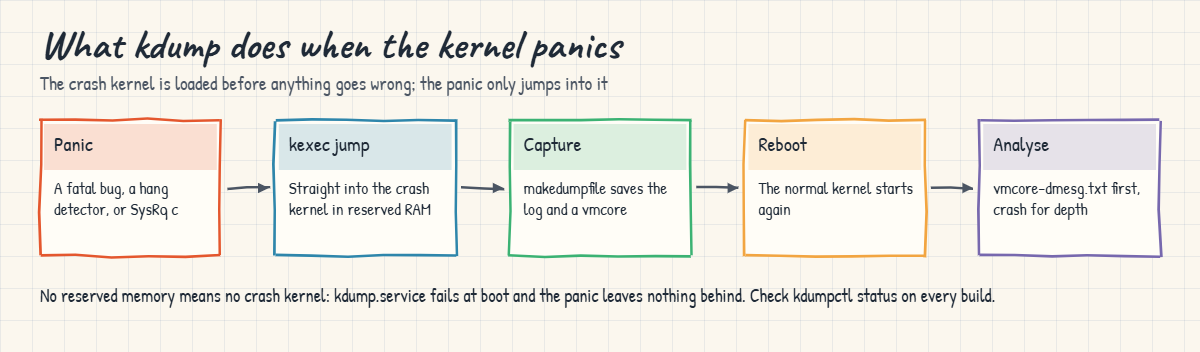
Here is what happens from boot to the moment you read the dump. The diagram after these steps shows the same path.

1GRUB reserves memory at boot

The crashkernel= argument on the kernel line tells the kernel to set aside a block of RAM that it will never use for anything else. The size rule depends on the machine’s RAM; with RHEL 10’s default a 4 GB server reserves 256 MB and a 2 GB VM reserves nothing, because 2 GB is where the first range starts and a 2048 MB VM reports slightly less than 2 GiB to the kernel.

2kdump.service loads the crash kernel into it

At boot, kdumpctl builds a small initramfs for the crash kernel (with only the drivers and tools needed to reach the dump target) and loads kernel and initramfs into the reserved area with kexec. Nothing runs there yet; it’s parked. If no memory was reserved, this step fails and the service reports failed.

Linux kernel panic with kdump: panic, kexec into the crash kernel, save the vmcore, reboot, analyse

3The main kernel panics

On panic, the kernel doesn’t go through the BIOS or GRUB. It jumps straight into the parked crash kernel with kexec, leaving all of the old kernel’s memory untouched. That’s why the reservation must exist beforehand: there is no safe moment to load anything after the panic.

4The crash kernel saves the evidence

The crash kernel boots with a tiny command line (nr_cpus=1, reset_devices and friends), mounts the dump target and runs makedumpfile on /proc/vmcore. -d 31 skips free pages, cache and user data, so a 64 GB server usually produces a dump of a few GB. It saves the old kernel’s log first as vmcore-dmesg.txt, then the vmcore, then reboots normally.

5You read the log, then the dump

vmcore-dmesg.txt is plain text and answers most questions in two minutes: the panic reason, the task that was running, the call trace, the modules loaded, and the taint flags that say whether out-of-tree or unsigned modules were in play. The vmcore needs the crash tool and the exact debuginfo for that kernel build, and it’s what a vendor engineer asks for.

The picture below shows how memory on rocky01 is split once kdump is set up, and where the files land.

Linux kernel panic preparation: memory reserved for the crash kernel and the files in /var/crash

6What to send when you open a vendor case

Send the vmcore-dmesg.txt and the vmcore (or upload it with the vendor’s tool), the output of uname -r, and a sos report from the server after it came back. Say what changed recently (Lesson 65): a new kernel, a driver or agent update, firmware, a hypervisor move. Red Hat’s support will look at panics in their own kernel and drivers; if the trace ends in a third-party module the case often goes to that module’s vendor.

A vmcore holds kernel memory, which can include passwords, keys and pieces of customer data that were in buffers. Treat it like a database backup: restricted folder, encrypted transfer, deleted when the case closes.

Hands-on lab: set up kdump on rocky01, crash it with SysRq and read the dump

Before you run any command, double-check it

Read every command twice before you press Enter. Check the target: the server name, the user, the disk or device name, the path and the sizes. These commands are for learning and were tested in our lab, not on your system. At work, run the read-only commands first, follow your change process, make sure a backup exists, and ask a second person to check anything that changes or deletes data. You run them at your own risk.

The lab runs on rocky01, with one read-only look at ubu01 in step 5. Step 2 changes rocky01’s memory in VirtualBox and step 6 crashes it on purpose, after a snapshot, from the VirtualBox console window. Never type the crash command on a server you care about, at work or at home: it stops the kernel instantly, and anything not yet written to disk is lost.

Outputs are examples from our lab VM.

1See whether kdump can work on rocky01 today

Run this:

rpm -q --qf '%{NAME} installed\n' kdump-utils kexec-tools makedumpfile
grep -o 'crashkernel=[^ ]*' /proc/cmdline
cat /sys/kernel/kexec_crash_size
systemctl is-enabled kdump; systemctl is-active kdump
free -m | head -n 2

On a 2048 MB rocky01 you’ll probably see:

kdump-utils installed
kexec-tools installed
makedumpfile installed
crashkernel=2G-64G:256M,64G-:512M
0
disabled
inactive
               total        used        free      shared  buff/cache   available
Mem:            1739         452        1102           8         335        1287

The packages are there and the kernel line carries the RHEL 10 default, but the kernel reserved 0 bytes: the first range in 2G-64G:256M starts at 2 GB, and a VM set to 2048 MB reports a little less than that after firmware and reserved areas. kdump.service is disabled because you unticked kdump in the installer in Lesson 2, the right call on a VM this small: enabled, it would fail at every boot. So on this VM there has never been a black box. If a package is missing, install it with sudo dnf install -y kdump-utils.

If you see 268435456, your rocky01 already has more than 2 GB; skip step 2.

✅ Checkpoint: You know whether rocky01 has memory reserved (kexec_crash_size) and whether kdump.service is enabled.

2Give rocky01 enough memory for a crash kernel

Shut rocky01 down, then on the laptop raise its memory to 3 GB and start it again:

sudo systemctl poweroff
VBoxManage modifyvm rocky01 --memory 3072
VBoxManage startvm rocky01 --type headless

The laptop shows something like this:

0%...10%...20%...30%...40%...50%...60%...70%...80%...90%...100%
Waiting for VM "rocky01" to power on...
VM "rocky01" has been successfully started.

SSH back in and check the reservation:

cat /sys/kernel/kexec_crash_size
sudo dmesg | grep -i 'crashkernel reserved'
free -m | head -n 2

You should see something like this:

268435456
[    0.000000] crashkernel reserved: 0x00000000a3000000 - 0x00000000b3000000 (256 MB)
               total        used        free      shared  buff/cache   available
Mem:            2481         461        1843           8         337        2020

268435456 bytes is 256 MB, taken out of RAM before anything else could use it, so free shows about 2.4 GB total instead of 2.7. That is the price of kdump on every server, which is why vendors tune the default by RAM size. On an 8 GB laptop, run only rocky01 for the rest of this lesson.

✅ Checkpoint: cat /sys/kernel/kexec_crash_size prints 268435456 and dmesg shows a 256 MB crashkernel reservation.

3Start kdump and read its settings

Run this:

sudo systemctl enable --now kdump
sudo kdumpctl status
sudo kdumpctl showmem
kdumpctl get-default-crashkernel
grep -v '^#' /etc/kdump.conf | grep .

You should see something like this:

kdump: Kdump is operational
kdump: Reserved 256MB memory for crash kernel
2G-64G:256M,64G-:512M
core_collector makedumpfile -l --message-level 1 -d 31

“Kdump is operational” means the crash kernel is loaded into the reserved memory and ready. The only active line in /etc/kdump.conf is the core_collector: makedumpfile with -l (LZO compression) and -d 31 (leave out free, cache and user pages). With no path line, dumps go to /var/crash on the root file system; at work you’d often add a separate file system, an NFS share or an SSH target with enough space for a dump the size of the kernel’s memory.

✅ Checkpoint: sudo kdumpctl status says “Kdump is operational” and systemctl is-active kdump says active.

4Ask kdump how much memory it needs

Run this:

sudo kdumpctl estimate

You should see something like this:

Reserved crashkernel:    256M
Recommended crashkernel: 192M

Kernel image size:   47M
Kernel modules size: 8M
Initramfs size:      21M
Runtime reservation: 64M
Large modules:
    xfs: 2629632
    nft_compat: 1081344

estimate adds up what the crash kernel needs: its own image, the modules and initramfs it must load, and working memory. If the recommended value is above the reserved one, kdumpctl adds a WARNING line, and that crash kernel may run out of memory in the middle of a dump, which is a classic “kdump was set up but we got nothing” case. Large servers with many drivers, LUKS-encrypted dump targets or big storage stacks need more than the default.

✅ Checkpoint: estimate shows a recommended value at or below the 256M reserved, with no WARNING line.

5Compare with ubu01 (read only)

On ubu01, run this:

grep -o 'crashkernel=[^ ]*' /proc/cmdline; echo "exit=$?"
apt-cache policy kdump-tools | head -n 3
nproc
free -g | head -n 2

You should see something like this:

exit=1
kdump-tools:
  Installed: (none)
  Candidate: 1:1.10.7ubuntu3
2
               total        used        free      shared  buff/cache   available
Mem:               1           0           1           0           0           1

No crashkernel argument and no kdump-tools: Ubuntu turns kdump on during installation only when the machine has at least 4 CPU threads, at least 6 GB of RAM and enough free space in /var, and ubu01 has 2 CPUs and 2 GB. On a real Ubuntu server you install kdump-tools (or linux-crashdump), say yes to enabling it, reboot, and check with kdump-config show; the 2G-4G range in its default means it also needs more than 2 GB of RAM.

✅ Checkpoint: You can say why kdump isn’t active on ubu01 and which two commands would show it working on an Ubuntu server.

6Snapshot, then crash rocky01 on purpose

On the laptop, take a snapshot first:

VBoxManage snapshot rocky01 take before-l79-crash

Open rocky01’s window in VirtualBox (Show), log in as student on the console, and run:

sync
echo c | sudo tee /proc/sysrq-trigger

The console shows something like this, then rocky01 reboots on its own:

[  412.385210] sysrq: Trigger a crash
[  412.385519] Kernel panic - not syncing: sysrq triggered crash
[  412.385876] CPU: 1 UID: 0 PID: 2731 Comm: tee Kdump: loaded Not tainted 6.12.0-211.16.1.el10_2.0.1.x86_64 #1
...
kdump: saving vmcore-dmesg.txt to /sysroot/var/crash/127.0.0.1-2026-10-27-14:22:31/
kdump: saving vmcore-dmesg.txt complete
kdump: saving vmcore
Copying data                                      : [100.0 %] |
kdump: saving vmcore complete

[Add your screenshot here]: the rocky01 VirtualBox console a second after the command, showing the “Kernel panic – not syncing: sysrq triggered crash” lines.

sudo tee writes the c as root; sudo echo c > /proc/sysrq-trigger would fail, because the redirection is done by your own shell, not by sudo. The kernel panicked at once (Comm: tee was the task writing the letter), jumped into the crash kernel, which saved the log and a dump into /var/crash, then rebooted. Use the console, not SSH: your SSH session dies with the kernel, and the console is where you’d see the dump progress or a failure.

The whole thing takes one or two minutes on a 3 GB VM.

✅ Checkpoint: rocky01 came back by itself after the panic and you can log in again.
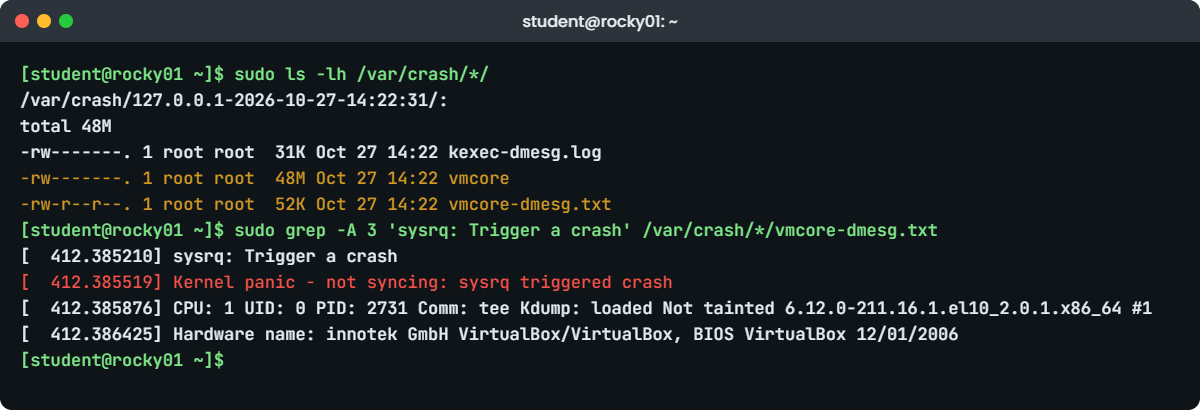
Linux kernel panic lab: vmcore-dmesg.txt and the dump folder on rocky01
Example output on rocky01: the dated /var/crash folder and the panic in vmcore-dmesg.txt after a SysRq test crash.

7Find the dump and read vmcore-dmesg.txt

Run this:

sudo ls -lh /var/crash/*/
sudo grep -A 16 'sysrq: Trigger a crash' /var/crash/*/vmcore-dmesg.txt

You should see something like this:

/var/crash/127.0.0.1-2026-10-27-14:22:31/:
total 48M
-rw-------. 1 root root  31K Oct 27 14:22 kexec-dmesg.log
-rw-------. 1 root root  48M Oct 27 14:22 vmcore
-rw-r--r--. 1 root root  52K Oct 27 14:22 vmcore-dmesg.txt
[  412.385210] sysrq: Trigger a crash
[  412.385519] Kernel panic - not syncing: sysrq triggered crash
[  412.385876] CPU: 1 UID: 0 PID: 2731 Comm: tee Kdump: loaded Not tainted 6.12.0-211.16.1.el10_2.0.1.x86_64 #1
[  412.386425] Hardware name: innotek GmbH VirtualBox/VirtualBox, BIOS VirtualBox 12/01/2006
[  412.386790] Call Trace:
[  412.386943]  <TASK>
[  412.387081]  dump_stack_lvl+0x34/0x48
[  412.387314]  panic+0x336/0x370
[  412.387508]  sysrq_handle_crash+0x1a/0x20
[  412.387750]  __handle_sysrq.cold+0x7a/0xfc
[  412.387998]  write_sysrq_trigger+0x6f/0x90
[  412.388244]  proc_reg_write+0x56/0xa0
[  412.388471]  vfs_write+0xf7/0x420
[  412.388681]  ksys_write+0x67/0xe0
[  412.388890]  do_syscall_64+0x7d/0x160
[  412.389116]  entry_SYSCALL_64_after_hwframe+0x76/0x7e

One folder per crash, named after the dump target (127.0.0.1 for local disk) and the time. Read vmcore-dmesg.txt from the panic line upwards: the lines before it show what the kernel was doing, and the call trace shows how it got there, newest call on top. “Not tainted” is worth noting; a real panic on a server with “Tainted: P” or “O” or “E” means a proprietary, out-of-tree or unsigned module was loaded, and that changes who you call.

✅ Checkpoint: /var/crash holds one dated folder with vmcore, vmcore-dmesg.txt and kexec-dmesg.log, and the log shows “sysrq triggered crash”.

8Open the dump with crash (optional, about 1 GB to download)

Install the tool and the debug symbols for the running kernel, then open the dump:

sudo dnf install -y crash
sudo dnf debuginfo-install -y kernel-core-$(uname -r)
sudo crash /usr/lib/debug/lib/modules/$(uname -r)/vmlinux /var/crash/*/vmcore

crash prints a summary and a crash> prompt. Type bt, then quit. You should see something like this:

      KERNEL: /usr/lib/debug/lib/modules/6.12.0-211.16.1.el10_2.0.1.x86_64/vmlinux
    DUMPFILE: /var/crash/127.0.0.1-2026-10-27-14:22:31/vmcore  [PARTIAL DUMP]
        CPUS: 2
        DATE: Tue Oct 27 14:22:29 IST 2026
      UPTIME: 00:06:52
LOAD AVERAGE: 0.08, 0.05, 0.01
       TASKS: 168
    NODENAME: rocky01.saatlab.test
     RELEASE: 6.12.0-211.16.1.el10_2.0.1.x86_64
     MACHINE: x86_64  (2496 Mhz)
      MEMORY: 3 GB
       PANIC: "Kernel panic - not syncing: sysrq triggered crash"
         PID: 2731
     COMMAND: "tee"
         CPU: 1
       STATE: TASK_RUNNING (PANIC)

crash> bt
PID: 2731     TASK: ffff8d2a4c3b0000  CPU: 1    COMMAND: "tee"
 #0 [ffffa94a40c5bb68] machine_kexec at ffffffffa5a7c7a3
 #1 [ffffa94a40c5bbc0] __crash_kexec at ffffffffa5bd9b7a
 #2 [ffffa94a40c5bc80] panic at ffffffffa5b0c3a1
 #3 [ffffa94a40c5bd00] sysrq_handle_crash at ffffffffa60f3b1a
 #4 [ffffa94a40c5bd08] __handle_sysrq.cold at ffffffffa66d2e8f
 #5 [ffffa94a40c5bd38] write_sysrq_trigger at ffffffffa60f4a6f
 ...
#10 [ffffa94a40c5bf50] entry_SYSCALL_64_after_hwframe at ffffffffa680012f
crash> quit

The summary repeats the panic reason, the task and the CPU; bt shows the backtrace of the panicking task from the dump itself. Other first commands are log (the full kernel log, like vmcore-dmesg.txt), ps (every task at the moment of the crash), kmem -i (memory use) and mod (loaded modules). The vmlinux must come from the very kernel build that crashed, which is why you install debuginfo for $(uname -r) and not “the latest”.

Keep the snapshot and the 3 GB setting for the Break-It part. If you skip it, run the clean-up block at the end of the Break-It section now, so rocky01 goes back to 2 GB without a failed kdump.service.

✅ Checkpoint: crash opened the dump and bt shows panic and sysrq_handle_crash for COMMAND “tee”, or you understood the step and skipped the download.

Break It, Then Fix It

Both failures below change boot settings on rocky01, so make sure the snapshot before-l79-crash from step 6 exists (or take VBoxManage snapshot rocky01 take before-l79-break). Each one ends with kdump working again.

1No memory reserved, so kdump can’t start

Remove the crashkernel argument from every kernel entry and reboot:

sudo grubby --update-kernel=ALL --remove-args=crashkernel
sudo systemctl reboot

After the reboot, check:

cat /sys/kernel/kexec_crash_size
systemctl status kdump --no-pager | tail -n 4

You’ll get something like this:

0
Oct 27 14:41:07 rocky01.saatlab.test systemd[1]: Starting kdump.service - Crash recovery kernel arming...
Oct 27 14:41:08 rocky01.saatlab.test kdumpctl[812]: kdump: No memory reserved for crash kernel
Oct 27 14:41:08 rocky01.saatlab.test kdumpctl[812]: kdump: Starting kdump: [FAILED]
Oct 27 14:41:08 rocky01.saatlab.test systemd[1]: Failed to start kdump.service - Crash recovery kernel arming.

This is the most common broken kdump at work: someone edited the kernel line, a template image dropped the argument, or (as on the 2 GB lab VM) the default rule reserves nothing for that amount of RAM. The server runs fine for months; the problem only shows the day it panics and /var/crash is empty. Checking kdumpctl status belongs in your build checklist and monitoring, not in the post-mortem.

Fix: put the default back with kdumpctl, check it, and reboot.

sudo kdumpctl reset-crashkernel --kernel=ALL
sudo grubby --info=DEFAULT | grep -o 'crashkernel=[^ "]*'
sudo systemctl reboot

You should see something like this before the reboot, and “Kdump is operational” from sudo kdumpctl status after it:

kdump: Updated crashkernel=2G-64G:256M,64G-:512M for kernel=/boot/vmlinuz-6.12.0-211.16.1.el10_2.0.1.x86_64. Please reboot the system for the change to take effect.
crashkernel=2G-64G:256M,64G-:512M

reset-crashkernel writes the value kdump-utils recommends into the boot entries with grubby for you. Use a fixed size such as crashkernel=512M with grubby --update-kernel=ALL --args only when estimate tells you the default is too small.

✅ Checkpoint: After the second reboot kexec_crash_size is 268435456 and kdumpctl status says operational.

2A dump path that doesn’t exist

Send dumps to a new folder without creating it, and restart kdump:

echo 'path /var/crash/lab79' | sudo tee -a /etc/kdump.conf
sudo kdumpctl restart; echo "exit=$?"
sudo kdumpctl status; echo "exit=$?"

You’ll get something like this (read the exact wording on yours):

kdump: Dump path /var/crash/lab79 does not exist.
kdump: Starting kdump: [FAILED]
exit=1
kdump: Kdump is not operational
exit=3

On RHEL 10 the folder named by path must exist before kdump starts, because the crash kernel only has a moment to save the dump and no chance to fix your config. The same failure appears when path points at a mount that isn’t mounted yet, a typo in an NFS server name, or an SSH target whose key was never set up with kdumpctl propagate. Any edit to /etc/kdump.conf should be followed by kdumpctl restart and kdumpctl status.

Fix: create the folder or take the line out, then restart and check.

sudo sed -i '/^path \/var\/crash\/lab79$/d' /etc/kdump.conf
sudo kdumpctl restart
sudo kdumpctl status
kdump: Kdump is operational

✅ Checkpoint: /etc/kdump.conf no longer has the lab79 line and kdumpctl status says operational.

Clean up: remove the dump and debuginfo, switch kdump off for the 2 GB lab VM, and give rocky01 its normal memory back:

sudo rm -rf /var/crash/127.0.0.1-*
sudo dnf remove -y kernel-debuginfo kernel-debuginfo-common-x86_64
sudo systemctl disable kdump
sudo systemctl poweroff
VBoxManage modifyvm rocky01 --memory 2048
VBoxManage startvm rocky01 --type headless
VBoxManage snapshot rocky01 delete before-l79-crash

Back on 2 GB, the default reserves nothing, so a kdump.service left enabled would fail at every boot; disabling it keeps systemctl --failed clean for the rest of the course. On real servers with more memory, kdump stays enabled and tested. If your laptop has 16 GB, you can keep rocky01 at 3 GB with kdump on instead.

This happened at work

The savings app that rebooted at 2 a.m.

My team lead tells this one from a fintech company in Kolkata that runs a savings app: recurring deposits and goal savings, nothing to do with crypto. For three weeks one of the two RHEL 9 servers that reconcile the day’s transactions with the partner banks rebooted by itself between 1:30 and 3 a.m., about twice a week. The batch restarted from a checkpoint each time, so customers didn’t notice, but the reconciliation reports reached the banks late.

The first theory was the hypervisor, and the VMware team spent a week finding nothing in their logs. The journal on the server stopped mid-line before each reboot. When my lead checked kdumpctl status it said “Kdump is not operational”: the VM had been cut from 8 GB to 4 GB during a cost review, a template script had replaced the kernel line without crashkernel=, and nobody had looked since.

She ran kdumpctl reset-crashkernel --kernel=ALL, added a separate 10 GB file system for /var/crash, ran kdumpctl estimate to confirm the size, and did one test crash with SysRq on a clone of the VM. Four nights later the server panicked again, and this time there was a vmcore. vmcore-dmesg.txt showed a NULL pointer dereference inside an out-of-tree kernel module from the endpoint security agent, with the kernel marked tainted.

Red Hat support confirmed the trace ended in the third-party module, the agent vendor shipped a fixed module within a week, and the reboots stopped. The build checklist now has kdumpctl status as a required check, monitoring alerts when kdump.service isn’t active, and every agent that ships a kernel module gets tested on a staging server through one full batch night before it goes to production.

Common mistakes and troubleshooting

MistakeWhat happensWhat to do instead
Setting up kdump and never testing itThe day the server panics, /var/crash is emptyTest once per build with SysRq c on a clone or in a maintenance slot, from the console
Running the SysRq crash on a production or shared machineIt stops the kernel instantly; unsaved data and every session are lostOnly on a lab VM with a snapshot, or a planned test with the owners agreed
Not checking kdump after RAM, kernel line or template changesThe reservation silently drops to 0 and kdump.service failsMonitor kdumpctl status (or kdump-config show), and run kdumpctl estimate after changes
Dumping to a root file system with little free spaceThe dump is cut short or fills / at the worst momentGive /var/crash its own file system, or use an NFS or SSH target sized for the dump
Opening the vmcore with debuginfo for a different kernelcrash refuses or shows nonsenseInstall debuginfo for the exact uname -r that crashed
Writing sudo echo c > /proc/sysrq-triggerPermission denied, because the redirect runs as your userUse echo c | sudo tee /proc/sysrq-trigger (on a lab VM)
Sharing vmcore files casuallyThey can contain keys, passwords and customer data from kernel buffersKeep them in a restricted folder, transfer encrypted, delete after the case

Interview questions

Click a question to open it. Each one is written the way an interviewer would ask it. Under it you will see why they ask it and one way you could answer, in your own words.

Fresher level

1. What is the difference between a kernel oops and a kernel panic?

Why they ask this: They want to see you know what each means for the running system, not only the words.

How you might answer: An oops is the kernel reporting a bug with a call trace, often killing the task involved, and the system may keep running in a damaged state. A panic is the kernel deciding it can’t continue: it prints “Kernel panic – not syncing” and stops.

On RHEL-family servers kernel.panic_on_oops is normally 1, so an oops becomes a panic (I check with sysctl kernel.panic_on_oops), which is good when kdump is configured, because then we get a dump instead of a half-broken system.

2. How would you check that kdump is ready on a RHEL server?

Why they ask this: A practical question: they want the commands and what a good answer looks like.

How you might answer: I run sudo kdumpctl status and expect “Kdump is operational”, then cat /sys/kernel/kexec_crash_size or kdumpctl showmem to see memory is reserved, and grep crashkernel /proc/cmdline.

I also check the dump target in /etc/kdump.conf has enough space and run kdumpctl estimate to make sure the reservation isn’t smaller than recommended. On Ubuntu the equivalent is kdump-config show with “ready to kdump”.

2–5 years experience

3. A server reboots by itself at night every few days and the logs stop mid-line. How do you find out why?

Why they ask this: This checks a structured approach to unexplained reboots, with kdump as the key tool.

How you might answer: First I rule out the obvious: hypervisor or iLO logs for power events and watchdogs, journalctl --list-boots and the last lines of the previous boot, and what changed recently. Logs that stop mid-line with no shutdown messages point at a panic or a hard reset.

Then I make sure kdump is operational and has space, and test it once on a clone. With the next crash I read vmcore-dmesg.txt for the panic reason, call trace and taint flags, and open a case with the vmcore if it’s in the vendor’s kernel or a third-party module.

4. How do you decide how much memory to reserve for the crash kernel?

Why they ask this: They want to hear about defaults, measuring and the cost of getting it wrong.

How you might answer: I start from the distribution default, which scales with RAM: on RHEL 10 that’s 256M from 2 to 64 GB and 512M above. Then I run kdumpctl estimate, which adds up the crash kernel, its initramfs, the modules it needs and runtime memory, and warns if the reservation is too small.

Too small and the crash kernel runs out of memory halfway through a dump; too big and you waste RAM on every server. Big storage stacks, many drivers or an encrypted dump target need more, so I test with a real crash on one server of each build type.

Senior level

5. How would you set up kdump across a fleet of 500 RHEL and Ubuntu servers?

Why they ask this: Seniors should think about targets, space, security, testing and monitoring, not only the package.

How you might answer: I’d manage it with Ansible: packages, crashkernel through kdumpctl reset-crashkernel or a sized value per hardware class, and a dump target. Local disks rarely have room, so I’d use an NFS or SSH target on a dump server with enough space for several dumps, with keys set up by kdumpctl propagate.

Monitoring alerts when kdump isn’t operational, a test crash runs on one server of each build type after major kernel or hardware changes, and vmcores are treated as sensitive data with access control and a retention period.

6. A vendor asks for a vmcore from a production panic. What do you collect and what do you watch out for?

Why they ask this: They’re checking that you give support what they need and handle sensitive data responsibly.

How you might answer: I collect the vmcore and vmcore-dmesg.txt from /var/crash, uname -r, a sos report from after the reboot, and a timeline of recent changes. I check the vmcore isn’t partial or incomplete and that the kernel version matches what I report.

Kernel memory can contain secrets and customer data, so I upload only through the vendor’s secure channel, note the case number, keep the files in a restricted location and delete them when the case is closed. If the trace ends in a third-party module I open a case with that vendor too.

Quick quiz

Q1. On a 2048 MB rocky01 with crashkernel=2G-64G:256M,64G-:512M, what is reserved?

  1. 256 MB
  2. 512 MB
  3. Nothing, because the VM reports slightly less than 2 GB
  4. 2 GB
Show answer

C — The first range starts at 2 GB, and a 2048 MB VM has a little less usable RAM than that, so nothing is reserved and kdump fails.

Q2. Which command shows whether kdump is ready on Rocky Linux 10?

  1. kdumpctl status
  2. systemctl list-timers
  3. dmesg -c
  4. rpm -V kexec-tools
Show answer

A — kdumpctl status prints “Kdump is operational” when the crash kernel is loaded.

Q3. Why must memory for the crash kernel be reserved at boot?

  1. To make the server faster
  2. Because after a panic there is no safe way to load anything; kexec jumps into a kernel that is already loaded
  3. Because GRUB needs it
  4. It isn’t needed
Show answer

B — The crash kernel is parked in reserved RAM beforehand so the panicking kernel can jump straight into it.

Q4. Which file should you read first after a crash on Rocky?

  1. /var/log/messages
  2. vmcore-dmesg.txt in the dated /var/crash folder
  3. /etc/kdump.conf
  4. /proc/vmcore
Show answer

B — vmcore-dmesg.txt is the crashed kernel’s log in plain text: the panic reason and call trace.

Q5. Why does sudo echo c > /proc/sysrq-trigger fail?

  1. SysRq is disabled
  2. The redirection runs as your own user, not as root
  3. c is not a valid letter
  4. It needs a reboot first
Show answer

B — Use echo c | sudo tee /proc/sysrq-trigger, and only on a lab VM.

Quick recap

  • A Linux kernel panic stops the machine with “Kernel panic – not syncing”; without kdump, the evidence is lost at the reboot.
  • kdump needs memory reserved at boot (crashkernel=); RHEL 10’s default reserves nothing below 2 GB of RAM, so check /sys/kernel/kexec_crash_size.
  • On Rocky: kdumpctl status, showmem, estimate and reset-crashkernel --kernel=ALL; on Ubuntu: kdump-tools and kdump-config show.
  • Test with echo c | sudo tee /proc/sysrq-trigger only on a lab VM with a snapshot, from the console.
  • Read vmcore-dmesg.txt first (panic reason, call trace, taint), then the vmcore with crash and debuginfo for the exact kernel.
  • Send vendors the vmcore, vmcore-dmesg.txt, uname -r and a sos report, and treat the dump as sensitive data.

Next lesson

Lesson 80: Linux commands cheat sheet by job → You’ll get one page of the commands from this course grouped by job, from health checks and logs to storage, networking, packages and troubleshooting, each linked to its Command Builder task.

Further reading: Linux kernel panic

Want to go deeper into Linux kernel panic? Read Red Hat’s Managing, monitoring and updating the kernel (RHEL 10) chapters on kdump and core dump analysis, Rocky’s crash analysis guide, Ubuntu’s kernel crash dump how-to, and the kernel documentation on kdump and Magic SysRq. You can also see the full plan for this course on the Linux Administration course page.

Scroll to Top

This website uses cookies

We use a few cookies to keep this site working. If you allow it, we also use Google Analytics to count visits so we can improve our lessons. You can accept all, deny the optional ones, or choose what to allow.