Reset a forgotten root password on Linux
-
Phase 0: Before you start
-
Phase 1: The origins and OS architecture
-
Phase 2: Day-to-day administration and the command builder
-
Phase 3: Enterprise infrastructure and storage
-
Phase 4: Troubleshooting step by step
-
Phase 5: Final project and career
Sooner or later you meet a server where nobody has the root password: the admin who built it left, the vault holds an old value, or a rotation job changed it and never saved the new one. To reset root password Linux admins use the console and the boot loader, because whoever can edit the kernel line at boot can reach a root shell. That same fact is why you then protect the boot loader and the console on real servers.
Here you make rocky01 forget its root password and get it back the way Red Hat documents it, with the boot loader, chroot and an SELinux relabel. Then you reset the admin password on ubu01, see where Ubuntu’s recovery menu fits, and put a password on the GRUB editor so the method stops working for a stranger who walks up to the keyboard.
Where this lesson fits
Lesson 71 of 82 in Linux Administration · Phase 4: Troubleshooting step by step · Before this: Lesson 70, server stuck in emergency mode · Next: Lesson 72, can’t SSH into the server
| Time | You need | By the end you can |
|---|---|---|
| About 70 minutes | rocky01 and ubu01 with their VirtualBox console windows (not SSH), snapshots of both, and your SSH key from Lesson 33 | Recover a lost root or admin password on Rocky and Ubuntu from the console, avoid the SELinux and read-only traps, and explain how a boot-loader password and disk encryption stop others doing the same |
What it is, in one line
Recovering a root password means stopping the boot before any login runs, getting a root shell on the real root file system, running passwd, and making sure SELinux still labels the changed file correctly.
In Simple Words
The watchman with the master key
Your flat has a lock and only you hold the key. One evening you lose it. You don’t climb a wall, you go to the society office, and the watchman opens your door with the master key, because he is already inside the building and the office trusts him.
That is also why the office keeps the master key in a locked cabinet and signs a register each time it comes out. If anyone off the street could take it, every lock in the building would mean nothing.
The console is the inside of the building, the boot loader is the office cabinet, and a boot-loader password is the lock on that cabinet.
Engineer's View
What stops asking for a password, and why
A login program asks for a password because systemd started it. If you stop the boot before systemd gets that far, or ask the kernel to run a shell in place of systemd, nothing asks you anything. The boot loader lets you edit the kernel command line for one boot by pressing e, so every method here starts at that menu.
| Method | Where it stops | What you land in | The catch |
|---|---|---|---|
rd.break (Rocky / RHEL) | In the initramfs, before the real root is handed over | A small shell with the real root mounted read-only on /sysroot | Remount read-write, chroot /sysroot, then touch /.autorelabel because SELinux is not loaded here |
init=/bin/bash (any distro) | The kernel runs bash as the first process | A shell on the real root, mounted read-only, with no systemd | No reboot command works; leave with exec /sbin/init and never with exit |
| Recovery mode (Ubuntu) | A small menu after the kernel loads | A rescue menu, then a root shell if root has a password | On Ubuntu root is locked, so the shell opens without a password; a graphical reset exists on desktops only |
Two details trip people up every time. On the RHEL family the root file system comes up read-only, so passwd cannot write /etc/shadow until you remount it read-write. And SELinux is enforcing on Rocky but is not running inside the initramfs, so a /etc/shadow written there gets the wrong label and every login fails afterwards unless you ask for a relabel with /.autorelabel.
Ubuntu is simpler and more dangerous at once: no SELinux relabel to remember, but the disk is read-only until you remount it, and the root account ships locked, so the reset you actually do is for your own admin user, student.
How it works, step by step
The Rocky method runs in a fixed order, and skipping a step is what causes the famous “I reset it but now nothing logs in” problem. The diagram below shows the five stops.
1Stop in the initramfs with rd.break
At the boot-loader menu you press e, add rd.break to the line that starts with linux, and boot that one time with Ctrl+X. Dracut stops before it hands control to systemd and drops you at a switch_root:/# prompt. Your real root file system is mounted, but under /sysroot and read-only.
2Make the real root writable and enter it
mount -o remount,rw /sysroot makes it writable, and chroot /sysroot moves you into it, so from now on / means the real system and passwd edits the real /etc/shadow. Miss the remount and passwd fails with a read-only error.
3Change the password
Inside the chroot, passwd root sets the new password straight away, with no old password asked, because you are already root. This is the one line that actually fixes the problem; everything around it is about getting here safely and leaving cleanly.
4Tell SELinux to relabel on the next boot
touch /.autorelabel leaves an empty file at the root of the file system. On the next boot SELinux sees it, fixes the label on every file (including the /etc/shadow you just wrote), removes the file and reboots once more. On a lab disk this takes a minute or two; on a big server it can take much longer, so you never power off in the middle.
5Leave and let it finish
You type exit to leave the chroot and exit again to leave the initramfs shell, and the boot carries on into the relabel. The picture below shows the same path for Ubuntu, where init=/bin/bash replaces steps 1 and 2 and there is no relabel, only a remount.
6Decide how much to lock down afterwards
The reset is easy because the console is trusted. On a server you can’t trust everyone with console access, so you add a boot-loader password with grub2-setpassword on Rocky (or a user line in /etc/grub.d on Ubuntu), which makes editing an entry ask for a password while still letting the server boot on its own.
A boot-loader password stops the edit trick but not someone who moves the disk to another machine. Full-disk encryption (LUKS, Lesson 55 touches on it) is the real answer there: without the passphrase the disk is unreadable, so none of these methods even reach a file system. Pick the level that matches where the server lives, a locked data centre or a shared desk.
Hands-on lab: recover root on rocky01 and the admin user on ubu01
Before you run any command, double-check it
Read every command twice before you press Enter. Check the target: the server name, the user, the disk or device name, the path and the sizes. These commands are for learning and were tested in our lab, not on your system. At work, run the read-only commands first, follow your change process, make sure a backup exists, and ask a second person to check anything that changes or deletes data. You run them at your own risk.
Everything here is done in the VirtualBox console window, not over SSH, because that is the point of the lesson. Take a snapshot of both VMs first (VBoxManage snapshot rocky01 take before-l71 and the same for ubu01, run on your laptop). You set rocky01’s root password in Lesson 2; you’ll pretend you forgot it, recover it, then leave both machines exactly as Lesson 33 left them, key-only SSH and all.
1Open the boot-loader menu on rocky01
In VirtualBox, click rocky01, choose Machine then Reset. Rocky shows its menu for 5 seconds. Highlight the top entry (do not press Enter) and press e. You’ll see something like this:
load_video
set gfxpayload=keep
insmod gzio
linux ($root)/vmlinuz-6.12.0-211.16.1.el10_2.0.1.x86_64 root=/dev/mapper/rl-root ro crashkernel=2G-64G:256M,64G-:512M resume=/dev/mapper/rl-swap rd.lvm.lv=rl/root rd.lvm.lv=rl/swap rhgb quiet
initrd ($root)/initramfs-6.12.0-211.16.1.el10_2.0.1.x86_64.img $tuned_initrdThis is the entry for your running kernel, the same options line you read in Lesson 50. The cursor keys move around it. Nothing you change here is saved: it affects this one boot only, which is what makes it safe to experiment.
✅ Checkpoint: You are looking at the editable boot entry with the linux line visible.
2Add rd.break and boot once
Move to the end of the line that starts with linux. For a clearer screen, delete rhgb quiet, then type a space and add:
rd.breakPress Ctrl+X to boot this one time. Dracut stops before handing over to systemd and you land at a prompt. You should see something like this:
[ OK ] Reached target Basic System.
Press Enter for maintenance
(or press Control-D to continue):
switch_root:/#The switch_root:/# prompt means you are in the initramfs, a tiny temporary system in RAM. Your real root is here too, mounted on /sysroot, but read-only. Run ls /sysroot and you’ll see the normal folders (etc, var, home).
✅ Checkpoint: You are at a switch_root:/# prompt and ls /sysroot shows the real file system.
3Make the root writable and change the password
Run this:
mount -o remount,rw /sysroot
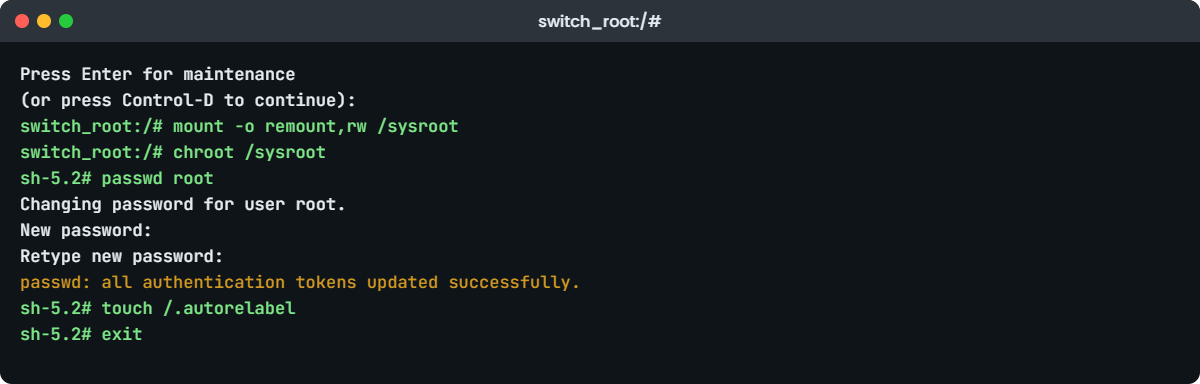
chroot /sysrootThe prompt changes to sh-5.2#. You should see something like this:
switch_root:/# mount -o remount,rw /sysroot
switch_root:/# chroot /sysroot
sh-5.2#remount,rw makes /sysroot writable and chroot steps inside it, so /etc/shadow now means the real file. Set the new password:
passwd rootYou should see something like this:
sh-5.2# passwd root
Changing password for user root.
New password:
Retype new password:
passwd: all authentication tokens updated successfully.No old password was asked, because inside the chroot you are already root. If passwd instead says “Read-only file system”, you skipped the remount in the step above; run it and try again.
✅ Checkpoint: passwd reports “all authentication tokens updated successfully”.
4Ask SELinux to relabel, then leave
Still inside the chroot, run this:
touch /.autorelabel
exit
exitThe empty /.autorelabel file is the whole reason logins keep working afterwards. Because SELinux wasn’t loaded in the initramfs, the /etc/shadow you just wrote has the wrong label, and without a relabel every login would be denied. The two exit commands leave the chroot and then the initramfs shell, and the boot carries on.
On the next boot you’ll see a line like “Relabeling / , this may take a while” and the VM reboots once more on its own. On a 20 GB lab disk it’s a minute or two. Never power the VM off while it relabels.
✅ Checkpoint: rocky01 relabels, reboots, and you can log in on the console as root with the new password.
5Prove it worked, from your normal login
Log in as student on the console (or over SSH with your key), and check the shadow file changed:
sudo grep '^root:' /etc/shadow | cut -c1-14
getenforce
sudo ls -Z /etc/shadowYou should see something like this:
[student@rocky01 ~]$ sudo grep '^root:' /etc/shadow | cut -c1-14
root:$6$Hk2pYq
Enforcing
system_u:object_r:shadow_t:s0 /etc/shadowThe hash starts with $6$ (SHA-512, the default on Rocky 10), getenforce still says Enforcing, and /etc/shadow carries its proper shadow_t label, which the relabel restored. If getenforce said Permissive or logins failed, the relabel didn’t run, and you’d repeat step 4.
✅ Checkpoint: The root line in /etc/shadow has a fresh $6$ hash, SELinux is Enforcing, and /etc/shadow is labelled shadow_t.
6Reset the admin password on ubu01
Reset ubu01 in VirtualBox. Ubuntu hides its menu, so press Esc on a UEFI VM or hold Shift on a BIOS VM as it starts. Highlight the top Ubuntu entry, press e, find the line starting with linux, change ro to rw, remove quiet splash, and add this at the end:
init=/bin/bashPress Ctrl+X. The kernel runs bash straight away, as the first process, with no login and no systemd. Set student’s password (root is locked on Ubuntu, so student is the account that matters):
mount -o remount,rw /
passwd student
exec /sbin/initYou should see something like this:
bash-5.2# mount -o remount,rw /
bash-5.2# passwd student
New password:
Retype new password:
passwd: password updated successfully
bash-5.2# exec /sbin/initYou changed ro to rw on the kernel line, so the disk was already writable and no separate remount was strictly needed, but running it is harmless and saves you if you forgot. There is no SELinux relabel on Ubuntu. Leave only with exec /sbin/init, which replaces bash with the real init and boots normally; typing exit or reboot here leaves the system half-started.
[Add your screenshot here]: the Ubuntu boot entry open for editing with init=/bin/bash added at the end of the linux line.
✅ Checkpoint: ubu01 boots normally and you can log in as student with the new password.
7See where Ubuntu recovery mode fits
Reset ubu01 again, open the menu the same way, but this time choose “Advanced options for Ubuntu”, then the entry ending in “(recovery mode)”. After a moment you reach the Recovery Menu. Choose “root – Drop to root shell prompt”. You’ll see this:
Cannot open access to console, the root account is locked.
See sulogin(8) man page for more details.
Press Enter to continue.That message is Ubuntu telling you root has no password to check, so it has no shell to open for you. Press Enter, pick “resume – Resume normal boot”, and let it start. Recovery mode is useful for a root shell on a server where root does have a password, and for its fsck and network options, but for a lost admin password the init=/bin/bash route in step 6 is the one that works on a stock Ubuntu Server.
✅ Checkpoint: You saw the “root account is locked” message and returned to a normal boot with resume.
8Lock the boot-loader editor on rocky01
Back as student on rocky01, put a password on the GRUB editor so the step-1 trick asks for one:
sudo grub2-setpasswordYou should see something like this:
[student@rocky01 ~]$ sudo grub2-setpassword
Enter password:
Confirm password:
[student@rocky01 ~]$ sudo ls -l /boot/grub2/user.cfg
-rw-------. 1 root root 221 Oct 27 12:14 /boot/grub2/user.cfggrub2-setpassword writes a hashed password into /boot/grub2/user.cfg and sets the superuser to root, without you editing any script. The file holds a PBKDF2 hash, not the password:
sudo cat /boot/grub2/user.cfgYou should see something like this:
GRUB2_PASSWORD=grub.pbkdf2.sha512.10000.5F9A...C3B1The server still boots on its own, because the default entry is unrestricted. But pressing e now asks for the user “root” and this password before it lets you edit, so a stranger at the keyboard can no longer add rd.break. On Ubuntu the same idea is a set superusers and password_pbkdf2 pair in a /etc/grub.d file (generate the hash with grub-mkpasswd-pbkdf2), then update-grub.
✅ Checkpoint: Resetting rocky01 and pressing e now prompts for a user name and password before the entry can be edited.
9Put the boot-loader password back to open
So later lessons’ Break-It labs can still edit the entry freely, remove the GRUB password on rocky01:
sudo rm -f /boot/grub2/user.cfg
sudo ls /boot/grub2/user.cfgYou should see:
ls: cannot access '/boot/grub2/user.cfg': No such file or directoryDeleting user.cfg is all it takes; there is nothing to regenerate. On a real server you would keep the password and store it in your vault. Reset rocky01 once to confirm pressing e no longer asks for anything, then leave the VM running.
✅ Checkpoint: user.cfg is gone and the GRUB editor opens without a prompt again, leaving rocky01 as earlier lessons expect.
Break It, Then Fix It
Take a fresh snapshot of rocky01 first (VBoxManage snapshot rocky01 take before-l71-break). Both traps below are the real reasons a password reset “works” and then nobody can log in, which is far worse than a known-forgotten password.
1Reset the password but forget /.autorelabel
Reset rocky01, press e, add rd.break, Ctrl+X, and this time do the reset without the relabel:
mount -o remount,rw /sysroot
chroot /sysroot
passwd root
exit
exitThe boot finishes and looks normal. Then try to log in as root or student on the console:
rocky01 login: root
Password:
Login incorrectThe password is right, but every login is refused. Because SELinux wasn’t loaded in the initramfs, the /etc/shadow you wrote got the generic unlabeled_t type instead of shadow_t, and the login program is not allowed to read it. Nothing in the message tells you that, which is why this trap catches people.
Fix: get back into rd.break and either relabel or fix the one file. The quick fix is to relabel just shadow:
mount -o remount,rw /sysroot
chroot /sysroot
load_policy -i
restorecon -v /etc/shadow
touch /.autorelabel
exit
exitload_policy -i loads the SELinux policy inside the chroot so restorecon can set the right label at once, and the /.autorelabel covers anything else you touched. On the next boot logins work again. The lesson: the relabel is not optional on Rocky, it is part of the reset.
✅ Checkpoint: After the relabel, root and student can log in on the console and ls -Z /etc/shadow shows shadow_t.
2Try to reset without remounting read-write
Reset rocky01, add rd.break again, and this time skip the remount:
chroot /sysroot
passwd rootYou’ll get this error:
sh-5.2# passwd root
Changing password for user root.
New password:
Retype new password:
passwd: Authentication token manipulation errorpasswd took the new password, then failed when it tried to save it, because /sysroot (now / inside the chroot) is still read-only. The message doesn’t say “read-only”, so people retype the password again and again. On the init=/bin/bash route on Ubuntu the same mistake gives “passwd: Authentication token manipulation error” too, or a clearer “cannot create file /etc/shadow.NNNN: Read-only file system”.
Fix: leave the chroot, remount read-write, go back in, and set it:
exit
mount -o remount,rw /sysroot
chroot /sysroot
passwd root
touch /.autorelabel
exit
exitCheck your work before rebooting if you like: mount | grep sysroot should show rw and not ro. From here the normal relabel runs and the reset holds.
✅ Checkpoint: passwd succeeds after the remount, and rocky01 boots to a working login.
This happened at work
The server nobody had the password for
At a digital wallet company in Lucknow, the on-call engineer got a 2 a.m. page: a payment-reconciliation server had stopped running its hourly job, and the service needed a change only root could make. The one admin who had built the box two years earlier had left the company, and the password in the vault returned “Login incorrect” on both the console and SSH.
The first idea was to rebuild the VM from the image, but the job’s state lived in local files that weren’t in the last backup, so a rebuild meant a day of reconciliation by hand. Instead the engineer opened the hypervisor console, reset the VM, and at the GRUB menu added rd.break. Two minutes later root had a new password and the service change was made.
What nearly went wrong came next. The box was RHEL, SELinux enforcing, and on the reboot every login failed, exactly the trap from this lesson. The engineer had skipped touch /.autorelabel in the rush.
A second trip through rd.break, a restorecon on /etc/shadow and the relabel, and logins came back.
The follow-up mattered more than the fix. The team added every server to a password manager with a monthly check that the stored password actually logs in, put a boot-loader password on the hypervisor-facing servers so a lost console session couldn’t be abused, and wrote a one-page runbook with the exact rd.break steps including the relabel line, so the next 2 a.m. call would be ten calm minutes, not an hour.
Common mistakes and troubleshooting
| Mistake | What happens | What to do instead |
|---|---|---|
Forgetting touch /.autorelabel on Rocky | Password is set, but every login says “Login incorrect” afterwards | Always relabel after an rd.break reset, or restorecon /etc/shadow |
Not remounting /sysroot read-write | passwd fails with “Authentication token manipulation error” | mount -o remount,rw /sysroot before chroot |
Leaving init=/bin/bash with exit or reboot | The system boots half-started or hangs | Leave only with exec /sbin/init |
| Editing grub.cfg to make the change permanent | Next normal boot drops to a shell or fails | Edit at the menu for one boot; fix for good with grubby or update-grub |
| Assuming Ubuntu recovery resets root | “root account is locked”, nothing to reset | Use init=/bin/bash and reset the admin user (student) |
| Relying on a boot-loader password alone for a stolen disk | The disk reads fine in another machine | Use full-disk encryption (LUKS) where theft is a real risk |
| Powering off during the SELinux relabel | A half-relabelled file system, more logins broken | Let the relabel finish; it reboots on its own |
Interview questions
Click a question to open it. Each one is written the way an interviewer would ask it. Under it you will see why they ask it and one way you could answer, in your own words.
Fresher level
1. You’ve inherited a RHEL server and nobody has the root password. The console works. How do you get in?
Why they ask this: A day-one task for anyone running Red Hat systems; they want the method and whether you remember SELinux.
How you might answer: At the boot-loader menu I press e, add rd.break to the linux line and boot once. That drops me into the initramfs with the real root on /sysroot, read-only. I run mount -o remount,rw /sysroot, chroot /sysroot, then passwd root.
The step people forget is touch /.autorelabel before exiting, because SELinux isn’t loaded in the initramfs and the new /etc/shadow would get the wrong label, so logins would fail until a relabel fixes it.
2. On Ubuntu Server you need to reset a lost password. What’s different from RHEL?
Why they ask this: They’re checking that you know Ubuntu has no SELinux relabel and that root is locked.
How you might answer: On Ubuntu I add init=/bin/bash at the boot-loader menu, usually changing ro to rw on the same line, then run passwd for the admin user, because root ships locked with no password.
There’s no SELinux relabel to do, but I leave with exec /sbin/init, never exit, so systemd takes over cleanly. Recovery mode doesn’t help for the password itself because it just tells you the root account is locked.
2–5 years experience
3. Someone reset the root password on a RHEL box, but now nobody can log in at all even with the new password. What happened?
Why they ask this: This is the classic SELinux trap; they want to see you diagnose it, not just recite steps.
How you might answer: Almost certainly they reset it through rd.break or init=/bin/bash and skipped the SELinux relabel. The new /etc/shadow got labelled unlabeled_t instead of shadow_t, so the login program can’t read it and every login is refused with no useful message.
I’d go back in the same way, load_policy -i then restorecon -v /etc/shadow, and touch /.autorelabel to be safe. After the relabel reboot, logins work. ls -Z /etc/shadow confirms the label.
4. If editing the kernel line at boot gives anyone root, how do you stop that on a server you can’t physically lock up?
Why they ask this: They want layered thinking: boot-loader password plus encryption, and the limits of each.
How you might answer: I’d put a password on the boot-loader editor: grub2-setpassword on RHEL, or a set superusers and password_pbkdf2 pair on Ubuntu. The server still boots unattended, but editing an entry needs the password, so the rd.break trick is blocked.
That doesn’t protect a disk someone removes and reads elsewhere, so where theft is a real risk I’d add full-disk encryption with LUKS. Then the data is unreadable without the passphrase and none of the boot tricks even reach a file system. I’d also control who can reach the console, since console access is effectively root.
Senior level
5. Design a process so that losing a root password is never an emergency across a few hundred Linux servers.
Why they ask this: Seniors should talk about password lifecycle, access, and recovery runbooks, not just the reset command.
How you might answer: Every server’s root (and a break-glass admin) password lives in a central vault with regular rotation, and a job that actually logs in to verify the stored value, so a stale entry is caught before someone needs it. Console and hypervisor access is restricted and logged, because that access is equal to root.
For recovery I’d keep a tested one-page runbook with the exact rd.break and init=/bin/bash steps including the SELinux relabel, and I’d standardise on boot-loader passwords and, for sensitive estates, LUKS with keys escrowed in the vault or a network-bound setup like Clevis, so recovery is a known procedure rather than a 2 a.m. scramble.
6. A colleague wants to set SELINUX=disabled so password resets stop breaking logins. What do you tell them?
Why they ask this: They want to hear that you push back on turning off security to avoid a two-word step.
How you might answer: I’d say no. Disabling SELinux to save one touch /.autorelabel removes a whole layer of protection from every service on the box, and re-enabling it later forces a full relabel anyway. The real fix is to make the relabel part of the reset runbook.
If logins are already broken from a missed relabel, the right move is restorecon /etc/shadow and /.autorelabel, not disabling SELinux. I’d keep it Enforcing and make sure the team knows the reset is three commands plus the relabel, which is easy once it’s written down.
Quick quiz
Q1. On Rocky, after rd.break drops you to a shell, where is your real root file system?
- On
/ - On
/sysroot, read-only - On
/mnt/sysimage - Not mounted yet
Show answer
B — Dracut mounts the real root on /sysroot read-only; you remount it rw and chroot into it.
Q2. Why do you run touch /.autorelabel after resetting a root password on RHEL?
- To speed up the next boot
- So SELinux relabels /etc/shadow, which was written with the wrong label
- To clear the old password
- To rebuild the initramfs
Show answer
B — The initramfs has no SELinux loaded, so the new /etc/shadow is mislabelled and logins fail until a relabel fixes it.
Q3. Using init=/bin/bash, how should you leave the shell so the system boots normally?
exitrebootexec /sbin/initsystemctl default
Show answer
C — bash is PID 1 here, so exit or reboot leave it half-started; exec /sbin/init hands over to the real init.
Q4. On a stock Ubuntu Server, recovery mode’s “root shell” says the account is locked. Why?
- SELinux blocks it
- Ubuntu ships root with no password (locked)
- The disk is read-only
- Recovery mode is disabled
Show answer
B — Ubuntu locks the root account by default, so sulogin has no password to check and you reset the admin user instead.
Q5. What does grub2-setpassword protect against, and what does it not?
- A stolen disk, not a reboot
- Editing boot entries, not a removed disk read elsewhere
- Network attacks, not local ones
- Nothing useful
Show answer
B — A boot-loader password blocks editing the entry at the menu; a disk moved to another machine still reads, which is what LUKS is for.
Quick recap
- Whoever has the console and can edit the boot-loader line can reach root; that is why console access equals root.
- Rocky / RHEL:
rd.break,mount -o remount,rw /sysroot,chroot /sysroot,passwd,touch /.autorelabel, exit twice. - The
/.autorelabelstep is not optional on Rocky; skip it and every login fails with “Login incorrect”. - Ubuntu:
init=/bin/bash(setrw),passwd student, leave withexec /sbin/init; root is locked, recovery mode won’t reset it. - A read-only root gives “Authentication token manipulation error”; remount read-write first.
- Lock the boot-loader editor with
grub2-setpassword(or a grub.d user on Ubuntu), and use LUKS where a disk could be stolen.
Next lesson
Lesson 72: Can’t SSH into the server → You’ll tell connection refused from timeout from permission denied, check sshd and the firewall, read ssh -vvv, and fix the SELinux port and key-permission traps that lock people out.
Further reading: reset root password Linux
Want to go deeper into reset root password Linux? Read Red Hat’s guide to changing and resetting the root password on RHEL 10, the Rocky Linux security guides, the Ubuntu Server documentation, and the GRUB manual on security. You can also see the full plan for this course on the Linux Administration course page.
