DNS and name resolution problems on Linux
-
Phase 0: Before you start
-
Phase 1: The origins and OS architecture
-
Phase 2: Day-to-day administration and the command builder
-
Phase 3: Enterprise infrastructure and storage
-
Phase 4: Troubleshooting step by step
-
Phase 5: Final project and career
Linux DNS troubleshooting starts from one question: what happened when this program asked for this name? The answer can be an old line in /etc/hosts, a search domain that turned one lookup into four, a cache holding yesterday’s address, a DNS server that said “no such name”, one that failed, or a firewall that let nothing through, and each one looks different once you know where to look.
Lesson 30 showed the path from a name to an IP and the difference between getent and dig. This lesson goes deeper: you’ll run a small DNS server for a lab zone on rocky01, send only that zone to it from ubu01 (split DNS), and then work through search domains and ndots, caches, NXDOMAIN against SERVFAIL against a timeout, dig +trace, and a blocked port 53.
Where this lesson fits
Lesson 76 of 82 in Linux Administration · Phase 4: Troubleshooting step by step · Before this: Lesson 75, too many open files · Next: Lesson 77, package manager errors
| Time | You need | By the end you can |
|---|---|---|
| About 80 minutes | rocky01 and ubu01 running, with snapshots, bind-utils on rocky01 from Lesson 30 and dig on ubu01 | Read any resolution failure by its exact symptom, set up and check split DNS with systemd-resolved, explain search domains and ndots, and clear a stale cache safely |
What it is, in one line
Name resolution goes program, nsswitch.conf, /etc/hosts, the local resolver and its cache, then a DNS server, and every failure (wrong answer, NXDOMAIN, SERVFAIL, timeout) points at one link of that chain.
In Simple Words
Finding a classmate’s house in a new colony
You want to visit a classmate and you only know his name. First you look in your own diary. If he isn’t there, you ask your mother, who remembers what the neighbours told her last month.
If she doesn’t know, she calls the colony secretary, and for people in the new phase of the colony the secretary sends you to the phase watchman, who has his own register.
Things go wrong in different ways. Your diary may have an old address. Your mother may remember a house they moved out of.
The secretary may say “no one by that name lives here”, or “my register is wet and I can’t read it”, or not pick up the phone at all.
The diary is /etc/hosts, your mother is the local cache in systemd-resolved, the secretary is the DNS server, and the phase watchman is split DNS sending one zone to its own server.
Engineer's View
The resolution chain, and how each tool uses it
| Tool | Path it takes | Use it for |
|---|---|---|
getent hosts NAME, getent ahostsv4 NAME | glibc and /etc/nsswitch.conf, the same path as ping, ssh, curl and most programs | What the application gets. Exit code 2 means not found |
resolvectl query NAME | Asks systemd-resolved over D-Bus (Ubuntu); shows the link, cache and source | Which server or cache answered, and why it failed |
dig NAME | Asks the server in /etc/resolv.conf directly, skips nsswitch | The raw DNS answer: status, flags, TTL, which server |
dig @SERVER NAME | Asks the server you name, nothing else | What one DNS server says, bypassing every local layer |
nslookup NAME | Like dig, shorter output | Quick checks; dig gives more detail |
| Rocky Linux 10 | Ubuntu 26.04 | |
|---|---|---|
| hosts: line in nsswitch.conf | files dns myhostname | files dns |
| /etc/resolv.conf | Plain file written by NetworkManager with the real servers | Symlink to the stub file: nameserver 127.0.0.53 |
| Local cache | None by default; every lookup goes to the server | systemd-resolved caches answers for their TTL |
| Split DNS | Not built in (NetworkManager can hand it to dnsmasq or resolved) | resolved routing domains (~zone), and DNS delegates in /etc/systemd/dns-delegate.d (systemd 258 and later) |
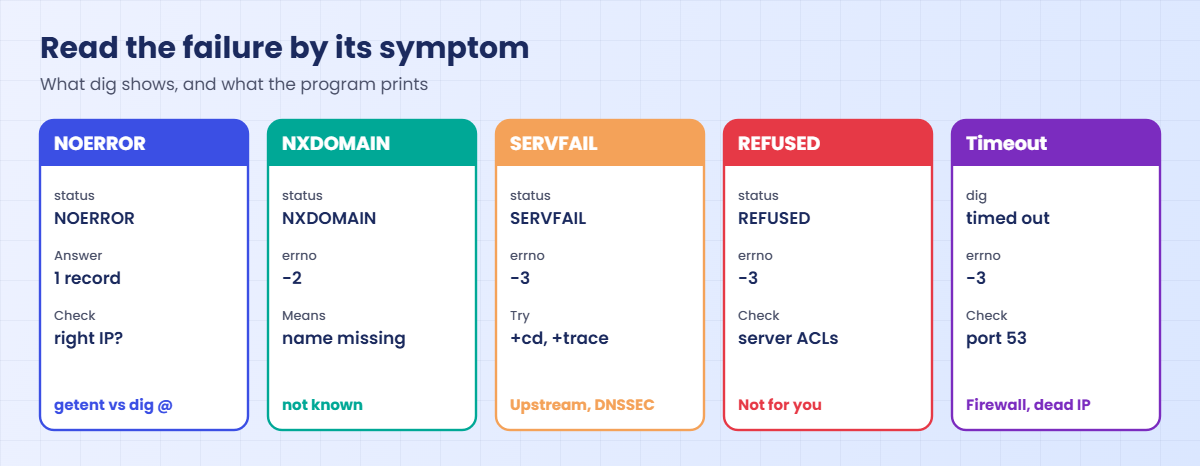
| Result | Means | What a program shows |
|---|---|---|
| NOERROR with an answer | Found | |
| NXDOMAIN | The server is sure the name doesn’t exist | “Name or service not known”, Python errno -2, curl (6) |
| SERVFAIL | The server tried and failed: broken zone, dead upstream, DNSSEC failure | “Temporary failure in name resolution”, errno -3 |
| REFUSED | The server won’t answer you for this name | “Temporary failure in name resolution” |
| Timeout | No reply at all: dead server, blocked port 53, wrong IP | A long wait, then “Temporary failure in name resolution” |
Search domains and ndots decide which names are tried. A name with fewer dots than ndots (default 1) is tried with each search domain first and as written last; a name with at least that many dots is tried as written first. glibc waits timeout seconds (default 5) for each server in turn, so a dead first nameserver adds 5 seconds to every lookup that isn’t cached.
How it works, step by step
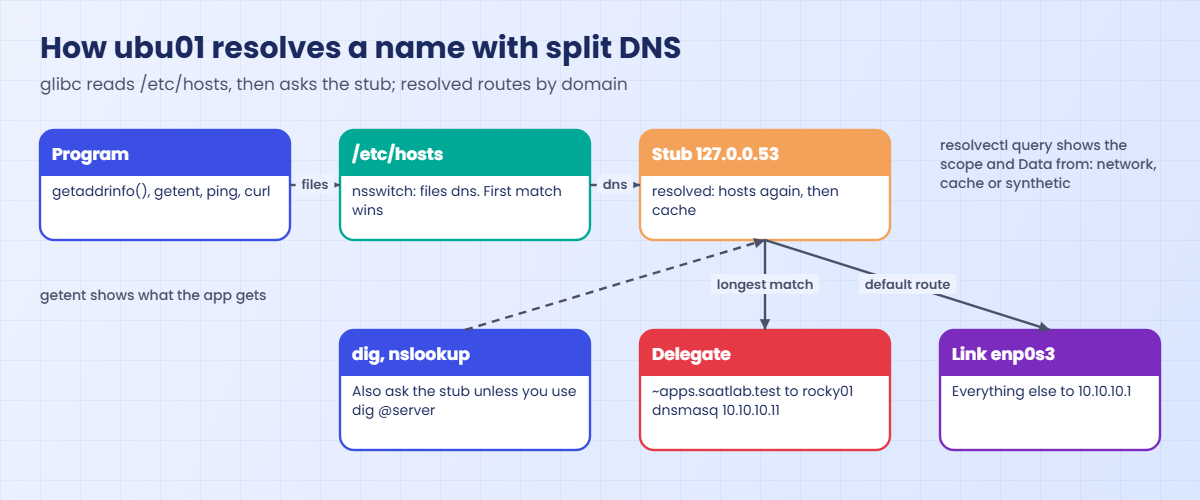
Here is what happens on ubu01 when a program looks up shop.apps.saatlab.test after this lesson’s lab has set up split DNS. The diagram after these steps shows the same chain.
1The program calls getaddrinfo()
glibc reads the hosts: line in /etc/nsswitch.conf. On Ubuntu that’s “files dns”, so /etc/hosts is checked first and the first matching line wins.
2glibc builds the list of names to try
It applies the search domains and ndots from /etc/resolv.conf, then sends each candidate to the nameserver listed there, 127.0.0.53 on Ubuntu, the systemd-resolved stub.
3systemd-resolved checks /etc/hosts and its cache
resolved reads /etc/hosts too, and answers from it before anything else, then looks in its cache. A cached answer is served until its TTL runs out, even if the record has changed on the server.
4resolved picks a server by domain
Each link and each delegate has DNS servers and domains. The query goes to the scope whose domain is the longest match for the name: ~apps.saatlab.test beats the link’s default route, so shop.apps.saatlab.test goes only to rocky01 (10.10.10.11) and everything else goes to 10.10.10.1. There is no fallback: if the delegate’s server is down, that zone fails.
5The DNS server answers, fails, or stays silent
dnsmasq on rocky01 answers its own records with the AA (authoritative) flag, says NXDOMAIN for names it doesn’t have in the zone, and forwards anything else to 10.10.10.1. Each of these outcomes travels back up the chain and appears as a different message to the program. The picture below lists them.
6Work down the chain, stop at the first surprise
Start with getent on the failing server, because that’s what the application sees. Then resolvectl query to see which scope and whether the cache answered, then dig @SERVER to ask the real server directly. The first tool whose answer differs from the one before it tells you which layer is wrong.
For anything outside your own zones, dig +trace walks the delegation from the root servers down, and shows whether the problem is your resolver or the domain’s own name servers.
Hands-on lab: split DNS, caches and DNS failures on rocky01 and ubu01
Before you run any command, double-check it
Read every command twice before you press Enter. Check the target: the server name, the user, the disk or device name, the path and the sizes. These commands are for learning and were tested in our lab, not on your system. At work, run the read-only commands first, follow your change process, make sure a backup exists, and ask a second person to check anything that changes or deletes data. You run them at your own risk.
Take snapshots of both VMs first (VBoxManage snapshot rocky01 take before-l76 and the same for ubu01). rocky01 becomes a small DNS server for one lab zone, apps.saatlab.test, using dnsmasq, and ubu01 sends only that zone to it. Everything is removed again at the end of the Break-It section, so both VMs go back to how they were.
1Build a lab DNS server on rocky01
On rocky01, install dnsmasq, give it the lab zone and open port 53:
sudo dnf install -y dnsmasq
sudo tee /etc/dnsmasq.d/saatlab-apps.conf >/dev/null <<'EOF'
# Lab DNS server for apps.saatlab.test (SaatVedha Linux course, Lesson 76)
listen-address=10.10.10.11
no-resolv
no-hosts
server=10.10.10.1
local=/apps.saatlab.test/
host-record=shop.apps.saatlab.test,10.10.10.11
host-record=api.apps.saatlab.test,10.10.10.21
local-ttl=300
log-queries
EOF
sudo dnsmasq --test
sudo systemctl enable --now dnsmasq
sudo firewall-cmd --permanent --add-service=dns
sudo firewall-cmd --reload
dig @10.10.10.11 +short shop.apps.saatlab.testYou should see something like this:
dnsmasq: syntax check OK.
Created symlink '/etc/systemd/system/multi-user.target.wants/dnsmasq.service' → '/usr/lib/systemd/system/dnsmasq.service'.
success
success
10.10.10.11local=/apps.saatlab.test/ makes dnsmasq the final word for that zone: names it has get an answer, names it doesn’t have get NXDOMAIN, and nothing in the zone is forwarded. Everything else goes to server=10.10.10.1, VirtualBox’s DNS. no-hosts stops it from also serving rocky01’s /etc/hosts, local-ttl=300 gives the records a five-minute TTL so caches matter, and log-queries writes every query to the journal. The firewalld dns service opens 53 over both UDP and TCP; DNS needs TCP for large answers.
✅ Checkpoint: dig @10.10.10.11 +short shop.apps.saatlab.test prints 10.10.10.11 on rocky01.
2Ask the server directly from ubu01
On ubu01, ask rocky01 three questions and keep only the useful lines:
for n in shop.apps.saatlab.test nope.apps.saatlab.test one.one.one.one; do
dig @10.10.10.11 $n | grep -E '^;; (->>HEADER|flags|SERVER)|^[^;].*IN[[:space:]]+A'
doneYou should see something like this:
;; ->>HEADER<<- opcode: QUERY, status: NOERROR, id: 2231
;; flags: qr aa rd ra; QUERY: 1, ANSWER: 1, AUTHORITY: 0, ADDITIONAL: 1
shop.apps.saatlab.test. 300 IN A 10.10.10.11
;; SERVER: 10.10.10.11#53(10.10.10.11) (UDP)
;; ->>HEADER<<- opcode: QUERY, status: NXDOMAIN, id: 18164
;; flags: qr rd ra; QUERY: 1, ANSWER: 0, AUTHORITY: 0, ADDITIONAL: 1
;; SERVER: 10.10.10.11#53(10.10.10.11) (UDP)
;; ->>HEADER<<- opcode: QUERY, status: NOERROR, id: 14646
;; flags: qr rd ra; QUERY: 1, ANSWER: 2, AUTHORITY: 0, ADDITIONAL: 1
one.one.one.one. 243 IN A 1.0.0.1
one.one.one.one. 243 IN A 1.1.1.1
;; SERVER: 10.10.10.11#53(10.10.10.11) (UDP)Read the status and the flags. shop is NOERROR with the aa flag, because dnsmasq owns that name. nope is NXDOMAIN with no answer: the server is certain the name doesn’t exist. one.one.one.one is NOERROR without aa, forwarded to 10.10.10.1 and passed back; its TTL is whatever the real record had left. ra (recursion available) says this server will chase names for you.
✅ Checkpoint: You get NOERROR with aa for shop, NXDOMAIN for nope, and NOERROR without aa for one.one.one.one.
3Send only the lab zone to rocky01 (split DNS)
First prove that ubu01 can’t resolve the zone on its own:
getent hosts shop.apps.saatlab.test; echo "exit $?"
dig shop.apps.saatlab.test | grep HEADERYou should see something like this:
exit 2
;; ->>HEADER<<- opcode: QUERY, status: NXDOMAIN, id: 40211Now add a DNS delegate for the zone and restart systemd-resolved:
sudo mkdir -p /etc/systemd/dns-delegate.d
sudo tee /etc/systemd/dns-delegate.d/apps-saatlab.dns-delegate >/dev/null <<'EOF'
[Delegate]
DNS=10.10.10.11
Domains=~apps.saatlab.test
EOF
sudo systemctl restart systemd-resolved
resolvectl statusYou should see something like this:
Global
Protocols: -LLMNR -mDNS -DNSOverTLS DNSSEC=no/unsupported
resolv.conf mode: stub
Link 2 (enp0s3)
Current Scopes: DNS
Protocols: +DefaultRoute -LLMNR -mDNS -DNSOverTLS DNSSEC=no/unsupported
Current DNS Server: 10.10.10.1
DNS Servers: 10.10.10.1
DNS Domain: saatlab.test
Delegate apps-saatlab
DNS Servers: 10.10.10.11
DNS Domain: ~apps.saatlab.test
Default Route: noA delegate is a third kind of scope next to Global and the links, added in systemd 258, which Ubuntu 26.04 has. The ~ in front of the domain makes it a routing domain only, not a search domain, and Default Route: no means the delegate gets nothing but names under apps.saatlab.test. On older Ubuntu releases you’d get the same effect with DNS= and Domains=~apps.saatlab.test on a link in netplan, or a drop-in in /etc/systemd/resolved.conf.d.
✅ Checkpoint: resolvectl status shows a “Delegate apps-saatlab” section with DNS Servers 10.10.10.11 and DNS Domain ~apps.saatlab.test.
4Ask the same question four ways
On ubu01, run this:
getent hosts shop.apps.saatlab.test
resolvectl query shop.apps.saatlab.test
resolvectl query -4 one.one.one.one
nslookup shop.apps.saatlab.testYou should see something like this:
10.10.10.11 shop.apps.saatlab.test
shop.apps.saatlab.test: 10.10.10.11
-- Information acquired via protocol DNS in 2.4ms.
-- Data is authenticated: no; Data was acquired via local or encrypted transport: no
-- Data from: network
one.one.one.one: 1.1.1.1 -- link: enp0s3
1.0.0.1 -- link: enp0s3
-- Information acquired via protocol DNS in 21.7ms.
-- Data is authenticated: no; Data was acquired via local or encrypted transport: no
-- Data from: network
Server: 127.0.0.53
Address: 127.0.0.53#53
Non-authoritative answer:
Name: shop.apps.saatlab.test
Address: 10.10.10.11getent, the application’s view, now gets 10.10.10.11. resolvectl query adds what the others hide: shop came from the network with no link shown, because the delegate answered, while one.one.one.one came through the enp0s3 link and its server 10.10.10.1. nslookup asked the stub at 127.0.0.53 and calls the answer non-authoritative: the stub sets the aa flag only on answers it makes up itself, never on answers it fetched from a server.
Try it yourself: build the name-resolution check for Rocky or Ubuntu in the Command Builder.
✅ Checkpoint: All four tools return 10.10.10.11 for shop.apps.saatlab.test, and resolvectl shows one.one.one.one going through enp0s3.
5See search domains and ndots in the server’s log
On ubu01, look up the same full name with ndots:5 and then with the default, using two glibc environment variables that override resolv.conf for one command. The flushes make sure every lookup reaches the server instead of resolved’s cache:
sudo resolvectl flush-caches
LOCALDOMAIN='apps.saatlab.test saatlab.test' RES_OPTIONS='ndots:5' getent ahostsv4 shop.apps.saatlab.test | head -n 1
sudo resolvectl flush-caches
LOCALDOMAIN='apps.saatlab.test saatlab.test' getent ahostsv4 shop.apps.saatlab.test | head -n 1
sudo resolvectl flush-caches
LOCALDOMAIN='apps.saatlab.test saatlab.test' getent ahostsv4 shop | head -n 1You should see something like this:
10.10.10.11 STREAM shop.apps.saatlab.test
10.10.10.11 STREAM shop.apps.saatlab.testThen on rocky01, read what dnsmasq received in the last minute:
sudo journalctl -u dnsmasq --since "1 min ago" -o cat | grep -E 'query\[|config'You should see something like this:
query[A] shop.apps.saatlab.test.apps.saatlab.test from 10.10.10.21
config shop.apps.saatlab.test.apps.saatlab.test is NXDOMAIN
query[A] shop.apps.saatlab.test from 10.10.10.21
config shop.apps.saatlab.test is 10.10.10.11
query[A] shop.apps.saatlab.test from 10.10.10.21
config shop.apps.saatlab.test is 10.10.10.11
query[A] shop.apps.saatlab.test from 10.10.10.21
config shop.apps.saatlab.test is 10.10.10.11Same answer three times, different work behind it. shop.apps.saatlab.test has three dots; with ndots:5 that counts as “short”, so glibc tried shop.apps.saatlab.test.apps.saatlab.test first (NXDOMAIN, logged here), then shop.apps.saatlab.test.saatlab.test (sent to 10.10.10.1, so not in this log), and the real name last. With the default ndots:1 it went straight to the real name. The short name shop was completed with the first search domain and found in one query.
Kubernetes pods use ndots:5 with three or four search domains, so every lookup of an outside name like an API host costs several wasted queries, each one for A and AAAA. Write a trailing dot (api.example.com.) or lower ndots for that workload when it matters.
✅ Checkpoint: The dnsmasq log shows the extra .apps.saatlab.test query only for the ndots:5 lookup.

6Watch the cache, then flush it
On ubu01, ask twice and look at the source and the TTL:
resolvectl query shop.apps.saatlab.test
dig +noall +answer shop.apps.saatlab.testYou should see something like this:
shop.apps.saatlab.test: 10.10.10.11
-- Information acquired via protocol DNS in 214us.
-- Data is authenticated: no; Data was acquired via local or encrypted transport: no
-- Data from: cache
shop.apps.saatlab.test. 251 IN A 10.10.10.11On rocky01, move shop to a new address:
sudo sed -i 's/^host-record=shop.apps.saatlab.test,10.10.10.11$/host-record=shop.apps.saatlab.test,10.10.10.21/' /etc/dnsmasq.d/saatlab-apps.conf
sudo systemctl restart dnsmasqBack on ubu01, compare the server with what programs get:
dig @10.10.10.11 +short shop.apps.saatlab.test
resolvectl query shop.apps.saatlab.test
getent hosts shop.apps.saatlab.testYou should see something like this:
10.10.10.21
shop.apps.saatlab.test: 10.10.10.11
-- Information acquired via protocol DNS in 198us.
-- Data is authenticated: no; Data was acquired via local or encrypted transport: no
-- Data from: cache
10.10.10.11 shop.apps.saatlab.testThe server already says 10.10.10.21, yet every program on ubu01 still gets 10.10.10.11 from resolved’s cache, and will until the 300-second TTL runs out. That’s normal DNS behaviour, and it’s why a migration plan lowers the TTL a day before an address changes. When you can’t wait, flush:
sudo resolvectl flush-caches
resolvectl query shop.apps.saatlab.test
getent hosts shop.apps.saatlab.testYou should see something like this:
shop.apps.saatlab.test: 10.10.10.21
-- Information acquired via protocol DNS in 2.1ms.
-- Data is authenticated: no; Data was acquired via local or encrypted transport: no
-- Data from: network
10.10.10.21 shop.apps.saatlab.testrocky01 has no local cache, so a lookup there sees a change at once. Java applications often keep their own cache inside the JVM, which no flush on the server touches; restarting the app or setting networkaddress.cache.ttl is the fix there.
✅ Checkpoint: After flush-caches, resolvectl says “Data from: network” and getent returns 10.10.10.21.
7Tell NXDOMAIN, SERVFAIL and a timeout apart
On ubu01, run one of each:
getent hosts nope.apps.saatlab.test; echo "exit $?"
python3 -c 'import socket; socket.getaddrinfo("nope.apps.saatlab.test", 80)' 2>&1 | tail -n 1
curl -sS http://nope.apps.saatlab.test/
dig @10.10.10.99 shop.apps.saatlab.test
dig @1.1.1.1 dnssec-failed.org | grep HEADER
dig @1.1.1.1 +cd dnssec-failed.org | grep HEADERYou should see something like this (the dig to 10.10.10.99 waits several seconds):
exit 2
socket.gaierror: [Errno -2] Name or service not known
curl: (6) Could not resolve host: nope.apps.saatlab.test
;; communications error to 10.10.10.99#53: timed out
; <<>> DiG 9.20.24-1ubuntu0.4-Ubuntu <<>> @10.10.10.99 shop.apps.saatlab.test
; (1 server found)
;; global options: +cmd
;; no servers could be reached
;; ->>HEADER<<- opcode: QUERY, status: SERVFAIL, id: 51520
;; ->>HEADER<<- opcode: QUERY, status: NOERROR, id: 7714NXDOMAIN reaches programs as “Name or service not known” (errno -2): fix the name or add the record. “no servers could be reached” after “timed out” means nobody answered on port 53: wrong IP, dead server or a firewall. A program sees that, and SERVFAIL, as “Temporary failure in name resolution” (errno -3).
dnssec-failed.org is a test domain kept broken on purpose. 1.1.1.1 validates DNSSEC, the signatures don’t check out, so it answers SERVFAIL; the same query with +cd (checking disabled) gets NOERROR, which proves the data exists and the failure is validation. If your network blocks outside DNS servers, read along; at work, SERVFAIL from your own resolver usually means its upstream or the domain’s name servers are broken, and dig +trace is the next step.
✅ Checkpoint: You can name the status and the program message for a missing name, an unreachable server and a failed validation.
8Follow a name from the root with dig +trace
On ubu01, run this:
dig +trace +nodnssec wikipedia.orgYou should see something like this (shortened; addresses depend on where you are):
; <<>> DiG 9.20.24-1ubuntu0.4-Ubuntu <<>> +trace +nodnssec wikipedia.org
;; global options: +cmd
. 86400 IN NS a.root-servers.net.
. 86400 IN NS b.root-servers.net.
[... 11 more root servers ...]
;; Received 239 bytes from 127.0.0.53#53(127.0.0.53) in 12 ms
org. 172800 IN NS a0.org.afilias-nst.info.
org. 172800 IN NS a2.org.afilias-nst.info.
[... 4 more .org servers ...]
;; Received 449 bytes from 199.7.83.42#53(l.root-servers.net) in 36 ms
wikipedia.org. 86400 IN NS ns0.wikimedia.org.
wikipedia.org. 86400 IN NS ns1.wikimedia.org.
wikipedia.org. 86400 IN NS ns2.wikimedia.org.
;; Received 177 bytes from 199.19.56.1#53(a0.org.afilias-nst.info) in 48 ms
wikipedia.org. 600 IN A 103.102.166.224
;; Received 58 bytes from 208.80.154.238#53(ns0.wikimedia.org) in 214 ms+trace ignores caches and does what a resolver does: it gets the root servers from your stub, asks a root server who handles .org, asks a .org server who handles wikipedia.org, and asks that domain’s own server for the address. Each “Received” line shows which server answered and how fast. When a domain fails for everyone, the step where the trace stops, or where the NS names point at servers that don’t answer, is the domain owner’s problem and not yours.
Through VirtualBox NAT this needs outbound UDP 53 from your laptop; some office networks block it.
✅ Checkpoint: Your trace reaches an A record for wikipedia.org from one of the ns0, ns1 or ns2.wikimedia.org servers.
Break It, Then Fix It
Keep the lab setup for these three; the last step removes it. Each failure here is one people hit at work, and each one shows a different false clue.
1An old /etc/hosts line that even dig believes
On ubu01, add an entry left over from “testing” and ask with every tool:
sudo cp /etc/hosts /root/hosts.l76
echo '10.10.10.31 shop.apps.saatlab.test' | sudo tee -a /etc/hosts
getent hosts shop.apps.saatlab.test
dig +noall +answer shop.apps.saatlab.test
resolvectl query shop.apps.saatlab.test
dig @10.10.10.11 +short shop.apps.saatlab.testYou’ll get something like this:
10.10.10.31 shop.apps.saatlab.test
shop.apps.saatlab.test. 0 IN A 10.10.10.31
shop.apps.saatlab.test: 10.10.10.31
-- Information acquired via protocol DNS in 87us.
-- Data is authenticated: yes; Data was acquired via local or encrypted transport: yes
-- Data from: synthetic
10.10.10.21In Lesson 30, dig on rocky01 ignored /etc/hosts. On ubu01 it doesn’t: dig asks the stub at 127.0.0.53, and systemd-resolved answers from /etc/hosts before DNS, so even dig shows the stale address. The giveaways are “Data from: synthetic” (resolved made the answer up from local data), a TTL of 0, and the authenticated flag, which DNS from rocky01 never has.
Only dig @10.10.10.11 bypasses every local layer and shows the truth.
Fix: put the hosts file back and check there’s no line for the name.
sudo cp /root/hosts.l76 /etc/hosts
grep -c 'apps.saatlab.test' /etc/hosts
getent hosts shop.apps.saatlab.test✅ Checkpoint: grep counts 0 lines and getent returns 10.10.10.21 from DNS.
2A hand-written resolv.conf that bypasses split DNS
A blog post says to “fix DNS” by writing the server into resolv.conf. Do it on ubu01:
sudo cp -P /etc/resolv.conf /root/resolv.conf.l76
sudo rm /etc/resolv.conf
echo 'nameserver 10.10.10.1' | sudo tee /etc/resolv.conf
getent hosts shop.apps.saatlab.test; echo "exit $?"
resolvectl query shop.apps.saatlab.test | head -n 1
resolvectl status | grep 'resolv.conf mode'You’ll get something like this:
nameserver 10.10.10.1
exit 2
shop.apps.saatlab.test: 10.10.10.21
resolv.conf mode: foreignPrograms now fail for the lab zone while resolvectl, which talks to resolved over D-Bus, still says everything works. glibc reads resolv.conf, goes straight to 10.10.10.1, and that server has never heard of apps.saatlab.test, so split DNS, the cache and resolved’s view of /etc/hosts are all bypassed. “resolv.conf mode: foreign” is resolved telling you the file isn’t its own. On Rocky the same hand edit would be overwritten by NetworkManager at the next reconnect, as you saw in Lesson 30.
Fix: put the symlink back. Change DNS servers in netplan or a resolved drop-in, never in this file.
sudo ln -sf ../run/systemd/resolve/stub-resolv.conf /etc/resolv.conf
ls -l /etc/resolv.conf
resolvectl status | grep 'resolv.conf mode'
getent hosts shop.apps.saatlab.test✅ Checkpoint: /etc/resolv.conf is a symlink again, the mode says stub, and getent returns 10.10.10.21.
3Port 53 blocked by the firewall
On rocky01, close DNS in firewalld:
sudo firewall-cmd --remove-service=dnsOn ubu01, flush the cache and try again:
sudo resolvectl flush-caches
dig @10.10.10.11 shop.apps.saatlab.test | head -n 3
resolvectl query shop.apps.saatlab.test
time getent hosts shop.apps.saatlab.test; echo "exit $?"
ping -c 1 shop.apps.saatlab.testYou’ll get something like this:
;; communications error to 10.10.10.11#53: host unreachable
shop.apps.saatlab.test: resolve call failed: All attempts to contact name servers or networks failed
real 0m10.031s
user 0m0.001s
sys 0m0.003s
exit 2
ping: shop.apps.saatlab.test: Temporary failure in name resolution“host unreachable” comes from firewalld’s reject, an ICMP “administratively prohibited” reply; a firewall that drops packets silently gives “timed out” instead, as with 10.10.10.99 in the lab. Through the stub you get a long wait and “Temporary failure”, the timeout message, and other names keep working because only the delegate’s server is blocked. ping to 10.10.10.11 still works too, which is why “the server is up” is never proof that DNS is reachable.
Fix: open the port again, then remove everything this lesson added.
sudo firewall-cmd --reload
dig @10.10.10.11 +short shop.apps.saatlab.testThe removal was a runtime change, so --reload brings back the permanent rule from step 1. Now clean up, on rocky01:
sudo firewall-cmd --permanent --remove-service=dns
sudo firewall-cmd --reload
sudo systemctl disable --now dnsmasq
sudo rm /etc/dnsmasq.d/saatlab-apps.conf
sudo dnf remove -y dnsmasqand on ubu01:
sudo rm -r /etc/systemd/dns-delegate.d
sudo systemctl restart systemd-resolved
sudo resolvectl flush-caches
resolvectl status | grep -c Delegate✅ Checkpoint: dig answers again before the cleanup, and afterwards rocky01 has no dnsmasq and ubu01 shows no Delegate section (the count is 0).
This happened at work
Five seconds on every page during admissions week
A colleague of mine looked after the servers for a university admissions portal in Visakhapatnam. On the first morning of counselling registrations, with thousands of students logging in from their phones, pages that normally loaded in under a second were taking six or seven. The servers had low load, the database was idle, and the developers were sure it was “the network”.
The app called two outside services on every login, an SMS gateway for the one-time password and a payment provider, and both were fast when tested from a laptop. Someone ran dig for the SMS gateway on an app server and got an answer in 3 ms, so DNS was ruled out. My colleague ran it again and read the whole output this time: the first line said “communications error to 10.40.0.5#53: timed out”, and the 3 ms answer came from the second server after that.
10.40.0.5 was an old domain controller that had been switched off over the weekend as part of a clean-up. It was still the first nameserver in the NetworkManager connections on all six app servers. Because these Rocky servers had no local cache, glibc waited the full 5-second timeout on the dead server for every lookup before trying the second one, and the app did two lookups per login.
She removed the old server with nmcli on each app server, through their Ansible playbook so all six changed together, and response times dropped back under a second within minutes. Afterwards the team added options timeout:1 attempts:2 through the connection’s dns-options, a monitoring check that queries every configured DNS server directly, and a step in the decommissioning checklist: search all server configs for an IP before switching that machine off.
Common mistakes and troubleshooting
| Mistake | What happens | What to do instead |
|---|---|---|
| Calling DNS “fine” because dig returned an answer | A dead first server, a stale cache or /etc/hosts still breaks the app | Read the whole dig output; check getent on the failing server and resolvectl query for the source |
| Editing /etc/resolv.conf by hand | Rocky: NetworkManager overwrites it. Ubuntu: split DNS and the cache are silently bypassed | Rocky: nmcli connection modify ... ipv4.dns. Ubuntu: netplan or a resolved drop-in |
| Trusting dig on Ubuntu to skip /etc/hosts | Through the stub, resolved answers from /etc/hosts first | Use dig @SERVER to ask the real server; look for “Data from: synthetic” |
| Changing a record and expecting everyone to see it at once | Caches keep the old answer until the TTL runs out | Lower the TTL in advance; flush with resolvectl flush-caches; restart Java apps that cache |
| Long search lists with a high ndots | Every outside name costs several wasted queries and some delay | Keep search domains few; use trailing dots or ndots:1 where it matters |
| Opening only UDP 53 on a DNS server | Large answers that switch to TCP fail randomly | Open 53 over UDP and TCP (firewalld’s dns service does both) |
| Pointing every server at one DNS server | One outage stops logins, package installs and monitoring everywhere | At least two servers in different failure domains, and monitor each one directly |
Interview questions
Click a question to open it. Each one is written the way an interviewer would ask it. Under it you will see why they ask it and one way you could answer, in your own words.
Fresher level
1. A server can ping 10.10.10.11 but “ping shop” says “Name or service not known”. What does that tell you, and what’s your next step?
Why they ask this: They want you to read the exact error, because it narrows the cause before you touch anything.
How you might answer: “Name or service not known” means a DNS server answered and said the name doesn’t exist, NXDOMAIN, so the network and the server are reachable. “Temporary failure” would point at a timeout or SERVFAIL instead.
Next I’d check what was asked: with getent hosts shop and the search domains in resolv.conf, because a short name is completed with those domains. Then dig @SERVER shop.full.domain to see whether the record exists at all.
2. What is the difference between getent hosts and dig?
Why they ask this: A basic check that you know which tool shows the application’s view.
How you might answer: getent goes through glibc and /etc/nsswitch.conf, so it sees /etc/hosts, search domains and the local resolver, the same as ssh or curl. dig builds its own DNS query and sends it to the server in resolv.conf or the one I name with @.
On Ubuntu dig still goes to the systemd-resolved stub, which answers from /etc/hosts and its cache, so to ask the real DNS server I use dig @10.10.10.11 explicitly.
2–5 years experience
3. How would you set up split DNS on Ubuntu so one internal zone goes to its own server?
Why they ask this: They’re checking that you know resolved’s routing domains and won’t hack resolv.conf.
How you might answer: I’d give the zone its own scope in systemd-resolved with a routing domain, a ~ in front of the zone name. On Ubuntu 26.04 that can be a DNS delegate file in /etc/systemd/dns-delegate.d with DNS= and Domains=~zone; on older releases, DNS= and Domains=~zone on a link in netplan or in a resolved drop-in.
Then I’d verify with resolvectl status and resolvectl query for a name in the zone and one outside it, and remember there’s no fallback: if that zone’s server is down, only that zone fails.
4. After a DNS change, half the app servers still connect to the old IP. How do you work through it?
Why they ask this: They want a layered approach: authoritative data, caches, then the application.
How you might answer: First I’d confirm the authoritative answer with dig @the-authoritative-server and check the TTL. Then on a bad server, getent hosts and resolvectl query to see if the old answer comes from /etc/hosts (“synthetic”) or the cache.
I’d flush resolved’s cache, check for a forgotten /etc/hosts line, and if the OS now resolves correctly but the app still uses the old IP, it’s caching inside the application, often the JVM, which needs a restart or a lower networkaddress.cache.ttl.
Senior level
5. Every request to an outside API takes about five seconds longer than it should, but dig shows a fast answer. What could cause that?
Why they ask this: Seniors should know resolver timeouts and retries and read dig output carefully.
How you might answer: A classic cause is a dead first nameserver: glibc waits the timeout, 5 seconds by default, before trying the next one, and without a local cache that happens on every lookup. dig shows it too, as a “communications error … timed out” line above the answer, which people skip.
Another is search domains with a high ndots, where each lookup first tries several names that fail, or AAAA queries to a server that drops them. I’d confirm with time getent ahosts NAME, fix the server list in NetworkManager or netplan, and consider options timeout:1 attempts:2 plus monitoring of each DNS server.
6. A domain returns SERVFAIL from your resolvers but works from your laptop. How do you find out whose problem it is?
Why they ask this: They want you to separate resolver, validation and authoritative issues with evidence.
How you might answer: I’d run dig +trace from the server to see where the delegation breaks, and repeat the failing query with +cd. If +cd works, it’s a DNSSEC validation failure, so either the domain’s signatures are broken or our resolver’s clock or trust anchors are wrong.
If it fails without +cd too, I’d query the domain’s own NS servers directly with dig @ to see if they answer or give lame or inconsistent replies. If the laptop uses a resolver that doesn’t validate, that explains the difference, and the fix belongs to the domain owner, but I’d tell them with the trace output attached.
Quick quiz
Q1. A program prints “Name or service not known”. Which DNS result most likely caused it?
- A timeout
- SERVFAIL
- NXDOMAIN
- REFUSED
Show answer
C — NXDOMAIN reaches programs as EAI_NONAME, “Name or service not known”. Timeouts and SERVFAIL give “Temporary failure in name resolution”.
Q2. On Ubuntu 26.04, why can dig show an address that only exists in /etc/hosts?
- dig always reads /etc/hosts
- dig asks the 127.0.0.53 stub, and systemd-resolved answers from /etc/hosts first
- The DNS server copies /etc/hosts
- nsswitch.conf tells dig to
Show answer
B — Use dig @SERVER to bypass the stub; resolvectl marks such answers “Data from: synthetic”.
Q3. With ndots:5 and search domains apps.saatlab.test saatlab.test, what does glibc try first for shop.apps.saatlab.test?
- shop.apps.saatlab.test
- shop.apps.saatlab.test.apps.saatlab.test
- shop.saatlab.test
- Only /etc/hosts
Show answer
B — Three dots is fewer than five, so the search domains are tried before the name as written.
Q4. The DNS record changed, dig @server shows the new IP, but programs on ubu01 still get the old one. What is the quickest correct fix?
- Reboot ubu01
- Edit /etc/resolv.conf
sudo resolvectl flush-caches- Restart the DNS server
Show answer
C — resolved serves the cached answer until its TTL ends; flushing makes it ask again.
Q5. dig @10.10.10.11 prints “communications error to 10.10.10.11#53: host unreachable” while ping 10.10.10.11 works. What is the likely cause?
- NXDOMAIN
- A firewall rejecting port 53 on the server
- A stale cache
- A wrong search domain
Show answer
B — An ICMP reject for port 53 gives “host unreachable”; a silent drop gives “timed out”.
Quick recap
- Linux DNS troubleshooting follows the chain: program, nsswitch, /etc/hosts, local resolver and cache, DNS server. Stop at the first tool whose answer differs.
- getent shows what programs get;
resolvectl queryshows the scope and “Data from” (network, cache, synthetic);dig @SERVERshows the real server. - NXDOMAIN is “Name or service not known”; SERVFAIL and timeouts are “Temporary failure in name resolution”. dig’s status line and error lines tell them apart.
- Split DNS on Ubuntu: a routing domain (~zone) on a link or a DNS delegate; check it with resolvectl status. There is no fallback for that zone.
- Search domains and ndots decide how many queries one lookup costs; a dead first nameserver adds the full timeout to every uncached lookup.
- Never hand-edit resolv.conf: NetworkManager overwrites it on Rocky, and on Ubuntu it silently bypasses resolved.
Next lesson
Lesson 77: Package manager errors → You’ll clear a dnf lock, fix a broken repository and a GPG key error on Rocky, repair an interrupted dpkg run, and deal with held packages on Ubuntu.
Further reading: Linux DNS troubleshooting
Want to go deeper into Linux DNS troubleshooting? Read the man7.org pages for resolv.conf(5) (search, ndots, timeout, LOCALDOMAIN and RES_OPTIONS), nsswitch.conf(5) and getent(1), systemd’s resolvectl, systemd-resolved and systemd.dns-delegate, the BIND 9 dig manual and the dnsmasq man page. You can also see the full plan for this course on the Linux Administration course page.
