LVM snapshots and thin pools

An LVM snapshot is a point-in-time copy of a logical volume that LVM creates in under a second, without copying any data up front. You take one before an upgrade or a risky change, read old files from it or back it up while the application keeps running, and if the change goes wrong you merge it back and the volume returns to the moment of the snapshot.

In this lesson you’ll snapshot lv_app on rocky01, mount the snapshot read-only, make a “bad upgrade” on purpose and roll it back with a merge. Then you’ll build a thin pool, give it a volume bigger than the pool itself and learn which two numbers to watch so overprovisioning never takes a server down. You need about 2 GiB of unused space in vg_data (it has 4.24g after the previous lesson), and everything you create here is removed at the end.

Where this lesson fits

Lesson 46 of 82 in Linux Administration · Phase 3: Enterprise infrastructure and storage · Before this: Lesson 45, grow storage live · Next: Lesson 47, NFS server and autofs

TimeYou needBy the end you can
About 75 minutesrocky01 from Lesson 45 (vg_data with lv_app 4.25 GiB XFS on /srv/app and at least 2 GiB free), an SSH session as student, and a snapshot before the Break-It partCreate, mount, size and remove classic snapshots, roll back with a merge, and build and monitor a thin pool with thin volumes and thin snapshots

What it is, in one line

A classic LVM snapshot saves the old version of each block the first time it changes, so it only needs room for the changes, and it becomes useless the moment that room runs out.

In Simple Words

The teacher’s notebook before the inspection

The night before a school inspection, the class teacher has to correct a few entries in the big attendance register. She doesn’t photocopy all 200 pages. She keeps a thin notebook beside her, and before she changes any line, she copies the old line into the notebook with its page number.

If the principal later says “put it back the way it was”, she copies the lines from the notebook back into the register. The notebook only needs space for lines she changed. But if she changes more lines than the notebook has room for, she can’t record the rest, and the notebook can no longer bring the register back.

The register is lv_app and the notebook is the snapshot’s copy-on-write area. A thin pool is more like a bus company selling more tickets than seats because some passengers never turn up, which works until they all do.

Engineer's View

Classic snapshots, thin pools and the lvs flags

Both kinds are built from device-mapper targets. When you snapshot lv_app, LVM moves the real data to a hidden device (lv_app-real), puts a “snapshot-origin” target in its place and creates the snapshot from a “snapshot” target that reads lv_app-real plus a copy-on-write (COW) area. Taking the snapshot suspends the device for a moment, which also freezes the file system, so XFS or ext4 is consistent on the snapshot.

A database inside may still have half-written transactions in memory; Lesson 63 handles that with a lock.

Classic (thick) snapshotThin snapshot in a thin pool
Created withlvcreate -s -L 500M -n snap vg/lvlvcreate -s -n snap vg/thinlv (no size)
SpaceA fixed COW area you choose up frontShares blocks in the pool; uses space only for changes
Cost per writeFirst write to each chunk of the origin is copied to the COW area first (extra read and write)No copy: new data goes to new blocks, metadata records who owns what
When space runs outThe snapshot becomes invalid (Data% 100, Attr shows I). The origin is fineThe whole pool fills: writes queue for 60 seconds, then fail for every thin LV in it
ActivationActive with its originHas the “skip activation” flag; activate with lvchange -ay -K
Roll backlvconvert --merge vg/snapSame command

Learn to read the lvs Attr column for these volumes. The first letter is the volume type and the fifth is its state:

AttrMeaning
owi-aos---Origin of a snapshot (o), active, open; s in position 7 means the snapshot target type
swi-a-s---Classic snapshot (s), active
swi-I-s---Snapshot that filled up and is invalid (I): remove it
Owi-aos--- / Swi-a-s---Capital O and S: a merge is waiting or running
twi-aotz--Thin pool (t); z means new blocks are zeroed
Vwi-aotz--Thin volume (V) in a pool; Vwi---tz-k is a thin snapshot with skip activation (k)

Data% means different things: for a classic snapshot it’s how full the COW area is, for a thin pool how much of the pool’s data space is used, and for a thin volume how much of its virtual size has real blocks. Meta% is the thin pool’s metadata. If metadata fills, the pool can be damaged, so you watch both.

How it works, step by step

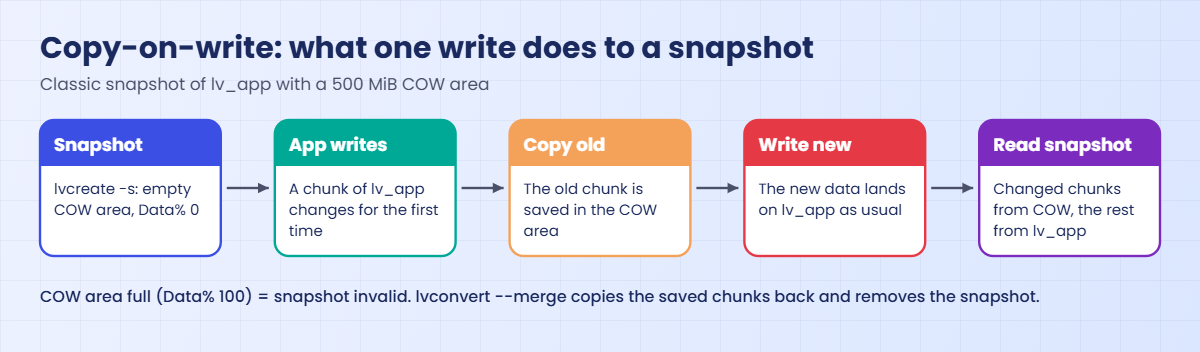
A classic snapshot doesn’t copy lv_app when you create it. It waits for the first write to each chunk (4 KiB by default) and saves the old content at that moment. The diagram below follows one write through that process.

1lvcreate -s sets up an empty COW area

lvcreate -s -n lv_app_snap -L 500M /dev/vg_data/lv_app takes 125 free extents for the COW area, briefly suspends lv_app and switches it to the snapshot-origin target. Data% starts at 0.00, and the snapshot already shows every file as it was, because so far it reads everything from the origin.

2The first write to a chunk triggers a copy

When the application writes to a chunk of lv_app for the first time since the snapshot, device-mapper reads the old chunk, writes it into the COW area, records that in the snapshot’s exception table, and only then lets the new data land on lv_app. Later writes to the same chunk go straight through.

LVM snapshot copy-on-write: how the first write to a chunk saves the old data

3Reading the snapshot mixes two sources

Reading from lv_app_snap returns the saved copy for chunks that have changed and the origin’s data for everything else. That’s why a snapshot is no backup by itself: it depends on the origin and on the same disks. You copy files out of it to real backup storage (Lesson 62), then remove it.

4Merging copies the old chunks back

lvconvert --merge vg_data/lv_app_snap writes every saved chunk back onto lv_app and then deletes the snapshot, so lv_app returns to the snapshot moment. The merge can only start when neither volume is open; if lv_app is mounted, LVM records the request and starts the merge the next time lv_app is activated.

5A thin pool hands out blocks on first write

A thin pool is one LV for data plus a small one for metadata (tp_data_tdata and tp_data_tmeta, hidden from plain lvs). Thin volumes in the pool have a virtual size, and the pool gives them real 64 KiB chunks only when they first write somewhere. A 2 GiB thin volume with 365 MiB of data uses 365 MiB of the pool.

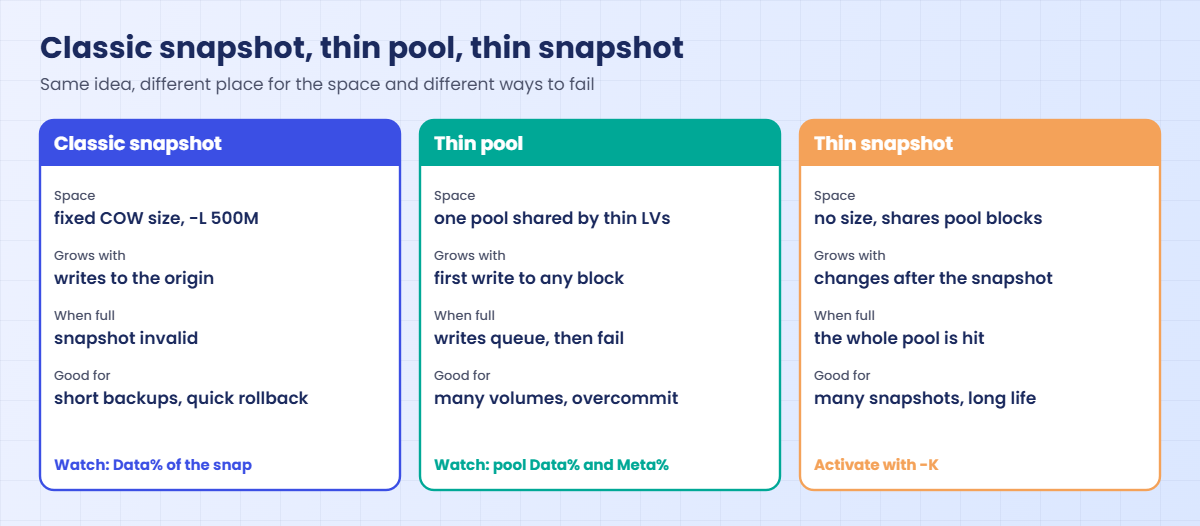
The picture below compares the two kinds of snapshot with the pool itself.

LVM snapshot compared with a thin pool and a thin snapshot

6Overprovisioning needs a watcher

Because thin volumes only take what they use, the sum of their sizes can be bigger than the pool. That is the point of thin provisioning, and also its danger: if the pool fills, every thin volume in it stops accepting writes. LVM prints a warning each time the total goes over, and the defense is monitoring the pool’s Data% and Meta%, plus autoextend (dmeventd grows the pool by thin_pool_autoextend_percent when it passes thin_pool_autoextend_threshold, as long as the VG has free space).

Classic snapshots have the same option, snapshot_autoextend_threshold and snapshot_autoextend_percent in the activation section of /etc/lvm/lvm.conf. Both thresholds ship at 100, which means “never autoextend”, on Rocky and Ubuntu.

Hands-on lab: snapshot lv_app, roll back a bad upgrade and build a thin pool

Before you run any command, double-check it

Read every command twice before you press Enter. Check the target: the server name, the user, the disk or device name, the path and the sizes. These commands are for learning and were tested in our lab, not on your system. At work, run the read-only commands first, follow your change process, make sure a backup exists, and ask a second person to check anything that changes or deletes data. You run them at your own risk.

All steps run on rocky01 as student with sudo. You’ll use a small folder /srv/app/release as a pretend application release, so there is something real to break and restore. The writer from Lesson 45 should be stopped; pgrep -af '[w]riter.sh' must print nothing.

1Check the free space and create a release to protect

Run this:

sudo vgs vg_data
sudo mkdir -p /srv/app/release
echo "version 1.4.2" | sudo tee /srv/app/release/VERSION
sudo cp /etc/services /srv/app/release/config.txt
ls /srv/app/release

You should see something like this:

  VG      #PV #LV #SN Attr   VSize VFree
  vg_data   2   2   0 wz--n- 9.99g 4.24g
version 1.4.2
config.txt  VERSION

vg_data has 4.24g free, enough for a 500 MiB snapshot, a 1 GiB thin pool and the Break-It tests. If yours shows less than 2 GiB, look for leftovers with sudo lvs vg_data before you continue. The release folder holds a version file and a config file, like a real deployment would.

✅ Checkpoint: VFree is at least 2 GiB and /srv/app/release has VERSION and config.txt.

2Take a snapshot of lv_app

Run this:

sudo lvcreate -s -n lv_app_snap -L 500M /dev/vg_data/lv_app
sudo lvs vg_data
sudo vgs vg_data

You should see something like this:

  Logical volume "lv_app_snap" created.
  LV          VG      Attr       LSize   Pool Origin Data%  Meta%  Move Log Cpy%Sync Convert
  lv_app      vg_data owi-aos---   4.25g
  lv_app_snap vg_data swi-a-s--- 500.00m      lv_app   0.00
  lv_logs     vg_data -wi-ao----   1.50g
  VG      #PV #LV #SN Attr   VSize VFree
  vg_data   2   3   1 wz--n- 9.99g 3.75g

-s means snapshot, and -L 500M is the size of the COW area, not of the snapshot as you see it (that is always the origin’s 4.25 GiB). lv_app is now an origin (owi-aos---) and the snapshot shows Origin lv_app with Data% 0.00. vgs counts one snapshot (#SN 1), and VFree dropped by 500 MiB.

✅ Checkpoint: lvs shows lv_app_snap with Attr swi-a-s--- and Origin lv_app.

3Mount the snapshot read-only

First try a normal read-only mount:

sudo mkdir -p /mnt/snap
sudo mount -o ro /dev/vg_data/lv_app_snap /mnt/snap
sudo dmesg | tail -n 1

You’ll get this error:

mount: /mnt/snap: wrong fs type, bad option, bad superblock on /dev/mapper/vg_data-lv_app_snap, missing codepage or helper program, or other error.
       dmesg(1) may have more information after failed mount system call.
[ 4321.556102] XFS (dm-6): Filesystem has duplicate UUID 6b1f3c2e-9a4d-4e57-8c1b-2f7d0a9e5c31 - can't mount

The snapshot is a copy of lv_app, so its XFS has the same UUID, and XFS refuses to mount two file systems with one UUID at the same time. ext4 doesn’t have this rule. Tell XFS to ignore the UUID:

sudo mount -o ro,nouuid /dev/vg_data/lv_app_snap /mnt/snap
ls /mnt/snap
cat /mnt/snap/release/VERSION

You should see something like this:

config.txt  heartbeat.log  VERSION
version 1.4.2

You’re looking at lv_app frozen at the moment of the snapshot, including heartbeat.log from Lesson 45. A backup job would copy from here while the live /srv/app keeps changing.

✅ Checkpoint: findmnt /mnt/snap shows the snapshot mounted ro, and VERSION says 1.4.2.
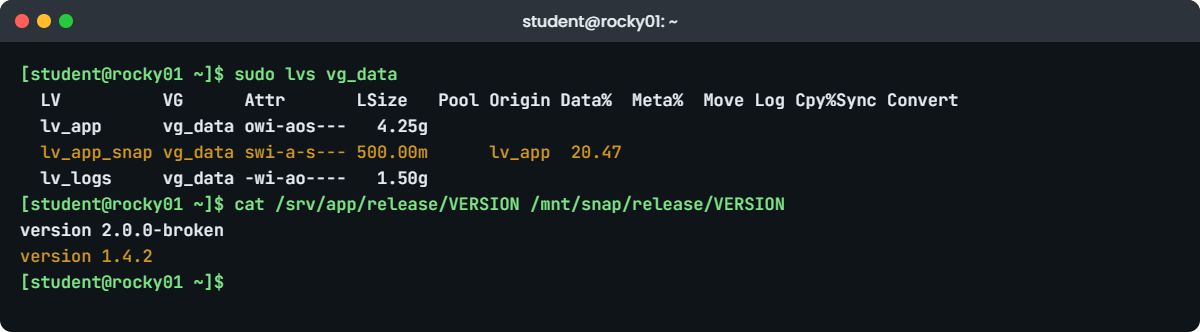
LVM snapshot lab: lvs on rocky01 showing Data% of lv_app_snap
Example output: the snapshot’s Data% after 100 MiB of changes on rocky01.

4Make a bad upgrade and watch Data% grow

Break the live release, add a 100 MiB file and compare (paste this whole block):

echo "version 2.0.0-broken" | sudo tee /srv/app/release/VERSION
sudo rm /srv/app/release/config.txt
sudo dd if=/dev/urandom of=/srv/app/release/bundle.bin bs=1M count=100 conv=fsync
sudo lvs vg_data
echo "--- live /srv/app/release"; ls /srv/app/release; cat /srv/app/release/VERSION
echo "--- snapshot /mnt/snap/release"; ls /mnt/snap/release; cat /mnt/snap/release/VERSION

You should see something like this:

version 2.0.0-broken
100+0 records in
100+0 records out
104857600 bytes (105 MB, 100 MiB) copied, 0.743519 s, 141 MB/s
  LV          VG      Attr       LSize   Pool Origin Data%  Meta%  Move Log Cpy%Sync Convert
  lv_app      vg_data owi-aos---   4.25g
  lv_app_snap vg_data swi-a-s--- 500.00m      lv_app  20.47
  lv_logs     vg_data -wi-ao----   1.50g
--- live /srv/app/release
bundle.bin  VERSION
version 2.0.0-broken
--- snapshot /mnt/snap/release
config.txt  VERSION
version 1.4.2

Writing 100 MiB to lv_app pushed the snapshot’s Data% to about 20 percent, because each chunk that changed had its old content copied into the 500 MiB COW area first, even chunks that were unused space before. conv=fsync makes dd flush to disk so lvs sees the change straight away. The live release is broken and config.txt is gone, while the snapshot still has the old release.

Use this as your sizing rule: a snapshot needs room for everything written to the origin while it exists. A database rewrite or a big log file can fill a small snapshot in minutes.

✅ Checkpoint: Data% of lv_app_snap is around 20 and the two VERSION files differ.

5Roll back with a merge

Unmount both, merge, then mount lv_app again:

sudo umount /mnt/snap
sudo umount /srv/app
sudo lvconvert --merge vg_data/lv_app_snap
sudo mount /srv/app
ls /srv/app/release; cat /srv/app/release/VERSION
sudo lvs vg_data

You should see something like this:

  Merging of volume vg_data/lv_app_snap started.
  vg_data/lv_app: Merged: 100.00%
config.txt  VERSION
version 1.4.2
  LV      VG      Attr       LSize Pool Origin Data%  Meta%  Move Log Cpy%Sync Convert
  lv_app  vg_data -wi-ao---- 4.25g
  lv_logs vg_data -wi-ao---- 1.50g

Because nothing had lv_app open, the merge started at once and LVM printed its progress until it reached 100 percent. The snapshot was consumed by the merge, so lvs shows lv_app as a normal volume again, and the release is back at 1.4.2 with config.txt and without bundle.bin. sudo mount /srv/app worked with no options because the fstab line from Lesson 44 still points at the same UUID.

✅ Checkpoint: VERSION says 1.4.2, config.txt is back, and lvs no longer lists lv_app_snap.

6Build a thin pool

Run this:

sudo lvcreate --type thin-pool -L 1G -n tp_data vg_data
sudo lvs -a vg_data

You should see something like this:

  Thin pool volume with chunk size 64.00 KiB can address at most <15.88 TiB of data.
  Logical volume "tp_data" created.
  LV              VG      Attr       LSize Pool Origin Data%  Meta%  Move Log Cpy%Sync Convert
  lv_app          vg_data -wi-ao---- 4.25g
  lv_logs         vg_data -wi-ao---- 1.50g
  [lvol0_pmspare] vg_data ewi------- 4.00m
  tp_data         vg_data twi-a-tz-- 1.00g               0.00  10.94
  [tp_data_tdata] vg_data Twi-ao---- 1.00g
  [tp_data_tmeta] vg_data ewi-ao---- 4.00m

lvs -a shows the hidden parts: tp_data_tdata holds the data (1 GiB), tp_data_tmeta the metadata (4 MiB), and lvol0_pmspare is a spare metadata area of the same size that LVM keeps for repairs. The pool starts at 0.00 Data% and about 11 percent Meta%, which is the empty metadata structures. On Rocky the thin tools come with lvm2 (device-mapper-persistent-data); on Ubuntu they are in thin-provisioning-tools, which Ubuntu Server installs.

✅ Checkpoint: lvs -a shows tp_data with Attr twi-a-tz-- and its tdata and tmeta parts.

7Create a thin volume bigger than the pool

Ask for 2 GiB in a 1 GiB pool:

sudo lvcreate -V 2G --thin -n lv_thin1 vg_data/tp_data

You should see something like this:

  WARNING: Sum of all thin volume sizes (2.00 GiB) exceeds the size of thin pool vg_data/tp_data (1.00 GiB).
  WARNING: You have not turned on protection against thin pools running out of space.
  WARNING: Set activation/thin_pool_autoextend_threshold below 100 to trigger automatic extension of thin pools before they get full.
  Logical volume "lv_thin1" created.

LVM allowed it and warned you three times: the pool is overprovisioned, and autoextend is off. Now put a file system on it and write 300 MiB:

sudo mkfs.xfs -q /dev/vg_data/lv_thin1
sudo mkdir -p /mnt/thin1
sudo mount /dev/vg_data/lv_thin1 /mnt/thin1
sudo dd if=/dev/urandom of=/mnt/thin1/orders.bin bs=1M count=300 conv=fsync
df -h /mnt/thin1
sudo lvs vg_data/lv_thin1 vg_data/tp_data

You should see something like this:

300+0 records in
300+0 records out
314572800 bytes (315 MB, 300 MiB) copied, 2.10418 s, 150 MB/s
Filesystem                    Size  Used Avail Use% Mounted on
/dev/mapper/vg_data-lv_thin1  2.0G  371M  1.7G  19% /mnt/thin1
  LV       VG      Attr       LSize Pool    Origin Data%  Meta%  Move Log Cpy%Sync Convert
  lv_thin1 vg_data Vwi-aotz-- 2.00g tp_data         17.82
  tp_data  vg_data twi-aotz-- 1.00g                 35.64  11.43

The file system thinks it has 2 GiB and 1.7G free, but the pool has 1 GiB in total and 35.64 percent of it is used: 300 MiB of file plus about 65 MiB that mkfs.xfs wrote for the log and metadata. lv_thin1’s own Data% is 17.82, the same 365 MiB measured against its 2 GiB virtual size. df on a thin volume can promise space the pool doesn’t have.

✅ Checkpoint: Pool Data% is around 35 and thin volume Data% is around 18.

8Watch the pool and grow it

Check the autoextend settings, grow the pool by hand and read the two numbers that matter:

sudo lvmconfig --typeconfig full activation/thin_pool_autoextend_threshold activation/thin_pool_autoextend_percent
sudo lvextend -L +512M vg_data/tp_data
sudo lvs -o lv_name,lv_size,data_percent,metadata_percent vg_data/lv_thin1 vg_data/tp_data

You should see something like this:

thin_pool_autoextend_threshold=100
thin_pool_autoextend_percent=20
  Size of logical volume vg_data/tp_data_tdata changed from 1.00 GiB (256 extents) to 1.50 GiB (384 extents).
  WARNING: Sum of all thin volume sizes (2.00 GiB) exceeds the size of thin pool vg_data/tp_data (1.50 GiB).
  WARNING: You have not turned on protection against thin pools running out of space.
  WARNING: Set activation/thin_pool_autoextend_threshold below 100 to trigger automatic extension of thin pools before they get full.
  Logical volume vg_data/tp_data successfully resized.
  LV       LSize Data%  Meta%
  lv_thin1 2.00g  17.82
  tp_data  1.50g  23.76  11.43

A threshold of 100 means dmeventd never grows the pool for you. Growing a pool is the same lvextend you know; LVM grows the hidden tdata volume, and the warning repeats because 2 GiB of thin volumes still exceeds 1.5 GiB of pool. At work you’d set the threshold to something like 70 and the percent to 20 in the activation section of /etc/lvm/lvm.conf, keep free extents in the VG for it, and alert on Data% and Meta% above 80 in your monitoring.

✅ Checkpoint: tp_data is 1.50g with Data% about 24, and Meta% is well below 80.

9Take a thin snapshot, then clean up

Thin snapshots need no size:

sudo lvcreate -s -n lv_thin1_snap vg_data/lv_thin1
sudo lvs vg_data/lv_thin1 vg_data/lv_thin1_snap vg_data/tp_data

You should see something like this:

  WARNING: Sum of all thin volume sizes (4.00 GiB) exceeds the size of thin pool vg_data/tp_data and the amount of free space in volume group (2.73 GiB).
  WARNING: You have not turned on protection against thin pools running out of space.
  WARNING: Set activation/thin_pool_autoextend_threshold below 100 to trigger automatic extension of thin pools before they get full.
  Logical volume "lv_thin1_snap" created.
  LV            VG      Attr       LSize Pool    Origin   Data%  Meta%  Move Log Cpy%Sync Convert
  lv_thin1      vg_data Vwi-aotz-- 2.00g tp_data           17.82
  lv_thin1_snap vg_data Vwi---tz-k 2.00g tp_data lv_thin1
  tp_data       vg_data twi-aotz-- 1.50g                   23.76  11.52

The snapshot took no pool space at all (Data% of the pool didn’t move) because it shares every block with lv_thin1 until one of them changes. Its Attr ends in k: skip activation, so it stays inactive until you run sudo lvchange -ay -K vg_data/lv_thin1_snap. The warning now counts 4 GiB of thin volumes against the pool and the VG’s free space.

Remove everything you made in steps 6 to 9 (answer y to any prompt):

sudo umount /mnt/thin1
sudo lvremove -y vg_data/lv_thin1_snap vg_data/lv_thin1 vg_data/tp_data
sudo rmdir /mnt/thin1
sudo vgs vg_data
sudo lvs vg_data

You should see something like this:

  Logical volume "lv_thin1_snap" successfully removed.
  Logical volume "lv_thin1" successfully removed.
  Logical volume "tp_data" successfully removed.
  VG      #PV #LV #SN Attr   VSize VFree
  vg_data   2   2   0 wz--n- 9.99g 4.24g
  LV      VG      Attr       LSize Pool Origin Data%  Meta%  Move Log Cpy%Sync Convert
  lv_app  vg_data -wi-ao---- 4.25g
  lv_logs vg_data -wi-ao---- 1.50g

✅ Checkpoint: vg_data is back to two LVs and 4.24g free, and /srv/app is mounted with release 1.4.2.

Break It, Then Fix It

Take a snapshot of rocky01 first (on the laptop: VBoxManage snapshot rocky01 take before-l46-break). Both failures are quiet: no command fails at the moment it goes wrong, which is why people only find out when they need the rollback.

1Make a snapshot too small and fill it

Create a 64 MiB snapshot and write 100 MiB to lv_app (paste this whole block):

sudo lvcreate -s -n lv_app_tiny -L 64M /dev/vg_data/lv_app
sudo dd if=/dev/urandom of=/srv/app/release/bundle.bin bs=1M count=100 conv=fsync
sudo lvs vg_data
sudo dmesg | tail -n 1
sudo journalctl -t dmeventd -n 1 --no-pager

You should see something like this:

  Logical volume "lv_app_tiny" created.
100+0 records in
100+0 records out
104857600 bytes (105 MB, 100 MiB) copied, 0.802114 s, 131 MB/s
  LV          VG      Attr       LSize  Pool Origin Data%  Meta%  Move Log Cpy%Sync Convert
  lv_app      vg_data owi-aos---  4.25g
  lv_app_tiny vg_data swi-I-s--- 64.00m      lv_app 100.00
  lv_logs     vg_data -wi-ao----  1.50g
[ 5021.334812] device-mapper: snapshots: Invalidating snapshot: Unable to allocate exception.
Oct 27 12:31:04 rocky01 dmeventd[811]: WARNING: Snapshot vg_data-lv_app_tiny changed state to: Invalid and should be removed.

dd finished without any error, because the origin is fine and keeps taking writes. The snapshot is what broke: its 64 MiB COW area filled at about 64 MiB of changes, the kernel marked it invalid, and the I in its Attr means it can no longer show or restore anything. Try the rollback anyway:

sudo lvconvert --merge vg_data/lv_app_tiny

You’ll get this error:

  Unable to merge invalidated snapshot LV vg_data/lv_app_tiny.

Fix: remove the invalid snapshot, then size the next one for the expected change, or let LVM grow it.

sudo lvremove -y vg_data/lv_app_tiny
sudo rm /srv/app/release/bundle.bin

For a real change, estimate the writes (test the upgrade on a copy and watch Data%) and add a margin, or set snapshot_autoextend_threshold = 70 and snapshot_autoextend_percent = 20 in the activation section of /etc/lvm/lvm.conf, then sudo systemctl restart lvm2-monitor. Autoextend only works while the VG has free extents, and dmeventd checks every few seconds, so a very fast writer can still beat it.

✅ Checkpoint: sudo lvs vg_data shows only lv_app and lv_logs, and lv_app shows -wi-ao---- again.

2Merge while the origin is mounted

Take a proper snapshot, make a change, and ask for a rollback without unmounting:

sudo lvcreate -s -n lv_app_snap -L 500M /dev/vg_data/lv_app
echo "oops" | sudo tee /srv/app/release/oops.txt
sudo lvconvert --merge vg_data/lv_app_snap
sudo lvs vg_data
ls /srv/app/release

You should see something like this:

  Logical volume "lv_app_snap" created.
oops
  Delaying merge since origin is open.
  Merging of snapshot vg_data/lv_app_snap will occur on next activation of vg_data/lv_app.
  LV          VG      Attr       LSize   Pool Origin Data%  Meta%  Move Log Cpy%Sync Convert
  lv_app      vg_data Owi-aos---   4.25g
  lv_app_snap vg_data Swi-a-s--- 500.00m      lv_app   0.06
  lv_logs     vg_data -wi-ao----   1.50g
config.txt  oops.txt  VERSION

The command returned success, and it’s easy to stop reading there and tell everyone the rollback is done. It isn’t: lv_app is mounted (open), so LVM only recorded the merge, shown by the capital O and S, and oops.txt is still there. The merge will run the next time lv_app is activated, which on a server you forget about can be a reboot weeks later that silently throws away weeks of changes.

Fix: take the origin out of use and activate it again, so the merge runs now.

sudo umount /srv/app
sudo lvchange -an vg_data/lv_app
sudo lvchange -ay vg_data/lv_app
sleep 5; sudo lvs vg_data
sudo mount /srv/app
ls /srv/app/release

You should see something like this:

  LV      VG      Attr       LSize Pool Origin Data%  Meta%  Move Log Cpy%Sync Convert
  lv_app  vg_data -wi-a----- 4.25g
  lv_logs vg_data -wi-ao---- 1.50g
config.txt  VERSION

Activation started the merge in the background (lvmpolld runs it), and a few seconds later the snapshot was gone. When the origin is the root file system you can’t unmount it, so the merge happens during the next boot; that is how OS-upgrade rollbacks with a root snapshot work.

✅ Checkpoint: oops.txt is gone, lvs shows no snapshot, and /srv/app is mounted again.

This happened at work

The 2 GB snapshot that was meant to save the night

The on-call engineer at a courier company in Visakhapatnam told me about this one at a meetup. It was the Saturday before Diwali, with parcel volumes at their peak, and the team was upgrading the hub sorting application at 1 a.m., when the sorting lines were quiet. The plan said: take an LVM snapshot of the 300 GB data volume, run the upgrade, and if anything fails, merge back.

Someone created the snapshot with -L 2G, because 2 GB had been plenty for the last few small patches. This upgrade included a data migration that rewrote about 40 GB of tables. Nobody watched lvs during the run, and the snapshot went invalid about six minutes in.

The migration failed at 2:10 a.m. on a schema error, and the merge stopped with “Unable to merge invalidated snapshot”.

They had to restore from the 11 p.m. database backup. The two hours of parcel scans between the backup and the failed upgrade had to be replayed from the handheld scanners’ local logs, which took the morning shift most of Sunday, during the busiest week of the year. The snapshot had been working perfectly; it was only a tenth of the size the change needed.

After that the team changed three things: every upgrade is first run on a copy of production while someone records the snapshot’s Data%, and the real snapshot gets twice that size; snapshot_autoextend_threshold is 70 on those servers with free space kept in the VG; and the upgrade runbook has a line to check lvs every ten minutes and stop if Data% passes 70.

Common mistakes and troubleshooting

MistakeWhat happensWhat to do instead
Sizing a snapshot by habit, not by the changeIt fills, goes invalid, and the rollback is goneMeasure the change on a test copy and size for it, or turn on autoextend
Mounting an XFS snapshot without nouuid“wrong fs type, bad option, bad superblock” and a duplicate UUID in dmesgUse mount -o ro,nouuid
Treating a snapshot as a backupIt lives on the same disks and depends on the originCopy from the snapshot to backup storage, then remove it
Running lvconvert --merge on a mounted origin and walking awayThe merge waits for the next activation, maybe a reboot weeks laterUnmount, lvchange -an, lvchange -ay, then check lvs
Leaving snapshots around for daysEvery write costs extra I/O, and the COW area keeps fillingRemove them as soon as the backup or the change check is done
Overprovisioning a thin pool with no monitoringThe pool fills and every thin volume in it stops taking writesAlert on Data% and Meta%, set autoextend, keep VG space free
Forgetting that thin snapshots skip activationThe snapshot “isn’t there” after a rebootActivate it with lvchange -ay -K vg/snap

Interview questions

Click a question to open it. Each one is written the way an interviewer would ask it. Under it you will see why they ask it and one way you could answer, in your own words.

Fresher level

1. What is an LVM snapshot, and why is it not a backup?

Why they ask this: A basic concept check: they want to hear copy-on-write and the dependency on the origin.

How you might answer: A classic LVM snapshot is a copy-on-write view of a logical volume at one moment. When the origin changes, the old blocks are copied into the snapshot’s COW area first, so the snapshot keeps showing the old data while using space only for what changed.

It isn’t a backup because it lives in the same volume group on the same disks and still reads unchanged blocks from the origin. If the disk dies, both are gone. I use it to get a consistent view, copy that to real backup storage, and remove it.

2. You need to mount a snapshot of an XFS volume to copy some files. What do you watch out for?

Why they ask this: They’re checking that you’ve done it for real: the nouuid detail is the giveaway.

How you might answer: The snapshot has the same XFS UUID as the mounted origin, so a normal mount fails with “wrong fs type, bad superblock” and dmesg says duplicate UUID. I mount it with mount -o ro,nouuid /dev/vg_data/lv_app_snap /mnt/snap.

I mount it read-only so I don’t change the snapshot, I keep an eye on its Data% while it exists, and I unmount and lvremove it as soon as the copy is done.

2–5 years experience

3. Before an application upgrade you’re asked to “take a snapshot so we can roll back”. How do you size it and how do you run the rollback?

Why they ask this: They want practical sizing and the merge procedure, including the open-origin catch.

How you might answer: I size it for the writes the upgrade will make while the snapshot exists, ideally measured by running the upgrade on a copy and watching Data% in lvs, then double it. If I can’t measure, I take a generous size and set snapshot_autoextend_threshold to 70 with free space left in the VG.

To roll back I stop the app, unmount the volume and run lvconvert --merge vg/snap. If something still holds it open, LVM only schedules the merge for the next activation, so I make sure it’s unmounted, or deactivate and reactivate the LV, and check that the snapshot has disappeared from lvs before I start the app again.

4. What happens when a thin pool runs out of data space, and how do you prevent it?

Why they ask this: This tests whether you understand the shared risk of thin provisioning and real monitoring.

How you might answer: When the pool is full, writes to every thin volume in it are queued for up to 60 seconds by default and then fail, so all those file systems hit I/O errors at once. If the metadata area fills, it’s worse, because the pool metadata can become inconsistent and need repair offline.

I prevent it with monitoring on the pool’s Data% and Meta% (warn at 70 to 80 percent), autoextend with thin_pool_autoextend_threshold below 100 and free extents in the VG, and a rule for how far we allow overprovisioning. For pools where a stall is worse than an error, I set --errorwhenfull y.

Senior level

5. When would you choose thin provisioning over classic LVs on a Linux server, and when would you avoid it?

Why they ask this: Seniors need to weigh flexibility against operational risk and know where the thin model fits.

How you might answer: I’d use thin pools when there are many volumes or many snapshots, for example lab or CI servers, or long-lived snapshot chains, because thin snapshots share blocks and don’t slow down writes the way classic COW snapshots do.

I’d avoid it for a single big database volume on a server without good monitoring, and I’d think twice when the SAN or the hypervisor is already thin, because thin on thin hides real usage from both teams. Where I use it, I write down the overprovisioning limit, autoextend settings and the alert thresholds.

6. Your backup design uses LVM snapshots for consistency. What can go wrong at scale and how would you design around it?

Why they ask this: They want to see failure modes thought through: application consistency, space, performance and cleanup.

How you might answer: A snapshot is only crash-consistent, so databases need their own freeze or lock around it (Lesson 63 does this with MariaDB). At scale the common failures are snapshots filling during long copies, the extra COW I/O slowing busy volumes, and failed jobs leaving snapshots behind that slow the server for weeks.

I’d size snapshots from measured change rates, set autoextend with VG free space as a hard requirement, have the post-script always remove the snapshot even on failure, and alert on any snapshot older than a few hours. For very busy volumes I’d look at thin snapshots or application-level backups like mariabackup instead.

Quick quiz

Q1. What does the -L 500M mean in lvcreate -s -n lv_app_snap -L 500M /dev/vg_data/lv_app?

  1. The snapshot shows only 500 MiB of the origin
  2. The COW area can hold 500 MiB of changed data
  3. The origin is limited to 500 MiB
  4. The snapshot is a 500 MiB copy of the start of the volume
Show answer

B — The snapshot always shows the whole origin; -L sizes the copy-on-write area that stores old versions of changed chunks.

Q2. lvs shows a snapshot with Attr swi-I-s--- and Data% 100.00. What does it mean?

  1. The merge is running
  2. The snapshot is inactive
  3. The snapshot filled up and is invalid
  4. The origin is damaged
Show answer

C — The I means invalid. It can’t be read or merged; remove it. The origin is unaffected.

Q3. Why does mounting an XFS snapshot need -o nouuid?

  1. XFS snapshots have no UUID
  2. The snapshot has the same UUID as the mounted origin, and XFS refuses duplicates
  3. nouuid makes it read-only
  4. LVM changes the UUID
Show answer

B — The snapshot is a copy of the file system, UUID included. ext4 does not have this check.

Q4. You run lvconvert --merge while the origin is mounted. What happens?

  1. The merge runs at once
  2. The command fails
  3. The merge is delayed until the origin is next activated
  4. The origin is unmounted automatically
Show answer

C — LVM prints “Delaying merge since origin is open” and runs it at the next activation, for example after unmount and lvchange -an / -ay, or a reboot.

Q5. A 1 GiB thin pool holds a 2 GiB thin volume with 365 MiB written. What is the pool’s Data%?

  1. About 18%
  2. About 36%
  3. 100%
  4. 0%, thin pools don’t count
Show answer

B — 365 MiB out of 1024 MiB of pool is about 36%. The thin volume’s own Data% is about 18% of its 2 GiB virtual size.

Quick recap

  • An LVM snapshot is copy-on-write: lvcreate -s -L size reserves room for old copies of changed chunks, and Data% shows how full that room is.
  • Mount XFS snapshots with -o ro,nouuid; copy from them to real backup storage, then remove them.
  • Roll back with lvconvert --merge while the origin is unmounted; if it’s open, the merge waits for the next activation.
  • A full classic snapshot becomes invalid (Attr I) and can’t be merged, so size for the change or turn on autoextend.
  • Thin pools allocate on first write and allow overprovisioning; watch Data% and Meta%, and set thin_pool_autoextend_threshold below 100.
  • Thin snapshots take no space up front and skip activation; use lvchange -ay -K.

Next lesson

Lesson 47: NFS server and autofs → You’ll export a share from ubu01, mount it on rocky01 by hand, in fstab and with autofs, and fix the root_squash and firewall problems everyone meets the first time.

Further reading: LVM snapshot

Want to go deeper into LVM snapshot? Read the RHEL 10 guide’s chapter on managing logical volume snapshots and creating thin logical volumes, the lvmthin(7) man page, and the kernel’s device-mapper snapshot and thin provisioning documents. You can also see the full plan for this course on the Linux Administration course page.

Scroll to Top

This website uses cookies

We use a few cookies to keep this site working. If you allow it, we also use Google Analytics to count visits so we can improve our lessons. You can accept all, deny the optional ones, or choose what to allow.