Host a web app with Nginx, PHP-FPM and MariaDB

The Nginx MariaDB Linux stack (people call it LEMP when PHP sits in the middle) runs a huge number of company websites, admin portals and small internal tools. Sooner or later a developer hands you a folder of PHP files and says “put this on a server”, and from that moment the uptime, the logs, the permissions and the 2 a.m. calls are yours.

In this lesson you’ll build SaatShop, a tiny order list written in PHP that reads a MariaDB table, on rocky01. You’ll give the database its own logical volume first, install Nginx, PHP-FPM and MariaDB 10.11 from AppStream, wire them together through Unix sockets, keep SELinux enforcing and open only HTTP in firewalld. SaatShop stays on rocky01 for the rest of the course: the monitoring, backup and final project lessons all protect it.

Where this lesson fits

Lesson 56 of 82 in Linux Administration · Phase 3: Enterprise infrastructure and storage · Before this: Lesson 55, Linux hardening · Next: Lesson 57, containers with Podman and Docker

TimeYou needBy the end you can
About 90 minutesrocky01 with vg_data from Lessons 44 and 45 (at least 2 GiB unallocated), webteam from Lessons 15 and 16, and ubu01 to test from a second machineServe a PHP and MariaDB app through Nginx with SELinux enforcing, read every log on the path, and fix a 502, a 403 and a blocked database connection

What it is, in one line

Nginx takes the web request, passes PHP pages to PHP-FPM through a Unix socket, PHP reads the data from MariaDB through another socket, and each of the three is its own systemd service with its own config file and log.

In Simple Words

The darshini, the kitchen hatch and the store room

Think of a busy darshini in Bengaluru. The man at the counter takes every order. If you want a bottle of water he hands it over himself in a second, but for a masala dosa he pushes the slip through a small hatch to the kitchen, where a few cooks work on many slips at once.

The cooks never go to the market. They ask the storekeeper, who keeps the store room locked and only gives out what is on the day’s list. When the hatch is shut, the counter man can only say “kitchen is not answering”, and when the store room is locked the cook can only say “no batter today”.

Nginx is the counter, PHP-FPM is the kitchen behind the hatch, and MariaDB is the store room.

Engineer's View

Three services, two sockets, one data volume

Nginx is an event-driven web server: a master process running as root binds port 80, and a few worker processes running as the nginx user handle thousands of connections each. It serves static files itself and sends anything ending in .php to a FastCGI backend. PHP-FPM (FastCGI Process Manager) is that backend: a master and a pool of PHP worker processes that run your code.

MariaDB stores the data and answers SQL.

PieceRocky Linux 10.2 (AppStream)Ubuntu Server 26.04
Versions you getnginx 1.26.3, php-fpm 8.3, mariadb-server 10.11nginx 1.28.3, php8.5-fpm, mariadb-server 11.8
Servicesnginx, php-fpm, mariadbnginx, php8.5-fpm, mariadb
Site config/etc/nginx/conf.d/*.conf/etc/nginx/sites-available/ plus a link in sites-enabled/
PHP-FPM pool/etc/php-fpm.d/www.conf, user apache/etc/php/8.5/fpm/pool.d/www.conf, user www-data
PHP-FPM socket/run/php-fpm/www.sock (upstream name php-fpm)/run/php/php8.5-fpm.sock
MariaDB socket/var/lib/mysql/mysql.sock/run/mysqld/mysqld.sock
Data folder/var/lib/mysql/var/lib/mysql
Logs/var/log/nginx, /var/log/php-fpm, /var/log/mariadb/mariadb.log/var/log/nginx, /var/log/php8.5-fpm.log, MariaDB in the journal

On Rocky, SELinux runs Nginx and PHP-FPM in the httpd_t domain. They may read files labelled httpd_sys_content_t, and they may connect to MariaDB’s Unix socket by default. A TCP connection to port 3306 needs the boolean httpd_can_network_connect_db, and calls out to other web APIs need httpd_can_network_connect.

MariaDB itself runs as mysqld_t and its files must be mysqld_db_t.

On Ubuntu, AppArmor doesn’t confine Nginx or PHP-FPM by default and ufw stays closed until you add sudo ufw allow 'Nginx HTTP'. The plumbing is the same; only names and paths change.

How it works, step by step

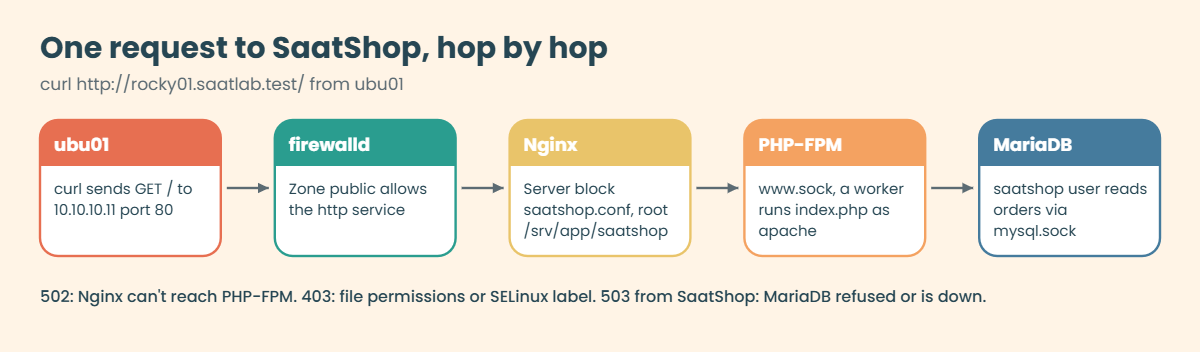
Follow one request from ubu01 to the SaatShop order table and back. Each hop below is a place where things can break, so this is also your troubleshooting map.

1The request reaches port 80

ubu01 runs curl http://rocky01.saatlab.test/. The packet arrives on enp0s3, firewalld checks the public zone, and because the http service is allowed it reaches the socket the Nginx master opened. If http isn’t allowed, firewalld rejects the packet, curl fails at once with “No route to host”, and Nginx never sees anything (Lesson 34).

2Nginx picks a server block and a location

Nginx compares the port and the Host header with each server_name and picks the SaatShop server block. Inside it, location / checks that the path exists under root /srv/app/saatshop and adds index.php for a bare “/”. A path ending in .php matches the PHP location, which sends it through fastcgi_pass.

The diagram below shows the whole trip.

Nginx MariaDB Linux: one request from ubu01 through firewalld, Nginx, PHP-FPM and MariaDB

3PHP-FPM runs the script

Nginx writes the request to the socket /run/php-fpm/www.sock, with SCRIPT_FILENAME telling PHP-FPM which file to run. The socket has an ACL that lets only the apache and nginx users connect. An idle worker from the www pool (running as apache) opens index.php, runs it and writes the HTML back through the socket.

The pool size is set by pm.max_children. When every worker is busy, new requests queue on the socket, and when the queue is full Nginx gives up with a 502 or a 504.

4PHP asks MariaDB for the rows

index.php reads its settings from /etc/saatshop/db.ini and connects with PDO to unix_socket=/var/lib/mysql/mysql.sock as the saatshop user. That user may only SELECT, INSERT, UPDATE and DELETE in the saatshop database, so a bug in the app can’t drop tables or read other databases. MariaDB checks the user, runs the query on the orders table and sends five rows back.

5The data lives on its own volume

MariaDB writes everything under /var/lib/mysql. You’ll mount a 2 GiB XFS logical volume, lv_db in vg_data, on that path before the package is installed. A runaway table or binary log can then fill only lv_db, never the root file system, and Lesson 63 can take an LVM snapshot of the database alone.

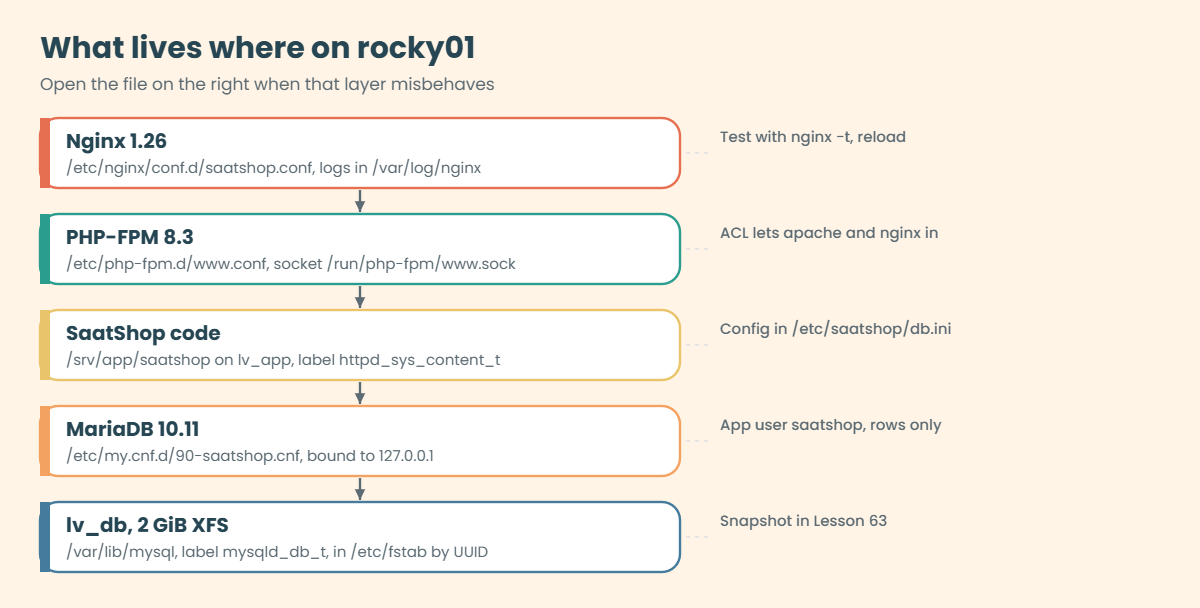
The layers below show what lives where on rocky01 once the lab is done, with the file you’d open for each one.

Nginx MariaDB Linux: what lives where on rocky01, from Nginx config to the lv_db volume

6Read the error code before you touch anything

The HTTP status tells you which hop failed, and each hop has its own log:

You seeIt usually meansLook in
502 Bad GatewayNginx couldn’t talk to PHP-FPM: service down, wrong socket path, socket permissions/var/log/nginx/saatshop.error.log, systemctl status php-fpm
504 Gateway TimeoutPHP-FPM accepted the request but didn’t answer in time (60 s by default)PHP-FPM slow log, MariaDB slow queries
403 ForbiddenNginx or PHP-FPM can’t read the file: Unix permissions or the SELinux labelNginx error log, ausearch -m AVC -ts recent
404 Not FoundThe file isn’t under the root you think, or the wrong server block answeredNginx access log, nginx -T
503 from SaatShopPHP ran but MariaDB refused or wasn’t there/var/log/php-fpm/www-error.log, systemctl status mariadb

Whatever you change, test it before you apply it: sudo nginx -t for Nginx and sudo php-fpm -t for the pool files. A reload with a broken file leaves the old config running, but a restart or a reboot with one leaves the site down.

Hands-on lab: build SaatShop on rocky01 with Nginx, PHP-FPM and MariaDB

Before you run any command, double-check it

Read every command twice before you press Enter. Check the target: the server name, the user, the disk or device name, the path and the sizes. These commands are for learning and were tested in our lab, not on your system. At work, run the read-only commands first, follow your change process, make sure a backup exists, and ask a second person to check anything that changes or deletes data. You run them at your own risk.

Everything runs on rocky01 as student with sudo, except step 8, which tests from ubu01. Take a snapshot first (VBoxManage snapshot rocky01 take before-l56 on the laptop), because step 1 adds a volume to /etc/fstab. The passwords below are lab passwords; at work they come from your password vault and never appear in a ticket or a wiki page.

1Give MariaDB its own logical volume

Check the space in vg_data, then create, format and mount lv_db before MariaDB is installed:

sudo vgs vg_data
sudo lvcreate -L 2G -n lv_db vg_data
sudo mkfs.xfs -L dbdata /dev/vg_data/lv_db
sudo mkdir -p /var/lib/mysql
UUID=$(sudo blkid -s UUID -o value /dev/vg_data/lv_db)
echo "UUID=$UUID  /var/lib/mysql  xfs  defaults  0 0" | sudo tee -a /etc/fstab
sudo systemctl daemon-reload
sudo mount -a
findmnt /var/lib/mysql
ls -ldZ /var/lib/mysql

You should see something like this (mkfs.xfs output cut):

  VG      #PV #LV #SN Attr   VSize VFree
  vg_data   2   2   0 wz--n- 9.99g 4.24g
  Logical volume "lv_db" created.
UUID=5c1f7a52-0d3e-4c8b-9a51-2f6e4b7d9c03  /var/lib/mysql  xfs  defaults  0 0
TARGET         SOURCE                   FSTYPE OPTIONS
/var/lib/mysql /dev/mapper/vg_data-lv_db xfs    rw,relatime,seclabel,attr2,inode64,logbufs=8,logbsize=32k,noquota
drwxr-xr-x. 2 root root system_u:object_r:unlabeled_t:s0 6 Oct 27 11:31 /var/lib/mysql

vg_data has two PVs (sdb from Lesson 44 and sdd from Lesson 45) and a little over 4 GiB unallocated (VFree), so 2 GiB for the database fits. The fstab entry uses the UUID, as in Lesson 44, and daemon-reload lets systemd pick up the new line before mount -a. The new file system’s root has no SELinux label yet (unlabeled_t), and MariaDB, confined as mysqld_t, would refuse to start on it.

The policy already knows what /var/lib/mysql should be, so restorecon fixes it:

sudo restorecon -Rv /var/lib/mysql
Relabeled /var/lib/mysql from system_u:object_r:unlabeled_t:s0 to system_u:object_r:mysqld_db_t:s0

✅ Checkpoint: findmnt shows /var/lib/mysql on /dev/mapper/vg_data-lv_db, and ls -ldZ /var/lib/mysql now shows mysqld_db_t.

2Install Nginx, PHP-FPM and MariaDB

Run this:

sudo dnf install -y nginx php-fpm php-cli php-mysqlnd mariadb-server policycoreutils-python-utils
rpm -q nginx php-fpm php-mysqlnd mariadb-server
sudo chown mysql:mysql /var/lib/mysql
ls -ldZ /var/lib/mysql

You should see something like this:

nginx-1.26.3-6.el10_2.5.x86_64
php-fpm-8.3.31-1.el10_2.x86_64
php-mysqlnd-8.3.31-1.el10_2.x86_64
mariadb-server-10.11.18-1.el10_2.x86_64
drwxr-xr-x. 2 mysql mysql system_u:object_r:mysqld_db_t:s0 6 Oct 27 11:33 /var/lib/mysql

php-mysqlnd brings the PDO MySQL driver that PHP needs to talk to MariaDB; without it the app fails with “could not find driver”. policycoreutils-python-utils gives you semanage for step 5. The package normally sets the owner of /var/lib/mysql itself, and the chown makes sure of it on a folder that existed before the package did. Your patch numbers may be newer, which is fine.

✅ Checkpoint: All four packages are installed and /var/lib/mysql is owned by mysql:mysql with the mysqld_db_t label.

3Start MariaDB, lock it to localhost and secure it

SaatShop talks to MariaDB on the same server, so keep the database off the network with a small drop-in file, then start it:

printf '[mysqld]\nbind-address = 127.0.0.1\n' | sudo tee /etc/my.cnf.d/90-saatshop.cnf
sudo systemctl enable --now mariadb
sudo ss -ltnp | grep 3306
sudo mariadb -e "SELECT VERSION();"
ls /var/lib/mysql | head -n 5

You should see something like this:

[mysqld]
bind-address = 127.0.0.1
Created symlink '/etc/systemd/system/multi-user.target.wants/mariadb.service' → '/usr/lib/systemd/system/mariadb.service'.
LISTEN 0      80         127.0.0.1:3306      0.0.0.0:*    users:(("mariadbd",pid=4518,fd=19))
VERSION()
10.11.18-MariaDB
aria_log.00000001
aria_log_control
ib_buffer_pool
ib_logfile0
ibdata1

The first start created the system tables on lv_db. Port 3306 listens on 127.0.0.1 only, so even if someone opened 3306 in the firewall by mistake, nothing outside rocky01 could reach it. sudo mariadb worked without a password because MariaDB’s root account uses unix_socket authentication: Linux root is MariaDB root, and nobody else is. Now remove the test leftovers:

sudo mariadb-secure-installation
The script asksAnswerWhy
Enter current password for rootPress Enterroot has no password, it uses the socket
Switch to unix_socket authenticationnIt already uses it
Change the root passwordnSocket login is safer than a password that can leak
Remove anonymous usersYAnyone could log in without a name
Disallow root login remotelyYroot only from the server itself
Remove test database and access to itYA database every user can write to
Reload privilege tables nowYApplies all of the above

✅ Checkpoint: ss shows mariadbd on 127.0.0.1:3306 only, and the script ends with “Thanks for using MariaDB!”.

4Create the SaatShop database, table and user

Save the SQL in a file, so the same steps can be repeated in Lesson 81:

cat > ~/saatshop.sql <<'EOF'
CREATE DATABASE saatshop CHARACTER SET utf8mb4 COLLATE utf8mb4_unicode_ci;
CREATE USER 'saatshop'@'localhost' IDENTIFIED BY 'Lab-Only-Pass-56';
GRANT SELECT, INSERT, UPDATE, DELETE ON saatshop.* TO 'saatshop'@'localhost';
USE saatshop;
CREATE TABLE orders (
  id         INT UNSIGNED NOT NULL AUTO_INCREMENT PRIMARY KEY,
  customer   VARCHAR(60)  NOT NULL,
  item       VARCHAR(80)  NOT NULL,
  qty        SMALLINT UNSIGNED NOT NULL DEFAULT 1,
  amount     DECIMAL(10,2) NOT NULL,
  created_at TIMESTAMP NOT NULL DEFAULT CURRENT_TIMESTAMP
) ENGINE=InnoDB;
INSERT INTO orders (customer, item, qty, amount) VALUES
  ('Priya Sharma', 'Steel water bottle', 2,  598.00),
  ('Arjun Rao',    'Cotton kurta',       1, 1199.00),
  ('Meena Iyer',   'Pressure cooker 5 L',1, 2450.00),
  ('Rahul Verma',  'Masala tea 500 g',   3,  735.00),
  ('Fatima Khan',  'Bedsheet set',       1, 1599.00);
EOF
sudo mariadb < ~/saatshop.sql
sudo mariadb -t -e "SELECT * FROM saatshop.orders;"
sudo mariadb -t -e "SHOW GRANTS FOR 'saatshop'@'localhost';"

You should see something like this:

+----+--------------+---------------------+-----+---------+---------------------+
| id | customer     | item                | qty | amount  | created_at          |
+----+--------------+---------------------+-----+---------+---------------------+
|  1 | Priya Sharma | Steel water bottle  |   2 |  598.00 | 2026-10-27 11:42:18 |
|  2 | Arjun Rao    | Cotton kurta        |   1 | 1199.00 | 2026-10-27 11:42:18 |
|  3 | Meena Iyer   | Pressure cooker 5 L |   1 | 2450.00 | 2026-10-27 11:42:18 |
|  4 | Rahul Verma  | Masala tea 500 g    |   3 |  735.00 | 2026-10-27 11:42:18 |
|  5 | Fatima Khan  | Bedsheet set        |   1 | 1599.00 | 2026-10-27 11:42:18 |
+----+--------------+---------------------+-----+---------+---------------------+
+-----------------------------------------------------------------------------------------------------------------+
| Grants for saatshop@localhost                                                                                   |
+-----------------------------------------------------------------------------------------------------------------+
| GRANT USAGE ON *.* TO `saatshop`@`localhost` IDENTIFIED BY PASSWORD '*DE964D166B9428B7A44591FF1BCE10CEBC0E9228' |
| GRANT SELECT, INSERT, UPDATE, DELETE ON `saatshop`.* TO `saatshop`@`localhost`                                  |
+-----------------------------------------------------------------------------------------------------------------+

The app user can work with rows in saatshop and nothing else: no CREATE, no DROP, no access to the mysql database. The USAGE line only means “may log in”. Test the login the way PHP will do it, through the socket with the password:

mariadb -u saatshop -p saatshop -e "SELECT COUNT(*) AS orders FROM orders;"
Enter password:
orders
5

✅ Checkpoint: The table shows five orders and the saatshop user can count them with its own password.

5Put the app in place with the right owner and SELinux label

Create the config file outside the web root, readable only by root and the apache group that PHP-FPM runs as:

sudo mkdir -p /etc/saatshop
sudo tee /etc/saatshop/db.ini >/dev/null <<'EOF'
; SaatShop database settings (read by PHP-FPM, kept outside the web root)
[database]
dsn  = "mysql:unix_socket=/var/lib/mysql/mysql.sock;dbname=saatshop;charset=utf8mb4"
user = "saatshop"
pass = "Lab-Only-Pass-56"
EOF
sudo chown root:apache /etc/saatshop/db.ini
sudo chmod 0640 /etc/saatshop/db.ini

Create the app folder for webteam (Lesson 15) and the two PHP files:

sudo mkdir -p /srv/app/saatshop
sudo chown root:webteam /srv/app/saatshop
sudo chmod 2775 /srv/app/saatshop
sudo tee /srv/app/saatshop/index.php >/dev/null <<'EOF'
<?php
// SaatShop: a tiny order list for the SaatVedha Linux course (Lesson 56)
declare(strict_types=1);
$cfg = parse_ini_file('/etc/saatshop/db.ini', true)['database'] ?? null;
if ($cfg === null) {
    http_response_code(500);
    exit("SaatShop: config missing\n");
}
try {
    $db = new PDO($cfg['dsn'], $cfg['user'], $cfg['pass'],
                  [PDO::ATTR_ERRMODE => PDO::ERRMODE_EXCEPTION]);
    $rows = $db->query('SELECT id, customer, item, qty, amount FROM orders ORDER BY id')
               ->fetchAll(PDO::FETCH_ASSOC);
} catch (PDOException $e) {
    error_log('saatshop: ' . $e->getMessage());
    http_response_code(503);
    exit("SaatShop: database unavailable\n");
}
$h = fn($s) => htmlspecialchars((string) $s, ENT_QUOTES);
?>
<!doctype html>
<html lang="en">
<head><meta charset="utf-8"><title>SaatShop orders</title></head>
<body>
<h1>SaatShop orders</h1>
<p>Served by <?= $h(gethostname()) ?> with PHP <?= PHP_VERSION ?></p>
<table border="1" cellpadding="4">
<tr><th>#</th><th>Customer</th><th>Item</th><th>Qty</th><th>Amount (INR)</th></tr>
<?php foreach ($rows as $r): ?>
<tr><td><?= $h($r['id']) ?></td><td><?= $h($r['customer']) ?></td><td><?= $h($r['item']) ?></td><td><?= $h($r['qty']) ?></td><td><?= $h($r['amount']) ?></td></tr>
<?php endforeach; ?>
</table>
<p><?= count($rows) ?> orders</p>
</body>
</html>
EOF
sudo tee /srv/app/saatshop/health.php >/dev/null <<'EOF'
<?php
// SaatShop health check: one line of text, HTTP 200 only if the database answers
header('Content-Type: text/plain');
$cfg = parse_ini_file('/etc/saatshop/db.ini', true)['database'] ?? [];
try {
    $db = new PDO($cfg['dsn'] ?? '', $cfg['user'] ?? '', $cfg['pass'] ?? '',
                  [PDO::ATTR_ERRMODE => PDO::ERRMODE_EXCEPTION, PDO::ATTR_TIMEOUT => 3]);
    $n = $db->query('SELECT COUNT(*) FROM orders')->fetchColumn();
    echo "OK db=up orders=$n\n";
} catch (Throwable $e) {
    error_log('saatshop health: ' . $e->getMessage());
    http_response_code(503);
    echo "FAIL db=down\n";
}
EOF
sudo chown root:webteam /srv/app/saatshop/*.php
sudo chmod 0664 /srv/app/saatshop/*.php
php -l /srv/app/saatshop/index.php
php -l /srv/app/saatshop/health.php

You should see this:

No syntax errors detected in /srv/app/saatshop/index.php
No syntax errors detected in /srv/app/saatshop/health.php

The setgid bit on the folder (the 2 in 2775, from Lesson 18) makes new files belong to webteam, so priya and arjun can deploy without sudo. The password stays in /etc/saatshop/db.ini, so a mistake in the Nginx config can never send it to a browser as plain text. Now tell SELinux that this folder is web content, permanently:

sudo semanage fcontext -a -t httpd_sys_content_t "/srv/app/saatshop(/.*)?"
sudo restorecon -Rv /srv/app/saatshop
ls -lZ /srv/app/saatshop

You should see something like this:

Relabeled /srv/app/saatshop from unconfined_u:object_r:var_t:s0 to unconfined_u:object_r:httpd_sys_content_t:s0
Relabeled /srv/app/saatshop/index.php from unconfined_u:object_r:var_t:s0 to unconfined_u:object_r:httpd_sys_content_t:s0
Relabeled /srv/app/saatshop/health.php from unconfined_u:object_r:var_t:s0 to unconfined_u:object_r:httpd_sys_content_t:s0
total 8
-rw-rw-r--. 1 root webteam unconfined_u:object_r:httpd_sys_content_t:s0  606 Oct 27 11:47 health.php
-rw-rw-r--. 1 root webteam unconfined_u:object_r:httpd_sys_content_t:s0 1343 Oct 27 11:47 index.php

chcon would change the label too, but only until the next relabel; the semanage rule is stored in the policy, so restorecon (and a full relabel after a restore) always puts httpd_sys_content_t back.

✅ Checkpoint: Both files pass php -l and show httpd_sys_content_t in ls -lZ.

6Check the PHP-FPM pool and start it

Read the settings that matter, then start the service and look at its socket:

grep -E '^(user|group|listen|listen.acl_users|pm|pm.max_children) *=' /etc/php-fpm.d/www.conf
sudo php-fpm -t
sudo systemctl enable --now php-fpm
sudo getfacl -p /run/php-fpm/www.sock
cat /etc/nginx/conf.d/php-fpm.conf | grep -v '^#'

You should see something like this:

user = apache
group = apache
listen = /run/php-fpm/www.sock
listen.acl_users = apache,nginx
pm = dynamic
pm.max_children = 50
[27-Oct-2026 11:49:02] NOTICE: configuration file /etc/php-fpm.conf test is successful
Created symlink '/etc/systemd/system/multi-user.target.wants/php-fpm.service' → '/usr/lib/systemd/system/php-fpm.service'.
# file: /run/php-fpm/www.sock
# owner: root
# group: root
user::rw-
user:apache:rw-
user:nginx:rw-
group::---
mask::rw-
other::---

upstream php-fpm {
        server unix:/run/php-fpm/www.sock;
}

The workers run as apache (Rocky keeps that name even without Apache httpd installed), and the socket uses an ACL, the same tool you met in Lesson 19, to let only apache and nginx connect. The php-fpm package also dropped an Nginx upstream called php-fpm into conf.d, which is why the server block in the next step can say fastcgi_pass php-fpm; instead of a socket path.

✅ Checkpoint: php-fpm is active, and getfacl shows user:nginx:rw- on /run/php-fpm/www.sock.
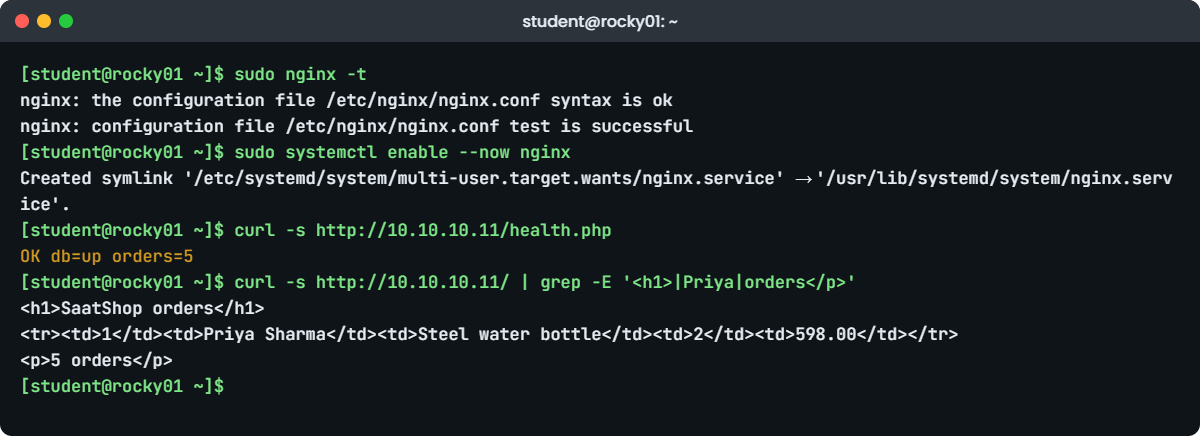
Nginx MariaDB Linux lab: nginx -t and the SaatShop health check on rocky01
Example output on rocky01: nginx -t passes and SaatShop answers through Nginx, PHP-FPM and MariaDB.

7Add the Nginx server block and start Nginx

Write the server block, test the whole config, start Nginx and ask for the health page:

sudo tee /etc/nginx/conf.d/saatshop.conf >/dev/null <<'EOF'
# /etc/nginx/conf.d/saatshop.conf  (SaatVedha Linux course, Lesson 56)
server {
    listen       80;
    server_name  rocky01.saatlab.test rocky01 10.10.10.11;
    root         /srv/app/saatshop;
    index        index.php;

    access_log   /var/log/nginx/saatshop.access.log;
    error_log    /var/log/nginx/saatshop.error.log;

    location / {
        try_files $uri $uri/ =404;
    }

    location ~ \.php$ {
        try_files      $uri =404;
        fastcgi_pass   php-fpm;
        fastcgi_index  index.php;
        fastcgi_param  SCRIPT_FILENAME $document_root$fastcgi_script_name;
        include        fastcgi_params;
    }
}
EOF
sudo nginx -t
sudo systemctl enable --now nginx
curl -s http://10.10.10.11/health.php
curl -s http://10.10.10.11/ | grep -E '<h1>|Priya|orders</p>'

You should see something like this:

nginx: the configuration file /etc/nginx/nginx.conf syntax is ok
nginx: configuration file /etc/nginx/nginx.conf test is successful
Created symlink '/etc/systemd/system/multi-user.target.wants/nginx.service' → '/usr/lib/systemd/system/nginx.service'.
OK db=up orders=5
<h1>SaatShop orders</h1>
<tr><td>1</td><td>Priya Sharma</td><td>Steel water bottle</td><td>2</td><td>598.00</td></tr>
<p>5 orders</p>

The whole chain works: Nginx passed the PHP files to PHP-FPM, PHP read db.ini and fetched the rows from MariaDB. try_files $uri =404 in the PHP location is a safety line: Nginx only hands a path to PHP-FPM when that file exists, so nobody can make PHP run an uploaded image as code. $document_root$fastcgi_script_name becomes /srv/app/saatshop/index.php, the file PHP-FPM opens.

Since Lesson 16, priya and arjun may run sudo systemctl reload nginx and read the Nginx journal. That rule now has a real service behind it, so the web team can deploy a change and reload without asking you.

✅ Checkpoint: curl prints “OK db=up orders=5” and the page shows the h1 heading, Priya’s order and “5 orders”.

8Open the firewall and test from ubu01

On rocky01, allow HTTP permanently:

sudo firewall-cmd --permanent --add-service=http
sudo firewall-cmd --reload
sudo firewall-cmd --list-services
success
success
dhcpv6-client http ntp ssh

On ubu01, run this:

curl -s http://rocky01.saatlab.test/health.php
curl -sI http://rocky01.saatlab.test/ | head -n 4

You should see something like this:

OK db=up orders=5
HTTP/1.1 200 OK
Server: nginx/1.26.3
Date: Tue, 27 Oct 2026 06:24:31 GMT
Content-Type: text/html; charset=UTF-8

Only http (port 80) was added; 3306 stays closed and listens on 127.0.0.1 anyway. The Date header is always in GMT, which is why it reads 06:24 while rocky01’s clock says 11:54 IST. To open SaatShop in your laptop’s browser, add one more port forward on the laptop and browse to http://127.0.0.1:8011/:

VBoxManage natnetwork modify --netname=LinuxLab --port-forward-4="web-rocky01:tcp:[127.0.0.1]:8011:[10.10.10.11]:80"

[Add your screenshot here]: the SaatShop orders page open in the laptop browser at http://127.0.0.1:8011/, showing the five orders. If you see the Rocky test page instead, add 127.0.0.1 to the server_name line and reload Nginx.

✅ Checkpoint: ubu01 gets “OK db=up orders=5” and a 200 OK with Server: nginx.

9Read the three logs on the path

On rocky01, run this:

sudo tail -n 2 /var/log/nginx/saatshop.access.log
sudo tail -n 3 /var/log/php-fpm/error.log
sudo tail -n 2 /var/log/mariadb/mariadb.log
systemctl is-active nginx php-fpm mariadb

You should see something like this:

10.10.10.21 - - [27/Oct/2026:11:54:31 +0530] "GET /health.php HTTP/1.1" 200 18 "-" "curl/8.18.0"
10.10.10.21 - - [27/Oct/2026:11:54:31 +0530] "HEAD / HTTP/1.1" 200 0 "-" "curl/8.18.0"
[27-Oct-2026 11:49:02] NOTICE: fpm is running, pid 4702
[27-Oct-2026 11:49:02] NOTICE: ready to handle connections
[27-Oct-2026 11:49:02] NOTICE: systemd monitor interval set to 10000ms
2026-10-27 11:36:40 0 [Note] /usr/libexec/mariadbd: ready for connections.
Version: '10.11.18-MariaDB'  socket: '/var/lib/mysql/mysql.sock'  port: 3306  MariaDB Server
active
active
active

The access log shows ubu01’s address, the request, the status and the bytes sent (18 is the length of “OK db=up orders=5” plus the newline). PHP-FPM keeps its own service log in error.log and PHP errors from the pool in www-error.log, which is empty for now. MariaDB’s log confirms the socket path the app uses.

These are the files Lesson 61 will watch with Zabbix and Lesson 62 will include in the backup plan.

✅ Checkpoint: All three services are active and you can find ubu01’s requests in the SaatShop access log.

Break It, Then Fix It

Take a snapshot of rocky01 first (VBoxManage snapshot rocky01 take before-l56-break). Each failure below is one that web teams hit every month, and each one shows a different HTTP status, so you’ll learn to read the code before you touch the config.

1A 502 Bad Gateway after someone “tidied” the pool file

Someone thinks the ACL line is clutter and comments it out:

sudo sed -i 's/^listen.acl_users/;listen.acl_users/' /etc/php-fpm.d/www.conf
sudo systemctl restart php-fpm
curl -sI http://10.10.10.11/ | head -n 1
sudo tail -n 1 /var/log/nginx/saatshop.error.log
ls -l /run/php-fpm/www.sock

You’ll get this error:

HTTP/1.1 502 Bad Gateway
2026/10/27 12:10:44 [crit] 4809#4809: *31 connect() to unix:/run/php-fpm/www.sock failed (13: Permission denied) while connecting to upstream, client: 10.10.10.11, server: rocky01.saatlab.test, request: "HEAD / HTTP/1.1", upstream: "fastcgi://unix:/run/php-fpm/www.sock:", host: "10.10.10.11"
srw-rw----. 1 root root 0 Oct 27 12:10 /run/php-fpm/www.sock

PHP-FPM is running and healthy, but without the ACL its socket is owned by root:root with mode 0660, so the nginx user can’t connect. “502” always means “Nginx couldn’t get an answer from the backend”, and the error log says why: 13 is a permission problem, 2 (“No such file or directory”) is a wrong socket path, 111 (“Connection refused”) is a TCP backend that isn’t listening. A common way to get error 2 on Rocky is copying fastcgi_pass unix:/run/php/php8.3-fpm.sock; from an Ubuntu guide.

Fix: put the line back, check, restart and test.

sudo sed -i 's/^;listen.acl_users/listen.acl_users/' /etc/php-fpm.d/www.conf
sudo php-fpm -t && sudo systemctl restart php-fpm
curl -sI http://10.10.10.11/ | head -n 1
HTTP/1.1 200 OK

✅ Checkpoint: The page answers 200 again and getfacl -p /run/php-fpm/www.sock shows user:nginx:rw-.

2A 403 Forbidden from SELinux after a quick edit

priya edits index.php in her home folder and moves it into place (here student plays priya):

cp /srv/app/saatshop/index.php ~/index.php
sed -i 's/SaatShop orders<\/h1>/SaatShop orders (Diwali sale)<\/h1>/' ~/index.php
sudo mv ~/index.php /srv/app/saatshop/index.php
curl -sI http://10.10.10.11/ | head -n 1
curl -s http://10.10.10.11/health.php
sudo tail -n 1 /var/log/nginx/saatshop.error.log

You’ll get this error:

HTTP/1.1 403 Forbidden
OK db=up orders=5
2026/10/27 12:16:09 [error] 4811#4811: *44 "/srv/app/saatshop/index.php" is forbidden (13: Permission denied), client: 10.10.10.11, server: rocky01.saatlab.test, request: "HEAD / HTTP/1.1", host: "10.10.10.11"

health.php still works and the Unix permissions on index.php allow everyone to read it, so this is not chmod. Look at the label and the audit log:

ls -lZ /srv/app/saatshop/index.php
sudo ausearch -m AVC -ts recent | grep index.php

You should see something like this:

-rw-r--r--. 1 student student unconfined_u:object_r:user_home_t:s0 1357 Oct 27 12:15 /srv/app/saatshop/index.php
type=AVC msg=audit(1793083569.204:1187): avc:  denied  { getattr } for  pid=4811 comm="nginx" path="/srv/app/saatshop/index.php" dev="dm-3" ino=134 scontext=system_u:system_r:httpd_t:s0 tcontext=unconfined_u:object_r:user_home_t:s0 tclass=file permissive=0

mv keeps a file’s SELinux label, so the file still says user_home_t, the label of anything in a home folder. Nginx, running as httpd_t, isn’t allowed even to look at such a file, and the index module turns that into a 403. A copy with cp would have taken the folder’s label instead.

The tempting “fix”, setenforce 0, makes the page work and leaves the whole web server unconfined, which is the very thing SELinux is there to stop.

Fix: restore the label from the policy rule you added in step 5, and give the file back to webteam.

sudo restorecon -v /srv/app/saatshop/index.php
sudo chown root:webteam /srv/app/saatshop/index.php
curl -s http://10.10.10.11/ | grep '<h1>'

You should see something like this:

Relabeled /srv/app/saatshop/index.php from unconfined_u:object_r:user_home_t:s0 to unconfined_u:object_r:httpd_sys_content_t:s0
<h1>SaatShop orders (Diwali sale)</h1>

✅ Checkpoint: The page shows the new heading, and ls -lZ shows httpd_sys_content_t on index.php.

3A database that is “down” but running fine

A developer says sockets are old-fashioned and switches the app to TCP:

sudo sed -i 's|unix_socket=/var/lib/mysql/mysql.sock|host=127.0.0.1;port=3306|' /etc/saatshop/db.ini
curl -s http://10.10.10.11/health.php
systemctl is-active mariadb
sudo tail -n 1 /var/log/php-fpm/www-error.log

You’ll get this error:

FAIL db=down
active
[27-Oct-2026 06:56:47 UTC] saatshop health: SQLSTATE[HY000] [2002] Permission denied

MariaDB is up and listening on 127.0.0.1:3306, yet the connection failed with “Permission denied”, not “Connection refused”. The PHP log uses UTC because date.timezone isn’t set in PHP, so its 06:56 is 12:26 IST. That word “Permission” on a network connection is the SELinux signature:

sudo ausearch -m AVC -ts recent | grep 3306
getsebool httpd_can_network_connect_db

You should see something like this:

type=AVC msg=audit(1793084207.551:1203): avc:  denied  { name_connect } for  pid=4705 comm="php-fpm" dest=3306 scontext=system_u:system_r:httpd_t:s0 tcontext=system_u:object_r:mysqld_port_t:s0 tclass=tcp_socket permissive=0
httpd_can_network_connect_db --> off

PHP-FPM (httpd_t) may use MariaDB’s Unix socket by default, but connecting to the MariaDB port over TCP is behind a boolean that is off. If the database lived on another server, turning it on with sudo setsebool -P httpd_can_network_connect_db on would be the right fix (-P keeps it after a reboot). Here the database is local, so the better fix is to undo the change.

Fix: go back to the socket and test.

sudo sed -i 's|host=127.0.0.1;port=3306|unix_socket=/var/lib/mysql/mysql.sock|' /etc/saatshop/db.ini
grep dsn /etc/saatshop/db.ini
curl -s http://10.10.10.11/health.php
dsn  = "mysql:unix_socket=/var/lib/mysql/mysql.sock;dbname=saatshop;charset=utf8mb4"
OK db=up orders=5

✅ Checkpoint: health.php says “OK db=up orders=5” and httpd_can_network_connect_db is still off.

This happened at work

The 502s that came with the biggest campaign of the year

My team lead tells this one from her time at an ad-tech startup in Dubai. The night a large retail client’s Ramadan campaign went live, the advertiser dashboard, a PHP app on Nginx and PHP-FPM, started throwing 502 Bad Gateway to about one request in five, a little after iftar when traffic peaked. The sales team was on the phone with the client before the alert even fired.

The first moves were the usual ones. Someone restarted Nginx, which cleared the errors for three minutes. Someone else raised worker_connections in nginx.conf, which changed nothing, because Nginx was never short of connections.

The error log had the real clue all along: connect() to unix:/run/php-fpm/www.sock failed (11: Resource temporarily unavailable), which means the socket’s queue was full, not that PHP-FPM was down.

PHP-FPM’s own log said it plainly: WARNING: [pool www] server reached pm.max_children setting (5), consider raising it. The servers had been built from an old image tuned for a 1 GB test VM, so each 16 GB server ran five PHP workers. A new “campaign report” page ran a slow query for 20 seconds, and five clicks on it were enough to tie up the whole pool while normal requests piled up behind them.

That night they raised pm.max_children to 60, after checking that one worker’s RSS was about 70 MB, so 60 workers fit in RAM with room for the OS and cache. The week after, the report page moved to its own pool with its own socket and a 30-second request_terminate_timeout, the slow log was turned on, and the monitoring started reading the pool status page, so “listen queue” and “max children reached” became graphs instead of surprises.

Common mistakes and troubleshooting

MistakeWhat happensWhat to do instead
Installing MariaDB first and mounting the new LV on /var/lib/mysql laterThe old data is hidden under the mount, MariaDB starts on an empty disk or failsMount and restorecon the LV first; to move later, stop MariaDB, copy with rsync -aX, remount, restorecon
Fixing a 403 or a database error with setenforce 0It works, and Nginx and PHP lose their confinement on a server facing the networkRead the AVC with ausearch -m AVC, then restorecon, a semanage rule or one boolean
Letting the app connect as MariaDB rootAny SQL injection bug can drop every database on the serverOne user per app with only the rights it needs, like saatshop
Copying an Ubuntu socket path into a Rocky config (or back)502 Bad Gateway with “(2: No such file or directory)”Use the upstream php-fpm on Rocky, /run/php/php8.5-fpm.sock on Ubuntu 26.04
Restarting Nginx without nginx -tA typo stops Nginx, and the whole site is down until you find itAlways sudo nginx -t && sudo systemctl reload nginx
Opening 3306 in the firewall “so the app can connect”The database is exposed to the network and the local app gains nothingKeep bind-address = 127.0.0.1 and the Unix socket for a local app
Running chmod -R 777 on the web folderAnyone on the box can change the code, and SELinux errors stay unfixed anywayOwner root:webteam, folders 2775, files 664, and the right label

Interview questions

Click a question to open it. Each one is written the way an interviewer would ask it. Under it you will see why they ask it and one way you could answer, in your own words.

Fresher level

1. A user says the site shows “502 Bad Gateway”. What does that tell you, and what do you check first?

Why they ask this: They want to see whether you can read an HTTP status as a pointer to the failing component instead of restarting things at random.

How you might answer: 502 means Nginx itself is fine but couldn’t get a valid answer from the backend, here PHP-FPM. First I’d check systemctl status php-fpm and then the Nginx error log for the site, because the errno in it tells me the cause: 13 is socket permissions, 2 is a wrong socket path, 111 is a backend that isn’t listening.

If PHP-FPM is up and the log says “Resource temporarily unavailable”, the pool is full, and I’d look at the PHP-FPM log for “reached pm.max_children”.

2. Why do we run PHP-FPM as a separate service instead of inside the web server?

Why they ask this: A concept question: they want to hear about process separation, users and scaling.

How you might answer: Nginx doesn’t run PHP at all; it passes PHP requests over FastCGI to PHP-FPM, which keeps its own pool of workers. That means the web server can stay small and fast for static files, PHP runs as a different user (apache on Rocky, www-data on Ubuntu) with its own limits, and I can restart or resize one without touching the other.

It also lets one Nginx front several apps, each with its own PHP-FPM pool, socket and user.

2–5 years experience

3. You need to move an existing MariaDB data folder to a new disk on a RHEL server with SELinux enforcing. Walk me through it.

Why they ask this: They’re checking that you know the order of steps and the SELinux part, which is where most moves fail.

How you might answer: I’d take a backup first with mariadb-dump or a snapshot, then stop MariaDB, create and mount the new file system on a temporary path, and copy with rsync -aX so owners and attributes survive. Then I’d mount it on /var/lib/mysql through fstab by UUID and run restorecon -Rv /var/lib/mysql so everything is mysqld_db_t.

If the path is new, like /data/mysql, I’d add semanage fcontext -a -e /var/lib/mysql /data/mysql and set datadir and the socket in a drop-in. Then start MariaDB, check its log and the app’s health page, and only later delete the old copy.

4. The PHP-FPM log keeps saying “server reached pm.max_children”. How do you decide the new value?

Why they ask this: They want a sizing method based on memory and evidence, not “double it”.

How you might answer: I’d measure the real memory of one worker under load, for example with ps -o rss -C php-fpm, and divide the RAM I can give PHP by that number. On a 16 GB server where PHP may have 6 GB and a worker uses 70 MB, that’s about 80 workers.

I’d also look at why workers are busy: the slow log and the pool status page often show one slow page holding the pool, and that page may need its own pool or a timeout rather than more workers.

Senior level

5. SaatShop must handle ten times the traffic and survive the loss of one server. How would you change this design?

Why they ask this: Seniors should separate state from stateless parts and explain each layer’s redundancy.

How you might answer: I’d split it: two or more web servers running Nginx and PHP-FPM behind a load balancer, with no local state, so sessions go to Redis or the database and uploads go to shared or object storage. The database moves to its own servers with replication, a primary and at least one replica, and a tested failover method.

Deployments become a pipeline that ships the same release to every web node, and monitoring checks health.php on each node through the load balancer. Backups stay on the database tier, taken from a replica so the primary isn’t slowed down.

6. A security review says your web servers “run with too many rights”. What would you look at on a stack like this one?

Why they ask this: They want a structured, layered answer that covers OS, services, files and the database.

How you might answer: I’d start with exposure: only 80 and 443 open, MariaDB bound to localhost or a private network, SSH keys only. Then the processes: Nginx workers and PHP-FPM as unprivileged users, SELinux enforcing with no permissive domains, and only the booleans the app needs.

For files, the code owned by a deploy group and not writable by the PHP user, secrets outside the web root with 0640, and upload folders that can’t execute PHP. In the database, one least-privilege user per app, no remote root, and the test leftovers removed. Finally TLS with a current crypto policy and logs shipped off the box.

Quick quiz

Q1. Nginx returns 502 and its error log says “connect() to unix:/run/php-fpm/www.sock failed (13: Permission denied)”. What is wrong?

  1. MariaDB is down
  2. The nginx user isn’t allowed to connect to the PHP-FPM socket
  3. The PHP file has a syntax error
  4. Port 80 is closed
Show answer

B — Error 13 on the socket means permissions. On Rocky the listen.acl_users line normally gives nginx access.

Q2. Why was lv_db mounted on /var/lib/mysql before installing MariaDB?

  1. MariaDB needs XFS
  2. So the database files are created on the new volume from the start, not hidden under a later mount
  3. To make the install faster
  4. Because dnf refuses otherwise
Show answer

B — Mounting later would hide whatever MariaDB had already written on the root file system.

Q3. A file moved from /home/priya into /srv/app/saatshop gives 403. What fixes it the right way?

  1. setenforce 0
  2. chmod 777 index.php
  3. restorecon -v /srv/app/saatshop/index.php
  4. Restart Nginx
Show answer

C — mv kept the user_home_t label; restorecon applies httpd_sys_content_t from the semanage rule.

Q4. PHP gets “SQLSTATE[HY000] [2002] Permission denied” connecting to 127.0.0.1:3306 on Rocky while MariaDB runs. What is the cause?

  1. Wrong password
  2. SELinux blocks httpd_t from TCP connections to the database port unless httpd_can_network_connect_db is on
  3. MariaDB is bound to 0.0.0.0
  4. The firewall blocks localhost
Show answer

B — The Unix socket is allowed by default; TCP to mysqld_port_t needs the boolean.

Q5. Which command must you run before reloading Nginx after an edit?

  1. nginx -s stop
  2. nginx -t
  3. systemctl daemon-reload
  4. php -l
Show answer

B — nginx -t checks the syntax of the whole config so a typo never takes the site down.

Quick recap

  • Nginx serves the request, PHP-FPM runs the PHP through a Unix socket, MariaDB answers through its own socket: three services, three configs, three logs.
  • Give the database its own LV and mount it with the right SELinux label before the package is installed.
  • Use a least-privilege database user per app and keep its password outside the web root, readable only by root and the PHP-FPM group.
  • Label web content with semanage fcontext plus restorecon, and fix SELinux denials from the AVC, never with setenforce 0.
  • Read the status code first: 502 is the PHP-FPM hop, 403 is permissions or labels, 503 from the app is the database.
  • Test before you apply: nginx -t, php-fpm -t, php -l, and open only http in the firewall.

Next lesson

Lesson 57: Containers for Linux admins: Podman and Docker → You’ll run rootless containers with Podman on rocky01, fix the SELinux volume and low-port traps, turn a container into a service with Quadlet and see why the docker group is root.

Further reading: Nginx MariaDB Linux

Want to go deeper into Nginx MariaDB Linux? Read the Nginx documentation (the beginner’s guide and the fastcgi module), the PHP-FPM configuration reference, the MariaDB Knowledge Base, and Red Hat’s RHEL 10 documentation on deploying web servers, using MariaDB and SELinux for confined services. You can also see the full plan for this course on the Linux Administration course page.

Scroll to Top

This website uses cookies

We use a few cookies to keep this site working. If you allow it, we also use Google Analytics to count visits so we can improve our lessons. You can accept all, deny the optional ones, or choose what to allow.