Packages on Rocky Linux and RHEL: dnf, rpm and repositories
-
Phase 0: Before you start
-
Phase 1: The origins and OS architecture
-
Phase 2: Day-to-day administration and the command builder
-
Phase 3: Enterprise infrastructure and storage
-
Phase 4: Troubleshooting step by step
-
Phase 5: Final project and career
DNF package management is how you install, update, check and remove software on Rocky Linux, RHEL, AlmaLinux and Oracle Linux. dnf reads repository files, works out dependencies, checks GPG signatures and hands the packages to rpm, which keeps the database of everything installed and records every change in a history you can undo.
In Lesson 34 you opened ports with firewalld. Now you’ll look after the software behind those ports on rocky01: read the .repo files, install and verify a package, check signatures, undo a transaction, apply only security updates, add EPEL and build a local repository from the Rocky ISO for a server with no internet.
Where this lesson fits
Lesson 35 of 82 in Linux Administration · Phase 2: Day-to-day administration and the command builder · Before this: Lesson 34, firewalld and ufw · Next: Lesson 36, packages on Ubuntu with apt
| Time | You need | By the end you can |
|---|---|---|
| About 75 minutes | rocky01 with internet access through the LinuxLab NAT Network, the Rocky 10.2 minimal ISO from Lesson 2 still in C:\Lab\Linux\ISO, and a snapshot before the Break-It part | Install, query, verify and undo packages with dnf and rpm, read and write .repo files, manage GPG keys and set up an offline repository from the ISO |
What it is, in one line
dnf finds packages in the repositories listed under /etc/yum.repos.d, resolves dependencies, checks signatures and lets rpm install them, while rpm itself remembers every file each package owns.
In Simple Words
The ration shop and the register
Think of a government ration shop. The shopkeeper doesn’t grow rice or make oil; he gets sealed bags from approved warehouses only, and he checks the seal on each bag before it goes on the shelf. When you ask for rice and dal, he also knows you need a bag to carry them, so he hands that over too.
Every sale goes into a register with the date, the family and what was given. If something was handed over by mistake, the register shows exactly what to take back. dnf is the shopkeeper, the warehouses are repositories, the seal is the GPG signature, and the register is the rpm database plus dnf history.
Engineer's View
dnf, rpm and the files behind them
Rocky Linux 10 and RHEL 10 ship DNF 4 (dnf 4.20), not the DNF5 that Fedora moved to, so everything here also works on RHEL 8 and 9. Two tools work as a pair:
| Tool | What it knows | Use it for |
|---|---|---|
| rpm | Only the local database (/var/lib/rpm) and single .rpm files. It never downloads anything or resolves dependencies | Querying (-q -qi -ql -qf -qc), verifying files (-V), checking signatures (-K), importing keys |
| dnf | Repositories, their metadata, dependencies, groups, modules and a history database (/var/lib/dnf/history.sqlite) | Installing, upgrading, removing, searching, history and undo, security updates |
A repository is a folder of .rpm files plus a repodata/ folder whose index file is repomd.xml. Each repository is described by a section in a .repo file:
| Field | Meaning |
|---|---|
[baseos] | The repo id you use on the command line |
name= | Human name shown in dnf output |
baseurl= | One fixed location: https://, http:// or file:// |
mirrorlist= / metalink= | A URL that returns a list of mirrors (metalink also carries checksums of repomd.xml). Rocky uses mirrorlist, Fedora and EPEL use metalink. Set one of the three, not several |
enabled= | 1 means dnf uses it by default; 0 means only when you ask with --enablerepo or --repo |
gpgcheck= / gpgkey= | Check package signatures, and where to import the key from if it isn’t in the rpm database yet |
metadata_expire= | How long downloaded metadata stays fresh (Rocky uses 6h) |
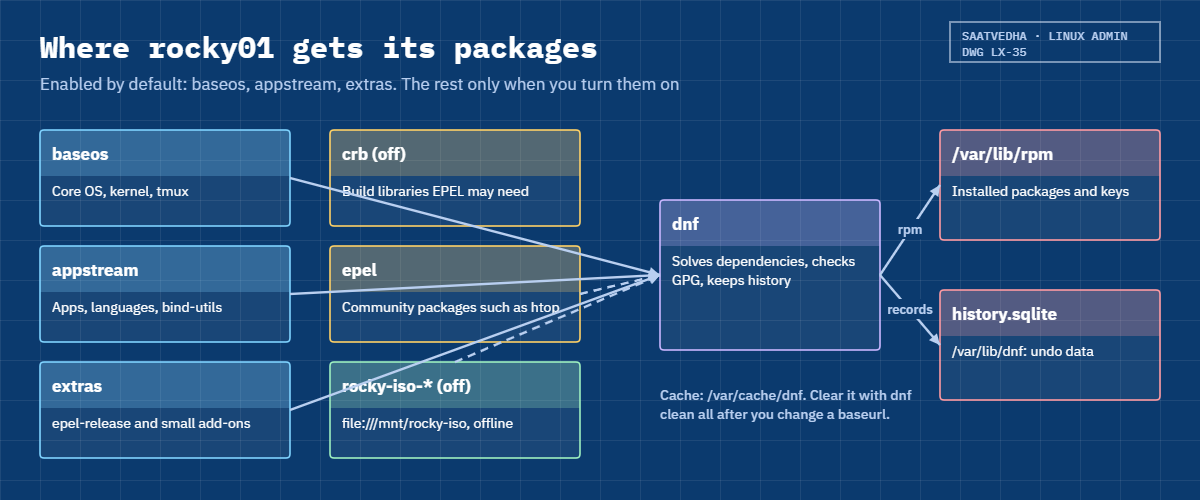
Variables such as $releasever (10), $basearch (x86_64) and Rocky’s own $rltype are filled in by dnf. Rocky 10 enables three repos by default: baseos (the core OS), appstream (applications, languages, databases) and extras (small add-ons such as epel-release). crb (CodeReady Builder, build libraries) is present but off. EL10 has no separate updates repo; updates land in the same repo as the original package.
How it works, step by step
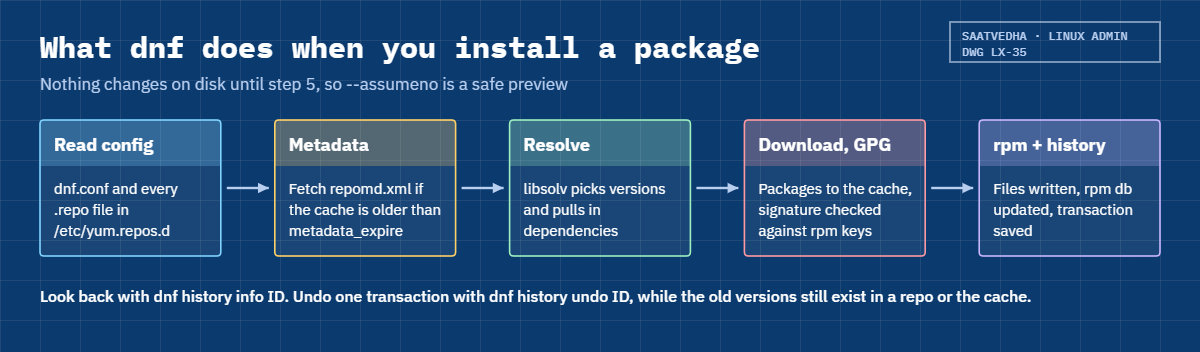
Here is what happens between typing sudo dnf install tmux and getting your prompt back. The diagram after these steps shows the same path.
1dnf reads its configuration
dnf reads /etc/dnf/dnf.conf (global options such as installonly_limit=3 and skip_if_unavailable=False) and every *.repo file in /etc/yum.repos.d/. Disabled repos are ignored unless you name them.
2It refreshes metadata when it has expired
For each enabled repo, dnf checks whether its cached metadata in /var/cache/dnf is older than metadata_expire. If so, it asks the mirrorlist for a mirror, downloads repomd.xml and then the package lists it points to. If any enabled repo can’t be reached and skip_if_unavailable is False, dnf stops right there.
3It resolves dependencies
The solver (libsolv) works out which packages and versions satisfy every Requires line, prefers the newest version, and prints the transaction table. Nothing has changed on disk yet, which is why --assumeno is a safe preview.
4It downloads and checks signatures
Packages go into the cache, then dnf checks each one against the public keys in the rpm database. If a key is missing and the repo has a gpgkey= line, dnf offers to import it and shows the fingerprint. With no key and no gpgkey line, it stops with “GPG check FAILED”.
5rpm runs the transaction
rpm checks for file conflicts and free space, runs any scriptlets, writes the files, updates /var/lib/rpm and finally verifies what it wrote. dnf then records the whole transaction (who, when, command line, every package and version) in its history database.
6Where the packages come from
dnf can mix several sources in one transaction: Rocky’s own repos from the internet, EPEL (Extra Packages for Enterprise Linux, built by Fedora volunteers, which needs CRB for some libraries), a vendor repo, or a file:// repo on a mounted ISO for servers with no internet. Each source is trusted only as far as its signing key.
The picture below maps those sources, which are on by default, and where dnf keeps its cache and history on rocky01.
rpm files are named name-version-release.arch.rpm, for example tmux-3.3a-13.20230918gitb202a2f.el10.x86_64.rpm. The release part (el10) says which OS it was built for, and a package’s “NEVRA” (name, epoch, version, release, arch) is how dnf history and rpm identify it exactly.
Kernels are “install-only” packages: dnf never upgrades them in place. Each update installs a new kernel next to the old ones and removes the oldest once there are more than installonly_limit (3). That’s your fallback if a new kernel won’t boot, and Lesson 49 builds on it.
Two habits from the field: preview any big transaction with --assumeno before you run it, and on servers that matter, keep the repos the same on every node (an internal mirror or Satellite-style content view), so “install X” means the same versions everywhere.
Hands-on lab: install, verify, undo and go offline with dnf on rocky01
Before you run any command, double-check it
Read every command twice before you press Enter. Check the target: the server name, the user, the disk or device name, the path and the sizes. These commands are for learning and were tested in our lab, not on your system. At work, run the read-only commands first, follow your change process, make sure a backup exists, and ask a second person to check anything that changes or deletes data. You run them at your own risk.
Everything runs on rocky01 as student with sudo. Steps 1 to 3 only read; the rest install and remove a few small packages (tmux, htop, epel-release) and add one repo file. Rocky outputs below are examples from our lab VM: your versions, transaction IDs and timings will differ, the shape won’t.
1See which dnf you have and where its settings live
Run this:
dnf --version | head -n 1
ls /etc/yum.repos.d/
grep -v '^#' /etc/dnf/dnf.confYou should see something like this:
4.20.0
rocky-addons.repo rocky-devel.repo rocky-extras.repo rocky.repo
[main]
gpgcheck=1
installonly_limit=3
clean_requirements_on_remove=True
best=True
skip_if_unavailable=False4.20.0 is DNF 4. The four .repo files come from the rocky-repos package (the exact list can change between point releases). In dnf.conf, best=True means “the newest version or an error”, and skip_if_unavailable=False means one broken repo stops every dnf command, which you’ll see in the Break-It part.
✅ Checkpoint: dnf prints a 4.x version and you can name the file that holds the global options.
2Read the repo list and one repo definition
Run this:
dnf repolist
sed -n '/^\[baseos\]/,/^$/p' /etc/yum.repos.d/rocky.repoYou should see something like this:
repo id repo name
appstream Rocky Linux 10 - AppStream
baseos Rocky Linux 10 - BaseOS
extras Rocky Linux 10 - Extras
[baseos]
name=Rocky Linux $releasever - BaseOS
mirrorlist=https://mirrors.rockylinux.org/mirrorlist?arch=$basearch&repo=BaseOS-$releasever$rltype
#baseurl=http://dl.rockylinux.org/$contentdir/$releasever/BaseOS/$basearch/os/
gpgcheck=1
enabled=1
countme=1
metadata_expire=6h
gpgkey=file:///etc/pki/rpm-gpg/RPM-GPG-KEY-Rocky-10repolist shows enabled repos only; add --all to see crb, devel and the debug and source repos too. The baseos section uses a mirrorlist, and the commented baseurl is the fallback you can switch to if the mirror service is ever blocked by your proxy. The gpgkey path is the Rocky 10 release key that every package must be signed with.
✅ Checkpoint: You can point at the repo id, the mirrorlist, gpgcheck and gpgkey lines of baseos.
3Search before you install
Run this:
dnf info tmux
dnf provides /usr/bin/digYou should see something like this:
Last metadata expiration check: 0:14:02 ago on Tue 27 Oct 2026 10:48:11 AM IST.
Available Packages
Name : tmux
Version : 3.3a
Release : 13.20230918gitb202a2f.el10
Architecture : x86_64
Size : 476 k
Source : tmux-3.3a-13.20230918gitb202a2f.el10.src.rpm
Repository : baseos
Summary : A terminal multiplexer
URL : https://tmux.github.io/
bind-utils-32:9.18.33-4.el10.x86_64 : Utilities for querying DNS name servers
Repo : appstream
Matched from:
Filename : /usr/bin/digdnf info shows the version and repo before you commit to anything. dnf provides answers the everyday question “which package gives me this command or file?”, even for packages that aren’t installed. Use '*/dig' with quotes when you don’t know the full path.
✅ Checkpoint: You know tmux comes from baseos and dig comes from bind-utils.
4Install a package, then ask rpm about it
Run this:
sudo dnf install -y tmuxYou should see something like this:
Last metadata expiration check: 0:15:40 ago on Tue 27 Oct 2026 10:48:11 AM IST.
Dependencies resolved.
================================================================================
Package Architecture Version Repository Size
================================================================================
Installing:
tmux x86_64 3.3a-13.20230918gitb202a2f.el10 baseos 476 k
Transaction Summary
================================================================================
Install 1 Package
Total download size: 476 k
Installed size: 1.1 M
Downloading Packages:
tmux-3.3a-13.20230918gitb202a2f.el10.x86_64.rpm 2.1 MB/s | 476 kB 00:00
--------------------------------------------------------------------------------
Total 1.2 MB/s | 476 kB 00:00
Running transaction check
Transaction check succeeded.
Running transaction test
Transaction test succeeded.
Running transaction
Preparing : 1/1
Installing : tmux-3.3a-13.20230918gitb202a2f.el10.x86_64 1/1
Running scriptlet: tmux-3.3a-13.20230918gitb202a2f.el10.x86_64 1/1
Verifying : tmux-3.3a-13.20230918gitb202a2f.el10.x86_64 1/1
Installed:
tmux-3.3a-13.20230918gitb202a2f.el10.x86_64
Complete!Now query the rpm database:
rpm -q tmux
rpm -qi tmux | grep -E '^(Name|Version|Release|Signature|Vendor|Summary)'
rpm -ql tmux | head -n 4
rpm -qf /usr/bin/tmux /etc/ssh/sshd_configYou should see something like this:
tmux-3.3a-13.20230918gitb202a2f.el10.x86_64
Name : tmux
Version : 3.3a
Release : 13.20230918gitb202a2f.el10
Signature : RSA/SHA256, Thu 06 Nov 2025 01:12:44 PM IST, Key ID 5b106c736fedfc85
Vendor : Rocky Enterprise Software Foundation
Summary : A terminal multiplexer
/usr/bin/tmux
/usr/share/doc/tmux
/usr/share/doc/tmux/CHANGES
/usr/share/doc/tmux/README
tmux-3.3a-13.20230918gitb202a2f.el10.x86_64
openssh-server-9.9p1-11.el10_2.x86_64-q says whether it’s installed, -qi gives details including which key signed it (the Key ID ends in 6fedfc85, the Rocky 10 key), -ql lists its files and -qf tells you which package owns a file. That last one is how you find out where a strange config file came from. rpm -q kernel lists every installed kernel the same way:
rpm -q kernelkernel-6.12.0-211.16.1.el10_2.0.1.x86_64Try it yourself: build the install-and-check commands for dnf or apt in the Command Builder.
✅ Checkpoint: rpm -q tmux prints a full name-version-release and rpm -qf /usr/bin/tmux names the tmux package.
5Verify installed files with rpm -V
Change a file mode on purpose, then verify:
rpm -V tmux; echo "exit=$?"
sudo chmod 700 /usr/bin/tmux
rpm -V tmuxYou should see this:
exit=0
.M....... /usr/bin/tmuxNo output means every file matches the size, digest, mode, owner and timestamp recorded at install. In the changed line each position is one test: S size, M mode, 5 digest, D device, L link, U user, G group, T time, P capabilities, and a dot means “same”. A c before the path marks a config file, where changes are normal.
Put the mode back from the database:
sudo rpm --setperms tmux
rpm -V tmux; echo "exit=$?"exit=0✅ Checkpoint: rpm -V shows .M……. after the chmod and nothing after rpm --setperms.
6Check GPG keys and a package signature
Run this:
rpm -q gpg-pubkey --qf '%{NAME}-%{VERSION}-%{RELEASE}\t%{SUMMARY}\n'
cd /tmp && dnf download tmux
rpm -K tmux-*.rpmYou should see something like this:
gpg-pubkey-6fedfc85-682b3e10 Release Engineering (Rocky Linux 10) <releng@rockylinux.org> public key
tmux-3.3a-13.20230918gitb202a2f.el10.x86_64.rpm: digests signatures OKImported keys live in the rpm database as fake packages named gpg-pubkey-KEYID-DATE. The Rocky 10 key ID 6fedfc85 matches the fingerprint published on rockylinux.org/keys (FC22 6859 … 6FED FC85), which is how you check a key before trusting it. rpm -K checks a downloaded file’s digests and signature without installing it, useful for vendor RPMs that arrive by email or USB. Remove the file afterwards with rm /tmp/tmux-*.rpm.
✅ Checkpoint: rpm -K prints “digests signatures OK” for the tmux file.
7Look back with dnf history, then undo
Run this:
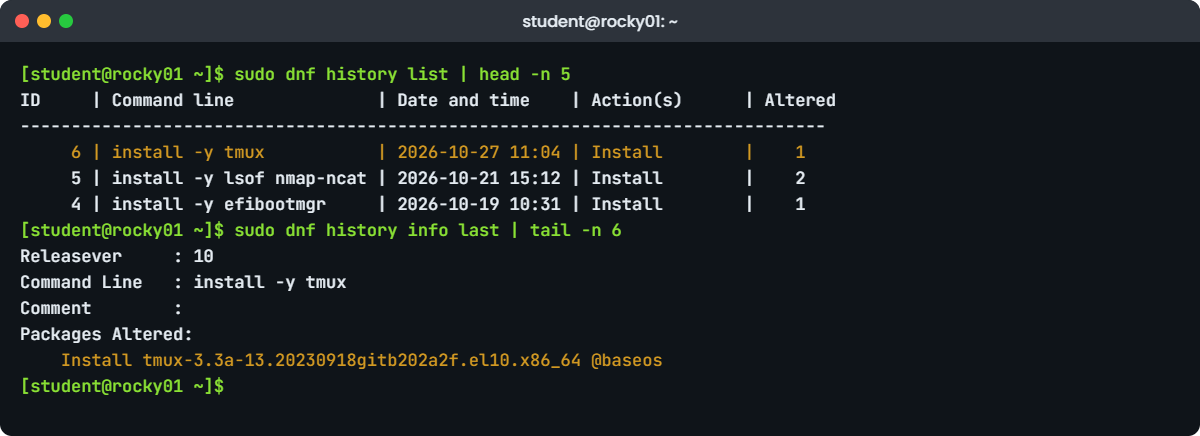
sudo dnf history list | head -n 5
sudo dnf history info lastYou should see something like this:
ID | Command line | Date and time | Action(s) | Altered
-------------------------------------------------------------------------------
6 | install -y tmux | 2026-10-27 11:04 | Install | 1
5 | install -y lsof nmap-ncat | 2026-10-21 15:12 | Install | 2
4 | install -y efibootmgr | 2026-10-19 10:31 | Install | 1
Transaction ID : 6
Begin time : Tue 27 Oct 2026 11:04:19 AM IST
Begin rpmdb : 6c1f4e0a9b27d3c58e41a7f2b90d6e13c4a85f7d2e9b01c36a4d8f5e7b2c9a10
End time : Tue 27 Oct 2026 11:04:20 AM IST (1 seconds)
End rpmdb : 0e9d3b71c5a24f86d1b3e07a95c2f48e6a1d7b39c0f52e84a6b9d13f7c2e5a48
User : student <student>
Return-Code : Success
Releasever : 10
Command Line : install -y tmux
Comment :
Packages Altered:
Install tmux-3.3a-13.20230918gitb202a2f.el10.x86_64 @baseosEvery dnf transaction gets an ID with who ran it, when, the command line and each package with its exact version. This is the first place to look when someone asks “what changed on this server?” (Lesson 65 adds rpm -qa --last for packages installed outside dnf). Now reverse the tmux install:
sudo dnf history undo last -yYou should see something like this (shortened):
Removing:
tmux x86_64 3.3a-13.20230918gitb202a2f.el10 @baseos 1.1 M
Transaction Summary
================================================================================
Remove 1 Package
...
Removed:
tmux-3.3a-13.20230918gitb202a2f.el10.x86_64
Complete!undo reverses one transaction: installs become removals, removals become installs, upgrades become downgrades. Undoing an upgrade only works if the older version is still in a repo or the cache, so it’s a quick fix, not a replacement for snapshots. dnf history rollback ID undoes everything after a given transaction.
Try it yourself: build the history and undo commands in the Command Builder.
✅ Checkpoint: dnf history list shows a new transaction (Removed) and rpm -q tmux says it isn’t installed.
8Apply only security updates
Run this:
dnf updateinfo summary
dnf updateinfo list --security
sudo dnf upgrade --security --assumenoYou should see something like this (the advisory list changes every week):
Updates Information Summary: available
3 Security notice(s)
1 Important Security notice(s)
2 Moderate Security notice(s)
2 Bugfix notice(s)
RLSA-2026:9214 Important/Sec. openssl-libs-1:3.5.1-7.el10_2.x86_64
RLSA-2026:9214 Important/Sec. openssl-1:3.5.1-7.el10_2.x86_64
RLSA-2026:9187 Moderate/Sec. libxml2-2.12.5-9.el10_2.x86_64
RLSA-2026:9160 Moderate/Sec. curl-8.12.1-4.el10_2.x86_64Rocky publishes advisories (RLSA, the same as Red Hat’s RHSA) with a severity. --assumeno prints the transaction table and stops with “Operation aborted.”, so you can paste the list into a change request first. Drop it to apply the updates, then check whether a reboot or service restart is needed with sudo dnf needs-restarting -r (Lesson 49 covers kernels and reboots).
Try it yourself: build the security-update commands for dnf or apt in the Command Builder.
✅ Checkpoint: You can say how many security advisories rocky01 has and which packages they touch.
9Clean the cache and rebuild it
Run this:
sudo dnf clean all
sudo dnf makecacheYou should see something like this:
37 files removed
Rocky Linux 10 - BaseOS 4.6 MB/s | 2.6 MB 00:00
Rocky Linux 10 - AppStream 7.9 MB/s | 9.8 MB 00:01
Rocky Linux 10 - Extras 21 kB/s | 12 kB 00:00
Metadata cache created.clean all deletes cached metadata and packages in /var/cache/dnf. Do this when a mirror changed under you, when /var is filling up, or after you edit a repo’s baseurl. makecache downloads fresh metadata now so the next install doesn’t wait.
✅ Checkpoint: makecache ends with “Metadata cache created.”
10Add EPEL the supported way
First try a package that isn’t in Rocky’s repos:
sudo dnf install -y htopYou’ll get:
No match for argument: htop
Error: Unable to find a match: htopEnable CRB, install the EPEL release package from extras, then try again:
sudo dnf config-manager --set-enabled crb
sudo dnf install -y epel-release
dnf repolist
sudo dnf install -y htopYou should see something like this (repolist, then the key prompt during the htop install):
repo id repo name
appstream Rocky Linux 10 - AppStream
baseos Rocky Linux 10 - BaseOS
crb Rocky Linux 10 - CRB
epel Extra Packages for Enterprise Linux 10 - x86_64
extras Rocky Linux 10 - Extras
Importing GPG key 0xE37ED158:
Userid : "Fedora (epel10) <epel@fedoraproject.org>"
Fingerprint: 7D8D 15CB FC4E 6268 8591 FB26 33D9 8517 E37E D158
From : /etc/pki/rpm-gpg/RPM-GPG-KEY-EPEL-10
Key imported successfullyEPEL packages often need libraries from CRB, which is why Rocky’s documentation enables it first. The first EPEL install asks to import EPEL’s key; -y accepts it, so at work compare the fingerprint with Fedora’s published one before you say yes. EPEL is community-built and not covered by Red Hat support, so many companies allow only a reviewed list of EPEL packages on production servers.
✅ Checkpoint: htop --version prints a version and rpm -qi htop | grep Signature shows key ID e37ed158.
11Build a local repository from the Rocky ISO
On your laptop, put the ISO back in rocky01’s DVD drive (it works while the VM runs):
VBoxManage storageattach rocky01 --storagectl=IDE --port=1 --device=0 --type=dvddrive --medium="C:\Lab\Linux\ISO\Rocky-10.2-x86_64-minimal.iso"On rocky01, mount it and check for the two repos:
lsblk /dev/sr0
sudo mkdir -p /mnt/rocky-iso
sudo mount -o ro /dev/sr0 /mnt/rocky-iso
ls -d /mnt/rocky-iso/*/repodataYou should see something like this:
NAME MAJ:MIN RM SIZE RO TYPE MOUNTPOINTS
sr0 11:0 1 1.9G 0 rom
/mnt/rocky-iso/AppStream/repodata
/mnt/rocky-iso/BaseOS/repodataWrite the repo file (paste this whole block):
sudo tee /etc/yum.repos.d/rocky-iso.repo > /dev/null <<'EOF'
[rocky-iso-baseos]
name=Rocky 10.2 ISO - BaseOS
baseurl=file:///mnt/rocky-iso/BaseOS
enabled=0
gpgcheck=1
gpgkey=file:///etc/pki/rpm-gpg/RPM-GPG-KEY-Rocky-10
[rocky-iso-appstream]
name=Rocky 10.2 ISO - AppStream
baseurl=file:///mnt/rocky-iso/AppStream
enabled=0
gpgcheck=1
gpgkey=file:///etc/pki/rpm-gpg/RPM-GPG-KEY-Rocky-10
EOF
sudo dnf --repo 'rocky-iso-*' makecache
dnf --repo 'rocky-iso-*' repoinfo rocky-iso-baseos | grep -E '^Repo-(id|name|status|pkgs|size|baseurl|filename)'You should see something like this:
Rocky 10.2 ISO - BaseOS 41 MB/s | 1.4 MB 00:00
Rocky 10.2 ISO - AppStream 38 MB/s | 210 kB 00:00
Metadata cache created.
Repo-id : rocky-iso-baseos
Repo-name : Rocky 10.2 ISO - BaseOS
Repo-status : enabled
Repo-pkgs : 392
Repo-size : 412 M
Repo-baseurl : file:///mnt/rocky-iso/BaseOS
Repo-filename : /etc/yum.repos.d/rocky-iso.repo--repo tells dnf to use only the repos you name (a glob works), which is how you prove a server can install from the ISO with the internet cut off. Both repos are enabled=0 on purpose, so a missing DVD after a reboot can’t break normal dnf commands. The minimal ISO carries only the few hundred packages an installer needs; at work you’d use the full DVD ISO or an internal mirror built with dnf reposync.
On macOS or Linux laptops the ISO path is ~/Lab/Linux/ISO/Rocky-10.2-x86_64-minimal.iso. In the VirtualBox window you can also use Devices, Optical Drives and pick the ISO.
✅ Checkpoint: repoinfo shows rocky-iso-baseos with a file:///mnt/rocky-iso/BaseOS baseurl and a package count above zero.
Break It, Then Fix It
Take a snapshot first (VBoxManage snapshot rocky01 take before-l35-break on the laptop). Both failures below are ones you’ll meet at work: a repo with no key, and a repo whose source has gone away.
1A repo with gpgcheck on and no gpgkey line
Create a copy of BaseOS that forgets its gpgkey line, remove the Rocky key from the rpm database, and install from that repo:
sudo tee /etc/yum.repos.d/lab-nokey.repo > /dev/null <<'EOF'
[lab-nokey]
name=Lab copy of BaseOS without a gpgkey line
mirrorlist=https://mirrors.rockylinux.org/mirrorlist?arch=$basearch&repo=BaseOS-$releasever$rltype
gpgcheck=1
enabled=0
EOF
sudo rpm -e gpg-pubkey-6fedfc85
sudo dnf --repo lab-nokey install -y tmuxYou’ll get something like this at the end:
Downloading Packages:
tmux-3.3a-13.20230918gitb202a2f.el10.x86_64.rpm 2.3 MB/s | 476 kB 00:00
warning: /var/cache/dnf/lab-nokey-3c5d81e2f0a4b7c9/packages/tmux-3.3a-13.20230918gitb202a2f.el10.x86_64.rpm: Header V4 RSA/SHA256 Signature, key ID 6fedfc85: NOKEY
Public key for tmux-3.3a-13.20230918gitb202a2f.el10.x86_64.rpm is not installed
The downloaded packages were saved in cache until the next successful transaction.
You can remove cached packages by executing 'dnf clean packages'.
Error: GPG check FAILEDNOKEY means the package is signed with a key the rpm database doesn’t hold, and dnf has no gpgkey= line telling it where to get one. This is exactly what happens with a vendor repo set up from a half-finished guide, or on a golden image where someone deleted the keys. Never “fix” it with gpgcheck=0; that turns off the only proof the package is genuine.
Fix: import the key from the file the OS ships (check its fingerprint first), then try again, and give vendor repos a proper gpgkey line.
gpg --show-keys /etc/pki/rpm-gpg/RPM-GPG-KEY-Rocky-10
sudo rpm --import /etc/pki/rpm-gpg/RPM-GPG-KEY-Rocky-10
sudo dnf --repo lab-nokey install -y tmux
sudo rm /etc/yum.repos.d/lab-nokey.repo
sudo dnf remove -y tmux✅ Checkpoint: rpm -q gpg-pubkey lists gpg-pubkey-6fedfc85 again and the install from lab-nokey ended with “Complete!”.
2The ISO is gone and every dnf command fails
Enable the ISO repos as many people do, then lose the DVD (here with umount; a reboot without an fstab entry does the same):
sudo dnf config-manager --set-enabled 'rocky-iso-*'
sudo umount /mnt/rocky-iso
sudo dnf makecacheYou’ll get this error:
Rocky 10.2 ISO - AppStream 0.0 B/s | 0 B 00:00
Errors during downloading metadata for repository 'rocky-iso-appstream':
- Curl error (37): Couldn't read a file:// file for file:///mnt/rocky-iso/AppStream/repodata/repomd.xml [Couldn't open file /mnt/rocky-iso/AppStream/repodata/repomd.xml]
Error: Failed to download metadata for repo 'rocky-iso-appstream': Cannot download repomd.xml: Cannot download repodata/repomd.xml: All mirrors were triedThe internet repos are fine, but because skip_if_unavailable=False is the RHEL default, one unreachable repo stops the whole command, including your security updates. The same error appears for an http baseurl with a typo, a mirror that moved, or a proxy that blocks the host (then you’ll see a Curl error number for the network problem instead of 37).
Fix: bring the source back, or take the repo out of the default set. Choose one:
# A: mount the ISO again
sudo mount -o ro /dev/sr0 /mnt/rocky-iso
# B: keep the repo but only use it on purpose
sudo dnf config-manager --set-disabled 'rocky-iso-*'
# C: for a repo that is allowed to be missing sometimes
sudo dnf config-manager --save --setopt=rocky-iso-appstream.skip_if_unavailable=TrueFor a one-off command you can also skip it with --disablerepo='rocky-iso-*'. On our lab, option B is the clean state, and when you’re done unmount the ISO and eject it in VirtualBox.
✅ Checkpoint: sudo dnf makecache ends with “Metadata cache created.” again.
This happened at work
Nineteen packages changed by one install
My team lead tells this one from a genomics research lab in Toronto. They ran 24 RHEL 9 compute nodes for sequencing analysis, and two days before a grant deadline the variant-calling jobs started crashing on half of them with an “undefined symbol” error from a shared library. Nobody had patched anything, or so everyone said in the morning meeting.
The first idea was to reinstall the pipeline’s conda environment, which took an hour and changed nothing. Then he ran dnf history list on a broken node and a good one. The broken nodes all had one extra transaction from the previous afternoon: a postdoc had installed the sequencer vendor’s analysis tool from its own repo, and dnf history info 87 showed that one install had altered 19 packages, replacing htslib and two compression libraries with the vendor’s newer builds.
He tried dnf downgrade htslib first, which refused because the vendor tool required the new version. Running sudo dnf history undo 87 worked in one go, removing the tool and putting the 18 original packages back, because their internal mirror still kept the older versions. The jobs ran again within the hour.
The vendor repo file on every node now carries includepkgs= with only the vendor’s own package names, so it can never replace system libraries again. New repos are tried on one node first with --assumeno and the transaction table goes into the ticket, and the team reads dnf history before reinstalling anything.
Common mistakes and troubleshooting
| Mistake | What happens | What to do instead |
|---|---|---|
Setting gpgcheck=0 to get past a NOKEY error | Any tampered or fake package installs without a warning | Import the right key with rpm --import after checking its fingerprint, or add a correct gpgkey= line |
Installing with rpm -ivh to save time | Missing dependencies stop it, or you force it and break dnf’s view of the system | Use sudo dnf install ./file.rpm; dnf resolves dependencies from your repos |
| Leaving an ISO or vendor repo enabled when its source can go away | Every dnf command fails with “Cannot download repomd.xml” | Keep such repos enabled=0 and use --repo, or set skip_if_unavailable=True for that repo only |
Running a big dnf upgrade -y without reading the table | Kernels, libraries or a database engine change during business hours | Preview with --assumeno, or use --security and check dnf needs-restarting -r |
| Adding a third-party repo with no limits | It replaces system packages with its own builds | Use includepkgs= or excludepkgs= in the repo section and test on one server |
Expecting dnf history undo to fix any upgrade | It fails when the old version is no longer in any repo or cache | Snapshot first (VM or LVM, Lesson 46), and keep an internal mirror that retains old versions |
| Editing a repo baseurl and not clearing the cache | dnf keeps using old metadata and the change seems to do nothing | Run sudo dnf clean all then sudo dnf makecache |
Interview questions
Click a question to open it. Each one is written the way an interviewer would ask it. Under it you will see why they ask it and one way you could answer, in your own words.
Fresher level
1. What’s the difference between rpm and dnf, and when would you use each one?
Why they ask this: They want to see you know rpm is the low-level database tool and dnf the repository and dependency layer on top, not two names for one thing.
How you might answer: rpm works on the local package database and single .rpm files: rpm -qa, rpm -qf /path, rpm -V to verify files, rpm -K to check a signature. It doesn’t download or resolve dependencies.
dnf reads the repos in /etc/yum.repos.d, resolves dependencies and keeps a history I can undo, so I install, upgrade and remove with dnf, and use rpm for questions and checks. Even for a local file I use dnf install ./file.rpm.
2. A user says a command is missing on a RHEL server. How do you find which package provides it and install it?
Why they ask this: A basic practical check: do you know dnf provides and the habit of looking before installing.
How you might answer: I run dnf provides '*/bin/dig' to find the package, in that case bind-utils from appstream, and dnf info bind-utils to see the version and repo.
Then sudo dnf install bind-utils, and I confirm with rpm -qf $(command -v dig). If dnf says no match, I check whether it’s in a disabled repo such as CRB or in EPEL before adding anything.
2–5 years experience
3. dnf install fails with “Public key for X is not installed” and “GPG check FAILED”. Walk me through it.
Why they ask this: They’re checking that you won’t switch off signature checking, and that you know where keys come from.
How you might answer: That means the package is signed with a key that’s not in the rpm database and the repo has no usable gpgkey= line. I check rpm -q gpg-pubkey and the repo file, then get the vendor’s key from its documented location and compare the fingerprint with gpg --show-keys.
Once it matches I import it with rpm --import or add the gpgkey line so dnf offers it with the fingerprint shown. I never set gpgcheck=0 on a server, and I use rpm -K to check single RPMs that arrive outside a repo.
4. An update yesterday broke an application. How do you find what changed and put it back?
Why they ask this: They want to hear dnf history used properly, plus awareness of its limits.
How you might answer: I run dnf history list and dnf history info ID to see exactly which packages and versions changed and who ran it. If it’s one transaction, sudo dnf history undo ID reverses it, as long as the old versions are still in a repo or the cache.
If the old versions are gone, I downgrade from an internal mirror or restore the VM or LVM snapshot taken before patching. Then I add a version lock or exclude for that package until the app team has tested the new version.
Senior level
5. How would you patch 300 RHEL servers in a data centre with no internet access?
Why they ask this: Seniors should talk about repo design, consistency and control, not only commands.
How you might answer: I’d keep internal mirrors (Satellite, or reposync to a web server) with dated snapshots, so dev, test and production install the same versions in that order. Servers get .repo files pointing to the snapshot for their stage, managed with Ansible.
Patching runs per group with --assumeno output saved first, then dnf upgrade --security or a full upgrade, needs-restarting -r and rolling reboots behind the load balancer. Keys are imported once from a checked source, and an ISO repo is only the emergency fallback.
6. A vendor wants you to add their yum repo to production database servers. What do you check before saying yes?
Why they ask this: They’re looking for supply-chain thinking and practical guardrails.
How you might answer: I check the repo uses HTTPS and signed packages with a published key, and what packages it carries, because a vendor repo that ships its own openssl or glibc builds can replace system libraries. I test the install on a clone with --assumeno and read every package in the table.
In production I limit it with includepkgs= to their packages only, mirror it internally so their changes don’t reach us untested, and record it in the build standard so audits know why it’s there.
Quick quiz
Q1. Which command tells you which installed package owns /etc/ssh/sshd_config?
dnf info /etc/ssh/sshd_configrpm -qf /etc/ssh/sshd_configrpm -ql sshd_configdnf search sshd_config
Show answer
B — rpm -qf queries the rpm database for the package that owns a file.
Q2. What does enabled=0 mean in a .repo section?
- The repo is deleted
- dnf uses it only when you name it with
--repoor--enablerepo - GPG checks are off
- The repo is read-only
Show answer
B — A disabled repo stays configured but is ignored unless you ask for it.
Q3. rpm -V prints .M....... /usr/bin/tmux. What changed?
- The file size
- The file mode (permissions)
- The digest
- The owner
Show answer
B — M is the mode position. Fix it with rpm --setperms tmux.
Q4. Why did every dnf command fail after the ISO was unmounted?
- The Rocky key was removed
- An enabled repo was unreachable and skip_if_unavailable is False by default
- dnf needs the ISO to run
- The cache was full
Show answer
B — On RHEL-family systems one unreachable enabled repo stops dnf, so ISO repos are best left disabled.
Q5. What is the safest way to see what dnf upgrade --security would change without changing anything?
- Add
--assumeno - Run
dnf clean allfirst - Use
rpm -Uvh - Add
--nogpgcheck
Show answer
A — --assumeno resolves and prints the transaction, then stops with “Operation aborted.”
Quick recap
- Rocky 10 and RHEL 10 use DNF 4: dnf handles repos, dependencies and history, rpm handles the database, verification and signatures.
- Repos live in
/etc/yum.repos.d/*.repo: repo id, baseurl or mirrorlist, enabled, gpgcheck and gpgkey. - Query with
rpm -q -qi -ql -qf, verify withrpm -V, check signatures withrpm -Kand the keys withrpm -q gpg-pubkey. dnf history infoshows exactly what changed;dnf history undo IDreverses it when old versions are still available.- Use
--assumenoto preview,--securityfor security-only patching, andclean allplusmakecacheafter repo changes. - EPEL needs CRB; a file:// repo on the mounted ISO gives offline installs, and it should stay disabled until you need it.
Next lesson
Lesson 36: Packages on Ubuntu with apt → You’ll do the same jobs on ubu01 with apt and dpkg: deb822 .sources files, holds, the new apt history commands, recovering an interrupted dpkg and automatic security updates with unattended-upgrades.
Further reading: dnf package management
Want to go deeper into dnf package management? Read Red Hat’s Managing software with the DNF tool (RHEL 10), the dnf command reference and dnf.conf reference, Rocky’s repository list and GPG key page, and Fedora’s EPEL documentation. You can also see the full plan for this course on the Linux Administration course page.
