Out of memory and the OOM killer

The Linux OOM killer is the part of the kernel that ends a process when the machine, or one service’s memory limit, has nothing left to give. It works in a split second and leaves only a few lines in the kernel log, so the usual report at work is “the database crashed for no reason” or “the Java app keeps dying at night”, and nobody thinks to look at memory.

Lesson 22 taught you to read available memory, RSS and swap. Here you go one step further: you’ll trigger real OOM kills on rocky01, read every line the kernel writes about them, see how systemd reports a killed service, put a memory limit on one service, and decide which process should die first when memory runs out.

Where this lesson fits

Lesson 74 of 82 in Linux Administration · Phase 4: Troubleshooting step by step · Before this: Lesson 73, high load and a slow server · Next: Lesson 75, too many open files

TimeYou needBy the end you can
About 75 minutesrocky01 (2 vCPU, 2 GB RAM, 2 GB swap), the appsvc account from Lesson 15, stress-ng from Lesson 53, a VirtualBox snapshot, and ubu01 for one short stepFind an OOM kill in the logs and read it, cap a service with MemoryMax, protect an important service with OOMScoreAdjust, and explain why a particular process was chosen

What it is, in one line

When RAM and swap are both used up, or a cgroup hits its memory limit, the kernel’s OOM killer picks the process with the highest oom_score, kills it with SIGKILL and writes “Killed process” in the kernel log.

In Simple Words

The overloaded autorickshaw

An autorickshaw driver keeps saying yes to passengers, because most people who wave him down only go a short way and get off soon. Usually that works. One evening near the railway station everyone stays on, someone climbs in with a big trunk, and the auto can’t move at all.

The driver doesn’t argue with everyone. He looks for the person taking up the most room and asks that one person to get down, unless it’s the old aunty he promised to drop home, whom he never asks. Nobody is told in advance; one person is suddenly on the road with their trunk.

Linux is the driver that promised more memory than it has, the big trunk is the process with the highest oom_score, and the aunty is a process with oom_score_adj set to -1000.

Engineer's View

How the kernel decides, and what you can change

Linux hands out memory on credit (overcommit). A program can reserve far more than it uses, and the kernel only finds real pages when the program writes to them. When a write needs a page and reclaim finds none, because the page cache is already dropped and swap is full or absent, the OOM killer runs.

The same thing happens inside a cgroup that hits its memory.max, even when the rest of the machine has plenty free.

SettingWhereWhat it does
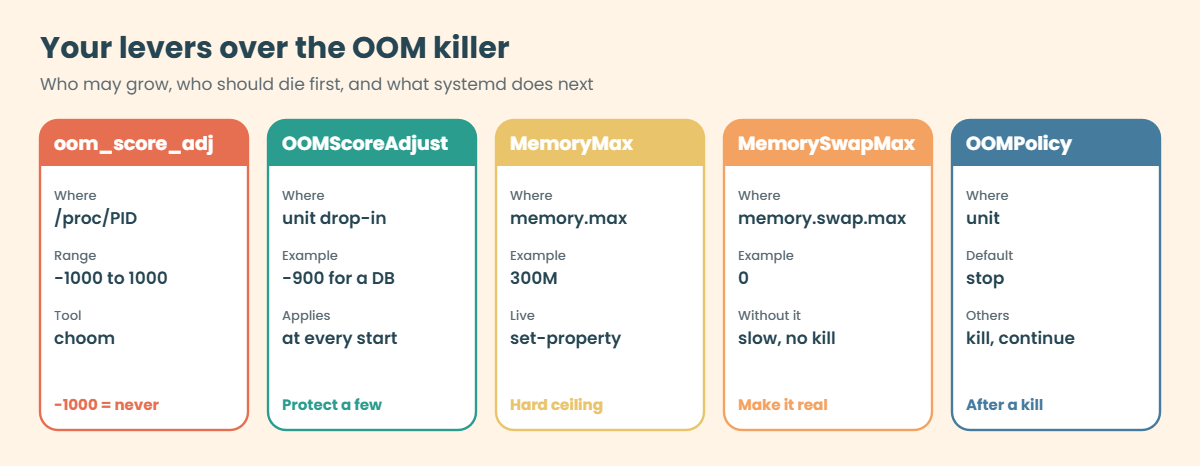
/proc/PID/oom_scoreRead onlyThe kernel’s current “badness” for the process, 0 to about 1333 on kernel 6.12. Highest dies first. It’s mostly RSS plus swap plus page tables, as a share of RAM plus swap
/proc/PID/oom_score_adjPer process, -1000 to 1000Added to the badness in thousandths of total memory. -1000 means never kill; 1000 means kill this first. Children inherit it
OOMScoreAdjust=systemd unitSets oom_score_adj for the service’s processes at start. journald ships with -250, udevd with -1000, user@.service with 100
MemoryMax=systemd unit (cgroup v2 memory.max)Hard RAM limit for the whole service. Hitting it starts an OOM kill inside that cgroup only
MemorySwapMax=systemd unit (memory.swap.max)Swap the service may use. Without it, a service at MemoryMax swaps instead of being killed
OOMPolicy=systemd unitWhat systemd does after the kernel kills one of the service’s processes: stop (default), kill (kill the rest of the group) or continue
vm.overcommit_memorysysctl0 (default) heuristic, 1 always say yes, 2 strict: refuse allocations beyond CommitLimit, so programs get an error instead of an OOM kill
vm.panic_on_oomsysctl0 (default). 1 or 2 panics the whole machine instead of killing a process, used only where a reboot is safer than a half-dead system

systemd-oomd is a separate, user-space killer that acts earlier, on memory pressure (PSI) and swap use, and kills a whole cgroup. On Ubuntu 26.04 the systemd-oomd package belongs to the desktop task and isn’t installed on Server, and rocky01 doesn’t run it either, so on both lab VMs the kernel’s OOM killer is the only one at work.

How it works, step by step

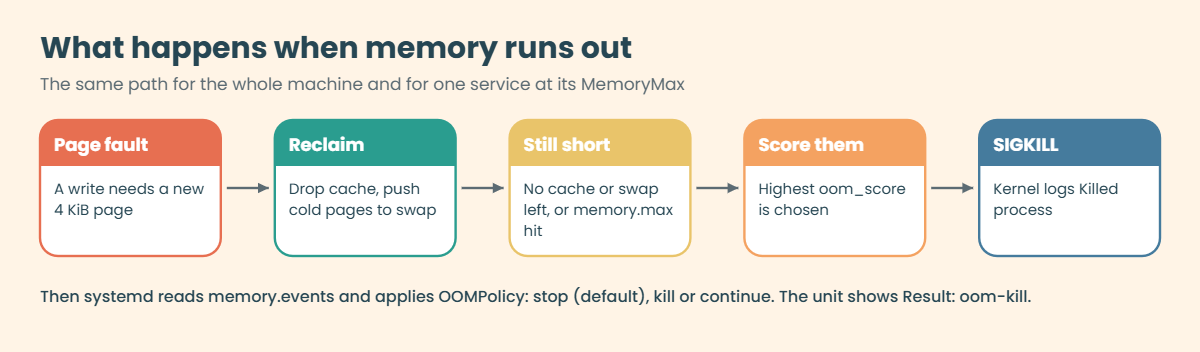
Here is what happens from the moment a program asks for memory that isn’t there. The diagram after these steps shows the same path.

1A write needs a page that doesn’t exist yet

The program’s earlier malloc() only reserved address space. When it writes, the CPU raises a page fault and the kernel must find a free 4 KiB page, either in the whole machine or, for a service with MemoryMax, inside that service’s cgroup.

2The kernel tries to reclaim first

It drops clean page cache, writes dirty pages to disk and pushes cold anonymous pages to swap. This is the slow, sticky phase you met in Lesson 22, where SSH feels heavy and vmstat shows si and so above zero. If reclaim frees enough, nobody dies.

Linux OOM killer flow: page fault, reclaim, scoring, SIGKILL and the kernel log

3Reclaim fails, so the OOM killer scores every candidate

For a whole-machine OOM it looks at every process; for a cgroup OOM only at the processes in that cgroup. Each gets a badness score from its RSS, swap and page tables, plus oom_score_adj. PID 1, kernel threads and anything at -1000 are skipped.

4The winner gets SIGKILL

There is no SIGTERM first and no chance to save anything. The kernel logs the reason, a memory report, a table of candidates and one line naming the victim, then the oom_reaper frees the victim’s memory straight away.

5systemd notices and applies OOMPolicy

If the victim belonged to a service, systemd reads the cgroup’s memory.events file, logs that the OOM killer struck, and with the default OOMPolicy=stop stops the unit with result oom-kill. Restart= then decides whether it comes back. The picture below lists the levers you have over this.

Linux OOM killer controls: oom_score_adj, OOMScoreAdjust, MemoryMax, MemorySwapMax and OOMPolicy

6Read the evidence afterwards

Every OOM kill leaves the same trail: Out of memory: Killed process (whole machine) or Memory cgroup out of memory: Killed process (a limit) in journalctl -k or dmesg -T, and for services a line in the unit’s own journal. The “invoked oom-killer” line names the process that asked for memory, which is often not the one that was killed.

The real fix is almost never “add swap and hope”. You find who grew (a leak, a wrong heap size, a report loading a whole table), put a limit on the things that are allowed to fail, and protect the few things that must not.

Hands-on lab: trigger, read and control OOM kills on rocky01

Before you run any command, double-check it

Read every command twice before you press Enter. Check the target: the server name, the user, the disk or device name, the path and the sizes. These commands are for learning and were tested in our lab, not on your system. At work, run the read-only commands first, follow your change process, make sure a backup exists, and ask a second person to check anything that changes or deletes data. You run them at your own risk.

This lab kills processes on purpose, so take a snapshot of rocky01 first: VBoxManage snapshot rocky01 take before-l74 on the laptop. Keep rocky01 at 2 GB RAM; with more, the numbers below change and the whole-machine test needs bigger values. Work over SSH as student, make a folder with mkdir -p ~/lab74, and check that stress-ng from Lesson 53 is there with stress-ng --version (if not: sudo dnf install -y stress-ng, or sudo apt install stress-ng from universe on Ubuntu).

1Check memory, swap and the overcommit rules

Run this:

free -h
swapon --show
sysctl vm.overcommit_memory vm.overcommit_ratio vm.panic_on_oom
grep -E '^(CommitLimit|Committed_AS)' /proc/meminfo

You should see something like this:

               total        used        free      shared  buff/cache   available
Mem:           1.7Gi       462Mi       988Mi       8.8Mi       421Mi       1.2Gi
Swap:          2.0Gi          0B       2.0Gi
NAME      TYPE      SIZE USED PRIO
/dev/dm-1 partition   2G   0B   -2
vm.overcommit_memory = 0
vm.overcommit_ratio = 50
vm.panic_on_oom = 0
CommitLimit:     2989154 kB
Committed_AS:    1187340 kB

About 1.2Gi is available and 2 GB of swap sits unused on the rl-swap logical volume (dm-1). overcommit_memory 0 is the heuristic mode: the kernel refuses only a single request that is obviously bigger than RAM plus swap. Committed_AS is what all processes have reserved so far, and CommitLimit (swap plus half of RAM) only matters in strict mode 2.

✅ Checkpoint: You know rocky01’s available memory, its swap size, and that overcommit is in mode 0 and panic_on_oom is 0.

2See who the OOM killer would pick right now

Create a small script that ranks every process by oom_score (paste this whole block):

cat > ~/lab74/oomtop.sh <<'EOF'
#!/bin/bash
# oomtop.sh: the processes the OOM killer would pick first (Lesson 74)
n=$1
[ -n "$n" ] || n=8
printf '%7s %5s %6s %s\n' PID SCORE ADJ COMMAND
for d in /proc/[0-9]*; do
    score=$(cat "$d/oom_score" 2>/dev/null) || continue
    adj=$(cat "$d/oom_score_adj" 2>/dev/null)
    printf '%7s %5s %6s %s\n' "$(basename "$d")" "$score" "$adj" "$(cat "$d/comm" 2>/dev/null)"
done | sort -k2,2nr | head -n "$n"
EOF
chmod +x ~/lab74/oomtop.sh
~/lab74/oomtop.sh 6
for p in sshd systemd-journal systemd-udevd; do printf '%-16s adj %5s  score %s\n' $p "$(cat /proc/$(pgrep -o -x $p)/oom_score_adj)" "$(cat /proc/$(pgrep -o -x $p)/oom_score)"; done

You should see something like this:

    PID SCORE    ADJ COMMAND
   1838   735    100 systemd
    812   674      0 firewalld
   1046   672      0 tuned
    868   670      0 NetworkManager
    790   670      0 polkitd
   2077   667      0 bash
sshd             adj -1000  score 0
systemd-journal  adj  -250  score 503
systemd-udevd    adj -1000  score 0

Anyone can read these files, so no sudo is needed. On kernel 6.12 a small process with adj 0 scores about 667, and the score rises with its share of RAM plus swap. Your own user manager (systemd --user, PID 1838 here) sits on top because user@.service gives it an adj of 100, and its children inherit that.

The sshd listener is at -1000 because OpenSSH sets that for itself on Linux (your login session gets 0 back), journald has -250 from its unit, and udevd -1000. PID 1 isn’t in the list at all: it can never be chosen.

✅ Checkpoint: oomtop.sh prints six processes and you can explain why sshd and systemd-udevd score 0.

3Run a service with a memory limit

Create the hog script, its settings file and a unit with MemoryMax=300M (paste this whole block):

sudo tee /usr/local/bin/saat-memhog.py >/dev/null <<'EOF'
#!/usr/bin/python3
# saat-memhog.py: grows by 50 MiB a second up to a target, then holds it (Lesson 74)
import sys
import time

target = int(sys.argv[1]) if len(sys.argv) > 1 else 200
held = []
while len(held) * 50 < target:
    held.append(b"x" * (50 * 1024 * 1024))
    print(f"saat-memhog: holding {len(held) * 50} MiB", flush=True)
    time.sleep(1)
print("saat-memhog: target reached, holding", flush=True)
time.sleep(86400)
EOF
sudo chmod 755 /usr/local/bin/saat-memhog.py
echo 'MB=200' | sudo tee /etc/saat-memhog.env
sudo tee /etc/systemd/system/saat-memhog.service >/dev/null <<'EOF'
[Unit]
Description=Memory hog for the OOM lab (Lesson 74)

[Service]
User=appsvc
EnvironmentFile=/etc/saat-memhog.env
ExecStart=/usr/local/bin/saat-memhog.py $MB
MemoryMax=300M
MemorySwapMax=0
EOF
sudo systemctl daemon-reload
sudo systemctl start saat-memhog
sleep 6; sudo journalctl -u saat-memhog -o cat --no-pager | grep saat-memhog:

You should see this:

MB=200
saat-memhog: holding 50 MiB
saat-memhog: holding 100 MiB
saat-memhog: holding 150 MiB
saat-memhog: holding 200 MiB
saat-memhog: target reached, holding

Now read the limit from the cgroup side:

cd /sys/fs/cgroup/system.slice/saat-memhog.service
cat memory.max memory.current memory.swap.max memory.events
cd

You should see something like this:

314572800
223870976
0
low 0
high 0
max 0
oom 0
oom_kill 0
oom_group_kill 0

systemd turned MemoryMax=300M into 314572800 bytes in memory.max, and MemorySwapMax=0 into a swap limit of 0. memory.current (about 213 MiB) counts the 200 MiB of data, Python itself and any page cache the service caused. In memory.events, max counts how often the limit was touched and oom_kill how many processes the kernel killed here: none yet.

✅ Checkpoint: saat-memhog holds 200 MiB, memory.max is 314572800 and oom_kill is 0.

4Push the service past its limit

Ask for 600 MiB and restart:

echo 'MB=600' | sudo tee /etc/saat-memhog.env
sudo systemctl restart saat-memhog
sleep 10; sudo journalctl -u saat-memhog -o cat --no-pager --since "20 sec ago"
systemctl status saat-memhog --no-pager | grep Active:

You should see something like this:

MB=600
Started saat-memhog.service - Memory hog for the OOM lab (Lesson 74).
saat-memhog: holding 50 MiB
saat-memhog: holding 100 MiB
saat-memhog: holding 150 MiB
saat-memhog: holding 200 MiB
saat-memhog: holding 250 MiB
saat-memhog.service: A process of this unit has been killed by the OOM killer.
saat-memhog.service: Main process exited, code=killed, status=9/KILL
saat-memhog.service: Failed with result 'oom-kill'.
saat-memhog.service: Consumed 1.204s CPU time, 300M memory peak.
     Active: failed (Result: oom-kill) since Tue 2026-10-27 11:32:10 IST; 15s ago

The script reached 250 MiB of data, the next 50 MiB would have taken the cgroup past 300M, and the kernel killed it. Read the systemd lines in order: the OOM killer struck a process of this unit, the main process died from signal 9 (SIGKILL), and with the default OOMPolicy=stop the unit ended as failed with result oom-kill. Nothing else on rocky01 noticed, because the limit belonged to this service alone.

On Ubuntu 26.04 (systemd 259) the first systemd line reads “The kernel OOM killer killed some processes in this unit.” instead; Rocky 10 runs systemd 257, which uses the older wording. Search your logs for oom-kill, which is the same on both.

✅ Checkpoint: systemctl status shows Active: failed (Result: oom-kill).

Linux OOM killer lab: Memory cgroup out of memory lines in journalctl -k on rocky01
Example output from rocky01: the kernel log lines for a cgroup OOM kill.

5Read the kernel’s side of the story

Run this:

sudo journalctl -k --since "5 min ago" -g 'invoked oom-killer|memory: usage|swap: usage|oom-kill:|killed process' --no-pager

You should see something like this:

Oct 27 11:32:10 rocky01 kernel: saat-memhog.py invoked oom-killer: gfp_mask=0xcc0(GFP_KERNEL), order=0, oom_score_adj=0
Oct 27 11:32:10 rocky01 kernel: memory: usage 307200kB, limit 307200kB, failcnt 0
Oct 27 11:32:10 rocky01 kernel: swap: usage 0kB, limit 0kB, failcnt 0
Oct 27 11:32:10 rocky01 kernel: oom-kill:constraint=CONSTRAINT_MEMCG,nodemask=(null),cpuset=/,mems_allowed=0,oom_memcg=/system.slice/saat-memhog.service,task_memcg=/system.slice/saat-memhog.service,task=saat-memhog.py,pid=3128,uid=991
Oct 27 11:32:10 rocky01 kernel: Memory cgroup out of memory: Killed process 3128 (saat-memhog.py) total-vm:330112kB, anon-rss:297216kB, file-rss:6400kB, shmem-rss:0kB, UID:991 pgtables:672kB oom_score_adj:0

Five lines tell the whole story. Line one names the process that needed memory and couldn’t get it, the “invoked” process, here the same script. The memory and swap lines show usage at the limit and a swap limit of 0, which is what makes this a cgroup OOM (CONSTRAINT_MEMCG, oom_memcg=/system.slice/saat-memhog.service) and not a whole-machine one.

The last line is the one to put in the ticket: PID, name, user (UID 991 is appsvc) and anon-rss, the private memory it had built up, 297216 kB or about 290 MiB. Between those lines the full log also has a memory report and a candidate table; sudo dmesg -T | grep -A3 "Tasks state" shows the table, with sizes in 4 KiB pages:

Oct 27 11:32:10 rocky01 kernel: Tasks state (memory values in pages):
Oct 27 11:32:10 rocky01 kernel: [  pid  ]   uid  tgid total_vm      rss rss_anon rss_file rss_shmem pgtables_bytes swapents oom_score_adj name
Oct 27 11:32:10 rocky01 kernel: [   3128]   991  3128    82528    75904    74304     1600         0   688128        0             0 saat-memhog.py

✅ Checkpoint: You found the “Memory cgroup out of memory: Killed process” line and can say which process, which user and how much anon-rss.

6Change the limit without editing the unit

Run this:

sudo systemctl set-property saat-memhog MemoryMax=700M
systemctl show saat-memhog -p MemoryMax --value
cat /etc/systemd/system.control/saat-memhog.service.d/50-MemoryMax.conf
sudo systemctl restart saat-memhog
sleep 14; sudo journalctl -u saat-memhog -n 1 -o cat --no-pager
cat /sys/fs/cgroup/system.slice/saat-memhog.service/memory.max

You should see something like this:

734003200
# /etc/systemd/system.control/saat-memhog.service.d/50-MemoryMax.conf
# This is a drop-in unit file extension, created via "systemctl set-property"
# or an equivalent operation. Do not edit.
[Service]
MemoryMax=734003200
saat-memhog: target reached, holding
734003200

set-property changes the running cgroup at once and saves the value as a drop-in under /etc/systemd/system.control, so it survives a reboot (add --runtime for a temporary change). That makes it the quickest safe lever during an incident: a runaway service gets a ceiling without a restart. Here the restart was only needed to let the killed service start again.

✅ Checkpoint: saat-memhog reached its 600 MiB target and memory.max shows 734003200.

7Run the whole VM out of memory with stress-ng

Stop the hog, switch swap off for the test, and ask for more memory than rocky01 has:

sudo systemctl stop saat-memhog
sudo swapoff -a
free -h
stress-ng --vm 1 --vm-bytes 1500M --vm-keep --oomable -t 60s
sudo journalctl -k --since "2 min ago" -g 'invoked oom-killer|oom-kill:|killed process|oom_reaper' --no-pager
sudo swapon -a

You should see something like this:

               total        used        free      shared  buff/cache   available
Mem:           1.7Gi       455Mi       1.0Gi       8.8Mi       410Mi       1.2Gi
Swap:             0B          0B          0B
stress-ng: info:  [2911] setting to a 1 min run per stressor
stress-ng: info:  [2911] dispatching hogs: 1 vm
stress-ng: info:  [2911] skipped: 0
stress-ng: info:  [2911] passed: 1: vm (1)
stress-ng: info:  [2911] failed: 0
stress-ng: info:  [2911] metrics untrustworthy: 0
stress-ng: info:  [2911] successful run completed in 6.84 secs
Oct 27 11:41:52 rocky01 kernel: stress-ng-vm invoked oom-killer: gfp_mask=0x140dca(GFP_HIGHUSER_MOVABLE|__GFP_COMP|__GFP_ZERO), order=0, oom_score_adj=1000
Oct 27 11:41:52 rocky01 kernel: oom-kill:constraint=CONSTRAINT_NONE,nodemask=(null),cpuset=/,mems_allowed=0,global_oom,task_memcg=/user.slice/user-1000.slice/session-4.scope,task=stress-ng-vm,pid=2913,uid=1000
Oct 27 11:41:52 rocky01 kernel: Out of memory: Killed process 2913 (stress-ng-vm) total-vm:1573756kB, anon-rss:1203840kB, file-rss:2304kB, shmem-rss:0kB, UID:1000 pgtables:2412kB oom_score_adj:1000
Oct 27 11:41:52 rocky01 kernel: oom_reaper: reaped process 2913 (stress-ng-vm), now anon-rss:0kB, file-rss:0kB, shmem-rss:0kB

With swap off, many cloud servers look like this. 1500M is less than the 1.7Gi total, so the heuristic overcommit let stress-ng reserve it, and the kernel only ran out when the worker wrote to those pages. This time the line says “Out of memory” and global_oom: the whole machine was short, not one cgroup.

The victim was stress-ng-vm with oom_score_adj 1000. stress-ng sets that on its own workers on purpose, and --oomable tells it to count an OOM kill as a pass instead of restarting the worker. A real memory hog doesn’t volunteer like that, which is what the Break-It section shows. swapon -a turns rl-swap back on from /etc/fstab.

✅ Checkpoint: The kernel log shows “Out of memory: Killed process … (stress-ng-vm)” with global_oom, and swapon --show lists /dev/dm-1 again.

8Set oom_score_adj by hand with choom

Run this:

choom -n 500 -- sleep 600 &
choom -p $!
choom -p $! -n -100
sudo choom -p $! -n -100
choom -p $!
kill %1

You should see something like this:

[1] 3301
pid 3301's current OOM score: 1000
pid 3301's current OOM score adjust value: 500
choom: failed to set score adjust value: Permission denied
pid 3301's OOM score adjust value changed from 500 to -100
pid 3301's current OOM score: 600
pid 3301's current OOM score adjust value: -100

choom (util-linux) reads and writes /proc/PID/oom_score_adj. Any user may make their own process a likelier victim, but going below 0 needs root (CAP_SYS_RESOURCE), otherwise every user would mark their own jobs as untouchable. For services, put the value in the unit with OOMScoreAdjust= instead, so it is there after every restart.

✅ Checkpoint: You raised the score as student, were refused going negative, and root set -100.

9Check systemd-oomd and memory pressure on ubu01

On ubu01, run this:

systemctl is-active systemd-oomd
apt-cache policy systemd-oomd | head -n 3
cat /proc/pressure/memory

You should see something like this:

inactive
systemd-oomd:
  Installed: (none)
  Candidate: 259.9-0ubuntu0.1
some avg10=0.00 avg60=0.00 avg300=0.00 total=1834
full avg10=0.00 avg60=0.00 avg300=0.00 total=1102

Ubuntu Server 26.04 doesn’t install systemd-oomd; the desktop flavours do. /proc/pressure/memory is the PSI file oomd would watch: “some” is the share of time at least one task waited for memory, “full” the time all of them did, averaged over 10, 60 and 300 seconds. On a healthy server they sit at 0.00. If you ever see oomd kill something on a desktop or on a server where someone installed it, its own journal (journalctl -u systemd-oomd) says which cgroup and why.

✅ Checkpoint: systemd-oomd is inactive on ubu01 and you can read the some and full lines in /proc/pressure/memory.

Break It, Then Fix It

Take a snapshot first if you didn’t at the start (VBoxManage snapshot rocky01 take before-l74-break). Both failures are real ones from work: the wrong process dies, and a limit that seems to do nothing.

1The database dies instead of the report that caused it

Start a pretend database that holds 700 MiB, switch swap off, then run a “report” in your shell that keeps growing:

printf '[Unit]\nDescription=Pretend database (Lesson 74)\n[Service]\nUser=appsvc\nExecStart=/usr/bin/python3 /usr/local/bin/saat-memhog.py 700\n' | sudo tee /etc/systemd/system/saat-db.service >/dev/null
sudo systemctl daemon-reload
sudo systemctl start saat-db
sleep 16
sudo swapoff -a
/usr/local/bin/saat-memhog.py 900

When it says “target reached”, press Ctrl+C and run:

sudo journalctl -k --since "2 min ago" -g 'killed process' --no-pager
systemctl status saat-db --no-pager | grep Active:

You’ll get something like this:

saat-memhog: holding 50 MiB
...
saat-memhog: holding 900 MiB
saat-memhog: target reached, holding
^C
Oct 27 11:52:37 rocky01 kernel: Out of memory: Killed process 3402 (python3) total-vm:740292kB, anon-rss:717860kB, file-rss:6272kB, shmem-rss:0kB, UID:991 pgtables:1468kB oom_score_adj:0
     Active: failed (Result: oom-kill) since Tue 2026-10-27 11:52:37 IST; 40s ago

Your report finished happily and the “database” is dead. When the report reached about 500 MiB, the machine ran out, and the kernel chose the biggest process, the 700 MiB database (shown as python3 because its unit runs the script through python3), with a score near 938 against the report’s 880. The kernel doesn’t know which process is important; it only knows which is biggest.

Fix: tell the kernel the database matters, then repeat the same test.

printf '[Service]\nOOMScoreAdjust=-900\n' | sudo systemctl edit --stdin saat-db
sudo systemctl restart saat-db
sleep 16; cat /proc/$(systemctl show -p MainPID --value saat-db)/oom_score_adj
/usr/local/bin/saat-memhog.py 900
sudo journalctl -k --since "1 min ago" -g 'killed process' --no-pager
systemctl is-active saat-db

You should see something like this:

-900
saat-memhog: holding 50 MiB
...
saat-memhog: holding 500 MiB
Killed
Oct 27 11:56:03 rocky01 kernel: Out of memory: Killed process 3521 (saat-memhog.py) total-vm:533464kB, anon-rss:512640kB, file-rss:6400kB, shmem-rss:0kB, UID:1000 pgtables:1060kB oom_score_adj:0
active

Now the report is killed (your shell prints “Killed”) and the database stays up. Use -900 or so for things that matter, not -1000: a process that can never be chosen, and that leaks, leaves the kernel nothing to kill but everything else. The better long-term fix is to give the report its own limit (run it as a service or with systemd-run -p MemoryMax=400M) or move it to a different server.

✅ Checkpoint: saat-db is active with oom_score_adj -900, and the kernel log names saat-memhog.py as the victim.

2MemoryMax that “doesn’t work” because of swap

Turn swap back on, stop the database, and remove MemorySwapMax from the hog (keep a 300M limit):

sudo swapon -a
sudo systemctl stop saat-db
sudo rm -r /etc/systemd/system.control/saat-memhog.service.d
printf '[Service]\nMemorySwapMax=infinity\n' | sudo systemctl edit --stdin saat-memhog
sudo systemctl restart saat-memhog
sleep 20; sudo journalctl -u saat-memhog -n 1 -o cat --no-pager
cd /sys/fs/cgroup/system.slice/saat-memhog.service; cat memory.max memory.current memory.swap.current; cd
vmstat 1 3

You’ll get something like this:

saat-memhog: target reached, holding
314572800
314466304
318767104
procs -----------memory---------- ---swap-- -----io---- -system-- -------cpu-------
 r  b   swpd   free   buff  cache   si   so    bi    bo   in   cs us sy id wa st gu
 0  0 311296 951210   1104 402580    9  610    52  640  288  410  1  2 93  4  0  0
 0  0 311296 951180   1104 402580    0    0     0    0  102  170  0  0 100 0  0  0
 0  0 311296 951180   1104 402580    0    0     0    0   98  166  0  0 100 0  0  0

No OOM kill, no error, and the service says it holds 600 MiB under a 300M limit. MemoryMax caps RAM, not RAM plus swap: memory.current is pinned at the limit and the other 300 MB sits in swap (memory.swap.current). In a real app that’s worse than a clean kill, because every request now waits for swap-in and the service is slow without ever failing.

The first vmstat line shows the so (swap-out) burst while the hog grew.

Fix: decide what you want. For a hard stop, limit swap too; for gentle slowing before the hard limit, add MemoryHigh.

printf '[Service]\nMemorySwapMax=0\nMemoryHigh=250M\n' | sudo systemctl edit --stdin saat-memhog
sudo systemctl restart saat-memhog
sleep 20; systemctl status saat-memhog --no-pager | grep Active:

You should see something like this:

     Active: failed (Result: oom-kill) since Tue 2026-10-27 12:03:44 IST; 3s ago

Back to a clean, visible failure. MemoryHigh=250M makes the kernel reclaim and throttle the service above 250M, which buys time and shows up as pressure, before MemoryMax kills at 300M.

Clean up everything from this lesson:

sudo systemctl stop saat-memhog saat-db
sudo rm -r /etc/systemd/system/saat-memhog.service /etc/systemd/system/saat-memhog.service.d /etc/systemd/system/saat-db.service /etc/systemd/system/saat-db.service.d
sudo rm /etc/saat-memhog.env /usr/local/bin/saat-memhog.py
sudo systemctl daemon-reload
sudo systemctl reset-failed
swapon --show

✅ Checkpoint: Both test units are gone (systemctl status saat-memhog says it could not be found) and swapon --show lists /dev/dm-1. Delete the snapshots when you’re happy.

This happened at work

The order database that kept dying during the sale

My team lead tells this one from the first night of a big festive sale at an electronics retailer in Mumbai. At 11:05 p.m., with phones and TVs flying off the website, the order service started failing and the app team said the MariaDB primary had “crashed”. It came back on its own through systemd’s Restart=, so everyone breathed out, and at 11:47 it crashed again.

The first theory was a MariaDB bug in the new minor version, and someone started talking about failing over to the replica. My lead opened the kernel log instead: journalctl -k -g "killed process" had “Out of memory: Killed process (mariadbd)” at 11:05 and 11:47, and the “invoked oom-killer” line above each one named python3, not MariaDB. MariaDB was the biggest process on the box, with a 20 GB buffer pool on a 32 GB server, so it was always going to be chosen.

The python3 was the finance team’s reconciliation export, set up a week earlier on the database server “because it’s close to the data”. It ran at five past every hour and loaded the whole day’s orders into memory, which on a normal day was a few hundred MB. On sale night it grew past 8 GB, and the machine had no swap.

They stopped the export’s timer that night and the database ran clean till morning. The next week the export moved to the reporting replica and ran as a transient unit with MemoryMax=4G, MariaDB got OOMScoreAdjust=-800 in a drop-in, and any “Killed process” line in the kernel log now pages the on-call engineer directly instead of waiting for the app team to notice.

Common mistakes and troubleshooting

MistakeWhat happensWhat to do instead
Blaming the killed processYou debug MariaDB or Java for days while the real hog keeps runningRead the “invoked oom-killer” line and the candidate table; find who grew
Searching only the app’s logThe app log ends mid-line; SIGKILL leaves no message thereCheck journalctl -k -g "killed process" and the unit’s journal for oom-kill
Setting OOMScoreAdjust=-1000 on everything importantThe kernel has nothing left to kill, or kills many small processes firstUse around -900 for a few key services and put limits on the rest
MemoryMax with swap still allowedThe service crawls in swap instead of being stoppedAdd MemorySwapMax=0 (or a small value) and MemoryHigh for early throttling
Adding swap as “the fix”The kill becomes hours of slowness, then the kill anywayFix the growth: leak, heap size, a report on the wrong box
Running batch jobs and the database on one box with no limitsThe biggest, most important process is the one chosenRun batch jobs in a cgroup with MemoryMax, or on another server
Turning off overcommit (mode 2) without testingJava, browsers and forking programs fail with “Cannot allocate memory”Leave mode 0 unless the vendor asks; test mode 2 on a copy with real load

Interview questions

Click a question to open it. Each one is written the way an interviewer would ask it. Under it you will see why they ask it and one way you could answer, in your own words.

Fresher level

1. An application died at 2 a.m. with no error in its log. How would you check whether the OOM killer did it?

Why they ask this: They want to know if you go to the kernel log, because SIGKILL leaves nothing in the app’s own log.

How you might answer: I’d search the kernel log for that time with journalctl -k --since "02:00" --until "02:30" -g "killed process", or dmesg -T | grep -i "killed process" if the machine hasn’t rebooted. The line gives me the PID, process name, UID and how much memory it held.

If it ran as a service I’d also check systemctl status for “Result: oom-kill” and the unit’s journal. Then I’d read the “invoked oom-killer” line, because the process that asked for memory is often a different one.

2. What is oom_score_adj, and what does -1000 mean?

Why they ask this: A basic check that you know the one setting that changes the killer’s choice.

How you might answer: It’s a per-process value from -1000 to 1000 in /proc/PID/oom_score_adj that the kernel adds to the badness score. Positive values make the process a likelier victim, negative values protect it, and -1000 means it is never chosen.

sshd’s listener sets itself to -1000 on Linux and udevd has -1000 from its unit. For my own services I’d set it with OOMScoreAdjust= in a drop-in, usually something like -900 rather than -1000.

2–5 years experience

3. How do you limit how much memory one systemd service can use, and what happens when it reaches the limit?

Why they ask this: They’re checking you know cgroup v2 limits and the swap detail that catches many people.

How you might answer: I set MemoryMax= in a drop-in, or live with systemctl set-property NAME MemoryMax=2G. systemd writes it to memory.max in the service’s cgroup. When the service needs more, the kernel first reclaims inside that cgroup and then OOM-kills a process there, logging “Memory cgroup out of memory”.

The catch is swap: if MemorySwapMax isn’t set, the service can push its overflow into swap and get slow. So I set MemorySwapMax=0 or a small value, and often MemoryHigh a bit below MemoryMax so it gets throttled before it is killed.

4. The database keeps getting OOM-killed. Walk me through finding out why.

Why they ask this: They want a calm method: evidence first, then the real cause, then protection.

How you might answer: I start with the kernel log around each kill: the “invoked oom-killer” process, the candidate table with RSS per process, and whether it says global_oom or a memcg. That tells me if the box ran out or a limit was hit, and who was growing.

Then I check what changed: a new job, a bigger heap or buffer pool, traffic. I fix that cause, and meanwhile protect the database with OOMScoreAdjust around -800 and give the other job its own MemoryMax so it fails instead of the database.

Senior level

5. Would you use vm.overcommit_memory=2 on a database server? What are the trade-offs?

Why they ask this: Seniors should understand overcommit and the cost of changing it, not repeat a forum tip.

How you might answer: Mode 2 makes the kernel refuse allocations beyond CommitLimit, swap plus overcommit_ratio percent of RAM, so a program gets ENOMEM instead of being killed later. For a dedicated database with known memory needs that can be reasonable, and PostgreSQL’s documentation discusses it.

The risk is that programs which reserve much more than they use, Java, forking servers, some agents, start failing at startup even with free RAM. I’d only do it on a dedicated box, size overcommit_ratio from real Committed_AS numbers, and test with production-like load first.

6. How would you design memory protection for a host that runs one critical service and several batch jobs?

Why they ask this: They want layered thinking: limits, priorities, monitoring.

How you might answer: The batch jobs would run as systemd units or transient units in their own slice with MemoryHigh and MemoryMax, so they get throttled and then killed inside their own cgroup without touching the critical service. The critical service gets OOMScoreAdjust around -900 and, if needed, MemoryMin so the kernel keeps some memory for it under pressure.

I’d add monitoring on MemAvailable, PSI memory pressure, memory.events oom_kill counters per service, and an alert on any “Killed process” kernel line. On hosts where early action matters more than tidiness, systemd-oomd with ManagedOOMMemoryPressure on the batch slice is another layer.

Quick quiz

Q1. Which log line tells you the kernel killed a process because a service hit its MemoryMax?

  1. “Out of memory: Killed process”
  2. “Memory cgroup out of memory: Killed process”
  3. “oom_reaper: reaped process”
  4. “Started saat-memhog.service”
Show answer

B — A cgroup limit gives “Memory cgroup out of memory” and CONSTRAINT_MEMCG; a whole-machine OOM says “Out of memory” and global_oom.

Q2. What does oom_score_adj = -1000 do?

  1. Kills the process first
  2. Makes the process never chosen by the OOM killer
  3. Limits the process to 1000 MB
  4. Lowers its CPU priority
Show answer

B — -1000 removes the process from the candidates. 1000 makes it the first choice.

Q3. A service has MemoryMax=300M, swap is on, and it grows to 600 MiB without being killed. Why?

  1. MemoryMax only applies after a reboot
  2. MemoryMax caps RAM, and the rest went to swap because MemorySwapMax wasn’t set
  3. The OOM killer is disabled
  4. 300M means 300 GB
Show answer

B — Set MemorySwapMax=0 (or small) to make MemoryMax a real ceiling.

Q4. Which systemd setting decides what happens to the rest of a service after the kernel kills one of its processes?

  1. OOMScoreAdjust=
  2. OOMPolicy=
  3. MemoryHigh=
  4. Restart=
Show answer

B — OOMPolicy=stop (default) stops the unit, kill kills the whole group, continue leaves it running.

Q5. Why did the kernel kill the 700 MiB database instead of the growing report in the Break-It test?

  1. Databases are always killed first
  2. The report had oom_score_adj -1000
  3. The database had the highest oom_score because it was the biggest process
  4. The report was run by root
Show answer

C — With equal adj, the score follows memory use, so the biggest process is chosen whatever its importance.

Quick recap

  • The Linux OOM killer runs when reclaim fails, for the whole machine or inside one cgroup, and sends SIGKILL to the process with the highest oom_score.
  • Find kills with journalctl -k -g "killed process" or dmesg -T; “invoked oom-killer” names who asked, “Killed process” names who died.
  • A killed service shows “Result: oom-kill”; OOMPolicy= decides whether systemd stops it, kills the group or carries on.
  • Limit a service with MemoryMax (and MemorySwapMax=0, MemoryHigh for early throttling); change it live with systemctl set-property.
  • Protect what matters with OOMScoreAdjust around -900, and read scores in /proc/PID/oom_score or with choom.
  • Ubuntu Server 26.04 and rocky01 don’t run systemd-oomd; the kernel’s killer is what you’ll meet on servers.

Next lesson

Lesson 75: “Too many open files” → You’ll reproduce the error, count a process’s open files against its limit, find a file handle leak with lsof, raise a limit live with prlimit, and fix the Nginx and inotify versions of the same error.

Further reading: Linux OOM killer

Want to go deeper into Linux OOM killer? Read the kernel’s memory management concepts and cgroup v2 guide (memory.max, memory.events), proc_pid_oom_score_adj(5), systemd’s systemd.resource-control (MemoryMax, MemoryHigh, MemorySwapMax) and systemd.service (OOMPolicy), the choom(1) page and systemd-oomd. You can also see the full plan for this course on the Linux Administration course page.

Scroll to Top

This website uses cookies

We use a few cookies to keep this site working. If you allow it, we also use Google Analytics to count visits so we can improve our lessons. You can accept all, deny the optional ones, or choose what to allow.