SELinux in practice: labels, ports and booleans

SELinux basics come down to one idea: every process and every file on rocky01 carries a label, and the kernel lets a process touch a file or a port only when the policy has a rule for those two labels. When a web page gives 403 even though the permissions look perfect, or a service refuses to start on a new port, SELinux is very often the reason, and the fix is almost always a label, a port type or a boolean.

In this lesson you’ll read labels on files, processes and ports, serve a site from a new folder and a new port the proper way, find denials with ausearch, audit2why and sealert, and fix them without ever switching SELinux off. At the end you’ll take a short look at AppArmor, which does the same job on ubu01.

Where this lesson fits

Lesson 41 of 82 in Linux Administration · Phase 2: Day-to-day administration and the command builder · Before this: Lesson 40, time sync with chrony · Next: Lesson 42, disks and partitions

TimeYou needBy the end you can
About 75 minutesrocky01 (SELinux enforcing, as installed in Lesson 2), an SSH session as student, internet access for dnf, and ubu01 for the last stepRead an SELinux denial, tell which of the four usual fixes it needs, and apply it so it survives a reboot and a relabel

What it is, in one line

SELinux is a second lock on top of normal permissions: the kernel checks the label of the process against the label of the file or port, and if the policy has no rule allowing it, the access is denied and logged.

In Simple Words

The hospital wristband

In a big hospital every patient gets a wristband and every room has a board on the door: “Ward 3”, “Operation theatre”, “Pharmacy store”. A nurse from Ward 3 may walk into Ward 3 rooms, but the guard at the pharmacy store stops her, even if the door happens to be open, because her band and the board on that door don’t match the hospital’s rule book.

When a patient is moved from the ICU to a general ward, the old board travels with his trolley by mistake, and now the ward staff can’t get in. Nobody breaks the door. Someone changes the board to the right one, and the rule book does the rest.

The wristband is a process label, the door board is a file label, and the rule book is the SELinux policy.

Engineer's View

Labels, modes and the tools that read them

SELinux is mandatory access control built into the kernel. Normal permissions (owner, group, others, ACLs) are checked first, and only if they allow the access does SELinux check its own policy. On Rocky Linux 10 and RHEL 10 the policy is called targeted: system services such as sshd, nginx, chronyd and rsyslog run in their own confined domains, while your own login shell runs as unconfined_t and is mostly left alone.

A label (also called a context) has four parts separated by colons. In the targeted policy the third part, the type, is the one that matters day to day:

PartExampleWhat it means
usersystem_u, unconfined_uSELinux user, not your Linux login name
rolesystem_r, object_robject_r for files, system_r for services
typehttpd_t, httpd_sys_content_t, http_port_tThe type of a process is called its domain. Rules are written type to type
levels0, s0-s0:c0.c1023MLS/MCS level, used by containers and virtual machines, rarely by you
ModeWhat happensHow to set it
EnforcingDenies and logs what the policy doesn’t allowDefault. setenforce 1 now, SELINUX=enforcing in /etc/selinux/config for boot
PermissiveLogs the same denials but allows the accessFor short tests only: setenforce 0. One domain at a time: semanage permissive -a httpd_t
DisabledNo policy is loaded at allKernel argument selinux=0. On RHEL 9 and 10, SELINUX=disabled in the config file only stops the policy loading. Turning it back on needs a full relabel
JobCommandPackage on Rocky 10
Show labelsls -Z, ps -eZ, id -Zcoreutils, procps-ng (installed)
Modegetenforce, sestatus, setenforcelibselinux-utils, policycoreutils (installed)
Put the default label backrestorecon -Rvpolicycoreutils (installed)
Change the rules for paths and portssemanage fcontext, semanage portpolicycoreutils-python-utils
Booleansgetsebool, setsebool -P, semanage boolean -llibselinux-utils, policycoreutils, policycoreutils-python-utils
Read denialsausearch -m AVC, audit2why, sealertaudit (installed), policycoreutils-python-utils, setroubleshoot-server

Ubuntu doesn’t use SELinux by default. It ships AppArmor, which confines programs by path with one profile per program in /etc/apparmor.d. The idea is the same, the details are different, and the last lab step shows it on ubu01.

How it works, step by step

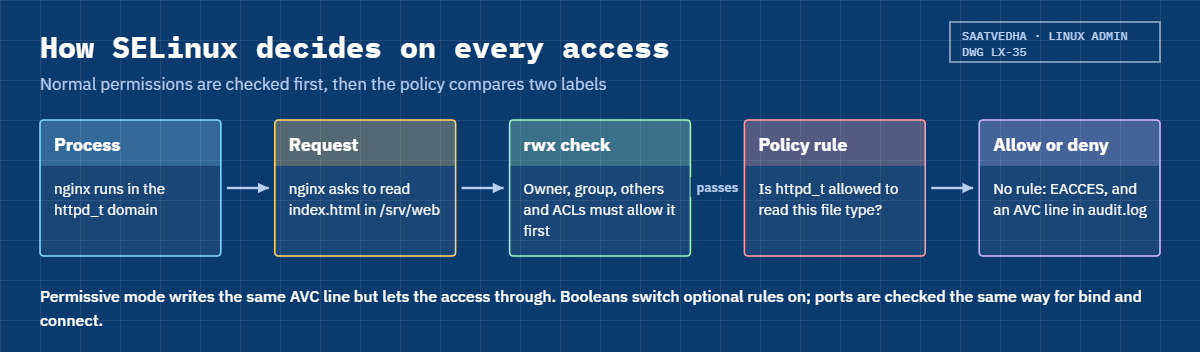
Every time a confined process opens a file, binds a port or connects somewhere, the kernel runs the same short check. The diagram below follows one request from nginx to a file.

1Every process runs in a domain

When systemd starts /usr/sbin/nginx, the file’s label (httpd_exec_t) tells the policy to start the process in the httpd_t domain. Apache and nginx share that one domain, which is why every web server rule in the policy says httpd. Your SSH shell runs as unconfined_t, so commands you type yourself are almost never blocked.

2Every file and port has a type

Files keep their label in an extended attribute on disk. Web content under /usr/share/nginx/html or /var/www is httpd_sys_content_t, files under /home are user_home_t, and anything under /srv is var_t unless a rule says otherwise. Ports get types too: 80, 443 and 8443 are http_port_t, 22 is ssh_port_t, and an unused high port like 8090 is unreserved_port_t.

3The policy says which domain may do what to which type

The targeted policy holds thousands of rules like “httpd_t may read httpd_sys_content_t files” and “httpd_t may bind http_port_t”. If no rule matches, the kernel refuses with “Permission denied” (EACCES), the same error a bad chmod gives, and writes an AVC line to /var/log/audit/audit.log.

SELinux basics: how the kernel checks a process label against a file label

4Where the default labels come from

The policy also has a list of paths and the label each one should get, such as /srv/web(/.*)? after you add one with semanage fcontext -a. restorecon reads that list and puts the right label back on files. A file you create gets the label of the folder it’s created in, but mv keeps the label the file already had, which is the classic way home-folder labels end up in a web folder (you met the same trap with systemd in Lesson 27).

5Booleans switch whole groups of rules on

Some rules are optional and off by default, because most servers don’t need them. A boolean such as httpd_can_network_connect lets the web server open connections to any port, which a reverse proxy needs. setsebool -P changes it for good; without -P the change is lost at the next reboot.

6Reading a denial

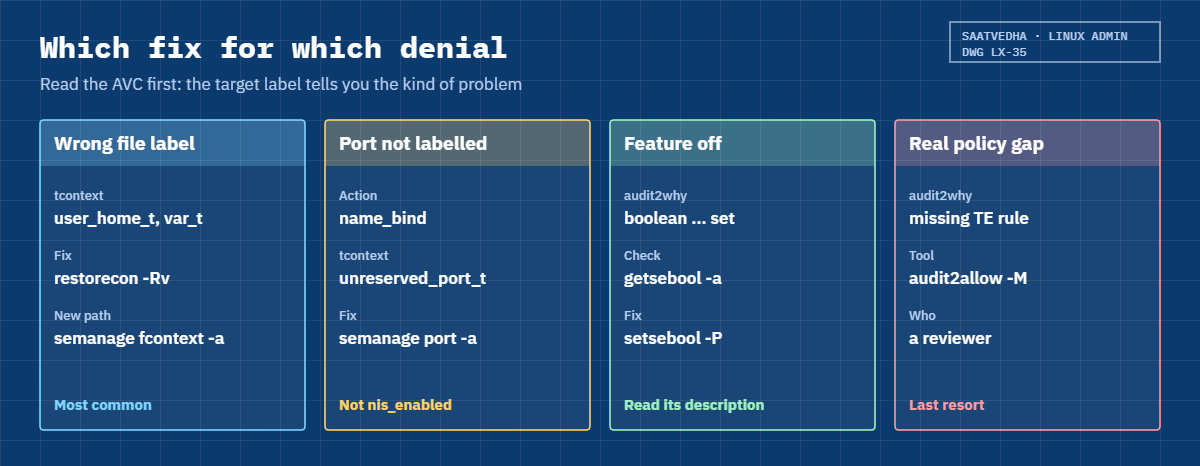
An AVC line names the action ({ read }, { name_bind }, { name_connect }), the process (comm=”nginx”), the source label (scontext) and the target label (tcontext). The target label tells you what kind of problem you have: a wrong file type, a port with no web type, or a feature that’s switched off. audit2why explains the line and sealert turns it into plain English with suggested fixes, but both can suggest the wrong fix, so you still decide.

The card picture below matches each kind of denial to its fix, in the order you’ll meet them at work. The last one, writing a custom policy module with audit2allow, is rare and needs a second pair of eyes.

SELinux basics: which fix for which denial, restorecon, semanage port, setsebool and audit2allow

Permissive mode is a diagnostic tool. If setenforce 0 makes a problem go away, you’ve proved SELinux is involved, and you switch back with setenforce 1 straight after and fix the label. Leaving a server permissive, or disabling SELinux, turns off a protection that has stopped real attacks on web servers, and many audits (PCI DSS, ISO 27001 reviews, CIS benchmarks) flag it.

Labels live on the file system, so a file copied with tar or rsync without its extended attributes, or files on a new disk, may arrive with no label or a wrong one. One restorecon -R on the path fixes that, as long as the path rule exists. That’s why the rule (semanage fcontext) and the relabel (restorecon) always go together.

Hands-on lab: serve a site from a new folder and port with SELinux enforcing

Before you run any command, double-check it

Read every command twice before you press Enter. Check the target: the server name, the user, the disk or device name, the path and the sizes. These commands are for learning and were tested in our lab, not on your system. At work, run the read-only commands first, follow your change process, make sure a backup exists, and ask a second person to check anything that changes or deletes data. You run them at your own risk.

Steps 1 to 7 run on rocky01 and build a small nginx site in /srv/web on port 8090, with a pretend API behind it on port 3000. Everything is tested from rocky01 itself with curl, so firewalld stays as it is. Step 8 runs on ubu01.

The Break-It section reuses this site and ends with a clean-up that removes it all.

1Check the SELinux mode

Run this on rocky01:

getenforce
sestatus
grep -E '^SELINUX(TYPE)?=' /etc/selinux/config

You should see something like this:

Enforcing
SELinux status:                 enabled
SELinuxfs mount:                /sys/fs/selinux
SELinux root directory:         /etc/selinux
Loaded policy name:             targeted
Current mode:                   enforcing
Mode from config file:          enforcing
Policy MLS status:              enabled
Policy deny_unknown status:     allowed
Memory protection checking:     actual (secure)
Max kernel policy version:      33
SELINUX=enforcing
SELINUXTYPE=targeted

Current mode is what the kernel does now; mode from config file is what it will do after the next boot. They should both say enforcing. The policy is targeted, and policy version 33 is the newest policy format this kernel can load.

If yours says permissive, fix it now with sudo setenforce 1 and set SELINUX=enforcing in the file.

✅ Checkpoint: getenforce prints Enforcing and the config file says SELINUX=enforcing.

2Read the labels on you, a few services and a few files

Run this:

id -Z
ps -eZ | grep -E 'chronyd$|sshd$'
ls -Z /etc/shadow
ls -Zd ~
ls -Zd /srv

You should see something like this:

unconfined_u:unconfined_r:unconfined_t:s0-s0:c0.c1023
system_u:system_r:chronyd_t:s0       798 ?        00:00:00 chronyd
system_u:system_r:sshd_t:s0-s0:c0.c1023 1012 ? 00:00:00 sshd
system_u:object_r:shadow_t:s0 /etc/shadow
unconfined_u:object_r:user_home_dir_t:s0 /home/student
system_u:object_r:var_t:s0 /srv

Your shell is unconfined_t, which is why commands you type are rarely stopped. chronyd and sshd each run in their own domain, chronyd_t and sshd_t. /etc/shadow is shadow_t, which only a few domains (login, passwd, sshd through PAM) may read. Your home folder is user_home_dir_t and the files inside it are user_home_t. /srv is var_t, a type web servers aren’t allowed to read.

✅ Checkpoint: You can name the type (the third part) of each label in the output.

3Install nginx and the SELinux tools, then look at nginx’s domain

Run this:

sudo dnf install -y nginx policycoreutils-python-utils setroubleshoot-server
sudo systemctl enable --now nginx
ps -eZ | grep nginx
ls -Zd /usr/share/nginx/html
curl -s -o /dev/null -w '%{http_code}\n' http://127.0.0.1/

You should see something like this (after the dnf output):

system_u:system_r:httpd_t:s0       3101 ?        00:00:00 nginx
system_u:system_r:httpd_t:s0       3102 ?        00:00:00 nginx
system_u:system_r:httpd_t:s0       3103 ?        00:00:00 nginx
system_u:object_r:httpd_sys_content_t:s0 /usr/share/nginx/html
200

policycoreutils-python-utils gives you semanage and audit2why, and setroubleshoot-server gives you sealert. The nginx master and its two workers (one per vCPU) all run as httpd_t. Its default web root is httpd_sys_content_t, so the welcome page loads with 200.

✅ Checkpoint: All nginx processes show httpd_t and curl prints 200.

4Serve a new folder: add the path rule, then relabel

Create the folder and a page, then check its label:

sudo mkdir -p /srv/web
echo '<h1>rocky01 web lab</h1>' | sudo tee /srv/web/index.html
ls -Zd /srv/web

You should see this:

<h1>rocky01 web lab</h1>
unconfined_u:object_r:var_t:s0 /srv/web

The new folder took var_t from /srv. nginx would get “Permission denied” on it. Tell the policy what this path is, then apply the rule to what’s already there:

Run this:

sudo semanage fcontext -a -t httpd_sys_content_t '/srv/web(/.*)?'
sudo restorecon -Rv /srv/web
sudo semanage fcontext -l -C

You should see something like this:

Relabeled /srv/web from unconfined_u:object_r:var_t:s0 to unconfined_u:object_r:httpd_sys_content_t:s0
Relabeled /srv/web/index.html from unconfined_u:object_r:var_t:s0 to unconfined_u:object_r:httpd_sys_content_t:s0
SELinux fcontext                                   type               Context

/srv/web(/.*)?                                     all files          system_u:object_r:httpd_sys_content_t:s0

The pattern /srv/web(/.*)? means the folder itself plus everything under it, and it must be in single quotes. restorecon changed only the type and printed each file it fixed (-v). semanage fcontext -l -C lists only your local rules, which is the first thing to check on a server someone else built.

✅ Checkpoint: /srv/web and index.html both show httpd_sys_content_t, and your rule appears in semanage fcontext -l -C.
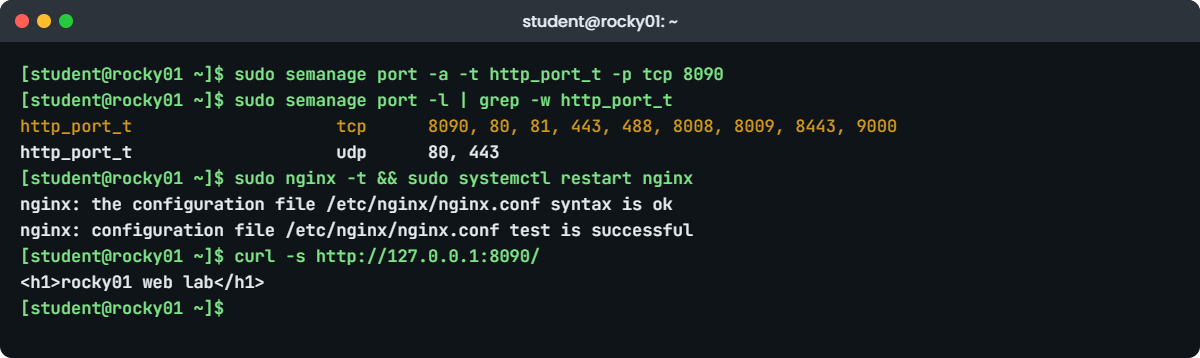
SELinux basics lab: semanage port and nginx on port 8090 on rocky01
Example output on rocky01: semanage adds port 8090 to http_port_t and nginx serves the site.

5Label a new port for nginx

See which ports nginx may use, add 8090, and check again:

sudo semanage port -l | grep -w http_port_t
sudo semanage port -a -t http_port_t -p tcp 8090
sudo semanage port -l | grep -w http_port_t

You should see something like this:

http_port_t                    tcp      80, 81, 443, 488, 8008, 8009, 8443, 9000
http_port_t                    udp      80, 443
http_port_t                    tcp      8090, 80, 81, 443, 488, 8008, 8009, 8443, 9000
http_port_t                    udp      80, 443

8090 now sits at the front of the list, where semanage puts local additions. Now give nginx a server block for the site and for the API you’ll add next:

Paste this whole block:

sudo tee /etc/nginx/conf.d/lab41.conf > /dev/null <<'EOF'
server {
    listen 8090;
    root /srv/web;

    location /api/ {
        proxy_pass http://127.0.0.1:3000/;
    }
}
EOF
sudo nginx -t && sudo systemctl restart nginx
curl -s http://127.0.0.1:8090/

You should see this:

nginx: the configuration file /etc/nginx/nginx.conf syntax is ok
nginx: configuration file /etc/nginx/nginx.conf test is successful
<h1>rocky01 web lab</h1>

nginx -t checks the syntax first, and the && only restarts if the check passed. Because the port was labelled before the restart, nginx could bind 8090 straight away. From another machine you’d also need the port open in firewalld (Lesson 34).

✅ Checkpoint: curl on port 8090 returns the rocky01 web lab page.

6Find a denial with ausearch and audit2why

Start a small backend on port 3000 as student, then call it directly and through nginx:

mkdir -p ~/lab41/api && echo 'api ok' > ~/lab41/api/index.html
python3 -m http.server 3000 --bind 127.0.0.1 --directory ~/lab41/api > /dev/null 2>&1 &
sleep 1
curl -s -o /dev/null -w '%{http_code}\n' http://127.0.0.1:3000/
curl -s -o /dev/null -w '%{http_code}\n' http://127.0.0.1:8090/api/
getsebool httpd_can_network_connect

You should see something like this:

[1] 3188
200
502
httpd_can_network_connect --> off

The backend answers directly with 200, but through nginx you get 502 Bad Gateway, which is nginx saying “I couldn’t reach the upstream”. Look for the denial:

Run this:

sudo ausearch -m AVC -ts recent
sudo ausearch -m AVC -ts recent | audit2why

You should see something like this (ausearch also prints PROCTITLE and SYSCALL lines, cut here):

----
time->Tue Oct 27 11:52:20 2026
type=AVC msg=audit(1793082140.417:512): avc:  denied  { name_connect } for  pid=3102 comm="nginx" dest=3000 scontext=system_u:system_r:httpd_t:s0 tcontext=system_u:object_r:ntop_port_t:s0 tclass=tcp_socket permissive=0

type=AVC msg=audit(1793082140.417:512): avc:  denied  { name_connect } for  pid=3102 comm="nginx" dest=3000 scontext=system_u:system_r:httpd_t:s0 tcontext=system_u:object_r:ntop_port_t:s0 tclass=tcp_socket permissive=0

	Was caused by:
	The boolean httpd_can_network_connect was set incorrectly.
	Description:
	Allow httpd to can network connect

	Allow access by executing:
	# setsebool -P httpd_can_network_connect 1

Read the AVC from left to right: denied, the action name_connect, process nginx, destination port 3000, source httpd_t, target ntop_port_t (3000 is labelled for an old monitoring tool called ntop). -ts recent means the last 10 minutes. audit2why points at a boolean, and here it’s right: a reverse proxy needs to connect out.

✅ Checkpoint: You found an AVC with comm=”nginx”, dest=3000 and tcontext ntop_port_t, and audit2why names httpd_can_network_connect.

7Read it in plain English with sealert, then fix it

Run this:

sudo sealert -a /var/log/audit/audit.log

You should see something like this (shortened):

100% done
found 1 alerts in /var/log/audit/audit.log
--------------------------------------------------------------------------------

SELinux is preventing /usr/sbin/nginx from name_connect access on the tcp_socket port 3000.

*****  Plugin connect_ports (85.9 confidence) suggests   *********************

If you want to allow /usr/sbin/nginx to connect to network port 3000
Then you need to modify the port type.
Do
# semanage port -a -t PORT_TYPE -p tcp 3000
    where PORT_TYPE is one of the following: dns_port_t, http_port_t, ...

*****  Plugin catchall_boolean (7.33 confidence) suggests   ******************

If you want to allow httpd to can network connect
Then you must tell SELinux about this by enabling the 'httpd_can_network_connect' boolean.

Do
setsebool -P httpd_can_network_connect 1

sealert gives two suggestions with a confidence score. The first, changing the type of port 3000, would fail anyway because 3000 already has a type (you’d need -m instead of -a), and it would affect everything that uses ntop_port_t. For a reverse proxy, the boolean is the standard answer:

Run this:

sudo setsebool -P httpd_can_network_connect on
getsebool httpd_can_network_connect
curl -s http://127.0.0.1:8090/api/

You should see this:

httpd_can_network_connect --> on
api ok

-P writes the value into the policy on disk, which takes a few seconds, so it survives reboots. semanage boolean -l | grep httpd_ shows every web server boolean with its current and default value and a one-line description.

✅ Checkpoint: getsebool shows on and curl through port 8090 prints api ok.

8See AppArmor on ubu01

Run this on ubu01:

sudo aa-status | head -n 9
sudo aa-status | grep -A1 'processes are in enforce'
ps -eZ | grep rsyslogd

You should see something like this (counts differ between installs):

apparmor module is loaded.
112 profiles are loaded.
26 profiles are in enforce mode.
   /usr/bin/man
   lsb_release
   man_filter
   man_groff
   rsyslogd
   ...
1 processes are in enforce mode.
   /usr/sbin/rsyslogd (812) rsyslogd
rsyslogd (enforce)                  812 ?        00:00:00 rsyslogd

AppArmor ties a profile to a program path, so rsyslogd is confined by the profile in /etc/apparmor.d/usr.sbin.rsyslogd. Most of the other loaded profiles are for desktop apps and sit in unconfined mode, which Ubuntu uses to control user namespaces. To see the two main modes, install the tools and flip rsyslogd to complain mode and back:

sudo apt install -y apparmor-utils
sudo aa-complain /usr/sbin/rsyslogd
sudo aa-status | grep -A1 'profiles are in complain'
sudo aa-enforce /usr/sbin/rsyslogd

You should see something like this:

Setting /usr/sbin/rsyslogd to complain mode.
1 profiles are in complain mode.
   rsyslogd
Setting /usr/sbin/rsyslogd to enforce mode.

Complain mode is AppArmor’s permissive: it logs what the profile would block (apparmor=”ALLOWED” in journalctl -k) but blocks nothing. Enforce mode blocks and logs apparmor=”DENIED”. As with SELinux, complain is for finding out, not for leaving on.

✅ Checkpoint: rsyslogd is back in enforce mode, and aa-status lists it under processes in enforce mode.

Break It, Then Fix It

Take a snapshot of rocky01 first (VBoxManage snapshot rocky01 take before-l41 on the laptop). Both failures use the lab site from steps 4 to 7, so keep nginx and the port 3000 backend running.

These are the two SELinux problems you’ll meet most often on web servers. In both, normal permissions are fine and the error message gives no hint that SELinux is involved.

1A page moved from a home folder gives 403

Create a page in your home folder, move it into the site and ask for it:

echo '<h1>Diwali hiring drive</h1>' > ~/promo.html
sudo mv ~/promo.html /srv/web/
curl -s -o /dev/null -w '%{http_code}\n' http://127.0.0.1:8090/promo.html
ls -l /srv/web/promo.html
ls -Z /srv/web/promo.html
sudo tail -n 1 /var/log/nginx/error.log

You’ll get this:

403
-rw-r--r--. 1 student student 28 Oct 27 12:01 /srv/web/promo.html
unconfined_u:object_r:user_home_t:s0 /srv/web/promo.html
2026/10/27 12:01:42 [error] 3102#3102: *9 open() "/srv/web/promo.html" failed (13: Permission denied), client: 127.0.0.1, server: , request: "GET /promo.html HTTP/1.1", host: "127.0.0.1:8090"

Mode 644 means anyone may read it, yet nginx gets “Permission denied”. mv kept the user_home_t label the file was born with in /home, and httpd_t may not read user_home_t. People lose hours here running chmod 777, which changes nothing. Prove it’s SELinux in ten seconds, then switch enforcing straight back on:

sudo setenforce 0
curl -s -o /dev/null -w '%{http_code}\n' http://127.0.0.1:8090/promo.html
sudo setenforce 1
sudo ausearch -m AVC -ts recent | audit2why | grep -A3 'Was caused'

You should see something like this:

200
	Was caused by:
	The boolean httpd_read_user_content was set incorrectly.
	Description:
	Allow httpd to read user content

audit2why suggests a boolean that would let nginx read every user’s home files. That’s the wrong fix: the file belongs to the website now, so it needs the website’s label, not a wider rule.

Fix: put the default label back from the rule you made in lab step 4.

sudo restorecon -v /srv/web/promo.html
curl -s http://127.0.0.1:8090/promo.html

You should see this:

Relabeled /srv/web/promo.html from unconfined_u:object_r:user_home_t:s0 to unconfined_u:object_r:httpd_sys_content_t:s0
<h1>Diwali hiring drive</h1>

Next time use cp (the copy gets the folder’s label), mv -Z (moves and sets the default label), or run restorecon -Rv on the folder after any bulk move or rsync.

✅ Checkpoint: getenforce says Enforcing, promo.html shows httpd_sys_content_t and curl returns the page.

2nginx won’t start on a new port

A developer asks for the site on 8091 instead. Change the port and restart:

sudo sed -i 's/listen 8090;/listen 8091;/' /etc/nginx/conf.d/lab41.conf
sudo nginx -t
sudo systemctl restart nginx

You’ll get this error:

nginx: the configuration file /etc/nginx/nginx.conf syntax is ok
nginx: configuration file /etc/nginx/nginx.conf test is successful
Job for nginx.service failed because the control process exited with error code.
See "systemctl status nginx.service" and "journalctl -xeu nginx.service" for details.

The syntax test passes, because there’s nothing wrong with the config. The journal shows where it breaks:

sudo journalctl -u nginx -n 4 --no-pager
sudo ausearch -m AVC -ts recent | audit2why

You should see something like this:

Oct 27 12:03:51 rocky01 nginx[3342]: nginx: [emerg] bind() to 0.0.0.0:8091 failed (13: Permission denied)
Oct 27 12:03:51 rocky01 systemd[1]: nginx.service: Control process exited, code=exited, status=1/FAILURE
Oct 27 12:03:51 rocky01 systemd[1]: nginx.service: Failed with result 'exit-code'.
Oct 27 12:03:51 rocky01 systemd[1]: Failed to start nginx.service - The nginx HTTP and reverse proxy server.
type=AVC msg=audit(1793082831.206:538): avc:  denied  { name_bind } for  pid=3342 comm="nginx" src=8091 scontext=system_u:system_r:httpd_t:s0 tcontext=system_u:object_r:unreserved_port_t:s0 tclass=tcp_socket permissive=0

	Was caused by:
	The boolean nis_enabled was set incorrectly.
	Description:
	Allow nis to enabled

	Allow access by executing:
	# setsebool -P nis_enabled 1

Error 13 on bind() is Permission denied, and nginx runs as root at that point, so it isn’t a normal permission. The AVC says httpd_t may not name_bind a port of type unreserved_port_t. audit2why suggests nis_enabled, an old boolean that lets many services bind almost any port; turning it on would fix nginx and quietly loosen the whole server.

Fix: give the port the web type, then restart.

sudo semanage port -a -t http_port_t -p tcp 8091
sudo systemctl restart nginx
curl -s http://127.0.0.1:8091/

You should see this:

<h1>rocky01 web lab</h1>

✅ Checkpoint: nginx is active on 8091, nis_enabled is still off (getsebool nis_enabled) and semanage port -l shows 8091 under http_port_t.

3Clean up the lab

Stop the backend, remove the site, undo every SELinux change and remove nginx (Lesson 56 installs it again with a real app):

pkill -f 'http.server 3000'
sudo rm /etc/nginx/conf.d/lab41.conf
sudo systemctl disable --now nginx
sudo semanage port -d -p tcp 8090
sudo semanage port -d -p tcp 8091
sudo semanage fcontext -d '/srv/web(/.*)?'
sudo setsebool -P httpd_can_network_connect off
sudo rm -rf /srv/web ~/lab41
sudo dnf remove -y nginx
sudo semanage port -l -C; sudo semanage fcontext -l -C

The last line should print nothing (or only headers): no local port or path rules are left. policycoreutils-python-utils and setroubleshoot-server stay installed, because you’ll use semanage and sealert again in later lessons.

✅ Checkpoint: getenforce still says Enforcing, nginx is gone, and semanage shows no local changes.

This happened at work

The resumes nobody could download

My team lead tells this one whenever someone suggests switching SELinux off. It was the first week of campus placement season at a job portal in Lucknow, and we had moved the resume store from an old CentOS 7 box to a new RHEL 9 VM over the weekend. On Monday at 10 a.m. recruiters started calling: every candidate profile opened, but every resume PDF gave a 403.

The developer who did the move first ran chmod -R 755 on the folder, then chmod -R 777, and nothing changed. By noon someone had edited /etc/selinux/config to disabled and asked for a reboot “after the lunch peak”. My lead stopped that and ran ls -Z on /data/resumes: most files were default_t, a few thousand were user_home_t.

The files had been unpacked in the developer’s home folder and moved, and /data had no file context rule at all.

ausearch -m AVC -ts today showed thousands of denied { read } lines from httpd_t, which settled it. The fix was two commands: a semanage fcontext -a -t httpd_sys_content_t rule for /data/resumes(/.*)? and a restorecon -R, which took about four minutes over four lakh files. Resumes came back before the afternoon interview slots started.

Two things changed afterwards. The server build role in Ansible now adds the fcontext rule with the sefcontext module before any data is copied, and our monitoring raises a ticket when new AVC denials show up on a web server, so a mislabelled file is found by us and not by a recruiter.

Common mistakes and troubleshooting

MistakeWhat happensWhat to do instead
Disabling SELinux or leaving it permissive to “fix” a 403The problem goes away and so does the protection; audits flag it, and re-enabling later needs a full relabelUse permissive for a ten-second test only, then fix the label, port or boolean
Using chcon as the permanent fixIt works until the next restorecon or full relabel puts the old label backAdd a rule with semanage fcontext -a, then run restorecon -Rv
Moving files into a web folder with mv or unpacking an archive thereFiles keep user_home_t or arrive unlabelled, and nginx gets 403Use cp or mv -Z, or run restorecon -Rv on the folder afterwards
Turning on whatever boolean audit2why suggestsnis_enabled or httpd_read_user_content open far more than you neededRead the AVC yourself; prefer the right label or port type over a wide boolean
setsebool without -PThe fix works today and is gone after the next rebootAlways use setsebool -P for a permanent change
semanage port -a on a port that already has a type“ValueError: Port tcp/8080 already defined”Use semanage port -m -t http_port_t -p tcp 8080 to change it
Piping every denial into audit2allow -M and loading the moduleYou may allow something an attacker was trying to doFix labels and booleans first; keep custom modules small, reviewed and in version control

Interview questions

Click a question to open it. Each one is written the way an interviewer would ask it. Under it you will see why they ask it and one way you could answer, in your own words.

Fresher level

1. What is SELinux, and what’s the difference between enforcing, permissive and disabled?

Why they ask this: They want to know you understand it as an extra access check by label, not a firewall or a password thing, and that you know the modes.

How you might answer: SELinux is mandatory access control in the kernel. Every process and file has a label, and after normal permissions pass, the policy decides whether that process type may do that action on that file or port type.

Enforcing blocks and logs denials, permissive only logs them, and disabled loads no policy at all. I check with getenforce or sestatus and keep servers enforcing; permissive is only for a short test.

2. A web page returns 403 on a RHEL server, and ls -l shows the file is readable by everyone. What do you check next?

Why they ask this: This is the most common SELinux ticket. They’re listening for ls -Z, the audit log and restorecon, not chmod.

How you might answer: I’d run ls -Z on the file and compare it with a file that works, for example httpd_sys_content_t versus user_home_t. Then I’d confirm with ausearch -m AVC -ts recent, which shows nginx or httpd denied { read } on that type.

If the folder has the right rule I run restorecon -Rv on it. If it’s a new path, I add a rule with semanage fcontext -a -t httpd_sys_content_t first and then run restorecon.

2–5 years experience

3. What’s the difference between chcon and semanage fcontext, and when would you use each?

Why they ask this: They want to see that you know which change survives a relabel, because chcon-only fixes are a common source of repeat incidents.

How you might answer: chcon changes the label on the file right now and nothing else. semanage fcontext changes the policy’s list of default labels for a path, and restorecon then applies it, so the label survives restorecon and a full relabel.

I use chcon only for a quick test. For anything permanent it’s semanage fcontext -a -t TYPE '/path(/.*)?' plus restorecon -Rv /path, and on a fleet the same thing through Ansible’s sefcontext module.

4. Developers want Nginx on port 8090 proxying to an app on 3000. Walk me through the SELinux side.

Why they ask this: A practical design question. They’re checking you know ports have types and that proxying needs a boolean.

How you might answer: First the listening port: semanage port -a -t http_port_t -p tcp 8090, otherwise nginx fails with bind() Permission denied. If the content lives outside /var/www or /usr/share/nginx/html, I add an fcontext rule and restorecon it.

For the proxy, nginx needs to connect out, so I set setsebool -P httpd_can_network_connect on. Then I test with curl and check ausearch -m AVC -ts recent is empty, and I open 8090 in firewalld if clients come from outside.

Senior level

5. A vendor’s install guide says “disable SELinux”. How do you handle that?

Why they ask this: Seniors are expected to push back with evidence and a plan, not refuse or give in.

How you might answer: I install it on a test server in enforcing mode, or with only that product’s domain permissive using semanage permissive -a, and collect the denials with ausearch while the vendor’s tests run. Most of the time the result is a few fcontext rules, a port label and a boolean.

If a real policy gap remains, I build a small module with audit2allow, review every rule in it, keep it in version control and ship it with the install. I’d also ask the vendor for their SELinux module, since many enterprise products now provide one.

6. How would you manage SELinux settings across 300 servers and catch denials before users do?

Why they ask this: They want to hear about automation, drift and monitoring rather than one-off fixes.

How you might answer: All local changes go through configuration management: Ansible’s sefcontext, seport and seboolean modules, plus custom modules as files in the repo. I can audit drift with semanage export, which prints every local change in one list.

For detection I’d ship audit logs to the central log system and alert on new AVC denials per host and service, with setroubleshoot’s summary in the alert. A denial right after a change is usually a label, and a denial out of nowhere is worth a security look.

Quick quiz

Q1. Which part of an SELinux label does the targeted policy mostly use to make decisions?

  1. The user, like unconfined_u
  2. The role, like object_r
  3. The type, like httpd_sys_content_t
  4. The level, like s0
Show answer

C — Rules in the targeted policy are written type to type, for example httpd_t may read httpd_sys_content_t.

Q2. A file moved with mv from /home/student into /srv/web gives 403. What is the right fix?

  1. chmod 777 the file
  2. setenforce 0
  3. restorecon -v on the file (with an fcontext rule for /srv/web in place)
  4. setsebool -P httpd_read_user_content on
Show answer

C — mv kept user_home_t. restorecon applies the default label from the fcontext rule.

Q3. nginx fails with “bind() to 0.0.0.0:8091 failed (13: Permission denied)”. Which command fixes it the right way?

  1. setsebool -P nis_enabled 1
  2. semanage port -a -t http_port_t -p tcp 8091
  3. chmod 755 /usr/sbin/nginx
  4. setenforce 0
Show answer

B — The port needs a type httpd_t may bind. nis_enabled would work but loosens far more than one port.

Q4. What does the -P in setsebool -P httpd_can_network_connect on do?

  1. Prints the result
  2. Makes the change permanent across reboots
  3. Applies it to every boolean
  4. Only previews the change
Show answer

B — Without -P the boolean goes back to its old value at the next boot.

Q5. On ubu01, what is AppArmor’s equivalent of SELinux permissive mode for one program?

  1. Enforce mode
  2. Complain mode
  3. Kill mode
  4. Disabled profile
Show answer

B — Complain mode logs what the profile would block but allows it, like permissive.

Quick recap

  • SELinux basics: every process has a domain, every file and port has a type, and the policy allows domain-to-type actions; everything else is denied and logged as an AVC.
  • Read labels with ls -Z, ps -eZ and id -Z, and the mode with getenforce and sestatus.
  • Wrong file label: restorecon -Rv, and for a new path semanage fcontext -a -t TYPE '/path(/.*)?' first. Port: semanage port -a. Optional feature: setsebool -P.
  • Find denials with ausearch -m AVC -ts recent, explain them with audit2why and sealert, and think before taking their suggestion.
  • Permissive is a ten-second test, never a fix. On Ubuntu, AppArmor profiles do the same job with enforce and complain modes.

Next lesson

Lesson 42: Disks and partitions → You’ll add two 5 GB disks to rocky01, read them with lsblk, blkid and fdisk, and partition one with fdisk, parted and gdisk while learning when to choose GPT over MBR.

Further reading: SELinux basics

Want to go deeper into SELinux basics? Read Red Hat’s Using SELinux guide for RHEL 10, the SELinux Notebook from the SELinux project, the man7.org page for ausearch(8), and Ubuntu’s AppArmor how-to. You can also see the full plan for this course on the Linux Administration course page.

Scroll to Top

This website uses cookies

We use a few cookies to keep this site working. If you allow it, we also use Google Analytics to count visits so we can improve our lessons. You can accept all, deny the optional ones, or choose what to allow.