A custom systemd service fails to start: triage and fixes
-
Phase 0: Before you start
-
Phase 1: The origins and OS architecture
-
Phase 2: Day-to-day administration and the command builder
-
Phase 3: Enterprise infrastructure and storage
-
Phase 4: Troubleshooting step by step
-
Phase 5: Final project and career
When a systemd service failed message shows up for a unit your team wrote, the answer is nearly always on your screen already: the exit status in systemctl status tells you which step broke, and the unit’s journal tells you why. Admins lose hours when they skip those two lines and start restarting, rebooting or reinstalling.
In Lesson 27 you fixed the two classic 203/EXEC cases on disk-report.service: a missing x bit and a wrong SELinux label. This lesson goes further with a long-running service, saat-heartbeat, that runs as the appsvc account from Lesson 15. You’ll learn a triage order you can use on any unit, and then break the service seven ways: a wrong user, a missing folder, Windows line endings, a bad shebang, the wrong Type=, a forgotten daemon-reload and a restart loop that ends in start-limit-hit.
Where this lesson fits
Lesson 68 of 82 in Linux Administration · Phase 4: Troubleshooting step by step · Before this: Lesson 67, “No space left on device” with free space · Next: Lesson 69, static routes disappear after a reboot
| Time | You need | By the end you can |
|---|---|---|
| About 80 minutes | rocky01 with an SSH session as student (sudo), the appsvc account from Lesson 15, Lessons 26 and 27 done | Read any failed unit’s status code, find the cause in a fixed order, reproduce the failure with systemd-run, and fix 217/USER, 200/CHDIR, 203/EXEC, 127, timeout and start-limit-hit failures |
What it is, in one line
When a service fails, the status number names the step that broke (200 CHDIR, 203 EXEC, 217 USER, or your program’s own code below 200) and the unit’s journal names the reason.
In Simple Words
The courier’s “not delivered” slip
When a courier can’t deliver your parcel, he doesn’t only write “failed”. The slip has a box ticked: address not found, building locked, nobody home, or customer refused. Each box points to a different fix, and nobody sensible sends the same parcel out ten more times without reading the slip first.
A good office also has a rule. If a parcel comes back five times in one morning, it goes on the problem shelf and stays there until someone fixes the address and clears the shelf by hand.
The ticked box is the exit status, the courier’s note is the journal line, and the problem shelf is systemd’s start limit.
Engineer's View
Exit codes, results and limits
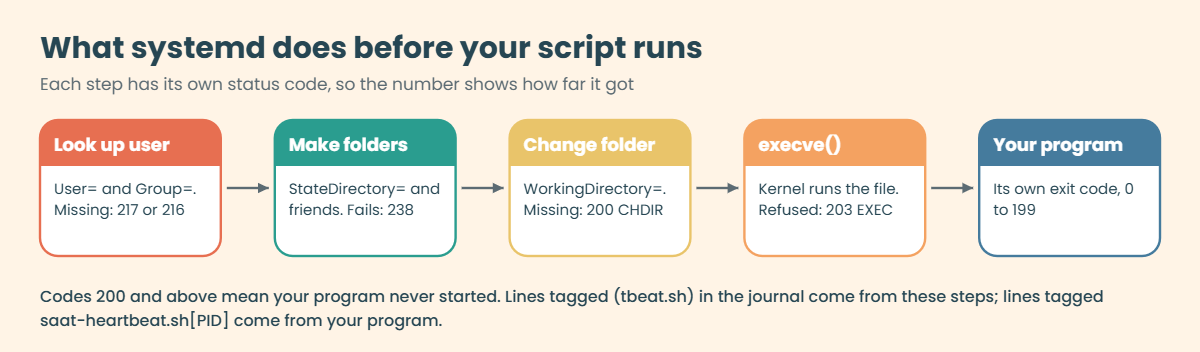
Before your program runs, systemd prepares the process step by step: it looks up the user, sets up folders, changes into the working directory and finally asks the kernel to execute the file. If one of those steps fails, your code never starts and the process exits with a code of 200 or more that names the step. Codes below 200 come from your own program.
You can look any of them up with systemd-analyze exit-status.
| Status | Name | What it means | First thing to check |
|---|---|---|---|
| 0, 1 | SUCCESS, FAILURE | Your program ended and chose this code | Your program’s own last lines in the journal |
| 2 to 7 | LSB codes (2 INVALIDARGUMENT) | Your program ended; systemd only gives the number an LSB name | Same: read what the program printed |
| 127 | none | A shell or env ran but couldn’t find the command it was given | The shebang line and the PATH the script uses |
| 200 | CHDIR | WorkingDirectory= is missing or not reachable | Does the folder exist, can User= enter it? |
| 203 | EXEC | The kernel refused to run ExecStart= | x bits, shebang, CRLF, SELinux label (Lesson 27) |
| 216 / 217 | GROUP / USER | Group= or User= doesn’t exist | getent passwd and getent group |
| 226 | NAMESPACE | A sandboxing option such as ProtectSystem= or ReadWritePaths= failed | Paths named in those options |
| 238 | STATE_DIRECTORY | StateDirectory= couldn’t be created | Space and permissions under /var/lib |
systemd also records a Result for every failure, which is what systemctl start turns into its one-line error:
| Result | What happened | Message from systemctl |
|---|---|---|
| exit-code | The main process exited with a non-zero code | “the control process exited with error code” |
| signal | It was killed by a signal (SIGKILL, SIGSEGV) | “a fatal signal was delivered to the control process” |
| timeout | Start (or stop) took longer than TimeoutStartSec= (default 90s) | “a timeout was exceeded” |
| start-limit-hit | More than StartLimitBurst= starts (default 5) inside StartLimitIntervalSec= (default 10s) | “start of the service was attempted too often” |
| resources | systemd couldn’t set something up, often a missing file in EnvironmentFile= | “of unavailable resources or another system error” |
Restart=on-failure restarts the service after any of these except a clean exit, waiting RestartSec= between tries. Since systemd 254 a restart first passes through the failed state, so systemctl start reports the failure even when a restart is already scheduled. Rocky 10 ships systemd 257 and Ubuntu 26.04 a newer one, and every message in this lesson looks the same on both.
How it works, step by step
Here is what systemd does between your systemctl start and the first line your script prints.
1systemctl creates a start job
systemctl asks PID 1 to start the unit. systemd checks the start limit first: if the unit was started more than five times in the last ten seconds, the job is refused straight away with start-limit-hit. Otherwise it forks a helper process, which you’ll see in the journal under a short name in brackets such as (tbeat.sh), the last eight characters of the script name.
2The helper prepares the process, one step at a time
It resolves User= and Group= (217 or 216 if they don’t exist), creates StateDirectory= and friends (238), changes into WorkingDirectory= (200), connects standard output to the journal, and only then calls execve() on the ExecStart= path (203 if the kernel refuses). Each of these steps fails with its own number, so the number alone tells you how far it got. The diagram below shows the order.
3Type= decides when the start counts as done
With Type=exec, the start job finishes once execve() has worked, so a wrong user or a missing script fails the systemctl start command in front of you. With Type=simple the job finishes as soon as the helper is forked, so the same mistakes fail a moment later and start looks successful. Type=forking waits for the first process to exit and leave a daemon behind; give it a script that stays in the foreground and systemd waits until TimeoutStartSec= runs out.
4A failure sets a Result and maybe a restart
When the main process dies, systemd stores its exit code, sets Result= and logs both. If Restart= allows it, the unit shows activating (auto-restart) and starts again after RestartSec=. Each new start counts towards the start limit, which is how a quick crash loop turns into start-limit-hit after five tries.
5Three voices in the journal
Lines tagged systemd[1] are the service manager: Starting, Started, Main process exited, Failed with result. Lines tagged with the bracket name such as (tbeat.sh) come from the helper and explain a 200-range failure before your program existed. Lines tagged saat-heartbeat.sh[PID] are your own program’s output, so if you see any of those, the program did start.
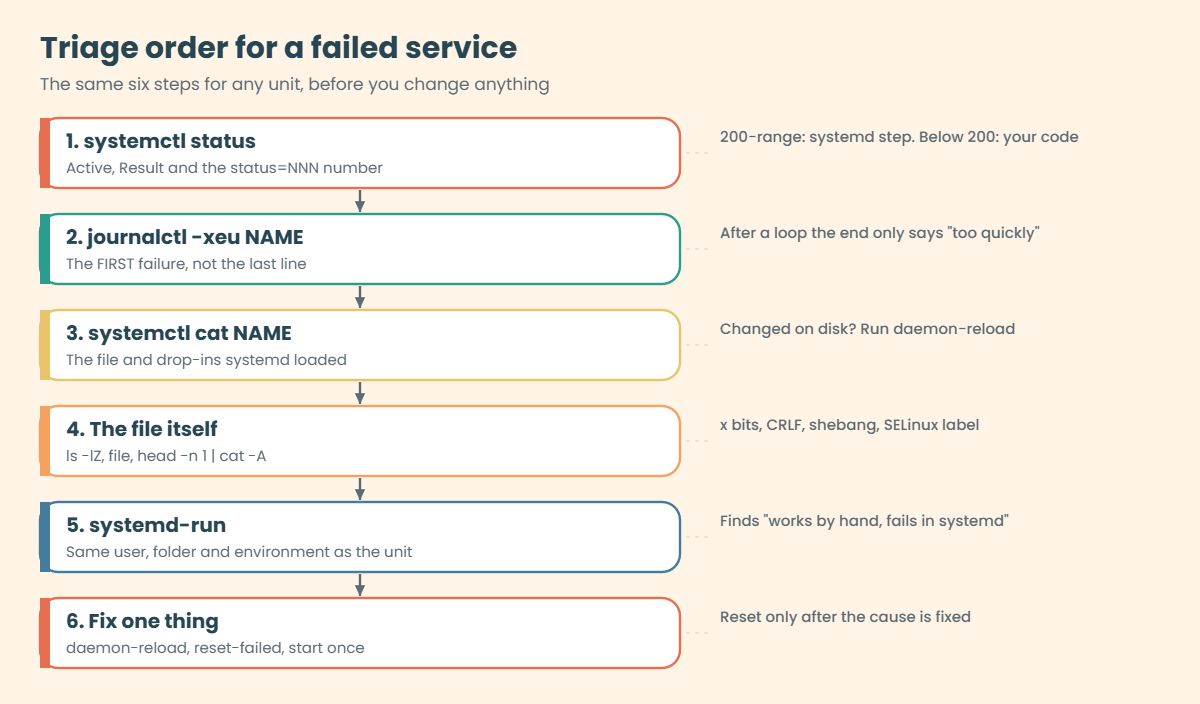
The picture below turns this into a fixed triage order.
6Work the same order every time
Read systemctl status for Active, Result and the status number. Read the first failure in journalctl -xeu NAME, not only the last lines, because after a restart loop the last line is always the start limit. Check systemctl cat NAME to see the file and drop-ins systemd has loaded, and run systemd-analyze verify.
Then look at the file itself: ls -lZ, file and head -n 1 | cat -A. Reproduce the start with systemd-run using the same user, folder and environment, fix one thing, daemon-reload if you edited a unit file, reset-failed and start once. verify catches typos in keys and values, but it can’t know that a user is missing on this server or that a script has Windows line endings, so it’s one step of the order, not the whole answer.
Hands-on lab: build saat-heartbeat.service and read its evidence
Before you run any command, double-check it
Read every command twice before you press Enter. Check the target: the server name, the user, the disk or device name, the path and the sizes. These commands are for learning and were tested in our lab, not on your system. At work, run the read-only commands first, follow your change process, make sure a backup exists, and ask a second person to check anything that changes or deletes data. You run them at your own risk.
You’ll build a small long-running service on rocky01: a script that writes the time into a file every ten seconds, run by systemd as the appsvc service account from Lesson 15. Then you’ll read every piece of evidence systemd gives you while it’s healthy, so the broken versions in the next section look familiar. The Break-It section removes everything at the end, so rocky01 finishes the lesson as it started.
1Write the script and test it as appsvc
Paste this whole block:
sudo tee /usr/local/bin/saat-heartbeat.sh > /dev/null <<'EOF'
#!/bin/bash
# saat-heartbeat.sh: write the time to heartbeat.txt every INTERVAL seconds.
# SaatVedha Linux Administration, Lesson 68. Runs from saat-heartbeat.service as appsvc.
INTERVAL=${INTERVAL:-10}
if ! [[ $INTERVAL =~ ^[0-9]+$ ]]; then
echo "INTERVAL must be a whole number of seconds, got '$INTERVAL'" >&2
exit 2
fi
echo "saat-heartbeat started as $(id -un) in $PWD, writing every ${INTERVAL}s"
while true; do
date '+%F %T' > heartbeat.txt
sleep "$INTERVAL"
done
EOF
sudo chmod 755 /usr/local/bin/saat-heartbeat.sh
sudo install -d -o appsvc -g appsvc -m 750 /var/lib/saat-heartbeat
sudo -u appsvc bash -c 'cd /var/lib/saat-heartbeat && INTERVAL=2 timeout 5 /usr/local/bin/saat-heartbeat.sh; cat heartbeat.txt'You should see something like this:
saat-heartbeat started as appsvc in /var/lib/saat-heartbeat, writing every 2s
2026-10-27 10:18:52The script refuses an INTERVAL that isn’t a whole number and exits with 2, which you’ll use later. install -d creates the working folder owned by appsvc with mode 750, so only that account can write there. appsvc has /sbin/nologin as its shell, but sudo -u appsvc bash -c runs the command directly, which is the closest you can get by hand to how systemd will run it; timeout 5 stops the test after five seconds.
✅ Checkpoint: The script printed “started as appsvc” and heartbeat.txt holds a timestamp.
2Write the unit and check it
Paste this whole block:
sudo tee /etc/systemd/system/saat-heartbeat.service > /dev/null <<'EOF'
[Unit]
Description=SaatVedha heartbeat writer (Lesson 68)
Documentation=https://saatvedha.com/lesson/systemd-service-failed/
[Service]
Type=exec
User=appsvc
Group=appsvc
WorkingDirectory=/var/lib/saat-heartbeat
Environment=INTERVAL=10
ExecStart=/usr/local/bin/saat-heartbeat.sh
Restart=on-failure
RestartSec=5s
[Install]
WantedBy=multi-user.target
EOF
sudo systemd-analyze verify /etc/systemd/system/saat-heartbeat.service && echo 'verify: no problems'
ls -lZ /usr/local/bin/saat-heartbeat.shYou should see something like this:
verify: no problems
-rwxr-xr-x. 1 root root unconfined_u:object_r:bin_t:s0 486 Oct 27 10:18 /usr/local/bin/saat-heartbeat.shType=exec makes a wrong path or a wrong user fail the start command itself instead of a second later. Restart=on-failure with RestartSec=5s brings the daemon back after a crash, and WantedBy=multi-user.target starts it at boot once enabled. The script is root-owned, 755 and bin_t, the three things Lesson 27 taught you to check.
Try it yourself: build a service file with User=, WorkingDirectory= and Restart= in the Command Builder.
✅ Checkpoint: verify reports no problems and the script shows bin_t.

3Start it and read a healthy status
Run this:
sudo systemctl daemon-reload
sudo systemctl enable --now saat-heartbeat.service
systemctl status saat-heartbeat.service --no-pager
sudo cat /var/lib/saat-heartbeat/heartbeat.txtYou should see something like this:
Created symlink '/etc/systemd/system/multi-user.target.wants/saat-heartbeat.service' → '/etc/systemd/system/saat-heartbeat.service'.
● saat-heartbeat.service - SaatVedha heartbeat writer (Lesson 68)
Loaded: loaded (/etc/systemd/system/saat-heartbeat.service; enabled; preset: disabled)
Active: active (running) since Tue 2026-10-27 10:21:14 IST; 8s ago
Invocation: 5b2f9c41d7e84a0b9c3e6f1a2d7b8c90
Docs: https://saatvedha.com/lesson/systemd-service-failed/
Main PID: 2614 (saat-heartbeat.)
Tasks: 2 (limit: 10936)
Memory: 612K (peak: 1.7M)
CPU: 11ms
CGroup: /system.slice/saat-heartbeat.service
├─2614 /bin/bash /usr/local/bin/saat-heartbeat.sh
└─2618 sleep 10
Oct 27 10:21:14 rocky01 systemd[1]: Starting saat-heartbeat.service - SaatVedha heartbeat writer (Lesson 68)...
Oct 27 10:21:14 rocky01 systemd[1]: Started saat-heartbeat.service - SaatVedha heartbeat writer (Lesson 68).
Oct 27 10:21:14 rocky01 saat-heartbeat.sh[2614]: saat-heartbeat started as appsvc in /var/lib/saat-heartbeat, writing every 10s
2026-10-27 10:21:14Read it top to bottom the way you will on a broken unit. Loaded tells you which file systemd loaded and whether it’s enabled. Active says running, Main PID is the bash process (its name is cut to 15 characters), and CGroup lists every process the unit owns, here bash and the sleep it’s waiting on.
The last lines are the newest journal entries for this unit, with your script’s own line tagged saat-heartbeat.sh[2614].
✅ Checkpoint: Active shows active (running) and heartbeat.txt has a fresh timestamp.
4Read the fields triage uses
Run this:
systemctl show -p Type,User,WorkingDirectory,Restart,RestartUSec,NRestarts,Result,ExecMainStatus saat-heartbeat
systemctl show -p TimeoutStartUSec,StartLimitIntervalUSec,StartLimitBurst saat-heartbeatYou should see something like this:
Type=exec
Restart=on-failure
RestartUSec=5s
Result=success
NRestarts=0
ExecMainStatus=0
WorkingDirectory=/var/lib/saat-heartbeat
User=appsvc
TimeoutStartUSec=1min 30s
StartLimitIntervalUSec=10s
StartLimitBurst=5systemctl show prints the values systemd is using right now, defaults included, in a key=value form that scripts and monitoring can read. Result, ExecMainStatus and NRestarts are the three you’ll check on every failure. The start limit you didn’t write is there anyway: five starts in ten seconds, set in the [Unit] section if you ever need different numbers.
✅ Checkpoint: Result=success, NRestarts=0, and the start limit shows 10s and 5.
5Kill it and watch Restart= bring it back
Run this:
sudo systemctl kill -s KILL saat-heartbeat
sleep 6
journalctl -u saat-heartbeat -n 6 --no-pager
systemctl show -p NRestarts,Result,MainPID saat-heartbeatYou should see something like this:
Oct 27 10:24:31 rocky01 systemd[1]: saat-heartbeat.service: Main process exited, code=killed, status=9/KILL
Oct 27 10:24:31 rocky01 systemd[1]: saat-heartbeat.service: Failed with result 'signal'.
Oct 27 10:24:36 rocky01 systemd[1]: saat-heartbeat.service: Scheduled restart job, restart counter is at 1.
Oct 27 10:24:36 rocky01 systemd[1]: Starting saat-heartbeat.service - SaatVedha heartbeat writer (Lesson 68)...
Oct 27 10:24:36 rocky01 systemd[1]: Started saat-heartbeat.service - SaatVedha heartbeat writer (Lesson 68).
Oct 27 10:24:36 rocky01 saat-heartbeat.sh[2671]: saat-heartbeat started as appsvc in /var/lib/saat-heartbeat, writing every 10s
NRestarts=1
Result=success
MainPID=2671SIGKILL is an unclean death, so Restart=on-failure applies: systemd logged the signal, set Result to signal for a moment, waited the five seconds of RestartSec and started a new process with a new PID. NRestarts counts restarts since the last manual start and is the number your monitoring should alert on. A clean exit with code 0 would not be restarted with on-failure; you would need Restart=always for that.
Try it yourself: build the journalctl command for one unit, with time range and priority, in the Command Builder.
✅ Checkpoint: The journal shows “restart counter is at 1” and MainPID changed.
6Decode status numbers without guessing
Run this:
systemd-analyze exit-status 0 1 2 200 203 217 226You should see this:
NAME STATUS CLASS
SUCCESS 0 libc
FAILURE 1 libc
INVALIDARGUMENT 2 LSB
CHDIR 200 systemd
EXEC 203 systemd
USER 217 systemd
NAMESPACE 226 systemdThe CLASS column tells you who chose the code: libc and LSB codes come from your program, systemd codes come from systemd before your program ran. Run systemd-analyze exit-status with no numbers for the full list. Status 127 isn’t in it, because it’s the shell’s “command not found” code, which you’ll meet in Break-It 4.
✅ Checkpoint: You can say which step failed for 200, 203 and 217 without looking at this lesson.
7Reproduce a run the way systemd does
Run the script with the same user, folder and environment, but a bad INTERVAL:
sudo systemd-run --wait --pipe -p User=appsvc -p WorkingDirectory=/var/lib/saat-heartbeat -E INTERVAL=abc /usr/local/bin/saat-heartbeat.shYou should see something like this:
Running as unit: run-p2689-i2990.service; invocation ID: 0f6b3e2a9c1d4e58a7b2c3d4e5f60718
INTERVAL must be a whole number of seconds, got 'abc'
Finished with result: exit-code
Main processes terminated with: code=exited/status=2
Service runtime: 11ms
CPU time consumed: 7mssystemd-run starts a temporary service with the properties you pass, so the program gets the same user, the same clean environment and the same sandbox as the real unit, not your login shell’s PATH and variables. --wait waits for it to finish and prints the result, and --pipe connects its output to your terminal. When “it works when I run it” and “it fails in systemd” disagree, this is how you find out which difference matters.
✅ Checkpoint: systemd-run printed the INTERVAL error, Finished with result: exit-code and status=2.
Break It, Then Fix It
Snapshot rocky01 first (VBoxManage snapshot rocky01 take before-l68-break on the laptop). Each step breaks saat-heartbeat in one real way, shows the exact evidence and fixes it before the next one. Work the triage order from step 6 of how it works each time, even when you know the answer, because building the habit is the point.
1217/USER, and the edit systemd ignored
A teammate “renames” the account in the unit file and restarts:
sudo sed -i 's/^User=appsvc/User=appsvx/' /etc/systemd/system/saat-heartbeat.service
sudo systemctl restart saat-heartbeat
systemctl show -p User saat-heartbeatYou’ll get this, and the service keeps running:
Warning: The unit file, source configuration file or drop-ins of saat-heartbeat.service changed on disk. Run 'systemctl daemon-reload' to reload units.
User=appsvcsystemd restarted the copy of the unit it holds in memory, so the change on disk did nothing yet. This catches people both ways: an edit that “didn’t work”, or a broken file that only bites at the next reboot or the next daemon-reload someone else runs. Now load it:
sudo systemctl daemon-reload
sudo systemctl restart saat-heartbeatYou’ll get this error:
Job for saat-heartbeat.service failed because the control process exited with error code.
See "systemctl status saat-heartbeat.service" and "journalctl -xeu saat-heartbeat.service" for details.Read the status and the first failure:
systemctl status saat-heartbeat --no-pager | head -n 7
journalctl -u saat-heartbeat -n 7 --no-pagerYou should see something like this:
● saat-heartbeat.service - SaatVedha heartbeat writer (Lesson 68)
Loaded: loaded (/etc/systemd/system/saat-heartbeat.service; enabled; preset: disabled)
Active: activating (auto-restart) (Result: exit-code) since Tue 2026-10-27 10:31:07 IST; 3s ago
Invocation: 2d61c0e5f9a84b73a1c8e0f4b6d29a17
Docs: https://saatvedha.com/lesson/systemd-service-failed/
Process: 2702 ExecStart=/usr/local/bin/saat-heartbeat.sh (code=exited, status=217/USER)
Main PID: 2702 (code=exited, status=217/USER)
Oct 27 10:31:07 rocky01 systemd[1]: Starting saat-heartbeat.service - SaatVedha heartbeat writer (Lesson 68)...
Oct 27 10:31:07 rocky01 (tbeat.sh)[2702]: saat-heartbeat.service: Failed to determine user credentials: No such process
Oct 27 10:31:07 rocky01 (tbeat.sh)[2702]: saat-heartbeat.service: Failed at step USER spawning /usr/local/bin/saat-heartbeat.sh: No such process
Oct 27 10:31:07 rocky01 systemd[1]: saat-heartbeat.service: Main process exited, code=exited, status=217/USER
Oct 27 10:31:07 rocky01 systemd[1]: saat-heartbeat.service: Failed with result 'exit-code'.
Oct 27 10:31:07 rocky01 systemd[1]: Failed to start saat-heartbeat.service - SaatVedha heartbeat writer (Lesson 68).
Oct 27 10:31:12 rocky01 systemd[1]: saat-heartbeat.service: Scheduled restart job, restart counter is at 1.217/USER and “Failed to determine user credentials” mean the account doesn’t exist on this server; “No such process” is only how the C library words “not found”. The tag (tbeat.sh) tells you the helper failed before the script started. Restart=on-failure now retries every five seconds forever, because two tries per ten seconds never reach the start limit. systemd-analyze verify passes this file, because a user can exist on one server and not another.
Fix: confirm the account, put the right name back, reload and restart.
getent passwd appsvx appsvc
sudo sed -i 's/^User=appsvx/User=appsvc/' /etc/systemd/system/saat-heartbeat.service
sudo systemctl daemon-reload
sudo systemctl restart saat-heartbeat
systemctl is-active saat-heartbeatappsvc:x:991:991:SaatShop app service:/home/appsvc:/sbin/nologin
active✅ Checkpoint: getent shows only appsvc, and the service is active again.
2200/CHDIR: the working folder is gone
Someone “cleans up” /var/lib on this server:
sudo systemctl stop saat-heartbeat
sudo rm -r /var/lib/saat-heartbeat
sudo systemctl start saat-heartbeatYou’ll get the same “Job for saat-heartbeat.service failed” error. The journal shows a different step:
journalctl -u saat-heartbeat -n 5 --no-pagerYou should see something like this:
Oct 27 10:36:40 rocky01 (tbeat.sh)[2741]: saat-heartbeat.service: Changing to the requested working directory failed: No such file or directory
Oct 27 10:36:40 rocky01 (tbeat.sh)[2741]: saat-heartbeat.service: Failed at step CHDIR spawning /usr/local/bin/saat-heartbeat.sh: No such file or directory
Oct 27 10:36:40 rocky01 systemd[1]: saat-heartbeat.service: Main process exited, code=exited, status=200/CHDIR
Oct 27 10:36:40 rocky01 systemd[1]: saat-heartbeat.service: Failed with result 'exit-code'.
Oct 27 10:36:40 rocky01 systemd[1]: Failed to start saat-heartbeat.service - SaatVedha heartbeat writer (Lesson 68).“No such file or directory” here is about WorkingDirectory=, not the script, and the 200 tells you so before you read a word. You could recreate the folder by hand, but the next server built from the same notes would fail the same way. Let systemd own the folder instead.
Fix: add StateDirectory=, which creates /var/lib/saat-heartbeat owned by User= at every start.
printf '[Service]\nStateDirectory=saat-heartbeat\n' | sudo systemctl edit --stdin saat-heartbeat
sudo systemctl restart saat-heartbeat
ls -ld /var/lib/saat-heartbeat
systemctl is-active saat-heartbeatYou should see something like this:
drwxr-xr-x. 2 appsvc appsvc 26 Oct 27 10:37 /var/lib/saat-heartbeat
activesystemctl edit wrote /etc/systemd/system/saat-heartbeat.service.d/override.conf and reloaded for you. Add StateDirectoryMode=0750 if you want the old mode back; the default is 0755.
✅ Checkpoint: The folder exists again, owned by appsvc, and the service is active.
3203/EXEC with “No such file or directory” for a file that exists
The script is edited on a Windows laptop and copied back. Simulate the line endings:
sudo sed -i 's/$/\r/' /usr/local/bin/saat-heartbeat.sh
sudo systemctl restart saat-heartbeat
journalctl -u saat-heartbeat -n 4 --no-pagerYou’ll get the “Job … failed” error, and then something like this:
Oct 27 10:41:22 rocky01 (tbeat.sh)[2788]: saat-heartbeat.service: Failed to execute /usr/local/bin/saat-heartbeat.sh: No such file or directory
Oct 27 10:41:22 rocky01 (tbeat.sh)[2788]: saat-heartbeat.service: Failed at step EXEC spawning /usr/local/bin/saat-heartbeat.sh: No such file or directory
Oct 27 10:41:22 rocky01 systemd[1]: saat-heartbeat.service: Main process exited, code=exited, status=203/EXEC
Oct 27 10:41:22 rocky01 systemd[1]: saat-heartbeat.service: Failed with result 'exit-code'.ls -l shows the file right there, which is why this one wastes so much time. The missing file is the interpreter: the kernel reads the first line as /bin/bash followed by a carriage return, and no program has that name. Lesson 38 showed the same thing in a terminal; under systemd it shows up as 203 instead of a bash error.
Look at the hidden characters:
file /usr/local/bin/saat-heartbeat.sh
head -n 1 /usr/local/bin/saat-heartbeat.sh | cat -AYou should see this:
/usr/local/bin/saat-heartbeat.sh: Bourne-Again shell script, ASCII text executable, with CRLF line terminators
#!/bin/bash^M$Fix: strip the carriage returns, check the label and restart.
sudo sed -i 's/\r$//' /usr/local/bin/saat-heartbeat.sh
file /usr/local/bin/saat-heartbeat.sh
sudo restorecon -v /usr/local/bin/saat-heartbeat.sh
sudo systemctl restart saat-heartbeat && systemctl is-active saat-heartbeat/usr/local/bin/saat-heartbeat.sh: Bourne-Again shell script, ASCII text executable
activerestorecon printed nothing because sed kept the bin_t label. A unit file with CRLF endings, by the way, loads fine: systemd strips the carriage returns from unit files, so only scripts are hurt.
✅ Checkpoint: file no longer mentions CRLF and the service is active.
4Status 127: a shebang that passes options through env
Someone “improves” the first line so the script stops on any error:
sudo sed -i '1s|.*|#!/usr/bin/env bash -e|' /usr/local/bin/saat-heartbeat.sh
sudo systemctl restart saat-heartbeat; echo "restart exit=$?"
sleep 2
journalctl -u saat-heartbeat -n 5 --no-pagerThe restart looks fine, but you should see something like this:
restart exit=0
Oct 27 10:44:02 rocky01 systemd[1]: Started saat-heartbeat.service - SaatVedha heartbeat writer (Lesson 68).
Oct 27 10:44:02 rocky01 saat-heartbeat.sh[2840]: /usr/bin/env: ‘bash -e’: No such file or directory
Oct 27 10:44:02 rocky01 saat-heartbeat.sh[2840]: /usr/bin/env: use -[v]S to pass options in shebang lines
Oct 27 10:44:02 rocky01 systemd[1]: saat-heartbeat.service: Main process exited, code=exited, status=127/n/a
Oct 27 10:44:02 rocky01 systemd[1]: saat-heartbeat.service: Failed with result 'exit-code'.This time execve() worked, because env exists, so Type=exec counted the start as done and restart returned 0. The kernel passes everything after the interpreter as one argument, so env looked for a program literally called “bash -e” and exited with 127, the shell family’s “command not found” code. The tag saat-heartbeat.sh[2840] tells you a program ran, which is the clue that separates this from 203.
Fix: name the interpreter plainly and put options inside the script.
sudo sed -i '1s|.*|#!/bin/bash|' /usr/local/bin/saat-heartbeat.sh
head -n 1 /usr/local/bin/saat-heartbeat.sh
sudo systemctl restart saat-heartbeat; sleep 2; systemctl is-active saat-heartbeat#!/bin/bash
activeIf you want options in the shebang, #!/usr/bin/env -S bash -e splits them, as env itself suggests. A set -e line inside the script is clearer for the next person.
✅ Checkpoint: Line 1 is #!/bin/bash again and the service stays active after two seconds.
5Type=forking on a script that never forks
Copy a unit “template” from an old forking daemon, with a short timeout so you don’t wait 90 seconds:
printf '[Service]\nType=forking\nTimeoutStartSec=20s\n' | sudo systemctl edit --stdin --drop-in=type-test saat-heartbeat
time sudo systemctl restart saat-heartbeatThe command hangs for 20 seconds, then you’ll get this:
Job for saat-heartbeat.service failed because a timeout was exceeded.
See "systemctl status saat-heartbeat.service" and "journalctl -xeu saat-heartbeat.service" for details.
real 0m20.061s
user 0m0.004s
sys 0m0.007sjournalctl -u saat-heartbeat -n 3 --no-pagerYou should see something like this:
Oct 27 10:47:31 rocky01 systemd[1]: saat-heartbeat.service: start operation timed out. Terminating.
Oct 27 10:47:31 rocky01 systemd[1]: saat-heartbeat.service: Failed with result 'timeout'.
Oct 27 10:47:31 rocky01 systemd[1]: Failed to start saat-heartbeat.service - SaatVedha heartbeat writer (Lesson 68).With Type=forking, systemd waits for the first process to exit and leave a child running in the background. The script never exits, so systemd waited out TimeoutStartSec= and killed it. The opposite mistake is quieter: Type=simple on a daemon that forks makes systemd think the service ended when the parent exits, and it stops the leftover child with it.
Fix: remove the test drop-in, reload and restart.
sudo rm /etc/systemd/system/saat-heartbeat.service.d/type-test.conf
sudo systemctl daemon-reload
sudo systemctl restart saat-heartbeat
systemctl show -p Type,Result saat-heartbeatType=exec
Result=success✅ Checkpoint: Type is exec again, the restart returns at once and Result is success.
6A crash loop that ends in start-limit-hit
Someone “tunes” the service: a faster restart, and an interval written with a unit:
printf '[Service]\nEnvironment=INTERVAL=10s\nRestartSec=1s\n' | sudo systemctl edit --stdin --drop-in=tuning saat-heartbeat
sudo systemctl restart saat-heartbeat
sleep 6
sudo systemctl start saat-heartbeatYou’ll get this error:
Job for saat-heartbeat.service failed because start of the service was attempted too often.
See "systemctl status saat-heartbeat.service" and "journalctl -xeu saat-heartbeat.service" for details.
To force a start use "systemctl reset-failed saat-heartbeat.service"
followed by "systemctl start saat-heartbeat.service" again.Look at the end of the journal, then at the beginning of the loop:
journalctl -u saat-heartbeat -n 4 --no-pager
journalctl -u saat-heartbeat --since '-1min' --no-pager | grep -m 1 saat-heartbeat.shYou should see something like this:
Oct 27 10:52:15 rocky01 systemd[1]: saat-heartbeat.service: Scheduled restart job, restart counter is at 5.
Oct 27 10:52:15 rocky01 systemd[1]: saat-heartbeat.service: Start request repeated too quickly.
Oct 27 10:52:15 rocky01 systemd[1]: saat-heartbeat.service: Failed with result 'start-limit-hit'.
Oct 27 10:52:15 rocky01 systemd[1]: Failed to start saat-heartbeat.service - SaatVedha heartbeat writer (Lesson 68).
Oct 27 10:52:10 rocky01 saat-heartbeat.sh[2911]: INTERVAL must be a whole number of seconds, got '10s'The script exited with 2 on every start, systemd restarted it one second later each time, and the sixth start inside ten seconds was refused. The last lines only say “too quickly”, which tells you nothing about the cause; the first program line of the loop does. Your manual start was refused too, because the ten-second window hadn’t passed yet.
Fix: remove the bad tuning, then clear the failed state and the counter, and start once.
systemctl list-units --failed --no-legend
sudo rm /etc/systemd/system/saat-heartbeat.service.d/tuning.conf
sudo systemctl daemon-reload
sudo systemctl reset-failed saat-heartbeat
sudo systemctl start saat-heartbeat
systemctl show -p Result,NRestarts,ActiveState saat-heartbeatYou should see something like this:
● saat-heartbeat.service loaded failed failed SaatVedha heartbeat writer (Lesson 68)
Result=success
NRestarts=0
ActiveState=activeResetting first and fixing later only buys another five failures. If a monitoring tool or a cron line runs reset-failed automatically, it hides real crash loops, so keep that command for after the fix.
✅ Checkpoint: The unit is active, NRestarts is 0 and systemctl list-units --failed no longer lists it.
7Clean up
Remove everything this lesson created:
sudo systemctl disable --now saat-heartbeat
sudo rm -r /etc/systemd/system/saat-heartbeat.service /etc/systemd/system/saat-heartbeat.service.d
sudo rm -r /usr/local/bin/saat-heartbeat.sh /var/lib/saat-heartbeat
sudo systemctl daemon-reload
sudo systemctl reset-failed
systemctl list-units --failed --no-legend | wc -lYou should see something like this:
Removed '/etc/systemd/system/multi-user.target.wants/saat-heartbeat.service'.
0✅ Checkpoint: No failed units, and systemctl status saat-heartbeat says the unit could not be found. disk-report.timer from Lesson 27 is untouched.
This happened at work
The report service that “had a resource problem”
Harpreet, a support engineer at an ERP software vendor in Chandigarh, told me this one over lunch at the office canteen. On the first working day of April, a customer’s finance team couldn’t get any year-end reports, because the report scheduler service on their server had been dead since the vendor’s upgrade the night before. The upgrade notes said “restart the service if needed”, so the customer’s admin had restarted it eleven times.
By the time the ticket reached Harpreet, systemctl status showed failed with Result: start-limit-hit, and the customer’s admin was sure the server was short of memory. Someone on the call suggested adding RAM to the VM. Harpreet ran the script by hand as root and it worked perfectly, which made everyone more confused.
She then scrolled up in journalctl -u past all the “repeated too quickly” lines to the first failure of the night: status=217/USER, “Failed to determine user credentials”. The new release’s unit file said User=erp-report, but that customer’s servers had been built years earlier by an old installer that named the account erp_report. She added a drop-in with the old name, ran reset-failed and started it once, and the reports ran within ten minutes.
The vendor changed three things the week after. The package now creates its account itself with a sysusers.d file and the installer stops early if getent passwd can’t find it, the unit uses Type=exec so a bad user fails loudly at install time, and the support runbook says to read the first failure in the journal, not the last line, before anyone restarts anything.
Common mistakes and troubleshooting
| Mistake | What happens | What to do instead |
|---|---|---|
| Restarting again and again without reading the journal | The real error scrolls away and you hit start-limit-hit | Read journalctl -xeu NAME first, from the first failure |
| Editing a unit file and forgetting daemon-reload | systemd keeps running the old copy, or breaks at the next reload | Use systemctl edit (reloads for you) or run daemon-reload after every edit |
| Trusting systemd-analyze verify alone | A missing user, a missing folder or CRLF passes verify | Treat verify as one step; reproduce with systemd-run -p User= -p WorkingDirectory= |
| Testing the script as root from your own shell | Different user, PATH and folder, so it works by hand and fails in systemd | Test with sudo -u USER from the WorkingDirectory=, or with systemd-run |
| Type=simple for everything | Bad paths and users fail after start says OK; forking daemons get stopped | Type=exec for foreground programs, forking only for daemons that background themselves |
| Running reset-failed before fixing the cause | Five more failures and the same start-limit-hit | Fix first, then reset-failed and start once |
| Creating working folders by hand on each server | 200/CHDIR on the next server or after a cleanup | Use StateDirectory=, LogsDirectory= or a tmpfiles.d entry |
Interview questions
Click a question to open it. Each one is written the way an interviewer would ask it. Under it you will see why they ask it and one way you could answer, in your own words.
Fresher level
1. A service you wrote shows “failed”. What are the first two commands you run, and what do you look for?
Why they ask this: They want to see that you read evidence before acting, and that you know where systemd keeps it.
How you might answer: I run systemctl status NAME and look at Active, the Result and the status number on the Process or Main PID line, because 203, 217 or 200 already tell me which step broke.
Then journalctl -xeu NAME, and I scroll to the first failure, since after a restart loop the last lines only say the start limit was hit.
2. What does status=203/EXEC mean, and what would you check?
Why they ask this: A common fresher question to see if you know that 200-range codes come from systemd, not from the program.
How you might answer: It means systemd couldn’t execute the ExecStart= file at all, so the program never started. I’d check the path is absolute and right, the x bits with ls -l, the first line with head -n 1 | cat -A for a wrong interpreter or a ^M from Windows, and on RHEL the SELinux type with ls -Z.
The journal line before it says “Permission denied” or “No such file or directory”, which narrows it down: permission points to mode or SELinux, no such file to the path or the interpreter.
2–5 years experience
3. A unit fails with “start-limit-hit”. What does that mean and how do you get it running again?
Why they ask this: They are checking that you understand restart logic and won’t hide a crash loop with reset-failed.
How you might answer: It means the service was started more than StartLimitBurst times, five by default, inside StartLimitIntervalSec, ten seconds, usually because Restart= kept restarting a process that died straight away. The start limit isn’t the cause, it’s the symptom.
I read the first failure in the journal to find the real exit code, fix that, then run systemctl reset-failed NAME and start it once. If it needs tuning I set RestartSec= so a crash loop is slower, rather than raising the burst.
4. The script runs fine when you run it by hand, but fails as a service. Walk me through how you’d find the difference.
Why they ask this: This is the most common real ticket. They want a method, not a guess.
How you might answer: When I run it by hand I’m a different user, in a different folder, with my own PATH and variables and an unconfined SELinux context. systemd runs it as User=, in WorkingDirectory=, with a minimal environment and as a confined service on RHEL.
So I reproduce it the systemd way with systemd-run --wait --pipe -p User=appsvc -p WorkingDirectory=... and the same Environment=, and compare. Most of the time it’s a relative path, a variable from .bashrc, a folder the service user can’t write, or a label.
Senior level
5. How would you stop custom services across 200 servers from shipping with these mistakes?
Why they ask this: Seniors should think about prevention: packaging, testing and standards, not heroics.
How you might answer: I’d ship units and scripts in a package or an Ansible role, never by hand, with the service account created by a sysusers.d file and folders by StateDirectory= or tmpfiles.d, so a missing user or folder can’t happen. The pipeline would run systemd-analyze verify, shellcheck, a check for CRLF and a test start in a throwaway VM.
I’d also set standards: Type=exec or notify, Restart=on-failure with a sensible RestartSec=, and monitoring on NRestarts and failed units, so a crash loop pages someone before users notice.
6. When would you pick Type=simple, exec, forking, oneshot or notify, and what goes wrong if you choose badly?
Why they ask this: They want to see a real understanding of how systemd decides a service is up, which affects ordering and error reporting.
How you might answer: exec for a program that stays in the foreground, so a bad path or user fails the start command; notify when the program supports sd_notify, so dependants wait until it’s ready; forking only for old daemons that background themselves, ideally with PIDFile=; oneshot for jobs that finish.
Bad choices show up as a forking unit that times out after 90 seconds, a simple unit whose start “succeeds” and then fails quietly, or services that start before the thing they depend on is listening, because simple counts as started the moment it forks.
Quick quiz
Q1. A unit shows status=217/USER. Which step failed?
- The script exited with 217
- systemd couldn’t find the User= account
- The working folder is missing
- SELinux blocked the script
Show answer
B — 217 is systemd’s USER step: the account named in User= doesn’t exist on this server.
Q2. Which journal tag tells you the program itself did start and print something?
systemd[1](tbeat.sh)[2702]saat-heartbeat.sh[2840]kernel
Show answer
C — Lines tagged with the program name and PID are its own output. The bracketed short name is systemd’s helper before exec.
Q3. A script with Windows line endings fails under systemd. What do you see?
- status=127
- status=203/EXEC with “No such file or directory”
- status=200/CHDIR
- start-limit-hit on the first try
Show answer
B — The kernel looks for an interpreter called /bin/bash with a carriage return on the end, which doesn’t exist.
Q4. You edited a unit file and ran systemctl restart, but nothing changed. Why?
- restart only works with
--force - systemd is still using the copy in memory until daemon-reload
- The unit is masked
- The journal is full
Show answer
B — systemctl warns that the file changed on disk; run systemctl daemon-reload first.
Q5. What is the right order after a start-limit-hit?
- reset-failed, start, then read the journal
- Raise StartLimitBurst
- Read the first failure, fix it, reset-failed, start once
- Reboot the server
Show answer
C — The start limit is the symptom; reset only after the cause is fixed, or you get five more failures.
Quick recap
- Status codes of 200 and above come from systemd before your program ran: 200 CHDIR, 203 EXEC, 216 GROUP, 217 USER. Lower codes are your program’s own.
- Triage order: status, the first failure in
journalctl -xeu,systemctl cat, verify, the file itself, a systemd-run reproduction, then one fix. - 203 with “No such file or directory” for a file that exists means a bad interpreter: check
head -n 1 | cat -Afor ^M. - Type=exec makes bad paths and users fail the start command; Type=forking on a foreground script ends in a timeout.
- Edit units with
systemctl editor run daemon-reload; use StateDirectory= instead of hand-made folders. - start-limit-hit is a symptom: fix the cause, then
systemctl reset-failedand start once.
Next lesson
Lesson 69: Static routes disappear after a reboot → You’ll find runtime-only routes with ip route show proto boot, make routes persistent with nmcli and netplan, and fix “Nexthop has invalid gateway” and old route-eth0 files that Rocky 10 ignores.
Further reading: systemd service failed
Want to go deeper into systemd service failed? Read the man pages for systemd.exec(5) (the “Process Exit Codes” section), systemd.service(5) (Type= and Restart=), systemd.unit(5) (StartLimitIntervalSec= and StartLimitBurst=) and systemd-run(1), and Red Hat’s systemd unit files guide for RHEL 10. You can also see the full plan for this course on the Linux Administration course page.
