Prepare Linux for Commvault and Rubrik backup agents
-
Phase 0: Before you start
-
Phase 1: The origins and OS architecture
-
Phase 2: Day-to-day administration and the command builder
-
Phase 3: Enterprise infrastructure and storage
-
Phase 4: Troubleshooting step by step
-
Phase 5: Final project and career
A Linux backup agent is the small piece of a backup product that lives on your server: the backup server talks to it, it runs your pre and post scripts, reads the files and sends them away. Commvault and Rubrik are the two names you’ll meet most in Indian enterprises and banks, and the backup team will usually send you a ticket that says “please prepare these servers for the agent” long before anyone installs anything.
Both products are licensed software, so this lesson doesn’t pretend to install them. You’ll do the Linux admin’s half of the job for real on rocky01: check the OS, time, names, space and SELinux, open the vendor’s ports to the backup server only, create a service account with a narrow sudo rule, and write pre and post scripts with honest exit codes. Then a stand-in built from rsync over SSH, a forced command and a systemd timer on ubu01 pulls a nightly backup into /srv/backup, the folder you made in Lesson 37.
Where this lesson fits
Lesson 62 of 82 in Linux Administration · Phase 3: Enterprise infrastructure and storage · Before this: Lesson 61, monitoring with Zabbix · Next: Lesson 63, consistent MariaDB backups with an LVM snapshot
| Time | You need | By the end you can |
|---|---|---|
| About 90 minutes | rocky01 with SaatShop from Lesson 56, ubu01 with /srv/backup from Lesson 37, kafka01 from Lesson 58 for one firewall test, and the student SSH key from Lesson 33 | Run the checks a backup vendor asks for, open agent ports safely, build a restricted backup account, and run, schedule and break a pre/copy/post backup job |
What it is, in one line
A backup agent is a guest on your server: you give it the ports, the space, the rights and the pre and post scripts it needs, and nothing more.
In Simple Words
The tiffin service that collects from your house
Think of a dabbawala service that picks up lunch from homes every morning. Before the first pickup, the family has to do a few things: tell them the right address and time, keep the gate open at 10:30 for that one man only, and have the dabba packed and closed when he rings the bell. If the lunch isn’t ready, the mother tells him “not today”, and he goes away with an empty hand instead of a half-cooked meal.
The backup server is the dabbawala, the open gate is the firewall rule, and the packed dabba is what your pre-script prepares.
Engineer's View
What Commvault and Rubrik ask of a Linux server
In Commvault, the CommServe server runs the schedules, MediaAgents write the data to disk or tape, and the File System Agent on your server reads the files. In Rubrik, the cluster does all of that and the Rubrik Backup Service (RBS) on your server does the reading. In both cases the backup side starts the job and connects in to your server, so most of the preparation is about letting the right machine in.
| Item | Commvault (Linux File System Agent) | Rubrik (Rubrik Backup Service) |
|---|---|---|
| Supported OS | The 11.46 requirements list RHEL 10.x, Rocky Linux 10.x and Ubuntu 26.04 and 24.04 LTS | Check the compatibility matrix for your cluster version |
| How it gets installed | Packages pushed from the CommCell or a package you run on the server | An RPM or DEB downloaded from the cluster: https://<cluster>/connector/rubrik-agent.x86_64.rpm (or .deb); service rubrikagents |
| Ports into your server (TCP) | 8400 (the CVD port) and 8403 (data and control), both can be changed | 12800 and 12801, from the cluster (the firewalld service in Rubrik’s own Ansible role) |
| Disk and memory | 1 GB software, 1 GB temp, 1 GB logs (default under /var/log), plus a job results folder; 2 GB RAM or more, plus 1.5 GB for every 500,000 folders | Check the vendor sizing for your version |
| SELinux | Build the agent’s SELinux policy module as root before the first backup; needs the SELinux development package (selinux-policy-devel on Rocky) | Check the install guide for your version before you change any SELinux setting |
| Pre and post scripts | The next phase starts only when a script exits 0. From 11.40, new clients refuse scripts outside the install folder unless the path is allow-listed | Each script has a path, a timeout and a failure setting: abort or continue |
Treat the numbers above as the starting point of the conversation and confirm them against the vendor’s port and requirements pages for the exact version your backup team runs. Both agents also expect correct time (Commvault wants a standard time zone the CommServe recognises), forward and reverse name lookups that agree, and root or a sudo rule for the parts that read every file.
The stand-in in this lesson copies the same shape with open-source tools. ubu01 plays the backup server and starts the job, SSH (already open) plays the agent port, a forced command in authorized_keys plays the agent by allowing only “pre”, “post” and a read-only rsync, and the vendor’s pre/post tab becomes two scripts in /usr/local/sbin on rocky01.
How it works, step by step
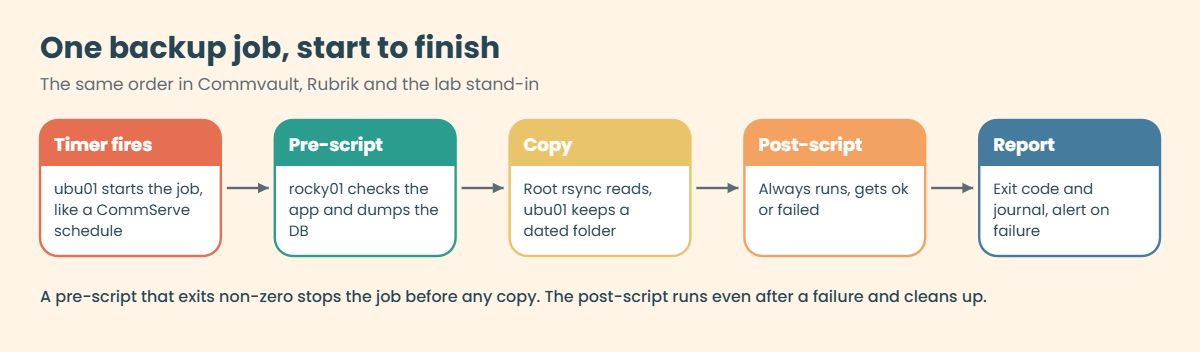
Every product, paid or not, runs a backup job in the same order. Once you know the order, you know where to look when the job fails at 1:30 at night.
1The backup server starts the job
The schedule lives on the backup side: a schedule policy on the CommServe, an SLA domain in Rubrik, and in our lab a systemd timer on ubu01. At the set time the server connects to the client. If that connection fails (wrong port, firewall, DNS, an expired certificate), the job never reaches your scripts, and the error is on the backup side’s screen, not in your logs.
2The pre-script gets the server ready
Before any data moves, the agent runs your pre-script as root. It checks that the app is healthy and puts the data into a state worth copying: a database dump, a flushed cache, or (Lesson 63) a frozen database and a snapshot. Its exit code is a decision.
Exit 0 means “go ahead”; anything else means “don’t copy today”, and the job should stop. The diagram below shows the whole run.
3The data moves
The agent reads the files as root, because a backup that can’t read /etc/shadow or the database files is useless at restore time. It sends them to the MediaAgent or cluster, which deduplicates, compresses and stores them. In the lab, a root rsync started through sudo plays the reader, and ubu01 stores each night in a dated folder, hard-linking files that didn’t change.
4The post-script always runs
Whatever happened, the post-script runs next and gets told the result. It undoes what the pre-script did (unfreeze, remove a snapshot, delete a temporary dump) and records the outcome. A post-script that only runs after success leaves frozen databases and full snapshots behind after every failure, which is when you can least afford them.
5The client must be ready before the first job
Most failed agent installs are not agent bugs. They are a port nobody opened, a DNS name that points to the old IP, a full /var, a clock that is twenty minutes off, or SELinux blocking something because someone wanted it “quick”. The picture below is the checklist you’ll work through on rocky01, from the bottom layer up, with the command that proves each one.
6How a backup sees LVM and files
A file-level agent walks the mounted file systems, so to the agent, /srv/app on lv_app looks like any folder. What it can’t see is what an application holds in memory, which is why the kind of copy matters:
| Kind of copy | What you get | Good enough for |
|---|---|---|
| Files copied while the app runs | Each file as it was when the agent read it, files from different moments | Config, code, static files, logs |
| Crash-consistent (LVM or storage snapshot) | The whole volume at one instant, like pulling the power plug | Most file systems; databases recover like after a crash |
| Application-consistent | The app flushed and paused (or dumped) its data first, then the copy or snapshot | Databases and anything with its own transactions |
Some agent features take their own LVM snapshot to get a crash-consistent view, and those need unallocated space in the volume group, so check the vendor’s rule for how much. The database files under /var/lib/mysql are the classic trap: copied file by file while MariaDB writes, they can restore into a database that won’t start. In this lesson the pre-script makes a logical dump, and Lesson 63 adds a frozen LVM snapshot of lv_db.
Hands-on lab: prepare rocky01 for an agent and run a stand-in backup from ubu01
Before you run any command, double-check it
Read every command twice before you press Enter. Check the target: the server name, the user, the disk or device name, the path and the sizes. These commands are for learning and were tested in our lab, not on your system. At work, run the read-only commands first, follow your change process, make sure a backup exists, and ask a second person to check anything that changes or deletes data. You run them at your own risk.
You’ll switch between rocky01 (the client) and ubu01 (the backup server), and step 2 uses kafka01 once. Take snapshots first on the laptop: VBoxManage snapshot rocky01 take before-l62 and the same for ubu01. On ubu01, load your Lesson 33 key into the agent before you start (eval "$(ssh-agent -s)"; ssh-add), because a few steps copy files with it.
1Run the agent pre-checks on rocky01
Run this on rocky01:
cat /etc/redhat-release; uname -r; getenforce
timedatectl | grep -E 'Time zone|synchronized'
getent hosts rocky01.saatlab.test ubu01.saatlab.test
getent hosts 10.10.10.11
df -h --output=target,avail /opt /var/log
free -h | head -n 2You should see something like this:
Rocky Linux release 10.2 (Red Quartz)
6.12.0-211.16.1.el10_2.0.1.x86_64
Enforcing
Time zone: Asia/Kolkata (IST, +0530)
System clock synchronized: yes
10.10.10.11 rocky01.saatlab.test rocky01
10.10.10.21 ubu01.saatlab.test ubu01
10.10.10.11 rocky01.saatlab.test rocky01
Mounted on Avail
/ 14G
/ 14G
total used free shared buff/cache available
Mem: 1.7Gi 1.1Gi 142Mi 18Mi 628Mi 612MiThese are the lines a vendor’s pre-install checklist asks for, and you’ll paste them into the ticket. The OS and kernel go against the support list, SELinux stays Enforcing, chrony keeps the clock in sync (Lesson 40), and the name of each machine resolves to the right IP both ways. /opt and /var/log share the root file system here, with plenty of room for 1 GB of software and 1 GB of logs; also run findmnt /tmp to see whether /tmp is its own file system with less space. rocky01’s 2 GB of RAM would be the bare minimum for a real Commvault client, which is worth saying in the ticket rather than finding out during the first big backup.
At work, check names against DNS, not only /etc/hosts: dig +short rocky01.saatlab.test and dig +short -x 10.10.10.11. The backup server resolves your name through DNS, and a reverse record that still points to a decommissioned server is a classic reason for “client not reachable”.
✅ Checkpoint: You have the OS, kernel, SELinux mode, time sync, name lookups, space and memory for rocky01, and all of them look sane.
2Open the agent ports for the backup server only
On rocky01, define a firewalld service for Commvault’s two ports and allow it only from ubu01, which plays the backup server:
sudo firewall-cmd --permanent --new-service=commvault
sudo firewall-cmd --permanent --service=commvault --set-description="Commvault CVD 8400 and data/control 8403 (Lesson 62)"
sudo firewall-cmd --permanent --service=commvault --add-port=8400/tcp
sudo firewall-cmd --permanent --service=commvault --add-port=8403/tcp
sudo firewall-cmd --permanent --zone=public --add-rich-rule='rule family="ipv4" source address="10.10.10.21" service name="commvault" accept'
sudo firewall-cmd --reload
sudo firewall-cmd --info-service=commvault
sudo firewall-cmd --zone=public --list-rich-rulesYou should see something like this:
success
success
success
success
success
success
commvault
ports: 8400/tcp 8403/tcp
protocols:
source-ports:
modules:
destination:
includes:
helpers:
rule family="ipv4" source address="10.10.10.21" service name="commvault" acceptA named service keeps the rule readable: six months from now, “commvault” in --list-all tells the next admin why the ports are open, where “8400/tcp” alone doesn’t. The rich rule lets only 10.10.10.21 use it. Now prove it from both sides.
On ubu01, run nc -zv -w 3 10.10.10.11 8403, and on kafka01 run timeout 3 bash -c '</dev/tcp/10.10.10.11/8403':
nc: connect to 10.10.10.11 port 8403 (tcp) failed: Connection refused
bash: connect: No route to host
bash: line 1: /dev/tcp/10.10.10.11/8403: No route to hostThe first line is from ubu01 and it’s the result you want: “Connection refused” means the firewall let the packet in and nothing is listening yet, which is right before the agent is installed. kafka01 got “No route to host”, firewalld’s reject from Lesson 34, so other machines can’t even reach the port. For Rubrik you’d do the same with ports 12800/tcp and 12801/tcp, allowed from the cluster’s addresses.
✅ Checkpoint: --info-service=commvault shows 8400/tcp and 8403/tcp, ubu01 gets “Connection refused” and kafka01 gets “No route to host”.
3Write the pre and post scripts on rocky01
Paste this whole block on rocky01. It creates the pre-script:
sudo tee /usr/local/sbin/backup-pre.sh >/dev/null <<'EOF'
#!/bin/bash
# /usr/local/sbin/backup-pre.sh (SaatVedha Linux course, Lesson 62)
# Runs as root on rocky01 before every backup. Exit 0 = go ahead, anything else stops the job.
set -euo pipefail
META=/var/local/backup-meta
say() { logger -t backup-pre "$*"; echo "backup-pre: $*"; }
# 1. Only back up a healthy app, or you save a broken state
for svc in mariadb php-fpm nginx; do
if ! systemctl is-active --quiet "$svc"; then
say "FAIL: $svc is not running"
exit 2
fi
done
# 2. Save what you need to rebuild the server, not only its files
install -d -m 0700 "$META"
rpm -qa --qf '%{NAME}-%{VERSION}-%{RELEASE}.%{ARCH}\n' | sort > "$META/packages.txt"
lsblk -o NAME,SIZE,TYPE,FSTYPE,MOUNTPOINTS > "$META/lsblk.txt"
{ vgs; lvs; } > "$META/lvm.txt" 2>&1
cp /etc/fstab "$META/fstab"
# 3. A logical dump of the SaatShop database (Lesson 63 adds an LVM snapshot)
mariadb-dump --single-transaction --routines --triggers --databases saatshop > "$META/saatshop.sql"
say "OK: metadata and saatshop.sql ready in $META"
EOFThen the post-script:
sudo tee /usr/local/sbin/backup-post.sh >/dev/null <<'EOF'
#!/bin/bash
# /usr/local/sbin/backup-post.sh (SaatVedha Linux course, Lesson 62)
# Runs as root on rocky01 after every backup attempt. $1 is "ok" or "failed".
set -euo pipefail
META=/var/local/backup-meta
result=${1:-unknown}
say() { logger -t backup-post "$*"; echo "backup-post: $*"; }
# The dump holds customer data: once it is on the backup server, don't keep a spare copy here
rm -f "$META/saatshop.sql"
date '+%F %T' > "$META/last-$result"
say "backup result recorded: $result"
EOF
sudo chmod 0750 /usr/local/sbin/backup-pre.sh /usr/local/sbin/backup-post.sh
sudo bash -n /usr/local/sbin/backup-pre.sh && sudo bash -n /usr/local/sbin/backup-post.sh && echo "syntax OK"Run both by hand once, the way the backup job will:
sudo /usr/local/sbin/backup-pre.sh; echo "pre exit code: $?"
sudo ls -l /var/local/backup-meta
sudo /usr/local/sbin/backup-post.sh okYou should see something like this:
backup-pre: OK: metadata and saatshop.sql ready in /var/local/backup-meta
pre exit code: 0
total 32
-rw-r--r--. 1 root root 612 Oct 27 15:20 fstab
-rw-r--r--. 1 root root 724 Oct 27 15:20 lsblk.txt
-rw-r--r--. 1 root root 689 Oct 27 15:20 lvm.txt
-rw-r--r--. 1 root root 18734 Oct 27 15:20 packages.txt
-rw-r--r--. 1 root root 2760 Oct 27 15:20 saatshop.sql
backup-post: backup result recorded: okThe pre-script refuses to go on if MariaDB, PHP-FPM or Nginx is down, because a backup of a broken app is a broken backup. It saves what you need to rebuild the server (the package list, disks, LVM layout and fstab) next to a mariadb-dump of saatshop, taken with --single-transaction so InnoDB gives one consistent view without locking the shop. set -euo pipefail (Lesson 39) makes any failed command end the script with a non-zero code, which is what tells the job to stop.
The post-script deletes the dump once it’s been copied, so a file full of customer orders doesn’t sit on the server for anyone with root to read later, and it leaves a timestamp in last-ok or last-failed. Lesson 61’s Zabbix can alert when last-ok gets older than a day.
✅ Checkpoint: The pre-script exits 0, /var/local/backup-meta holds the five files, and the post-script records “ok”.
4Create the backup service account and its narrow rights
On rocky01, create the account, the gate script that will be its only command, and the sudo rule (paste the whole block):
sudo useradd --system --create-home --home-dir /var/lib/bkpsvc --shell /bin/bash --comment "Backup service account" bkpsvc
sudo tee /usr/local/sbin/backup-gate.sh >/dev/null <<'EOF'
#!/bin/bash
# /usr/local/sbin/backup-gate.sh (SaatVedha Linux course, Lesson 62)
# Forced command for the backup key of bkpsvc. It allows these requests and nothing else:
# pre | post ok | post failed | rsync in sender (read-only) mode
set -euo pipefail
set -f # never expand wildcards in the request
req=${SSH_ORIGINAL_COMMAND:-}
from=${SSH_CLIENT:-local}
logger -t backup-gate "request from ${from%% *}: ${req:0:120}"
case $req in
pre)
exec sudo -n /usr/local/sbin/backup-pre.sh ;;
"post ok"|"post failed")
exec sudo -n /usr/local/sbin/backup-post.sh "${req#post }" ;;
"rsync --server --sender "*)
case $req in
*--remove*|*--log-file*) ;; # these would let the caller delete or write files
*) # shellcheck disable=SC2086 # split the request into rsync's own arguments
exec sudo -n /usr/bin/rsync ${req#rsync } ;;
esac ;;
esac
echo "backup-gate: request not allowed" >&2
exit 1
EOF
sudo chmod 0755 /usr/local/sbin/backup-gate.sh
sudo tee /etc/sudoers.d/bkpsvc >/dev/null <<'EOF'
# /etc/sudoers.d/bkpsvc (Lesson 62): what the backup account may run as root, nothing more
bkpsvc ALL=(root) NOPASSWD: /usr/local/sbin/backup-pre.sh, \
/usr/local/sbin/backup-post.sh ok, \
/usr/local/sbin/backup-post.sh failed, \
/usr/bin/rsync --server --sender *
EOF
sudo chmod 0440 /etc/sudoers.d/bkpsvc
sudo visudo -cf /etc/sudoers.d/bkpsvc
id bkpsvc
sudo -l -U bkpsvc | tail -n 2You should see something like this:
/etc/sudoers.d/bkpsvc: parsed OK
uid=976(bkpsvc) gid=976(bkpsvc) groups=976(bkpsvc)
User bkpsvc may run the following commands on rocky01:
(root) NOPASSWD: /usr/local/sbin/backup-pre.sh, /usr/local/sbin/backup-post.sh ok, /usr/local/sbin/backup-post.sh failed, /usr/bin/rsync --server --sender *bkpsvc is a system account with a locked password, so nobody can log in as it with a password. Its sudo rule names the exact commands and arguments, the way Lesson 16 taught: the two scripts (and the post-script only with “ok” or “failed”), and rsync only in --server --sender mode, which is the mode where rsync on this side reads and sends files. The gate script adds a second check, because sudo’s * would also match rsync options such as --remove-source-files, which deletes the files it has sent.
✅ Checkpoint: visudo -cf says “parsed OK”, and sudo -l -U bkpsvc lists four commands.
5Give the backup server its own key, locked to the gate
On ubu01, create a key without a passphrase for the job (a timer can’t type one) and copy the public half to rocky01 with your normal key:
ssh-keygen -t ed25519 -N '' -C 'backup-job@ubu01' -f ~/.ssh/backup_ed25519
scp ~/.ssh/backup_ed25519.pub rocky01:/tmp/On rocky01, install it for bkpsvc with its restrictions, and give the folder the right SELinux label:
sudo install -d -m 0700 -o bkpsvc -g bkpsvc /var/lib/bkpsvc/.ssh
echo 'restrict,from="10.10.10.21",command="/usr/local/sbin/backup-gate.sh" '"$(cat /tmp/backup_ed25519.pub)" | sudo tee /var/lib/bkpsvc/.ssh/authorized_keys
sudo chown bkpsvc:bkpsvc /var/lib/bkpsvc/.ssh/authorized_keys
sudo chmod 0600 /var/lib/bkpsvc/.ssh/authorized_keys
sudo restorecon -Rv /var/lib/bkpsvc/.ssh
rm /tmp/backup_ed25519.pubYou should see something like this:
restrict,from="10.10.10.21",command="/usr/local/sbin/backup-gate.sh" ssh-ed25519 AAAAC3NzaC1lZDI1NTE5AAAAIL0d3Wq8bV2nYk7rT4xPz1mHc9sJ5uFgE6aQyN2oR8tK backup-job@ubu01
Relabeled /var/lib/bkpsvc/.ssh from unconfined_u:object_r:var_lib_t:s0 to unconfined_u:object_r:ssh_home_t:s0
Relabeled /var/lib/bkpsvc/.ssh/authorized_keys from unconfined_u:object_r:var_lib_t:s0 to unconfined_u:object_r:ssh_home_t:s0The options in front of the key are the real protection. restrict turns off terminals and every kind of forwarding, from= accepts the key only from ubu01’s address, and command= means sshd runs the gate whatever the client asks for, passing the request in SSH_ORIGINAL_COMMAND. The SELinux policy already has a rule for .ssh folders under /var/lib, so restorecon gives them the ssh_home_t label that sshd expects.
Back on ubu01, add a host alias for the job and test what the key can and can’t do:
cat >> ~/.ssh/config <<'EOF'
Host rocky01-backup
HostName 10.10.10.11
User bkpsvc
IdentityFile ~/.ssh/backup_ed25519
IdentitiesOnly yes
BatchMode yes
ConnectTimeout 10
EOF
ssh rocky01-backup pre
ssh rocky01-backup "post ok"
ssh rocky01-backup "cat /etc/shadow"You should see something like this:
backup-pre: OK: metadata and saatshop.sql ready in /var/local/backup-meta
backup-post: backup result recorded: ok
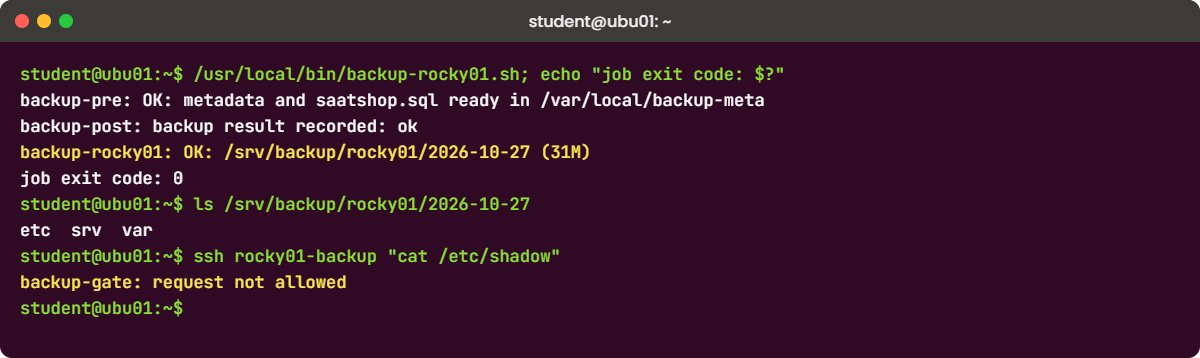
backup-gate: request not allowedThe alias keeps the job script short and sets IdentitiesOnly yes, so SSH offers only the backup key. Without it, SSH could also offer your Lesson 33 key from the agent, and each rejected key counts as a failed login for fail2ban on rocky01 (Lesson 55 bans after three). BatchMode yes makes SSH fail at once instead of waiting for a prompt nobody will answer at 1:30 at night. rocky01’s journal shows every request: sudo journalctl -t backup-gate -n 3.
✅ Checkpoint: pre and “post ok” work through the alias, and “cat /etc/shadow” is refused with “request not allowed”.
6Run the backup job from ubu01
On ubu01, install the job script (paste the whole block):
sudo tee /usr/local/bin/backup-rocky01.sh >/dev/null <<'EOF'
#!/bin/bash
# /usr/local/bin/backup-rocky01.sh (SaatVedha Linux course, Lesson 62)
# Runs on ubu01 as student: pre-script on rocky01, pull the files, post-script on rocky01.
set -euo pipefail
CLIENT=rocky01-backup # Host block in ~/.ssh/config
DEST=/srv/backup/rocky01
SOURCES=(/etc /srv/app /var/local/backup-meta)
MIN_FREE_MB=${MIN_FREE_MB:-1024}
TODAY=$(date +%F)
say() { echo "backup-rocky01: $*"; }
# 1. Is there room on the backup target?
free_mb=$(df -Pm "$DEST" | awk 'NR==2 {print $4}')
if (( free_mb < MIN_FREE_MB )); then
say "FAIL: only ${free_mb} MB free in $DEST, need ${MIN_FREE_MB} MB"
exit 3
fi
# 2. Pre-script on the client. If it fails, no copy is taken.
if ! ssh "$CLIENT" pre; then
say "FAIL: pre-script failed on rocky01, nothing copied"
ssh "$CLIENT" "post failed" || true
exit 2
fi
# 3. Copy into a dated folder; unchanged files become hard links to the last good copy
prev=$(find "$DEST" -mindepth 1 -maxdepth 1 -type d -name '20??-??-??' ! -name "$TODAY" | sort | tail -n 1)
link=()
if [[ -n $prev ]]; then link=(--link-dest="$prev"); fi
remote=()
for s in "${SOURCES[@]}"; do remote+=("$CLIENT:$s"); done
status=ok
if ! rsync -aHAXR --delete --numeric-ids --fake-super "${link[@]}" "${remote[@]}" "$DEST/$TODAY/"; then
status=failed
fi
# 4. Post-script always runs, and gets the result
# shellcheck disable=SC2029 # $status is meant to expand here, on ubu01
ssh "$CLIENT" "post $status" || say "WARN: post-script failed on rocky01"
if [[ $status != ok ]]; then
say "FAIL: copy to $DEST/$TODAY did not complete"
exit 1
fi
say "OK: $DEST/$TODAY ($(du -sh "$DEST/$TODAY" | cut -f1))"
EOF
sudo chmod 0755 /usr/local/bin/backup-rocky01.sh
bash -n /usr/local/bin/backup-rocky01.sh && echo "syntax OK"Run it as student, then look at what arrived:
/usr/local/bin/backup-rocky01.sh; echo "job exit code: $?"
ls /srv/backup/rocky01
ls /srv/backup/rocky01/$(date +%F)
sudo apt install -y attr
cd /srv/backup/rocky01/$(date +%F) && getfattr -n user.rsync.%stat etc/shadow; cdYou should see something like this:
backup-pre: OK: metadata and saatshop.sql ready in /var/local/backup-meta
backup-post: backup result recorded: ok
backup-rocky01: OK: /srv/backup/rocky01/2026-10-27 (31M)
job exit code: 0
2026-10-27 site
etc srv var
# file: etc/shadow
user.rsync.%stat="100000 0,0 0:0"The job checked for 1 GB of room, ran the pre-script, pulled /etc, /srv/app and the metadata folder, and ran the post-script with the result. -R kept the full paths, so the copy has etc, srv and var at the top, next to Lesson 37’s site folder. rsync on rocky01 ran as root through the gate and sudo, which is why even /etc/shadow came across.
student on ubu01 can’t create files owned by root, so --fake-super stores the real owner and mode in an extended attribute instead: “100000 0,0 0:0” means a regular file with mode 0000, owned by UID 0 and GID 0, which matches /etc/shadow on rocky01. --numeric-ids keeps the numbers rather than mapping names, because UID 27 is mysql on Rocky and nothing on Ubuntu. When you restore with the same option as root, rsync puts the owners and modes back.
✅ Checkpoint: The job prints “OK” with exit code 0, today’s folder holds etc, srv and var, and getfattr shows the saved owner and mode of etc/shadow.
7Schedule it with a systemd timer on ubu01
Create the service and the timer (paste the whole block):
sudo tee /etc/systemd/system/backup-rocky01.service >/dev/null <<'EOF'
[Unit]
Description=Pull a backup of rocky01 into /srv/backup (SaatVedha Lesson 62)
Wants=network-online.target
After=network-online.target
[Service]
Type=oneshot
User=student
Group=student
ExecStart=/usr/local/bin/backup-rocky01.sh
Nice=10
IOSchedulingClass=idle
EOF
sudo tee /etc/systemd/system/backup-rocky01.timer >/dev/null <<'EOF'
[Unit]
Description=Nightly backup of rocky01 (SaatVedha Lesson 62)
[Timer]
OnCalendar=*-*-* 01:30:00
RandomizedDelaySec=15min
Persistent=true
[Install]
WantedBy=timers.target
EOF
sudo systemctl daemon-reload
sudo systemctl enable --now backup-rocky01.timer
sudo systemctl start backup-rocky01.service
systemctl list-timers backup-rocky01.timer --no-legend
journalctl -u backup-rocky01.service -n 6 --no-pagerYou should see something like this:
Created symlink '/etc/systemd/system/timers.target.wants/backup-rocky01.timer' → '/etc/systemd/system/backup-rocky01.timer'.
Wed 2026-10-28 01:41:17 IST 10h - - backup-rocky01.timer backup-rocky01.service
Oct 27 15:36:02 ubu01 systemd[1]: Starting backup-rocky01.service - Pull a backup of rocky01 into /srv/backup (SaatVedha Lesson 62)...
Oct 27 15:36:03 ubu01 backup-rocky01.sh[3120]: backup-pre: OK: metadata and saatshop.sql ready in /var/local/backup-meta
Oct 27 15:36:05 ubu01 backup-rocky01.sh[3120]: backup-post: backup result recorded: ok
Oct 27 15:36:05 ubu01 backup-rocky01.sh[3120]: backup-rocky01: OK: /srv/backup/rocky01/2026-10-27 (31M)
Oct 27 15:36:05 ubu01 systemd[1]: backup-rocky01.service: Deactivated successfully.
Oct 27 15:36:05 ubu01 systemd[1]: Finished backup-rocky01.service - Pull a backup of rocky01 into /srv/backup (SaatVedha Lesson 62).This is Lesson 27’s pattern with three additions. User=student runs the job without root on the backup server, because it only needs to write into /srv/backup. RandomizedDelaySec=15min spreads the start, so fifty clients on one backup server don’t all start at 01:30:00, and Persistent=true runs a missed backup after ubu01 was off at that time.
The second run of the day went into the same dated folder; --delete keeps that folder an exact copy of rocky01 at the last run.
At work you’d run this as a dedicated account on the backup server, not your own login. Here /srv/backup belongs to student since Lesson 37, so the lab keeps it simple.
✅ Checkpoint: list-timers shows the next run around 01:30 to 01:45, and the journal ends with “Deactivated successfully” and “Finished”.
8See hard links save space, and check a restore
Pretend today’s copy is yesterday’s, run the job again and compare:
cd /srv/backup/rocky01
mv "$(date +%F)" "$(date -d yesterday +%F)"
/usr/local/bin/backup-rocky01.sh | tail -n 1
du -sh "$(date -d yesterday +%F)" "$(date +%F)"
stat -c '%h %n' 20*/etc/hosts
ssh rocky01 cat /etc/hosts | diff - "$(date +%F)/etc/hosts" && echo "backup matches rocky01"You should see something like this:
backup-rocky01: OK: /srv/backup/rocky01/2026-10-27 (31M)
31M 2026-10-26
1.2M 2026-10-27
2 2026-10-26/etc/hosts
2 2026-10-27/etc/hosts
backup matches rocky01The job found the older folder and used it with --link-dest: every unchanged file became a hard link to yesterday’s copy (link count 2), so the new night costs about 1.2 MB, the files that did change, while each folder still looks like a full backup you can restore from. du counts a hard-linked file only once, the first time it meets it. The diff shows the copy of /etc/hosts is identical to the live one, and that is the smallest restore test there is.
✅ Checkpoint: du shows the second folder at a small fraction of the first, /etc/hosts has two links, and the diff prints “backup matches rocky01”.
Break It, Then Fix It
Take snapshots of rocky01 and ubu01 first (VBoxManage snapshot rocky01 take before-l62-break, and the same for ubu01). Both failures below happen in real backup estates every week; the difference between a good and a bad setup is whether anyone finds out the same night.
1The pre-script fails, and the job must stop
On rocky01, stop the database. On ubu01, start the job through systemd:
sudo systemctl stop mariadb # on rocky01
sudo systemctl start backup-rocky01.service # on ubu01
systemctl status backup-rocky01.service --no-pager | grep -E 'Active|Process'
journalctl -u backup-rocky01.service -n 3 -o cat --no-pagerYou’ll get this error:
Job for backup-rocky01.service failed because the control process exited with error code.
See "systemctl status backup-rocky01.service" and "journalctl -xeu backup-rocky01.service" for details.
Active: failed (Result: exit-code) since Tue 2026-10-27 16:02:11 IST; 4s ago
Process: 3388 ExecStart=/usr/local/bin/backup-rocky01.sh (code=exited, status=2/INVALIDARGUMENT)
backup-pre: FAIL: mariadb is not running
backup-rocky01: FAIL: pre-script failed on rocky01, nothing copied
backup-post: backup result recorded: failedThis is the behaviour you want: the pre-script exited 2, the job copied nothing, the post-script still ran and recorded “failed”, and systemd marked the unit failed (systemd prints exit code 2 as INVALIDARGUMENT, an old LSB name; read it as “2”). systemctl --failed and your monitoring now show a red line. Now see what a common “improvement” does. A colleague thinks one bad check shouldn’t kill the whole backup and softens the pre-script line; try his version from a copy:
sed 's/^if ! ssh "$CLIENT" pre; then/if ! { ssh "$CLIENT" pre || say "pre-script reported a problem"; }; then/' /usr/local/bin/backup-rocky01.sh > /tmp/backup-naive.sh
bash /tmp/backup-naive.sh; echo "exit code: $?"
ls /srv/backup/rocky01/$(date +%F)/var/local/backup-metaYou’ll get this:
backup-pre: FAIL: mariadb is not running
backup-rocky01: pre-script reported a problem
backup-post: backup result recorded: ok
backup-rocky01: OK: /srv/backup/rocky01/2026-10-27 (31M)
exit code: 0
fstab last-failed last-ok lsblk.txt lvm.txt packages.txtThe || swallowed the exit code, so the job went on, the post-script was told “ok”, and the report says OK. Look at the listing: saatshop.sql is gone. The post-script of the earlier run deleted the dump on rocky01, the failed pre-script never made a new one, and --delete made today’s copy match, so this “successful” job removed the only good copy of the database from tonight’s folder.
Nobody will notice until the restore.
Fix: delete the softened copy, start MariaDB and run the real job again.
rm /tmp/backup-naive.sh # on ubu01
sudo systemctl start mariadb # on rocky01
sudo systemctl start backup-rocky01.service # on ubu01
ls /srv/backup/rocky01/$(date +%F)/var/local/backup-metafstab last-failed last-ok lsblk.txt lvm.txt packages.txt saatshop.sql✅ Checkpoint: systemctl is-failed backup-rocky01.service prints “active” (not “failed”) and saatshop.sql is back in tonight’s folder.
2The backup disk fills up
On ubu01, lay a tiny 5 MB tmpfs over the folder for a few minutes, so you can fill it without touching ubu01’s real disk, then run the job:
sudo mount -t tmpfs -o size=5m,uid=student,gid=student,mode=0755 tmpfs /srv/backup/rocky01
/usr/local/bin/backup-rocky01.sh; echo "exit code: $?"You’ll get this error:
backup-rocky01: FAIL: only 5 MB free in /srv/backup/rocky01, need 1024 MB
exit code: 3The space check stopped the job before it touched rocky01, with its own exit code, 3. A size check can only guess, though: a night with a big change still fills the disk halfway through. Skip the check with the override built into the script and watch that happen:
MIN_FREE_MB=1 /usr/local/bin/backup-rocky01.sh; echo "exit code: $?"You’ll get this error:
backup-pre: OK: metadata and saatshop.sql ready in /var/local/backup-meta
rsync: [receiver] write failed on "/srv/backup/rocky01/2026-10-27/etc/pki/ca-trust/extracted/java/cacerts": No space left on device (28)
rsync error: error in file IO (code 11) at receiver.c(518) [receiver=3.4.1]
backup-post: backup result recorded: failed
backup-rocky01: FAIL: copy to /srv/backup/rocky01/2026-10-27 did not complete
exit code: 1rsync stopped at the first file that didn’t fit, with error 28 (ENOSPC) and rsync’s own code 11 (file I/O). The job still ran the post-script with “failed” and exited 1. On a real backup server this is the night the backup disk was 97 percent full and nobody had a retention rule.
Fix: remove the tmpfs (your real backups come back into view), then look at what you keep and for how long.
sudo umount /srv/backup/rocky01
ls /srv/backup/rocky01
df -h --output=target,avail /srv/backup
find /srv/backup/rocky01 -mindepth 1 -maxdepth 1 -type d -name '20??-??-??' -mtime +14 -print2026-10-26 2026-10-27 site
Mounted on Avail
/ 4.0G
The last command is the dry run of a retention rule (Lesson 25): it prints dated folders older than 14 days and deletes nothing. Once you trust the list, a weekly timer can run it with -exec rm -rf {} +. Real products do the same with retention rules and a “days and cycles” setting, and they alert on free space; add a Zabbix check on df for /srv/backup at 80 percent.
✅ Checkpoint: /srv/backup/rocky01 shows your dated folders and Lesson 37’s site folder again, and the find dry run prints nothing (or only folders you agree to remove).
This happened at work
Twenty-three green ticks and no playlists
I was on the infrastructure team of a music streaming app in Ahmedabad when this one happened, a week before a big festival release. A developer ran an UPDATE without a WHERE clause on the playlist database on a Thursday evening, and we went to restore the night’s backup. The backup console showed a green tick for every night of the month.
The restore brought back the files, but the database dump in it was zero bytes. We went back night by night: twenty-three dumps in a row were empty. Three weeks earlier the DB team had rotated the password of the backup user, and the pre-script’s mysqldump had failed every night since with “Access denied”.
The script wrote the dump with a redirect and ended with echo "pre-backup done", so its exit code was always 0, and the agent went on and backed up an empty file with full confidence. We rebuilt most playlists from the app’s event stream, which took two days, and some users’ edits from that evening were lost for good.
After that, every pre-script started with set -euo pipefail and checked that the dump was bigger than a minimum size before exiting 0. The backup user moved to unix_socket authentication so there was no password to rotate, and a monthly restore test into a scratch server became a calendar entry with an owner. A green tick now meant “a restore test passed this month”, not “a job finished”.
Common mistakes and troubleshooting
| Mistake | What happens | What to do instead |
|---|---|---|
| Opening the agent ports to everyone | Any machine on the network can talk to a root-level service | A firewalld service plus a rich rule from the backup server’s addresses only |
A pre-script that ends with echo done | Exit code 0 even when the dump failed; the job backs up garbage | Use set -euo pipefail, check results, and exit non-zero on any failure |
| Running the post-script only after success | Frozen databases, snapshots and dumps stay behind after every failed night | Call the post-script always, and pass it the result |
Giving the backup account ALL=(ALL) NOPASSWD: ALL | A stolen backup key is root on every server | Exact commands in sudoers, plus a forced command for the key |
| Setting SELinux to permissive “until the agent works” | It stays permissive for years and the server loses its main defence | Read the AVC, install the vendor’s policy module, keep Enforcing |
| Backing up the live /var/lib/mysql files | A restore that won’t start, or silently missing rows | A dump in the pre-script now, a frozen snapshot in Lesson 63 |
| Calling it done after the first green job | Nobody knows if the backup can be restored | Restore something real on a schedule and record the result |
Interview questions
Click a question to open it. Each one is written the way an interviewer would ask it. Under it you will see why they ask it and one way you could answer, in your own words.
Fresher level
1. The backup team asks you to “prepare a Linux server for the agent”. What do you check before they install anything?
Why they ask this: They want to see that you know an agent install is mostly OS work, and that you work from a checklist instead of finding problems one failed job at a time.
How you might answer: I check the OS and kernel against the vendor’s support list, that time is synced with chrony and the names resolve both ways in DNS, and that there’s space for the software, logs and temp files, for Commvault about 1 GB each, plus enough RAM.
Then the network: the agent ports, 8400 and 8403 for Commvault or 12800 and 12801 for Rubrik, opened in firewalld only from the backup servers, and tested with nc. I keep SELinux enforcing and ask for the vendor’s policy module, and I agree with them on the pre and post scripts and how failures are reported.
2. What is a pre-script and a post-script in a backup job, and why does the exit code matter?
Why they ask this: A basic concept check: they want to hear that a pre-script prepares the data and that its exit code controls whether the copy happens.
How you might answer: The pre-script runs before the data is read, for example to dump or freeze a database, and the post-script runs after, to undo that and clean up. The backup software reads the pre-script’s exit code: 0 means go ahead, anything else means stop.
So a pre-script must fail loudly. If it hides an error with something like an echo at the end, the job backs up a broken or empty dump and reports success, which you only discover when you try to restore.
2–5 years experience
3. A backup job fails with “client not reachable” but you can SSH to the server fine. Walk me through it.
Why they ask this: They’re testing a layered approach: name resolution, the vendor ports, firewall, and the agent service, instead of guessing.
How you might answer: SSH working only proves port 22. I’d check from the backup server side that the name resolves to the right IP, forward and reverse, then test the agent ports with nc from the MediaAgent or cluster. “Connection refused” means the firewall passed it but the agent isn’t listening, so I check the service; “No route to host” or a timeout points to firewalld or a network firewall.
I’d also check the clock, because certificate-based agents fail when time drifts, and the agent’s own log on the client. Most of the time it’s a firewall rule that allowed the old backup server’s IP, or a reverse DNS record pointing somewhere else.
4. How would you give a backup system root-level read access on Linux without handing it full root?
Why they ask this: They want least privilege thinking: separate account, key restrictions, exact sudo rules.
How you might answer: I’d create a dedicated service account with a locked password and a key that only the backup server holds. In authorized_keys the key gets restrict, a from= with the backup server’s address and a forced command, so whatever it asks, sshd runs my gate script.
The gate allows only the pre-script, the post-script and rsync in sender mode, and sudoers lists those commands with their arguments and nothing else. Every request is logged. The account can read everything, which a backup needs, but it can’t write, delete or get a shell.
Senior level
5. You inherit 400 Linux servers backed up by an agent. How do you find out whether the backups are any good?
Why they ask this: Seniors should go beyond job status to restore testing, coverage and evidence.
How you might answer: First coverage: I compare the CMDB or inventory with the clients in the backup console, because the dangerous servers are the ones nobody added. Then I read the job history for partial successes and skipped files, not only failures, and I check which servers have application-consistent backups for their databases.
Then evidence: scheduled restore tests by tier, a full restore of a database into a scratch server, a few file restores, and one bare-metal rebuild a year, each with a recorded time. Pre-scripts get reviewed for error handling. I report restore success and restore time, because “jobs green” says nothing about either.
6. A security review says the backup agent is a big risk because it runs as root on every server. How do you respond?
Why they ask this: They want a balanced answer: the need for broad read access, and the controls that reduce the risk.
How you might answer: They’re right that it’s high-value: whoever controls the backup server can read and often restore files onto every client. A backup has to read everything, so the answer is to control the path, not to remove root.
I’d restrict the agent ports to the backup servers in the host firewall, keep SELinux enforcing with the vendor’s policy, protect the backup server and its admin console with MFA and separate admin accounts, encrypt backups, and alert on restores and on changes to pre/post scripts. Where the product supports it, I’d also use immutable or air-gapped copies, so ransomware on the backup side can’t delete history.
Quick quiz
Q1. From the backup server, nc -zv 10.10.10.11 8403 prints “Connection refused” before the agent is installed. What does it mean?
- The firewall blocked the port
- The packet passed the firewall and nothing listens on 8403 yet
- DNS failed
- The server is down
Show answer
B — Refused is an answer from the server’s TCP stack. firewalld’s reject shows as “No route to host”.
Q2. A pre-script’s dump fails, but the script ends with echo "done". What does the backup job do?
- Stops and reports a failure
- Retries the pre-script
- Goes on and backs up the bad dump, reporting success
- Skips the post-script
Show answer
C — The exit code of the last command (echo) is 0, so the job sees success.
Q3. Which authorized_keys option makes sshd run your script whatever command the client sends?
restrictfrom="10.10.10.21"command="/usr/local/sbin/backup-gate.sh"no-pty
Show answer
C — A forced command runs instead of the requested one; the request is in SSH_ORIGINAL_COMMAND.
Q4. Why does the job use --fake-super when ubu01 receives files as student?
- To make the copy faster
- To store owners and modes in extended attributes, since student can’t chown to root
- To skip root-owned files
- To compress the files
Show answer
B — A non-root receiver keeps the real owner and mode in user.rsync.%stat, and a later restore puts them back.
Q5. What does --link-dest do in the nightly copy?
- Deletes yesterday’s folder
- Creates symbolic links to rocky01
- Hard-links unchanged files to the previous folder, so each night costs only the changes
- Copies only the files that changed into one folder
Show answer
C — Every dated folder looks complete, but unchanged files share disk blocks with the last copy.
Quick recap
- A backup agent is a guest: the backup server starts the job, connects in on the vendor’s ports and runs your pre and post scripts as root.
- Check OS support, time, forward and reverse DNS, space, memory and SELinux before the agent arrives, and open its ports only from the backup servers.
- A pre-script’s exit code decides whether the copy happens; make it fail loudly with
set -euo pipefail. The post-script always runs and cleans up. - Give backup access through a dedicated account: a key with restrict, from= and a forced command, and exact commands in sudoers.
- The stand-in job pulls with rsync over SSH into dated folders, keeps owners with
--fake-superand saves space with--link-dest. - Watch free space and retention on the backup side, and prove backups with restore tests, not green ticks.
Next lesson
Lesson 63: Consistent backups: LVM snapshot with a MariaDB freeze → You’ll hold FLUSH TABLES WITH READ LOCK in one session while LVM snapshots lv_db, plug that into these pre and post scripts, and restore the copy into a scratch MariaDB to prove it works.
Further reading: Linux backup agent
Want to go deeper into Linux backup agent? Read Commvault’s port requirements, the Linux File System Agent system requirements and the pre-process and post-process overview; Rubrik’s public Ansible role for the Rubrik connector shows the package, service and ports; and for the stand-in, the rsync manual (fake-super, link-dest) and the AUTHORIZED_KEYS section of sshd(8). You can also see the full plan for this course on the Linux Administration course page.
