Monitoring with Zabbix: agent 2, server and HA proxies
-
Phase 0: Before you start
-
Phase 1: The origins and OS architecture
-
Phase 2: Day-to-day administration and the command builder
-
Phase 3: Enterprise infrastructure and storage
-
Phase 4: Troubleshooting step by step
-
Phase 5: Final project and career
A Zabbix proxy collects monitoring data for a group of servers and forwards it to the Zabbix server, so one central server can watch machines in other networks, data centres or cloud accounts without connecting to each of them. Since Zabbix 7.0, two or more proxies can form a proxy group: when one proxy dies, its hosts move to the others, and monitoring carries on.
In this lesson you’ll install Zabbix 7.0 LTS, the current long-term release, with PostgreSQL and the web frontend on ubu01, put a proxy on rocky01 and a second one on kafka01 in one proxy group, and run agent 2 on all three VMs. You’ll watch the Kafka nodes from Lesson 60, stop a proxy to see the failover, and then break the proxy name and the agent’s ServerActive line on purpose.
Where this lesson fits
Lesson 61 of 82 in Linux Administration · Phase 3: Enterprise infrastructure and storage · Before this: Lesson 60, Kafka security with SSL and SASL · Next: Lesson 62, preparing Linux for backup agents
| Time | You need | By the end you can |
|---|---|---|
| About 2 hours | ubu01, rocky01 and kafka01 running together (8 GB of VM RAM, so a 16 GB laptop; the lab says how to squeeze it onto 8 GB), a browser on your laptop | Install a Zabbix server, frontend, proxies and agent 2 from the official repos, open the right firewall ports and SELinux boolean, build a proxy group, and fix the two most common proxy and agent mistakes |
What it is, in one line
Zabbix agent 2 on each server sends its numbers to a nearby proxy, the proxies forward everything to one Zabbix server that stores it and raises alerts, and a proxy group lets a surviving proxy take over the servers of one that failed.
In Simple Words
Tiffin carriers and the sorting point
Think of Mumbai’s tiffin carriers. Each carrier collects lunch boxes from homes in his own lane and brings them to a sorting point at the local station, where the boxes are grouped and sent on to the office area in one batch. Nobody from the office runs to every home.
If one sorting point floods in the monsoon, the carriers walk to the next station’s point instead, and lunch still arrives. That only works if every carrier already knows both sorting points; a carrier who only knows the flooded one stands there with his boxes.
The homes are your servers with agent 2, the sorting points are proxies, the office is the Zabbix server, and the list of sorting points a carrier knows is the agent’s ServerActive line.
Engineer's View
Zabbix 7.0 LTS: the pieces, the ports and the versions
Zabbix 7.0 LTS came out on 4 June 2024, with full support until June 2027 and limited support until June 2029; 7.0.32 was released on 20 October 2026. Zabbix 8.0 LTS is due in late 2026 and was at release-candidate stage when this lesson was written, so production installs still start on 7.0 and plan the 8.0 upgrade later. Zabbix’s own repositories carry 7.0 for Ubuntu 26.04 and for Rocky Linux 10.
| Component | Job | Port | In this lab |
|---|---|---|---|
| Zabbix server | Stores data in a database, evaluates triggers, sends alerts, serves configuration to proxies | 10051 in | ubu01, zabbix-server-pgsql with PostgreSQL 18 |
| Web frontend | PHP pages for configuration and dashboards | 8080 (our choice) in | ubu01, Nginx and PHP-FPM |
| Proxy | Collects from agents nearby, buffers, forwards to the server | 10051 in, connects out to the server | proxy-rocky01 and proxy-kafka01, SQLite, active mode |
| Agent 2 | Go agent with plugins (systemd, Docker, databases) | 10050 in for passive checks | rocky01, kafka01 and ubu01 |
| zabbix_get | Asks an agent for one value, for testing | connects to 10050 | installed on ubu01 and rocky01 |
Checks come in two directions. A passive check means the server or proxy connects to the agent on 10050 and asks for a value, so the agent’s Server= must list who may ask. An active check means the agent connects out to 10051, asks for its list of items and sends values back, so ServerActive= must point at the right proxy or proxies, and Hostname= must match the host name in the frontend, letter for letter.
On memory: the server, PostgreSQL, Nginx and PHP-FPM fit in ubu01’s 2 GB for a three-host lab, using roughly 700 to 900 MB. A real installation of a few thousand hosts needs a much bigger database server, which Zabbix’s sizing guide covers; a proxy with SQLite stays small, typically under 100 MB.
How it works, step by step
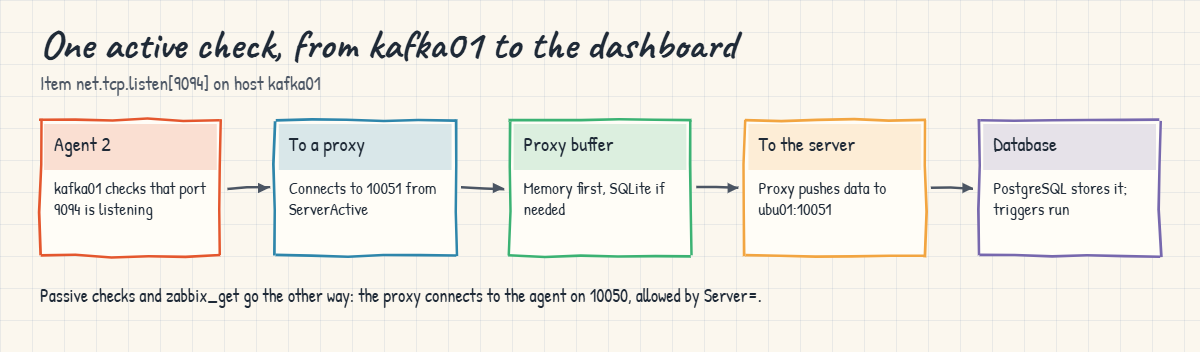
Follow one number, kafka01’s check that the SASL_SSL port is listening, from the agent to the dashboard.
1The agent asks a proxy what to collect
Agent 2 on kafka01 connects to the first address in ServerActive and sends its Hostname. The proxy looks the name up in the configuration it copied from the server; if kafka01 belongs to it, the agent gets its item list. If the host is assigned to the other proxy in the group, the proxy answers with a redirect, which 7.0 agents follow on their own.
2Values go to the proxy, then to the server
The agent collects each item on its interval and sends the values to its proxy, which keeps them in memory and, if needed, in its SQLite database (the shipped config sets ProxyBufferMode=hybrid). An active proxy connects to the server on 10051 every second or so to send data and every 10 seconds to fetch configuration changes. The server stores the values in PostgreSQL and evaluates triggers.
The diagram below shows the whole trip.
3Passive checks run the other way
For a passive item, or when you test with zabbix_get, the proxy or server opens a connection to the agent’s port 10050. The agent accepts it only from addresses in Server=, so that line lists both proxies here. Agent 2 drops a connection from anyone else and logs “connection from … rejected”.
4Active and passive proxies
An active proxy (the default, ProxyMode=0) connects to the server, which suits proxies behind NAT or in other networks because only the server’s 10051 has to be reachable. A passive proxy waits for the server to connect to it. For an active proxy, Hostname= must equal the proxy name in the frontend, because that name is the only way the server knows which configuration to send.
5Proxy groups: high availability for proxies
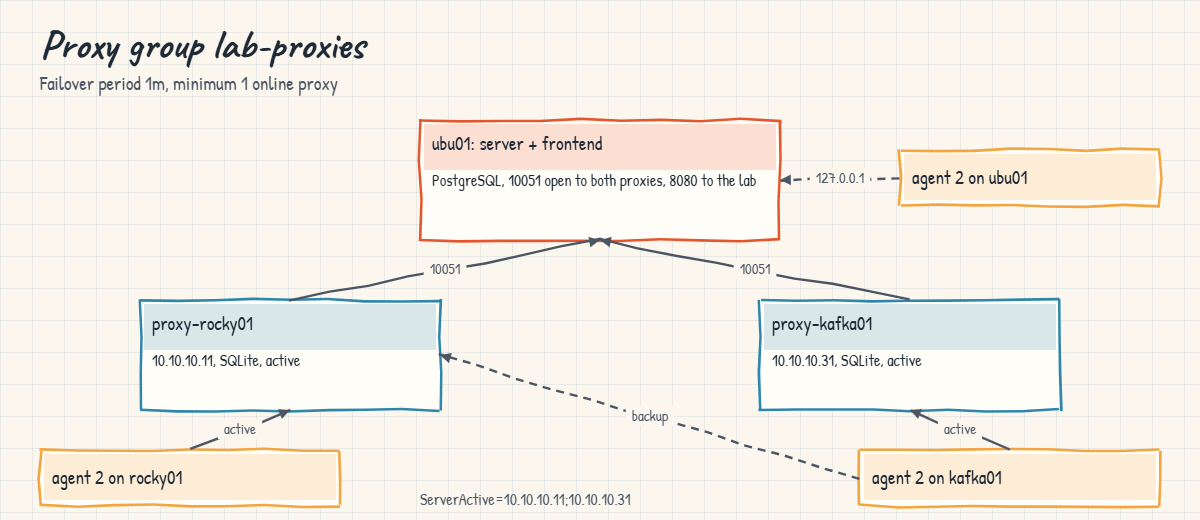
A proxy group, new in Zabbix 7.0, has a failover period (default 1m) and a minimum number of online proxies (default 1). Hosts are “monitored by” the group, and the server spreads them across the online members. When a proxy stops reporting for longer than the failover period, the server marks it offline and moves its hosts to the remaining proxies, which pick up the work at their next configuration sync.
For this to work, agents must know every proxy in the group: ServerActive lists them separated by semicolons, and Server= lists them separated by commas. The picture below shows the group in this lab.
6Firewalls, SELinux and the official packages
Each VM needs only the ports its role uses. ubu01 runs ufw (Lesson 34), so it allows 10051 from the two proxies and 8080 from the lab network; the server’s own agent is reached over 127.0.0.1, which ufw doesn’t filter. rocky01 and kafka01 run firewalld and open 10050 for the agent and 10051 for the proxy. Their SELinux policy confines the proxy, and its connection out to the server needs the zabbix_can_network boolean, which the RHEL policy ships switched off.
Install from repo.zabbix.com, not from distribution repositories: EPEL (enabled on rocky01 since Lesson 55) also ships Zabbix packages with other versions and file paths, so the Zabbix docs tell you to exclude them. Keep server and proxies on the same major version, because an older proxy is refused with “current proxy version is not supported by server” after the server is upgraded.
Hands-on lab: a Zabbix server, two proxies in a group and agent 2
Before you run any command, double-check it
Read every command twice before you press Enter. Check the target: the server name, the user, the disk or device name, the path and the sizes. These commands are for learning and were tested in our lab, not on your system. At work, run the read-only commands first, follow your change process, make sure a backup exists, and ask a second person to check anything that changes or deletes data. You run them at your own risk.
Step 1 runs on the laptop, steps 2 to 5 on ubu01, step 6 on rocky01, step 7 on kafka01, and steps 8 and 9 move between them; each step says where. The Zabbix web pages are reached from the laptop’s browser through a port forward.
1Plan the RAM and take snapshots
On the laptop, start the three VMs and snapshot them:
VBoxManage startvm ubu01 rocky01 kafka01 --type=headless
VBoxManage list runningvms
for vm in ubu01 rocky01 kafka01; do VBoxManage snapshot $vm take before-l61; doneYou should see something like this (snapshot progress cut):
"rocky01" {6b0f4c1e-2d3a-4b8e-9f10-7c2d5e8a1b34}
"ubu01" {a3e9d7c2-5f1b-4e6a-8d20-1b9c4f7e2a56}
"kafka01" {e1c84b6a-9d2f-4a37-b5e1-3f6a2c8d9e70}Together they use 8 GB (2 + 2 + 4), which is comfortable on a 16 GB laptop. On an 8 GB laptop, first stop the Kafka cluster on kafka01 (sudo systemctl stop kafka@1 kafka@2 kafka@3), shut kafka01 down and lower it to 2048 MB with VBoxManage modifyvm kafka01 --memory=2048; the Kafka items will then show “down”, which is still a useful test. Set it back to 4096 MB before Lesson 62. ubu01 uses ad01 as its first DNS server since Lesson 54, so if ad01 is off, apt waits a few seconds on every lookup before falling back to 10.10.10.1; that is slow but works.
✅ Checkpoint: VBoxManage list runningvms shows ubu01, rocky01 and kafka01, and each has a before-l61 snapshot.
2Install PostgreSQL and Zabbix 7.0 on ubu01
On ubu01, add the Zabbix 7.0 repository for Ubuntu 26.04 and install the server, frontend and agent:
sudo apt update
sudo apt install -y postgresql
cd /tmp
curl -fLO https://repo.zabbix.com/zabbix/7.0/ubuntu/pool/main/z/zabbix-release/zabbix-release_latest_7.0+ubuntu26.04_all.deb
sudo dpkg -i zabbix-release_latest_7.0+ubuntu26.04_all.deb
sudo apt update
sudo apt install -y zabbix-server-pgsql zabbix-frontend-php php-pgsql zabbix-nginx-conf zabbix-sql-scripts zabbix-agent2 zabbix-get
apt-cache policy zabbix-server-pgsql | head -n 3
psql --version
ls /etc/phpYou should see something like this (apt output cut):
zabbix-server-pgsql:
Installed: 1:7.0.32-1+ubuntu26.04
Candidate: 1:7.0.32-1+ubuntu26.04
psql (PostgreSQL) 18.6 (Ubuntu 18.6-0ubuntu0.26.04.1)
8.5The release package adds Zabbix’s apt source and signing key, so the server comes from repo.zabbix.com rather than Ubuntu’s archive. If the download returns 404, copy the current link from zabbix.com/download for Zabbix 7.0 LTS on Ubuntu 26.04; the file name changes now and then. “8.5” is the PHP version on Ubuntu 26.04, which names the PHP-FPM service in the next step.
✅ Checkpoint: apt-cache policy shows a 1:7.0.x version installed from the Zabbix repository and psql reports PostgreSQL 18.
3Create the database, start the server and open ufw
Paste this whole block on ubu01:
sudo -u postgres psql -c "CREATE USER zabbix WITH PASSWORD 'Lab-Only-Pass-61';"
sudo -u postgres createdb -O zabbix zabbix
SQL=$(dpkg -L zabbix-sql-scripts | grep 'postgresql/server.sql.gz$')
echo "$SQL"
zcat "$SQL" | sudo -u zabbix psql -q zabbix >/dev/null
sudo -u zabbix psql -d zabbix -tAc 'SELECT count(*) FROM users;'
sudo sed -i 's/^# DBPassword=$/DBPassword=Lab-Only-Pass-61/' /etc/zabbix/zabbix_server.conf
sudo sed -i -E -e 's/^#\s*listen\s+8080;/ listen 8080;/' \
-e 's/^#\s*server_name\s+example\.com;/ server_name ubu01.saatlab.test;/' /etc/zabbix/nginx.conf
sudo grep -E '^DB(Name|User|Password)=' /etc/zabbix/zabbix_server.conf
grep -nE '^\s*(listen|server_name)' /etc/zabbix/nginx.conf
sudo nginx -t
sudo systemctl restart zabbix-server nginx php8.5-fpm
sudo systemctl enable zabbix-server nginx php8.5-fpm
sudo ufw allow from 10.10.10.0/24 to any port 8080 proto tcp
sudo ufw allow from 10.10.10.11 to any port 10051 proto tcp
sudo ufw allow from 10.10.10.31 to any port 10051 proto tcp
sudo grep 'server #0 started' /var/log/zabbix/zabbix_server.logYou should see something like this:
CREATE ROLE
/usr/share/zabbix-sql-scripts/postgresql/server.sql.gz
2
DBName=zabbix
DBUser=zabbix
DBPassword=Lab-Only-Pass-61
2: listen 8080;
3: server_name ubu01.saatlab.test;
nginx: the configuration file /etc/nginx/nginx.conf syntax is ok
nginx: configuration file /etc/nginx/nginx.conf test is successful
Created symlink '/etc/systemd/system/multi-user.target.wants/zabbix-server.service' → '/usr/lib/systemd/system/zabbix-server.service'.
Rule added
Rule added
Rule added
3418:20261027:143011.906 server #0 started [main process]The schema import takes a minute or so; the 2 is the two built-in users (Admin and guest), proof the data loaded. The schema path differs between package builds, which is why dpkg finds it for you. The server reaches PostgreSQL over TCP on localhost with the password; the import used the zabbix OS user through peer authentication.
Port 8080 is used because Ubuntu’s default Nginx site already owns 80. The three ufw rules are the only openings ubu01 needs for this lesson.
✅ Checkpoint: The log has “server #0 started” and sudo ufw status lists 8080 from 10.10.10.0/24 and 10051 from 10.10.10.11 and 10.10.10.31.
4Finish the web installer and set up ubu01’s own agent
On the laptop, forward a port to the frontend (adjust for macOS/Linux shells as in Lesson 2):
VBoxManage natnetwork modify --netname=LinuxLab --port-forward-4="zabbix-web:tcp:[127.0.0.1]:8021:[10.10.10.21]:8080"Open http://127.0.0.1:8021/ in your browser and follow the installer: at “Configure DB connection” pick PostgreSQL, host localhost, database zabbix, user zabbix, password Lab-Only-Pass-61; at “Settings” name the server SaatLab Zabbix and pick Asia/Kolkata. Log in as Admin with the password zabbix, and change it at once under User settings. Then open Data collection, Hosts, click “Zabbix server” and change its Host name to ubu01.
[Add your screenshot here]: the Zabbix 7.0 installer at the “Configure DB connection” page with PostgreSQL, localhost and database zabbix filled in.
Back on ubu01, give the agent the same name and test it:
sudo sed -i 's/^Hostname=Zabbix server$/Hostname=ubu01/' /etc/zabbix/zabbix_agent2.conf
sudo systemctl restart zabbix-agent2
sudo systemctl enable zabbix-agent2
zabbix_get -s 127.0.0.1 -k agent.hostname
zabbix_get -s 127.0.0.1 -k 'vfs.file.contents[/proc/sys/kernel/osrelease]'You should see something like this:
ubu01
7.0.0-15-genericThe default host for the server itself watches 127.0.0.1:10050 with the “Linux by Zabbix agent” template, so ubu01 is monitored directly by the server, not through a proxy. Server= and ServerActive= stay at 127.0.0.1 here. Within a minute or two, the ZBX icon for ubu01 under Monitoring, Hosts turns green.
✅ Checkpoint: zabbix_get answers ubu01 and the kernel string, and the frontend shows host ubu01 with a green ZBX icon.
5Create the proxy group and the two proxies
In the frontend, open Administration, Proxy groups, Create proxy group, then Administration, Proxies, Create proxy (twice):
| Form | Field | Value |
|---|---|---|
| Proxy group | Name | lab-proxies |
| Proxy group | Failover period / Minimum number of proxies | 1m / 1 (the defaults) |
| Proxy 1 | Proxy name | proxy-rocky01 |
| Proxy 1 | Proxy group; Address for active agents | lab-proxies; 10.10.10.11 port 10051 |
| Proxy 1 | Proxy mode; Proxy address | Active; 10.10.10.11 |
| Proxy 2 | Proxy name | proxy-kafka01 |
| Proxy 2 | Proxy group; Address for active agents | lab-proxies; 10.10.10.31 port 10051 |
| Proxy 2 | Proxy mode; Proxy address | Active; 10.10.10.31 |
Then on ubu01, check that the server is listening for them and ufw lets them in:
ss -ltn '( sport = :10051 )'
sudo ufw status | grep 10051You should see something like this:
State Recv-Q Send-Q Local Address:Port Peer Address:PortProcess
LISTEN 0 4096 0.0.0.0:10051 0.0.0.0:*
LISTEN 0 4096 [::]:10051 [::]:*
10051/tcp ALLOW 10.10.10.11
10051/tcp ALLOW 10.10.10.31The proxy names are deliberately different from the VM names, so you can tell a proxy (proxy-rocky01) from the host it runs on (rocky01). “Address for active agents” is where the group sends redirected agents. “Proxy address” limits which IP may claim to be that proxy.
Both proxies show “Unknown” state and “Never” seen until they connect.
✅ Checkpoint: Administration, Proxies lists proxy-rocky01 and proxy-kafka01 in group lab-proxies, and the server listens on 10051.
6Install the proxy and agent 2 on rocky01
On rocky01, paste this whole block (the first line keeps EPEL’s Zabbix packages out of the way):
sudo dnf config-manager --save --setopt=epel.excludepkgs='zabbix*'
sudo rpm -Uvh https://repo.zabbix.com/zabbix/7.0/rocky/10/x86_64/zabbix-release-latest-7.0.el10.noarch.rpm
sudo dnf clean all
sudo dnf install -y zabbix-proxy-sqlite3 zabbix-selinux-policy zabbix-agent2 zabbix-get
sudo install -d -o zabbix -g zabbix -m 750 /var/lib/zabbix
sudo restorecon -R /var/lib/zabbix
sudo sed -i -e 's/^Server=127.0.0.1$/Server=10.10.10.21/' -e 's/^Hostname=Zabbix proxy$/Hostname=proxy-rocky01/' \
-e 's#^DBName=zabbix_proxy$#DBName=/var/lib/zabbix/zabbix_proxy.db#' /etc/zabbix/zabbix_proxy.conf
sudo sed -i -e 's/^Server=127.0.0.1$/Server=10.10.10.11,10.10.10.31/' \
-e 's/^ServerActive=127.0.0.1$/ServerActive=10.10.10.11;10.10.10.31/' \
-e 's/^Hostname=Zabbix server$/Hostname=rocky01/' /etc/zabbix/zabbix_agent2.conf
sudo grep -E '^(Server|Hostname|DBName)=' /etc/zabbix/zabbix_proxy.conf
sudo grep -E '^(Server|ServerActive|Hostname)=' /etc/zabbix/zabbix_agent2.conf
sudo setsebool -P zabbix_can_network on
getsebool zabbix_can_network
sudo firewall-cmd --permanent --add-port={10050,10051}/tcp
sudo firewall-cmd --reload
sudo systemctl enable --now zabbix-proxy zabbix-agent2
sleep 20
sudo grep -E 'creating database|proxy #0 started|received configuration data' /var/log/zabbix/zabbix_proxy.logYou should see something like this (dnf output cut):
Server=10.10.10.21
Hostname=proxy-rocky01
DBName=/var/lib/zabbix/zabbix_proxy.db
Server=10.10.10.11,10.10.10.31
ServerActive=10.10.10.11;10.10.10.31
Hostname=rocky01
zabbix_can_network --> on
success
success
Created symlink '/etc/systemd/system/multi-user.target.wants/zabbix-proxy.service' → '/usr/lib/systemd/system/zabbix-proxy.service'.
Created symlink '/etc/systemd/system/multi-user.target.wants/zabbix-agent2.service' → '/usr/lib/systemd/system/zabbix-agent2.service'.
2871:20261027:143522.104 creating database ...
2871:20261027:143522.688 proxy #0 started [main process]
2896:20261027:143523.311 received configuration data from server at "10.10.10.21", datalen 6871With SQLite the proxy creates its own database file on first start, so there is no schema to import. ProxyMode isn’t set, so the proxy is active. “received configuration data” is the line to look for: it means the server recognised the name proxy-rocky01 and sent its configuration.
The proxy’s connection to 10.10.10.21:10051 is what zabbix_can_network allows; setsebool -P takes a little while because it rebuilds the policy. If the rpm URL returns 404, take the current one from zabbix.com/download for Zabbix 7.0 on Rocky Linux 10.
✅ Checkpoint: The proxy log shows “received configuration data from server”, and proxy-rocky01 is Online in Administration, Proxies.
7Install the second proxy and agent 2 on kafka01
On kafka01 (no EPEL here, so no exclude line), paste this whole block:
sudo rpm -Uvh https://repo.zabbix.com/zabbix/7.0/rocky/10/x86_64/zabbix-release-latest-7.0.el10.noarch.rpm
sudo dnf clean all
sudo dnf install -y zabbix-proxy-sqlite3 zabbix-selinux-policy zabbix-agent2 zabbix-get
sudo install -d -o zabbix -g zabbix -m 750 /var/lib/zabbix
sudo restorecon -R /var/lib/zabbix
sudo sed -i -e 's/^Server=127.0.0.1$/Server=10.10.10.21/' -e 's/^Hostname=Zabbix proxy$/Hostname=proxy-kafka01/' \
-e 's#^DBName=zabbix_proxy$#DBName=/var/lib/zabbix/zabbix_proxy.db#' /etc/zabbix/zabbix_proxy.conf
sudo sed -i -e 's/^Server=127.0.0.1$/Server=10.10.10.11,10.10.10.31/' \
-e 's/^ServerActive=127.0.0.1$/ServerActive=10.10.10.11;10.10.10.31/' \
-e 's/^Hostname=Zabbix server$/Hostname=kafka01/' /etc/zabbix/zabbix_agent2.conf
sudo grep -E '^(Server|Hostname|DBName)=' /etc/zabbix/zabbix_proxy.conf
sudo grep -E '^(Server|ServerActive|Hostname)=' /etc/zabbix/zabbix_agent2.conf
sudo setsebool -P zabbix_can_network on
getsebool zabbix_can_network
sudo firewall-cmd --permanent --add-port={10050,10051}/tcp
sudo firewall-cmd --reload
sudo systemctl enable --now zabbix-proxy zabbix-agent2
sleep 20
sudo grep -E 'creating database|proxy #0 started|received configuration data' /var/log/zabbix/zabbix_proxy.log
sudo firewall-cmd --list-portsYou should see something like this:
Server=10.10.10.21
Hostname=proxy-kafka01
DBName=/var/lib/zabbix/zabbix_proxy.db
Server=10.10.10.11,10.10.10.31
ServerActive=10.10.10.11;10.10.10.31
Hostname=kafka01
zabbix_can_network --> on
success
success
5530:20261027:144107.420 creating database ...
5530:20261027:144107.977 proxy #0 started [main process]
5554:20261027:144108.602 received configuration data from server at "10.10.10.21", datalen 6871
9094/tcp 9194/tcp 9294/tcp 10050/tcp 10051/tcpRunning a proxy on the Kafka VM is a lab shortcut to get two proxies without a fourth VM; at work, proxies get their own small servers. kafka01’s firewall now has the three SASL_SSL ports from Lesson 60 plus the two Zabbix ports. Until the next step the agents log “host [rocky01] not found” and “host [kafka01] not found”, because those hosts don’t exist in the frontend yet.
✅ Checkpoint: Both proxies show Online in Administration, Proxies, each with Version 7.0.32 and a “Last seen” of a few seconds.
8Add rocky01 and kafka01 to the proxy group
In Data collection, Hosts, create host rocky01: template “Linux by Zabbix agent active”, host group “Linux servers”, an Agent interface 10.10.10.11 port 10050, and Monitored by “Proxy group” lab-proxies. Create kafka01 the same way with 10.10.10.31, then add two items to kafka01, both of type “Zabbix agent (active)” with a 1m interval: “Kafka node 1 service” with key systemd.unit.info[kafka@1.service] and “Kafka SASL_SSL port 9094” with key net.tcp.listen[9094].
[Add your screenshot here]: Administration, Proxies with proxy-rocky01 and proxy-kafka01 Online in group lab-proxies, one host each.
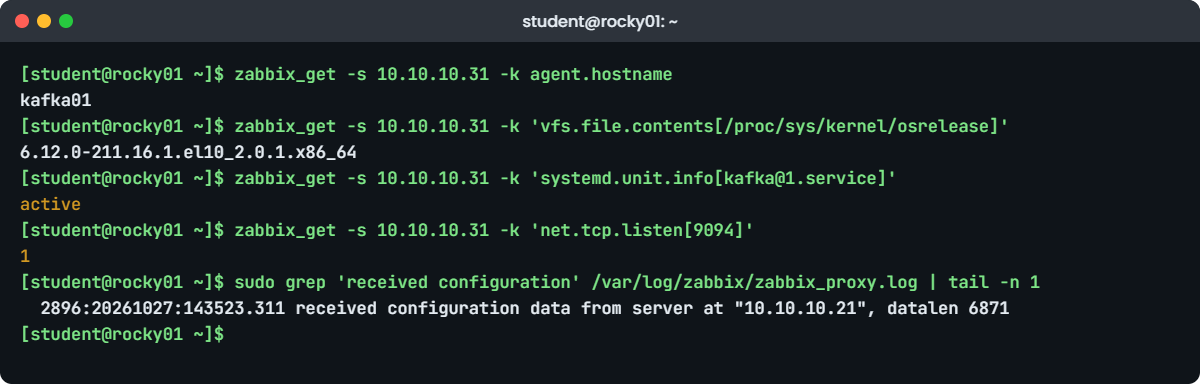
On rocky01, ask kafka01’s agent directly, the same way a proxy runs a passive check:
zabbix_get -s 10.10.10.31 -k agent.hostname
zabbix_get -s 10.10.10.31 -k 'vfs.file.contents[/proc/sys/kernel/osrelease]'
zabbix_get -s 10.10.10.31 -k 'systemd.unit.info[kafka@1.service]'
zabbix_get -s 10.10.10.31 -k 'net.tcp.listen[9094]'You should see this:
kafka01
6.12.0-211.16.1.el10_2.0.1.x86_64
active
1systemd.unit.info comes from agent 2’s systemd plugin and returns the ActiveState of the unit, and net.tcp.listen[9094] returns 1 while the SASL_SSL listener is up. The server shares the two hosts between the proxies, so Administration, Proxies shows one host each, and Monitoring, Latest data for kafka01 fills in within a couple of minutes. To watch Kafka’s open files against its limit from Lesson 58, teams add a UserParameter that reads /proc through a narrow sudo rule, or use Kafka’s JMX metrics; the agent itself can’t read another user’s /proc/PID/fd.
✅ Checkpoint: zabbix_get returns kafka01, the kernel string, active and 1, and Latest data shows values for both new hosts.
9Fail a proxy and watch the group take over
On rocky01, stop its proxy. On ubu01, wait past the 1-minute failover period and read the server log:
sudo systemctl stop zabbix-proxy # on rocky01
sleep 90; sudo grep 'changed state' /var/log/zabbix/zabbix_server.log | tail -n 1 # on ubu01You should see something like this:
3461:20261027:150412.006 Proxy "proxy-rocky01" changed state from online to offlineIn Administration, Proxies, proxy-rocky01 is Offline and proxy-kafka01 now has both hosts, and rocky01’s graphs carry on because its agent also knows 10.10.10.31. The group itself stayed online: one proxy is still at least the minimum of 1. Start the proxy again with sudo systemctl start zabbix-proxy on rocky01; the server logs the change back to online, and it may move a host back to balance the load.
✅ Checkpoint: The server logged proxy-rocky01 going offline, Latest data for rocky01 kept updating, and after the restart proxy-rocky01 is Online again.
Break It, Then Fix It
Take snapshots of rocky01 and kafka01 first (VBoxManage snapshot rocky01 take before-l61-break, and the same for kafka01). Both failures are configuration mistakes that monitoring teams make every week, and in both the dashboards at first look fine.
1A proxy whose Hostname doesn’t match the frontend
Someone “tidies” the proxy config on rocky01 to use the machine’s own name:
sudo sed -i 's/^Hostname=proxy-rocky01$/Hostname=rocky01/' /etc/zabbix/zabbix_proxy.conf # on rocky01
sudo systemctl restart zabbix-proxy
sleep 30; sudo grep 'not found' /var/log/zabbix/zabbix_server.log | tail -n 2 # on ubu01You’ll get this error:
3433:20261027:151807.215 cannot parse proxy configuration data request from active proxy at "10.10.10.11": proxy "rocky01" not found
3437:20261027:151807.904 cannot parse proxy data from active proxy at "10.10.10.11": proxy "rocky01" not foundThe proxy connects and announces itself as “rocky01”, the server has no proxy by that name, and it drops the connection. The proxy’s own log only says it can’t obtain configuration data from the server, which is why you read the server’s log first. Now look at the frontend: after a minute proxy-rocky01 goes Offline, the group moves its host to proxy-kafka01, and every graph keeps working.
The group hid the mistake, so alert on proxy state (the “Last seen (age)” of every proxy), not only on host data.
Fix: the Hostname must equal the proxy name in the frontend, letter for letter and in the same case.
sudo sed -i 's/^Hostname=rocky01$/Hostname=proxy-rocky01/' /etc/zabbix/zabbix_proxy.conf
sudo systemctl restart zabbix-proxy
sleep 20; sudo grep 'received configuration data' /var/log/zabbix/zabbix_proxy.log | tail -n 1You should see something like this:
3907:20261027:152011.468 received configuration data from server at "10.10.10.21", datalen 6871✅ Checkpoint: proxy-rocky01 is Online again with a “Last seen” of a few seconds.
2An agent that knows only one proxy
An old golden image puts a single proxy in ServerActive on kafka01. Then rocky01’s proxy is stopped for patching:
sudo sed -i 's/^ServerActive=.*/ServerActive=10.10.10.11/' /etc/zabbix/zabbix_agent2.conf # on kafka01
sudo systemctl restart zabbix-agent2
sudo systemctl stop zabbix-proxy # on rocky01
sleep 120; sudo grep -E 'cannot connect|started to fail' /var/log/zabbix/zabbix_agent2.log | tail -n 2 # on kafka01You’ll get this error:
2026/10/27 15:26:41.118302 [101] cannot connect to [10.10.10.11:10051]: dial tcp 10.10.10.11:10051: connect: connection refused
2026/10/27 15:26:41.118377 [101] active check configuration update from host [kafka01] started to failThe proxy group is fine: proxy-kafka01 is online and has taken over kafka01. But kafka01’s agent only knows 10.10.10.11, where nothing listens now, so its active items stop arriving even though a working proxy runs on the same VM. In the frontend, Latest data for kafka01 stops updating and the host’s active-agent availability goes grey or red.
A comma would be wrong too: comma-separated addresses are independent servers that each get their own copy of the data, while semicolons list members of one cluster or proxy group.
Fix: list both proxies with a semicolon, restart the agent, and bring the proxy back.
sudo sed -i 's/^ServerActive=.*/ServerActive=10.10.10.11;10.10.10.31/' /etc/zabbix/zabbix_agent2.conf # on kafka01
N=$(sudo wc -l /var/log/zabbix/zabbix_agent2.log | cut -d' ' -f1)
sudo systemctl restart zabbix-agent2
sleep 60; sudo tail -n +$((N + 1)) /var/log/zabbix/zabbix_agent2.log | grep -c -E 'cannot connect|started to fail'
sudo systemctl start zabbix-proxy # on rocky01You should see this:
0No new failures since the restart: when 10.10.10.11 refuses, the agent moves on to 10.10.10.31 in the same list without logging an error, and Latest data for kafka01 updates again. Put the full ServerActive line in your configuration management, so a rebuilt server never comes back with the old one.
✅ Checkpoint: kafka01’s items update again with proxy-rocky01 stopped, and after starting it both proxies are Online.
This happened at work
The semi-final with flat graphs
The on-call engineer at a cricket streaming app in Pune told me this one, from a semi-final night. The app’s edge cache servers in two data centres were monitored through two Zabbix proxies, which the team had put into a proxy group a few months earlier after moving to 7.0. Twenty minutes into the second innings, graphs for about forty edge servers went flat, and minutes later social media filled with complaints about buffering in Maharashtra and Goa.
The proxy list showed proxy A offline and proxy B online with every host assigned to it, so the failover had worked. The engineer restarted agents on a few edge servers, which changed nothing, and then rebooted proxy A, which wouldn’t come back because its disk was full: a flaky link to the server earlier that week had grown its buffer, and nobody watched the proxy’s own disk.
The flat graphs had a separate cause. The edge servers had been built from a golden image made before the second proxy existed, and their ServerActive listed only proxy A. Agent logs on every one of them said “cannot connect” to proxy A, so with A down they sent nothing to anyone, and three edge servers with a real cache problem went unnoticed for twelve minutes while the group looked healthy.
The fix that night was a one-line change pushed with Ansible: both proxies in ServerActive, separated by a semicolon. Afterwards the team added “no data” triggers per host, alerts on proxy last-seen and proxy disk space, sized the proxy buffer on purpose, and started a monthly test where one proxy is stopped on a quiet afternoon.
Common mistakes and troubleshooting
| Mistake | What happens | What to do instead |
|---|---|---|
| Proxy Hostname= not equal to the proxy name in the frontend | Server log: proxy “x” not found; proxy shows Never or Offline | Copy the name letter for letter, same case; check the server log first |
| Agent Hostname= not equal to the host name | Active checks fail with “host [x] not found” | Match the frontend host name, or use autoregistration with HostMetadata |
| ServerActive listing one proxy of a group, or using commas | No data when that proxy is down, or duplicate streams to “independent” servers | List every group member separated by semicolons |
| Forgetting a firewall rule (ufw on ubu01, firewalld elsewhere) | Proxies can’t reach 10051, or zabbix_get times out on 10050 | Open 10051 on server and proxies, 10050 on agents, only from the addresses that need it |
| Leaving zabbix_can_network off on an SELinux host | The proxy can’t open its connections; AVC denials in the audit log | setsebool -P zabbix_can_network on; check denials with ausearch -m avc -c zabbix_proxy |
| Installing Zabbix packages from EPEL by accident | Wrong version, different config paths, mixed packages | Exclude zabbix* from EPEL and use repo.zabbix.com |
| Upgrading the server but not the proxies | “current proxy version is not supported by server” | Upgrade server and proxies together, agents can follow later |
Interview questions
Click a question to open it. Each one is written the way an interviewer would ask it. Under it you will see why they ask it and one way you could answer, in your own words.
Fresher level
1. What’s the difference between Zabbix passive and active checks, and which ports do they use?
Why they ask this: A basic question about the data flow that every Zabbix troubleshooting starts from.
How you might answer: With a passive check the server or proxy connects to the agent on port 10050 and asks for one value; the agent’s Server= line lists who may ask. With an active check the agent connects out to the server or proxy on 10051, fetches its list of items and sends the values on its own schedule.
Active checks need ServerActive= and a Hostname that matches the frontend. They scale better and work when the agent sits behind NAT, because only 10051 on the proxy or server has to be reachable.
2. What is a Zabbix proxy, and why would you add one?
Why they ask this: They want to see you understand where proxies fit in a real network.
How you might answer: A proxy collects data from a group of hosts on the server’s behalf, buffers it and forwards it to the server. I’d use one for a remote site, a DMZ or a cloud network, so only the proxy talks to the server, and to take load off the server when there are many hosts.
It also keeps collecting when the link to the server is down and sends the backlog later, within its buffer limits. In my lab I ran two proxies in a proxy group so one could take over from the other.
2–5 years experience
3. A host monitored through a proxy shows no data. Walk me through how you find the cause.
Why they ask this: A practical troubleshooting question; they want an order of checks, not guesses.
How you might answer: First I check the proxy’s state and “Last seen” in Administration, Proxies, and the server log for “proxy … not found” or version errors. Then on the host I read the agent log for “cannot connect” or “host [name] not found”, which points at ServerActive or Hostname.
Next I test the path: zabbix_get from the proxy to the agent on 10050 for passive items, and the firewall and SELinux on both sides, for example firewall-cmd --list-ports and the zabbix_can_network boolean. Only then do I look at the items and templates themselves.
4. How do proxy groups in Zabbix 7.0 give you high availability, and what must the agents have?
Why they ask this: They are checking you know the new 7.0 feature and the agent side that people forget.
How you might answer: Hosts are monitored by the group, not by one proxy. The server spreads them over the online proxies, and when a proxy hasn’t reported for longer than the failover period, default one minute, its hosts move to the others while the group stays online as long as the minimum number of proxies is met.
Agents must list every proxy in the group: ServerActive with semicolons between them, and Server= with commas so all proxies can run passive checks. 7.0 agents also follow redirects from a proxy to the right group member.
Senior level
5. Design Zabbix monitoring for 3,000 servers across two data centres and a cloud VPC.
Why they ask this: Seniors should cover placement, HA, database sizing, security and operations.
How you might answer: I’d run the server, with Zabbix server HA if downtime of monitoring matters, and its database in the main data centre, with the database sized from Zabbix’s guidelines and partitioned history, often with TimescaleDB on PostgreSQL. Each location gets a proxy group of at least two active proxies, so only outbound 10051 from the proxies has to cross firewalls.
Agents are deployed by configuration management with Hostname, Server and ServerActive set per site, using autoregistration to create hosts. I’d encrypt proxy and agent traffic with PSK or certificates, and monitor the monitoring itself: proxy last seen, queue, buffer and disk, with no-data triggers on critical hosts.
6. You’re moving from Zabbix 7.0 LTS to 8.0 LTS. What’s your plan?
Why they ask this: They want ordering, backups and awareness of version compatibility between components.
How you might answer: I’d wait for the 8.0.0 general release rather than a release candidate, read the upgrade notes for removed or changed items, and rehearse on a copy of the database, because the server upgrades the schema on first start and that can take a long time on big history tables. A full database backup comes first.
The server and all proxies are upgraded in the same window, since an older proxy is refused by a newer server. Agents can follow afterwards, because 8.0 servers still talk to 7.0 agents, and I’d check templates and dashboards once everything is on 8.0.
Quick quiz
Q1. Which port does an agent 2 active check connect to?
- 10050 on the agent
- 10051 on the proxy or server
- 8080 on the frontend
- 5432 on PostgreSQL
Show answer
B — Active checks go out from the agent to 10051; passive checks come in to 10050.
Q2. A proxy’s config says Hostname=rocky01 but the frontend proxy is named proxy-rocky01. What does the server log?
- Nothing
- proxy “rocky01” not found
- host [rocky01] not found
- current proxy version is not supported
Show answer
B — The server matches the proxy by name; an unknown name is refused.
Q3. How should ServerActive list the two proxies of one proxy group?
- 10.10.10.11,10.10.10.31
- 10.10.10.11;10.10.10.31
- 10.10.10.11 10.10.10.31
- Only the first proxy
Show answer
B — Semicolons separate members of one cluster or proxy group; commas mean independent servers.
Q4. Which SELinux boolean lets a Zabbix proxy on Rocky open its network connections?
- httpd_can_network_connect
- zabbix_can_network
- zabbix_run_sudo
- nis_enabled
Show answer
B — zabbix_can_network allows the zabbix_t domain to connect to TCP ports.
Q5. In a proxy group with two proxies and a minimum of one, one proxy stops. What happens after the failover period?
- All its hosts stop being monitored
- Its hosts move to the other proxy and the group stays online
- The server monitors them directly
- The group goes offline
Show answer
B — One online proxy still meets the minimum, so the group stays online and takes the hosts.
Quick recap
- Zabbix 7.0 LTS: server and frontend with a database, proxies near the hosts, agent 2 on every host; 8.0 LTS is due in late 2026.
- Passive checks come in to the agent on 10050 (Server=); active checks go out to 10051 (ServerActive=, Hostname= must match).
- A proxy’s Hostname= must equal its name in the frontend; the server log says “proxy … not found” when it doesn’t.
- Proxy groups move hosts from a failed proxy to the others; agents must list every member with semicolons.
- Open only the ports each role needs (ufw on ubu01, firewalld elsewhere), set zabbix_can_network on SELinux hosts, and install from repo.zabbix.com.
Next lesson
Lesson 62: Prepare Linux for Commvault and Rubrik agents → You’ll get a Linux server ready for an enterprise backup agent: ports, firewall, SELinux, free space and pre/post scripts, with ubu01 standing in for the backup server.
Further reading: Zabbix proxy
Want to go deeper into Zabbix proxy? Read the Zabbix 7.0 manual on proxies and proxy load balancing and high availability, the installation from packages pages (including SELinux settings), the agent 2 configuration reference, and the release and support policy for 7.0 and 8.0 dates. You can also see the full plan for this course on the Linux Administration course page.
