Kernel patching on Rocky and Ubuntu
-
Phase 0: Before you start
-
Phase 1: The origins and OS architecture
-
Phase 2: Day-to-day administration and the command builder
-
Phase 3: Enterprise infrastructure and storage
-
Phase 4: Troubleshooting step by step
-
Phase 5: Final project and career
A Linux kernel update is the one update that never takes effect on its own. dnf and apt install the new kernel next to the old one, the server keeps running the old one, and only a reboot switches over. That design is what makes kernel patching safe, because the previous kernel is still there when the new one misbehaves, but it also means a “patched” server can run an unpatched kernel for months.
In this lesson you’ll update the kernel on rocky01, read GRUB’s list with grubby, check whether a reboot is needed, boot the previous kernel on purpose and see how many kernels dnf keeps. Then you’ll do the Ubuntu side on ubu01 and see where live patching (kpatch, Ksplice and Canonical Livepatch) fits.
Where this lesson fits
Lesson 49 of 82 in Linux Administration · Phase 3: Enterprise infrastructure and storage · Before this: Lesson 48, iSCSI and multipath · Next: Lesson 50, GRUB and dracut
| Time | You need | By the end you can |
|---|---|---|
| About 75 minutes | rocky01 and ubu01, console access for rocky01 (the VirtualBox window) and a snapshot before the Break-It part | Install a kernel update, prove which kernel is running, roll back to the previous one and back again, keep /boot healthy and explain live patching |
What it is, in one line
A kernel update installs a new kernel beside the running one, and the server only starts using it after a reboot, which keeps the old kernel as a way back.
In Simple Words
The new engine waiting in the garage
A bus depot gets a new engine for one of its buses. The mechanics don’t pull the old engine out on the road; they keep the new one ready in the garage, and the swap happens when the bus comes in for the night. If the new engine knocks on the first trip, they put the old one back, which is why they keep it on the shelf for a while.
The engine is the kernel, the night stop is the reboot, and the shelf is /boot, which only has room for a few old engines.
Engineer's View
How the two families handle kernels
| Rocky Linux 10 / RHEL 10 | Ubuntu 26.04 | |
|---|---|---|
| Packages per kernel | kernel, kernel-core, kernel-modules, kernel-modules-core | linux-image-7.0.0-15-generic, linux-modules-..., pulled in by the linux-generic metapackage |
| How many are kept | installonly_limit=3 in /etc/dnf/dnf.conf; the oldest is removed at the next install | The running kernel and the two newest; apt autoremove --purge removes older ones |
| Boot entries | One BLS file per kernel in /boot/loader/entries/, managed with grubby | /boot/grub/grub.cfg rebuilt by update-grub; older kernels under “Advanced options” |
| New kernel becomes default | UPDATEDEFAULT=yes in /etc/sysconfig/kernel | Always the newest (GRUB_DEFAULT=0) |
| Is a reboot needed? | dnf needs-restarting -r (exit code 1 = yes) | /var/run/reboot-required and needrestart |
| Hold kernels back | exclude=kernel* in dnf.conf, or the versionlock plugin | apt-mark hold |
| Automatic updates | dnf-automatic (off by default) | unattended-upgrades, on by default for security updates, no automatic reboot |
Ubuntu LTS releases offer two kernel tracks. The GA kernel is the one the release shipped with (7.0 on 26.04) and stays for the whole life of the release. The HWE (hardware enablement) kernel follows newer releases: from 26.04.2, expected in February 2027, linux-generic-hwe-26.04 brings the 26.10 kernel for newer hardware.
Servers usually stay on GA unless the hardware needs HWE.
| Live patching | Where | How you see it |
|---|---|---|
| kpatch | RHEL with a subscription: Red Hat ships kpatch-patch packages for important and critical CVEs, for a limited time per kernel. Rocky has no kpatch-patch packages | sudo dnf install "kpatch-patch = $(uname -r)", then kpatch list |
| Ksplice | Oracle Linux with Oracle Linux Premier Support; can also patch some user-space libraries | uptrack-upgrade -y, and uptrack-uname -r shows the effective level |
| Canonical Livepatch | Ubuntu Pro (also offered at no cost for personal use on a few machines) | sudo pro enable livepatch, then canonical-livepatch status |
Live patches change running kernel code in memory to fix a few serious bugs without a reboot. They buy time; they don’t replace kernel updates, because each patch covers only selected CVEs on supported kernels, and the server still needs a reboot into a fully patched kernel at the next planned slot.
How it works, step by step
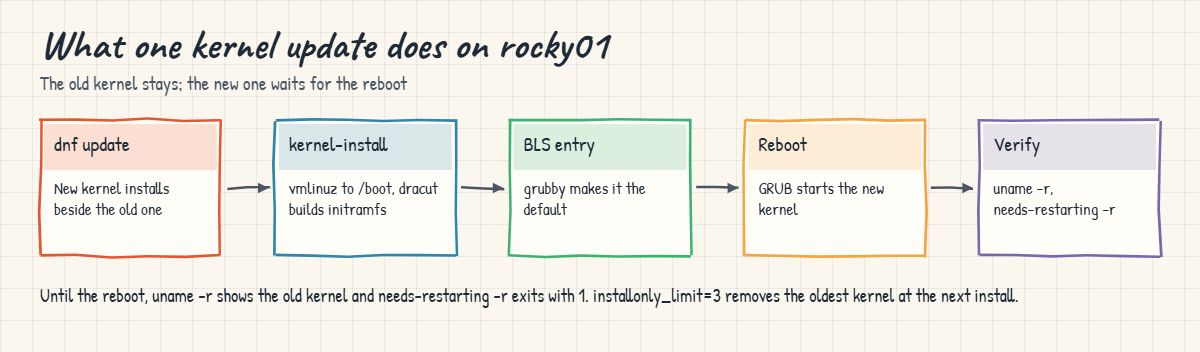
On Rocky, a kernel update is a short chain of hand-offs between dnf, kernel-install, dracut and grubby. The diagram after these steps shows the whole chain.
1dnf installs the new kernel beside the old one
Most packages are upgraded in place: the old version is removed when the new one goes in. Kernel packages are “install-only”: dnf adds the new version and leaves the old ones, up to installonly_limit versions. When the limit is passed, the oldest is removed, but never the one that is running.
2kernel-install fills /boot and adds a boot entry
The package’s scripts run kernel-install, which copies vmlinuz into /boot, asks dracut to build the matching initramfs for this server, and writes a BLS entry file in /boot/loader/entries/. Because UPDATEDEFAULT=yes, grubby then makes the new entry GRUB’s default.
3Nothing changes until the reboot
The running kernel is in memory and can’t be swapped, so uname -r still shows the old version. dnf needs-restarting -r compares the install time of core packages (kernel, glibc, systemd, linux-firmware and a few more) with the boot time and tells you whether a reboot is due. Scanners that read the running kernel keep flagging the server until you reboot.
4Reboot and prove it
After the reboot, check three things: uname -r shows the new version, dnf needs-restarting -r says no reboot is needed, and your applications and drivers came up. Third-party kernel modules (backup agents, security agents, HBA drivers) are what most often fail on a new kernel, as the Lesson 6 story showed.
5Roll back if the new kernel misbehaves
For one boot, choose the previous kernel in the GRUB menu at the console (Rocky shows the menu for 5 seconds; on Ubuntu hold Shift on BIOS or press Esc on UEFI, then open “Advanced options”). To make it stick, run grubby --set-default /boot/vmlinuz-VERSION with the path of the good kernel. Once you know the new kernel is bad, remove it with dnf or apt so the next reboot can’t pick it again, and report the problem to the vendor.
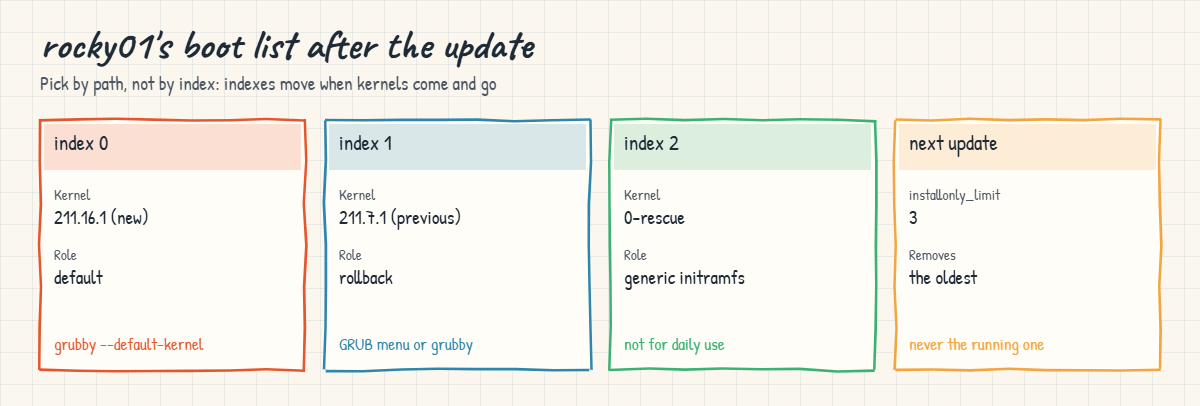
The cards below are rocky01’s boot list after the update in this lab, and what happens at the next one.
Ubuntu follows the same idea with different tools. The linux-generic metapackage depends on the newest kernel, so apt upgrade installs it as a new package; unattended-upgrades does this on its own for security fixes and then creates /var/run/reboot-required. Nothing reboots the server unless you turn on Unattended-Upgrade::Automatic-Reboot, which is a decision for the service owner, not the patch tool.
Holding kernels back is sometimes right: a vendor hasn’t certified a new kernel, or you’re in a freeze before a big sale. Use exclude=kernel* in dnf.conf or apt-mark hold linux-image-generic with a ticket and an end date, and install the update on purpose with dnf update --disableexcludes=main kernel when it’s approved. A hold that nobody remembers is how a fleet ends up two years behind.
Lesson 50 goes one level deeper: changing kernel boot arguments with grubby, and rebuilding an initramfs with dracut when one is missing or broken.
Hands-on lab: update, verify and roll back a kernel
Before you run any command, double-check it
Read every command twice before you press Enter. Check the target: the server name, the user, the disk or device name, the path and the sizes. These commands are for learning and were tested in our lab, not on your system. At work, run the read-only commands first, follow your change process, make sure a backup exists, and ask a second person to check anything that changes or deletes data. You run them at your own risk.
Steps 1 to 8 run on rocky01 and need two reboots plus one more for the rollback drill, so keep the VirtualBox console window open. Steps 9 and 10 run on ubu01 and change nothing. The outputs were captured on a rocky01 still running 6.12.0-211.7.1.el10_2.0.1.x86_64 with 6.12.0-211.16.1.el10_2.0.1 waiting in the repository; your build numbers will be whatever dnf offers today, so follow the pattern rather than the digits.
If your rocky01 is already on the newest kernel (dnf says “Nothing to do” in step 4), install the previous build next to it so you have something to roll back to: dnf list --showduplicates kernel lists the builds the repository still has, and sudo dnf install kernel-VERSION adds one. Then carry on from step 5.
1Which kernel runs, which are installed?
Run this on rocky01:
uname -r
rpm -q kernel-core
ls /boot/vmlinuz-*You should see something like this:
6.12.0-211.7.1.el10_2.0.1.x86_64
kernel-core-6.12.0-211.7.1.el10_2.0.1.x86_64
/boot/vmlinuz-0-rescue-8c1f2e7a4b9d4f6e9a2c3b1d5e7f9a0c
/boot/vmlinuz-6.12.0-211.7.1.el10_2.0.1.x86_64One kernel installed and running, plus the rescue kernel that the installer made: a copy of the install-time kernel with a generic initramfs that has drivers for any hardware. The file name carries the machine ID, which is why it looks different on every server.
✅ Checkpoint: You know your running kernel and how many kernel-core packages are installed.
2Read GRUB’s list with grubby
Run this on rocky01:
sudo grubby --default-kernel
sudo grubby --default-index
sudo grubby --info=ALL | grep -E '^(index|kernel|title)'You should see something like this:
/boot/vmlinuz-6.12.0-211.7.1.el10_2.0.1.x86_64
0
index=0
kernel="/boot/vmlinuz-6.12.0-211.7.1.el10_2.0.1.x86_64"
title="Rocky Linux (6.12.0-211.7.1.el10_2.0.1.x86_64) 10.2 (Red Quartz)"
index=1
kernel="/boot/vmlinuz-0-rescue-8c1f2e7a4b9d4f6e9a2c3b1d5e7f9a0c"
title="Rocky Linux (0-rescue-8c1f2e7a4b9d4f6e9a2c3b1d5e7f9a0c) 10.2 (Red Quartz)"Each index is one BLS file in /boot/loader/entries/. Newer kernels sort first and the rescue entry last. Use --info=ALL without the grep when you need the kernel arguments and initramfs path of each entry too.
✅ Checkpoint: grubby shows the running kernel as index 0 and the default.
3Check the rules dnf follows
Run this on rocky01:
grep -E 'installonly|exclude' /etc/dnf/dnf.conf
grep -E '^[A-Z]' /etc/sysconfig/kernelYou should see something like this:
installonly_limit=3
UPDATEDEFAULT=yes
DEFAULTKERNEL=kernel-corednf keeps up to three kernel versions, every new kernel becomes the default, and there is no exclude= line, so kernels are not held back. If your company’s build adds exclude=kernel*, you’ll see it here, and dnf update will quietly skip kernels until someone adds --disableexcludes=main.
✅ Checkpoint: installonly_limit is 3 and UPDATEDEFAULT is yes.
4Check for a kernel update and install it
Run this on rocky01:
dnf check-update kernel; echo "exit code: $?"You should see something like this:
Last metadata expiration check: 0:41:12 ago on Tue 27 Oct 2026 01:05:44 PM IST.
kernel.x86_64 6.12.0-211.16.1.el10_2.0.1 baseos
exit code: 100Exit code 100 means “updates available”, 0 means none and 1 means an error, which makes check-update handy in scripts and monitoring. Now install it:
sudo dnf update -y kernelThe end of the output should look something like this:
Installed:
kernel-6.12.0-211.16.1.el10_2.0.1.x86_64
kernel-core-6.12.0-211.16.1.el10_2.0.1.x86_64
kernel-modules-6.12.0-211.16.1.el10_2.0.1.x86_64
kernel-modules-core-6.12.0-211.16.1.el10_2.0.1.x86_64
Complete!dnf listed the four packages under “Installing”, not “Upgrading”: the old kernel stays. Behind the “Running scriptlet” lines, kernel-install copied the kernel into /boot, dracut built its initramfs and grubby added the entry, which takes a minute on a small VM.
✅ Checkpoint: dnf finished with Complete! and listed kernel-core for the new version.
5Installed is not running
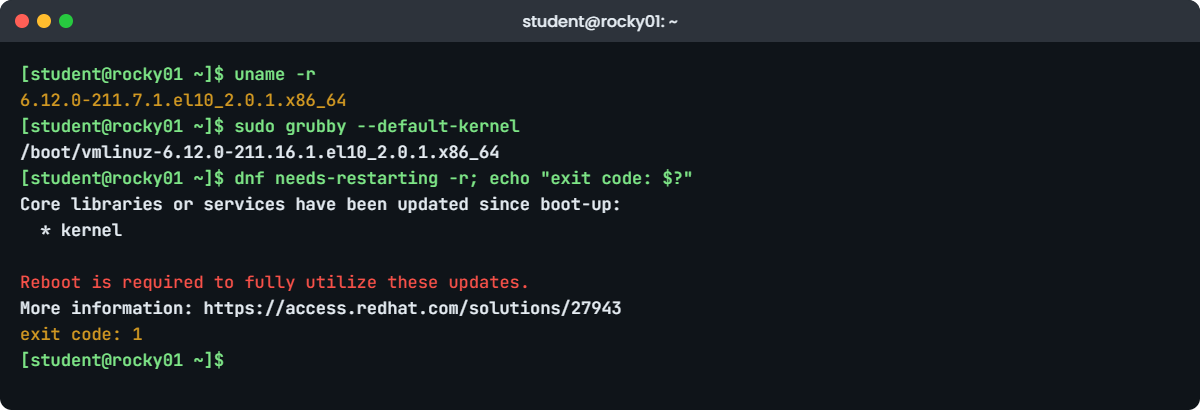
Run this on rocky01:
uname -r
sudo grubby --default-kernel
dnf needs-restarting -r; echo "exit code: $?"You should see something like this:
6.12.0-211.7.1.el10_2.0.1.x86_64
/boot/vmlinuz-6.12.0-211.16.1.el10_2.0.1.x86_64
Core libraries or services have been updated since boot-up:
* kernel
Reboot is required to fully utilize these updates.
More information: https://access.redhat.com/solutions/27943
exit code: 1This is the state most patch reports miss: the new kernel is installed and set as default, but the old one is still running. needs-restarting returns 1, so a patch script or monitoring check can act on it. Plan the reboot now, through your change process.
✅ Checkpoint: uname -r still shows the old kernel, the default is the new one and needs-restarting exits with 1.
6Reboot and prove the new kernel runs
Run this on rocky01, log in again when it’s back, then run the rest:
sudo systemctl rebootuname -r
dnf needs-restarting -r; echo "exit code: $?"
sudo grubby --info=ALL | grep -E '^(index|kernel)'You should see something like this:
6.12.0-211.16.1.el10_2.0.1.x86_64
No core libraries or services have been updated since boot-up.
Reboot should not be necessary.
exit code: 0
index=0
kernel="/boot/vmlinuz-6.12.0-211.16.1.el10_2.0.1.x86_64"
index=1
kernel="/boot/vmlinuz-6.12.0-211.7.1.el10_2.0.1.x86_64"
index=2
kernel="/boot/vmlinuz-0-rescue-8c1f2e7a4b9d4f6e9a2c3b1d5e7f9a0c"The new kernel runs, nothing else needs a reboot, and GRUB now has three entries: new, previous and rescue. Before you close the ticket at work, also check systemctl --failed and any kernel modules your applications need.
✅ Checkpoint: uname -r shows the new kernel and needs-restarting exits with 0.
7Boot the previous kernel on purpose
Practise the rollback while nothing is on fire. On rocky01:
sudo grubby --set-default /boot/vmlinuz-6.12.0-211.7.1.el10_2.0.1.x86_64
sudo systemctl rebootgrubby answers something like this before the reboot:
The default is /boot/loader/entries/8c1f2e7a4b9d4f6e9a2c3b1d5e7f9a0c-6.12.0-211.7.1.el10_2.0.1.x86_64.conf with index 1 and kernel /boot/vmlinuz-6.12.0-211.7.1.el10_2.0.1.x86_64After the reboot, check and put the new kernel back as default:
uname -r
sudo grubby --set-default /boot/vmlinuz-6.12.0-211.16.1.el10_2.0.1.x86_64
sudo systemctl reboot6.12.0-211.7.1.el10_2.0.1.x86_64
The default is /boot/loader/entries/8c1f2e7a4b9d4f6e9a2c3b1d5e7f9a0c-6.12.0-211.16.1.el10_2.0.1.x86_64.conf with index 0 and kernel /boot/vmlinuz-6.12.0-211.16.1.el10_2.0.1.x86_64Always give grubby the kernel path, not an index: indexes move every time a kernel is added or removed. At the console you can do the same for one boot only by picking the older entry in the GRUB menu, which is the faster choice when a server won’t come up at all.
✅ Checkpoint: rocky01 booted the previous kernel once and is back on the new one, with grubby --default-kernel showing the new path.
8Remove a kernel safely, and the one dnf won’t remove
See what removing the old kernel would do, without doing it:
sudo dnf remove --assumeno kernel-core-6.12.0-211.7.1.el10_2.0.1You should see something like this:
Dependencies resolved.
================================================================================
Package Arch Version Repository Size
================================================================================
Removing:
kernel-core x86_64 6.12.0-211.7.1.el10_2.0.1 @anaconda 69 M
Removing dependent packages:
kernel x86_64 6.12.0-211.7.1.el10_2.0.1 @anaconda 0
kernel-modules x86_64 6.12.0-211.7.1.el10_2.0.1 @anaconda 37 M
kernel-modules-core x86_64 6.12.0-211.7.1.el10_2.0.1 @anaconda 33 M
Transaction Summary
================================================================================
Remove 4 Packages
Freed space: 139 M
Operation aborted.Removing kernel-core takes its three companion packages with it, and dnf’s scriptlets also delete the files in /boot and the BLS entry, which is why you never remove kernels with rm. --assumeno showed the plan and answered no. Now try the running kernel:
sudo dnf remove kernel-core-$(uname -r)You’ll get something like this:
Error:
Problem: The operation would result in removing the following protected packages: kernel-corednf protects the running kernel, so even a careless command can’t leave a server without the kernel it is using. Keep both kernels: the old one is your rollback until the new one has run cleanly for a while, and installonly_limit will remove it for you later.
✅ Checkpoint: You saw the four packages a kernel removal touches, and dnf refused to remove the running kernel.
9The Ubuntu side: kernels and the reboot flag
Run this on ubu01:
uname -r
dpkg -l 'linux-image*' | grep '^ii'
ls /var/run/reboot-required 2>/dev/null || echo "no reboot needed"
sudo needrestart -b -r lYou should see something like this:
7.0.0-15-generic
ii linux-image-7.0.0-15-generic 7.0.0-15.15 amd64 Signed kernel image generic
ii linux-image-generic 7.0.0-15.15 amd64 Generic Linux kernel image
no reboot needed
NEEDRESTART-VER: 3.8
NEEDRESTART-KCUR: 7.0.0-15-generic
NEEDRESTART-KEXP: 7.0.0-15-generic
NEEDRESTART-KSTA: 1When apt installs a new kernel, its scripts create /var/run/reboot-required (and list the packages in reboot-required.pkgs), and needrestart reports KSTA 3 for “newer kernel installed, not running”. KSTA 1, as here, means the running kernel is the newest one installed. Monitoring tools read either of these.
✅ Checkpoint: ubu01 runs the only installed kernel image and needs no reboot.
10Who installs kernels on Ubuntu while you sleep
Run this on ubu01:
cat /etc/apt/apt.conf.d/20auto-upgrades
grep 'Automatic-Reboot' /etc/apt/apt.conf.d/50unattended-upgrades
apt-mark showhold
apt-cache policy linux-generic | head -n 3You should see something like this:
APT::Periodic::Update-Package-Lists "1";
APT::Periodic::Unattended-Upgrade "1";
//Unattended-Upgrade::Automatic-Reboot "false";
//Unattended-Upgrade::Automatic-Reboot-WithUsers "true";
//Unattended-Upgrade::Automatic-Reboot-Time "02:00";
linux-generic:
Installed: 7.0.0-15.15
Candidate: 7.0.0-15.15unattended-upgrades runs every day and installs security updates, and kernel fixes arrive as security updates, so an Ubuntu server can collect new kernels on its own. The reboot lines are commented out, so it never reboots by itself. No packages are held, and the GA kernel metapackage linux-generic is installed (Lesson 36 covers holds and unattended-upgrades in full).
✅ Checkpoint: unattended-upgrades is on, automatic reboot is off, and no kernel packages are held.
Break It, Then Fix It
Take a VirtualBox snapshot of both VMs first (“before-l49-break”). The first failure changes how rocky01 boots, and the second fills ubu01’s /boot on purpose.
1Set the default by index and boot the wrong kernel
A tired admin wants “the previous kernel” and remembers it as index 2. On rocky01:
sudo grubby --set-default-index=2
sudo systemctl rebootgrubby answers:
The default is /boot/loader/entries/8c1f2e7a4b9d4f6e9a2c3b1d5e7f9a0c-0-rescue.conf with index 2 and kernel /boot/vmlinuz-0-rescue-8c1f2e7a4b9d4f6e9a2c3b1d5e7f9a0cAfter the reboot (it is slower than usual), check:
uname -r
cat /proc/cmdlineYou’ll see something like this:
6.12.0-211.7.1.el10_2.0.1.x86_64
BOOT_IMAGE=(hd0,gpt2)/vmlinuz-0-rescue-8c1f2e7a4b9d4f6e9a2c3b1d5e7f9a0c root=/dev/mapper/rl-root ro crashkernel=2G-64G:256M,64G-:512M resume=/dev/mapper/rl-swap rd.lvm.lv=rl/root rd.lvm.lv=rl/swap rhgb quietuname -r looks like the previous kernel, because the rescue kernel is a copy of the kernel from install day. Only /proc/cmdline gives it away: the server booted the rescue entry, with a large generic initramfs, and it will stay on that frozen kernel at every reboot until someone notices. If the default points to an entry that no longer exists (the kernel was removed), GRUB falls back to the first entry, which hides the mistake in a different way.
Fix: set the default by path, reboot, and check the boot image, not only the version:
sudo grubby --set-default /boot/vmlinuz-6.12.0-211.16.1.el10_2.0.1.x86_64
sudo systemctl rebootuname -r
grep -o 'BOOT_IMAGE=[^ ]*' /proc/cmdline6.12.0-211.16.1.el10_2.0.1.x86_64
BOOT_IMAGE=(hd0,gpt2)/vmlinuz-6.12.0-211.16.1.el10_2.0.1.x86_64✅ Checkpoint: rocky01 runs the new kernel again and /proc/cmdline names its vmlinuz file, not the rescue one.
2Fill /boot and install a kernel
On ubu01, fill /boot until only 5 MB are left, then reinstall the kernel package:
df -h /boot
sudo fallocate -l $(( $(stat -f -c '%f * %S' /boot) - 5*1024*1024 )) /boot/fill.tmp
df -h /boot
sudo apt install --reinstall -y linux-image-$(uname -r)You’ll get something like this (the end of apt’s output):
Filesystem Size Used Avail Use% Mounted on
/dev/sda2 1.9G 186M 1.6G 11% /boot
Filesystem Size Used Avail Use% Mounted on
/dev/sda2 1.9G 1.9G 0 100% /boot
...
Preparing to unpack .../linux-image-7.0.0-15-generic_7.0.0-15.15_amd64.deb ...
Unpacking linux-image-7.0.0-15-generic (7.0.0-15.15) over (7.0.0-15.15) ...
dpkg: error processing archive /var/cache/apt/archives/linux-image-7.0.0-15-generic_7.0.0-15.15_amd64.deb (--unpack):
cannot copy extracted data for './boot/vmlinuz-7.0.0-15-generic' to '/boot/vmlinuz-7.0.0-15-generic.dpkg-new': failed to write (No space left on device)
dpkg-deb: error: paste subprocess was killed by signal (Broken pipe)
Errors were encountered while processing:
/var/cache/apt/archives/linux-image-7.0.0-15-generic_7.0.0-15.15_amd64.deb
E: Sub-process /usr/bin/dpkg returned an error code (1)The stat arithmetic counts the blocks root may use, including ext4’s reserved 5%, so the file leaves almost nothing. dpkg writes every new file as .dpkg-new first and renames it at the end, so the running kernel’s vmlinuz is untouched and the package stays installed. A real kernel update fails the same way, and on Rocky dnf stops earlier with something like installing package kernel-core-... needs 41MB more space on the /boot filesystem. The dangerous case is when the package fits but the initramfs that dracut builds afterwards doesn’t, which is what the story below is about.
Fix: free space the right way, then repeat the install so the package is consistent:
sudo rm /boot/fill.tmp
sudo apt install --reinstall -y linux-image-$(uname -r)
dpkg -l linux-image-$(uname -r) | tail -n 1
df -h /bootii linux-image-7.0.0-15-generic 7.0.0-15.15 amd64 Signed kernel image generic
Filesystem Size Used Avail Use% Mounted on
/dev/sda2 1.9G 186M 1.6G 11% /bootOn a real server the space goes to old kernels, so the fix is sudo apt autoremove --purge on Ubuntu or removing the oldest kernel with dnf on Rocky (step 8 of the lab). Never delete vmlinuz or initramfs files by hand: the package database still lists them, and GRUB keeps entries that point at files that are gone.
✅ Checkpoint: The reinstall finishes, dpkg shows ii for the kernel image and /boot is back to about 11%.
This happened at work
The historian server that wouldn’t come back
The shift engineer who told me this one looks after the servers at a steel plant in Jamshedpur. Their quarterly patch night covered 24 RHEL servers that run the plant historian and the production reporting system, all patched with dnf and rebooted in two batches. The first batch was fine.
In the second, one historian server stopped at a kernel panic on the console: “VFS: Unable to mount root fs on unknown-block(0,0)”.
The first thought was the SAN, because the historian keeps its data on a LUN, and the storage team was called at 1 a.m. Then someone wanted to boot rescue media and reinstall GRUB. He scrolled up the dnf log they had saved on the jump host instead, and found a dracut error in the middle of a “Complete!” transaction: no space left on device while writing the new initramfs.
/boot was 1 GB, and it held eight kernels. Years earlier a vendor’s install guide had told someone to set installonly_limit=10 “to keep rollback options”, so dnf never cleaned up. The kernel package passed dnf’s space check, but the initramfs written after it didn’t fit, and the new default entry pointed at a truncated file.
He picked the previous kernel from the GRUB menu, and the historian was recording again in five minutes.
The next day they removed the extra kernels with dnf, set the limit back to 3, rebuilt the initramfs for the new kernel with dracut (Lesson 50) and rebooted it in daylight. The pre-patch checklist now includes df -h /boot with a stop at 70%, and the monitoring alerts on /boot like any other file system.
Common mistakes and troubleshooting
| Mistake | What happens | What to do instead |
|---|---|---|
Reporting a server as patched after dnf update without a reboot | The scanner still finds the old kernel, and so would an attacker | Check uname -r and dnf needs-restarting -r (or reboot-required) after the reboot |
| Deleting vmlinuz and initramfs files in /boot with rm | The package database and GRUB entries point at missing files | Remove kernels with dnf remove kernel-core-VERSION or apt autoremove --purge |
Raising installonly_limit “for more rollback options” | /boot fills up and a later kernel or initramfs doesn’t fit | Keep 3, watch /boot space, and keep tested backups for real rollback |
| Setting the default kernel by index | The index points at another entry after kernels are added or removed, even the rescue one | Use grubby --set-default /boot/vmlinuz-VERSION and check /proc/cmdline |
Leaving exclude=kernel* or an apt hold in place for good | The fleet silently falls months behind on kernel fixes | Hold with a ticket and an end date, and report held servers |
| Removing the previous kernel straight after the update | No way back if a driver fails on the new one | Keep it until the new kernel has run cleanly, and let installonly_limit clean up |
| Treating live patching as “no more reboots” | Only selected CVEs are fixed, and other updates still wait | Use live patches to bridge to the next planned reboot |
Interview questions
Click a question to open it. Each one is written the way an interviewer would ask it. Under it you will see why they ask it and one way you could answer, in your own words.
Fresher level
1. You installed a kernel update. How do you check whether the server is running it?
Why they ask this: A basic but very common question. They want to hear that installing and running are different things.
How you might answer: I compare uname -r, which is the running kernel, with the installed ones from rpm -q kernel-core and the default from grubby --default-kernel. If uname shows the old version, the server hasn’t been rebooted into the new one.
On RHEL I also run dnf needs-restarting -r, which exits with 1 when a reboot is needed. On Ubuntu I look for /var/run/reboot-required.
2. Why does Linux keep old kernels after an update, and how many does RHEL keep?
Why they ask this: They’re checking that you understand the rollback design, not only the number.
How you might answer: Kernels are install-only packages, so the new one goes in beside the old one and the old one stays as a fallback in the GRUB menu. If the new kernel breaks a driver, I can boot the previous one.
RHEL and Rocky keep three versions by default, set by installonly_limit=3 in /etc/dnf/dnf.conf, and remove the oldest at the next install, never the running one. Ubuntu protects the running kernel and the two newest from autoremove.
2–5 years experience
3. After patching, a server boots but its HBA driver doesn’t load on the new kernel. How do you roll back, and what next?
Why they ask this: A realistic situation. They want a calm, ordered response and follow-up with the vendor.
How you might answer: I’d confirm it with journalctl -b -k and modinfo for the driver, then set the previous kernel as default with grubby --set-default /boot/vmlinuz-OLD and reboot, checking /proc/cmdline and the paths with multipath -ll afterwards.
Then I’d hold the kernel with exclude=kernel* or versionlock on that server group, open a case with the HBA vendor for a driver that supports the new kernel, and record the hold with an end date so it doesn’t become permanent.
4. How do you decide whether a server needs a reboot after updates, on RHEL and on Ubuntu?
Why they ask this: They want the tools and some judgement about what needs a reboot versus a service restart.
How you might answer: On RHEL, dnf needs-restarting -r tells me whether core packages like the kernel, glibc or systemd were updated since boot, and needs-restarting -s lists services that only need a restart. On Ubuntu, /var/run/reboot-required and needrestart do the same job.
A kernel always needs a reboot (unless a live patch covers that specific fix). For a library like OpenSSL I can often restart the affected services instead, which I check with needs-restarting or needrestart.
Senior level
5. Security wants critical kernel CVEs fixed in 7 days on 300 servers, but the business allows one reboot a month. How do you meet both?
Why they ask this: A senior trade-off question about risk, tooling and negotiation.
How you might answer: I’d use live patching for the gap: kpatch on RHEL with the subscription, Canonical Livepatch on Ubuntu Pro, or Ksplice on Oracle Linux, so critical CVEs are covered within days without a reboot. Rocky has no kpatch-patch packages, so those servers would need a commercial service or an exception.
The monthly reboot still installs the full kernel, because live patches cover only selected CVEs. I’d make sure HA pairs and clusters can be rebooted node by node outside the monthly slot, and report live-patched versus fully patched separately so nobody mixes them up.
6. Design a kernel patching process for a mixed RHEL and Ubuntu fleet.
Why they ask this: They want structure: stages, checks, rollback, automation and reporting.
How you might answer: I’d use the same stages for both: test servers first, then a small production group, then the rest, with a few days between them. Before patching, each server is checked for /boot space, held packages, third-party modules and a recent backup; after the reboot, uname -r, failed units and application health checks.
Rollback is the previous kernel through grubby or the GRUB menu, practised before we need it. Ansible runs the steps and records the running kernel per server, so the report shows installed versus running, and any hold or exclude comes with a ticket and an end date.
Quick quiz
Q1. After sudo dnf update kernel, what does uname -r show before a reboot?
- The new kernel
- The old, running kernel
- Both kernels
- An error
Show answer
B — The new kernel is installed and set as default, but the running kernel only changes at the next boot.
Q2. Which setting decides how many kernel versions dnf keeps?
UPDATEDEFAULTinstallonly_limitexcludeGRUB_DEFAULT
Show answer
B — installonly_limit in /etc/dnf/dnf.conf, 3 by default on RHEL and Rocky.
Q3. What does an exit code of 1 from dnf needs-restarting -r mean?
- dnf is broken
- A reboot is needed
- No reboot is needed
- There are updates to install
Show answer
B — It exits with 1 when core packages such as the kernel were installed after the last boot.
Q4. Why should you set the default kernel by path rather than by index?
- Paths are shorter
- Indexes change when kernels are added or removed
- grubby doesn’t accept indexes
- GRUB ignores indexes on UEFI
Show answer
B — Index 1 today can be the rescue entry after the next update or removal.
Q5. What does Canonical Livepatch, kpatch or Ksplice NOT do?
- Fix selected kernel CVEs in memory
- Avoid an immediate reboot
- Replace the need to ever reboot into a new kernel
- Work on a running server
Show answer
C — Live patches bridge to the next reboot; they cover only selected fixes.
Quick recap
- A Linux kernel update installs a new kernel beside the old one; the server runs it only after a reboot.
- On Rocky, dnf keeps
installonly_limit=3versions, andgrubby --default-kernel,--info=ALLand--set-default /boot/vmlinuz-VERSIONread and change GRUB’s choice. dnf needs-restarting -r(exit 1 = reboot needed) on Rocky, and/var/run/reboot-requiredor needrestart on Ubuntu, tell you when a reboot is due.- Roll back by picking the previous entry in GRUB for one boot, or with grubby for good; remove a bad kernel with dnf or apt, never with rm.
- Ubuntu installs kernels through
linux-generic(GA) or the HWE metapackage, and unattended-upgrades installs security kernels without rebooting. - kpatch, Ksplice and Canonical Livepatch fix selected CVEs in memory and bridge to the next planned reboot.
Next lesson
Lesson 50: GRUB and dracut → You’ll change kernel boot parameters with grubby and GRUB_CMDLINE_LINUX, regenerate GRUB’s config, and rebuild an initramfs with dracut on both Rocky and Ubuntu.
Further reading: Linux kernel update
Want to go deeper into Linux kernel update? Read Red Hat’s guide to managing, monitoring and updating the kernel on RHEL 10, the dnf configuration reference (installonly_limit, exclude), Ubuntu’s kernel lifecycle and HWE page, Canonical Livepatch and the Oracle Ksplice documentation. You can also see the full plan for this course on the Linux Administration course page.
