The Linux family tree: Red Hat, Debian, SUSE and more

There are hundreds of Linux distributions, but at work you’ll meet only a handful, and almost all of them belong to three families: Red Hat, Debian and SUSE. Learn the families and you know which package manager to type, where the logs are, which security layer is switched on and how long the vendor will send you fixes.

This lesson draws the family tree with the facts that matter in a job: package formats, release cycles and support end dates checked in October 2026. In the lab you’ll put rocky01 and ubu01 side by side and find every difference an admin trips over in the first week.

Where this lesson fits

Lesson 7 of 82 in Linux Administration · Phase 1: The origins and OS architecture · Before this: Lesson 6, Linus Torvalds and the Linux kernel · Next: Lesson 8, Linux architecture

TimeYou needBy the end you can
About 50 minutesrocky01 and ubu01 from Lesson 2, logged in as student over SSHPlace any distribution in its family, say how long it’s supported and compare a RHEL-family server with an Ubuntu server in five minutes

What it is, in one line

A Linux distribution is the Linux kernel plus GNU and other software, a package manager, an installer and a support promise, put together and maintained by one project or company.

In Simple Words

Same recipe, different kitchens

Think of biryani. Hyderabad, Lucknow and Kolkata all start from rice, meat and spices, yet each city cooks it its own way, and a Lucknow cook walking into a Hyderabad kitchen has to ask where things are kept before starting.

Linux distributions are like that. The kernel and the GNU tools are the rice and spices, and Red Hat, Debian and SUSE are the kitchen styles, each with its own way of storing ingredients (packages), its own utensils (dnf, apt, zypper) and its own house rules. Inside one style, the kitchens are nearly identical: if you can cook in Rocky Linux, you can cook in RHEL, AlmaLinux and Oracle Linux.

Engineer's View

The families, their formats and their support dates

Every family has a package format, a low-level tool that installs one file, and a high-level tool that finds packages in online repositories and sorts out dependencies.

FamilyPackage formatLow level / high levelDefault security layer
Red Hat (RHEL, Rocky, Alma, Oracle, CentOS Stream, Fedora).rpmrpm / dnf (yum still works as a link to dnf)SELinux enforcing, firewalld
Debian (Debian, Ubuntu, Mint).debdpkg / aptAppArmor on Ubuntu; ufw installed but off on Ubuntu Server
SUSE (SLES, openSUSE).rpmrpm / zypperSELinux on SLES 16 (AppArmor before); firewalld
Arch.pkg.tar.zstpacmanNone by default
Alpine.apkapkNone by default; uses musl and BusyBox, not glibc and GNU coreutils

Support dates are what managers ask about, so here they are as checked on 27 October 2026. “End of support” means the last date the vendor publishes security fixes for that release without an extra paid add-on.

DistributionCurrent releaseReleasedSupport ends
RHEL10.2 (10.3 due Nov 2026)RHEL 10: 20 May 2025Full support 31 May 2030, maintenance to 31 May 2035
Rocky Linux10.2Rocky 10: 11 Jun 202531 May 2035 (security fixes; active updates to 31 May 2030)
AlmaLinux10.2Alma 10: 27 May 202531 May 2035
Oracle Linux10OL 10: 26 Jun 2025Premier support to June 2035
CentOS Stream1012 Dec 2024About 31 May 2030
Fedora44 (45 due Nov 2026)28 Apr 2026About 13 months per release
Ubuntu LTS26.04.123 Apr 2026Standard support to April 2031, 10 years with Ubuntu Pro
Debian13 “trixie” (13.7)9 Aug 20259 Aug 2028, LTS to 30 Jun 2030
Linux Mint22.3 (based on Ubuntu 24.04)13 Jan 2026April 2029
SLES16.0 (16.1 due Nov 2026)4 Nov 202516 years for the 16 code stream with LTSS
openSUSE Leap16.0Oct 202524 months per release
Alpine3.249 Jun 20261 Jun 2028 (main repository)
Arch, openSUSE TumbleweedRollingUpdated continuouslyNo releases, you stay current or you fall behind

Dates move: vendors extend support, and point releases come out every few months. Always check the vendor’s own lifecycle page before you put a date in a project plan.

How it works, step by step

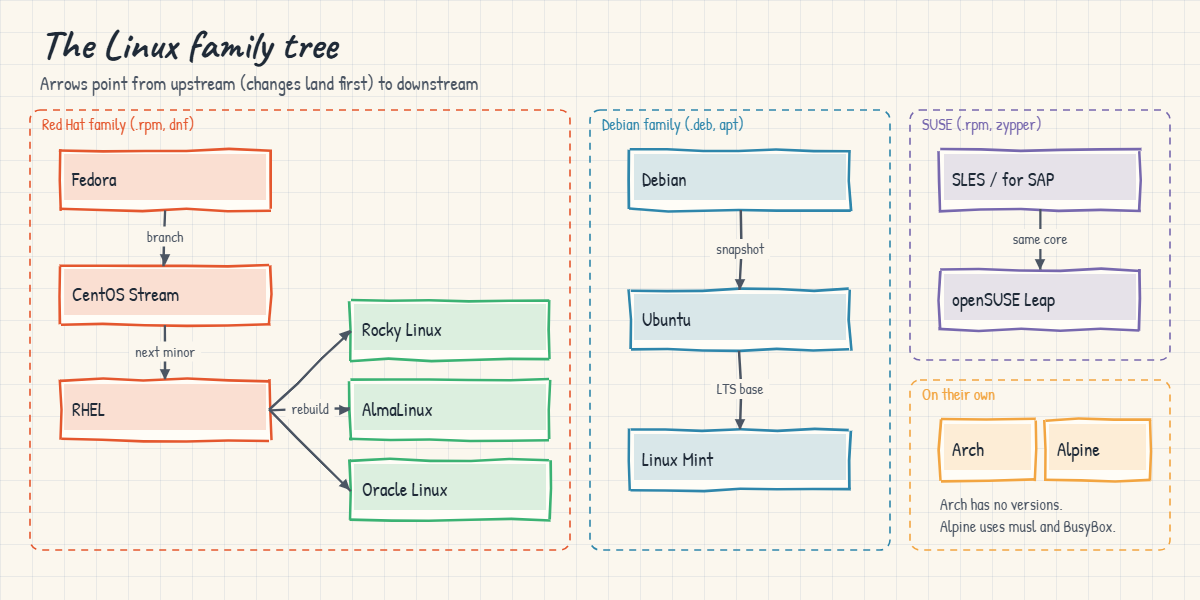
Most distributions are built from another one, and knowing which way the code flows explains most of their behaviour. The diagram below is that family tree, with arrows pointing from upstream (where changes land first) to downstream.

1Red Hat: Fedora, then CentOS Stream, then RHEL

New ideas land in Fedora, a fast community distribution with a release about every six months. Every few years a Fedora release is branched into CentOS Stream, which is the public preview of the next RHEL minor release. RHEL is the paid, certified product with ten years of maintenance.

Rocky Linux and AlmaLinux rebuild RHEL’s sources so you get a RHEL-compatible system without a subscription, and Oracle Linux does the same with an optional kernel of its own (UEK) and Ksplice live patching.

2Why Rocky and Alma exist

CentOS Linux used to be the free RHEL rebuild that everyone ran on servers that didn’t need vendor support. At the end of 2020 Red Hat announced it would end CentOS Linux 8 early (on 31 December 2021) and focus on CentOS Stream, which sits before RHEL, not after it. Rocky Linux (started by CentOS co-founder Gregory Kurtzer) and AlmaLinux (from CloudLinux) appeared within months to fill that gap.

CentOS 7, the last of the old line, ended on 30 June 2024.

Linux distributions family tree from Fedora to RHEL and Debian to Ubuntu

3Debian: Debian, then Ubuntu, then Mint

Debian is a community project, run by volunteers under its own constitution, with a stable release roughly every two years. Ubuntu takes a snapshot of Debian’s development branch every six months, adds Canonical’s changes and makes every second April release an LTS. Linux Mint builds a desktop on top of Ubuntu LTS (and a Debian edition called LMDE).

You’ll find Ubuntu on cloud VMs and developer machines everywhere, and Debian on many appliances and container images.

4SUSE: SLES and openSUSE

SUSE Linux Enterprise Server is strong in Europe and in SAP: SLES for SAP Applications is one of the main platforms SAP certifies for HANA, along with RHEL for SAP. openSUSE Leap shares SLES’s core packages, and openSUSE Tumbleweed is a rolling release. SLES 16 switched to SELinux, NetworkManager, a new installer called Agama and Cockpit for web management.

5Rolling releases and container bases

Arch Linux has no versions. You install it once and pacman -Syu keeps moving you to the newest packages, which is great for learning and personal machines and risky for servers that must not change under you. Alpine is tiny and is used mostly as a base for container images, where its musl C library and BusyBox tools behave a little differently from glibc and GNU, as you saw in Lesson 5.

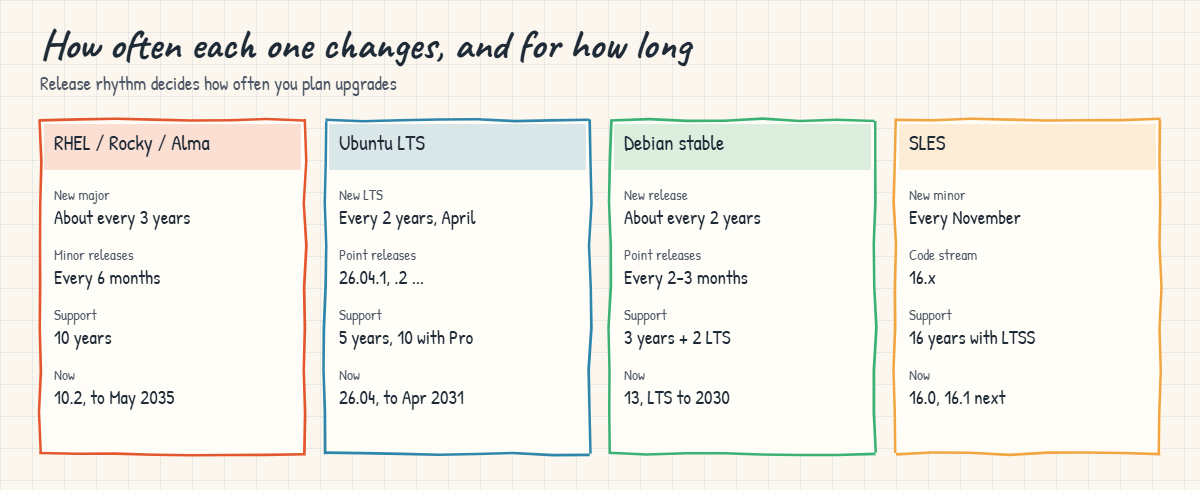
The picture underneath compares the release rhythm of the four you’re most likely to support. The rhythm decides how often you plan upgrades.

Linux distributions release cycles and support length compared

Choosing a distribution for a job usually comes down to four questions. What does the application vendor certify (SAP, Oracle Database and many banking packages name exact releases)? Do you need a vendor to call at 3 a.m.?

What does the team already know? And how long must the server live before it’s rebuilt?

SituationCommon choiceWhy
Bank, telecom, government, anything with a support contractRHEL (or Oracle Linux in Oracle shops)Certified by most vendors, ten years of fixes, a support desk
Same as above but no support budgetRocky Linux or AlmaLinuxSame packages as RHEL, same skills
Cloud VMs, Kubernetes nodes, developer toolingUbuntu LTSDefault image in most clouds, huge package choice
SAP HANASLES for SAP or RHEL for SAPCertified by SAP, with HA add-ons
Appliances, minimal servers that rarely changeDebian stableConservative, long track record
Container imagesAlpine, Debian slim or Red Hat UBISmall images, clear licences
Your own laptop to learn onFedora, Ubuntu or MintRecent software, big communities

For your career, Red Hat skills and Debian/Ubuntu skills cover nearly every Linux job advert in India and abroad, which is why this course runs rocky01 and ubu01 side by side.

Hands-on lab: rocky01 and ubu01 side by side

Before you run any command, double-check it

Read every command twice before you press Enter. Check the target: the server name, the user, the disk or device name, the path and the sizes. These commands are for learning and were tested in our lab, not on your system. At work, run the read-only commands first, follow your change process, make sure a backup exists, and ask a second person to check anything that changes or deletes data. You run them at your own risk.

Open two terminal windows next to each other, one on rocky01 and one on ubu01, and run each step on both. Everything is read-only, so nothing here can break your servers. At the end you’ll have your own cheat sheet of the differences.

Log in with ssh -p 2211 student@127.0.0.1 (rocky01) and ssh -p 2221 student@127.0.0.1 (ubu01). Counts and version numbers will be a little different on your VMs.

Linux distributions lab output from ubu01 showing os-release and package details
Example output from ubu01 (Ubuntu 26.04). Counts on your VM will differ.

1Which distribution, which family?

Run this on both servers:

grep -E '^(ID|ID_LIKE|VERSION_ID)=' /etc/os-release
. /etc/os-release; echo "$ID $VERSION_ID family: $ID_LIKE"

On rocky01 you should see this:

ID="rocky"
ID_LIKE="rhel centos fedora"
VERSION_ID="10.2"
rocky 10.2 family: rhel centos fedora

On ubu01:

VERSION_ID="26.04"
ID=ubuntu
ID_LIKE=debian
ubuntu 26.04 family: debian

/etc/os-release is a list of shell variables, so a script can load it with . (source) and use $ID and $ID_LIKE. ID_LIKE lists the distributions this one is built from or compatible with, and it’s the line to test when you want “any RHEL-like system”.

✅ Checkpoint: You can say which family each server belongs to, using ID_LIKE.

2The older release files

On rocky01:

cat /etc/redhat-release

You should see this:

Rocky Linux release 10.2 (Red Quartz)

On ubu01:

cat /etc/debian_version

You should see this:

forky/sid

Before os-release existed, scripts read these files, and many vendor installers still do. The Ubuntu answer surprises people: Ubuntu 26.04 was built from Debian’s development branch at a time when the next Debian (“forky”) was still in progress, and “sid” is Debian’s name for its permanently unstable branch. It’s a reminder that Ubuntu is downstream of Debian.

✅ Checkpoint: Both files print a line, and you can explain why Ubuntu’s mentions forky.

3Package format and package count

On rocky01:

rpm -qf /usr/bin/bash
rpm -qa | wc -l

You should see something like this:

bash-5.2.26-6.el10.x86_64
512

On ubu01:

dpkg -S /usr/bin/bash
dpkg -l | grep -c '^ii'

You should see something like this:

bash: /usr/bin/bash
689

Same question, two tools. RPM names the package with its full version and architecture, dpkg just names the package. The counts tell you how much is installed; a lower count is a smaller attack surface and less to patch.

✅ Checkpoint: You found the package that owns bash on both servers.

4Where do the packages come from?

On rocky01:

ls /etc/yum.repos.d/
dnf repolist

You should see something like this:

rocky-addons.repo  rocky-devel.repo  rocky-extras.repo  rocky.repo
repo id                        repo name
appstream                      Rocky Linux 10 - AppStream
baseos                         Rocky Linux 10 - BaseOS
extras                         Rocky Linux 10 - Extras

On ubu01:

grep -v -e '^#' -e '^$' /etc/apt/sources.list.d/ubuntu.sources

You should see something like this:

Types: deb
URIs: http://archive.ubuntu.com/ubuntu/
Suites: resolute resolute-updates resolute-backports
Components: main restricted universe multiverse
Signed-By: /usr/share/keyrings/ubuntu-archive-keyring.gpg
Types: deb
URIs: http://security.ubuntu.com/ubuntu/
Suites: resolute-security
Components: main restricted universe multiverse
Signed-By: /usr/share/keyrings/ubuntu-archive-keyring.gpg

Rocky uses .repo files in INI style, with BaseOS (the core OS) and AppStream (applications and languages) enabled, plus Extras. Ubuntu 24.04 and later use the deb822 format in ubuntu.sources instead of the old one-line /etc/apt/sources.list. Lessons 35 and 36 go deep into both.

✅ Checkpoint: You can name the enabled repositories on rocky01 and the suites on ubu01.

5Which security layer is switched on?

On rocky01:

getenforce
sudo firewall-cmd --state

You should see this:

Enforcing
running

On ubu01:

sudo aa-status | head -n 3
sudo ufw status

You should see something like this:

apparmor module is loaded.
118 profiles are loaded.
41 profiles are in enforce mode.
Status: inactive

The RHEL family uses SELinux, which labels every file and process, and firewalld is running from the first boot. Ubuntu uses AppArmor, which confines programs by path, and ships ufw switched off. Try getenforce on ubu01 and you’ll see that the SELinux tools aren’t even installed:

Command 'getenforce' not found, but can be installed with:
sudo apt install selinux-utils

A port that works on ubu01 and is blocked on rocky01 is very often one of these two layers. Lesson 34 covers firewalls and Lesson 41 SELinux.

✅ Checkpoint: You know which mandatory access control system and which firewall each server uses, and whether they are on.

6Init, admin group and main log file

On rocky01:

ps -p 1 -o comm=
getent group wheel
ls /var/log/messages

You should see something like this:

systemd
wheel:x:10:student
/var/log/messages

On ubu01:

ps -p 1 -o comm=
getent group sudo
ls /var/log/syslog

You should see something like this:

systemd
sudo:x:27:student
/var/log/syslog

Both run systemd as process 1, so systemctl and journalctl work the same everywhere. Admin rights come from the wheel group on the RHEL family and the sudo group on Ubuntu, and the main text log is /var/log/messages on one and /var/log/syslog on the other.

rocky01 (Rocky Linux 10.2)ubu01 (Ubuntu 26.04)
Family (ID_LIKE)rhel centos fedoradebian
Packages.rpm with rpm / dnf.deb with dpkg / apt
Repositories/etc/yum.repos.d/*.repo/etc/apt/sources.list.d/ubuntu.sources
Security layerSELinux enforcing, firewalld runningAppArmor, ufw inactive
Admin groupwheelsudo
Main log file/var/log/messages/var/log/syslog
Network configNetworkManager keyfiles (nmcli)Netplan YAML
Kernel6.12 based7.0

✅ Checkpoint: You can fill in this table from memory for both servers.

Break It, Then Fix It

The two mistakes below are the ones every admin makes in their first month of working on both families. Neither changes anything on your servers.

1Use the other family’s package manager

Run this on rocky01:

sudo apt install tree

You’ll get this error:

sudo: apt: command not found

Muscle memory from an Ubuntu laptop. The RHEL family has no apt at all. The reverse happens on Ubuntu with dnf or yum.

Fix: use the family’s own tool:

sudo dnf install -y tree

✅ Checkpoint: tree is installed on rocky01 and tree -L 1 /etc/yum.repos.d runs.

2A script that only knows one distribution name

Paste this whole block on rocky01, then on ubu01:

cat > ~/install-tree.sh <<'EOF'
#!/bin/bash
. /etc/os-release
if [ "$ID" = "rhel" ]; then
  sudo dnf install -y tree
elif [ "$ID" = "debian" ]; then
  sudo apt install -y tree
else
  echo "Unsupported OS: $ID" >&2
  exit 1
fi
EOF
bash ~/install-tree.sh

rocky01 says:

Unsupported OS: rocky

ubu01 says:

Unsupported OS: ubuntu

Rocky is RHEL-compatible but its ID is “rocky”, and Ubuntu is Debian-based but its ID is “ubuntu”. The same script would refuse AlmaLinux (almalinux) and Linux Mint (linuxmint). Plenty of real vendor installers fail exactly like this.

Fix: test the family with ID_LIKE as well as ID:

cat > ~/install-tree.sh <<'EOF'
#!/bin/bash
. /etc/os-release
case " $ID $ID_LIKE " in
  *" rhel "*|*" fedora "*) sudo dnf install -y tree ;;
  *" debian "*)            sudo apt install -y tree ;;
  *) echo "Unsupported OS: $ID" >&2; exit 1 ;;
esac
EOF
bash ~/install-tree.sh

The spaces around $ID $ID_LIKE make sure “rhel” only matches as a whole word. Now rocky01 runs dnf and ubu01 runs apt, and AlmaLinux, Oracle Linux and Mint would work too.

✅ Checkpoint: The script installs tree on both servers without the Unsupported OS message.

This happened at work

The kiosk server that said “all up to date”

A colleague of mine looked after the airport systems of a domestic airline in Indore. One of them was the server that pushes boarding pass layouts and flight updates to the self check-in kiosks, a quiet Ubuntu 20.04 VM nobody had touched in years because it never gave trouble.

In mid-2025 a vulnerability scan flagged an OpenSSH issue on it. The on-call engineer logged in, ran sudo apt update && sudo apt upgrade, saw nothing to install and closed the ticket as a false positive. The scanner flagged it again the next week, and the week after.

The real cause was the calendar. Ubuntu 20.04 had left standard support in May 2025, so new security fixes for it were only published through Ubuntu Pro’s Expanded Security Maintenance, and this server wasn’t attached to Pro. As far as its configured repositories knew, it really was up to date. cat /etc/os-release would have told them in five seconds, but nobody had asked the question.

They attached the server to Ubuntu Pro to get the fixes that week, then rebuilt it on 24.04 a month later. The lasting change was an inventory: a small script collects ID, VERSION_ID and the vendor’s end-of-support date for every server, and anything within 12 months of its end date shows up in the monthly review.

Common mistakes and troubleshooting

MistakeWhat happensWhat to do instead
Checking only ID in scriptsThe script refuses Rocky, Alma, Oracle or MintMatch on ID_LIKE too, as in the Break-It fix
Treating CentOS Stream as “free RHEL”You run a preview of the next RHEL minor release, which changes ahead of RHELUse Rocky Linux or AlmaLinux for a RHEL-compatible server without a subscription
Not tracking end-of-support datesServers stop getting fixes while apt upgrade or dnf update says all is wellKeep an inventory with os-release and the vendor’s lifecycle dates, and plan upgrades a year ahead
Running a rolling release (Arch, Tumbleweed) on a server that must not changeAn update changes a library or config format under your applicationUse a fixed-release distribution for production and test upgrades first
Assuming firewall and SELinux behave the same on both familiesA port works on Ubuntu and is blocked on RockyCheck getenforce and firewall-cmd --list-all on RHEL-family servers before blaming the app
Picking a distribution the application vendor doesn’t certifyThe vendor refuses to help during an outageRead the vendor’s support matrix before you build the server

Interview questions

Click a question to open it. Each one is written the way an interviewer would ask it. Under it you will see why they ask it and one way you could answer, in your own words.

Fresher level

1. What’s the difference between RHEL, CentOS Stream, Fedora and Rocky Linux?

Why they ask this: A classic fresher question. They want to hear the upstream and downstream order and why Rocky exists.

How you might answer: Fedora is the fast community distribution where new things land first. CentOS Stream comes from Fedora and is the preview of the next RHEL minor release, and RHEL is Red Hat’s supported product with ten years of maintenance.

Rocky Linux rebuilds RHEL’s sources so it behaves the same as RHEL without a subscription. It appeared after CentOS Linux 8 was ended early in 2021, and AlmaLinux did the same.

2. How do you find out which distribution and version a server is running?

Why they ask this: They want a quick, reliable command and a sign you know the family matters, not only the name.

How you might answer: I run cat /etc/os-release. ID and VERSION_ID give the distribution and version, for example rocky and 10.2, and ID_LIKE tells me the family, rhel centos fedora or debian.

On older systems I’d also look at /etc/redhat-release or /etc/debian_version, and hostnamectl shows the OS on one line.

2–5 years experience

3. You’ve been an Ubuntu admin and you’re now given ten Rocky Linux servers. What changes in your daily work?

Why they ask this: They’re checking whether you can switch families safely, and whether you know the differences that cause outages.

How you might answer: Packages move from apt and dpkg to dnf and rpm, and repos are .repo files in /etc/yum.repos.d. Admin rights come from the wheel group, and the main log is /var/log/messages.

The big one is security: SELinux is enforcing and firewalld is running, so a new service often needs a firewall rule and the right SELinux context or port label. Networking is done with nmcli instead of Netplan.

4. How would you choose between RHEL, Rocky Linux and Ubuntu LTS for a new internal application?

Why they ask this: They want reasoning with real criteria, not loyalty to one distribution.

How you might answer: I start with what the application vendor certifies, because that decides who helps us in an outage. Then I ask whether we need a vendor support contract, what the team already knows and how long the server must live: RHEL and Rocky give ten years, Ubuntu LTS five, or ten with Pro.

If it’s certified on RHEL and we have budget, I pick RHEL. Without budget Rocky is the same platform, and if it’s cloud-native tooling, Ubuntu LTS is usually the natural fit.

Senior level

5. Your company runs a mix of CentOS 7, RHEL 8, Ubuntu 20.04 and Ubuntu 24.04. How would you build a lifecycle plan?

Why they ask this: Senior admins own risk across the fleet. They want inventory, dates, prioritisation and a migration path.

How you might answer: First an inventory from os-release on every server, joined with vendor end dates. CentOS 7 ended in June 2024 and Ubuntu 20.04 left standard support in 2025, so those are already exposed and go first, with paid extended support as a short bridge if a migration can’t happen quickly.

Then I’d standardise on two targets, for example RHEL 10 or Rocky 10 and Ubuntu 26.04, migrate by rebuilding with automation rather than in-place jumps where possible, and review the dates every quarter so nothing reaches its end date unnoticed.

6. A vendor’s installer refuses to run on Rocky Linux because it only accepts RHEL. What are your options?

Why they ask this: This tests judgement around support, compatibility and risk, not just a workaround.

How you might answer: Technically the installer probably checks ID in os-release or the text in /etc/redhat-release, and Rocky would run the software fine. But faking the OS name means the vendor can refuse support later.

So I’d first ask the vendor whether they support Rocky or Alma, since many now do. If they don’t and the system is important, I’d run it on RHEL, and for a test lab I might use a RHEL developer subscription instead of tricking the installer.

Quick quiz

Q1. Which distribution is upstream of RHEL and acts as the preview of its next minor release?

  1. Fedora
  2. CentOS Stream
  3. Rocky Linux
  4. Oracle Linux
Show answer

B — The order is Fedora, then CentOS Stream, then RHEL. Rocky, Alma and Oracle Linux are rebuilt from RHEL.

Q2. Which package format and tool does Ubuntu use?

  1. .rpm with dnf
  2. .deb with apt
  3. .apk with apk
  4. .pkg.tar.zst with pacman
Show answer

B — Ubuntu is in the Debian family: .deb packages with dpkg underneath and apt on top.

Q3. Until when does Ubuntu 26.04 LTS get standard security updates?

  1. April 2028
  2. April 2031
  3. May 2035
  4. April 2036
Show answer

B — Five years of standard support to April 2031, and up to ten years with Ubuntu Pro.

Q4. A script checks [ "$ID" = "rhel" ]. What happens on Rocky Linux?

  1. It works, Rocky reports rhel
  2. It fails, because Rocky’s ID is rocky
  3. It fails, because Rocky has no os-release file
  4. It works only as root
Show answer

B — Rocky’s ID is “rocky” and its ID_LIKE contains “rhel”, so check ID_LIKE for the family.

Q5. Which statement about Alpine Linux is true?

  1. It uses glibc and GNU coreutils
  2. It uses musl and BusyBox and is popular for container images
  3. It is a rolling release like Arch
  4. It is a rebuild of RHEL
Show answer

B — Alpine is small because it uses musl and BusyBox, which is why scripts tested on GNU tools can behave differently there.

Quick recap

  • Three families cover most jobs: Red Hat (RHEL, Rocky, Alma, Oracle, CentOS Stream, Fedora), Debian (Debian, Ubuntu, Mint) and SUSE (SLES, openSUSE). Arch is rolling and Alpine is the container favourite.
  • Code flows Fedora to CentOS Stream to RHEL, and RHEL’s sources are rebuilt into Rocky, AlmaLinux and Oracle Linux. Debian flows into Ubuntu, and Ubuntu into Mint.
  • RHEL 10 and its rebuilds are supported to 2035, Ubuntu 26.04 to April 2031 (2036 with Pro), Debian 13 to 2028 (LTS 2030). Check the vendor page before you plan.
  • Read the family from ID_LIKE in /etc/os-release, and write scripts that test it.
  • On rocky01 versus ubu01: dnf vs apt, wheel vs sudo, SELinux and firewalld vs AppArmor and ufw, /var/log/messages vs /var/log/syslog.

Next lesson

Lesson 8: Linux architecture: hardware, kernel, shell and user space → You’ll see how a command you type travels through the shell, the C library and system calls into the kernel and down to the hardware, and you’ll list and inspect kernel modules.

Further reading: Linux distributions

Want to go deeper into Linux distributions? Check the official lifecycle pages before you plan upgrades: RHEL life cycle, Rocky Linux releases, Ubuntu release cycle, Debian releases, SUSE product lifecycle and Alpine release branches. You can also see the full plan for this course on the Linux Administration course page.

Scroll to Top

This website uses cookies

We use a few cookies to keep this site working. If you allow it, we also use Google Analytics to count visits so we can improve our lessons. You can accept all, deny the optional ones, or choose what to allow.