The GNU Project and free software
-
Phase 0: Before you start
-
Phase 1: The origins and OS architecture
-
Phase 2: Day-to-day administration and the command builder
-
Phase 3: Enterprise infrastructure and storage
-
Phase 4: Troubleshooting step by step
-
Phase 5: Final project and career
The GNU project is the reason a Linux server has a shell, a compiler, a C library and the hundred small commands you type all day. Richard Stallman announced it in September 1983 with one goal: a complete Unix-like operating system that anyone could use, study, change and share. By 1991 almost every piece was ready except the kernel, and that gap is where Linux came in.
In this lesson you’ll learn where GNU came from, what “free software” and copyleft mean, and why GNU never got a working kernel of its own. Then you’ll go hunting for GNU on rocky01 and ubu01, and you’ll find a surprise on Ubuntu 26.04 that many experienced admins haven’t noticed yet.
Where this lesson fits
Lesson 5 of 82 in Linux Administration · Phase 1: The origins and OS architecture · Before this: Lesson 4, Unix history · Next: Lesson 6, Linus Torvalds and the Linux kernel
| Time | You need | By the end you can |
|---|---|---|
| About 50 minutes | rocky01 and ubu01 from Lesson 2, logged in as student over SSH | Name the GNU parts of a Linux system, read their licences and spot GNU-only behaviour before it breaks a script |
What it is, in one line
The GNU Project is the effort, started by Richard Stallman in 1983, to write a complete free Unix-like operating system, and most of the tools you use on Linux today came out of it.
In Simple Words
Building a house with borrowed tools
Imagine a village where the only good set of carpentry tools belongs to one company. You may use them, but you can’t open them up to see how they work, you can’t sharpen them your own way and you can’t lend them to your neighbour. If the company changes the rules, your half-built house stays half-built.
One carpenter gets fed up and starts making his own set, hammer by hammer and saw by saw, and gives every tool away with one condition attached: whoever passes it on must pass on the freedom too. Other carpenters join in. Within a few years the village has every tool it needs except the big machine that drives the whole workshop.
The GNU tools are that set, and the missing machine was the kernel, which a student in Finland would supply in 1991.
Engineer's View
GNU in dates and parts
GNU stands for “GNU’s Not Unix”, a recursive joke that also states the design: it behaves like Unix but contains no Unix code. Stallman posted the announcement on 27 September 1983 to the net.unix-wizards and net.usoft newsgroups. He planned to start at Thanksgiving, but the work began in January 1984, when he left his job at the MIT AI Lab so that MIT could not claim the code.
| When | What happened | Why an admin cares |
|---|---|---|
| 27 Sep 1983 | GNU announced on Usenet | The start of the free software movement |
| Jan 1984 | Work starts; GNU Emacs follows in 1985 | The first big GNU program people used |
| Mar 1985 | The GNU Manifesto is published | Explains the “why” behind the licences you still read |
| 4 Oct 1985 | Free Software Foundation (FSF) founded in Boston | Holds copyright on most GNU code and publishes the GPL |
| 22 Mar 1987 | GCC 1.0 released | Every Linux kernel and distribution is still built with a compiler, usually GCC |
| 1987 | Roland McGrath starts the GNU C Library (glibc) | The layer between every program and the kernel |
| 25 Feb 1989 | GPL version 1 | Copyleft written down as a licence |
| Jun 1989 | Brian Fox releases the first Bash beta | The default shell on RHEL and Ubuntu |
| Jun 1991 | GPL version 2 | The licence of the Linux kernel to this day |
| 2003 | fileutils, sh-utils and textutils merge into coreutils | ls, cp, mv, cat, df, chmod and about a hundred more |
| 29 Jun 2007 | GPL version 3 | The licence of today’s bash, coreutils and gcc |
“Free” here means freedom, not price. The FSF lists four freedoms, numbered from zero the way programmers count: run the program for any purpose (0), study and change it (1), share copies (2) and share your changed versions (3). Freedoms 1 and 3 need the source code, which is why the GPL insists on it.
Copyleft is the trick that keeps those freedoms alive. It uses copyright law the other way round: if you distribute a GPL program, or a changed version of it, you must give the people who receive it the source code under the same GPL terms. You can use GPL software inside your company as much as you like without publishing anything, because the duty starts when you hand the program to someone else.
Permissive licences such as MIT, BSD and Apache 2.0 allow free use too, but they don’t force changed versions to stay open. You’ll see both kinds side by side on your servers in the lab.
How it works, step by step
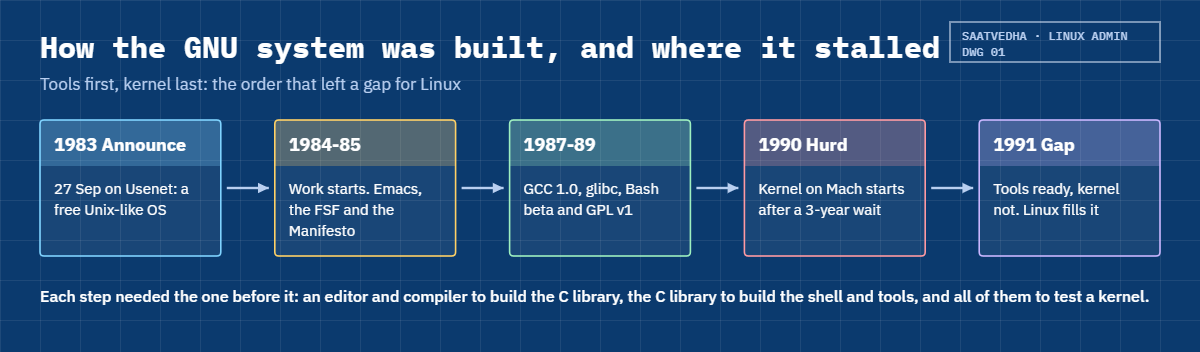
The GNU plan was a full operating system, written one piece at a time. The order mattered: you can’t build a C library without a compiler, and you can’t build anything without an editor and a debugger. The timeline below follows that path.
1Write the tools that build everything else
Emacs came first, so the team had an editor, then GCC, the debugger GDB, make and binutils (the assembler and linker). With a free compiler, every later piece could be built without paying anyone for a licence.
2Write the tools people type
Next came the shell (Bash), the file and text utilities (later merged into coreutils), grep, sed, gawk, tar, gzip and the rest. Developers ran these on top of commercial Unix systems such as SunOS, so GNU tools were in daily use long before there was a GNU system to run them on.
3Write the C library
glibc gives programs functions like printf() and open(), and turns those calls into system calls the kernel understands. It’s the reason the same program source can be built on many kernels and CPUs.
4Write the kernel last
The kernel was planned last, and it never caught up. A first attempt based on an MIT research system called TRIX was dropped in 1986. In 1987 Stallman chose the Mach microkernel from Carnegie Mellon University, but waited about three years for it to be released under a usable licence, so work on the GNU Hurd (a set of servers running on top of Mach) only started in 1990.
5Why the Hurd lost the race
A microkernel keeps the core tiny and runs file systems, networking and drivers as separate programs that send each other messages. That is elegant and safer in theory, but much harder to debug, and Stallman later said the choice cost GNU many years. When Linux arrived in 1991 as a simple monolithic kernel that already worked with the GNU tools, most volunteers moved to it.
The Hurd still exists (Debian GNU/Hurd 2025 came out in August 2025), but nobody runs it in production.
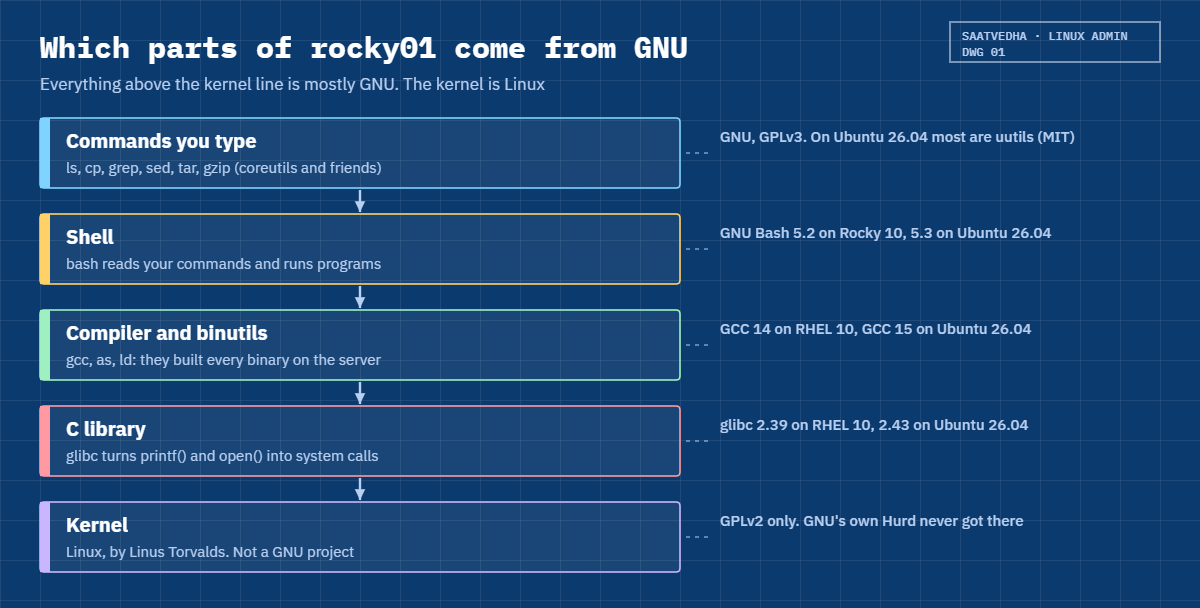
The picture underneath shows what that means on rocky01 today. Everything above the kernel line is mostly GNU, and the kernel itself is Linux.
This is why the Free Software Foundation asks people to say “GNU/Linux” for the whole system, and why Debian calls itself Debian GNU/Linux. Lesson 6 covers that naming argument from both sides. For your daily work the useful habit is simpler: when a command behaves oddly, ask which project wrote it and which version you have, because the answer is not always GNU any more.
Ubuntu 26.04 is the clearest example. Its core utilities now come from uutils, a rewrite in Rust under the MIT licence, while GNU coreutils stays installed beside it. RHEL 10, Rocky Linux 10 and Oracle Linux 10 still ship GNU coreutils 9.5.
Alpine Linux, which you’ll meet in containers, uses BusyBox and musl instead of GNU coreutils and glibc. Same commands on the screen, different code underneath.
Hands-on lab: find the GNU inside your Linux servers
Before you run any command, double-check it
Read every command twice before you press Enter. Check the target: the server name, the user, the disk or device name, the path and the sizes. These commands are for learning and were tested in our lab, not on your system. At work, run the read-only commands first, follow your change process, make sure a backup exists, and ask a second person to check anything that changes or deletes data. You run them at your own risk.
In this lab you’ll go looking for GNU on both lab servers: ask each tool who wrote it, find the package it came from, read its licence and compile a tiny program with GCC. Everything is read-only except two package installs and one small folder in your home directory.
Log in to both VMs from your laptop: ssh -p 2211 student@127.0.0.1 for rocky01 and ssh -p 2221 student@127.0.0.1 for ubu01. Your version numbers may be a little newer than the ones shown here if you’ve installed updates.
1Ask the shell who made it
Run this on rocky01:
bash --versionYou should see something like this:
GNU bash, version 5.2.26(1)-release (x86_64-redhat-linux-gnu)
Copyright (C) 2022 Free Software Foundation, Inc.
License GPLv3+: GNU GPL version 3 or later <http://gnu.org/licenses/gpl.html>
This is free software; you are free to change and redistribute it.
There is NO WARRANTY, to the extent permitted by law.Bash is a GNU program, and the second line names the Free Software Foundation as the copyright holder. The licence line says GPLv3 “or later”. On ubu01 the same command shows a newer Bash:
GNU bash, version 5.3.9(1)-release (x86_64-pc-linux-gnu)
Copyright (C) 2025 Free Software Foundation, Inc.
License GPLv3+: GNU GPL version 3 or later <http://gnu.org/licenses/gpl.html>
This is free software; you are free to change and redistribute it.
There is NO WARRANTY, to the extent permitted by law.The part in brackets is the build target. x86_64-redhat-linux-gnu and x86_64-pc-linux-gnu both end in “linux-gnu”: a Linux kernel with the GNU C library on top.
✅ Checkpoint: You can read the Bash version on both servers and say who holds its copyright.
2Ask ls who wrote it, on rocky01
Run this on rocky01:
ls --versionYou should see something like this:
ls (GNU coreutils) 9.5
Copyright (C) 2024 Free Software Foundation, Inc.
License GPLv3+: GNU GPL version 3 or later <https://gnu.org/licenses/gpl.html>.
This is free software: you are free to change and redistribute it.
There is NO WARRANTY, to the extent permitted by law.
Written by Richard M. Stallman and David MacKenzie.Almost every GNU program answers --version and --help the same way, which is one of the GNU coding standards. The last line is a little piece of history: Stallman wrote the first GNU ls himself.
✅ Checkpoint: rocky01 reports ls (GNU coreutils) 9.5 or a newer 9.x.
3Which tools are GNU on Ubuntu 26.04?
Run this on ubu01:
ls --versionYou should see this:
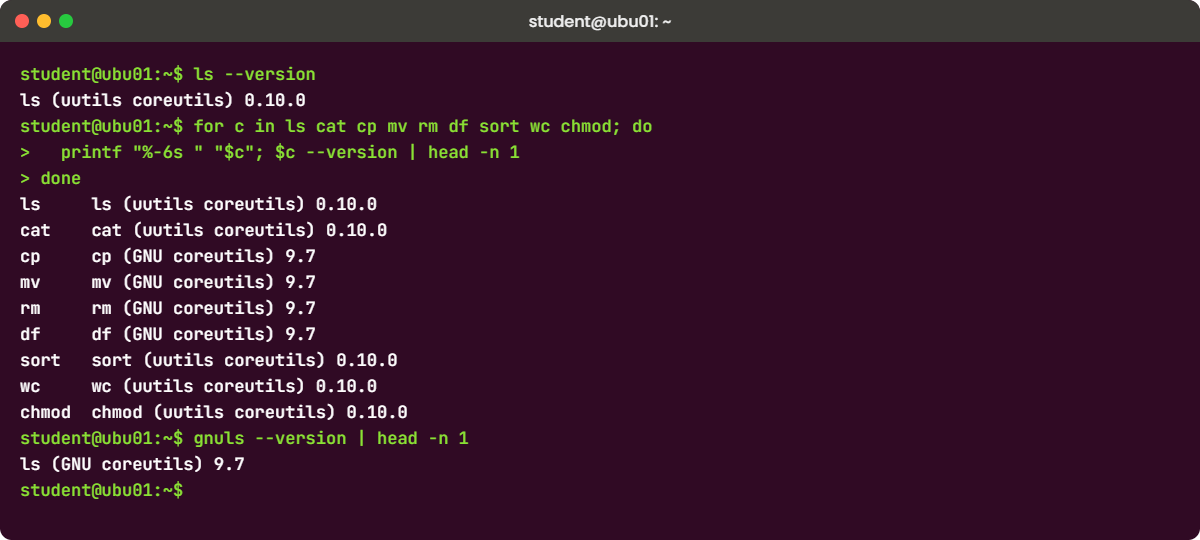
ls (uutils coreutils) 0.10.0That isn’t GNU. Ubuntu 26.04 switched its core utilities to uutils, a Rust rewrite, but kept the GNU versions for the commands where the rewrite still had bugs. Check a handful at once.
Paste this whole block:
for c in ls cat cp mv rm df sort wc chmod; do
printf "%-6s " "$c"; $c --version | head -n 1
doneYou should see something like this:
ls ls (uutils coreutils) 0.10.0
cat cat (uutils coreutils) 0.10.0
cp cp (GNU coreutils) 9.7
mv mv (GNU coreutils) 9.7
rm rm (GNU coreutils) 9.7
df df (GNU coreutils) 9.7
sort sort (uutils coreutils) 0.10.0
wc wc (uutils coreutils) 0.10.0
chmod chmod (uutils coreutils) 0.10.0On a fresh 26.04 install before updates you may see uutils 0.8.0 instead of 0.10.0. The GNU originals are still there with a gnu prefix, and the normal names are only symbolic links:
gnuls --version | head -n 2
readlink -f /usr/bin/ls /usr/bin/cpYou should see this:
ls (GNU coreutils) 9.7
Packaged by Ubuntu (9.7-3ubuntu2.1)
/usr/lib/cargo/bin/coreutils/ls
/usr/bin/gnucp✅ Checkpoint: You can name three commands on ubu01 that come from uutils and three that still come from GNU.
4Find the package behind a command
Run this on rocky01:
rpm -qf /usr/bin/ls
rpm -qi coreutils | grep -E '^(Name|Version|License|URL|Summary)'You should see something like this:
coreutils-9.5-8.el10_2.1.x86_64
Name : coreutils
Version : 9.5
License : GPL-3.0-or-later AND GFDL-1.3-no-invariants-or-later AND LGPL-2.1-or-later AND LGPL-3.0-or-later
URL : https://www.gnu.org/software/coreutils/
Summary : A set of basic GNU tools commonly used in shell scriptsrpm -qf answers “which package owns this file?” and rpm -qi prints the package’s details, including its licence in SPDX form (the short standard licence names). On ubu01 the Debian tools do the same job:
dpkg -S /usr/bin/ls
dpkg -l coreutils coreutils-from-uutils gnu-coreutils rust-coreutils | tail -n 6You should see something like this:
coreutils-from-uutils: /usr/bin/ls
||/ Name Version Architecture Description
+++-=====================-===========================-============-==========================================
ii coreutils 9.5-1ubuntu2+0.0.0~ubuntu25 all coreutils meta package
ii coreutils-from-uutils 0.0.0~ubuntu25 all coreutils from the uutils project
ii gnu-coreutils 9.7-3ubuntu2.1 amd64 GNU core utilities
ii rust-coreutils 0.10.0-1ubuntu2~26.04.1 amd64 Universal coreutils utils, written in RustOn Ubuntu, coreutils is now an empty “meta package” that pulls in one provider, coreutils-from-uutils by default. You’ll use rpm and dpkg properly in Lessons 35 and 36.
✅ Checkpoint: You can say which package owns /usr/bin/ls on each server.
5Read the licence that came with the code
Run this on rocky01:
ls /usr/share/licenses/bash /usr/share/licenses/coreutils-common
head -n 2 /usr/share/licenses/bash/COPYINGYou should see something like this:
/usr/share/licenses/bash:
COPYING
/usr/share/licenses/coreutils-common:
COPYING
GNU GENERAL PUBLIC LICENSE
Version 3, 29 June 2007RPM packages put licence files under /usr/share/licenses/<package> and other documents under /usr/share/doc/<package>. Debian and Ubuntu keep one machine-readable copyright file per package and the full common licence texts in /usr/share/common-licenses. Run this on ubu01:
grep -m1 '^License:' /usr/share/doc/bash/copyright /usr/share/doc/rust-coreutils/copyright
ls /usr/share/common-licensesYou should see something like this:
/usr/share/doc/bash/copyright:License: GPL-3+
/usr/share/doc/rust-coreutils/copyright:License: MIT
Apache-2.0 CC0-1.0 GFDL-1.3 GPL-2 LGPL-2 MPL-1.1
Artistic GFDL GPL GPL-3 LGPL-2.1 MPL-2.0
BSD GFDL-1.2 GPL-1 LGPL LGPL-3So the shell on ubu01 is copyleft (GPL-3+) and its ls is permissive (MIT). Both are free software, but only the first forces changed versions to stay open.
✅ Checkpoint: You found the licence files for bash on both servers.
6Try GNU long options
Run this on either server:
cd ~
ls -a
ls --all
ls -A
ls --almost-allYou should see something like this:
. .. .bash_history .bash_logout .bashrc .cache .profile
.bash_history .bash_logout .bashrc .cache .profile
.bash_history .bash_logout .bashrc .cache .profileClassic Unix gave you short options: one dash and one letter. GNU added long options with two dashes and a readable name, so ls -A and ls --almost-all do the same thing. Long options make scripts easier to read six months later.
GNU programs also accept any unique start of a long option, so ls --alm works too, which leads straight into the first Break-It below.
✅ Checkpoint: You can give the long form of ls -a and ls -A.
7Build a program with GCC and glibc
Install the compiler. On rocky01:
sudo dnf install -y gccOn ubu01:
sudo apt install -y gccThen, on ubu01 (rocky01 works the same way), paste this whole block:
gcc --version | head -n 1
mkdir -p ~/gnu-lab && cd ~/gnu-lab
cat > hello.c <<'EOF'
#include <stdio.h>
int main(void)
{
printf("Hello from GNU tools\n");
return 0;
}
EOF
gcc hello.c -o hello
./hello
ldd ./hello
ldd --version | head -n 1You should see something like this:
gcc (Ubuntu 15.2.0-16ubuntu1) 15.2.0
Hello from GNU tools
linux-vdso.so.1 (0x00007ffd4b3e2000)
libc.so.6 => /lib/x86_64-linux-gnu/libc.so.6 (0x00007f2a6c400000)
/lib64/ld-linux-x86-64.so.2 (0x00007f2a6c6b1000)
ldd (Ubuntu GLIBC 2.43-2ubuntu2.4) 2.43GCC turned your C file into a program, and ldd shows it depends on libc.so.6, which is glibc. On rocky01 you get GCC 14.3.1 and glibc 2.39 instead, but the same picture. Nearly every program on the server, from sshd to the package manager, sits on that same library.
✅ Checkpoint: Your hello program prints its line, and ldd shows libc.so.6 on both servers.
Break It, Then Fix It
Three real failures, all caused by the gap between “a command called ls” and “GNU ls”. None of them can hurt your VMs, so no snapshot is needed.
1Shorten a long option too far
Run this on rocky01:
ls --alYou’ll get this error:
ls: option '--al' is ambiguous; possibilities: '--all' '--almost-all'
Try 'ls --help' for more information.GNU accepts a shortened long option only when exactly one option starts that way, and two do here. The uutils ls on ubu01 refuses it as well, with a different message, so a script that greps for the GNU wording won’t match:
error: unexpected argument '--al' found
tip: a similar argument exists: '--all'
Usage: ls [OPTION]... [FILE]...
For more information, try '--help'.Fix: always type the full long option, in scripts above all.
ls --all✅ Checkpoint: ls with the full option name works on both servers.
2Forget the header file
On ubu01, delete the first line of hello.c and compile again:
cd ~/gnu-lab
sed -i '1d' hello.c
gcc hello.c -o helloYou’ll get this error:
hello.c: In function ‘main’:
hello.c:4:5: error: implicit declaration of function ‘printf’ [-Wimplicit-function-declaration]
4 | printf("Hello from GNU tools\n");
| ^~~~~~
hello.c:1:1: note: include ‘<stdio.h>’ or provide a declaration of ‘printf’
+++ |+#include <stdio.h>
1 |
hello.c:4:5: warning: incompatible implicit declaration of built-in function ‘printf’ [-Wbuiltin-declaration-mismatch]printf lives in glibc, and stdio.h is the header that tells the compiler what it looks like. Older GCC releases only warned about this, but since GCC 14 it’s an error, so old source code that “always compiled” can fail on RHEL 10 and Ubuntu 26.04. You’ll meet this when someone asks you to rebuild an old in-house tool.
Fix: put the include back and compile again:
sed -i '1i #include <stdio.h>' hello.c
gcc hello.c -o hello && ./hello✅ Checkpoint: The program compiles and prints Hello from GNU tools again.
3A script that trusts GNU behaviour
Paste this whole block on rocky01, then the same block on ubu01:
cat > ~/gnu-lab/cpu-check.sh <<'EOF'
#!/bin/bash
if [ "$(uname -p)" = "x86_64" ]; then
echo "64-bit Intel/AMD server, OK to install the agent"
else
echo "Unsupported CPU: $(uname -p)" >&2
exit 1
fi
EOF
bash ~/gnu-lab/cpu-check.shrocky01 says:
64-bit Intel/AMD server, OK to install the agentubu01 says:
Unsupported CPU: unknownuname -p (processor type) isn’t defined by POSIX, and GNU itself prints “unknown” on Linux. Red Hat and Debian patch their GNU builds to print the machine type, so the check worked for years, until Ubuntu 26.04 switched to the uutils uname, which doesn’t carry that patch. Run gnuuname -p on ubu01 and you’ll see x86_64 again.
Fix: use the machine hardware name, which every implementation supports:
sed -i 's/uname -p/uname -m/g' ~/gnu-lab/cpu-check.sh
bash ~/gnu-lab/cpu-check.sh✅ Checkpoint: The script prints the OK line on both servers.
This happened at work
The CDR files that came from nowhere
I was working with the billing team of a mobile operator in Toronto when they moved their nightly mediation jobs from an old RHEL 8 VM into small Alpine containers. The jobs collect call detail records (CDRs) from the network, rename them by date and hand them to billing. The move was tested on a Friday afternoon and went live on Monday night.
On Tuesday morning a billing analyst noticed that the previous day’s file was missing and a file called cdr_.csv had appeared instead, holding records from three different days. The first idea was a network problem, so someone spent an hour checking whether the collectors had sent everything. They had.
The cause was one line in the shell script: date -d '1 day ago' +%Y%m%d. That relative date is a GNU extension. Alpine uses BusyBox, whose date printed “invalid date” to stderr and nothing to stdout, and the script never checked the exit code, so the date part of the filename was empty.
The Friday test had run on a laptop with GNU coreutils, which is why nobody saw it.
The quick fix was apk add coreutils in the image, which brings in GNU date. The lasting changes were more useful: every script now starts with set -euo pipefail, the test runs inside the same container image that goes live, and the team keeps a short list of GNU-only options they had been using without knowing it.
Common mistakes and troubleshooting
| Mistake | What happens | What to do instead |
|---|---|---|
| Thinking “free software” means “no cost” | You miss the licence duties when the company ships software to customers | Read it as freedom: run, study, change, share. Check the licence before you redistribute anything |
| Assuming every Linux has GNU coreutils | Scripts fail on Ubuntu 26.04 (uutils) or Alpine (BusyBox) with odd errors | Run ls --version and test scripts on the same image they will run on |
| Shortening long options in scripts | An option becomes ambiguous after an upgrade, or the other implementation rejects it | Type the full long option, such as --almost-all |
| Relying on non-POSIX output like uname -p | The script works on one distribution and fails on the next | Use portable options (uname -m) and check exit codes |
| Calling the GPL “viral” and banning all GPL tools | Teams avoid bash, gcc or rsync for no reason | Internal use creates no duty. Ask legal only when you distribute modified code |
| Looking for licences only in /usr/share/doc on Rocky | You think the package has no licence file | RPM puts them in /usr/share/licenses/<package>; Debian uses /usr/share/doc/<package>/copyright |
Interview questions
Click a question to open it. Each one is written the way an interviewer would ask it. Under it you will see why they ask it and one way you could answer, in your own words.
Fresher level
1. What is the GNU Project, and how is it related to Linux?
Why they ask this: They want to know you understand that a “Linux server” is more than the kernel. Mixing up the two is a common fresher mistake.
How you might answer: GNU is the project Richard Stallman started in 1983 to build a complete free Unix-like system. It produced bash, gcc, glibc, coreutils and most of the everyday tools.
Linux is the kernel Linus Torvalds wrote in 1991. A typical distribution like RHEL or Ubuntu is the Linux kernel with GNU tools and libraries on top, which is why the FSF calls it GNU/Linux.
2. What does “free software” mean, and what is copyleft?
Why they ask this: This checks whether you know free means freedom, and whether you can explain the GPL in plain words.
How you might answer: Free software gives you four freedoms: run it, study and change it, share it and share your changes. It’s about freedom, not price.
Copyleft is how the GPL protects that. If I distribute a GPL program or a changed version, I have to give the source code to whoever gets it, under the same licence. Using it inside the company doesn’t trigger that duty.
2–5 years experience
3. A shell script works on RHEL 9 but fails on an Ubuntu 26.04 server. How would you start?
Why they ask this: They want to see that you check which implementation of a command is running before you blame the script logic.
How you might answer: First I’d run the failing commands with --version. On 26.04 most coreutils commands are uutils, not GNU, and things like uname -p or shortened long options behave differently.
I’d test with the gnu prefixed command, for example gnuuname -p, to confirm the cause, then fix the script to use portable options. Switching the whole server back to GNU coreutils is possible, but I’d rather fix the script.
4. How do you find the licence of a package that’s installed on a server?
Why they ask this: This tests practical package knowledge on both families, which comes up in audits and when vendors ask what you ship.
How you might answer: On RHEL or Rocky I run rpm -qi <package> and read the License field, which is in SPDX form, and the full text is under /usr/share/licenses/<package>.
On Ubuntu I read /usr/share/doc/<package>/copyright, which lists a License line for each group of files, and the common texts are in /usr/share/common-licenses.
Senior level
5. Your company wants to ship an appliance built on Linux to customers. What licence questions would you raise?
Why they ask this: Senior admins often build images that leave the building. They want to hear about distribution duties, source offers and keeping records.
How you might answer: Shipping the appliance is distribution, so the GPL duties apply: the kernel is GPLv2 and tools like bash and coreutils are GPLv3. We must be able to give customers the matching source code, including any changes we made, and GPLv3 adds rules about letting users install modified versions on consumer devices.
I’d keep a package list with licences for every image build, from rpm -qa or dpkg -l, avoid modifying GPL code unless we’re ready to publish it, and get legal to sign off before the first shipment.
6. Why did the GNU Hurd never replace Linux, and does that history matter to you as an admin?
Why they ask this: They’re checking depth and judgement: can you explain a design trade-off and connect it to real decisions.
How you might answer: The Hurd chose a Mach microkernel, waited years for Mach’s licence, and found the message-passing design very hard to debug. Linux was a simpler monolithic kernel that worked with the GNU tools in 1991, so developers moved to it.
It matters because the same trade-off shows up in every technology choice: the cleaner design isn’t always the one that ships. When I pick tools for a team, working and supported today usually beats elegant and unfinished.
Quick quiz
Q1. When did Richard Stallman announce the GNU Project?
- January 1984
- September 1983
- October 1985
- August 1991
Show answer
B — He posted the announcement on 27 September 1983. Work started in January 1984 and the FSF was founded in October 1985.
Q2. Which of these is NOT a GNU project?
- bash
- gcc
- glibc
- the Linux kernel
Show answer
D — The Linux kernel was written by Linus Torvalds. GNU’s own kernel is the Hurd.
Q3. What does copyleft require?
- You may never charge money for the software
- If you distribute the program or a changed version, you must pass on the source under the same terms
- You must publish every change you make, even for internal use
- You must credit the FSF on your website
Show answer
B — The duty starts when you distribute. Selling copies is allowed, and internal use creates no duty.
Q4. On Ubuntu 26.04, ls --version prints “uutils coreutils”. What does that mean?
- The server is broken
- ls comes from a Rust rewrite of coreutils, not GNU
- Ubuntu removed GNU coreutils completely
- It is a BusyBox build
Show answer
B — Ubuntu 26.04 uses rust-coreutils (uutils) by default and keeps the GNU versions installed with a gnu prefix, such as gnuls.
Q5. Where does Rocky Linux keep the licence file for the bash package?
- /etc/licenses/bash
- /usr/share/doc/bash/copyright
- /usr/share/licenses/bash/COPYING
- /var/lib/rpm/bash.license
Show answer
C — RPM installs licence files under /usr/share/licenses/<package>. The copyright file in /usr/share/doc is the Debian and Ubuntu way.
Quick recap
- Richard Stallman announced GNU on 27 September 1983 to build a complete free Unix-like system. The FSF followed in 1985.
- Free software means four freedoms (run, study, change, share), and copyleft (the GPL) keeps them attached when you distribute.
- GNU gave Linux its compiler (gcc), C library (glibc), shell (bash) and everyday commands (coreutils). The GNU kernel, the Hurd, never became production ready.
- Ask any tool who made it with
--version, and find its package and licence withrpm -qf/rpm -qiordpkg -S//usr/share/doc/<package>/copyright. - Ubuntu 26.04 uses uutils for most core commands (GNU stays available as gnuls, gnucp and so on), so test scripts on the system they will run on.
Next lesson
Lesson 6: Linus Torvalds and the Linux kernel → You’ll see how a student’s hobby kernel from 1991 filled the gap GNU left, how kernel versions work today, and which kernels rocky01 and ubu01 run.
Further reading: GNU project
Want to go deeper into GNU project? Read Stallman’s initial GNU announcement, the free software definition, the quick guide to GPLv3 and Ubuntu’s 26.04 release notes, which explain the switch to rust-coreutils. You can also see the full plan for this course on the Linux Administration course page.
