Windows Server interview questions and certification prep

You’ve finished the course content. Now you need to show it. This last lesson prepares you for the Windows Server interview questions you’ll face at each level, and for the Microsoft certification that matches what you’ve learned.

You’ll turn your lab into evidence, practise explaining real command output, run timed troubleshooting drills, map your skills to the AZ-802 exam, and write stories you can tell with confidence.

TimeYou needBy the end you can
About 2 hours, then 15 minutes a day of practiceYour SaatLab VMs, the scripts from Lesson 53, and a notebook or text fileAnswer fresher, mid-level and senior questions with real examples, and plan your certification

What it is, in one line

Windows Server interview questions test three things: whether you know the concepts, whether you can troubleshoot calmly, and whether you can explain your real experience clearly.

In Simple Words

In Simple Words

Imagine a cooking competition. The judges don’t just ask “what is salt?” They watch you cook, ask why you added something, and taste the result.

An interview is the same. Knowing definitions is the start. Showing how you fixed a real problem, step by step, is what wins.

Your lab is your kitchen. Every problem you fixed there is a dish you can talk about.

Engineer's View

Engineer’s View

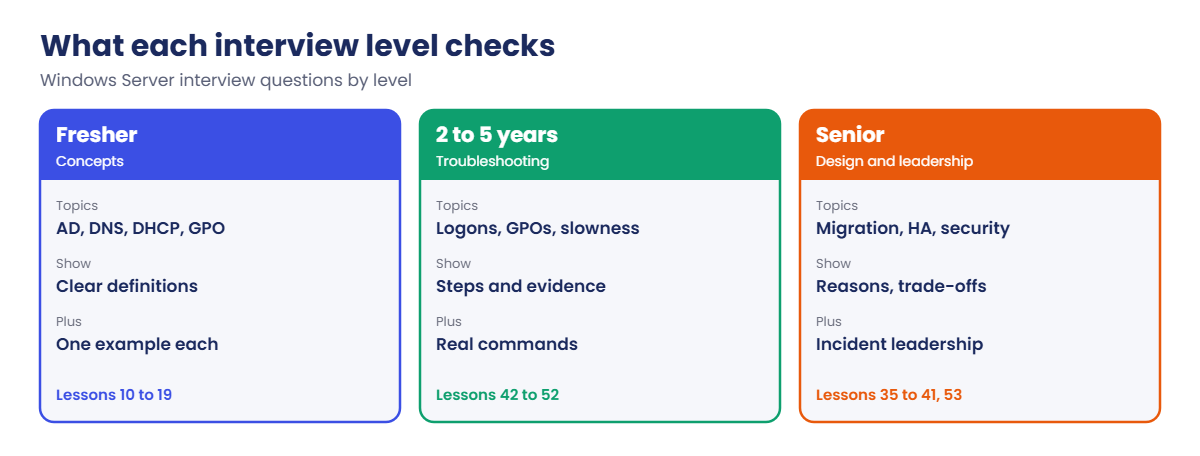
Fresher interviews check basics: AD, DNS, DHCP, Group Policy, permissions, PowerShell and how you’d approach a simple ticket. Clear definitions and one example each are enough.

2–5 year interviews check troubleshooting: they describe a symptom and want your steps, tools and the evidence you’d look for. Commands and event IDs you’ve actually used make answers believable.

Senior interviews check design, risk and leadership: migrations, availability, security tiering, incident handling, standards and trade-offs. They want reasons, not just steps.

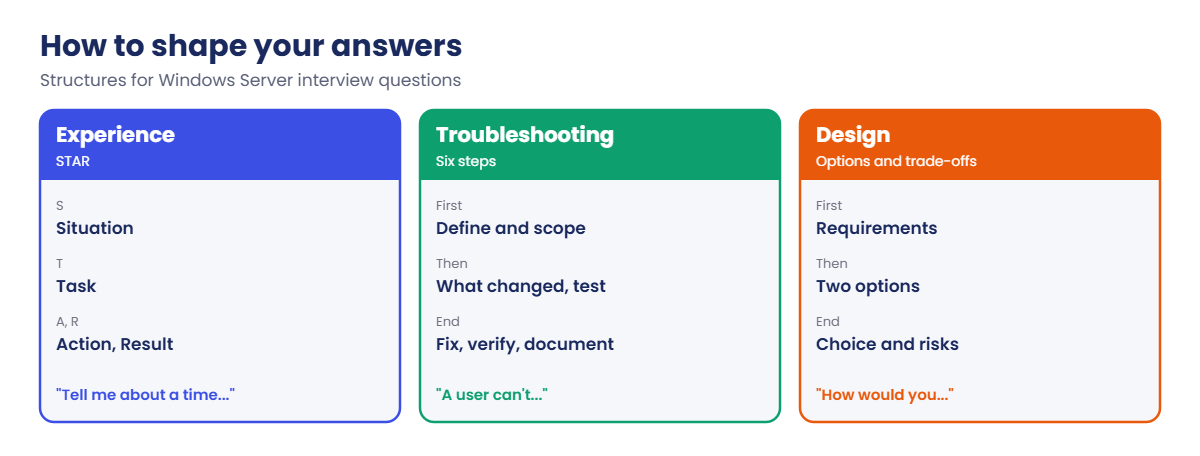
Answer shape: for experience questions use STAR (Situation, Task, Action, Result). For troubleshooting questions use the Lesson 42 workflow out loud. Saying “I’d check X because Y” beats a list of tools.

Certification: Microsoft’s current Windows Server exam is AZ-802: Administering Windows Server, which replaced AZ-800 and AZ-801 (retired in September 2026). It leads to the Windows Server Administrator Associate certification, has a passing score of 700, and covers AD DS, hybrid management, VMs, networking, storage, security, and monitoring and troubleshooting.

How it works, step by step

How interviewers move through the levels:

Windows Server interview questions: what fresher, mid-level and senior interviews check

Most interviews start easy and get harder until you stop being sure. That’s normal. What matters is how you behave at that point: say what you know, how you’d find out the rest, and where you’d look.

Here are twenty questions you’re likely to hear, with the lesson that prepares you for each:

QuestionLevelLesson
What is Active Directory, and what is a domain controller?Fresher10, 11
What are FSMO roles?Fresher10, 32
How does DNS work in a domain?Fresher14
Explain DHCP DORA and reservations.Fresher15
Share vs NTFS permissions?Fresher16
What is Group Policy and LSDOU?Fresher19
A user can’t log on. What do you check?2–5 years45
A GPO doesn’t apply. How do you troubleshoot?2–5 years46
How do you check AD replication?2–5 years31, 45
How does Kerberos work, and what breaks it?2–5 years21
A server is slow. Where do you start?2–5 years47
An update keeps failing. What do you do?2–5 years49
A server shows a blue screen. What next?2–5 years48
How do you back up and restore AD?2–5 years32, 38
How does a failover cluster decide who runs a role?Senior37, 51
How would you migrate 30 file servers?Senior41
How would you secure privileged accounts?Senior22, 23
How do you design patching for 500 servers?Senior24
How would you take over an undocumented environment?Senior53
Tell me about a major incident you handled.All42, 53

How to shape your answers:

Windows Server interview questions: STAR, six-step and design answer structures

In the lab you’ll:

  • Export your lab inventory as interview evidence.
  • Practise explaining real command output.
  • Run a timed troubleshooting drill.
  • Map your lab work to the AZ-802 skills.
  • Write three STAR stories from your lab.

Hands-on lab: turn your lab into interview evidence

Start DC01, DC02, SRV01 and CL01. Work as SAATLAB\adm.rahul in PowerShell as administrator on DC01.

1Export your lab inventory

On DC01, list your servers and the roles on each:

$servers = 'DC01', 'DC02', 'SRV01'
$servers | ForEach-Object {
    $roles = Get-WindowsFeature -ComputerName $_ | Where-Object { $_.Installed -and $_.FeatureType -eq 'Role' }
    [pscustomobject]@{ Server = $_; Roles = ($roles.Name -join ', ') }
} | Tee-Object -Variable inv | Format-Table -Wrap
$inv | Export-Csv C:\Lab\lab-inventory.csv -NoTypeInformation

You’ll see something like this:

Server Roles
------ -----
DC01   AD-Domain-Services, DNS, FileAndStorage-Services
DC02   AD-Domain-Services, DHCP, DNS, FileAndStorage-Services
SRV01  AD-Certificate, DHCP, FileAndStorage-Services, Print-Services, Remote-Desktop-Services, Web-Server

This is your answer to “what have you built?” You can describe each server, why it has those roles, and what you broke and fixed on it.

✅ Checkpoint: C:\Lab\lab-inventory.csv lists each server with its roles.
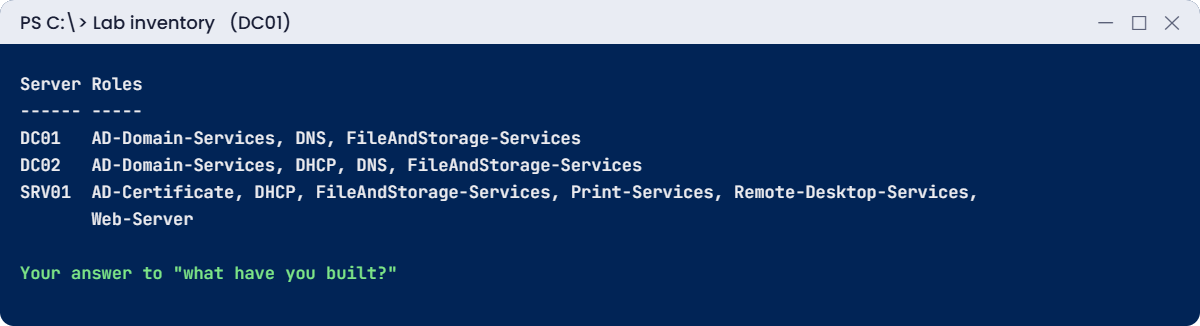
Windows Server interview questions lab: exporting the lab inventory as evidence
Windows Server interview questions: your lab inventory is your first piece of evidence

2Practise explaining real output

Run these, then explain each result out loud in under a minute:

repadmin /replsummary
dcdiag /s:DC01 /q
Get-ADDomain | Select-Object PDCEmulator, RIDMaster, InfrastructureMaster
Get-ADForest | Select-Object SchemaMaster, DomainNamingMaster

You’ll see something like this:

PDCEmulator           RIDMaster             InfrastructureMaster
-----------           ---------             --------------------
DC01.saatlab.internal DC01.saatlab.internal DC01.saatlab.internal

SchemaMaster          DomainNamingMaster
------------          ------------------
DC01.saatlab.internal DC01.saatlab.internal

Interviewers love “what does this output tell you?” Practise saying what each line means, what a bad result would look like, and what you’d do next. Record yourself once; you’ll hear where you hesitate.

✅ Checkpoint: You can explain repadmin, dcdiag and FSMO output in your own words.

3Run a timed troubleshooting drill

Apply one random fault and time how long it takes you to fix it:

C:\Lab\Break-SaatLab.ps1 -Fault (1..10 | Get-Random)
$timer = [Diagnostics.Stopwatch]::StartNew()
C:\Lab\Test-SaatLab.ps1 | Where-Object Result -eq 'FAIL'
# ...find and fix it, then:
C:\Lab\Test-SaatLab.ps1 | Where-Object Result -eq 'FAIL' | Measure-Object | Select-Object Count
"Fixed in {0:N0} minutes" -f $timer.Elapsed.TotalMinutes

You’ll see something like this at the end:

Count
-----
    0

Fixed in 7 minutes

Do one drill a day for two weeks and say every step out loud as you go. Live troubleshooting rounds feel very different when you’ve done it twenty times.

✅ Checkpoint: You fixed a random fault and recorded the time.

4Map your lab to the AZ-802 skills

Save this table and mark your confidence for each area from 1 to 5:

$skills = @(
    [pscustomobject]@{ Area = 'Deploy and manage AD DS';                  Weight = '20-25%'; Lessons = '10-13, 31-35' }
    [pscustomobject]@{ Area = 'Manage Windows Server in a hybrid setup';  Weight = '10-15%'; Lessons = '6, 7, 27, 40' }
    [pscustomobject]@{ Area = 'Manage virtual machines';                  Weight = '10-15%'; Lessons = '28-30' }
    [pscustomobject]@{ Area = 'Networking infrastructure';                Weight = '10-15%'; Lessons = '9, 14, 15, 26' }
    [pscustomobject]@{ Area = 'Storage and file services';                Weight = '15-20%'; Lessons = '16, 17, 36, 41' }
    [pscustomobject]@{ Area = 'Secure Windows Server';                    Weight = '10-15%'; Lessons = '21-24, 34' }
    [pscustomobject]@{ Area = 'Monitor and troubleshoot';                 Weight = '15-20%'; Lessons = '37-39, 42-52' }
)
$skills | Export-Csv C:\Lab\az802-plan.csv -NoTypeInformation
$skills | Format-Table -AutoSize

You should see this:

Area                                    Weight Lessons
----                                    ------ -------
Deploy and manage AD DS                 20-25% 10-13, 31-35
Manage Windows Server in a hybrid setup 10-15% 6, 7, 27, 40
Manage virtual machines                 10-15% 28-30
Networking infrastructure               10-15% 9, 14, 15, 26
Storage and file services               15-20% 16, 17, 36, 41
Secure Windows Server                   10-15% 21-24, 34
Monitor and troubleshoot                15-20% 37-39, 42-52

The weights come from Microsoft’s AZ-802 study guide. Hybrid topics (Azure Arc, Azure File Sync, Azure Monitor and similar) appear across several areas, so add Microsoft Learn’s AZ-802 learning paths for the Azure parts this course only introduced.

✅ Checkpoint: C:\Lab\az802-plan.csv lists the seven skill areas with weights and lessons.

5Write three STAR stories

Save a story file you can practise from:

$stories = @'
STORY 1 - Replication stopped (Lesson 53)
S: In my lab, changes made on the branch DC weren't reaching HQ.
T: Restore replication without losing changes.
A: repadmin /replicate showed error 8456; repadmin /options showed DISABLE_OUTBOUND_REPL on DC02. Removed it, ran /syncall, checked a test user on both DCs.
R: Replication healthy in 10 minutes; added a daily replsummary check.

STORY 2 - Pick one from Lessons 42-52
STORY 3 - Pick one from Lessons 36-41
'@
$stories | Set-Content C:\Lab\star-stories.txt
(Get-Content C:\Lab\star-stories.txt).Count

You should see this:

8

Be honest that these come from your lab. Interviewers respect a candidate who built and broke a real environment, explains it clearly, and doesn’t pretend it was production.

✅ Checkpoint: C:\Lab\star-stories.txt has your first STAR story and two more to write.

Break It, Then Fix It

Two interview situations you can rehearse in the lab: fixing something while someone asks “why?”, and meeting a problem you haven’t practised.

1Break it: fix a lockout while explaining every step

Ask a friend to play interviewer. Apply fault 8:

C:\Lab\Break-SaatLab.ps1 -Fault 8

Your friend says: “Kiran from Sales can’t log in. Talk me through it.” Answer out loud as you type. A good answer sounds like the commands below, with a reason before each one.

“First I confirm the account state, then I find where the bad passwords came from”:

Get-ADUser kiran.das -Properties LockedOut, BadLogonCount, LastBadPasswordAttempt |
    Select-Object SamAccountName, LockedOut, BadLogonCount, LastBadPasswordAttempt
Get-WinEvent -FilterHashtable @{ LogName = 'Security'; Id = 4740 } -MaxEvents 1 | Select-Object TimeCreated, Message

You’ll see something like this:

SamAccountName LockedOut BadLogonCount LastBadPasswordAttempt
-------------- --------- ------------- ----------------------
kiran.das      True      11            20/10/2026 01:12:44

“The 4740 event names SRV01 as the caller, so the bad passwords came through SRV01. I’d check its 4625 events for the source, then clear the lockout and fix the device with the old password.”

Fix it:

Unlock-ADAccount kiran.das
C:\Lab\Test-SaatLab.ps1 | Where-Object Check -like '08*'

You’ll see something like this:

Check                           Result
-----                           ------
08 Accounts: kiran.das unlocked PASS

✅ Checkpoint: You fixed the lockout and explained the reason for every command out loud.

2Break it: a fault that isn’t on the list

Ask your friend to run this without telling you what it does:

Set-GPLink -Name U-Staff-Desktop -Target 'OU=Staff,OU=SAATLAB,DC=saatlab,DC=internal' -LinkEnabled No | Out-Null

The symptom: Staff users lose their desktop settings, but your health check still passes, because check 05 only looks at the GPO’s status, not its link. In an interview, this is the moment to say “I haven’t seen this exact case, so here’s how I’d narrow it down”.

Narrow it down: check what applied for Priya, then the links on her OU:

Get-GPResultantSetOfPolicy -User SAATLAB\priya.sharma -Computer CL01 -ReportType Xml -Path C:\Lab\rsop.xml | Out-Null
Select-String -Path C:\Lab\rsop.xml -Pattern 'U-Staff-Desktop' -Quiet
(Get-GPInheritance -Target 'OU=Staff,OU=SAATLAB,DC=saatlab,DC=internal').GpoLinks | Select-Object DisplayName, Enabled

You’ll see something like this:

False

DisplayName     Enabled
-----------     -------
U-Staff-Desktop False
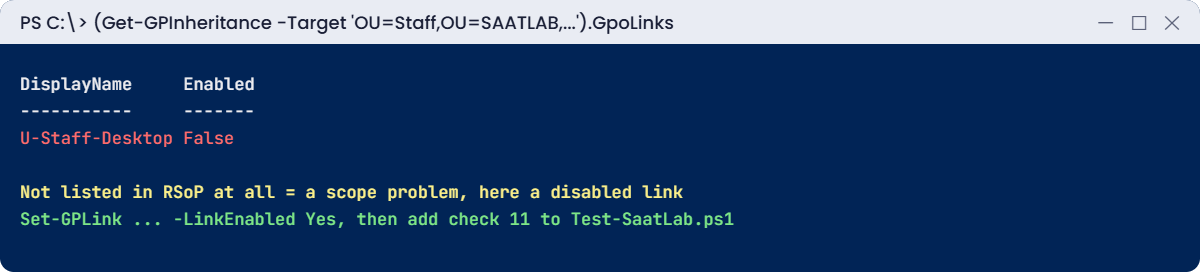
Windows Server interview questions break lab: reasoning through a fault you have not seen
Reasoning from the symptom to a disabled GPO link

The GPO doesn’t appear at all, not even as “filtered out”, which points at scope (Lesson 46). The link exists but is disabled. Your OU path may differ if you linked the GPO elsewhere in Lesson 19.

Fix it, and improve your health check so it catches this next time:

Set-GPLink -Name U-Staff-Desktop -Target 'OU=Staff,OU=SAATLAB,DC=saatlab,DC=internal' -LinkEnabled Yes | Out-Null
# Add to Test-SaatLab.ps1:
# '11 GPO: U-Staff-Desktop link enabled' = { ((Get-GPInheritance -Target 'OU=Staff,OU=SAATLAB,DC=saatlab,DC=internal').GpoLinks |
#     Where-Object DisplayName -eq 'U-Staff-Desktop').Enabled }

✅ Checkpoint: You found the disabled link without knowing the fault, fixed it, and added a check for it.

This happened at work

Two answers to the same question

A hiring manager interviewed two candidates for a server admin role on the same day and asked both: “A file share is suddenly slow for everyone. What do you do?”

The first said, “I’d restart the server.” When asked what if that didn’t help, he said he’d restart the file service. He had good certifications but no method.

The second asked two questions first: slow for everyone or one site, and since when? Then she walked through checking the server’s CPU, disk latency and network, recent changes and the event logs, and mentioned a similar problem she’d fixed in her home lab, caused by antivirus scanning. She got the job.

Why it worked: she showed a method, real tools and a real example. The manager said later that her lab story mattered more than any certificate.

The lesson: interviewers hire the way you think. Practise saying your steps out loud.

Common mistakes and troubleshooting

MistakeWhat happensWhat to do instead
Memorising definitions onlyWeak answers to scenario questionsPractise scenarios with your lab
Jumping to “restart it”Sounds like guessingAsk clarifying questions, then follow a method
Pretending to knowTrust is lost quicklySay what you know and how you’d find out
Long answers without structureThe interviewer loses trackUse STAR or the six-step workflow
Claiming lab work as productionCaught by follow-up questionsSay it was your lab, and show depth
Studying only for the examStrong score, weak practiceCombine AZ-802 study with lab drills
Ignoring the hybrid parts of AZ-802Gaps in a large part of the examAdd Microsoft Learn’s Azure Arc and hybrid modules
No questions for the interviewerLooks uninterestedAsk about their environment, tools and on-call

Interview questions

Click a question to open it. Under each one you’ll find what the interviewer is really looking for, and one good way to answer.

Fresher level

1. What’s the difference between a domain, a tree and a forest?

What they’re really checking: Do you know AD structure?

How you could answer: A domain is a security and admin boundary with its own database; a tree is domains sharing a namespace; a forest is the top boundary sharing a schema and global catalog.

2. What happens when a client joins a domain?

What they’re really checking: Can you explain a process?

How you could answer: It finds a DC through DNS SRV records, creates or uses a computer account, sets up a secure channel and gets Group Policy at the next restart.

3. Why should domain members use only internal DNS servers?

What they’re really checking: Do you know DNS and AD?

How you could answer: AD relies on DNS SRV records only internal DNS has; public DNS breaks logons, GPOs and DC discovery.

2–5 years experience

4. Users at one site can’t log on but others can. Walk me through it.

What they’re really checking: Can you scope a problem?

How you could answer: Check the site’s DC (dcdiag, Netlogon), DNS and SRV records, site and subnet mapping, network links, then replication and time.

5. How do you find which GPO set a setting?

What they’re really checking: Do you use the right tool?

How you could answer: An RSoP or gpresult /h report shows the winning GPO for each setting.

6. Tell me about a problem you troubleshot recently.

What they’re really checking: Can you tell a structured story?

How you could answer: Use STAR with a real lab example: the symptom, the evidence and commands, the cause, the fix and what you changed afterwards.

Senior level

7. How would you plan a move from Server 2016 to Server 2025?

What they’re really checking: Can you plan at scale?

How you could answer: Inventory and dependencies, compatibility, in-place versus migration per role, new DCs and demotions, Storage Migration Service, pilots, rollback and communication.

8. How do you make Windows infrastructure resilient?

What they’re really checking: Do you design for failure?

How you could answer: Two or more DCs per site where needed, clustered or redundant services, tested backups, monitoring with alerts, documented runbooks and regular failover tests.

9. How would you build a team process for incidents?

What they’re really checking: Can you lead?

How you could answer: Clear severity levels, an incident lead, a shared timeline, regular updates, blameless reviews and tracked prevention actions.

Quick quiz

Q1. What shape works best for experience questions?

  1. A list of tools
  2. STAR: Situation, Task, Action, Result
  3. One-word answers
Show answer

B — Stories need structure.

Q2. Which exam matches this course today?

  1. AZ-104
  2. AZ-802: Administering Windows Server
  3. MD-102
Show answer

B — It replaced AZ-800 and AZ-801.

Q3. What should you say when you don’t know an answer?

  1. Guess confidently
  2. What you know and how you’d find out
  3. Change the subject
Show answer

B — Honesty plus method.

Q4. Why didn’t the health check catch the disabled GPO link?

  1. It was broken
  2. It checked GPO status, not the link
  3. The GPO was deleted
Show answer

B — So you added check 11.

Q5. What made the second candidate in the work story stand out?

  1. More certificates
  2. A method, real tools and a lab example
  3. A longer answer
Show answer

B — Interviewers hire how you think.

Quick recap

  • Windows Server interview questions test concepts, troubleshooting and clear explanations of real work.
  • Use your lab inventory, scripts and incident notes as evidence.
  • Answer experience questions with STAR and troubleshooting questions with the six-step workflow.
  • Practise explaining command output and fixing timed faults out loud.
  • AZ-802 leads to the Windows Server Administrator Associate certification; use the skill map to plan your study.

What’s next

You’ve finished all 54 lessons of Windows Server Administration. Keep your lab, keep breaking and fixing it, and revisit any lesson from the course page before your interviews. Good luck!

Further reading: Windows Server interview questions

Want to go deeper into Windows Server interview questions? Microsoft’s AZ-802 study guide lists every skill measured, and the AZ-802T00 course outline shows the official training path. You can also see the full plan for this course on the Windows Server Administration course page.

Scroll to Top