Windows Server 2025 domain controllers and DC migration
-
Phase 0: Before you start
-
Phase 1: The foundation
-
Phase 2: Core administration and security
-
Phase 3: Enterprise infrastructure
-
Phase 4: Troubleshooting step by step
-
Phase 5: Final project and career
Most companies don’t build new forests; they replace old DCs with new ones. Running a Windows Server 2025 domain controller well means knowing what changed in this release, and being able to add, move roles to and retire DCs without anyone noticing.
In this lesson you’ll check functional levels and the new 32k database page feature, rehearse a DC migration with a temporary DC03 (promote, transfer FSMO roles, transfer them back, demote cleanly), and test one of Server 2025’s stricter LDAP defaults.
| Time | You need | By the end you can |
|---|---|---|
| About 90 minutes | DC01 and DC02, plus a new Server Core VM DC03 (2 GB RAM, 40 GB disk) | Explain what’s new for DCs in Server 2025, raise and check functional levels, enable optional features, transfer FSMO roles, demote a DC cleanly and spot insecure LDAP binds |
What it is, in one line
A Windows Server 2025 domain controller is a DC running the 2025 release, which brings a new functional level, an optional 32k-page AD database and stricter security defaults for LDAP, Kerberos and computer accounts.
In Simple Words
Moving the school office to a new building
When a school moves its office to a new building, it doesn’t close for a week. The new office opens first, copies all the records, and the head teacher hands over her keys and duties. Only then is the old office emptied and locked.
Retiring a DC works the same way: build the new one, let it replicate everything, hand over its special jobs (the FSMO roles), point everyone at the new one, then demote the old one properly.
The new building also has better locks. Server 2025 DCs refuse some old, insecure ways of talking that older DCs accepted.
Engineer's View
What changed for DCs in Server 2025
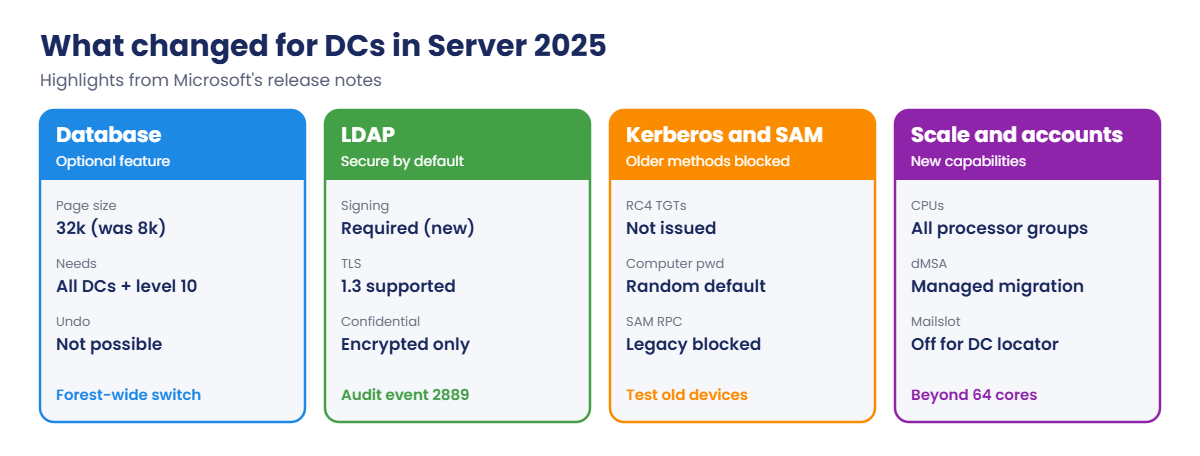
Functional level 10 (Windows2025Domain/Windows2025Forest) is new and required for the 32k database page size optional feature. 32k pages let a single object hold about 2.6 times more multivalued attribute values. New 2025 DCs can run a 32k-capable database; upgraded DCs keep 8k pages, and the switch is forest-wide and one-way, only when every DC is capable.
Security defaults: new deployments require LDAP signing and sealing for client communication; confidential attributes need an encrypted connection; LDAP over TLS supports TLS 1.3. The KDC no longer issues RC4 TGTs, default computer account passwords are random, and legacy remote SAM password-change methods are blocked.
Scale and accounts: AD DS now uses CPUs in all processor groups (beyond 64 cores), and delegated MSAs (dMSA) let you migrate old service accounts to managed ones.
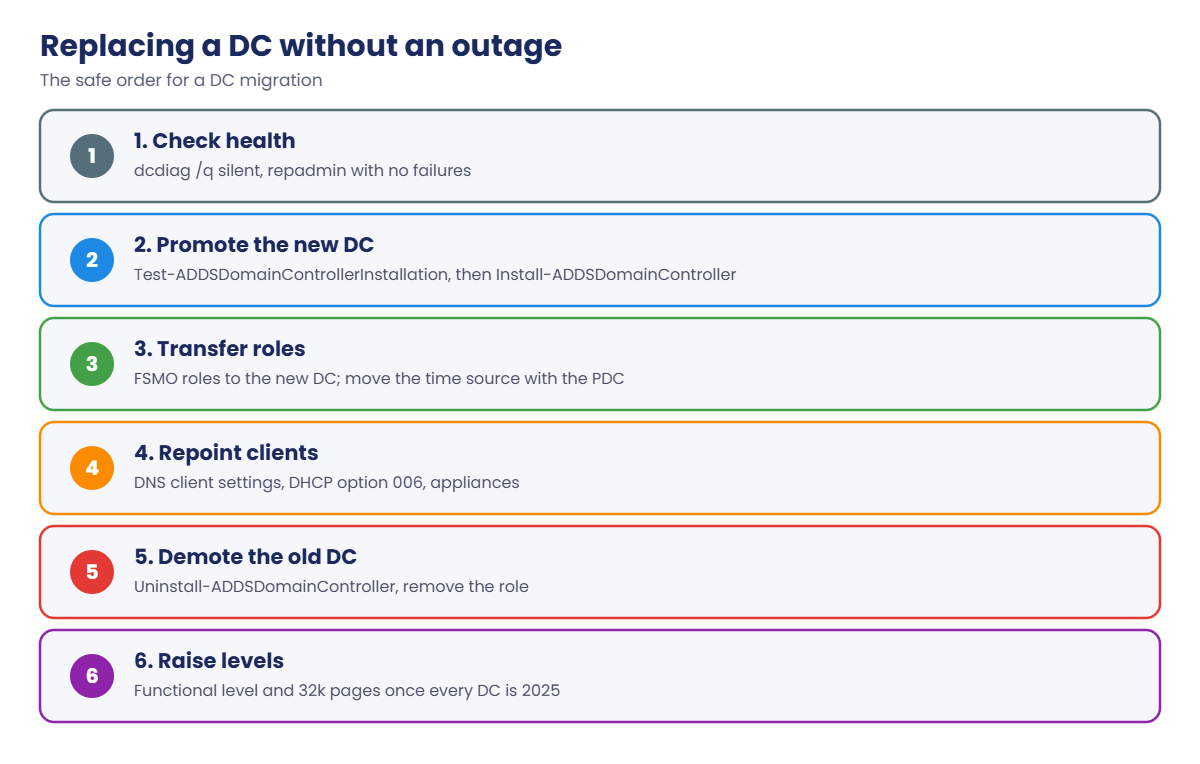
Migration basics: new DCs need the domain at 2016 functional level or higher. Promote the new DC, check replication, transfer FSMO roles with Move-ADDirectoryServerOperationMasterRole, update DNS client and DHCP settings that point to the old DC, then demote it with Uninstall-ADDSDomainController.
How it works, step by step
The safe order for replacing a DC:
The step people skip is the fourth one: finding every server, DHCP scope and appliance that has the old DC’s IP address written in as a DNS server. Reusing the old IP on the new DC, or a careful inventory, avoids the outage in the work story below.
The rehearsal you’ll run in the lab:
- Check health, functional levels and optional features.
- Promote DC03 (Server Core, 10.0.0.12) as the “new” DC.
- Transfer all FSMO roles from DC01 to DC03, then back.
- Demote DC03 cleanly and remove it from the domain.
- Test how a 2025 DC treats an insecure LDAP bind.
Hands-on Lab: Windows Server 2025 domain controller migration
Start DC01 and DC02. Work on DC01 as SAATLAB\adm.rahul in PowerShell as administrator.
1Check health, levels and optional features
On DC01:
dcdiag /q
repadmin /replsummary | Select-String 'fails'
(Get-ADForest).ForestMode; (Get-ADDomain).DomainMode
Get-ADOptionalFeature -Filter * | Select-Object Name, @{n='Enabled';e={[bool]$_.EnabledScopes}}You should see something like this:
Source DSA largest delta fails/total %% error
Destination DSA largest delta fails/total %% error
Windows2025Forest
Windows2025Domain
Name Enabled
---- -------
Recycle Bin Feature True
Privileged Access Management Feature False
Database 32k pages feature Falsedcdiag /q prints nothing when every test passes, which is what you want before any change to DCs. The forest is already at the 2025 level because you created it with Server 2025 in Lesson 11.
✅ Checkpoint: dcdiag /q is silent, replication has no failures, and both levels are Windows2025.
2Promote DC03, the “new” DC
On your laptop, create DC03 the way you created PDC1 in Lesson 33:
VBoxManage createvm --name DC03 --ostype Windows2025_64 --basefolder C:\Lab\VMs --register --default
VBoxManage modifyvm DC03 --memory 2048 --cpus 2 --nic1 natnetwork --nat-network1 LabNet
VBoxManage createmedium disk --filename C:\Lab\VMs\DC03\DC03.vdi --size 40960
VBoxManage storageattach DC03 --storagectl SATA --port 0 --device 0 --type hdd --medium C:\Lab\VMs\DC03\DC03.vdi
VBoxManage storageattach DC03 --storagectl SATA --port 1 --device 0 --type dvddrive --medium C:\Lab\ISO\server2025.iso
VBoxManage startvm DC03Install Server 2025 Datacenter Evaluation without Desktop Experience, set the password, and choose 15 in sconfig.
On DC03:
New-NetIPAddress -InterfaceAlias Ethernet -IPAddress 10.0.0.12 -PrefixLength 24 -DefaultGateway 10.0.0.1 | Out-Null
Set-DnsClientServerAddress -InterfaceAlias Ethernet -ServerAddresses 10.0.0.10
Add-Computer -DomainName saatlab.internal -NewName DC03 -Credential SAATLAB\adm.rahul -RestartAfter the restart, from DC01, check the new server and promote it:
Install-WindowsFeature AD-Domain-Services -ComputerName DC03 | Out-Null
$cred = Get-Credential SAATLAB\adm.rahul
$dsrm = Read-Host -AsSecureString 'DSRM password for DC03'
Invoke-Command -ComputerName DC03 -ScriptBlock {
Test-ADDSDomainControllerInstallation -DomainName saatlab.internal -Credential $using:cred -SafeModeAdministratorPassword $using:dsrm -SiteName HQ | Select-Object Status, Message
Install-ADDSDomainController -DomainName saatlab.internal -InstallDns -SiteName HQ -Credential $using:cred -SafeModeAdministratorPassword $using:dsrm -Force
}You should see something like this before DC03 restarts:
Status Message
------ -------
Success Operation completed successfullyRunning Test-ADDSDomainControllerInstallation first is a habit worth keeping: it checks credentials, DNS, functional levels and naming without changing anything.
✅ Checkpoint: Get-ADDomainController -Filter * lists DC01, DC02 and DC03 after DC03 restarts.
3Transfer the FSMO roles to DC03, then back
On DC01:
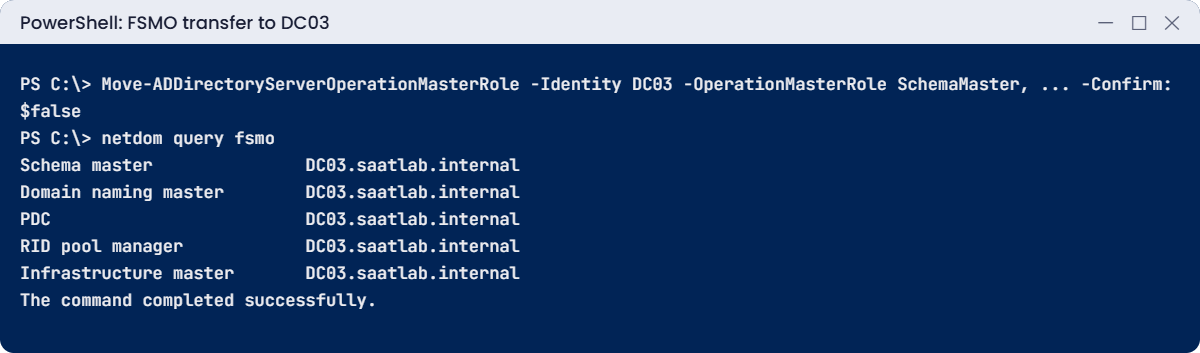
Move-ADDirectoryServerOperationMasterRole -Identity DC03 -OperationMasterRole SchemaMaster, DomainNamingMaster, PDCEmulator, RIDMaster, InfrastructureMaster -Confirm:$false
netdom query fsmoYou should see something like this:
Schema master DC03.saatlab.internal
Domain naming master DC03.saatlab.internal
PDC DC03.saatlab.internal
RID pool manager DC03.saatlab.internal
Infrastructure master DC03.saatlab.internal
The command completed successfully.This is a transfer, not a seizure: DC01 handed the roles over cleanly because it was online. Remember the PDC Emulator is also the forest’s time source, so in a real migration you’d set the external time source on the new PDC (Lesson 21) right after moving it.
Move them back to DC01, as the rest of the course expects:
Move-ADDirectoryServerOperationMasterRole -Identity DC01 -OperationMasterRole SchemaMaster, DomainNamingMaster, PDCEmulator, RIDMaster, InfrastructureMaster -Confirm:$false
(netdom query fsmo | Select-String 'DC01').CountYou should see this:
5✅ Checkpoint: All five roles went to DC03 and came back to DC01.
4Demote DC03 cleanly
From DC01, demote DC03 and remove the AD role:
Invoke-Command -ComputerName DC03 -ScriptBlock {
Uninstall-ADDSDomainController -LocalAdministratorPassword (Read-Host -AsSecureString 'New local admin password') -Credential $using:cred -Force
}DC03 removes its copy of AD, unregisters its DNS records, deletes its server object from Sites, and restarts as an ordinary member server. Wait for it to come back.
Then finish the clean-up from DC01:
Invoke-Command -ComputerName DC03 -ScriptBlock { Uninstall-WindowsFeature AD-Domain-Services | Select-Object Success }
Get-ADDomainController -Filter * | Select-Object -ExpandProperty Name
Get-DnsServerResourceRecord -ZoneName saatlab.internal -Name '@' -RRType A | Select-Object @{n='IP';e={$_.RecordData.IPv4Address}}You should see something like this:
Success
-------
True
DC01
DC02
IP
--
10.0.0.10
10.0.0.11No DC03 in the DC list and no 10.0.0.12 in the domain’s A records: a clean demotion. You can now shut down DC03 and delete the VM.
✅ Checkpoint: DC03 is no longer a DC and its DNS records are gone.
5See a 2025 LDAP default in action
On DC01, compare a signed Kerberos bind with a plain simple bind:
$p = Read-Host 'priya.sharma password'
$secure = New-Object DirectoryServices.DirectoryEntry('LDAP://DC01.saatlab.internal/DC=saatlab,DC=internal', 'SAATLAB\priya.sharma', $p, [DirectoryServices.AuthenticationTypes]'Secure, Signing, Sealing')
$secure.RefreshCache(); 'Signed bind: ' + $secure.distinguishedName
$plain = New-Object DirectoryServices.DirectoryEntry('LDAP://DC01.saatlab.internal/DC=saatlab,DC=internal', 'priya.sharma@saatlab.internal', $p, [DirectoryServices.AuthenticationTypes]::None)
try { $plain.RefreshCache() } catch { 'Plain bind: ' + $_.Exception.InnerException.Message }You should see something like this:
Signed bind: DC=saatlab,DC=internal
Plain bind: A more secure authentication method is required for this server.A simple bind sends the password in clear text unless the connection uses TLS. A DC that enforces LDAP signing refuses it. New Server 2025 deployments require signing by default; if your plain bind succeeded, enable the Group Policy setting Domain controller: LDAP server signing requirements Enforcement on the Domain Controllers OU and test again.
Old printers, scanners and apps that “log in to LDAP” often use them, so test devices before you migrate, and move them to LDAPS (port 636) with a certificate from your CA.
✅ Checkpoint: The signed bind worked and the plain simple bind was refused.
Break It, Then Fix It
Two migration mistakes: promoting with the wrong account, and forgetting the servers that still point at the old DC for DNS.
1Break it: promote with an ordinary account
Start DC03 again (now a member server). From DC01, run the prerequisite test with Priya’s account:
$priya = Get-Credential SAATLAB\priya.sharma
Invoke-Command -ComputerName DC03 -ScriptBlock {
Test-ADDSDomainControllerInstallation -DomainName saatlab.internal -Credential $using:priya -SafeModeAdministratorPassword (ConvertTo-SecureString 'Lab-Dsrm-2026!' -AsPlainText -Force) -InstallDns | Select-Object Status, Message
}You’ll see something like this (after installing the AD DS role on DC03 again if you removed it):
Status Message
------ -------
Error Verification of user permissions failed. You must supply the credentials of an account that is a member of
the Domain Admins group in the target domain.Adding a DC writes to the configuration partition and creates a server object, so it needs Domain Admin rights (or delegated rights on a pre-created RODC account). The test caught it before anything changed. Running the test first is cheaper than reading a failed promotion log.
Fix it: use an admin account (and remove the AD DS role from DC03 again afterwards):
Invoke-Command -ComputerName DC03 -ScriptBlock { Test-ADDSDomainControllerInstallation -DomainName saatlab.internal -Credential $using:cred -SafeModeAdministratorPassword (ConvertTo-SecureString 'Lab-Dsrm-2026!' -AsPlainText -Force) -InstallDns | Select-Object Status }✅ Checkpoint: The test failed for priya.sharma and returned Success with adm.rahul.
2Break it: a server still pointing at the old DC
On SRV01, set DNS to DC03’s address only, as if someone had typed it in during the migration:
Set-DnsClientServerAddress -InterfaceAlias Ethernet -ServerAddresses 10.0.0.12
Clear-DnsClientCache
Resolve-DnsName dc01.saatlab.internalYou’ll get an error like this:
Resolve-DnsName : dc01.saatlab.internal : This operation returned because the timeout period expired
At line:1 char:1
+ Resolve-DnsName dc01.saatlab.internal
+ ~~~~~~~~~~~~~~~~~~~~~~~~~~~~~~~~~~~~~
+ CategoryInfo : OperationTimeout: (dc01.saatlab.internal:String) [Resolve-DnsName], Win32Exception
+ FullyQualifiedErrorId : ERROR_TIMEOUT,Microsoft.DnsClient.Commands.ResolveDnsNameDC03 isn’t a DNS server any more, so SRV01 can’t resolve anything. Sign-ins, file access and Group Policy would all start failing on this server. This is why DC migrations need an inventory of DNS settings first.
Fix it: point SRV01 back at the real DCs, then audit every server:
Set-DnsClientServerAddress -InterfaceAlias Ethernet -ServerAddresses 10.0.0.10, 10.0.0.11 # on SRV01
Invoke-Command -ComputerName SRV01, DC01, DC02 -ScriptBlock { # from DC01
(Get-DnsClientServerAddress -AddressFamily IPv4 | Where-Object ServerAddresses).ServerAddresses -join ', '
} | ForEach-Object { $_ }✅ Checkpoint: SRV01 timed out with 10.0.0.12 as its only DNS server and resolves names again after the fix.

This happened at work
The DC that was still everyone’s DNS server
A company replaced its two oldest DCs with Server 2025 DCs over a weekend. New DCs promoted, roles transferred, replication healthy, old DCs demoted and switched off on Sunday night. Everything was ticked off.
On Monday, 40 servers couldn’t resolve names. Each had been built years earlier with static DNS settings pointing at the old DCs’ IP addresses. Applications timed out, backups failed, and a database cluster lost its quorum witness because it couldn’t find the file share.
The team gave one of the new DCs an extra IP address matching an old DC to stop the bleeding, then spent two days updating every server.
The fix: migration runbooks now start with a script that collects DNS client settings from every server, plus DHCP option 006 and appliance configs. Where possible, the new DC takes over the old DC’s IP address after demotion.
The lesson: a DC is also a DNS server that many machines remember by IP. Find all of them before you switch it off.
Common mistakes and troubleshooting
| Mistake or symptom | What happens | What to do instead |
|---|---|---|
| Servers still using the old DC’s IP for DNS | Name resolution fails after demotion | Inventory DNS settings; reuse the old IP or update them first |
| Promoting with a non-admin account | Prerequisite check fails | Test-ADDSDomainControllerInstallation with a Domain Admin |
| Switching off an old DC instead of demoting | Metadata, DNS records and FSMO problems | Uninstall-ADDSDomainController, then remove the role |
| Moving the PDC role without fixing time | Time drifts across the forest | Set the external time source on the new PDC |
| Enabling 32k pages without checking all DCs | It can’t be enabled, or later old DCs can’t be added | All DCs 2025 and capable; it’s one-way |
| Ignoring simple LDAP binds from devices | Devices break when signing is enforced | Audit event 2889; move them to LDAPS |
| Raising functional levels without planning | Older DCs can no longer join | Raise only after all DCs run the new version |
| No health check before changes | Migrating into existing problems | dcdiag and repadmin clean before you start |
| Forgetting DHCP option 006 | Clients get the old DC as DNS server | Update scopes before demotion |
Interview questions
Click a question to open it. Under each one you’ll find what the interviewer is really looking for, and one good way to answer.
Fresher level
1. What is new for domain controllers in Windows Server 2025?
What they’re really checking: Are you current?
How you could answer: A new functional level, an optional 32k database page size, LDAP signing and TLS 1.3 by default, no RC4 TGTs, random default computer account passwords, NUMA support and delegated MSAs.
2. How do you check the domain and forest functional levels?
What they’re really checking: Do you know the commands?
How you could answer: (Get-ADDomain).DomainMode and (Get-ADForest).ForestMode, or the properties in Active Directory Domains and Trusts.
3. What is the difference between demoting and switching off a DC?
What they’re really checking: Do you know clean removal?
How you could answer: Demoting removes AD, its DNS records and server object properly. Switching off leaves metadata behind that must be cleaned up.
2–5 years experience
4. Walk me through replacing an old DC with a new one.
What they’re really checking: Do you have a safe sequence?
How you could answer: Check health, promote the new DC, verify replication and DNS, transfer FSMO roles and time source if needed, update DNS client and DHCP settings, demote the old DC, remove the role, clean up DNS, then raise functional levels when all DCs are new.
5. What does the 32k database page feature require?
What they’re really checking: Do you know the constraints?
How you could answer: Every DC in the forest running Server 2025 with a 32k-capable database and the forest at the 2025 functional level. Enabling it is forest-wide and can’t be undone.
6. Why might a device stop authenticating against new 2025 DCs?
What they’re really checking: Do you know the new defaults?
How you could answer: It may use unsigned or simple LDAP binds, RC4-only Kerberos, or legacy SAM password-change RPCs, all restricted by default. Audit and update the device or move it to LDAPS.
Senior level
7. How would you plan an AD upgrade from Server 2016 DCs to 2025 in a 20-DC forest?
What they’re really checking: Do you plan at scale?
How you could answer: Health and app compatibility checks, audit LDAP binds and RC4 use, add 2025 DCs site by site, move FSMO roles, update DNS and DHCP, demote old DCs, then raise functional levels and consider 32k pages, with rollback points at each stage.
8. When would you use dMSAs?
What they’re really checking: Do you know new account types?
How you could answer: To migrate legacy service accounts with static passwords to managed, randomized keys with minimal app changes, disabling the old password after migration.
9. How do you find clients using insecure LDAP before enforcing signing?
What they’re really checking: Do you audit before enforcing?
How you could answer: Enable LDAP interface events logging to get event 2889 with client IPs and accounts, and channel binding events 3074/3075, then fix or exempt those clients before enforcement.
Quick quiz
Q1. What does the 32k database page feature need?
- Any single 2025 DC
- All DCs capable and the 2025 functional level
- Only the PDC on 2025
Show answer
B — It’s forest-wide and one-way.
Q2. Which cmdlet checks a DC promotion without changing anything?
- Install-ADDSDomainController -WhatIf
- Test-ADDSDomainControllerInstallation
- dcdiag /fix
Show answer
B — Run it first.
Q3. What did Priya’s promotion test fail on?
- DNS
- User permissions
- Disk space
Show answer
B — Adding a DC needs Domain Admin rights.
Q4. Why did SRV01 time out resolving dc01?
- DC01 was off
- Its only DNS server was the demoted DC03
- A firewall
Show answer
B — Inventory DNS settings before demotion.
Q5. In the work story, what caused Monday’s outage?
- Replication failure
- Servers with old DC IPs as DNS servers
- Expired certificates
Show answer
B — Find them before switching off the old DCs.
Quick recap
- A Windows Server 2025 domain controller brings functional level 10, optional 32k pages and stricter LDAP, Kerberos and account defaults.
- Check health with
dcdiag /qandrepadmin /replsummarybefore any DC change. - Test promotions with
Test-ADDSDomainControllerInstallation. - Transfer FSMO roles with
Move-ADDirectoryServerOperationMasterRole; move the time source with the PDC. - Demote with
Uninstall-ADDSDomainControllerafter updating DNS and DHCP settings. - Audit simple and unsigned LDAP binds before enforcing signing.
Next lesson
Lesson 36: Enterprise storage → You’ll build an iSCSI target on SRV01, connect a new server, NODE1, to it with MPIO, create a Storage Spaces pool with mirroring, try Storage Replica basics and look at SMB over QUIC.
Further reading: Windows Server 2025 domain controller
Want to go deeper into Windows Server 2025 domain controller? Microsoft’s What’s new in Windows Server 2025 lists every AD DS change, and the Uninstall-ADDSDomainController reference covers demotion options. You can also see the full plan for this course on the Windows Server Administration course page.
