Active Directory trusts: forest trusts and selective authentication
-
Phase 0: Before you start
-
Phase 1: The foundation
-
Phase 2: Core administration and security
-
Phase 3: Enterprise infrastructure
-
Phase 4: Troubleshooting step by step
-
Phase 5: Final project and career
Companies merge, partner with suppliers and split into divisions, and their users often need to reach each other’s servers. Active Directory trusts let users from one domain or forest sign in to resources in another, without creating duplicate accounts.
In this lesson you’ll build a small partner forest, partner.internal, connect DNS both ways, create a two-way forest trust, lock it down with selective authentication, and give one partner group access to one share on SRV01.
| Time | You need | By the end you can |
|---|---|---|
| About 90 minutes | DC01, DC02 and SRV01, plus a new Server Core VM (2 GB RAM, 40 GB disk) for the partner forest | Create and verify forest trusts, configure conditional forwarders, use selective authentication and SID filtering, and fix DNS and authentication-firewall errors |
What it is, in one line
Active Directory trusts are links between domains or forests that let accounts in one (the trusted side) be authenticated and given access in the other (the trusting side).
In Simple Words
Two schools sharing a library
Two schools agree to share their libraries. A student from School B shows her own school’s ID at School A’s library, and School A’s librarian accepts it, because the schools trust each other’s ID cards.
School A doesn’t hand out new cards; it just checks with School B. And it decides what visitors may do: maybe they can read in the library, but not use the science lab.
A trust is that agreement. Selective authentication is School A saying “visitors may enter only the rooms we list”, instead of the whole building.
Engineer's View
Trust types, direction and security
Direction: if domain A trusts domain B, users from B can access resources in A. Access goes the opposite way to the trust arrow.
A two-way trust is two one-way trusts. Domains in the same forest already trust each other transitively through automatic parent-child and tree-root trusts.
Types: forest trusts connect two forest roots and are transitive between all their domains; external trusts connect two specific domains; shortcut trusts speed up authentication inside a large forest; realm trusts connect to non-Windows Kerberos realms.
Requirements: each side must resolve the other’s DNS names (conditional forwarders or stub zones), time must be in sync for Kerberos, and the needed ports (DNS, Kerberos 88, LDAP 389, RPC, SMB 445) must be open between DCs.
Security: forest-wide authentication treats the other forest’s users like your own for “Authenticated Users” access. Selective authentication blocks them unless they’re granted “Allowed to authenticate” on specific computers. SID filtering, on by default for forest trusts, removes foreign SIDs from tickets so a partner admin can’t fake membership of your groups.
How it works, step by step
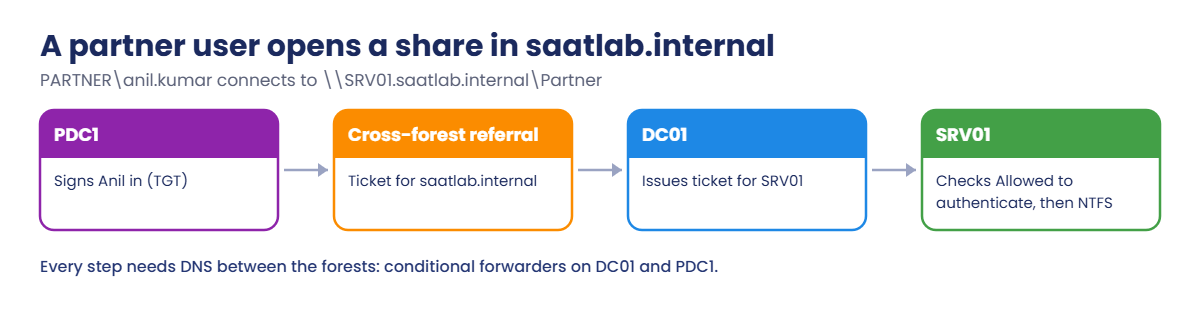
What happens when a partner user opens a share in saatlab.internal:
The partner’s DC vouches for the user, saatlab.internal’s DC issues a ticket for SRV01, and SRV01 checks the selective authentication right before NTFS permissions. Every step depends on DNS working across both forests.
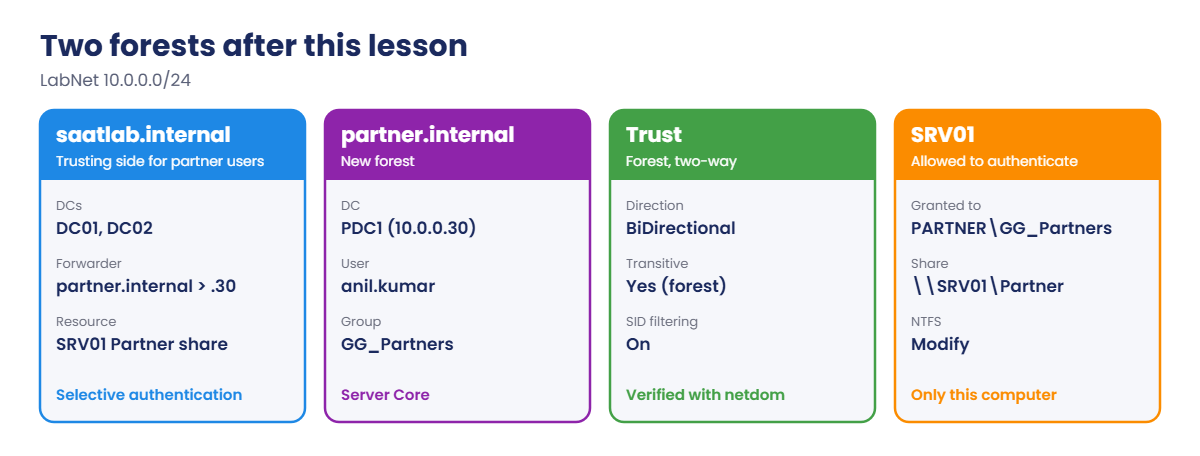
The two forests after this lesson:
- Build PDC1, a Server Core DC for partner.internal on LabNet (10.0.0.30).
- DNS: conditional forwarders in both directions.
- Trust: a two-way forest trust, created and verified from saatlab.internal.
- Lock down: selective authentication on the saatlab side, and “Allowed to authenticate” on SRV01 only.
- Access: PARTNER\GG_Partners gets a Partner share on SRV01.
With 8 GB of RAM, run DC01, SRV01 and PDC1 for this lesson, and leave DC02 off.
Hands-on Lab: Active Directory trusts with a partner forest
Start DC01 and SRV01. You’ll create PDC1 from your laptop, then work on DC01 as SAATLAB\adm.rahul in PowerShell as administrator.
1Create and install PDC1
On your laptop:
VBoxManage createvm --name PDC1 --ostype Windows2025_64 --basefolder C:\Lab\VMs --register --default
VBoxManage modifyvm PDC1 --memory 2048 --cpus 2 --nic1 natnetwork --nat-network1 LabNet
VBoxManage createmedium disk --filename C:\Lab\VMs\PDC1\PDC1.vdi --size 40960
VBoxManage storageattach PDC1 --storagectl SATA --port 0 --device 0 --type hdd --medium C:\Lab\VMs\PDC1\PDC1.vdi
VBoxManage storageattach PDC1 --storagectl SATA --port 1 --device 0 --type dvddrive --medium C:\Lab\ISO\server2025.iso
VBoxManage startvm PDC1Install Windows Server 2025 Datacenter Evaluation (without Desktop Experience), set the Administrator password, and choose 15 in sconfig to reach PowerShell.
On PDC1, configure the network and build the partner forest:
New-NetIPAddress -InterfaceAlias Ethernet -IPAddress 10.0.0.30 -PrefixLength 24 -DefaultGateway 10.0.0.1 | Out-Null
Set-DnsClientServerAddress -InterfaceAlias Ethernet -ServerAddresses 127.0.0.1
Rename-Computer -NewName PDC1 -RestartAfter the restart, on PDC1:
Install-WindowsFeature AD-Domain-Services -IncludeManagementTools | Out-Null
Install-ADDSForest -DomainName partner.internal -DomainNetbiosName PARTNER -InstallDns -ForceEnter a DSRM password when asked. PDC1 restarts as the first DC of partner.internal. Sign in as PARTNER\Administrator afterwards.
✅ Checkpoint: PDC1 is the DC of partner.internal at 10.0.0.30.
2Make each forest resolve the other
On DC01:
Add-DnsServerConditionalForwarderZone -Name partner.internal -MasterServers 10.0.0.30 -ReplicationScope Forest
Resolve-DnsName -Type SRV _ldap._tcp.dc._msdcs.partner.internal | Select-Object NameTargetOn PDC1:
Add-DnsServerConditionalForwarderZone -Name saatlab.internal -MasterServers 10.0.0.10, 10.0.0.11
Resolve-DnsName -Type SRV _ldap._tcp.dc._msdcs.saatlab.internal | Select-Object NameTargetYou should see something like this (on DC01, then PDC1):
NameTarget
----------
PDC1.partner.internal
NameTarget
----------
DC01.saatlab.internal
DC02.saatlab.internalA conditional forwarder sends queries for one domain to specific DNS servers. With -ReplicationScope Forest it’s stored in AD, so DC02 gets it too. Trusts fail without this step more often than for any other reason.
✅ Checkpoint: Each forest finds the other’s DC SRV records.
3Create and verify a two-way forest trust
On DC01, create the trust with the partner forest’s admin credentials:
$cred = Get-Credential PARTNER\Administrator
$ctx = New-Object System.DirectoryServices.ActiveDirectory.DirectoryContext('Forest', 'partner.internal', $cred.UserName, $cred.GetNetworkCredential().Password)
$partner = [System.DirectoryServices.ActiveDirectory.Forest]::GetForest($ctx)
$local = [System.DirectoryServices.ActiveDirectory.Forest]::GetCurrentForest()
$local.CreateTrustRelationship($partner, 'Bidirectional')
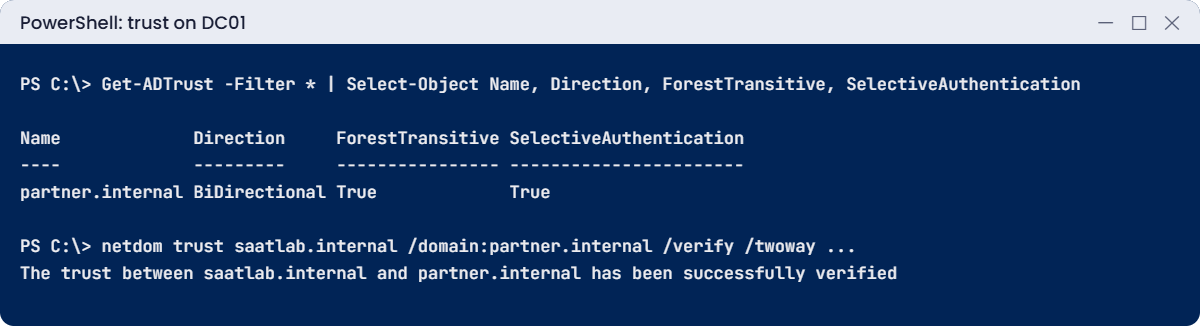
Get-ADTrust -Filter * | Select-Object Name, Direction, ForestTransitive, SelectiveAuthentication, SIDFilteringForestAwareYou should see something like this:
Name Direction ForestTransitive SelectiveAuthentication SIDFilteringForestAware
---- --------- ---------------- ----------------------- -----------------------
partner.internal BiDirectional True False FalseThe command created both sides of the trust at once, which needs admin rights in both forests. In real life, each company’s admins often create their own side with domain.msc (Active Directory Domains and Trusts) using a shared trust password.
Verify it:
netdom trust saatlab.internal /domain:partner.internal /verify /twoway /UserO:PARTNER\Administrator /PasswordO:*You should see something like this:
Type the password associated with the object user:
The trust between saatlab.internal and partner.internal has been successfully verified
The command completed successfully.✅ Checkpoint: Get-ADTrust shows a BiDirectional forest trust and netdom verifies it.
4Turn on selective authentication and allow only SRV01
On PDC1, create a partner user and group:
New-ADGroup -Name GG_Partners -GroupScope Global -GroupCategory Security
New-ADUser -Name 'Anil Kumar' -SamAccountName anil.kumar -UserPrincipalName anil.kumar@partner.internal -AccountPassword (Read-Host -AsSecureString 'Password') -Enabled $true
Add-ADGroupMember GG_Partners -Members anil.kumarOn DC01, require selective authentication for partner users, then allow GG_Partners on SRV01 only:
netdom trust saatlab.internal /domain:partner.internal /SelectiveAuth:Yes
dsacls "CN=SRV01,OU=Servers,OU=SAATLAB,DC=saatlab,DC=internal" /G "PARTNER\GG_Partners:CA;Allowed to Authenticate"
Get-ADTrust partner.internal | Select-Object Name, SelectiveAuthenticationYou should see something like this (after dsacls lists the permissions):
Selective Authentication for this trust has been enabled.
The command completed successfully.
...
The command completed successfully
Name SelectiveAuthentication
---- -----------------------
partner.internal TrueNow partner users can authenticate to SRV01 and nothing else in saatlab.internal. “Allowed to Authenticate” is a control access right (CA) on the computer object; you can also set it on the Security tab of SRV01 in ADUC with Advanced Features on.
✅ Checkpoint: SelectiveAuthentication is True and GG_Partners has Allowed to Authenticate on SRV01.
5Give partner users a share on SRV01 and test it
On SRV01:
New-Item -ItemType Directory D:\Shares\Partner -Force | Out-Null
icacls D:\Shares\Partner /inheritance:r /grant:r "SYSTEM:(OI)(CI)F" "BUILTIN\Administrators:(OI)(CI)F" "PARTNER\GG_Partners:(OI)(CI)M" | Out-Null
New-SmbShare -Name Partner -Path D:\Shares\Partner -ChangeAccess 'PARTNER\GG_Partners' -FullAccess 'SAATLAB\Domain Admins' | Out-NullOn PDC1, connect as Anil and write a file:
$anil = Get-Credential PARTNER\anil.kumar
New-PSDrive -Name P -PSProvider FileSystem -Root \\SRV01.saatlab.internal\Partner -Credential $anil | Out-Null
'Delivery schedule for October' | Set-Content P:\schedule.txt
Get-ChildItem P:\ | Select-Object NameYou should see something like this:
Name
----
schedule.txt✅ Checkpoint: Anil from partner.internal wrote schedule.txt to the Partner share on SRV01.
Break It, Then Fix It
Trusts usually fail for one of two reasons: one forest can’t find the other, or the authentication firewall says no.
1Break it: the partner can’t resolve saatlab.internal
On PDC1, remove the conditional forwarder and clear the DNS cache:
Remove-DnsServerZone saatlab.internal -Force
Clear-DnsServerCache -ForceOn DC01, verify the trust again:
netdom trust saatlab.internal /domain:partner.internal /verify /twoway /UserO:PARTNER\Administrator /PasswordO:*You’ll get an error like this:
The trust between saatlab.internal and partner.internal could not be verified.
The specified domain either does not exist or could not be contacted.
The command failed to complete successfully.DC01 can still find partner.internal, but PDC1 can no longer find saatlab.internal’s DCs, so the two-way check fails on the return path. Users from saatlab.internal would also fail to reach anything in the partner forest.
Fix it: put the forwarder back on PDC1 and verify again:
Add-DnsServerConditionalForwarderZone -Name saatlab.internal -MasterServers 10.0.0.10, 10.0.0.11 # on PDC1
netdom trust saatlab.internal /domain:partner.internal /verify /twoway /UserO:PARTNER\Administrator /PasswordO:* # on DC01✅ Checkpoint: Verification failed without the forwarder and succeeded after it was recreated.
2Break it: the authentication firewall
On DC01, remove the Allowed to Authenticate right from SRV01:
dsacls "CN=SRV01,OU=Servers,OU=SAATLAB,DC=saatlab,DC=internal" /R "PARTNER\GG_Partners"On PDC1, connect as Anil again (a fresh connection):
Remove-PSDrive P -ErrorAction SilentlyContinue; klist purge | Out-Null
New-PSDrive -Name P -PSProvider FileSystem -Root \\SRV01.saatlab.internal\Partner -Credential $anilYou’ll get an error like this:
New-PSDrive : The computer you are signing into is protected by an authentication firewall. The specified account is
not allowed to authenticate to the computer.The share and NTFS permissions still allow GG_Partners, but selective authentication stops Anil before they’re even checked. On the DC, the Security log shows event 4769 failures for the service ticket. This message is your clue that the trust uses selective authentication.
Fix it: grant the right again (on the computers partners really need, nothing more):
dsacls "CN=SRV01,OU=Servers,OU=SAATLAB,DC=saatlab,DC=internal" /G "PARTNER\GG_Partners:CA;Allowed to Authenticate"✅ Checkpoint: Anil got the authentication firewall error without the right, and connects again after it’s restored.

This happened at work
The merger that opened every share
After acquiring a smaller company, an IT team created a two-way forest trust so the new staff could reach the shared HR portal. It worked on the first day, and everyone moved on.
A year later, an audit found that users from the acquired company could read dozens of file shares, project folders and old exports. None had been shared with them on purpose. Those folders granted read access to “Authenticated Users”, and with forest-wide authentication, every user in the trusted forest counted as authenticated.
The team switched the trust to selective authentication, granted “Allowed to authenticate” only on the servers the acquired staff needed, and replaced Authenticated Users with specific groups on sensitive shares.
The fix: trusts now always start with selective authentication, and a quarterly report lists every resource granted to Authenticated Users or Everyone.
The lesson: a forest trust can quietly widen “everyone in the company” to “everyone in two companies”. Start narrow and open up deliberately.
Common mistakes and troubleshooting
| Mistake or symptom | What happens | What to do instead |
|---|---|---|
| “The specified domain either does not exist or could not be contacted” | DNS can’t find the other forest’s DCs | Conditional forwarders or stub zones on both sides |
| “protected by an authentication firewall” | Selective authentication without the right | Grant Allowed to authenticate on the needed computers |
| Forest-wide authentication by default | Partner users get Authenticated Users access everywhere | Selective authentication; tighten AU permissions |
| Getting the trust direction backwards | Access works the wrong way | Remember: access flows against the trust arrow |
| Disabling SID filtering | A partner admin could fake membership of your groups | Keep SID filtering on |
| Clock difference between forests | Kerberos failures across the trust | Both forests sync time from reliable sources |
| Firewalls between forests | Trust creation or sign-ins fail | Open DNS, Kerberos, LDAP, RPC and SMB between DCs |
| External trust where a forest trust fits | No transitivity to other domains | Forest trust between forest roots |
| Forgetting old trusts | Unused paths into your domain | Review and remove trusts nobody uses |
Interview questions
Click a question to open it. Under each one you’ll find what the interviewer is really looking for, and one good way to answer.
Fresher level
1. What is a trust in AD?
What they’re really checking: Do you know the basics?
How you could answer: A relationship that lets users from one domain or forest be authenticated and given access in another.
2. If domain A trusts domain B, who can access what?
What they’re really checking: Do you know direction?
How you could answer: Users in B can be given access to resources in A. Access flows opposite to the trust direction.
3. Do domains in the same forest need manual trusts?
What they’re really checking: Do you know forest basics?
How you could answer: No. They trust each other automatically through transitive parent-child and tree-root trusts.
2–5 years experience
4. What is selective authentication?
What they’re really checking: Do you know trust security?
How you could answer: A trust setting where users from the trusted forest can only authenticate to computers where they’ve been granted “Allowed to authenticate”, instead of anywhere.
5. What do you need before creating a forest trust?
What they’re really checking: Have you set one up?
How you could answer: Name resolution both ways (conditional forwarders), time sync, open ports between DCs, forest functional level 2003+, and admin credentials or a shared trust password on both sides.
6. What is SID filtering?
What they’re really checking: Do you understand ticket security?
How you could answer: It removes SIDs from other forests or domains from authentication data across a trust, so a trusted forest can’t inject SIDs for your privileged groups.
Senior level
7. Two companies are merging. How would you give access while planning a migration?
What they’re really checking: Do you think in phases?
How you could answer: Forest trust with selective authentication for the interim, resources shared to specific groups, DNS forwarders, then plan account and resource migration with tools like ADMT or a new forest, and remove the trust afterwards.
8. Users from a trusted forest get access denied on one server only. How do you troubleshoot?
What they’re really checking: Is your approach structured?
How you could answer: Check selective authentication rights on that computer, the user’s group memberships from the other forest, NTFS and share permissions, DNS from the server to the partner DCs, and DC security events like 4769 and 4771.
9. When would you use an external trust instead of a forest trust?
What they’re really checking: Do you know the trade-offs?
How you could answer: When only one domain needs to trust a specific domain (often an older or non-root domain), or for NT4-style scenarios. It’s non-transitive and uses NTLM-friendly paths; forest trusts are usually better.
Quick quiz
Q1. If saatlab.internal trusts partner.internal, who can access what?
- saatlab users in partner
- partner users in saatlab
- Nobody
Show answer
B — Access flows against the trust direction.
Q2. What made trust verification fail in Break It step 1?
- A wrong password
- PDC1 couldn’t resolve saatlab.internal
- SID filtering
Show answer
B — Conditional forwarders are needed both ways.
Q3. What message shows a selective authentication block?
- Access is denied
- The computer is protected by an authentication firewall
- Network path not found
Show answer
B — Grant Allowed to authenticate.
Q4. What does SID filtering protect against?
- Slow logons
- Foreign SIDs being injected into your groups
- DNS failures
Show answer
B — Keep it on for forest trusts.
Q5. In the work story, why could acquired users read many shares?
- A virus
- Forest-wide authentication plus Authenticated Users permissions
- Weak passwords
Show answer
B — Start with selective authentication.
Quick recap
- Active Directory trusts let users from one forest or domain access resources in another.
- Access flows opposite to the trust direction; forest trusts are transitive between forests’ domains.
- Both sides need DNS (conditional forwarders), time sync and open ports.
- Use selective authentication and grant “Allowed to authenticate” only where needed.
- Keep SID filtering on.
- “Domain does not exist” points at DNS; “authentication firewall” points at selective authentication.
Next lesson
Lesson 34: Active Directory Certificate Services → You’ll install an enterprise CA, publish a web server template, enrol certificates automatically with Group Policy, replace the self-signed intranet certificate and fix revocation errors.
Further reading: Active Directory trusts
Want to go deeper into Active Directory trusts? Microsoft’s netdom trust reference covers creating, verifying and changing trusts, and the How Domain and Forest Trusts Work paper still explains the design best. You can also see the full plan for this course on the Windows Server Administration course page.
