Active Directory Domain Services concepts
-
Phase 0: Before you start
-
Phase 1: The foundation
-
Phase 2: Core administration and security
-
Phase 3: Enterprise infrastructure
-
Phase 4: Troubleshooting step by step
-
Phase 5: Final project and career
Almost every company that runs Windows runs Active Directory Domain Services (AD DS).
It’s where every user and computer account lives, it checks every sign-in, and it decides who can open which file. When AD is slow, everything is slow. When AD is down, nobody works.
This lesson gives you the map before you build: forests, domains, OUs, the global catalog, FSMO roles and functional levels. You’ll choose your lab’s domain name, install the AD DS role on DC01 and run Microsoft’s own prerequisite check, so that Lesson 11’s promotion goes smoothly.
| Time | You need | By the end you can |
|---|---|---|
| About 45 minutes | DC01 from Lesson 9, with its static IP | Explain forests, trees, domains, OUs, sites and the global catalog, name the five FSMO roles, choose a safe domain name, install the AD DS role and run the promotion pre-check |
What it is, in one line
Active Directory Domain Services is the Windows Server role that stores users, computers and groups in a central database on domain controllers and checks who they are every time they sign in or use a resource.
In Simple Words
A school with a central office
A big school group has several schools (domains). Each school keeps its own register of students and teachers, but they all follow the same rulebook for what a register entry must contain (the schema), and they all belong to the same group (the forest).
Inside each school, classes are organised into sections (OUs) so each section head can manage their own class. Every school keeps copies of its register in more than one office (domain controllers), so if one office closes, nobody’s name is lost.
A few jobs only one office in the group may do, like adding a new school or changing the rulebook. Those are the special roles (FSMO roles). And there’s a summary list of everyone in every school, kept at main offices so people can find each other quickly (the global catalog).
Engineer's View
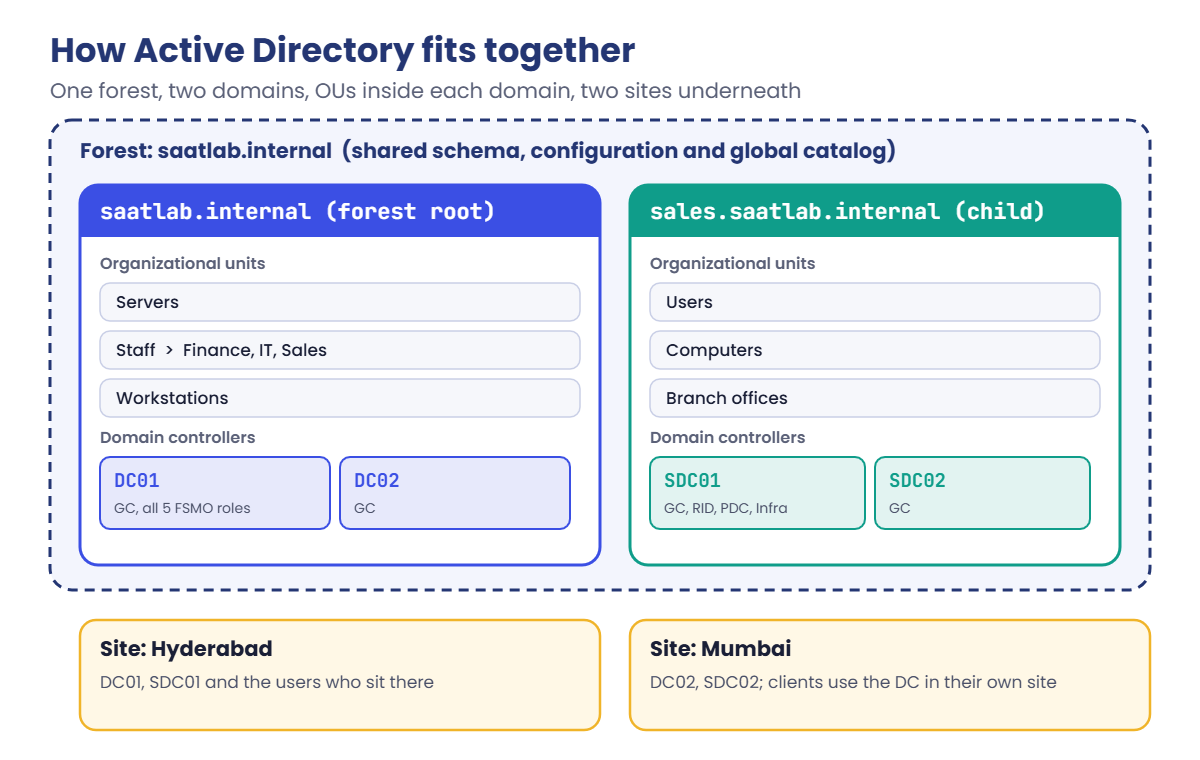
The building blocks of AD DS
Domain controller (DC). A server running AD DS that holds a writable copy of the domain’s database (C:\Windows\NTDS\ntds.dit) and the SYSVOL share with logon scripts and Group Policy files. DCs replicate changes to each other, and any DC can accept a change (multi-master).
Domain. A boundary for administration and replication, named with a DNS name like saatlab.internal.
Tree: domains sharing a namespace (sales.saatlab.internal). Forest: one or more trees sharing a schema, configuration and global catalog. The forest is the real security boundary; a domain is not.
Partitions. The database has a schema partition (what objects can exist, forest-wide), a configuration partition (sites and services, forest-wide), a domain partition (users, computers, groups) and application partitions such as the DNS zones.
OUs and containers. Organizational units hold objects so you can delegate admin rights and link Group Policy. The default Users and Computers folders are containers, not OUs, so Group Policy can’t be linked to them.
Global catalog (GC). A DC that also holds a partial, read-only copy of every object in the forest, used for searches and for universal group membership at sign-in.
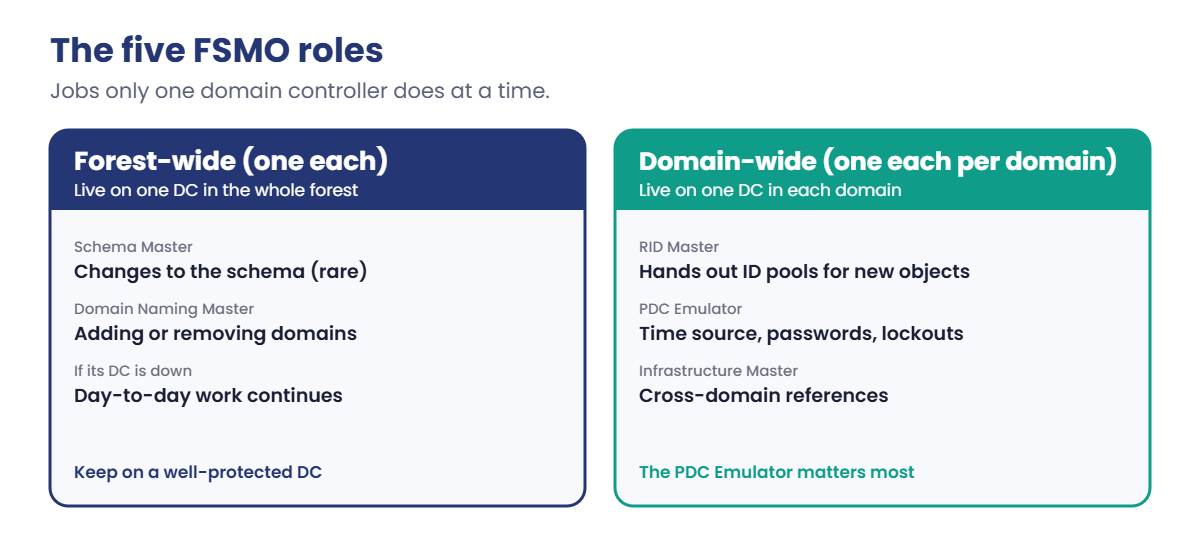
FSMO roles. Five jobs that only one DC does at a time: Schema Master and Domain Naming Master (one per forest), and RID Master, PDC Emulator and Infrastructure Master (one per domain). The PDC Emulator is the one you’ll meet most: it’s the time source for the domain and handles password changes and lockouts.
Sites map AD to your physical network so clients use a nearby DC (Lesson 31). Functional levels decide which features are on; Windows Server 2025 DCs work at the 2016 and 2025 levels, and the 2025 level, which needs every DC on 2025, turns on the 32k database page feature (Lesson 35).
DNS is not optional. Clients find DCs through DNS SRV records like _ldap._tcp.dc._msdcs.saatlab.internal. Most “AD problems” are DNS problems.
How it works, step by step
Here’s how the pieces fit for a company with two domains and two sites. Your lab will have one domain and one site, which is how most small and medium companies run:
Before you build, you decide four things. Here’s the plan for the lab:
| Decision | Lab choice | Why |
|---|---|---|
| Forest root domain name | saatlab.internal | .internal was reserved by ICANN in 2024 for private networks, so it will never clash with a real internet name |
| NetBIOS name | SAATLAB | The short name users see in SAATLAB\ravi; 15 characters or fewer |
| Functional level | Windows Server 2025 | Every DC will run 2025; use the highest level all DCs support |
| First DC and FSMO roles | DC01 holds all five roles; DC02 added in Lesson 13 | Small environments keep all roles on one well-protected DC |
In a company you’d normally use a subdomain of a domain you own, such as ad.yourcompany.com. Never use a name someone else owns, and avoid single-label names like saatlab and the old .local habit.
And here are the five FSMO roles at a glance:
You rarely think about FSMO roles day to day, but you must know where they are: when a DC holding a role dies, specific things stop working (new domains, schema updates, new objects after the RID pool runs out, time sync and lockouts). Lesson 32 covers moving and seizing them.
Hands-on Lab: prepare DC01 for Active Directory Domain Services
Start DC01 and open PowerShell as administrator. You’ll check the server is ready, install the AD DS role (the program files only), and run the same checks the promotion wizard runs, without changing anything yet.
1Confirm DC01 is ready to be a domain controller
Run this:
[pscustomobject]@{
Name = $env:COMPUTERNAME
IPv4 = (Get-NetIPAddress -InterfaceAlias Ethernet -AddressFamily IPv4).IPAddress
DHCP = (Get-NetIPInterface -InterfaceAlias Ethernet -AddressFamily IPv4).Dhcp
DNS = (Get-DnsClientServerAddress -InterfaceAlias Ethernet -AddressFamily IPv4).ServerAddresses -join ', '
TimeZone = (Get-TimeZone).Id
}You should see something like this:
Name : DC01
IPv4 : 10.0.0.10
DHCP : Disabled
DNS : 1.1.1.1
TimeZone : India Standard TimeA future DC needs a final name, a static address and the right time zone before promotion. DNS still points to 1.1.1.1; the promotion will install DNS on DC01 and switch it to itself.
✅ Checkpoint: DC01 has its name, 10.0.0.10, DHCP Disabled and your time zone.
2Check nobody else uses your domain name
Run this:
Resolve-DnsName saatlab.internalYou should get an error like this, which is good news:
Resolve-DnsName : saatlab.internal : DNS name does not exist
At line:1 char:1
+ Resolve-DnsName saatlab.internal
+ ~~~~~~~~~~~~~~~~~~~~~~~~~~~~~~~~
+ CategoryInfo : ResourceUnavailable: (saatlab.internal:String) [Resolve-DnsName], Win32Exception
+ FullyQualifiedErrorId : DNS_ERROR_RCODE_NAME_ERROR,Microsoft.DnsClient.Commands.ResolveDnsNameNobody on the internet answers for saatlab.internal, and nobody ever will, because .internal is reserved for private use. In a company, the same check against your proposed name catches clashes before they become permanent.
✅ Checkpoint: saatlab.internal does not exist in public DNS.
3Install the AD DS role
Run this:
Install-WindowsFeature -Name AD-Domain-Services -IncludeManagementToolsYou should see something like this:
Success Restart Needed Exit Code Feature Result
------- -------------- --------- --------------
True No Success {Active Directory Domain Services, Group P...This only copies the role’s files and tools: DC01 is not a domain controller yet. -IncludeManagementTools adds Active Directory Users and Computers, Group Policy Management and the PowerShell modules.
✅ Checkpoint: Success is True and Restart Needed is No.
4See what came with the role
Run these one at a time:
Get-WindowsFeature | Where-Object { $_.Installed -and $_.Name -match 'AD|GPMC' } | Select-Object Name, DisplayName
Get-Command -Module ADDSDeployment | Select-Object NameYou should see something like this:
Name DisplayName
---- -----------
AD-Domain-Services Active Directory Domain Services
GPMC Group Policy Management
RSAT-AD-Tools AD DS and AD LDS Tools
RSAT-AD-PowerShell Active Directory module for Windows PowerShell
RSAT-ADDS AD DS Tools
RSAT-AD-AdminCenter Active Directory Administrative Center
RSAT-ADDS-Tools AD DS Snap-Ins and Command-Line Tools
Name
----
Add-ADDSReadOnlyDomainControllerAccount
Install-ADDSDomain
Install-ADDSDomainController
Install-ADDSForest
Test-ADDSDomainControllerInstallation
Test-ADDSDomainControllerUninstallation
Test-ADDSDomainInstallation
Test-ADDSForestInstallation
Test-ADDSReadOnlyDomainControllerAccountCreation
Uninstall-ADDSDomainControllerThe ADDSDeployment module has an Install and a matching Test command for every kind of promotion: a new forest, a new domain, an extra DC, a read-only DC. The Test commands run every prerequisite check and change nothing.
✅ Checkpoint: You can see Install-ADDSForest and Test-ADDSForestInstallation.
5Run the promotion pre-check
Run this. It asks for a Directory Services Restore Mode (DSRM) password twice; use a strong one and write it down:
Test-ADDSForestInstallation -DomainName saatlab.internal -DomainNetbiosName SAATLAB -InstallDnsYou should see something like this:
SafeModeAdministratorPassword: ****************
Confirm SafeModeAdministratorPassword: ****************
WARNING: This computer has at least one physical network adapter that does not have static IP address(es) assigned to
its IP Properties. If both IPv4 and IPv6 are enabled for a network adapter, both IPv4 and IPv6 static IP addresses
should be assigned to both IPv4 and IPv6 Properties of the physical network adapter. Such static IP address(es)
assignment should be done to all the physical network adapters for reliable Domain Name System (DNS) operation.
WARNING: A delegation for this DNS server cannot be created because the authoritative parent zone cannot be found or
it does not run Windows DNS server. If you are integrating with an existing DNS infrastructure, you should manually
create a delegation to this DNS server in the parent zone to ensure reliable name resolution from outside the domain
"saatlab.internal". Otherwise, no action is required.
Message Context RebootRequired Status
------- ------- -------------- ------
Operation completed successfully Test.VerifyDcPromoCore.DCPromo.General.77 False Success
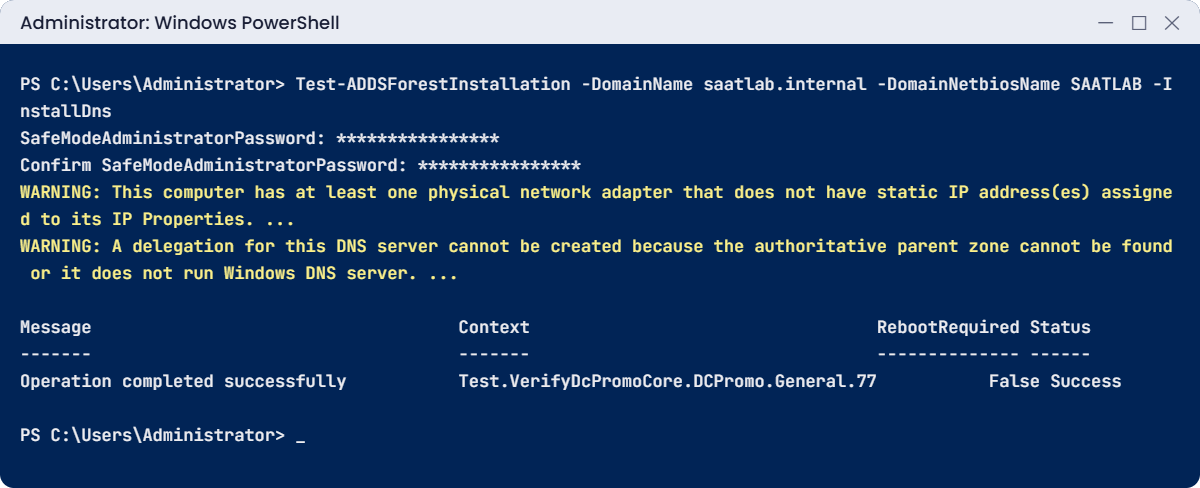
Status: Success means DC01 can be promoted. The two warnings are normal in a lab: IPv6 uses an automatic address (fine, as long as IPv4 is static), and there’s no parent zone to delegate from because .internal isn’t on the internet. You’ll still see these on real promotions, so it’s worth knowing they’re safe here.
The DSRM password is for a special local administrator used only when AD is offline for repairs (Lesson 32). Store it in your password manager.
✅ Checkpoint: Test-ADDSForestInstallation finishes with Status Success. Shut down DC01 and take a snapshot called “AD role installed”.
Break It, Then Fix It
The two decisions that are hardest to undo in AD are the name and where you run the tools. Break both on purpose.
1Break it: pick a name someone else owns
Imagine your company is called Contoso and someone suggests naming the AD domain contoso.com, the same as a real public website. Check what that name already means on the internet:
Run this:
Resolve-DnsName contoso.com -Type A | Select-Object Name, Type, IPAddressYou should see something like this:
Name Type IPAddress
---- ---- ---------
contoso.com A 20.70.246.20
contoso.com A 20.236.44.162The name is live on the internet. If your AD domain used it, your DCs would answer for contoso.com inside the office, so staff couldn’t reach the real public website without extra DNS records copying it (called split-brain DNS). Every new public service would need the same workaround, forever.
Fix it: choose the name before promotion: a subdomain of a domain your company owns (ad.contoso.com) or a reserved private name like saatlab.internal. Renaming a domain later is technically possible but so disruptive that almost nobody does it.
✅ Checkpoint: You can explain why the lab uses saatlab.internal and not a public name.
2Break it: run the promotion tools on the wrong server
On SRV01, where you haven’t installed the AD DS role, run:
Test-ADDSForestInstallation -DomainName saatlab.internalYou’ll get an error like this:
Test-ADDSForestInstallation : The term 'Test-ADDSForestInstallation' is not recognized as the name of a cmdlet,
function, script file, or operable program. Check the spelling of the name, or if a path was included, verify that the
path is correct and try again.
At line:1 char:1
+ Test-ADDSForestInstallation -DomainName saatlab.internal
+ ~~~~~~~~~~~~~~~~~~~~~~~~~~~
+ CategoryInfo : ObjectNotFound: (Test-ADDSForestInstallation:String) [], CommandNotFoundException
+ FullyQualifiedErrorId : CommandNotFoundException
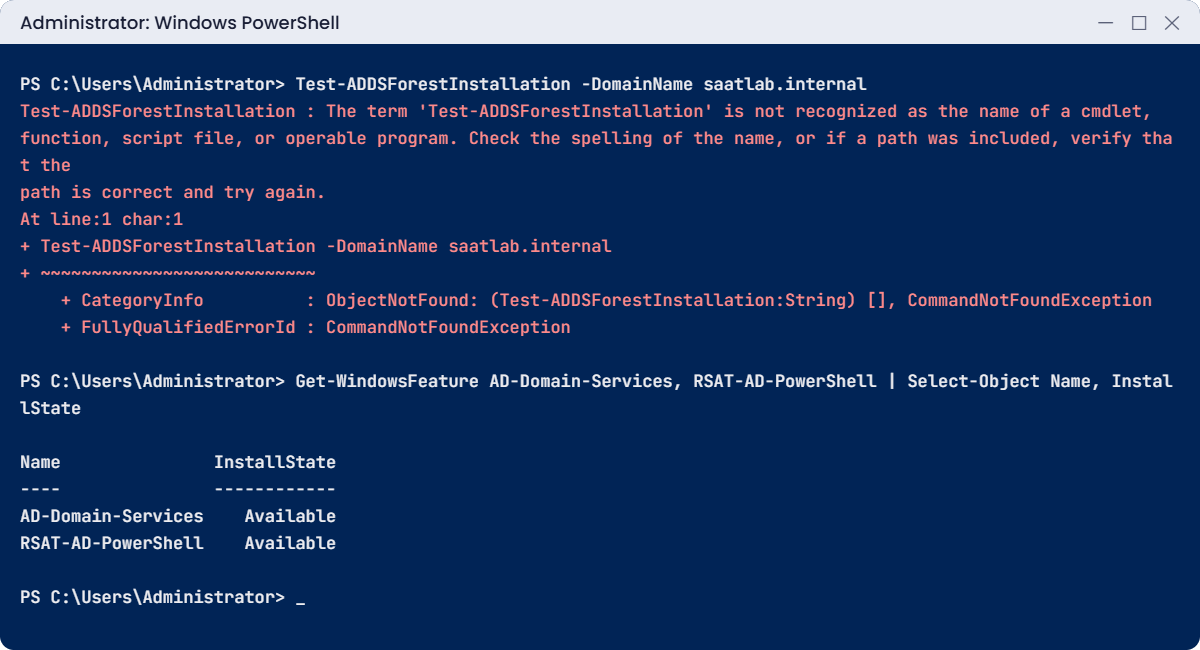
The ADDSDeployment module only exists where the AD DS role is installed. “Not recognized” for an AD command almost always means the role or its tools aren’t on that machine.
Fix it: check, and install only the management tools if you just want to manage AD from SRV01:
Get-WindowsFeature AD-Domain-Services, RSAT-AD-PowerShell | Select-Object Name, InstallStateYou should see something like this:
Name InstallState
---- ------------
AD-Domain-Services Available
RSAT-AD-PowerShell AvailableAvailable means not installed. To manage AD from SRV01 later, you’d install just RSAT-AD-PowerShell (the tools), never the full role on a server that shouldn’t be a DC. You’ll do exactly that in Lesson 13.
✅ Checkpoint: You saw “not recognized” on SRV01 and confirmed the role isn’t installed there.
This happened at work
The domain named after the website
Fifteen years ago, a growing company named its Active Directory domain after its public website, company.com. It seemed tidy: same name inside and out.
Inside the office, the domain controllers answered every query for company.com. When the marketing team moved the website to a cloud host, staff in the office couldn’t open it, while everyone else in the world could. The DCs didn’t know about the new address.
The fix was a DNS record on the DCs pointing www.company.com to the new host, and then another one for the shop, then another for the support portal. Over the years the internal zone collected dozens of copies of public records, and each website change needed the infrastructure team too.
The fix they could make: a documented list of public names mirrored internally, with a monthly check against public DNS. The fix they couldn’t make: renaming the domain, which would have touched every computer, app and service account.
The lesson: a domain name is chosen once and lives for decades. Spend an hour on it before promotion; it saves years of workarounds.
Common mistakes and troubleshooting
| Mistake or symptom | What happens | What to do instead |
|---|---|---|
| Naming the domain after a public website | Split-brain DNS workarounds forever | Use a subdomain you own (ad.company.com) or a reserved private name |
| Single-label names (saatlab) or .local | Problems with modern clients, certificates and cloud tools | Use a full DNS name with a real or reserved suffix |
| Promoting with a DHCP address | DNS records and clients break when it changes | Static IPv4 address before promotion |
| Forgetting the DSRM password | No way into Directory Services Restore Mode during recovery | Store it in a password vault, reset it with ntdsutil if needed |
| Thinking a domain is a security boundary | Admins of one domain can reach the whole forest | The forest is the boundary; separate forests for true separation |
| Linking Group Policy to the Users container | Not possible: it’s a container, not an OU | Create OUs and move objects into them (Lesson 12) |
| Losing track of FSMO role holders | Confusion when a DC fails | netdom query fsmo or Get-ADDomain / Get-ADForest |
| Only one domain controller | A single failure stops all sign-ins | At least two DCs per domain (Lesson 13) |
| “Test-ADDS… is not recognized” | Role or tools not installed on that server | Install the AD DS role on the future DC, or RSAT tools on admin machines |
Interview questions
Click a question to open it. Under each one you’ll find what the interviewer is really looking for, and one good way to answer.
Fresher level
1. What is Active Directory?
What they’re really checking: Do you know what it does, not just the name?
How you could answer: Microsoft’s directory service. It stores users, computers and groups, authenticates sign-ins with Kerberos, and controls access to resources. It runs on domain controllers and depends on DNS.
2. What is the difference between a domain, a tree and a forest?
What they’re really checking: Do you know the hierarchy?
How you could answer: A domain is a unit of administration and replication with a DNS name. A tree is domains sharing a namespace. A forest is one or more trees that share a schema, configuration and global catalog, and it’s the security boundary.
3. What is an OU used for?
What they’re really checking: Do you know OUs vs groups?
How you could answer: Organizing objects so you can delegate admin rights and link Group Policy. Groups are for giving permissions; OUs are for managing objects.
2–5 years experience
4. Name the five FSMO roles and where they live.
What they’re really checking: Do you know them beyond memorising?
How you could answer: Forest-wide: Schema Master and Domain Naming Master. Per domain: RID Master, PDC Emulator and Infrastructure Master. The PDC Emulator is also the domain’s time source and handles password changes and lockouts.
5. What is the global catalog?
What they’re really checking: Do you know why sign-ins can need it?
How you could answer: A DC that stores a partial copy of every object in the forest. It’s used for forest-wide searches and to find universal group memberships at sign-in, so each site should have one.
6. Why is DNS so important for AD?
What they’re really checking: Do you connect the two?
How you could answer: Clients and DCs find each other through DNS SRV records. Wrong DNS settings, like pointing members at a public resolver, cause failed joins, slow sign-ins and broken replication.
Senior level
7. How would you choose the AD domain name for a new company?
What they’re really checking: Do you think long term?
How you could answer: A subdomain of a registered domain the company controls, such as ad.company.com, short and neutral, never the public website name or a single label. Check it doesn’t exist publicly, and record the decision.
8. When would you create more than one domain or forest?
What they’re really checking: Do you avoid complexity without reason?
How you could answer: Usually one domain in one forest is enough. Separate forests when you need a real security boundary or separate schema control, such as an admin forest or an acquired company during migration. Extra domains rarely add value now.
9. What functional level would you run, and what blocks raising it?
What they’re really checking: Do you know the constraint?
How you could answer: The highest level all DCs support. Raising it needs every DC on that version, so old DCs must be replaced first. Windows Server 2025 DCs support the 2016 and 2025 levels; 2025 enables the 32k page feature.
Quick quiz
Q1. Which is the real security boundary in Active Directory?
- The OU
- The domain
- The forest
Show answer
C — Admins in one domain can affect the whole forest.
Q2. Which FSMO role is the domain’s time source?
- RID Master
- PDC Emulator
- Schema Master
Show answer
B — The PDC Emulator also handles password changes and lockouts.
Q3. Why does the lab use saatlab.internal?
- It is shorter
- .internal is reserved for private networks, so it can’t clash with a public name
- Windows requires it
Show answer
B — ICANN reserved .internal in July 2024.
Q4. What does Test-ADDSForestInstallation change on the server?
- It promotes the DC
- Nothing; it only checks prerequisites
- It installs DNS
Show answer
B — Test commands run the checks without making changes.
Q5. In the work story, what caused years of DNS workarounds?
- A failed DC
- Naming the AD domain after the public website
- Using .internal
Show answer
B — The DCs answered for the public name inside the office.
Quick recap
- Active Directory Domain Services stores accounts in
ntds.diton domain controllers and authenticates sign-ins. - Forest (security boundary) > trees > domains > OUs; sites map AD to the network.
- Five FSMO roles: Schema, Domain Naming (forest); RID, PDC Emulator, Infrastructure (domain).
- The global catalog holds a partial copy of every object in the forest.
- Lab plan:
saatlab.internal, NetBIOS SAATLAB, functional level 2025, all roles on DC01. - Install the role, then run
Test-ADDSForestInstallationbefore promoting.
Next lesson
Lesson 11: Promote the first domain controller → You’ll turn DC01 into the first domain controller of saatlab.internal, then check DNS, SYSVOL, the FSMO roles and the new event logs to prove the domain is healthy.
Further reading: Active Directory Domain Services
Want to go deeper into Active Directory Domain Services? Microsoft’s Active Directory Domain Services overview and the page on functional levels explain the concepts in this lesson. You can also see the full plan for this course on the Windows Server Administration course page.
