Active Directory troubleshooting: dcdiag, repadmin, nltest and lockouts

When Active Directory has a problem, everything feels broken: logons are slow, drives don’t map, policies don’t apply. Active Directory troubleshooting gives you a short list of tools that tell you exactly which part is sick.

In this lesson you’ll run a health check with dcdiag and repadmin, test the secure channel and DC locator with nltest, read Kerberos tickets and time sync, trace an account lockout to its source, and follow one change as it replicates.

TimeYou needBy the end you can
About 90 minutesDC01, DC02, SRV01, NODE1 and CL01Check domain health in five minutes and find the cause of logon, lockout and replication problems

What it is, in one line

Active Directory troubleshooting is checking the five things every logon depends on: DNS, DC health, replication, secure channels and Kerberos (with time).

In Simple Words

In Simple Words

Think of a school with two offices that keep the same list of students. When a new student joins, one office writes the name and sends a copy to the other.

If the copy doesn’t arrive, the second office says “never heard of you”. If the clocks in the two offices don’t match, a pass stamped at 9:00 looks fake at 8:50.

AD works the same. Most problems are a copy that didn’t travel (replication), a pass that doesn’t look right (Kerberos and time), or a student who can’t find the office at all (DNS).

Engineer's View

Engineer’s View

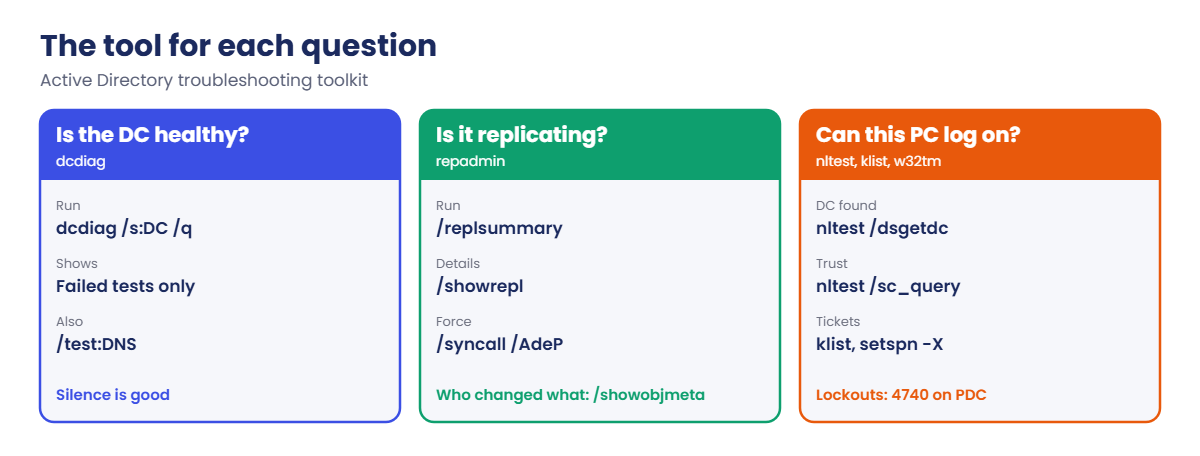
dcdiag: runs dozens of tests on a DC (Advertising, Replications, Services, FrsEvent or DFSREvent, SysVolCheck, KccEvent, DNS). dcdiag /q shows only failures.

repadmin: /replsummary gives a one-screen view of replication health, /showrepl shows each partner and the last error, /syncall /AdeP forces replication, and /showobjmeta shows which DC changed an attribute and when.

nltest: /dsgetdc: shows which DC and site a machine finds through DNS, /sc_query: checks the computer’s secure channel, and /sc_reset: rebuilds it against a chosen DC.

Kerberos and time: klist lists cached tickets and klist purge clears them. Kerberos allows 5 minutes of clock difference by default, so w32tm /query /source and w32tm /stripchart come next. setspn -X finds duplicate SPNs, which break Kerberos for that service.

Lockouts: the PDC emulator logs event 4740 with the caller computer. Then 4625 or 4771 on that computer leads you to the process with the old password.

How it works, step by step

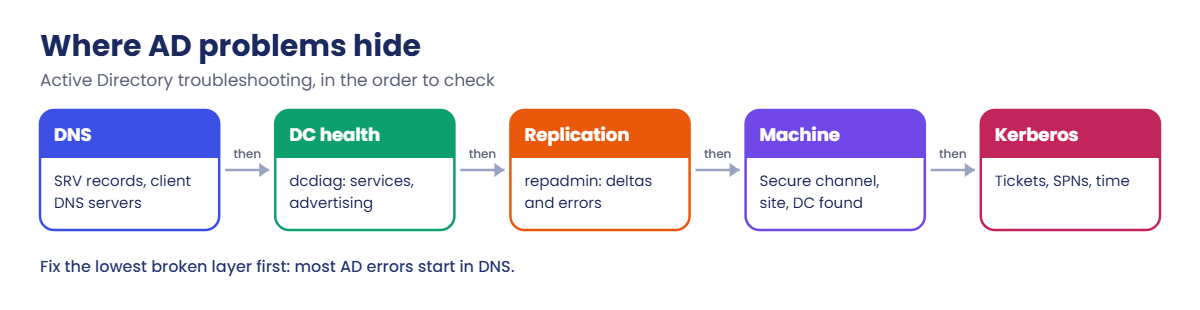
Where an AD problem usually hides:

Active Directory troubleshooting order: DNS, DC health, replication, machine and Kerberos

Start with DNS, because DCs, clients and replication all find each other through SRV records in DNS. If DNS is wrong, every other test gives confusing results.

Then check DC health and replication. A DC that hasn’t replicated for days gives users old passwords and missing group changes.

Finally look at the single machine or account: its secure channel, its tickets, its clock, and its lockout history.

The tool for each question:

Active Directory troubleshooting tools: dcdiag, repadmin, nltest, klist and w32tm

In the lab you’ll:

  • Run a five-minute health check with dcdiag and repadmin.
  • Check the DC locator and secure channel from CL01.
  • Look at Kerberos tickets and time sync.
  • Lock out an account and trace it to its source.
  • Follow one change from DC02 to DC01.

Hands-on lab: check domain health

Start DC01, DC02, SRV01, NODE1 and CL01. Work as SAATLAB\adm.rahul in PowerShell as administrator.

1Run a five-minute health check

On DC01:

dcdiag /s:DC01 /q
dcdiag /s:DC02 /q
repadmin /replsummary

You’ll see something like this:

Replication Summary Start Time: 2026-10-19 15:10:04

Beginning data collection for replication summary, this may take awhile:
  ....

Source DSA          largest delta    fails/total %%   error
 DC01                      08m:41s    0 /   5    0
 DC02                      06m:12s    0 /   5    0

Destination DSA     largest delta    fails/total %%   error
 DC01                      06m:12s    0 /   5    0
 DC02                      08m:41s    0 /   5    0

dcdiag /q printed nothing, which is what you want: quiet mode only shows failures. Zero fails in the summary means both DCs replicate every partition. A large delta (hours or days) or a number in the error column is your first lead.

✅ Checkpoint: dcdiag /q is silent for both DCs and repadmin /replsummary shows 0 fails.

2Check the DC locator and secure channel

On CL01:

nltest /dsgetdc:saatlab.internal
nltest /sc_query:saatlab.internal
Test-ComputerSecureChannel

You’ll see something like this:

           DC: \\DC01.saatlab.internal
      Address: \\10.0.0.10
     Dom Name: saatlab.internal
     Our Site Name: HQ
     Dc Site Name: HQ
The command completed successfully

Flags: 30 HAS_IP  HAS_TIMESERV
Trusted DC Name \\DC01.saatlab.internal
Trusted DC Connection Status Status = 0 0x0 NERR_Success
The command completed successfully

True

CL01 is in site HQ and found DC01 in the same site. The secure channel (the computer account’s trust with the domain) is healthy. If Test-ComputerSecureChannel returns False, users see “The trust relationship between this workstation and the primary domain failed”.

✅ Checkpoint: nltest finds DC01 in site HQ, the secure channel status is NERR_Success, and Test-ComputerSecureChannel returns True.

3Read Kerberos tickets and check time

On CL01, clear tickets, use a share, then list tickets and the time source:

klist purge
Get-ChildItem \\SRV01\Departments | Out-Null
klist | Select-String 'Server:'
w32tm /query /source
w32tm /stripchart /computer:DC01 /samples:3 /dataonly

You’ll see something like this:

	Server: krbtgt/SAATLAB.INTERNAL @ SAATLAB.INTERNAL
	Server: cifs/SRV01 @ SAATLAB.INTERNAL
DC01.saatlab.internal
Tracking DC01 [10.0.0.10:123].
Collecting 3 samples.
The current time is 19/10/2026 15:14:02.
15:14:02, +00.0021433s
15:14:04, +00.0018807s
15:14:06, +00.0020112s

You got a TGT (krbtgt) and a service ticket for cifs/SRV01, so Kerberos works. CL01 syncs from DC01 and is about 2 ms off, well inside the 5-minute limit. If you only see NTLM (no cifs ticket), check the name you used, the SPN and time.

✅ Checkpoint: klist shows krbtgt and cifs/SRV01 tickets, and the time offset to DC01 is a few milliseconds.

4Lock out an account and trace the source

On CL01, use a wrong password 11 times (the lockout threshold from Lesson 19 is 10):

1..11 | ForEach-Object { net use \\SRV01\IPC$ /user:SAATLAB\kiran.das WrongPass1 2>$null }
net use \\SRV01\IPC$ /user:SAATLAB\kiran.das WrongPass1

You’ll see something like this:

System error 1909 has occurred.

The referenced account is currently locked out and may not be logged on to.

On DC01 (the PDC emulator), find the lockout and its caller:

(Get-ADDomain).PDCEmulator
Get-WinEvent -FilterHashtable @{ LogName = 'Security'; Id = 4740 } -MaxEvents 1 | ForEach-Object {
    $x = [xml]$_.ToXml()
    [pscustomobject]@{
        Time   = $_.TimeCreated
        User   = ($x.Event.EventData.Data | Where-Object Name -eq 'TargetUserName').'#text'
        Caller = ($x.Event.EventData.Data | Where-Object Name -eq 'TargetDomainName').'#text'
    }
}
Search-ADAccount -LockedOut | Select-Object SamAccountName

You’ll see something like this:

DC01.saatlab.internal

Time                User      Caller
----                ----      ------
19/10/2026 15:18:40 kiran.das SRV01

SamAccountName
--------------
kiran.das

In event 4740, the TargetDomainName field holds the caller computer name: here SRV01, because CL01 authenticated to SRV01 and SRV01 checked the password with the DC. So you’d look next at SRV01’s 4625 events, which show CL01 (10.0.0.150) as the source. Follow the trail until you reach the device or process with the wrong password.

Clear the lockout:

Unlock-ADAccount kiran.das
(Get-ADUser kiran.das -Properties LockedOut).LockedOut

You should see this:

False

✅ Checkpoint: Event 4740 named the caller computer, and kiran.das is unlocked.
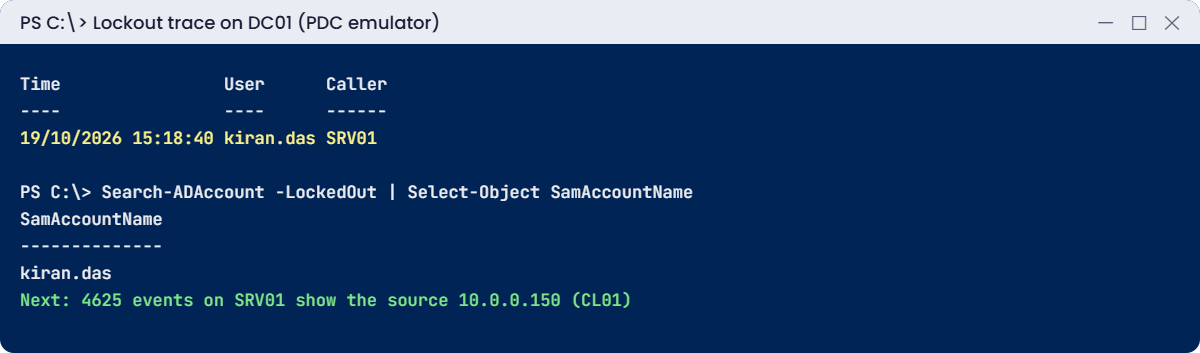
Active Directory troubleshooting lab: event 4740 shows the lockout caller computer
Active Directory troubleshooting: the 4740 event names the caller computer

5Follow one change from DC02 to DC01

On DC01, create a user on DC02, check DC01, then force replication:

New-ADUser test.repl -Path 'OU=Staff,OU=SAATLAB,DC=saatlab,DC=internal' -Server DC02
Get-ADUser test.repl -Server DC01
repadmin /syncall DC02 /AdeP | Select-String 'SyncAll terminated'
Get-ADUser test.repl -Server DC01 | Select-Object Name
repadmin /showobjmeta DC01 'CN=test.repl,OU=Staff,OU=SAATLAB,DC=saatlab,DC=internal' | Select-String 'whenCreated'

You’ll see something like this:

Get-ADUser : Cannot find an object with identity: 'test.repl' under: 'DC=saatlab,DC=internal'.
SyncAll terminated with no errors.

Name
----
test.repl
     1    Branch\DC02        1081736       19/10/2026 15:22:31      1 whenCreated

The user existed on DC02 but not yet on DC01, because inter-site replication runs on a schedule (Lesson 31). After the forced sync, /showobjmeta proves the change came from Branch\DC02. Delete the test user when you’re done with Remove-ADUser test.repl -Confirm:$false.

✅ Checkpoint: test.repl appeared on DC01 after repadmin /syncall, and showobjmeta shows DC02 as the originating DC.

Break It, Then Fix It

Two faults that dcdiag and setspn catch quickly: a DC that stops advertising itself, and a duplicate SPN.

1Break it: stop Netlogon on DC02

On DC01, stop the Netlogon service on DC02 and run dcdiag against it:

Invoke-Command -ComputerName DC02 -ScriptBlock { Stop-Service Netlogon }
dcdiag /s:DC02 /test:Advertising /test:Services

You’ll see something like this:

   Testing server: Branch\DC02
      Starting test: Advertising
         Warning: DsGetDcName returned information for \\DC01.saatlab.internal, when we were trying to reach
         DC02.
         SERVER IS NOT RESPONDING or IS NOT CONSIDERED SUITABLE.
         ......................... DC02 failed test Advertising
      Starting test: Services
            Invalid service startup type: Netlogon on DC02, current state is Stopped
         ......................... DC02 failed test Services
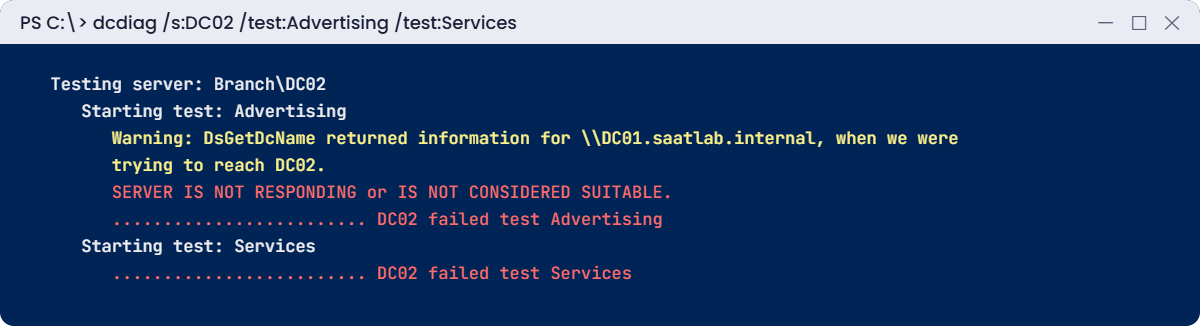
Active Directory troubleshooting break lab: dcdiag fails Advertising when Netlogon stops
With Netlogon stopped, DC02 fails the Advertising and Services tests

Netlogon is the service that registers the DC’s SRV records and answers “which DC should I use?” requests. With it stopped, DC02 still runs, but clients in the Branch site fall back to DC01 across the WAN, and logons there get slow.

Fix it: start Netlogon and test again:

Invoke-Command -ComputerName DC02 -ScriptBlock { Start-Service Netlogon }
dcdiag /s:DC02 /test:Advertising /test:Services /q

Quiet mode prints nothing, so both tests pass.

✅ Checkpoint: dcdiag failed Advertising and Services while Netlogon was stopped, and is silent after starting it.

2Break it: register a duplicate SPN

On DC01, add the same SPN to two computer accounts (setspn -A skips the duplicate check):

setspn -A HTTP/reports.saatlab.internal SRV01
setspn -A HTTP/reports.saatlab.internal NODE1
setspn -X

You’ll see something like this:

Checking domain DC=saatlab,DC=internal
Processing entry 0
HTTP/reports.saatlab.internal is registered on these accounts:
        CN=SRV01,OU=Servers,OU=SAATLAB,DC=saatlab,DC=internal
        CN=NODE1,OU=Servers,OU=SAATLAB,DC=saatlab,DC=internal

found 1 group of duplicate SPNs.

When a client asks for a ticket for HTTP/reports, the KDC can’t tell which account to encrypt it for, so Kerberos fails and the DC logs KDC event 11 in the System log. Users fall back to NTLM or get repeated password prompts.

Fix it: remove the SPN from the wrong account and check again:

setspn -D HTTP/reports.saatlab.internal NODE1
setspn -D HTTP/reports.saatlab.internal SRV01
setspn -X

You’ll see something like this:

Checking domain DC=saatlab,DC=internal
Processing entry 0

found 0 group of duplicate SPNs.

In real life you’d keep the SPN on the account that actually runs the service. Use setspn -S to add SPNs, because it refuses duplicates (Lesson 21).

✅ Checkpoint: setspn -X found one duplicate group, then zero after removing the test SPNs.

This happened at work

The DC that came back from a snapshot

A small company ran two DCs on an old hypervisor. After a failed patch, an admin reverted one DC to a snapshot from two weeks earlier. It booted fine, so he moved on.

Over the next days, password changes worked on one DC and not the other, new users appeared and disappeared, and a few computers lost their trust. The reverted DC had gone back in time, but its update counter (USN) was reused for new changes, so its partner ignored them. That is a USN rollback.

Event 2095 and a paused Netlogon service were on the DC the whole time. Nobody looked. The fix was to forcibly remove the DC, clean up its metadata on the healthy DC and build a new one.

The fix: DC snapshots are banned unless the hypervisor supports VM-GenerationID, and a daily repadmin /replsummary report now goes to the team.

The lesson: never restore a DC by snapshot on a platform that doesn’t support it. Restore AD with a system state backup (Lesson 32).

Common mistakes and troubleshooting

MistakeWhat happensWhat to do instead
Checking AD before DNSConfusing results from every toolCheck client DNS and SRV records first
Ignoring replication for daysOld passwords, missing groups, lingering objectsDaily repadmin /replsummary, alert on fails
Looking for 4740 on the wrong DCNo lockout events foundCheck the PDC emulator
Unlocking without finding the sourceThe account locks again in minutesFollow caller computer, 4625/4771, then the process
Adding SPNs with -ADuplicates break KerberosUse setspn -S; check with setspn -X
Fixing time on clients onlySkew returnsFix the PDC emulator’s time source; others follow the hierarchy
Rejoining machines to fix trustLoses local profile settings and takes timeTry Test-ComputerSecureChannel -Repair first
Reverting DC snapshotsUSN rollbackSystem state restore or rebuild the DC

Interview questions

Click a question to open it. Under each one you’ll find what the interviewer is really looking for, and one good way to answer.

Fresher level

1. A user can’t log on. Where do you start?

What they’re really checking: Do you have a method?

How you could answer: Check the exact error, whether the account is locked or disabled, the password expiry, and whether the computer can find a DC (DNS).

2. What does dcdiag do?

What they’re really checking: Do you know the tools?

How you could answer: It tests a DC’s health: advertising, services, replication, SYSVOL, DNS and more. dcdiag /q shows only failures.

3. How do you check replication?

What they’re really checking: Do you know repadmin?

How you could answer: repadmin /replsummary for an overview and repadmin /showrepl for details and errors per partner.

2–5 years experience

4. How do you find where lockouts come from?

What they’re really checking: Can you trace?

How you could answer: Event 4740 on the PDC emulator gives the caller computer. Then check 4625 or 4771 there and look for services, tasks, drives or devices with old passwords.

5. What causes “The trust relationship … failed”?

What they’re really checking: Do you understand secure channels?

How you could answer: The computer account password is out of sync, often after a snapshot revert or long time offline. Repair with Test-ComputerSecureChannel -Repair or nltest /sc_reset.

6. Kerberos fails for a web app but NTLM works. Why?

What they’re really checking: Do you know SPNs?

How you could answer: Missing or duplicate SPN, the wrong service account, a name that doesn’t match the SPN, or time skew. Check setspn -Q, setspn -X and klist.

Senior level

7. What is a USN rollback and how do you recover?

What they’re really checking: Do you know AD internals?

How you could answer: A DC restored by an unsupported snapshot reuses USNs, so partners ignore its changes. Event 2095. Recover by demoting or forcibly removing it, metadata cleanup and rebuilding.

8. Users in a branch log on slowly. How do you investigate?

What they’re really checking: Do you think about sites?

How you could answer: nltest /dsgetdc to see which DC they find, check subnets mapped to sites, the branch DC’s Netlogon and SRV records, and WAN links.

9. How would you monitor AD health at scale?

What they’re really checking: Do you think proactively?

How you could answer: Scheduled dcdiag and repadmin reports, alerts on key events (2042, 2095, 1311, 4740 spikes), DNS checks, time-offset checks and a dashboard per DC.

Quick quiz

Q1. What does dcdiag /q show?

  1. Every test
  2. Only failures
  3. Only DNS tests
Show answer

B — Silence means healthy.

Q2. Where do you find event 4740?

  1. Any client
  2. The PDC emulator
  3. The DHCP server
Show answer

B — Lockouts are processed there.

Q3. Which tool checks a computer’s secure channel?

  1. nltest /sc_query
  2. klist
  3. w32tm
Show answer

A — Or Test-ComputerSecureChannel.

Q4. Why did DC02 fail the Advertising test?

  1. DNS was down
  2. Netlogon was stopped
  3. Time skew
Show answer

B — Netlogon advertises the DC.

Q5. What caused the problem in the work story?

  1. A duplicate SPN
  2. A DC reverted to a snapshot (USN rollback)
  3. A full disk
Show answer

B — Use system state restores for DCs.

Quick recap

  • Active Directory troubleshooting checks DNS, DC health, replication, secure channels and Kerberos with time.
  • dcdiag /q and repadmin /replsummary give a five-minute health check.
  • nltest shows the DC locator result and secure channel status.
  • klist, w32tm and setspn -X cover Kerberos problems.
  • Trace lockouts from 4740 on the PDC emulator to the caller computer.
  • Never revert DCs by snapshot without VM-GenerationID support.

Next lesson

Lesson 46: Group Policy troubleshooting → You’ll find out why a policy doesn’t apply using gpresult, the Group Policy operational log and RSoP, and fix filtering, link order and slow-link problems.

Further reading: Active Directory troubleshooting

Want to go deeper into Active Directory troubleshooting? Microsoft’s Active Directory troubleshooting guidance covers common problems by area, and the dcdiag reference lists every test. You can also see the full plan for this course on the Windows Server Administration course page.

Scroll to Top