Active Directory sites and replication
-
Phase 0: Before you start
-
Phase 1: The foundation
-
Phase 2: Core administration and security
-
Phase 3: Enterprise infrastructure
-
Phase 4: Troubleshooting step by step
-
Phase 5: Final project and career
When a company opens a second office, its DCs can’t all sit in one building any more. Active Directory replication between sites is what keeps every DC’s copy of the directory in step, while sending as little traffic as possible over slower links.
In this lesson you’ll turn the lab into two sites, HQ and Branch, give each its subnets, move DC02 to the branch, connect them with a site link, watch and force replication with repadmin, and break it twice. You’ll also see where read-only DCs fit.
| Time | You need | By the end you can |
|---|---|---|
| About 75 minutes | DC01, DC02 and CL01 from Phase 2 | Create sites, subnets and site links, move a DC between sites, read repadmin output, force replication, and diagnose RPC and site-mapping problems |
What it is, in one line
Active Directory replication is the process that copies changes (new users, password resets, group changes) from the DC where they were made to every other DC, inside a site quickly and between sites on a schedule.
In Simple Words
Two school offices sharing one register
A school has two buildings, each with its own office and its own copy of the student register. When a new student joins at one office, the other office’s copy must be updated too.
Inside one building, the secretaries just shout the change across the room, straight away. Between buildings, someone walks over with the day’s changes every 15 minutes, so they aren’t running back and forth all day.
AD works the same way: fast within a site, on a schedule between sites. Sites tell AD which DCs are “in the same room”.
Engineer's View
Sites, KCC, USNs and RODCs
Sites and subnets: a site is a set of well-connected subnets. Subnet objects map client IP addresses to sites, so clients find DCs in their own site; the most specific subnet wins. Each DC belongs to the site its server object sits in.
Topology: the Knowledge Consistency Checker (KCC) on every DC builds connection objects automatically: a ring within a site, and through a bridgehead DC between sites. Site links have a cost (lower is preferred) and a replication interval (default 180 minutes, minimum 15).
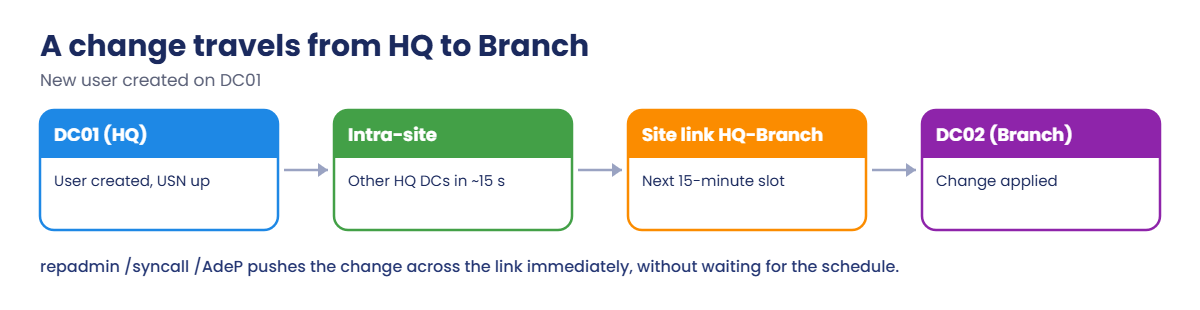
How changes flow: intra-site replication is triggered about 15 seconds after a change; inter-site follows the link schedule and is compressed. Each DC tracks changes with update sequence numbers (USNs) and the up-to-dateness vector, so only new changes are sent. Account lockouts and some security changes replicate urgently, and password changes go to the PDC Emulator straight away.
RODCs: read-only DCs for branches with weak physical security hold no passwords except those you allow to be cached (Password Replication Policy), accept no changes, and can be managed by local branch staff without Domain Admin rights.
How it works, step by step
How a change made at HQ reaches the branch:
Within HQ the change spreads in seconds. Between sites it waits for the next 15-minute slot on the site link, unless you force it, which you’ll do with repadmin.
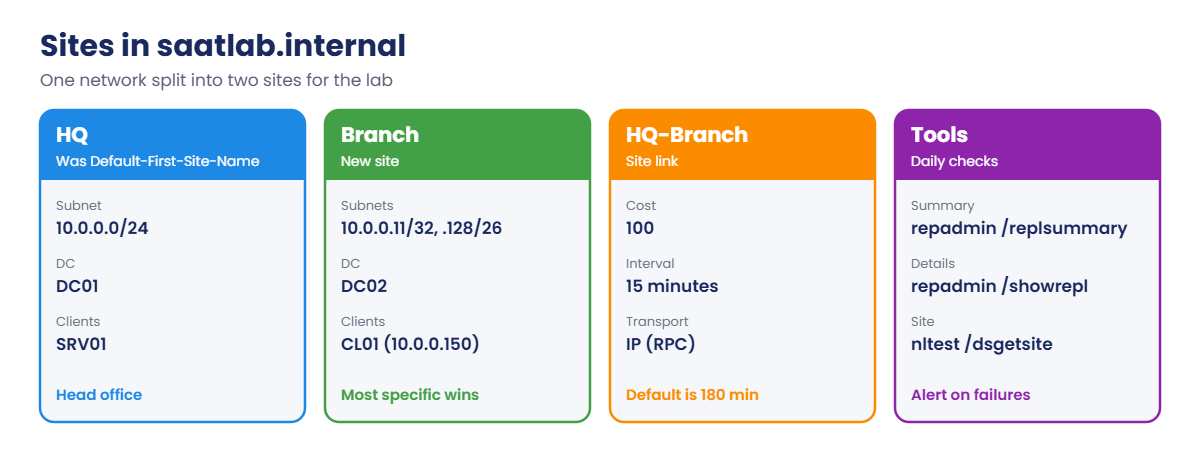
The site layout you’ll build:
- Rename Default-First-Site-Name to HQ and give it the 10.0.0.0/24 subnet.
- Create Branch with more specific subnets: 10.0.0.11/32 (DC02) and 10.0.0.128/26 (where CL01’s 10.0.0.150 lives).
- Link the sites with HQ-Branch, cost 100, every 15 minutes.
- Move DC02’s server object to Branch.
- Check clients and replication with nltest and repadmin.
In a real company the branch would be a different network. Using a more specific subnet inside the lab’s single network gives the same behaviour.
Hands-on Lab: Active Directory replication between two sites
Start DC01, DC02 and CL01. Work on DC01 as SAATLAB\adm.rahul in PowerShell as administrator.
1Rename the default site and add its subnet
On DC01:
Get-ADReplicationSite -Filter * | Select-Object Name
Rename-ADObject (Get-ADReplicationSite 'Default-First-Site-Name').DistinguishedName -NewName HQ
New-ADReplicationSubnet -Name '10.0.0.0/24' -Site HQ -Location 'Head office'
Get-ADReplicationSite -Filter * | Select-Object NameYou should see something like this:
Name
----
Default-First-Site-Name
Name
----
HQRenaming the default site is safe and common. Every DC and site link that referenced it follows the rename, because AD links objects by their identity, not their name.
✅ Checkpoint: The only site is now called HQ and it owns the 10.0.0.0/24 subnet.
2Create the Branch site, its subnets and a site link
On DC01:
New-ADReplicationSite -Name Branch -Description 'Branch office'
New-ADReplicationSubnet -Name '10.0.0.11/32' -Site Branch -Location 'Branch DC'
New-ADReplicationSubnet -Name '10.0.0.128/26' -Site Branch -Location 'Branch clients'
New-ADReplicationSiteLink -Name 'HQ-Branch' -SitesIncluded HQ, Branch -Cost 100 -ReplicationFrequencyInMinutes 15 -InterSiteTransportProtocol IP
Get-ADReplicationSubnet -Filter * | Select-Object Name, @{n='Site';e={($_.Site -split ',')[0] -replace 'CN='}}
Get-ADReplicationSiteLink -Filter * | Select-Object Name, Cost, ReplicationFrequencyInMinutesYou should see something like this:
Name Site
---- ----
10.0.0.0/24 HQ
10.0.0.11/32 Branch
10.0.0.128/26 Branch
Name Cost ReplicationFrequencyInMinutes
---- ---- -----------------------------
DEFAULTIPSITELINK 100 180
HQ-Branch 100 15DEFAULTIPSITELINK still contains only HQ. HQ-Branch is the link replication will use, every 15 minutes instead of the default 180.
✅ Checkpoint: Three subnets exist, two in Branch, and HQ-Branch replicates every 15 minutes.
3Move DC02 to the Branch site
On DC01:
Move-ADDirectoryServer -Identity DC02 -Site Branch
Get-ADDomainController -Filter * | Select-Object Name, IPv4Address, SiteYou should see something like this:
Name IPv4Address Site
---- ----------- ----
DC01 10.0.0.10 HQ
DC02 10.0.0.11 BranchRestart DC02 (or wait) so its Netlogon service re-registers DNS records for the Branch site, such as _ldap._tcp.Branch._sites.dc._msdcs.saatlab.internal. Clients in Branch use those records to find DC02 first.
After DC02 restarts, on DC01:
Resolve-DnsName -Type SRV _ldap._tcp.Branch._sites.dc._msdcs.saatlab.internal | Select-Object NameTargetYou should see something like this:
NameTarget
----------
DC02.saatlab.internal✅ Checkpoint: DC02 shows Site Branch, and the Branch SRV record points to DC02.
4Check which site and DC CL01 uses
On CL01 (any user), restart Netlogon as admin or just restart CL01, then:
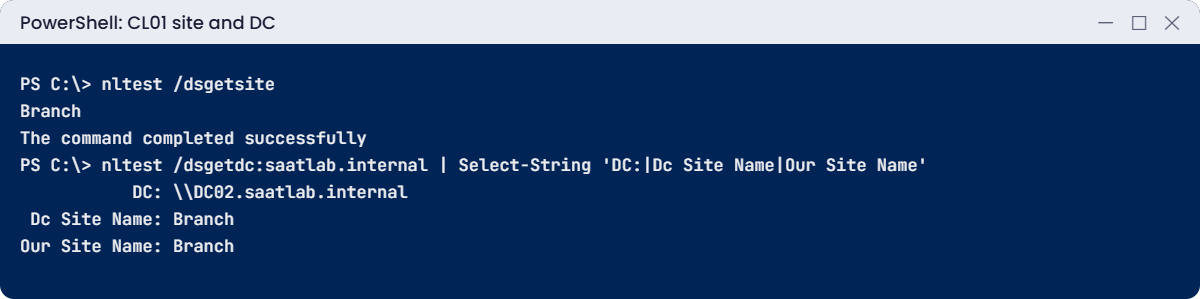
nltest /dsgetsite
nltest /dsgetdc:saatlab.internal | Select-String 'DC:|Dc Site Name|Our Site Name'You should see something like this:
Branch
The command completed successfully
DC: \\DC02.saatlab.internal
Dc Site Name: Branch
Our Site Name: BranchCL01’s address 10.0.0.150 falls in 10.0.0.128/26, the most specific match, so it’s in Branch and picks DC02. If DC02 went down, CL01 would fall back to a DC in another site.
✅ Checkpoint: CL01 reports site Branch and uses DC02.
5Watch and force replication
On DC01, look at the connections the KCC built and DC02’s inbound replication:
repadmin /kcc DC02
Get-ADReplicationConnection -Filter * -Server DC02 | Select-Object @{n='From';e={($_.ReplicateFromDirectoryServer -split ',')[1] -replace 'CN='}}, AutoGenerated
repadmin /showrepl DC02You should see something like this (shortened):
From AutoGenerated
---- -------------
DC01 True
Branch\DC02
DSA Options: IS_GC
Site Options: (none)
...
==== INBOUND NEIGHBORS ======================================
DC=saatlab,DC=internal
HQ\DC01 via RPC
DSA object GUID: 5b1f...
Last attempt @ 2026-10-19 22:51:12 was successful.Now create a user on DC01 and push it to DC02 without waiting 15 minutes:
New-ADUser -Name 'Site Test' -SamAccountName site.test -Path 'OU=Sales,OU=Staff,OU=SAATLAB,DC=saatlab,DC=internal'
Get-ADUser site.test -Server DC02 -ErrorAction SilentlyContinue | Select-Object Name
repadmin /syncall DC01 /AdeP
Get-ADUser site.test -Server DC02 | Select-Object NameYou should see something like this:
CALLBACK MESSAGE: The following replication is in progress:
From: 5b1f...._msdcs.saatlab.internal
To : 9e2c...._msdcs.saatlab.internal
CALLBACK MESSAGE: The following replication completed successfully:
...
CALLBACK MESSAGE: SyncAll Finished.
SyncAll terminated with no errors.
Name
----
Site TestThe first lookup on DC02 returned nothing because the change hadn’t crossed the site link yet. /syncall with /AdeP pushes (P) all partitions (A) across sites (e) by DN (d). Remove the test user afterwards with Remove-ADUser site.test -Confirm:$false.
✅ Checkpoint: site.test was missing on DC02, then present after repadmin /syncall finished with no errors.
Break It, Then Fix It
Two replication problems you’ll meet in real networks: a DC that can’t be reached, and clients whose address belongs to no site.
1Break it: a DC that doesn’t answer
Shut down DC02. On DC01, try to push changes:
repadmin /syncall DC01 /AdePYou’ll get an error like this:
SyncAll reported the following errors:
Error issuing replication: 1722 (0x6ba):
The RPC server is unavailable.
From: CN=NTDS Settings,CN=DC01,CN=Servers,CN=HQ,CN=Sites,CN=Configuration,DC=saatlab,DC=internal
To : CN=NTDS Settings,CN=DC02,CN=Servers,CN=Branch,CN=Sites,CN=Configuration,DC=saatlab,DC=internalAnd the summary view:
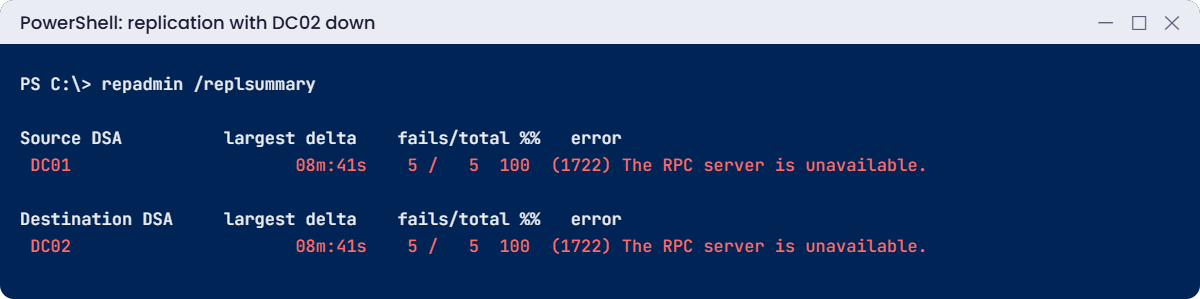
repadmin /replsummaryYou’ll see something like this:
Source DSA largest delta fails/total %% error
DC01 08m:41s 5 / 5 100 (1722) The RPC server is unavailable.
Destination DSA largest delta fails/total %% error
DC02 08m:41s 5 / 5 100 (1722) The RPC server is unavailable.1722 means DC01 couldn’t reach DC02 over RPC at all: the server is down, a firewall blocks RPC (TCP 135 plus dynamic ports), or DNS points to the wrong address. It’s the most common replication error. Check, in order: is it up, does its name resolve, can you reach it (Test-NetConnection DC02 -Port 135).
Fix it: start DC02, then sync and check again:
repadmin /syncall DC01 /AdeP
repadmin /replsummary✅ Checkpoint: replsummary showed 1722 while DC02 was off and 0 failures after it started and synced.
2Break it: clients in no site
On DC01, remove both subnets that cover CL01:
Remove-ADReplicationSubnet '10.0.0.128/26' -Confirm:$false
Remove-ADReplicationSubnet '10.0.0.0/24' -Confirm:$falseOn CL01, as administrator, make Netlogon look up its site again:
Restart-Service Netlogon
nltest /dsgetsiteYou’ll get an error like this:
Getting DC Site failed: Status = 1919 0x77f ERROR_NO_SITENAMECL01 now belongs to no site, so it may pick any DC in the domain, even one across a slow link. DCs record this in the System log as NETLOGON event 5807, listing client addresses that don’t map to a site. In large companies, new office subnets that nobody added to AD cause exactly this.
Fix it: recreate the subnets, then restart Netlogon on CL01:
New-ADReplicationSubnet -Name '10.0.0.0/24' -Site HQ -Location 'Head office' # on DC01
New-ADReplicationSubnet -Name '10.0.0.128/26' -Site Branch -Location 'Branch clients' # on DC01
Restart-Service Netlogon; nltest /dsgetsite # on CL01✅ Checkpoint: CL01 reported ERROR_NO_SITENAME without subnets and Branch again after recreating them.
This happened at work
The DC that came back from the dead
A company closed a small office and shut its DC down in a cupboard, intending to decommission it properly “later”. Seven months later, someone found it, plugged it back in and switched it on.
The DC hadn’t replicated for longer than the tombstone lifetime (180 days). Its partners refused to replicate with it and logged event 2042: “It has been too long since this machine last replicated with the named source machine.” Worse, it held objects deleted elsewhere months earlier, which could have come back to life as lingering objects.
The team didn’t try to force it back. They removed its metadata from AD with ntdsutil metadata cleanup, wiped the server, and checked the other DCs with repadmin /removelingeringobjects in advisory mode.
The fix: a decommissioning checklist (demote, then clean up, never just switch off), and monitoring that alerts when any DC hasn’t replicated for 24 hours.
The lesson: a DC offline past the tombstone lifetime must never rejoin. Demote DCs properly, and watch replication every day.
Common mistakes and troubleshooting
| Mistake or symptom | What happens | What to do instead |
|---|---|---|
| Error 1722 RPC server unavailable | DCs can’t replicate | Check the DC is up, DNS, and TCP 135 plus dynamic RPC ports |
| Subnets missing for new offices | Clients use distant DCs; event 5807 | Add every subnet to a site |
| Leaving the default 180-minute interval | Branch changes take hours | Shorter intervals where links allow |
| Manually created connection objects everywhere | The KCC can’t adapt to failures | Let the KCC manage connections |
| Switching off a DC instead of demoting it | Metadata left behind; risk of rejoin past tombstone | Demote, then metadata cleanup if needed |
| DC offline more than 180 days rejoining | Lingering objects, event 2042 | Never reconnect; clean up and rebuild |
| Writable DC in an insecure branch | Theft exposes every password hash | RODC with a tight Password Replication Policy |
| Not monitoring replication | Problems found weeks later | Daily repadmin /replsummary or monitoring alerts |
| Firewalls between sites blocking RPC | Replication fails silently between sites | Open AD ports between DCs, or use a fixed RPC port |
Interview questions
Click a question to open it. Under each one you’ll find what the interviewer is really looking for, and one good way to answer.
Fresher level
1. What is an AD site?
What they’re really checking: Do you know the basics?
How you could answer: A group of well-connected subnets. Sites control which DC clients use and how replication is scheduled between locations.
2. What is the difference between intra-site and inter-site replication?
What they’re really checking: Do you understand the two modes?
How you could answer: Intra-site happens within seconds of a change, uncompressed. Inter-site follows site link schedules and intervals, compressed, through bridgehead servers.
3. Which command shows replication health quickly?
What they’re really checking: Have you used repadmin?
How you could answer: repadmin /replsummary for an overview of failures and largest deltas; repadmin /showrepl for details per partner and partition.
2–5 years experience
4. What does error 1722 mean in replication?
What they’re really checking: Can you diagnose a common error?
How you could answer: The RPC server is unavailable: the partner DC is down, unreachable through firewalls, or DNS resolves it wrongly. Check name resolution, ports 135 and dynamic RPC, and the DC itself.
5. What is the KCC?
What they’re really checking: Do you know topology generation?
How you could answer: The Knowledge Consistency Checker builds replication connection objects automatically, rebuilding them when DCs or sites change.
6. What happens when a client’s IP isn’t in any subnet?
What they’re really checking: Do you understand site mapping?
How you could answer: It has no site, may use any DC, and DCs log event 5807. Add the subnet to the right site.
Senior level
7. Design AD sites for a company with HQ, two regional offices and 30 small shops.
What they’re really checking: Do you think about scale?
How you could answer: Sites for HQ and regions with DCs, site links with costs that match the WAN, shops either in the nearest regional site or with RODCs if local auth is needed, all subnets mapped, and monitoring of replication and site coverage.
8. What are lingering objects and how do you deal with them?
What they’re really checking: Do you know advanced recovery?
How you could answer: Objects deleted on other DCs that survive on a DC that missed the deletion past the tombstone lifetime. Prevent with strict replication consistency, detect and remove with repadmin /removelingeringobjects, and never reconnect stale DCs.
9. When would you deploy an RODC?
What they’re really checking: Do you understand branch security?
How you could answer: In locations with weak physical security or no IT staff, where local sign-in is needed but a stolen DC must not expose all passwords. Configure the Password Replication Policy and delegated RODC admins.
Quick quiz
Q1. How does a client know which site it’s in?
- From its computer name
- Its IP address matches a subnet linked to a site
- From the user account
Show answer
B — The most specific subnet wins.
Q2. What did repadmin show while DC02 was off?
- Error 5
- Error 1722 RPC server unavailable
- No errors
Show answer
B — The partner couldn’t be reached.
Q3. What does /AdeP do with repadmin /syncall?
- Deletes partitions
- Pushes all partitions across sites
- Shows errors only
Show answer
B — A all, d DN, e enterprise, P push.
Q4. What did nltest /dsgetsite return with no subnets?
- HQ
- ERROR_NO_SITENAME
- Branch
Show answer
B — Clients in no site may use any DC.
Q5. In the work story, why couldn’t the old DC rejoin?
- Its password expired
- It had been offline past the tombstone lifetime
- Its disk failed
Show answer
B — Demote, clean up and rebuild instead.
Quick recap
- Active Directory replication copies changes between DCs: seconds within a site, on schedule between sites.
- Sites are groups of subnets; clients use the most specific subnet to find their site.
- Site links have costs and intervals; the KCC builds connections automatically.
repadmin /replsummary,/showrepland/syncall /AdePare your daily tools.- 1722 means the partner can’t be reached; 5807 means clients without a site.
- Never reconnect a DC offline past the tombstone lifetime; use RODCs in insecure branches.
Next lesson
Lesson 32: AD backup and recovery → You’ll back up a DC’s system state, restore a deleted OU authoritatively in DSRM, seize an FSMO role from a dead DC and clean up its metadata.
Further reading: Active Directory replication
Want to go deeper into Active Directory replication? Microsoft’s common AD replication errors page explains each error code, and the replication and topology with PowerShell guide covers the cmdlets used here. You can also see the full plan for this course on the Windows Server Administration course page.
