Kerberos authentication and NTLM explained with a lab

Every time Priya opens a share, Windows proves who she is without sending her password. Kerberos authentication does that with tickets, and when it can’t, Windows quietly falls back to the older NTLM. Knowing which one happened, and why, solves a whole class of “access denied” and “it keeps asking for my password” problems.

In this lesson you’ll look at real tickets with klist, see Kerberos and NTLM side by side in the Security log, register an SPN for a service account, set up proper time sync, and break authentication with a clock that’s 10 minutes off.

TimeYou needBy the end you can
About 75 minutesDC01, SRV01 and CL01 from Lesson 20Read klist output, explain TGTs, service tickets and SPNs, tell Kerberos from NTLM in event 4624, fix time sync and SPN problems

What it is, in one line

Kerberos authentication is the ticket-based sign-in protocol AD uses: a domain controller gives you tickets that prove who you are to each service, so your password never crosses the network.

In Simple Words

The theme park wristband

At a theme park entrance, you show your ID once and get a wristband for the day. At each ride, you don’t show your ID again; you show the wristband, and the ride attendant gives you a ride token.

Kerberos works the same way. Signing in gets you a TGT (the wristband) from the DC. For each service, like a file share, you trade the TGT for a service ticket (the ride token).

Wristbands expire at closing time, and the park’s clocks must agree, or a valid wristband looks fake. That’s why time matters so much to Kerberos.

Engineer's View

TGT, TGS, SPNs, time and NTLM

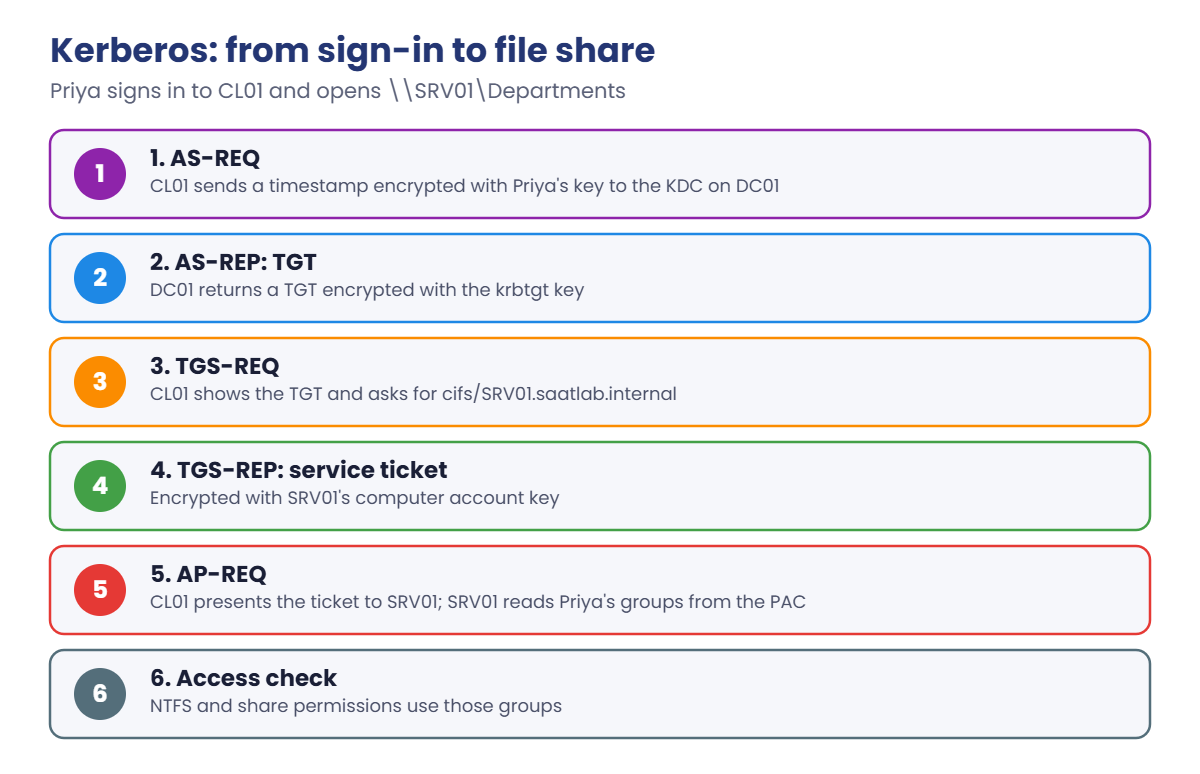
Flow: at sign-in the client sends an AS-REQ with pre-authentication (a timestamp encrypted with a key from the password) to the KDC on a DC, and gets a TGT encrypted with the krbtgt account’s key. For a service, it sends the TGT in a TGS-REQ and gets a service ticket encrypted with the service account’s key, which it presents to the service (AP-REQ). Default lifetimes: TGT 10 hours, renewable for 7 days.

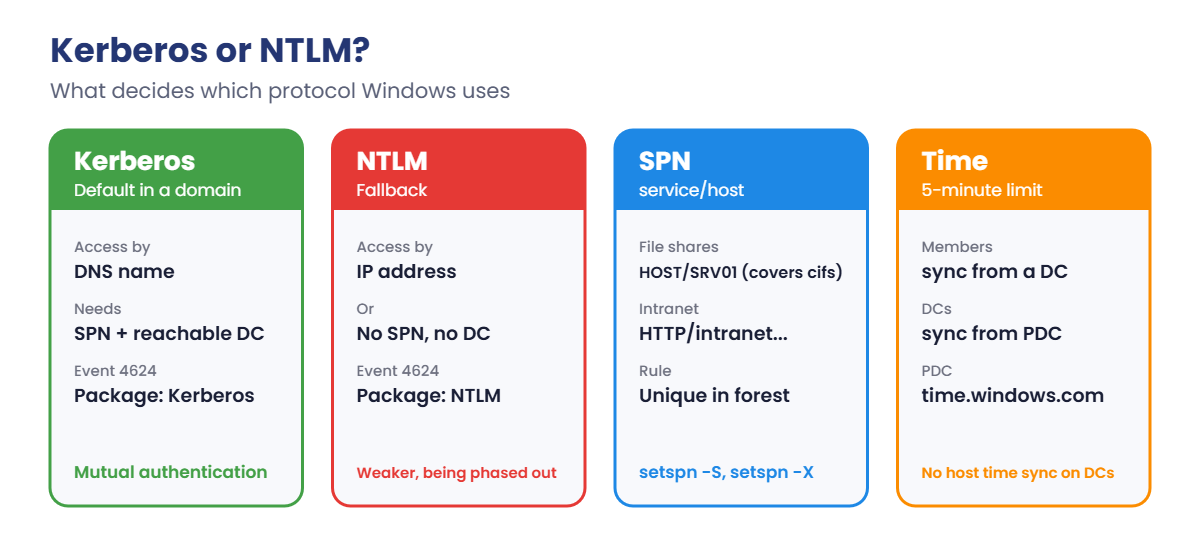
SPNs: a service principal name such as cifs/SRV01.saatlab.internal tells the KDC which account runs a service, so it knows which key to encrypt the ticket with. Missing SPNs cause NTLM fallback; SPNs on the wrong account cause KRB_AP_ERR_MODIFIED failures. SPNs must be unique in the forest.

Time: by default a ticket is rejected if the clocks differ by more than 5 minutes. Members sync with a DC, DCs with the PDC Emulator, and the PDC with a reliable external source. In VMs, turn off the hypervisor’s own time sync on DCs.

NTLM is challenge-response, used when Kerberos can’t be: access by IP address, no SPN, no DC reachable, or workgroup machines. It’s weaker (no mutual authentication, relay attacks) and Microsoft is phasing it out; Windows Server 2025 already removed NTLMv1.

How it works, step by step

Here’s every step when Priya signs in and then opens \\SRV01\Departments:

Kerberos authentication flow: AS-REQ, TGT, TGS-REQ, service ticket and AP-REQ

The DC is involved only to issue tickets. SRV01 checks the service ticket itself, using its own computer account key, and reads Priya’s groups from the PAC inside the ticket. That’s why group changes need a new sign-in: the groups are inside tickets she already has.

When does Windows use Kerberos, and when NTLM?

Kerberos authentication or NTLM: names, SPNs, IP addresses and time
  1. Look at Priya’s TGT and service tickets with klist.
  2. Compare access by name (Kerberos) and by IP (NTLM) in SRV01’s Security log.
  3. List and register SPNs with setspn.
  4. Fix time: the PDC Emulator syncs with an external source, and VirtualBox stops changing DC clocks.

Hands-on Lab: Kerberos authentication in saatlab.internal

Start DC01, SRV01 and CL01. Sign in to CL01 as SAATLAB\priya.sharma and open a normal PowerShell window.

1Look at Priya’s TGT

On CL01, run this:

klist tgt

You should see something like this (shortened):

Current LogonId is 0:0x5e2c1

Cached TGT:

ServiceName        : krbtgt
TargetName (SPN)   : krbtgt
ClientName         : priya.sharma
DomainName         : SAATLAB.INTERNAL
TargetDomainName   : SAATLAB.INTERNAL
AltTargetDomainName: SAATLAB.INTERNAL
Ticket Flags       : 0x40e10000 -> forwardable renewable initial pre_authent name_canonicalize
Session Key        : KeyType 0x12 - AES-256-CTS-HMAC-SHA1-96
StartTime          : 10/19/2026 18:02:11 (local)
EndTime            : 10/20/2026 4:02:11 (local)
RenewUntil         : 10/26/2026 18:02:11 (local)

The TGT is for the krbtgt service, lasts 10 hours and can be renewed for 7 days. KeyType 0x12 is AES-256, the encryption you want to see. RC4 here would be a warning sign.

✅ Checkpoint: klist tgt shows a krbtgt ticket for priya.sharma with AES-256.

2Get a service ticket for SRV01

On CL01, clear the tickets, open the share by name, and list tickets again:

klist purge
Get-ChildItem \\SRV01.saatlab.internal\Departments | Out-Null
klist

You should see something like this (shortened):

Current LogonId is 0:0x5e2c1

Cached Tickets: (2)

#0>     Client: priya.sharma @ SAATLAB.INTERNAL
        Server: krbtgt/SAATLAB.INTERNAL @ SAATLAB.INTERNAL
        KerbTicket Encryption Type: AES-256-CTS-HMAC-SHA1-96
        ...
        Kdc Called: DC01.saatlab.internal

#1>     Client: priya.sharma @ SAATLAB.INTERNAL
        Server: cifs/SRV01.saatlab.internal @ SAATLAB.INTERNAL
        KerbTicket Encryption Type: AES-256-CTS-HMAC-SHA1-96
        Ticket Flags 0x40a50000 -> forwardable renewable pre_authent ok_as_delegate name_canonicalize
        Start Time: 10/19/2026 18:10:42 (local)
        End Time:   10/20/2026 4:02:11 (local)
        Kdc Called: DC01.saatlab.internal

After the purge, Windows got a new TGT silently, then a service ticket for cifs/SRV01.saatlab.internal: cifs is the SPN prefix for file sharing (SMB). The service ticket ends when the TGT does.

✅ Checkpoint: klist shows a krbtgt ticket and a cifs/SRV01.saatlab.internal ticket.

3Access by IP address and see NTLM

On CL01, open the same share by IP, then list tickets:

Get-ChildItem \\10.0.0.20\Departments | Out-Null
klist | Select-String 'Server:'

You should see something like this:

        Server: krbtgt/SAATLAB.INTERNAL @ SAATLAB.INTERNAL
        Server: cifs/SRV01.saatlab.internal @ SAATLAB.INTERNAL

It worked, but no ticket for cifs/10.0.0.20 appeared, because there’s no SPN for an IP address. Windows used NTLM instead. Check what SRV01 recorded:

On SRV01, in PowerShell as administrator:

Get-WinEvent -FilterHashtable @{LogName='Security'; Id=4624} -MaxEvents 50 |
    Where-Object { $_.Properties[5].Value -eq 'priya.sharma' } |
    Select-Object -First 4 TimeCreated, @{n='Package';e={$_.Properties[10].Value}}, @{n='NtlmVersion';e={$_.Properties[14].Value}}

You should see something like this:

TimeCreated         Package  NtlmVersion
-----------         -------  -----------
19/10/2026 18:11:05 NTLM     NTLM V2
19/10/2026 18:10:42 Kerberos -

Event 4624 (successful logon) records which package was used. The IP access shows NTLM V2, the name access Kerberos. Many “Kerberos problems” are really people using IP addresses or aliases with no SPN.

✅ Checkpoint: SRV01 logged one Kerberos and one NTLM logon for Priya.
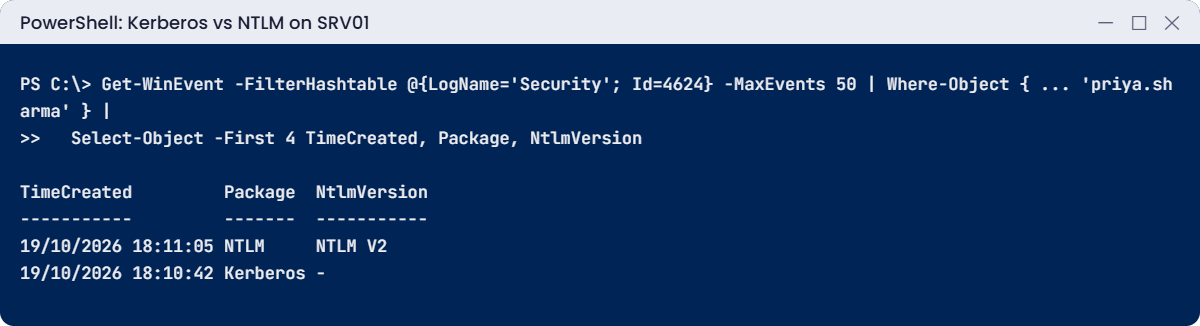
Kerberos authentication lab: event 4624 shows Kerberos for the name and NTLM for the IP
SRV01’s Security log: Kerberos when Priya used the name, NTLM V2 when she used the IP address.

4List SPNs and register one for a service account

On DC01, in PowerShell as administrator:

setspn -L SRV01
New-ADUser -Name svc_intranet -Path 'OU=Service Accounts,OU=SAATLAB,DC=saatlab,DC=internal' -AccountPassword (Read-Host -AsSecureString 'Password') -Enabled $true -PasswordNeverExpires $true
setspn -S HTTP/intranet.saatlab.internal SAATLAB\svc_intranet

You should see something like this:

Registered ServicePrincipalNames for CN=SRV01,OU=Servers,OU=SAATLAB,DC=saatlab,DC=internal:
        TERMSRV/SRV01.saatlab.internal
        WSMAN/SRV01.saatlab.internal
        RestrictedKrbHost/SRV01.saatlab.internal
        HOST/SRV01.saatlab.internal
        TERMSRV/SRV01
        WSMAN/SRV01
        RestrictedKrbHost/SRV01
        HOST/SRV01

Checking domain DC=saatlab,DC=internal

Registering ServicePrincipalNames for CN=svc_intranet,OU=Service Accounts,OU=SAATLAB,DC=saatlab,DC=internal
        HTTP/intranet.saatlab.internal
Updated object

HOST/ covers many built-in services, including cifs, which is why you never registered cifs/SRV01 yourself. The intranet site in Lesson 25 will run as svc_intranet, so its SPN must be on that account.

Always use -S: it checks for duplicates before adding. In Lesson 22 you’ll replace this account with a gMSA, which manages its own password.

✅ Checkpoint: setspn -L lists HOST/SRV01 entries, and HTTP/intranet.saatlab.internal is registered on svc_intranet.

5Set up time sync the right way

On DC01 (the PDC Emulator), point Windows Time at an external source:

w32tm /config /manualpeerlist:"time.windows.com,0x8" /syncfromflags:manual /reliable:yes /update
Restart-Service w32time
w32tm /resync
w32tm /query /source

You should see something like this:

The command completed successfully.
Sending resync command to local computer
The command completed successfully.
time.windows.com,0x8

On CL01 (as administrator), check where it gets time:

w32tm /query /source

You should see something like this:

DC01.saatlab.internal

VirtualBox Guest Additions also set the guest clock from your laptop, which fights with Windows Time on DCs. With DC01 and DC02 shut down, run this on your laptop for each, then start them again:

On your laptop:

VBoxManage setextradata DC01 "VBoxInternal/Devices/VMMDev/0/Config/GetHostTimeDisabled" 1
VBoxManage setextradata DC02 "VBoxInternal/Devices/VMMDev/0/Config/GetHostTimeDisabled" 1

✅ Checkpoint: DC01 syncs from time.windows.com, CL01 from DC01, and host time sync is off for both DCs.

Break It, Then Fix It

Two classic Kerberos breaks: a clock that drifts, and an SPN someone tries to register twice.

1Break it: CL01’s clock is 10 minutes fast

Shut down CL01. On your laptop, stop VirtualBox from fixing its clock, then start it:

VBoxManage setextradata CL01 "VBoxInternal/Devices/VMMDev/0/Config/GetHostTimeDisabled" 1
VBoxManage startvm CL01

Sign in to CL01 as the local labadmin account, and in PowerShell as administrator:

Stop-Service w32time
Set-Date (Get-Date).AddMinutes(10) | Out-Null
Get-Date

Sign out, then sign in as SAATLAB\priya.sharma.

You’ll get an error like this:

The system cannot log you on due to the following error: There is a time and/or date difference between the client and server. Please try again or consult your system administrator.

Priya’s password is right. But her pre-authentication timestamp is 10 minutes ahead of DC01, beyond the 5-minute limit, so the KDC rejects it as a possible replay. DC01’s System log shows Kerberos errors about clock skew, and CL01’s System log shows event 4 or similar from Security-Kerberos.

Fix it: sign in as labadmin and let Windows Time correct the clock from the DC:

Start-Service w32time
w32tm /resync /force
w32tm /query /status | Select-String 'Source|Last Successful'

You should see something like this:

Sending resync command to local computer
The command completed successfully.
Last Successful Sync Time: 19/10/2026 18:32:07
Source: DC01.saatlab.internal

Now Priya can sign in again. On a real network, check the PDC Emulator first: if it has the wrong time, every computer follows it. Leave CL01’s VirtualBox time sync disabled; Windows Time keeps it correct from DC01.

✅ Checkpoint: Priya couldn’t sign in with a 10-minute skew and can after w32tm /resync.
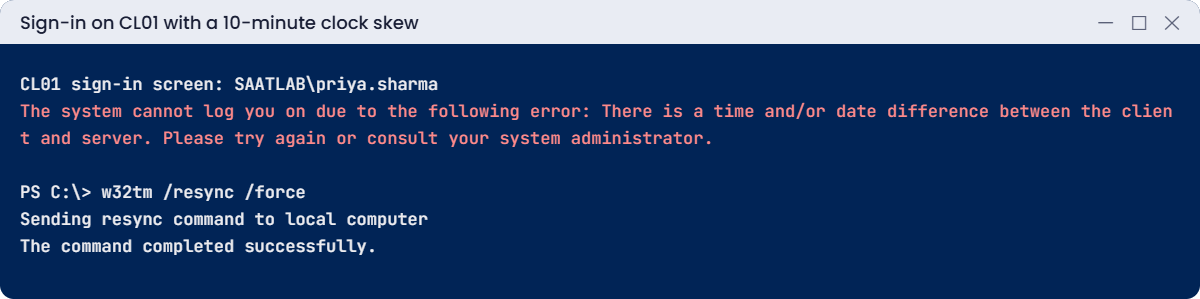
Kerberos authentication lab: time and date difference error from clock skew
A 10-minute clock difference blocks sign-in; resyncing time from DC01 fixes it.

2Break it: register an SPN that already exists

On DC01, try to put the intranet SPN on SRV01 as well:

setspn -S HTTP/intranet.saatlab.internal SRV01

You’ll see something like this:

Checking domain DC=saatlab,DC=internal
CN=svc_intranet,OU=Service Accounts,OU=SAATLAB,DC=saatlab,DC=internal
        HTTP/intranet.saatlab.internal

Duplicate SPN found, aborting operation!

Try going around setspn by writing the attribute directly:

Set-ADComputer SRV01 -ServicePrincipalNames @{Add='HTTP/intranet.saatlab.internal'}

You’ll get an error like this:

Set-ADComputer : The operation failed because SPN value provided for addition/modification is not unique forest-wide
At line:1 char:1
+ Set-ADComputer SRV01 -ServicePrincipalNames @{Add='HTTP/intranet.saatlab.internal'}
+ ~~~~~~~~~~~~~~~~~~~~~~~~~~~~~~~~~~~~~~~~~~~~~~~~~~~~~~~~~~~~~~~~~~~~~~~~~~~~~
    + CategoryInfo          : NotSpecified: (SRV01:ADComputer) [Set-ADComputer], ADException
    + FullyQualifiedErrorId : ActiveDirectoryServer:8647,Microsoft.ActiveDirectory.Management.Commands.SetADComputer

Modern DCs refuse duplicate SPNs outright. Duplicates still turn up in older domains, created before this check existed. With two accounts holding the same SPN, the KDC can’t decide which key to use and Kerberos to that service fails.

Fix it: find duplicates and remove the wrong one:

setspn -X
setspn -D HTTP/intranet.saatlab.internal <wrong-account>     # only if -X finds a duplicate

You should see something like this:

Checking domain DC=saatlab,DC=internal
Processing entry 0
...
found 0 group of duplicate SPNs.

✅ Checkpoint: setspn -S and Set-ADComputer both refused the duplicate, and setspn -X finds none.

This happened at work

The manager who couldn’t open the intranet

After a reorganisation, one senior manager couldn’t open any internal websites. Her browser showed “HTTP 400 Bad Request: Request header too long”, while her assistant at the next desk had no problem.

The helpdesk reset her password, rebuilt her profile and replaced her laptop. Nothing changed, because nothing was wrong with any of them.

Over the years she’d been added to more than 1,000 groups, many of them nested. Her Kerberos ticket, which carries every group SID, had grown so large that the HTTP header carrying it to IIS was over the server’s limit. File shares still worked, because SMB handles big tickets better than HTTP headers.

The fix: a group cleanup removed hundreds of old memberships and empty nested groups. The web servers’ header limits were raised a little as a safety margin, and a quarterly report now lists users in more than 300 groups.

The lesson: group sprawl isn’t just untidy. It makes tickets bigger, sign-ins slower and, at some point, authentication fails.

Common mistakes and troubleshooting

Mistake or symptomWhat happensWhat to do instead
Clocks more than 5 minutes apart“time and/or date difference” sign-in errorsMembers sync from DCs, PDC from a reliable source
Hypervisor time sync on DCsDC clocks jump and fight Windows TimeDisable host time sync for DCs
Accessing servers by IP addressNTLM instead of KerberosUse DNS names; register SPNs for aliases
SPN on the wrong accountKRB_AP_ERR_MODIFIED and failed sign-ins to the servicePut the SPN on the account that runs the service
Using setspn -ANo duplicate check on older toolsAlways setspn -S; check with setspn -X
Users in hundreds of groupsLarge tickets, HTTP 400 header errorsClean up groups; watch token size
Allowing RC4 and NTLMv1Weak, easily attacked authenticationAES only where possible; audit and reduce NTLM
“Kerberos is broken” after group changesOld tickets still in useklist purge or sign out and in
Service accounts with passwords that never changeTicket keys can be cracked offline (Kerberoasting)Long random passwords or gMSAs

Interview questions

Click a question to open it. Under each one you’ll find what the interviewer is really looking for, and one good way to answer.

Fresher level

1. What is Kerberos?

What they’re really checking: Do you know the basics?

How you could answer: The default authentication protocol in AD. A DC’s KDC issues tickets: a TGT at sign-in and service tickets for each service, so passwords don’t cross the network.

2. What is the maximum clock difference Kerberos allows by default?

What they’re really checking: Do you know the time rule?

How you could answer: 5 minutes. Beyond that, tickets and pre-authentication are rejected.

3. How do you see a user’s Kerberos tickets?

What they’re really checking: Have you used klist?

How you could answer: klist in the user’s session; klist tgt for the TGT, klist purge to clear them.

2–5 years experience

4. What is an SPN and why does it matter?

What they’re really checking: Do you understand SPNs?

How you could answer: A service principal name maps a service, like HTTP/intranet.domain, to the account running it. The KDC uses it to encrypt the ticket. Missing SPNs cause NTLM fallback, wrong or duplicate ones cause failures.

5. When does Windows fall back to NTLM?

What they’re really checking: Do you know the cases?

How you could answer: Access by IP, no SPN for the name used, no DC reachable, workgroup or cross-forest without trust, or apps that only support NTLM.

6. How does time sync work in a domain?

What they’re really checking: Do you know the hierarchy?

How you could answer: Members sync with a DC, DCs with the PDC Emulator of their domain, the forest root PDC with an external reliable source. Use w32tm to configure and check.

Senior level

7. Explain Kerberos delegation types and their risks.

What they’re really checking: Do you understand delegation?

How you could answer: Unconstrained (dangerous: the server can impersonate users anywhere), constrained (only to listed services), and resource-based constrained (configured on the target). Prefer RBCD or constrained, and protect sensitive accounts with “Account is sensitive” or Protected Users.

8. What is Kerberoasting and how do you defend against it?

What they’re really checking: Do you know attacks?

How you could answer: Any user can request service tickets for accounts with SPNs and crack them offline if passwords are weak. Use gMSAs or 25+ character random passwords, AES only, and monitor event 4769 for RC4 requests.

9. How would you plan to reduce NTLM in a large domain?

What they’re really checking: Do you think about migration?

How you could answer: Audit NTLM with the NTLM auditing policies and event logs, fix causes such as IP access and missing SPNs, add exceptions, then restrict NTLM step by step, server by server.

Quick quiz

Q1. What does Priya get from the DC when she signs in?

  1. A service ticket
  2. A TGT
  3. An NTLM hash
Show answer

B — The TGT is then traded for service tickets.

Q2. Why did accessing \\10.0.0.20 use NTLM?

  1. The share was hidden
  2. There’s no SPN for an IP address
  3. Kerberos was disabled
Show answer

B — Use names, not IPs.

Q3. What stopped Priya signing in during Break It step 1?

  1. A wrong password
  2. A 10-minute clock difference
  3. A missing SPN
Show answer

B — The default limit is 5 minutes.

Q4. Which command adds an SPN with a duplicate check?

  1. setspn -A
  2. setspn -S
  3. setspn -L
Show answer

B — Always use -S.

Q5. In the work story, what caused the HTTP 400 error?

  1. A broken browser
  2. A huge ticket from too many groups
  3. An expired certificate
Show answer

B — Group sprawl made the ticket too big.

Quick recap

  • Kerberos authentication uses a TGT from the DC and a service ticket per service; klist shows them.
  • SPNs tell the KDC which account runs a service; register them with setspn -S.
  • No SPN (or access by IP) means NTLM; event 4624 shows which package was used.
  • Keep clocks within 5 minutes: members to DCs, PDC to an external source, no host time sync on DCs.
  • Duplicate SPNs are refused by modern DCs; check old domains with setspn -X.
  • Large group counts make large tickets.

Next lesson

Lesson 22: Identity security → You’ll deploy Windows LAPS for local admin passwords, replace svc_intranet with a gMSA, add admins to Protected Users, set a fine-grained password policy and look at admin tiering.

Further reading: Kerberos authentication

Want to go deeper into Kerberos authentication? Microsoft’s Windows authentication overview explains Kerberos and NTLM, and the Windows Time service guide covers time sync. You can also see the full plan for this course on the Windows Server Administration course page.

Scroll to Top