
Before you run any command, double-check it
Read every command twice before you press Enter. Check the target: the server name, the user, the disk or device name, the path and the sizes. These commands are for learning and were tested in our lab, not on your system. At work, run the read-only commands first, follow your change process, make sure a backup exists, and ask a second person to check anything that changes or deletes data. You run them at your own risk.
This lab uses the SaatVedha ONTAP practice shell, our own learning tool. It is not NetApp software: real ONTAP output looks like this but is not identical.
This lab uses two terminals. The first runs the practice cluster, which plays the storage side.
The second runs python ontapsim.py --host linux1, a real-looking Ubuntu 24.04 client at 192.168.56.21 that shares the lab with the cluster. Your MAC addresses and timings will differ from the examples.
1Build the storage side
Save these lines as setup-net.txt, then reset and run it in the first terminal. It creates an SVM with an NFS LIF on the 192.168.56.0/24 network, a volume at /lab, and a second LIF on tagged VLAN 20.
storage aggregate create -aggregate aggr1_01 -node saat-cluster-01 -diskcount 8 -disktype SAS
storage aggregate create -aggregate aggr1_02 -node saat-cluster-02 -diskcount 8 -disktype SAS
vserver create -vserver svm1 -aggregate aggr1_01 -rootvolume-security-style unix
network interface create -vserver svm1 -lif svm1_nas1 -service-policy default-data-files -home-node saat-cluster-01 -home-port e0c -address 192.168.56.130 -netmask 255.255.255.0
vserver export-policy rule create -vserver svm1 -policyname default -clientmatch 192.168.56.0/24 -rorule sys -rwrule sys -superuser sys
vserver nfs create -vserver svm1 -v3 enabled -v4.1 enabled
volume create -vserver svm1 -volume vol_lab -aggregate aggr1_01 -size 20g -junction-path /lab
network port vlan create -node saat-cluster-01 -vlan-name e0e-20
network port broadcast-domain create -broadcast-domain bd_vlan20 -mtu 1500 -ipspace Default -ports saat-cluster-01:e0e-20
network interface create -vserver svm1 -lif svm1_nas20 -service-policy default-data-files -home-node saat-cluster-01 -home-port e0e-20 -address 192.168.20.130 -netmask 255.255.255.0
python ontapsim.py -c "simctl reset"
python ontapsim.py --run setup-net.txt✅ Checkpoint: No line in the output starts with Error.
2Look at the client’s interfaces, route and ARP table
In the second terminal, start linux1 with python ontapsim.py --host linux1 and run:
ip -br a
ip route get 192.168.56.130
ip neigh flush dev enp0s8
ip neigh
ping -c 2 192.168.56.130
ip neigh
You should see this:
root@linux1:~# ip -br a
lo               UNKNOWN        127.0.0.1/8 ::1/128
enp0s3           UP             10.0.2.15/24 metric 100 fe80::a00:27ff:fe59:f91f/64
enp0s8           UP             192.168.56.21/24 fe80::a00:27ff:feff:6dcf/64
root@linux1:~# ip route get 192.168.56.130
192.168.56.130 dev enp0s8 src 192.168.56.21 uid 0
    cache
root@linux1:~# ip neigh flush dev enp0s8
root@linux1:~# ip neigh
root@linux1:~# ping -c 2 192.168.56.130
PING 192.168.56.130 (192.168.56.130) 56(84) bytes of data.
64 bytes from 192.168.56.130: icmp_seq=1 ttl=64 time=0.292 ms
64 bytes from 192.168.56.130: icmp_seq=2 ttl=64 time=0.329 ms

--- 192.168.56.130 ping statistics ---
2 packets transmitted, 2 received, 0% packet loss, time 1006ms
rtt min/avg/max/mdev = 0.292/0.310/0.329/0.019 ms
root@linux1:~# ip neigh
192.168.56.130 dev enp0s8 lladdr 00:a0:98:54:28:6c REACHABLE
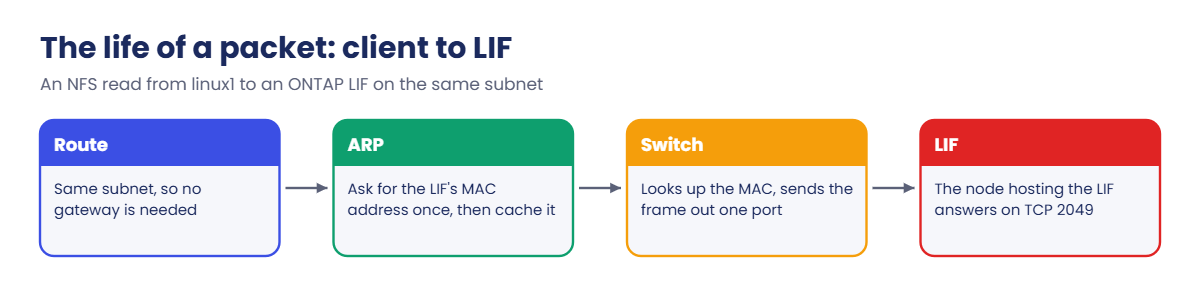
ip route get says the LIF is reached directly through enp0s8, with no “via” gateway: a same-subnet trip. Before the ping, the ARP table was empty; the ping triggered an ARP request, and now the LIF’s MAC is cached. The 00:a0:98 at the start is NetApp’s vendor prefix, so you can spot ONTAP LIFs in any ARP table.
✅ Checkpoint: ip neigh shows 192.168.56.130 as REACHABLE.
3Mount over NFS and watch the packets
Install the NFS client, mount the volume and capture four packets to port 2049:
apt install -y nfs-common tcpdump
mkdir -p /mnt/lab
mount -t nfs -o vers=4.1 192.168.56.130:/lab /mnt/lab
ss -tn
tcpdump -nn -i enp0s8 -c 4 port 2049
You should see this (the apt lines are trimmed):
root@linux1:~# mkdir -p /mnt/lab
root@linux1:~# mount -t nfs -o vers=4.1 192.168.56.130:/lab /mnt/lab
root@linux1:~# ss -tn
State Recv-Q Send-Q Local Address:Port   Peer Address:Port  Process
ESTAB 0      0      192.168.56.21:756  192.168.56.130:2049
ESTAB 0      0      192.168.56.21:22     192.168.56.1:51842
root@linux1:~# tcpdump -nn -i enp0s8 -c 4 port 2049
tcpdump: verbose output suppressed, use -v[v]... for full protocol decode
listening on enp0s8, link-type EN10MB (Ethernet), snapshot length 262144 bytes
12:06:45.306356 IP 192.168.56.21.756 > 192.168.56.130.2049: Flags [P.], seq 1:245, ack 1, win 502, options [nop,nop,TS val 3141592 ecr 271828], length 244: NFS request xid 2285417 240 getattr fh 0,0/22
12:06:45.306910 IP 192.168.56.130.2049 > 192.168.56.21.756: Flags [P.], seq 1:201, ack 245, win 4116, options [nop,nop,TS val 271828 ecr 3141592], length 200: NFS reply xid 2285417 reply ok 196 getattr NON 4 ids 0/0 sz 0
12:06:45.307726 IP 192.168.56.21.756 > 192.168.56.130.2049: Flags [P.], seq 245:489, ack 245, win 502, options [nop,nop,TS val 3141593 ecr 271829], length 244: NFS request xid 2285418 240 getattr fh 0,0/22
12:06:45.307925 IP 192.168.56.130.2049 > 192.168.56.21.756: Flags [P.], seq 245:445, ack 489, win 4116, options [nop,nop,TS val 271829 ecr 3141593], length 200: NFS reply xid 2285418 reply ok 196 getattr NON 4 ids 0/0 sz 0
4 packets captured
4 packets received by filter
0 packets dropped by kernel
ss -tn shows one TCP connection from linux1 to port 2049 on the LIF: that single connection carries every NFSv4.1 call. In tcpdump, each request from .21 gets a reply from .130, here GETATTR calls the client makes to check the mount. On a real client, start tcpdump before the mount to see the TCP handshake too.
✅ Checkpoint: ss shows an ESTAB connection to 192.168.56.130:2049 and tcpdump captures 4 packets.
4Test the MTU end to end
ping -M do -s 1472 -c 2 192.168.56.130
ping -M do -s 8972 -c 2 192.168.56.130
tracepath 192.168.56.130
You should see this:
root@linux1:~# ping -M do -s 1472 -c 2 192.168.56.130
PING 192.168.56.130 (192.168.56.130) 1472(1500) bytes of data.
1480 bytes from 192.168.56.130: icmp_seq=1 ttl=64 time=0.471 ms
1480 bytes from 192.168.56.130: icmp_seq=2 ttl=64 time=0.337 ms

--- 192.168.56.130 ping statistics ---
2 packets transmitted, 2 received, 0% packet loss, time 1006ms
rtt min/avg/max/mdev = 0.337/0.404/0.471/0.067 ms
root@linux1:~# ping -M do -s 8972 -c 2 192.168.56.130
PING 192.168.56.130 (192.168.56.130) 8972(9000) bytes of data.
ping: local error: message too long, mtu=1500
ping: local error: message too long, mtu=1500

--- 192.168.56.130 ping statistics ---
2 packets transmitted, 0 received, +2 errors, 100% packet loss, time 1006ms
root@linux1:~# tracepath 192.168.56.130
 1?: [LOCALHOST]                      pmtu 1500
 1:  192.168.56.130                                     0.522ms reached
 1:  192.168.56.130                                     0.401ms reached
     Resume: pmtu 1500 hops 1 back 1
-M do forbids splitting the packet, so 1472 bytes of data plus 28 bytes of headers fills a 1500 frame exactly. The 8972-byte test is the one you run when someone says “we use jumbo frames”: it must pass on every client before you trust it. tracepath reports the path MTU (pmtu 1500) without any guessing.
✅ Checkpoint: 1472 passes, 8972 fails with mtu=1500, and tracepath shows pmtu 1500.

5Reach a LIF on a tagged VLAN
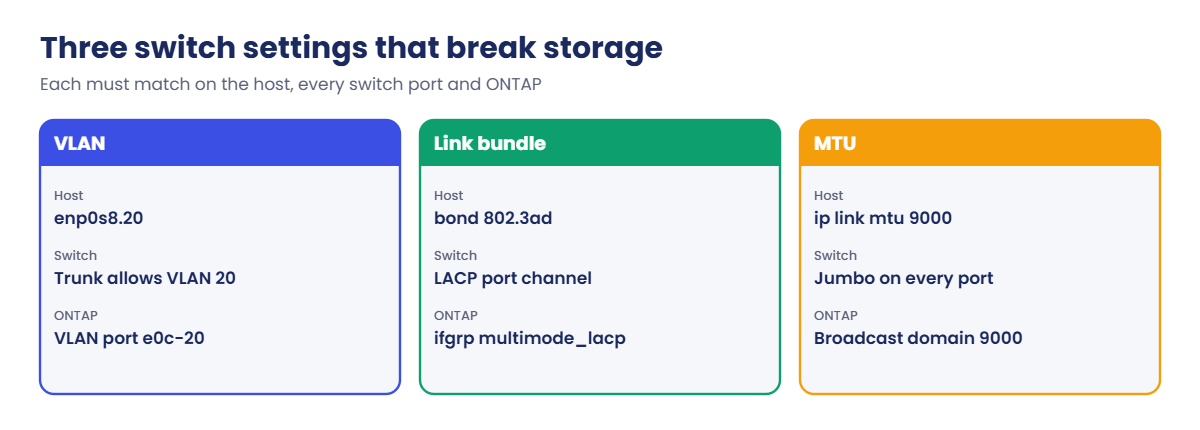
The cluster already has a LIF at 192.168.20.130 on VLAN 20 (port e0e-20). linux1 has no interface on that VLAN yet, so the first ping fails. Then add a tagged VLAN interface on top of enp0s8:
ping -c 2 192.168.20.130
ip link add link enp0s8 name enp0s8.20 type vlan id 20
ip addr add 192.168.20.21/24 dev enp0s8.20
ip link set enp0s8.20 up
ip -br a
ping -c 3 192.168.20.130
You should see this:
root@linux1:~# ping -c 2 192.168.20.130
PING 192.168.20.130 (192.168.20.130) 56(84) bytes of data.

--- 192.168.20.130 ping statistics ---
2 packets transmitted, 0 received, 100% packet loss, time 1006ms
root@linux1:~# ip link add link enp0s8 name enp0s8.20 type vlan id 20
root@linux1:~# ip addr add 192.168.20.21/24 dev enp0s8.20
root@linux1:~# ip link set enp0s8.20 up
root@linux1:~# ip -br a
lo               UNKNOWN        127.0.0.1/8 ::1/128
enp0s3           UP             10.0.2.15/24 metric 100 fe80::a00:27ff:fe59:f91f/64
enp0s8           UP             192.168.56.21/24 fe80::a00:27ff:feff:6dcf/64
enp0s8.20@enp0s8 UP             192.168.20.21/24 fe80::a00:27ff:feff:6dcf/64
root@linux1:~# ping -c 3 192.168.20.130
PING 192.168.20.130 (192.168.20.130) 56(84) bytes of data.
64 bytes from 192.168.20.130: icmp_seq=1 ttl=64 time=0.318 ms
64 bytes from 192.168.20.130: icmp_seq=2 ttl=64 time=0.302 ms
64 bytes from 192.168.20.130: icmp_seq=3 ttl=64 time=0.563 ms

--- 192.168.20.130 ping statistics ---
3 packets transmitted, 3 received, 0% packet loss, time 2009ms
rtt min/avg/max/mdev = 0.302/0.394/0.563/0.119 ms
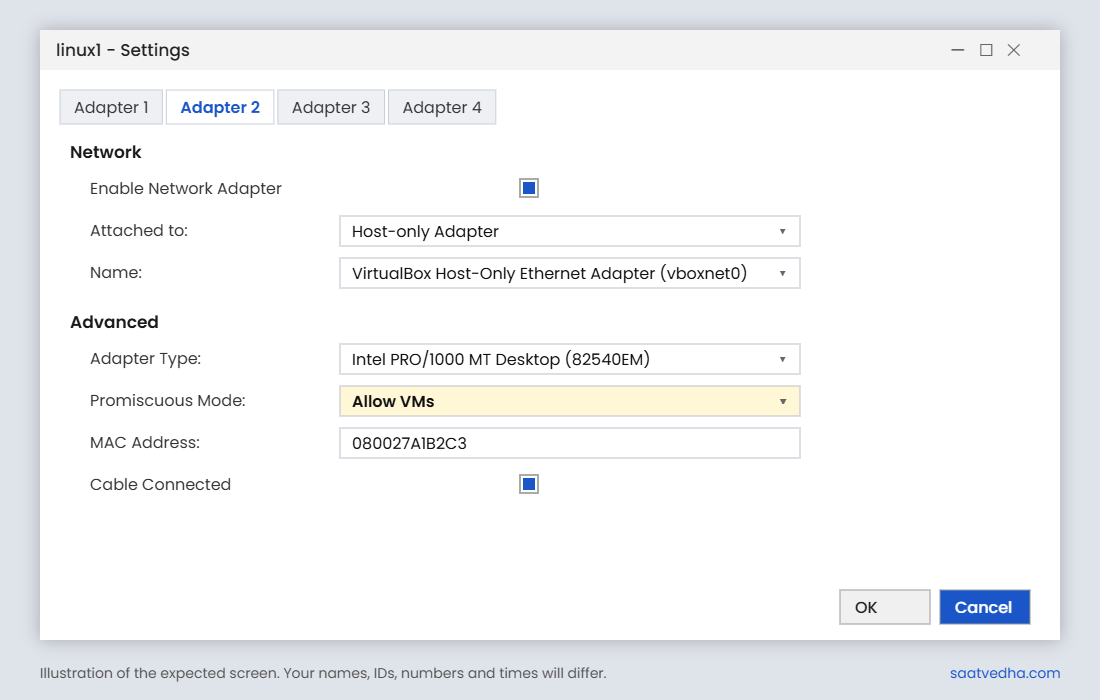
enp0s8.20@enp0s8 is a child of enp0s8 that tags its frames with VLAN 20. That’s exactly what ONTAP did when you created e0e-20: a tagged child port on a physical port. On real VMs, VirtualBox may need Adapter 2’s Promiscuous Mode set to “Allow VMs” for VLAN traffic.
✅ Checkpoint: The second ping to 192.168.20.130 gets 3 replies.
Try it yourself: Build an ONTAP VLAN port in the Command Builder.
Now make the MTU mismatch that causes so many “NFS hangs on big files” tickets, and fix it. Keep both terminals open.
1Raise the MTU on one side only
In the cluster terminal, run simctl break mtu-mismatch linux1. It sets linux1’s enp0s8 to MTU 9000 while the network path stays at 1500.
saat-cluster::> simctl break mtu-mismatch linux1
simctl: fault "mtu-mismatch" is active on linux1. Now find it from the host and the cluster.
Then in the linux1 terminal:
ip a show enp0s8
ping -c 2 192.168.56.130
ping -M do -s 8972 -c 2 192.168.56.130
ping -M do -s 1472 -c 2 192.168.56.130
You’ll get this:
root@linux1:~# ip a show enp0s8
3: enp0s8: <BROADCAST,MULTICAST,UP,LOWER_UP> mtu 9000 qdisc fq_codel state UP group default qlen 1000
    link/ether 08:00:27:ff:6d:cf brd ff:ff:ff:ff:ff:ff
    inet 192.168.56.21/24 brd 192.168.56.255 scope global enp0s8
       valid_lft forever preferred_lft forever
    inet6 fe80::a00:27ff:feff:6dcf/64 scope link
       valid_lft forever preferred_lft forever
root@linux1:~# ping -c 2 192.168.56.130
PING 192.168.56.130 (192.168.56.130) 56(84) bytes of data.
64 bytes from 192.168.56.130: icmp_seq=1 ttl=64 time=0.452 ms
64 bytes from 192.168.56.130: icmp_seq=2 ttl=64 time=0.606 ms

--- 192.168.56.130 ping statistics ---
2 packets transmitted, 2 received, 0% packet loss, time 1006ms
rtt min/avg/max/mdev = 0.452/0.529/0.606/0.077 ms
root@linux1:~# ping -M do -s 8972 -c 2 192.168.56.130
PING 192.168.56.130 (192.168.56.130) 8972(9000) bytes of data.

--- 192.168.56.130 ping statistics ---
2 packets transmitted, 0 received, 100% packet loss, time 1006ms
root@linux1:~# ping -M do -s 1472 -c 2 192.168.56.130
PING 192.168.56.130 (192.168.56.130) 1472(1500) bytes of data.
1480 bytes from 192.168.56.130: icmp_seq=1 ttl=64 time=0.452 ms
1480 bytes from 192.168.56.130: icmp_seq=2 ttl=64 time=0.606 ms

--- 192.168.56.130 ping statistics ---
2 packets transmitted, 2 received, 0% packet loss, time 1006ms
rtt min/avg/max/mdev = 0.452/0.529/0.606/0.077 ms
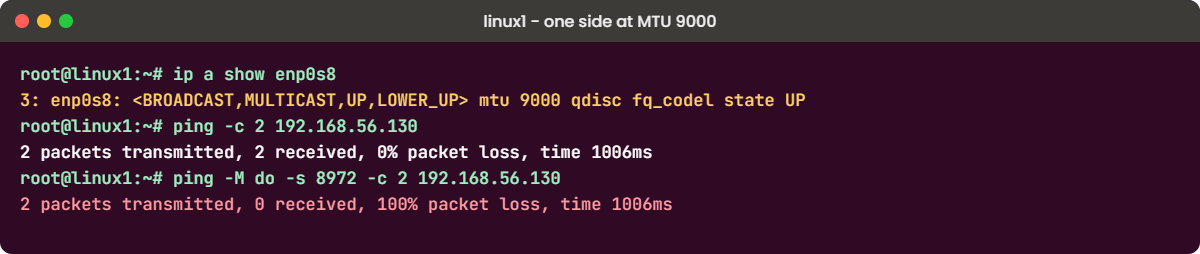
Small pings and 1500-byte pings work, so “the network is fine” to anyone who only runs a plain ping. But linux1 now sends 9000-byte frames that the path drops without a word, and big NFS writes hang. Notice there’s no “message too long” error this time: the client thinks 9000 is allowed.
✅ Checkpoint: Small pings pass and the 8972-byte ping loses every packet.
2Find it and fix it
Compare both ends. In the cluster terminal, check the LIF’s port and its broadcast domain:
network port show -node saat-cluster-01 -port e0c -fields mtu
network port broadcast-domain show -broadcast-domain Default -fields mtu
saat-cluster::> network port show -node saat-cluster-01 -port e0c -fields mtu
node port mtu
--------------- ---- ----
saat-cluster-01 e0c 1500
saat-cluster::> network port broadcast-domain show -broadcast-domain Default -fields mtu
ipspace broadcast-domain mtu
------- ---------------- ----
Default Default 1500The storage side is at 1500, so the client is the odd one out. Put it back in the linux1 terminal and test again:
ip link set dev enp0s8 mtu 1500
ip a show enp0s8
ping -M do -s 1472 -c 2 192.168.56.130
You should see this:
root@linux1:~# ip link set dev enp0s8 mtu 1500
root@linux1:~# ip a show enp0s8
3: enp0s8: <BROADCAST,MULTICAST,UP,LOWER_UP> mtu 1500 qdisc fq_codel state UP group default qlen 1000
    link/ether 08:00:27:ff:6d:cf brd ff:ff:ff:ff:ff:ff
    inet 192.168.56.21/24 brd 192.168.56.255 scope global enp0s8
       valid_lft forever preferred_lft forever
    inet6 fe80::a00:27ff:feff:6dcf/64 scope link
       valid_lft forever preferred_lft forever
root@linux1:~# ping -M do -s 1472 -c 2 192.168.56.130
PING 192.168.56.130 (192.168.56.130) 1472(1500) bytes of data.
1480 bytes from 192.168.56.130: icmp_seq=1 ttl=64 time=0.353 ms
1480 bytes from 192.168.56.130: icmp_seq=2 ttl=64 time=0.657 ms

--- 192.168.56.130 ping statistics ---
2 packets transmitted, 2 received, 0% packet loss, time 1006ms
rtt min/avg/max/mdev = 0.353/0.505/0.657/0.152 ms
Finally clear the lab fault in the cluster terminal with simctl fix mtu-mismatch. At work, either set every hop (client, switch ports, ONTAP broadcast domain) to 9000 or put the odd one back to 1500; never leave a mix.
saat-cluster::> simctl fix mtu-mismatch
simctl: fixed mtu-mismatch.
✅ Checkpoint: linux1 shows mtu 1500 and the 1472-byte test passes again.