SVM DR, SnapMirror Synchronous and cascades
-
Phase 0: Start here
-
Phase 1: Architecture and foundation
-
Phase 2: Protocols and day-to-day administration
-
Phase 3: Data protection and enterprise integrations
-
Phase 4: Troubleshooting blueprint
-
Phase 5: Final project and career
Volume mirrors from Lesson 39 copy data, but a real DR day needs more: the SVM’s IP addresses, its SMB server name, its export policies and DNS settings. Rebuilding all that by hand at 3 a.m. is how DR plans fail.
This lesson covers three tools that close the gaps. SVM DR copies a whole SVM with its configuration, SnapMirror Synchronous copies every write so you lose nothing, and a cascade makes a third copy from the DR copy. You’ll build a synchronous mirror and a cascade in the practice shell and walk through SVM DR on paper.
Where this lesson fits
Lesson 41 of 56 in NetApp ONTAP Storage Administration · Phase 3: Data protection and integrations · Before this: Lesson 40, SnapMirror vault · Next: Lesson 42, MetroCluster and SyncMirror
| Time | You need | By the end you can |
|---|---|---|
| 50 minutes | The practice shell with saat-cluster and saat-dr peered (Lesson 38) | Explain SVM DR and identity-preserve, create a SnapMirror Synchronous relationship and a cascade, and pick the right tool for an RPO |
What it is, in one line
SVM DR replicates a whole storage VM (its volumes and, optionally, its network and protocol identity) to another cluster, SnapMirror Synchronous replicates every write before acknowledging it, and a cascade chains one relationship after another.
In Simple Words
Moving house versus copying a cupboard
Copying one cupboard’s contents to your parents’ flat helps if the cupboard is lost, but if your whole house is unusable you also need your address, your phone number and your name on the door. SVM DR moves the address and name plate along with the cupboards.
Synchronous replication is like writing every cheque in a book with carbon paper, so the copy is never one cheque behind. A cascade is your parents then sending a photocopy of their copy to a cousin in a third city, so you don’t have to post two parcels yourself.
Engineer's View
How an engineer describes it
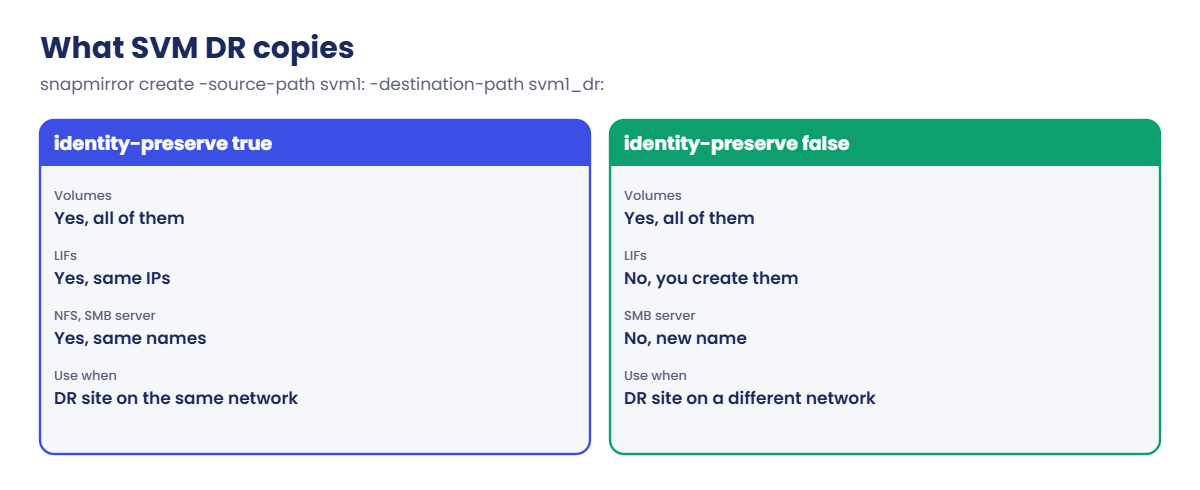
SVM DR uses SVM paths with a trailing colon: snapmirror create -source-path svm1: -destination-path svm1_dr:. The destination SVM is created with -subtype dp-destination. With -identity-preserve true the DR SVM gets the same LIFs (same IPs), the same SMB server and the same protocol settings, so clients reconnect without changes, which suits a DR site on a stretched network; with false only volumes and some configuration are copied and you build the network side yourself.
SnapMirror Synchronous (SM-S) uses the Sync or StrictSync policy, both type sync-mirror. A write is acknowledged to the host only after it’s on both clusters, giving zero RPO, so it needs short distances and low round-trip latency. If the link fails, Sync lets the primary keep running and catches up later, while StrictSync fails host writes to protect the zero-RPO promise.
On real ONTAP a healthy synchronous relationship shows the status InSync.
A cascade is A to B to C: for example a synchronous copy to a nearby site and a vault from there to a far site. The middle volume is both a destination and a source. For automatic, zero-RTO failover of SAN workloads NetApp also offers SnapMirror active sync with ONTAP Mediator, which is beyond this lesson.
How it works, step by step
1Pick the RPO and RTO first
Ask the business how much data it can lose (RPO) and how long it can be down (RTO). Hourly async mirrors give an RPO of about an hour; SM-S gives zero; SVM DR shortens RTO because the configuration is already at DR.
2Check distance and latency for SM-S
Every write waits for the remote cluster, so the replication link’s round-trip time adds straight to the host’s write latency. Measure it before you promise zero RPO.
3For SVM DR, create the DR SVM as a destination
The DR SVM has subtype dp-destination, the SVMs are peered, and one SVM-level relationship is created and initialized. Every volume, and new volumes added later, follow automatically.
4For a cascade, mirror from the middle
The B to C relationship is created on C with B’s volume as the source. Production does no extra work for the third copy.
| Command (real ONTAP) | What it does |
|---|---|
vserver create -vserver svm1_dr -subtype dp-destination | DR SVM that can receive SVM DR |
snapmirror create -source-path svm1: -destination-path svm1_dr: -identity-preserve true | SVM-level relationship |
snapmirror create ... -policy Sync | Synchronous volume mirror |
vserver stop / vserver start | Switch which SVM serves clients at failover |
5Fail over an SVM DR relationship
Quiesce and break the SVM relationship on DR, stop the source SVM if it’s still running (with identity-preserve true the IPs must not be up twice), and start the DR SVM. Clients reconnect to the same names and addresses.
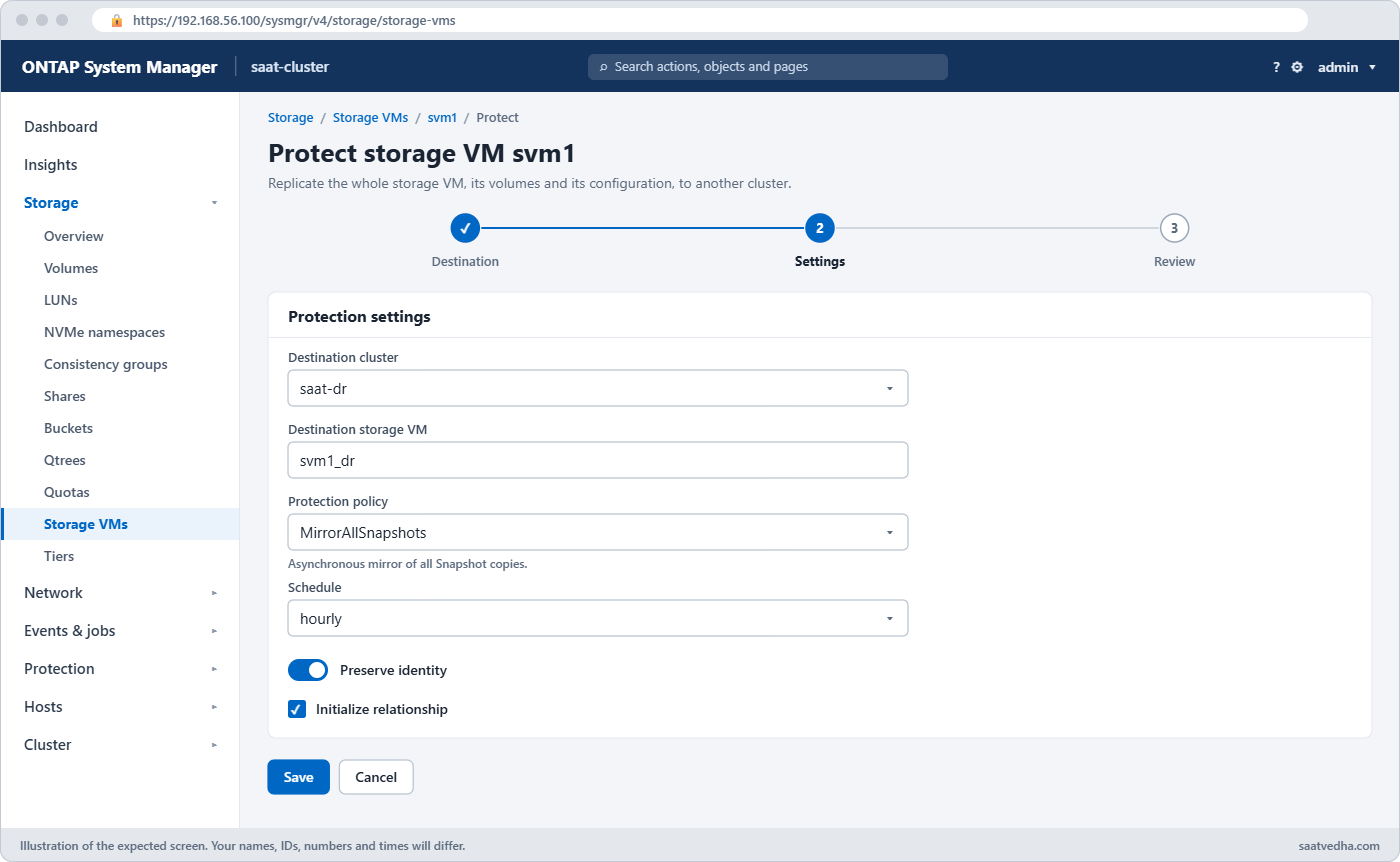
In System Manager, SVM DR starts from Storage › Storage VMs, select the SVM, then Protect; choose the DR cluster and whether to keep the identity. Synchronous protection is a policy choice in the volume Protect dialog.
Good to know: fan-out and fan-in
One source volume can feed several destinations at once (fan-out), for example a DR mirror and a separate long-term vault. Depending on the platform, ONTAP allows eight or sixteen destinations per source volume, and each relationship keeps its own policy and schedule.
Fan-in means many sources replicating into one destination SVM or cluster, such as branch offices backing up to a head office. Each source still needs its own destination volume, because two sources can’t write into the same volume.
Hands-on lab: a synchronous mirror and a cascade
Before you run any command, double-check it
Read every command twice before you press Enter. Check the target: the server name, the user, the disk or device name, the path and the sizes. These commands are for learning and were tested in our lab, not on your system. At work, run the read-only commands first, follow your change process, make sure a backup exists, and ask a second person to check anything that changes or deletes data. You run them at your own risk.
This lab uses the SaatVedha ONTAP practice shell, our own learning tool. It is not NetApp software: real ONTAP output looks like this but is not identical.
The practice shell runs volume relationships, including synchronous policies and cascades, but not SVM-level relationships, so SVM DR stays on paper in this lesson. Start with the two clusters and SVMs peered as in Lesson 38.
1saat-cluster: a database volume
volume create -vserver svm1 -volume vol_db -aggregate aggr1_01 -size 100g -junction-path /db[Job 108] Job succeeded: Successful✅ Checkpoint: vol_db exists on svm1.
2saat-dr: a synchronous mirror
volume create -vserver svm1dr -volume vol_db_dr -aggregate aggr1_dr -size 100g -type DP
snapmirror create -source-path svm1:vol_db -destination-path svm1dr:vol_db_dr -policy Sync
snapmirror initialize -destination-path svm1dr:vol_db_dr
simctl tick 2
snapmirror show -destination-path svm1dr:vol_db_dr -fields state,status,policy,policy-type,healthyYou should see this:
Operation succeeded: snapmirror create for the relationship with destination "svm1dr:vol_db_dr".
saat-dr::> snapmirror initialize -destination-path svm1dr:vol_db_dr
Operation is queued: snapmirror initialize of destination "svm1dr:vol_db_dr".
saat-dr::> simctl tick 2
simctl: time moved forward (2 steps).
saat-dr::> snapmirror show -destination-path svm1dr:vol_db_dr -fields state,status,policy,policy-type,healthy
source-path destination-path state status policy policy-type healthy
----------- ---------------- ------------ ------ ------ ----------- -------
svm1:vol_db svm1dr:vol_db_dr Snapmirrored Idle Sync sync-mirror trueNo -schedule this time: a synchronous relationship sends every write as it happens. On a real cluster the status column says InSync once the baseline is done; the practice shell shows Idle.
✅ Checkpoint: policy Sync, policy-type sync-mirror, healthy true.
3saat-dr: cascade a daily vault from the DR copy
volume create -vserver svm1dr -volume vol_db_vault -aggregate aggr1_dr -size 200g -type DP
snapmirror create -source-path svm1dr:vol_db_dr -destination-path svm1dr:vol_db_vault -policy XDPDefault -schedule daily
snapmirror initialize -destination-path svm1dr:vol_db_vault
simctl tick 2
snapmirror showYou should see this:
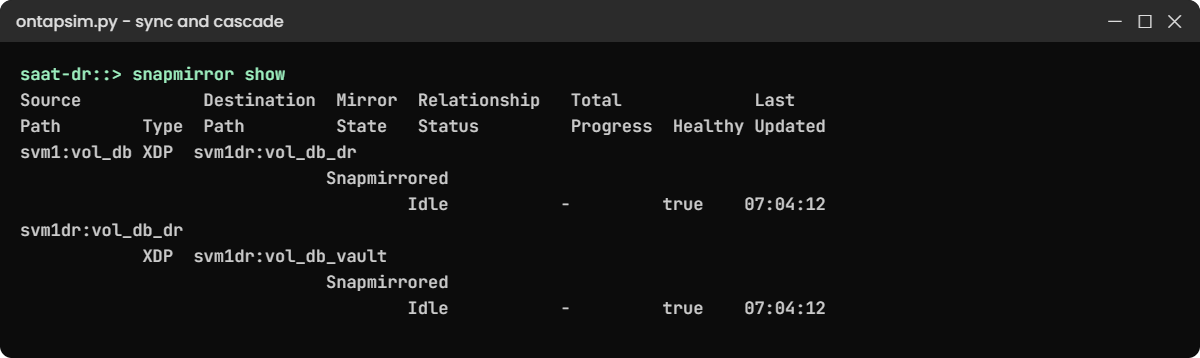
Source Destination Mirror Relationship Total Last
Path Type Path State Status Progress Healthy Updated
----------- ---- ------------ ------- -------------- --------- ------- --------
svm1:vol_db XDP svm1dr:vol_db_dr
Snapmirrored
Idle - true 07:04:12
svm1dr:vol_db_dr
XDP svm1dr:vol_db_vault
Snapmirrored
Idle - true 07:04:12
2 entries were displayed.Two hops: production to vol_db_dr, then vol_db_dr to the vault. In real life the vault would sit on a third cluster far away; here it’s on saat-dr so you can see the shape of a cascade with the clusters you have.
✅ Checkpoint: Both relationships are Snapmirrored and healthy.
4saat-cluster: what production knows about
snapmirror list-destinationsYou should see this:
Source Destination Transfer
Path Type Path Status
---------------------- ---- ---------------------- --------------
svm1:vol_db XDP svm1dr:vol_db_dr IdleProduction only sees its own destination. The third copy costs it nothing, which is the main reason to cascade instead of sending two copies from the source.
✅ Checkpoint: Only one destination is listed on saat-cluster.
5SVM DR on paper
These are the real ONTAP commands for an SVM DR with identity kept. Read them in order; the practice shell answers the SVM-level create with a message that it supports volume relationships only.
# On the DR cluster
vserver create -vserver svm1_dr -subtype dp-destination
vserver peer create -vserver svm1_dr -peer-vserver svm1 -applications snapmirror -peer-cluster saat-cluster
snapmirror create -source-path svm1: -destination-path svm1_dr: -identity-preserve true -policy MirrorAllSnapshots -schedule hourly
snapmirror initialize -destination-path svm1_dr:
# Failover
snapmirror quiesce -destination-path svm1_dr:
snapmirror break -destination-path svm1_dr:
# On production, if it is still running: vserver stop -vserver svm1
vserver start -vserver svm1_drThe trailing colon after the SVM name is what makes it an SVM-level relationship. The vserver stop on production matters: with identity-preserve true both SVMs have the same IPs and SMB server name, and they must never be up at the same time.
✅ Checkpoint: You can explain why the source SVM must be stopped before the DR SVM starts.
Try it yourself: Build a SnapMirror relationship in the Command Builder.
Break It, Then Fix It
Use the relationships from the lab.
1Forget to create the destination volume
snapmirror create -source-path svm1:vol_db -destination-path svm1dr:vol_db_sync2 -policy StrictSyncOn saat-dr you’ll get this:
Error: command failed: Destination volume "svm1dr:vol_db_sync2" does not exist. Create it with "-type DP".The CLI never creates the destination for you; System Manager’s Protect dialog does. Create the DP volume first, the same size as the source.
✅ Checkpoint: You know which object must exist before snapmirror create.

2Delete the middle of a cascade
Someone decides the DR copy of vol_db is no longer needed and tries to remove it.
volume offline -vserver svm1dr -volume vol_db_dr
volume delete -vserver svm1dr -volume vol_db_drYou’ll get this:
Volume "svm1dr:vol_db_dr" is now offline.
saat-dr::> volume delete -vserver svm1dr -volume vol_db_dr
Error: command failed: Volume "vol_db_dr" is the source of a SnapMirror relationship.vol_db_dr feeds the vault, so deleting it would orphan the long-term backups. Bring it back online with volume online, then decide: either keep it, or move the vault to take its copies straight from production (a new relationship and baseline) before you delete the middle hop, release it and remove it.
✅ Checkpoint: vol_db_dr is online again and the vault relationship is untouched.
This happened at work
The DR site that had a different name
A travel booking company in Goa protected its file server SVM to a DR cluster in another city using SVM DR. To save time during setup, the engineer chose -identity-preserve false, because the DR site was on a different subnet and he planned to “sort out the network later”.
Later never came. When monsoon flooding cut power to the main site for a day, the team broke the relationship and found every volume ready, but no LIFs, no SMB server and no DNS records at DR. Branch staff had drive mappings to the old server name, so nobody could reach anything until the team built LIFs, joined a new SMB server to the domain and changed DNS aliases, which took most of the afternoon.
After the main site came back, they kept identity-preserve false, which was right for two subnets, but pre-built the DR LIFs and SMB server, added a DNS alias plan to the runbook and ran a failover test every quarter.
Common mistakes and troubleshooting
| Mistake | What happens | Do this instead |
|---|---|---|
| Promising zero RPO without measuring latency | Host write latency jumps when SM-S is turned on | Measure round-trip time first and test with real load |
| Using StrictSync for an app that must keep running | A link failure stops host writes | Use Sync unless the business prefers stopping to losing a write |
| identity-preserve true with both SVMs started | Duplicate IPs and SMB names on the network | Stop the source SVM before starting the DR SVM |
| identity-preserve false with no DR network plan | Volumes are ready but nobody can reach them | Pre-create LIFs, SMB server and DNS changes at DR |
| Deleting a cascade’s middle volume | Downstream backups lose their source | Re-point or remove downstream relationships first |
Interview questions
Click a question to open it. Each one is written the way an interviewer would ask it. Under it you will see why they ask it and one way you could answer, in your own words.
Fresher level
1. What’s the difference between a volume SnapMirror and SVM DR?
Why they ask this: They want to see that you know what each one copies.
How you might answer: A volume SnapMirror copies one volume’s data. SVM DR copies a whole SVM: all its volumes and, with identity-preserve true, its LIFs, SMB server and protocol settings, so clients can reconnect to the same names and addresses after failover.
2. What does RPO zero mean, and which ONTAP feature gives it?
Why they ask this: They’re checking basic DR vocabulary and the right tool.
How you might answer: RPO zero means no acknowledged write is lost if the primary site fails. SnapMirror Synchronous gives it, because the host only gets an acknowledgement after the write is on both clusters.
2–5 years experience
3. When would you choose StrictSync over Sync?
Why they ask this: They want to see you understand the trade-off between availability and data loss.
How you might answer: StrictSync fails host writes if they can’t be replicated, so I’d use it only where losing a single write is worse than stopping, like some financial ledgers. For most applications Sync is better, because it keeps the primary running during a link problem and catches up afterwards.
4. Why would you build a cascade instead of two relationships from the source?
Why they ask this: They’re testing whether you think about load on production.
How you might answer: A cascade puts the third copy’s transfers on the DR cluster instead of production, so production does one transfer instead of two. It also fits designs like a synchronous copy nearby and a vault far away.
The catch is that the far copy depends on the middle one, so I monitor both hops.
Senior level
5. Design DR for a bank’s core SMB file service with a two-hour RTO and a 15-minute RPO.
Why they ask this: They want a full design that links requirements to features.
How you might answer: I’d use SVM DR with a 15-minute schedule so volumes, shares and the SMB identity are all at DR. If the DR site shares the network, identity-preserve true lets clients reconnect to the same server name; otherwise false, with pre-built LIFs and a DNS change in the runbook.
I’d add a vault for long-term backup and run a failover test every quarter to prove the two hours.
6. The business asks for zero RPO between Mumbai and Delhi. How do you respond?
Why they ask this: They want honesty about physics and alternatives.
How you might answer: I’d explain that synchronous replication adds the round-trip time to every write, and over that distance the delay would hurt most applications. I’d offer synchronous replication to a nearby site in the same metro plus async or a cascade to Delhi, which gives zero RPO for a local disaster and a small RPO for a regional one.
Quick quiz
Q1. How do you write an SVM-level SnapMirror path?
- svm1/
- svm1:
- /vol/svm1
- svm1:*
Show answer
B — a trailing colon means the whole SVM.
Q2. What does -identity-preserve true copy that false doesn’t?
- Volumes
- Snapshots
- LIFs and the SMB server identity
- Disks
Show answer
C — with true the DR SVM gets the same network and protocol identity.
Q3. What happens to host writes under StrictSync if replication fails?
- They continue
- They fail
- They are cached on the host
- They go to a vault
Show answer
B — StrictSync protects zero RPO by failing writes.
Q4. In a cascade A to B to C, which cluster sends data to C?
- A
- B
- Both
- Neither
Show answer
B — C copies from B.
Q5. What subtype must the DR SVM have for SVM DR?
- default
- dp-destination
- sync-source
- dr
Show answer
B — the destination SVM is created with subtype dp-destination.
Quick recap
- SVM DR copies a whole SVM; identity-preserve decides whether LIFs and the SMB identity go too.
- SnapMirror Synchronous gives zero RPO but adds round-trip latency to every write.
- Sync keeps the primary running on link loss; StrictSync stops writes.
- A cascade makes a third copy from the DR copy and spares production.
- Stop the source SVM before starting an identity-preserving DR SVM.
Next lesson
Lesson 42: MetroCluster and SyncMirror → You’ll see how two sites become one stretched cluster with mirrored aggregates and what a switchover does.
Further reading: ONTAP SVM DR
Want to go deeper into ONTAP SVM DR? Read NetApp’s ONTAP concepts guide for how SVMs, SnapMirror and replication policies fit together. You can also see the full plan for this course on the NetApp ONTAP Storage Administration course page.
