RAID-DP and RAID-TEC

Disks fail. Not maybe, not rarely: in a system with a few hundred drives, you’ll replace one most months. ONTAP’s RAID is what turns those failures into a routine part swap instead of a restore from backup.

This lesson explains RAID-DP and RAID-TEC in plain words, what parity disks do, how a rebuild uses a spare, and what “degraded” means. In the lab you’ll build an aggregate, fail a disk and watch it rebuild, then fail another with no spare left.

Where this lesson fits

Lesson 12 of 56 in NetApp ONTAP Storage Administration · Phase 1: Architecture and foundation · Before this: Lesson 11, disk ownership · Next: Lesson 13, aggregates and ADP

TimeYou needBy the end you can
45 minutesThe practice shellExplain RAID-DP and RAID-TEC, read show-status, and handle reconstruction and a degraded RAID group

What it is, in one line

RAID-DP protects each RAID group with two parity disks so it survives any two disk failures, and RAID-TEC adds a third parity disk so it survives three; when a disk fails, ONTAP rebuilds its contents onto a spare from the parity.

In Simple Words

The class register with totals

A teacher keeps marks for six students in a register, and at the bottom of each column she writes the total. If one student’s page gets torn out, she can still work out that student’s marks: total minus everyone else’s.

She also keeps a second kind of total, added diagonally across the pages, so even if two pages are lost on the same day she can rebuild both. The totals take two extra lines, but nobody’s marks are ever lost.

The totals are the parity disks. Rebuilding the torn page onto a fresh one is reconstruction onto a spare.

Engineer's View

How an engineer describes it

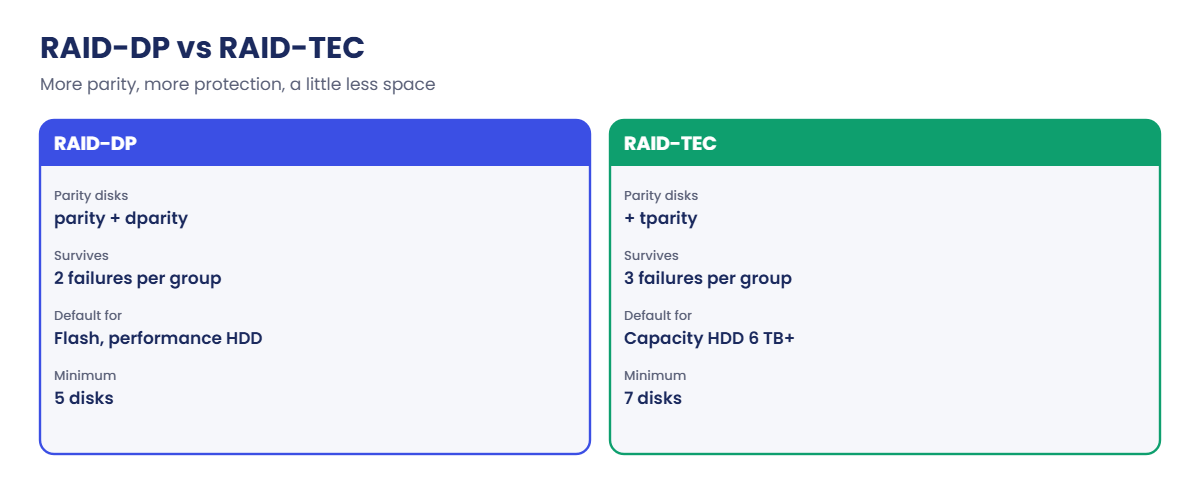
An aggregate is built from one or more RAID groups. In RAID-DP each RAID group has a row parity disk (shown as parity) and a diagonal parity disk (dparity), so any two disks in the group can fail without data loss. RAID-TEC adds a third (tparity) and survives three failures.

RAID-DP is the default for flash and performance HDD; RAID-TEC is the default for capacity HDDs of 6 TB or more, where rebuilds take long enough that a second or third failure becomes a real risk. RAID-DP needs at least 5 disks and RAID-TEC at least 7 when you create an aggregate.

When a disk fails, ONTAP picks a matching spare owned by the same node and reconstructs the missing data from parity. The RAID status shows reconstruct while it runs. With no suitable spare, the group stays degraded: still serving data, but with less protection.

If a disk shows signs of trouble before it dies, ONTAP can copy it to a spare first (Rapid RAID Recovery), which is quicker than a rebuild.

Parity disks hold no user data, so they cost capacity. Larger RAID groups waste less on parity but take longer to rebuild; ONTAP picks sensible sizes, and you can change them with -maxraidsize. You can convert a RAID-DP aggregate to RAID-TEC with storage aggregate modify -raidtype raid_tec if you have a spare disk per RAID group for the extra parity.

How it works, step by step

1Data is striped across the group

WAFL writes full stripes across the data disks of a RAID group and calculates parity for each stripe at the same time.

2Parity is written to its own disks

Row parity goes to the parity disk and diagonal parity to dparity (plus tparity in RAID-TEC).

ONTAP RAID-DP: RAID-DP compared with RAID-TEC

3A disk fails

ONTAP marks it broken, logs raid.disk.fail, sends AutoSupport, and keeps serving reads by calculating the missing blocks from parity.

4Reconstruction onto a spare

A matching spare on the same node takes the failed disk’s place and is filled from parity. On large HDDs this can take many hours; on SSDs it’s much faster.

ONTAP RAID-DP: broken disk, spare chosen, reconstruct, normal

5Back to normal, or degraded

When the rebuild finishes, the group is normal again. If there was no spare, it stays degraded until you add one or replace the disk.

In System Manager, Storage › Tiers shows each local tier’s RAID type; open a tier to see its RAID groups and disks. Cluster › Disks shows broken disks.
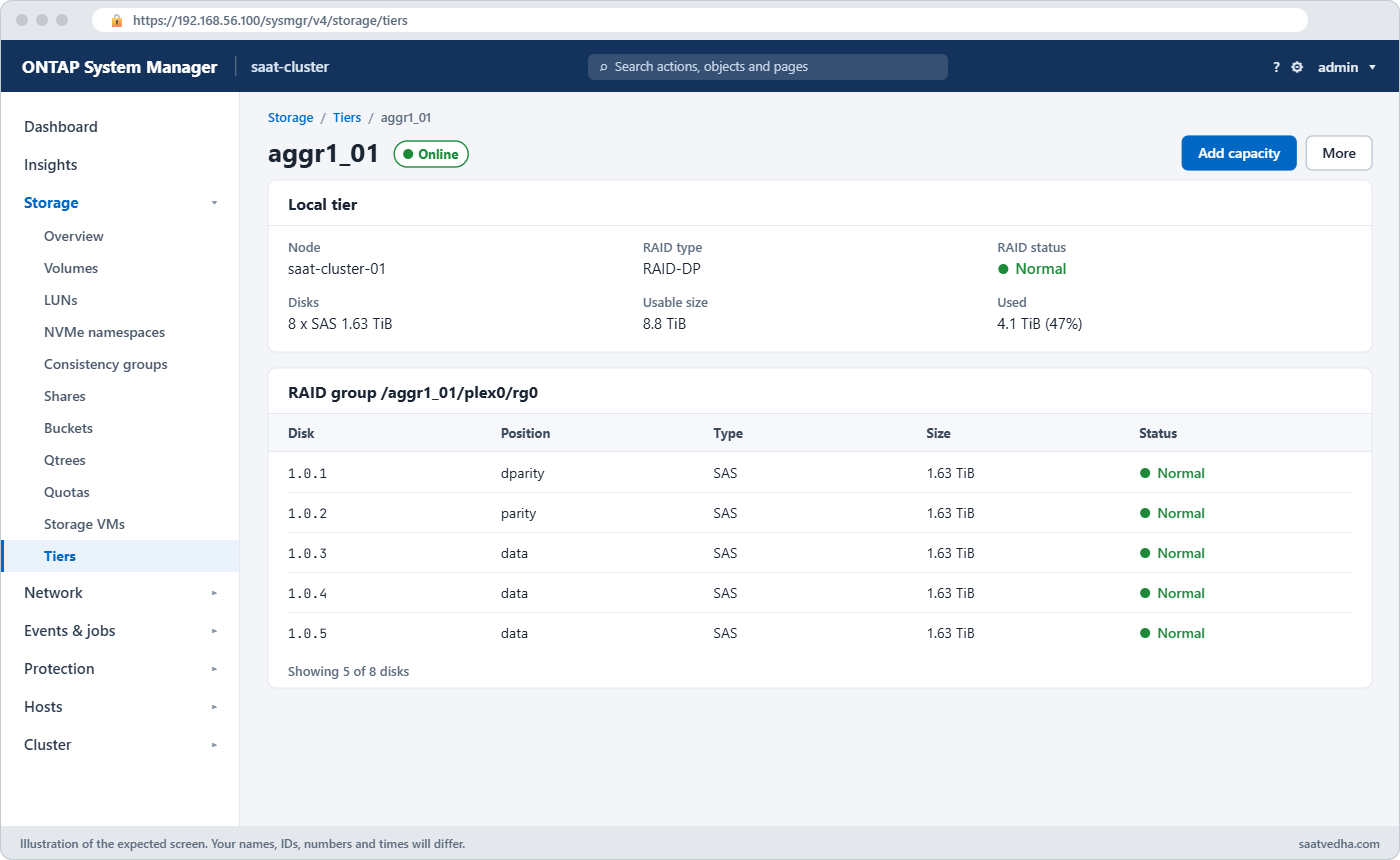
ONTAP RAID-DP in System Manager: local tier RAID groups and disks
Storage › Tiers: open a local tier to see its RAID type and RAID groups.
RAID-DPRAID-TEC
Parity disks per group2 (parity, dparity)3 (parity, dparity, tparity)
Failures it survives per group23
Default forFlash and performance HDDCapacity HDD of 6 TB or more
Minimum disks to create57

Hands-on lab: fail a disk and watch the rebuild

Before you run any command, double-check it

Read every command twice before you press Enter. Check the target: the server name, the user, the disk or device name, the path and the sizes. These commands are for learning and were tested in our lab, not on your system. At work, run the read-only commands first, follow your change process, make sure a backup exists, and ask a second person to check anything that changes or deletes data. You run them at your own risk.

This lab uses the SaatVedha ONTAP practice shell, our own learning tool. It is not NetApp software: real ONTAP output looks like this but is not identical.

1Reset and log in

python ontapsim.py -c "simctl reset"
python ontapsim.py

✅ Checkpoint: Your prompt reads saat-cluster::>

2Compare RAID-DP and RAID-TEC on 8 disks

storage aggregate create -aggregate aggr1_01 -node saat-cluster-01 -diskcount 8 -disktype SAS -raidtype raid_dp -simulate true
storage aggregate create -aggregate aggr1_01 -node saat-cluster-01 -diskcount 8 -disktype SAS -raidtype raid_tec -simulate true

You should see this (shortened):

        RAID Group rg0, 8 disks (block checksum, raid_dp)
          dparity    1.0.3                     SAS               -        -
          parity     1.0.4                     SAS               -        -
          data       1.0.5                     SAS          1.63TB   1.64TB
          ...
      Aggregate capacity available for volume use would be 8.80TB.

        RAID Group rg0, 8 disks (block checksum, raid_tec)
          tparity    1.0.3                     SAS               -        -
          dparity    1.0.4                     SAS               -        -
          parity     1.0.5                     SAS               -        -
          data       1.0.6                     SAS          1.63TB   1.64TB
          ...
      Aggregate capacity available for volume use would be 7.33TB.

Same 8 disks: RAID-TEC gives one disk less space but survives one more failure. -simulate true creates nothing, so it’s safe to compare.

✅ Checkpoint: RAID-DP shows 8.80TB and RAID-TEC 7.33TB.

3Build a RAID-DP aggregate, keeping one spare

storage aggregate create -aggregate aggr1_01 -node saat-cluster-01 -diskcount 7 -disktype SAS -raidtype raid_dp
storage aggregate show-status -aggregate aggr1_01

Answer y if asked. You should see this:

[Job 101] Job succeeded: DONE
saat-cluster::> storage aggregate show-status -aggregate aggr1_01

Owner Node: saat-cluster-01
 Aggregate: aggr1_01 (online, raid_dp) (block checksums)
  Plex: /aggr1_01/plex0 (online, normal, active, pool0)
   RAID Group /aggr1_01/plex0/rg0 (normal, block checksums)
                                                              Usable Physical
     Position Disk                        Pool Type     RPM     Size     Size Status
     -------- --------------------------- ---- ----- ------ -------- -------- ----------------
     dparity  1.0.3                          0 SAS    10000   1.63TB   1.64TB (normal)
     parity   1.0.4                          0 SAS    10000   1.63TB   1.64TB (normal)
     data     1.0.5                          0 SAS    10000   1.63TB   1.64TB (normal)
     data     1.0.6                          0 SAS    10000   1.63TB   1.64TB (normal)
     data     1.0.7                          0 SAS    10000   1.63TB   1.64TB (normal)
     data     1.0.8                          0 SAS    10000   1.63TB   1.64TB (normal)
     data     1.0.9                          0 SAS    10000   1.63TB   1.64TB (normal)

Seven disks, two of them parity. Node 01 still has one SAS spare, 1.0.10.

✅ Checkpoint: The RAID group is normal with 5 data disks.

4Fail a data disk and watch the rebuild

simctl break disk-fail 1.0.6
storage aggregate show-status -aggregate aggr1_01
storage aggregate show -aggregate aggr1_01 -fields raidstatus

You should see this:

   RAID Group /aggr1_01/plex0/rg0 (reconstruction, block checksums)
...
     data     1.0.5                          0 SAS    10000   1.63TB   1.64TB (normal)
     data     1.0.10                         0 SAS    10000   1.63TB   1.64TB (reconstruction 1% completed)
     data     1.0.7                          0 SAS    10000   1.63TB   1.64TB (normal)
...
saat-cluster::> storage aggregate show -aggregate aggr1_01 -fields raidstatus
aggregate raidstatus
--------- --------------------
aggr1_01  raid_dp, reconstruct

The spare 1.0.10 took 1.0.6’s place at once and is being filled from parity. Data stays online the whole time.

✅ Checkpoint: raidstatus shows reconstruct.

5Let the rebuild finish

simctl tick 3
storage aggregate show-status -aggregate aggr1_01

You should see this:

   RAID Group /aggr1_01/plex0/rg0 (normal, block checksums)
...
     data     1.0.10                         0 SAS    10000   1.63TB   1.64TB (normal)

✅ Checkpoint: The RAID group is normal again, with 1.0.10 as a data disk.
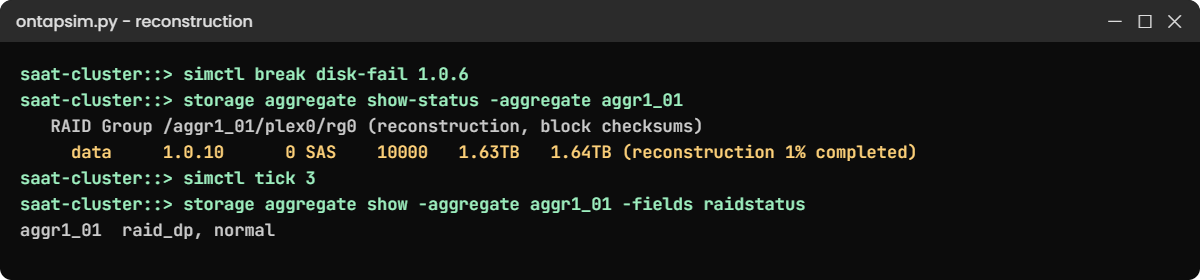
ONTAP RAID-DP lab: reconstruction onto spare 1.0.10 after a disk failure
The spare takes the failed disk’s place and is rebuilt from parity.

Break It, Then Fix It

Node 01 now has no SAS spare left. See what the next failure does.

1Fail another disk

simctl break disk-fail 1.0.7
storage aggregate show -aggregate aggr1_01 -fields raidstatus
event log show -severity <=ERROR

You'll get this:

aggregate raidstatus
--------- -----------------
aggr1_01  raid_dp, degraded
saat-cluster::> event log show -severity <=ERROR
Time                Node             Severity      Event
------------------- ---------------- ------------- ------------------------
11/7/2026 06:58:10  saat-cluster-01  ALERT         raid.vol.disk.missing: No spare available, aggr1_01 is degraded
11/7/2026 06:58:10  saat-cluster-01  ERROR         raid.disk.fail: Disk 1.0.7 failed (SV947AF302)
11/7/2026 06:58:10  saat-cluster-01  ERROR         raid.disk.fail: Disk 1.0.6 failed (SV251160C2)

Data is still online, but the group can now survive only one more failure. Notice the ALERT: no spare available. On a real cluster you'd get replacement drives in fast, or give node 01 a spare it can use straight away (ONTAP starts reconstruction as soon as a suitable spare appears).

2Replace the drives

simctl fix all
storage disk show -broken
storage aggregate show -aggregate aggr1_01 -fields raidstatus

You'll get this:

simctl: failed disk 1.0.6 replaced with a new drive. It is now a spare.
simctl: failed disk 1.0.7 replaced with a new drive. It is now a spare.
simctl: fixed disk-fail, disk-fail.
saat-cluster::> storage disk show -broken
There are no entries matching your query.
saat-cluster::> storage aggregate show -aggregate aggr1_01 -fields raidstatus
aggregate raidstatus
--------- ---------------
aggr1_01  raid_dp, normal

✅ Checkpoint: raidstatus is normal and no disks are broken.

ONTAP RAID-DP error: a degraded RAID group with no spare available
With no spare left, the group stays degraded and ONTAP raises an ALERT.

This happened at work

The rebuild that took two days

A cooperative bank in Nagpur used a FAS pair with large capacity HDDs as its backup target, in RAID-DP groups of about 20 disks each. When one 10 TB disk failed, the rebuild ran for almost two days because the backup jobs kept the disks busy.

On the second day another disk in the same group failed. RAID-DP survived, but for several hours the group had no protection left, and the team spent the night watching the reconstruction percentage and pausing backup jobs to let it finish.

Nothing was lost. Afterwards they added spares and converted the capacity aggregates to RAID-TEC with storage aggregate modify -raidtype raid_tec, which is also what ONTAP picks by default for disks that size today.

Common mistakes and troubleshooting

MistakeWhat happensDo this instead
Using every disk in an aggregateNo spare, so the next failure leaves the group degradedKeep spares per node and type
RAID-DP on very large HDDsLong rebuilds with thin protectionUse RAID-TEC for capacity HDDs of 6 TB and up
Ignoring “reconstruct” for daysA second failure during rebuild goes unnoticedWatch raidstatus and keep load moderate during rebuilds
Tiny last RAID group when adding disksPoor performance and wasted parityAdd enough disks for a full group (Lesson 13)
Thinking RAID is a backupDeleted or encrypted data is gone on every diskUse snapshots and SnapMirror too

Interview questions

Click a question to open it. Each one is written the way an interviewer would ask it. Under it you will see why they ask it and one way you could answer, in your own words.

Fresher level

1. What’s the difference between RAID-DP and RAID-TEC?

Why they ask this: They want the basic protection levels in plain words.

How you might answer: RAID-DP uses two parity disks per RAID group and survives two disk failures in that group. RAID-TEC uses three and survives three, so it’s used for big capacity HDDs where rebuilds take a long time.

2. What happens when a disk fails in an ONTAP aggregate?

Why they ask this: They’re checking you know the automatic steps.

How you might answer: ONTAP marks it broken, logs raid.disk.fail and sends AutoSupport. It picks a matching spare on the same node and rebuilds the data from parity, while the aggregate keeps serving data. I’d watch storage aggregate show-status until it’s normal.

2–5 years experience

3. The aggregate shows degraded. What does that mean and what do you do?

Why they ask this: They want to see urgency and the right fix.

How you might answer: It means a disk failed and there was no suitable spare to rebuild onto, so the RAID group has less protection. I’d confirm with show-status and the event log, check spares per node, and get a replacement disk in or give that node a spare so reconstruction can start.

4. Why not use one huge RAID group for all disks?

Why they ask this: They’re checking you understand the trade-off in group size.

How you might answer: A bigger group spends less on parity, but a rebuild has to read every other disk in the group, so it takes longer and the risk of another failure during it goes up. ONTAP’s default sizes balance that, and I’d only change -maxraidsize with a reason.

Senior level

5. A customer wants maximum capacity from new 16 TB HDD shelves and asks for RAID-DP. What would you advise?

Why they ask this: They want to see you defend data safety with numbers and options.

How you might answer: I’d explain that RAID-TEC is the default for disks that size because rebuilds can take a day or more. The capacity cost is one disk per RAID group. If they still want more space, I’d look at bigger RAID groups or efficiency features rather than dropping a parity disk.

6. Two disks failed in the same RAID group within a week. What would you look into beyond replacing them?

Why they ask this: They want root-cause thinking, not just parts swapping.

How you might answer: I’d check if they’re from the same batch or model with a known issue, using AutoSupport and Digital Advisor, and look at shelf and path errors in the event log. If there’s a pattern, I’d ask NetApp support about proactive replacement and keep extra spares meanwhile.

Quick quiz

Q1. How many disk failures per RAID group does RAID-DP survive?

  1. 1
  2. 2
  3. 3
  4. 4
Show answer

B — two parity disks mean two failures.

Q2. Which disk position exists only in RAID-TEC?

  1. parity
  2. dparity
  3. tparity
  4. data
Show answer

C — tparity is the third parity disk.

Q3. What does raidstatus “degraded” mean?

  1. The aggregate is offline
  2. A disk failed and there was no spare to rebuild onto
  3. It is rebuilding normally
  4. Parity is being converted
Show answer

B — degraded means reduced protection with no rebuild running.

Q4. Which RAID type is the default for capacity HDDs of 6 TB or more?

  1. RAID 4
  2. RAID-DP
  3. RAID-TEC
  4. RAID 0
Show answer

C — RAID-TEC is the default for large capacity HDDs.

Q5. Where does ONTAP rebuild a failed disk’s data?

  1. Onto any disk in the cluster
  2. Onto a matching spare owned by the same node
  3. Onto the partner’s spare
  4. Into NVRAM
Show answer

B — only the owning node’s spares are used.

Quick recap

  • RAID groups protect data with parity disks: two in RAID-DP, three in RAID-TEC.
  • A failed disk is rebuilt onto a spare of the same node while data stays online.
  • No spare means degraded: less protection until you add one.
  • RAID-TEC is the default for capacity HDDs of 6 TB and up.
  • RAID protects against disk failure, not deletion; you still need snapshots and backups.

Next lesson

Lesson 13: Aggregates and Advanced Disk Partitioning → You’ll build and grow data aggregates and see how ADP splits disks into partitions.

Further reading: ONTAP RAID-DP

Want to go deeper into ONTAP RAID-DP? Read NetApp’s default RAID policies for local tiers and RAID groups and local tiers on docs.netapp.com. You can also see the full plan for this course on the NetApp ONTAP Storage Administration course page.

Scroll to Top

This website uses cookies

We use a few cookies to keep this site working. If you allow it, we also use Google Analytics to count visits so we can improve our lessons. You can accept all, deny the optional ones, or choose what to allow.