LIF and network problems
-
Phase 0: Start here
-
Phase 1: Architecture and foundation
-
Phase 2: Protocols and day-to-day administration
-
Phase 3: Data protection and enterprise integrations
-
Phase 4: Troubleshooting blueprint
-
Phase 5: Final project and career
When a LIF stops working, clients don’t get a clear error. NFS mounts hang with “server not responding”, SMB drives show a red X, and iSCSI hosts lose a path and hope the other one holds.
A LIF can fail for a handful of reasons: someone set it down, its port lost link, it had nowhere to fail over to, it’s on a port in the wrong network, or it has no route to clients on other subnets. Each one leaves a different trace in ONTAP.
You’ll take a NAS LIF down two ways, once through a bad failover setting and once by hand, and bring it back each time.
Where this lesson fits
Lesson 53 of 56 in NetApp ONTAP Storage Administration · Phase 4: Troubleshooting blueprint · Before this: Lesson 52, volume or aggregate full · Next: Lesson 54, SnapMirror and takeover failures
| Time | You need | By the end you can |
|---|---|---|
| 55 minutes | The practice shell with setup-p4.txt from Lesson 47 | Read LIF status, failover settings and port state, and fix a LIF that is down or stuck away from home |
What it is, in one line
A LIF problem means the address clients use is down, on the wrong port, or can’t reach them, and network interface show with network port show tells you which.
In Simple Words
A shop counter with a backup counter
A bank branch has a counter with a number above it, and customers walk to that number. If the counter’s light fails, a good branch has a rule: move the number board to the next counter so customers keep coming.
Problems start when someone turns the board off, when the rule says “never move”, or when the only spare counter is in the same dark corner.
The number board is the LIF, the counters are ports, and the rule is the failover policy and failover group.
Engineer's View
How an engineer describes it
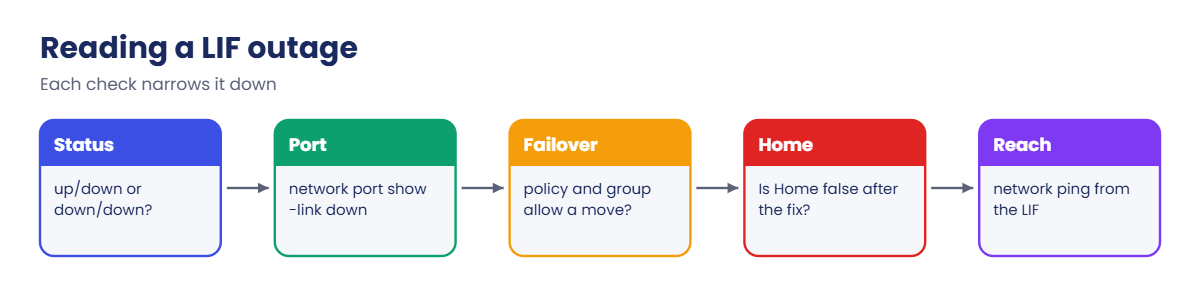
Each LIF has a home node and port, an admin status (what you set) and an operational status (what is really happening). up/down means you want it up but it can’t work, usually because the port has no link. down/down means someone set it down.
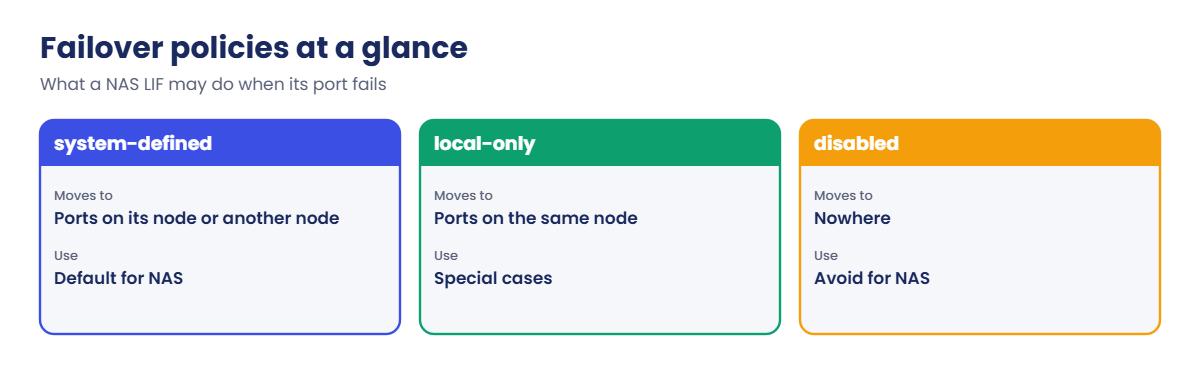
NAS LIFs move to another port when their port fails, following the failover policy (system-defined, broadcast-domain-wide, local-only, sfo-partner-only or disabled) and the ports in their failover group, which is normally the broadcast domain. With -auto-revert true they go home once the port is healthy again. SAN LIFs never fail over; hosts use their other paths.
Reachability is the last piece: the SVM needs routes (network route show) for clients on other subnets, and the port must be in the right VLAN and broadcast domain. network ping -vserver -lif tests from the LIF itself.
How it works, step by step
1What the user sees
NFS: “server not responding, still trying” and hung commands. SMB: mapped drives disconnected, “network path not found”. iSCSI: a path down in multipath -ll. Note the IP address the client uses; that names the LIF.
2Where to look, in order
| Question | Command | Problem looks like |
|---|---|---|
| Is the LIF up? | network interface show -vserver svm1 | down/down (set down) or up/down (no working port) |
| Is its port up? | network port show -link down | The home port listed as down |
| Could it fail over? | network interface show -fields failover-policy,failover-group | disabled, or a group with no healthy ports |
| Is it home? | network interface show -is-home false | Still on a backup port after the fix |
| Can it reach clients? | network ping, network route show | No answer, or no route for remote subnets |
| When did it start? | event log show -severity <=ERROR | vifmgr port down events |
3How to fix it
network interface modify -status-admin up for a LIF set down, network interface migrate to move it to a working port now, fix the failover policy or group so it can move by itself next time, and network interface revert once the home port is healthy.
4In System Manager
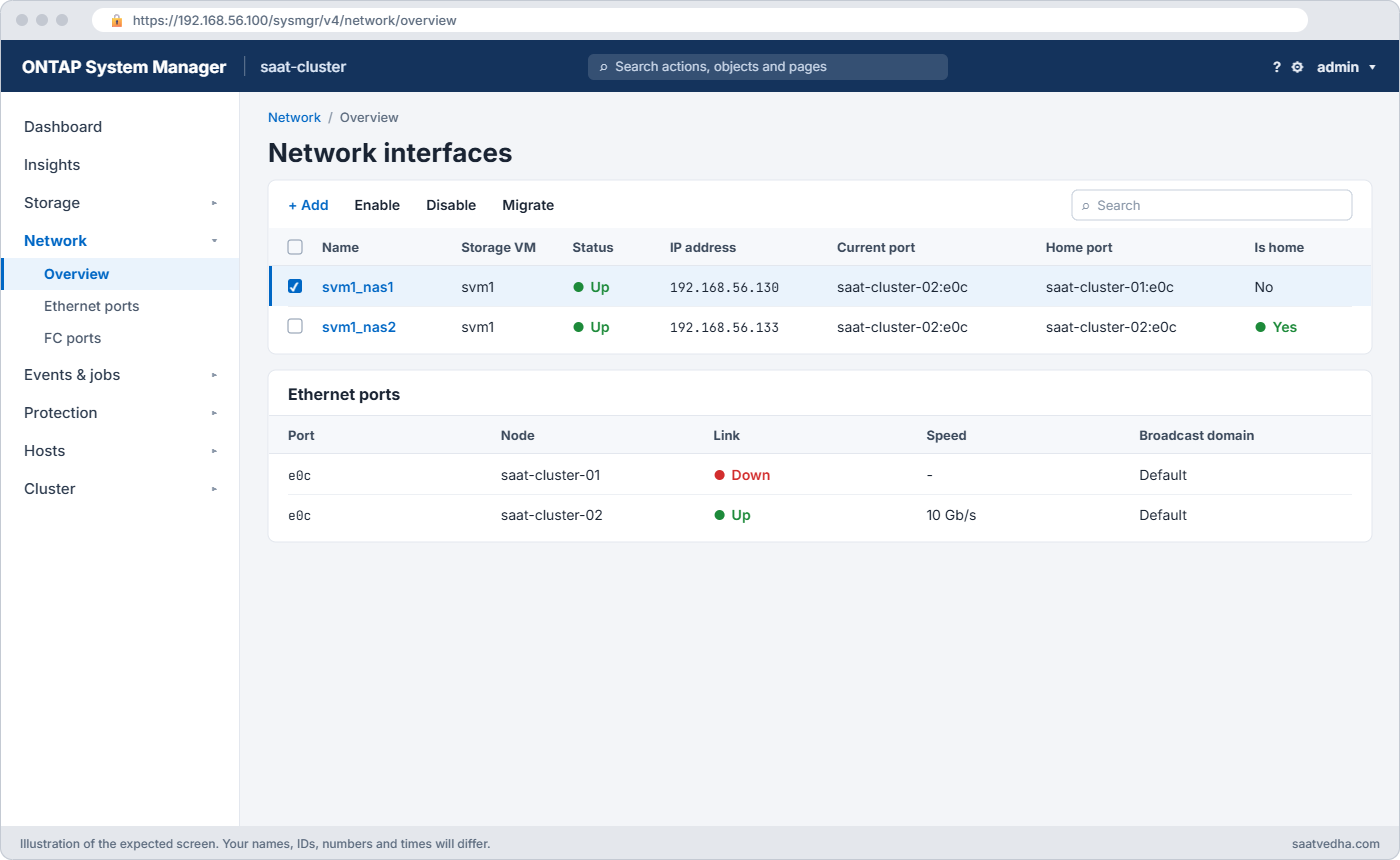
Network › Overview lists network interfaces with status, current port and home; select one to enable, disable or migrate it. Network › Ethernet ports shows link state.
Hands-on lab: a LIF stuck on a dead port
Before you run any command, double-check it
Read every command twice before you press Enter. Check the target: the server name, the user, the disk or device name, the path and the sizes. These commands are for learning and were tested in our lab, not on your system. At work, run the read-only commands first, follow your change process, make sure a backup exists, and ask a second person to check anything that changes or deletes data. You run them at your own risk.
This lab uses the SaatVedha ONTAP practice shell, our own learning tool. It is not NetApp software: real ONTAP output looks like this but is not identical.
1Mount a share and weaken the failover setting
Reset and run setup-p4.txt, log in, mount /app1 on linux1, and set the NAS LIF’s failover policy to disabled (someone did this months ago “to stop it moving around”):
simctl host linux1 mount 192.168.56.130:/app1 /mnt/app1 vers=3
network interface modify -vserver svm1 -lif svm1_nas1 -failover-policy disabled
network interface show -vserver svm1 -lif svm1_nas1 -fields failover-policy,failover-group,auto-revertYou should see this:
vserver lif failover-policy failover-group auto-revert
------- --------- --------------- -------------- -----------
svm1 svm1_nas1 disabled Default false✅ Checkpoint: failover-policy is disabled.
2The port loses link
simctl break port-down saat-cluster-01 e0c
simctl tick 1
simctl host linux1 ls /mnt/app1The client hangs:
nfs: server 192.168.56.130 not responding, still trying
(the command hangs: a hard mount waits for the server. Press Ctrl-C on a real host.)✅ Checkpoint: linux1 says the server is not responding.
3Find it
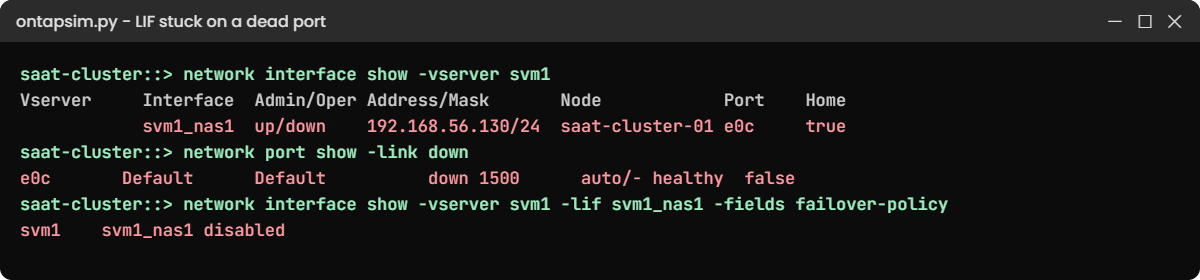
network interface show -vserver svm1
network port show -link down
event log show -severity <=ERRORYou should see this:
Logical Status Network Current Current Is
Vserver Interface Admin/Oper Address/Mask Node Port Home
----------- ---------- ---------- ------------------ --------------- ------- ----
svm1
svm1_nas1 up/down 192.168.56.130/24 saat-cluster-01 e0c true
svm1_iscsi1
up/up 192.168.56.131/24 saat-cluster-01 e0d true
svm1_iscsi2
up/up 192.168.56.132/24 saat-cluster-02 e0d true
3 entries were displayed.
saat-cluster::> network port show -link down
Node: saat-cluster-01
Ignore
Speed(Mbps) Health Health
Port IPspace Broadcast Domain Link MTU Admin/Oper Status Status
--------- ------------ ---------------- ---- ---- ----------- -------- ------
e0c Default Default down 1500 auto/- healthy false
saat-cluster::> event log show -severity <=ERROR
Time Node Severity Event
------------------- ---------------- ------------- ------------------------
11/7/2026 06:57:57 saat-cluster-01 ERROR vifmgr.portdown: A link down event was received on node saat-cluster-01, port e0c.up/down: the LIF should be up but its port has no link, and with failover disabled it stayed on the dead port. In Lesson 47 the same port failure caused only a short freeze, because failover was allowed.
✅ Checkpoint: svm1_nas1 shows up/down on e0c.
4Move it now, then fix the setting
network interface migrate -vserver svm1 -lif svm1_nas1 -destination-node saat-cluster-02 -destination-port e0c
simctl host linux1 ls /mnt/app1
network interface modify -vserver svm1 -lif svm1_nas1 -failover-policy system-defined -auto-revert trueThe client answers again:
(empty directory)The migrate brings clients back at once. Then you restore the default failover policy, so next time ONTAP moves the LIF by itself.
✅ Checkpoint: linux1 can list the mount again.
5Port fixed, send it home
simctl fix port-down
simctl tick 1
network interface revert -vserver svm1 -lif svm1_nas1
network interface show -vserver svm1 -lif svm1_nas1 -fields curr-node,curr-port,is-home,failover-policy,auto-revertYou should see this:
vserver lif curr-node curr-port is-home failover-policy auto-revert
------- --------- --------------- --------- ------- --------------- -----------
svm1 svm1_nas1 saat-cluster-01 e0c true system-defined true✅ Checkpoint: The LIF is home on e0c with system-defined failover.
Try it yourself: Open the LIF and failover check in the Command Builder.
Break It, Then Fix It
The simplest LIF outage: someone sets it down by mistake, often while meaning to disable a different one.
1Set the LIF down
simctl break lif-down svm1 svm1_nas1
simctl host linux1 ls /mnt/app1
network interface show -vserver svm1 -lif svm1_nas1 -fields status-admin,status-operYou’ll get this:
nfs: server 192.168.56.130 not responding, still trying
(the command hangs: a hard mount waits for the server. Press Ctrl-C on a real host.)
saat-cluster::> network interface show -vserver svm1 -lif svm1_nas1 -fields status-admin,status-oper
vserver lif status-admin status-oper
------- --------- ------------ -----------
svm1 svm1_nas1 down downdown/down with healthy ports and no port events means a person (or a script) did this. On a real cluster, security audit log show tells you who.
✅ Checkpoint: status-admin is down.

2Bring it back and test from the LIF
network interface modify -vserver svm1 -lif svm1_nas1 -status-admin up
network ping -vserver svm1 -lif svm1_nas1 -destination 192.168.56.21
simctl host linux1 ls /mnt/app1You should see:
192.168.56.21 is alive
saat-cluster::> simctl host linux1 ls /mnt/app1
(empty directory)The ping from the LIF to the client proves the path both ways. Mounted NFS clients carry on by themselves once the LIF is back, because a hard mount keeps retrying.
✅ Checkpoint: Ping answers and the client lists the mount.
This happened at work
The switch upgrade that took both doors
A steel company in Salem planned a firmware upgrade on one of its two data switches on a Saturday afternoon. The network team checked that every server had a link to both switches, and the storage team said “LIFs will fail over”.
When the switch rebooted, the ERP’s NFS mounts hung for eleven minutes. The NAS LIF did fail over, but its failover group had been built from e0c on both nodes, and both e0c ports were cabled to the switch being upgraded. The LIF moved from one dead port to another.
Once the switch came back the LIF recovered by itself. The team rebuilt the broadcast domain so every LIF could fail over to ports on both switches, checked network interface show -failover for every SVM, and now include storage port cabling in every switch change plan.
Common mistakes and troubleshooting
| Mistake | What happens | Do this instead |
|---|---|---|
| Setting failover-policy disabled on NAS LIFs | A single port failure becomes an outage | Keep system-defined unless you have a strong reason |
| Failover targets all on one switch | Failover moves the LIF to another dead port | Spread failover ports across switches |
| Forgetting to revert after a fix | Traffic stays on backup ports and crosses nodes | Check network interface show -is-home false |
| Pinging from the wrong LIF | The test passes but the data path is broken | Use network ping -vserver svm1 -lif <data LIF> |
| Expecting SAN LIFs to fail over | Panic when an iSCSI LIF stays down | SAN uses host multipath; check both paths exist |
Interview questions
Click a question to open it. Each one is written the way an interviewer would ask it. Under it you will see why they ask it and one way you could answer, in your own words.
Fresher level
1. What’s the difference between up/down and down/down on a LIF?
Why they ask this: They want to see you can read LIF status at a glance.
How you might answer: The first word is admin status, the second is operational. up/down means it should be up but can’t work, usually a port with no link. down/down means someone set it administratively down.
2. Do iSCSI LIFs fail over like NFS LIFs?
Why they ask this: They’re checking a basic SAN versus NAS difference.
How you might answer: No. SAN LIFs stay on their port; the host’s multipath software switches to another path through another LIF. That’s why every LUN should have paths through both nodes of the HA pair.
2–5 years experience
3. An NFS client says “server not responding”. Walk me through your checks on ONTAP.
Why they ask this: They want a methodical path from symptom to cause.
How you might answer: I’d find the LIF that owns the IP the client uses and run network interface show to see its status and port. Then network port show -link down and the event log for port events, and the failover policy and group to see why it didn’t move. Finally network ping from that LIF to the client.
4. After a port repair, a LIF still sits on the partner node. Is that a problem?
Why they ask this: They’re testing whether you understand indirect traffic.
How you might answer: Clients still work, but traffic for volumes on the home node now crosses the cluster network, which adds latency and leaves no spare if the partner port fails. I’d run network interface revert and set -auto-revert true if that fits the environment.
Senior level
5. How would you design LIF failover for a site with two data switches?
Why they ask this: They want to see network design thinking for storage.
How you might answer: I’d cable each node to both switches, put those ports in the same broadcast domain, and keep NAS LIFs on system-defined failover so they can move to the partner node’s port on the other switch. Ideally I’d use interface groups across both switches with a vPC or MLAG, and test failover before go-live.
6. A network change is planned that touches every storage port. What do you prepare?
Why they ask this: They want risk planning and communication.
How you might answer: I’d list which LIFs and hosts use which ports and switches, check failover targets, and plan to migrate LIFs away from ports before they’re touched. I’d agree a rollback, have host teams ready to check multipath and mounts, and run the health list before and after.
Quick quiz
Q1. A LIF shows up/down. What does that usually mean?
- Someone set it down
- It should be up but its port can’t carry traffic
- It is working normally
- It was deleted
Show answer
B — admin up, operational down: usually a port without link.
Q2. Which failover policy stops a NAS LIF from moving at all?
- system-defined
- broadcast-domain-wide
- disabled
- local-only
Show answer
C — disabled keeps the LIF on its port even if the port fails.
Q3. Which command moves a LIF to another port right now?
- network interface migrate
- network interface revert
- network port modify
- network route create
Show answer
A — migrate moves it to the node and port you name.
Q4. What does network interface revert do?
- Deletes the LIF
- Sends the LIF back to its home port
- Resets its IP
- Disables failover
Show answer
B — it returns the LIF home.
Q5. Why should failover ports be on different switches?
- It is faster
- So one switch failure doesn’t leave the LIF with no working port
- ONTAP requires it
- To save licences
Show answer
B — a failover group on one switch fails as a whole.
Quick recap
- Admin/Oper: down/down is set by a person, up/down is usually a dead port.
- NAS LIFs fail over by policy and group; SAN LIFs rely on host multipath.
- Check network interface show, network port show -link down and the event log.
- Migrate to restore service, fix the policy, revert once the port is healthy.
- Test reachability with network ping from the data LIF.
Next lesson
Lesson 54: SnapMirror and takeover failures → You’ll fix a lagging mirror and a giveback that refuses to finish.
Further reading: ONTAP LIF troubleshooting
Want to go deeper into ONTAP LIF troubleshooting? NetApp’s ONTAP concepts guide explains how SVMs use LIFs, ports and broadcast domains to reach clients. You can also see the full plan for this course on the NetApp ONTAP Storage Administration course page.
