SMB shares with Active Directory

Windows users never say “SMB”. They say “the finance drive” or “the S: drive”, and when it stops opening they call you within minutes.

In this lesson you’ll make an SVM a member of Active Directory, create a share for the finance team, give the right AD group access, and fix the most common reason shares break: time.

Where this lesson fits

Lesson 31 of 56 in NetApp ONTAP Storage Administration · Phase 2: Protocols and day-to-day administration · Before this: Lesson 30, Export policies · Next: Lesson 32, Quotas

TimeYou needBy the end you can
60 minutesThe practice shell with setup-29.txtJoin an SVM to AD, create a CIFS share with group permissions, and fix a Kerberos clock skew

What it is, in one line

An ONTAP CIFS server is the SVM’s Windows identity: it joins Active Directory as a computer account, and each share is a name that points at a path in the SVM’s namespace.

In Simple Words

A new shop joining a mall

A new shop opens in a mall. First it registers with the mall office, gets its name on the directory board and its keys (joining AD). Then it opens counters for different customers (shares).

The mall’s security uses time-stamped visitor passes. If the shop’s clock is badly wrong, every pass looks expired and nobody gets in. That’s Kerberos and clock skew.

Engineer's View

How an engineer describes it

vserver cifs create creates a machine account for the SVM in AD (default container CN=Computers, or -ou). It needs DNS servers that can find the domain controllers (vserver services name-service dns create), a NAS data LIF that can reach them, and a cluster clock within 5 minutes of the DCs, because Kerberos rejects tickets outside that window.

A share has a name and a path, for example finance → /fin. Two permission layers apply: share permissions (vserver cifs share access-control, default Everyone / Full Control) and NTFS permissions on the files. The stricter one wins.

Use -security-style ntfs on volumes that Windows users own.

ONTAP 9.18.1 supports SMB 2.x and 3.x; SMB1 is off by default. vserver cifs check shows the DC connection per node, and vserver cifs session show lists connected users.

How it works, step by step

1DNS and time first

Point the SVM at the AD DNS servers and make sure the cluster uses the same time source as the DCs.

ONTAP CIFS share steps: DNS, time, join, share, access

2Create the CIFS server

Give it a NetBIOS name of up to 15 characters. ONTAP asks for an AD account that may add computers.

3Make an NTFS volume and a share

Mount the volume in the namespace with a junction path, then create the share on that path.

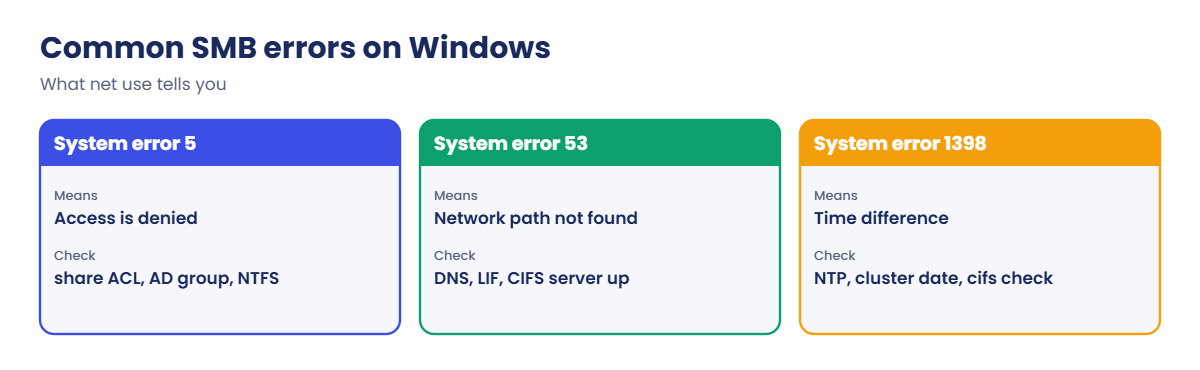
ONTAP CIFS share errors 5, 53 and 1398

4Set permissions

Add the AD group with change permission and remove Everyone. Then set NTFS permissions from a Windows admin PC.

JobSystem ManagerCLI
Join ADStorage VMs › svm1 › Settings › SMB/CIFSvserver cifs create
Create a shareStorage › Shares › + Add › Sharevserver cifs share create
Share permissionsShares › select › Edit › Permissionsvserver cifs share access-control create
Who is connectedStorage VMs › svm1 › SMB sessions (where shown)vserver cifs session show

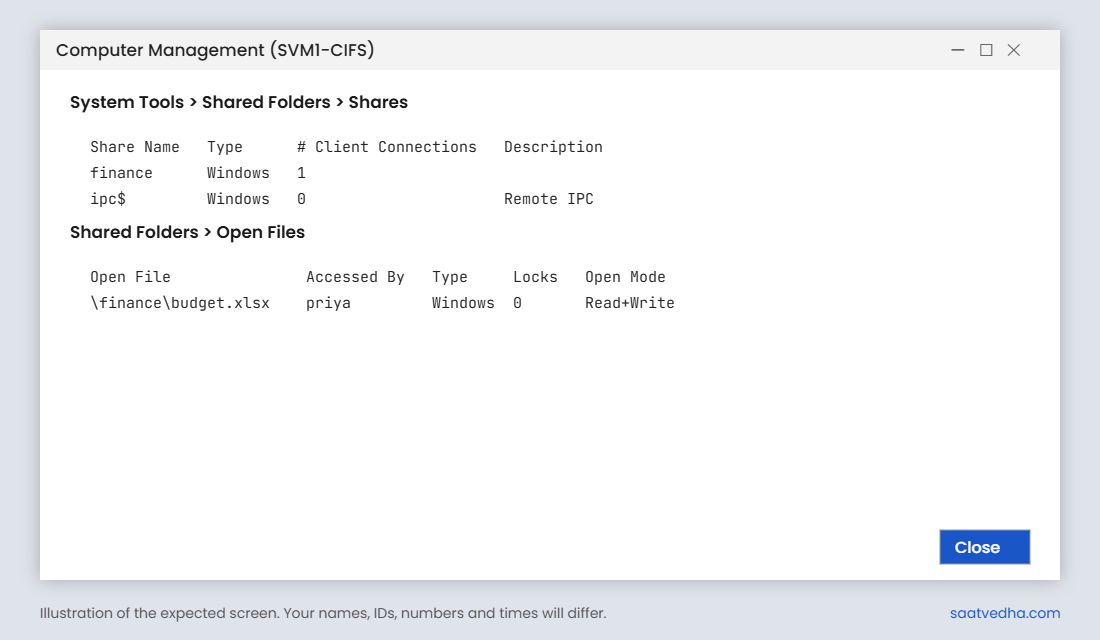
From Windows, compmgmt.msc › Connect to another computer › SVM1-CIFS shows the shares and open files, which help desks find handy.
Windows Computer Management connected to SVM1-CIFS showing the finance share and open files
Computer Management connected to SVM1-CIFS: the shares and who has files open.

Good to know: share features you will be asked about

Access-based enumeration (ABE) hides folders and files a user has no permission to open, so people only see what they can use. Turn it on per share with vserver cifs share properties add -vserver svm1 -share-name finance -share-properties access-based-enumeration.

Home directory shares give every user their own share without creating hundreds of them. You create one share whose name and path use variables such as %w (the Windows user name), mark it with the homedirectory property, and tell ONTAP where to search with vserver cifs home-directory search-path add.

SMB 3 continuously available shares and the Witness protocol let Hyper-V and SQL Server clients ride through a takeover with almost no pause. Export policies normally don’t apply to SMB, but you can switch them on with vserver cifs options modify -is-exportpolicy-enabled true at advanced privilege to add a client IP check on top of share and file permissions.

Hands-on lab: join AD and share a folder with a group

Before you run any command, double-check it

Read every command twice before you press Enter. Check the target: the server name, the user, the disk or device name, the path and the sizes. These commands are for learning and were tested in our lab, not on your system. At work, run the read-only commands first, follow your change process, make sure a backup exists, and ask a second person to check anything that changes or deletes data. You run them at your own risk.

This lab uses the SaatVedha ONTAP practice shell, our own learning tool. It is not NetApp software: real ONTAP output looks like this but is not identical.

1Start from the NAS setup and look at the lab AD

Reset and run setup-29.txt, log in, then:

simctl ad
vserver services name-service dns create -vserver svm1 -domains saatvedha.lab -name-servers 192.168.56.10
cluster time-service ntp server show

You should see this:

Lab Active Directory (practice): domain SAATVEDHA.LAB, DC/DNS 192.168.56.10, admin user Administrator, password Saat@2026
Users: SAATVEDHA\ravi, SAATVEDHA\priya, SAATVEDHA\Administrator
Groups: SAATVEDHA\finance, SAATVEDHA\Domain Admins
saat-cluster::> vserver services name-service dns create -vserver svm1 -domains saatvedha.lab -name-servers 192.168.56.10
saat-cluster::> cluster time-service ntp server show
Server                         Version Key ID
------------------------------ ------- ------
pool.ntp.org                   auto    -

priya is in the finance group; ravi isn’t. The cluster uses an internet NTP pool; in production you’d point it at your DCs (cluster time-service ntp server create -server 192.168.56.10).

✅ Checkpoint: DNS is set and you know who is in finance.

2Join the SVM to the domain

vserver cifs create -vserver svm1 -cifs-server SVM1-CIFS -domain saatvedha.lab

It asks for an account. Use Administrator and Saat@2026:

In order to create an Active Directory machine account for the CIFS server, you
must supply the name and password of a Windows account with sufficient
privileges to add computers to the "CN=Computers" container within the
"SAATVEDHA.LAB" domain.

Enter the user name: Administrator
Enter the password:
vserver cifs show -vserver svm1
vserver cifs check -vserver svm1

You should see this (check trimmed):

                          Vserver: svm1
         CIFS Server NetBIOS Name: SVM1-CIFS
    NetBIOS Domain/Workgroup Name: SAATVEDHA
      Fully Qualified Domain Name: SAATVEDHA.LAB
              Organizational Unit: CN=Computers
             Authentication Style: domain
CIFS Server Administrative Status: up
...
                       Domain DC Connection Status : ok

✅ Checkpoint: Administrative Status up and DC Connection Status ok on both nodes.

3Create the volume, share and permissions

volume create -vserver svm1 -volume vol_fin -aggregate aggr1_01 -size 20g -junction-path /fin -security-style ntfs
vserver cifs share create -vserver svm1 -share-name finance -path /fin
vserver cifs share access-control show -vserver svm1 -share finance
vserver cifs share access-control create -vserver svm1 -share finance -user-or-group SAATVEDHA\finance -permission change
vserver cifs share access-control delete -vserver svm1 -share finance -user-or-group Everyone
vserver cifs share access-control show -vserver svm1 -share finance

The two show commands give this:

               Share                             User/Group Access
Vserver        Name       User/Group Name        Type       Permission
-------------- ---------- ---------------------- ---------- ------------
svm1           finance    Everyone               windows    Full Control
...
svm1           finance    SAATVEDHA\finance      windows    Change

✅ Checkpoint: Only SAATVEDHA\finance with Change is left.

4Map the share as two users

simctl host win1 map \\SVM1-CIFS\finance SAATVEDHA\priya
simctl host win1 map \\SVM1-CIFS\finance SAATVEDHA\ravi
vserver cifs session show -vserver svm1

You should see this:

The command completed successfully.
saat-cluster::> simctl host win1 map \\SVM1-CIFS\finance SAATVEDHA\ravi
System error 5 has occurred.

Access is denied.
saat-cluster::> vserver cifs session show -vserver svm1
                            Session                                       Open
Node            Vserver          ID Workstation     Windows User         Files
--------------- ---------- -------- --------------- -------------------- -----
saat-cluster-01 svm1              1 192.168.56.31   SAATVEDHA\priya          1

On a real Windows PC the command is net use S: \\SVM1-CIFS\finance. priya gets in because she’s in finance; ravi gets error 5, Access is denied.

Command Prompt on win1 showing net use S: succeeding for priya and System error 5 Access is denied for ravi
net use as priya succeeds; as ravi it fails with System error 5, Access is denied.

✅ Checkpoint: priya connects, ravi gets System error 5.

Practice shell: finance group can map the ONTAP CIFS share, others are denied
priya (finance) maps the share; ravi gets Access is denied.

Break It, Then Fix It

Now the clock drifts ten minutes, which happens more often than you’d think when NTP is blocked or misconfigured.

1Skew the clock and try again

simctl break time-skew 600
simctl host win1 map \\SVM1-CIFS\finance SAATVEDHA\priya

You’ll get this:

System error 1398 has occurred.

There is a time and/or date difference between the client and server.

priya didn’t change and her permissions didn’t change. Kerberos refuses the ticket because the clocks are more than 5 minutes apart.

Practice shell: error 1398 from Kerberos clock skew
Same user, same permissions: only the clock changed.

2Confirm it from ONTAP

vserver cifs check -vserver svm1
event log show -severity <=ERROR

You'll see this (trimmed):

                          Cifs Status : Error
                       Domain DC Connection Status : unknown (clock skew)
...
11/7/2026 07:12:54  saat-cluster-01  ERROR         secd.kerberos.clockskew: Kerberos clock skew with the domain controller is 600 seconds

3Fix the time source

simctl fix time-skew
simctl host win1 map \\SVM1-CIFS\finance SAATVEDHA\priya
The command completed successfully.

✅ Checkpoint: priya maps the share again.

On a real cluster the fix is cluster time-service ntp server create -server <DC IP> (and removing unreachable servers), then checking cluster date show against a DC. Don't set the date by hand on a production cluster to "fix" it quickly; get NTP right.

This happened at work

Monday morning in Guwahati

A tea exporter in Guwahati kept its order files and invoices on SMB shares from ONTAP. During a firewall clean-up, the network team closed outbound NTP to the internet, and the cluster had been using public NTP servers since its install.

Nothing happened for three weeks while the clock drifted slowly. Then one Monday at 9:30 the accounts team couldn’t open the shares, Windows showed error 1398, and some users were told to restart their laptops, which didn’t help.

vserver cifs check showed clock skew and the event log had secd.kerberos.clockskew entries. The cluster was about seven minutes behind the domain controllers.

They pointed NTP at the two DCs, the clock caught up, and the shares came back without any change on the PCs. NTP to the DCs is now part of their build checklist.

Common mistakes and troubleshooting

MistakeWhat happensDo this instead
Cluster NTP not pointing at AD timeClock drifts; Kerberos fails with error 1398Use the domain controllers as NTP servers
SVM DNS not using AD DNScifs create can’t find a DCPoint the SVM at AD DNS servers
Leaving Everyone / Full Control on the shareAnyone in the domain can read and change filesAdd the right group, remove Everyone
unix security style on a Windows shareNTFS permissions can’t be set as users expectUse -security-style ntfs for Windows data
NetBIOS name longer than 15 characterscifs create failsKeep the CIFS server name short
Giving users Full Control on the shareUsers change permissions and lock others outChange on the share, finer control with NTFS ACLs

Interview questions

Click a question to open it. Each one is written the way an interviewer would ask it. Under it you will see why they ask it and one way you could answer, in your own words.

Fresher level

1. What do you need in place before you create a CIFS server on an SVM?

Why they ask this: They want to check you know the basic dependencies of an AD join.

How you might answer: DNS servers on the SVM that point to Active Directory, a data LIF that can reach the domain controllers, a cluster clock within five minutes of the DCs, and an AD account allowed to add computers to the OU.

2. What’s the difference between share permissions and NTFS permissions?

Why they ask this: They’re testing a basic Windows file-sharing concept that causes many tickets.

How you might answer: Share permissions apply when someone connects through that share; NTFS permissions apply to the files and folders themselves. Both are checked and the stricter one wins, so I usually give the group Change on the share and do the detailed control with NTFS ACLs.

2–5 years experience

3. Users get “System error 1398, time difference” when mapping a share. What do you do?

Why they ask this: They want a quick, correct diagnosis of a common outage.

How you might answer: That’s Kerberos clock skew. I’d run vserver cifs check and cluster date show, compare with a domain controller, and check cluster time-service ntp server show. Then I’d fix NTP to point at reachable DCs rather than setting the time by hand.

4. A user says they can’t open the finance share but a colleague can. How do you investigate?

Why they ask this: They’re checking a structured approach to permission problems.

How you might answer: I’d check vserver cifs share access-control show for the share and confirm the user is in the right AD group. If the share allows them, I’d look at NTFS permissions on the folder, and ask them to log off and on so their group membership refreshes.

Senior level

5. How would you design SMB access for a company with 20 departments on one SVM?

Why they ask this: They want to see a manageable structure, not one-off fixes.

How you might answer: One volume or qtree per department with ntfs security style, one share each, and share permissions granted to AD groups only, never individual users. The department’s IT owner manages NTFS ACLs through the groups.

I’d also set quotas, use snapshots with Previous Versions for self-service restores, and keep the CIFS server’s NTP and DNS pointing at the DCs.

6. Security wants SMB1 gone and encryption for the HR share. How do you approach it?

Why they ask this: They’re testing protocol security knowledge and change planning.

How you might answer: SMB1 is off by default on current ONTAP, so I’d confirm it with the CIFS options and find any old clients first. For HR I’d turn on SMB encryption for that share, which needs SMB 3 clients, test with a few users, then roll it out and watch session errors.

Quick quiz

Q1. What does vserver cifs create add to Active Directory?

  1. A user account
  2. A computer (machine) account for the SVM
  3. A new domain
  4. A DNS zone
Show answer

B — the CIFS server joins AD as a computer.

Q2. How far can the cluster clock be from the DCs before Kerberos fails, by default?

  1. 30 seconds
  2. 5 minutes
  3. 1 hour
  4. 1 day
Show answer

B — Kerberos allows 5 minutes of skew.

Q3. What is the default share permission on a new ONTAP share?

  1. No access
  2. Everyone / Full Control
  3. Domain Admins only
  4. Read for Everyone
Show answer

B — Everyone / Full Control, so change it.

Q4. Which security style suits a share used by Windows users?

  1. unix
  2. ntfs
  3. mixed
  4. none
Show answer

B — ntfs lets Windows permissions control the files.

Q5. Which command lists who is connected to the SVM over SMB?

  1. vserver cifs check
  2. vserver cifs session show
  3. network port show
  4. lun show
Show answer

B — it lists sessions, users and open files.

Quick recap

  • Before joining AD: AD DNS on the SVM, a reachable LIF, and NTP pointed at the DCs.
  • vserver cifs create joins the SVM as a computer account.
  • Shares point to junction paths; use ntfs security style for Windows data.
  • Grant the AD group on the share and remove Everyone; NTFS permissions do the rest.
  • Error 1398 means clock skew: fix NTP, not the share.

Next lesson

Lesson 32: Quotas → You’ll set tree and user quotas, watch a user hit the limit, and learn when to resize quotas.

Further reading: ONTAP CIFS share

Want to go deeper into ONTAP CIFS share? Read NetApp’s ONTAP concepts guide for NAS basics, and Microsoft’s documentation on share and NTFS permissions. You can also see the full plan for this course on the NetApp ONTAP Storage Administration course page.

Scroll to Top

This website uses cookies

We use a few cookies to keep this site working. If you allow it, we also use Google Analytics to count visits so we can improve our lessons. You can accept all, deny the optional ones, or choose what to allow.