NetApp interview questions

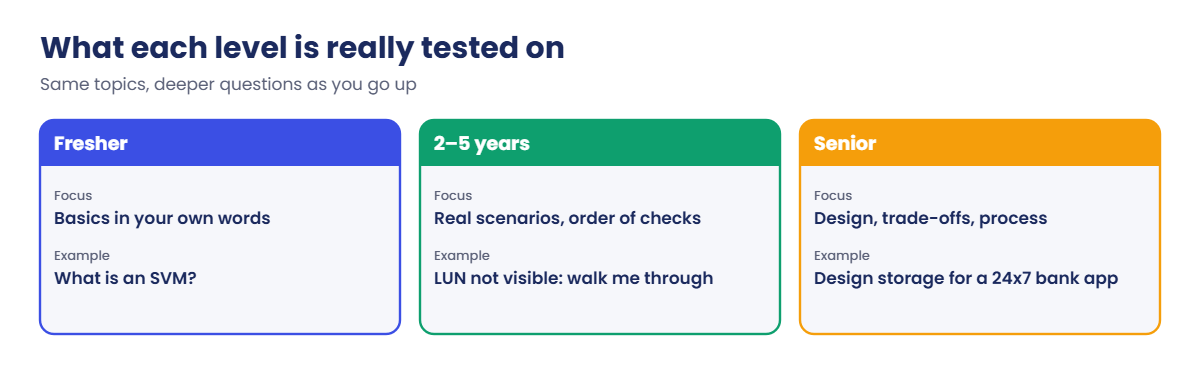
NetApp interviews in India follow a pattern you can prepare for. Freshers get asked what things are, people with two to five years get asked how they’d handle a real problem, and senior candidates get asked to design, choose and justify.

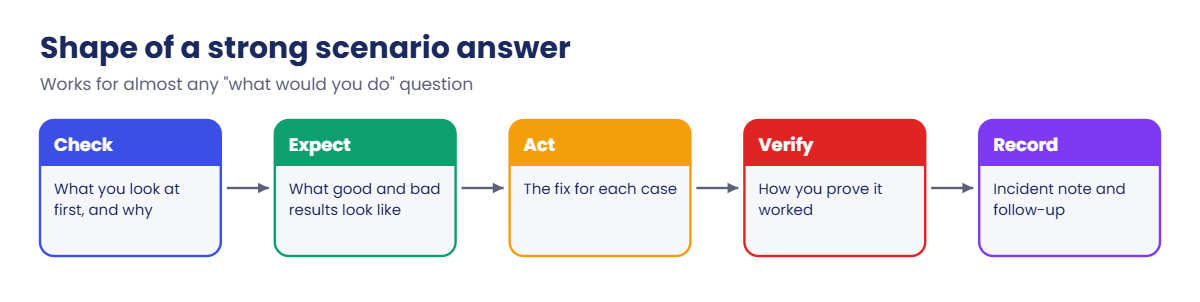
Interviewers rarely want a recited definition. They want to hear you think in the order a good engineer works: what you’d check, what you’d expect to see, and what you’d do next. That’s exactly what this course has drilled into you.

This lesson collects the questions that come up most, with the reason behind each one and a sample answer in plain spoken English. The lab is a timed drill on the practice cluster, because “show me” rounds are getting more common.

Where this lesson fits

Lesson 56 of 56 in NetApp ONTAP Storage Administration · Phase 5: Final project and career · Before this: Lesson 55, the final project

TimeYou needBy the end you can
75 minutesThe practice shell with setup-p4.txt from Lesson 47Answer NetApp questions at fresher, mid and senior level, and talk through a live cluster check under time pressure

What it is, in one line

A NetApp interview checks three things: that you know the ONTAP building blocks, that you can troubleshoot in a sensible order, and, for senior roles, that you can design for capacity, performance and data protection.

In Simple Words

A cooking test, not a recipe quiz

When a good restaurant hires a cook, the head chef doesn’t only ask for recipes. She asks what you’d do if the dal burns ten minutes before service, and then she hands you a knife and watches you chop an onion.

Knowing the recipe gets you through the first round. Staying calm and working in order gets you the job.

Engineer's View

What interviewers look for at each level

Fresher: clear basics. Cluster, HA pair, aggregate, SVM, volume, LIF, LUN, igroup, Snapshot copy, SnapMirror, NFS versus SMB versus iSCSI. Short, correct answers in your own words, and honesty when you don’t know.

2 to 5 years: real situations. A LUN not visible, a full volume, stale file handles, slow volumes, a SnapMirror that’s lagging, a planned takeover. They listen for the commands you’d run and the order you’d run them in.

Senior: design and judgement. Aggregate and SVM layout, HA and DR design with RPO and RTO, QoS and capacity planning, upgrades without downtime, and how you’d run a storage team’s process. Expect “why” after every answer.

How it works, step by step

1Know the topics that always come up

TopicTypical questionLessons
ArchitectureWhat is an HA pair? What does an SVM do?3, 4, 16
Storage layoutRAID-DP vs RAID-TEC, aggregates, FlexVol vs FlexGroup12, 13, 17, 18
NetworkingLIFs, failover groups, broadcast domains19, 20, 21
SANigroups, ALUA, multipath, FC zoning23, 24, 25, 27
NASExport policies, SMB with AD, quotas29, 30, 31, 32
Efficiency and capacityThin provisioning, dedupe, full volumes33, 34, 52
ProtectionSnapshots, SnapMirror, vault, MetroCluster35, 39, 40, 42
TroubleshootingLUN missing, stale handle, latency, LIF down47 to 54
NetApp interview questions: what fresher, mid-level and senior candidates are tested on

2Answer in the order you work

For any “what would you do” question, use the same shape: what you’d check first and why, what a good and a bad result look like, and what you’d do about each. Naming one or two real commands shows hands-on experience better than a long speech.

3Use your lab as evidence

“In my lab I broke the igroup on purpose and saw the initiator marked not logged in” is far stronger than “I think it would fail”. Mention the practice shell labs and your VirtualBox hosts honestly as practice, not as production experience.

NetApp interview questions: the shape of a strong scenario answer

4Be ready for a live round

Some interviewers share a screen with a lab cluster or System Manager and ask you to find something. Practise talking while you type: say what you’re checking and what you expect, then read the result out loud. The lab below trains exactly that.

Hands-on lab: a 10-minute live cluster drill

Before you run any command, double-check it

Read every command twice before you press Enter. Check the target: the server name, the user, the disk or device name, the path and the sizes. These commands are for learning and were tested in our lab, not on your system. At work, run the read-only commands first, follow your change process, make sure a backup exists, and ask a second person to check anything that changes or deletes data. You run them at your own risk.

This lab uses the SaatVedha ONTAP practice shell, our own learning tool. It is not NetApp software: real ONTAP output looks like this but is not identical.

1Set the timer

Reset and run setup-p4.txt from Lesson 47, log in, and start a 10-minute timer. Pretend an interviewer is watching and say each answer out loud.

✅ Checkpoint: Timer running, logged in to saat-cluster.

2Question 1: what are you looking at?

version
cluster show
storage failover show

You should see this (failover output shortened):

NetApp Release 9.18.1: Sat Nov 07 2026 (SaatVedha practice shell 1.0, not NetApp software)
saat-cluster::> cluster show
Node                  Health  Eligibility
--------------------- ------- ------------
saat-cluster-01       true    true
saat-cluster-02       true    true
2 entries were displayed.
...
saat-cluster-01 saat-cluster-02 true     Connected to saat-cluster-02
saat-cluster-02 saat-cluster-01 true     Connected to saat-cluster-01

Say it like this: “ONTAP 9.18.1, a two-node cluster forming one HA pair, both nodes healthy, and either node can take over the other.”

✅ Checkpoint: You gave a one-sentence summary.

3Question 2: what does svm1 serve, and from where?

vserver show -type data
volume show -vserver svm1 -fields aggregate,size,percent-used
network interface show -vserver svm1 -fields home-node,service-policy

You should see this:

                               Admin      Operational Root
Vserver     Type    Subtype    State      State       Volume     Aggregate
----------- ------- ---------- ---------- ----------- ---------- ----------
svm1        data    default    running    running     svm1_root  aggr1_01
saat-cluster::> volume show -vserver svm1 -fields aggregate,size,percent-used
vserver volume    aggregate size percent-used
------- --------- --------- ---- ------------
svm1    svm1_root aggr1_01  1GB  0%
svm1    vol_app1  aggr1_01  50GB 0%
2 entries were displayed.
saat-cluster::> network interface show -vserver svm1 -fields home-node,service-policy
vserver lif         home-node       service-policy
------- ----------- --------------- ------------------
svm1    svm1_nas1   saat-cluster-01 default-data-files
svm1    svm1_iscsi1 saat-cluster-01 default-data-iscsi
svm1    svm1_iscsi2 saat-cluster-02 default-data-iscsi
3 entries were displayed.

Say: “One data SVM with a 50 GB volume on aggr1_01. It serves NAS through one LIF on node 01 and iSCSI through one LIF on each node, so SAN hosts get a path through both nodes.”

✅ Checkpoint: You named the protocols and which node each LIF lives on.
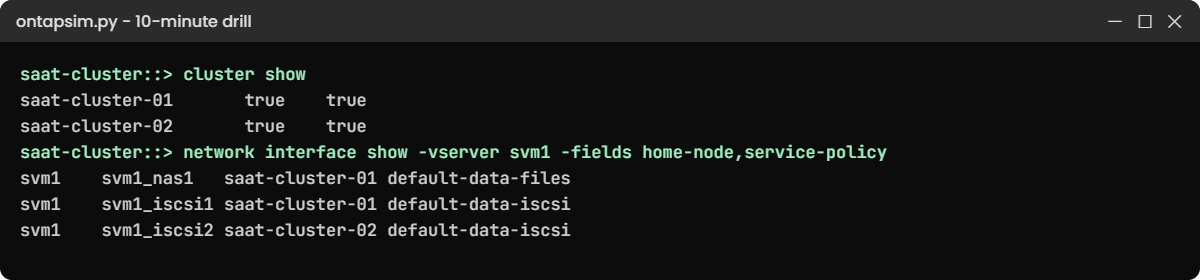
Practice shell: cluster health and LIF homes for the timed drill
Read the cluster out loud: two healthy nodes, LIFs on both.

4Question 3: is anything at risk?

storage aggregate show
network interface show -is-home false
event log show -severity <=ERROR
system node autosupport history show -node *

Expected: data aggregates nearly empty, no LIFs away from home, no serious events, and no AutoSupport history yet. A strong candidate adds: “I’d send an AutoSupport test, because an empty history means I can’t prove NetApp would hear about a failure.”

✅ Checkpoint: You finished inside 10 minutes and mentioned AutoSupport.

Break It, Then Fix It

The scenario round: “It’s 2 a.m. and you get an alert. Show me what you’d do.” Your interviewer (a friend, or you) triggers a fault while you look away.

1The fault

simctl break node-panic saat-cluster-02
simctl tick 1

✅ Checkpoint: The fault is active.

2Find it and report it in three sentences

cluster show
storage failover show
event log show -severity <=ERROR

You’ll see this:

Node                  Health  Eligibility
--------------------- ------- ------------
saat-cluster-01       true    true
saat-cluster-02       false   true
2 entries were displayed.
saat-cluster::> storage failover show
                                Takeover
Node            Partner         Possible State Description
--------------- --------------- -------- -------------------------------------
saat-cluster-01 saat-cluster-02 false    In takeover
saat-cluster-02 saat-cluster-01 false    Waiting for giveback (HA mailboxes)
2 entries were displayed.
saat-cluster::> event log show -severity <=ERROR
Time                Node             Severity      Event
------------------- ---------------- ------------- ------------------------
11/7/2026 07:05:13  saat-cluster-02  EMERGENCY     sk.panic: Panic String: practice shell panic on saat-cluster-02

A good report: “Node 02 panicked at 07:05 and node 01 took over its storage, so data is still being served, but we have no HA protection right now. I’d open a priority case with NetApp with the panic string and the AutoSupport, and tell the app teams we’re running on one node. Once the node is back and waiting for giveback, I’d give back in a quiet moment and check LIFs and paths.”

✅ Checkpoint: Your report covered impact, risk and next steps.
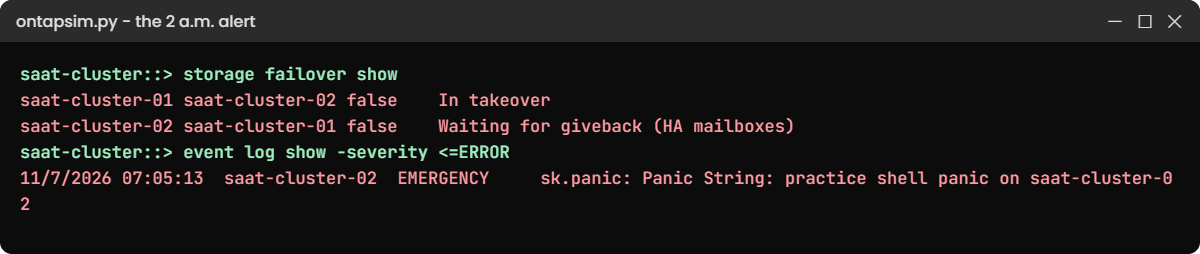
Practice shell: node 02 panic with node 01 in takeover
The 2 a.m. alert: a panic, a takeover, and no HA protection until giveback.

3Bring it back

simctl fix plays the node rebooting after support’s advice.

simctl fix node-panic
storage failover giveback -ofnode saat-cluster-02
simctl tick 1
storage failover show

You should see:

                                Takeover
Node            Partner         Possible State Description
--------------- --------------- -------- -------------------------------------
saat-cluster-01 saat-cluster-02 true     Connected to saat-cluster-02
saat-cluster-02 saat-cluster-01 true     Connected to saat-cluster-01
2 entries were displayed.

Interviewers love it when you finish the story: confirm takeover is possible again, check LIFs are home and SAN hosts have both paths, and write the incident note.

✅ Checkpoint: Takeover Possible is true on both nodes.

This happened at work

The candidate who said “I don’t know, but here’s how I’d find out”

A storage team lead at an IT services centre in Belagavi interviewed eight candidates in one week for a NetApp L2 role. Most of them could define an aggregate and recite RAID-DP. Two could tell her the difference between a volume and a qtree.

The one she hired got stuck on a question about MetroCluster tiebreaker software. He said he hadn’t worked with it, then explained how he’d check the cluster’s state, read the documentation and what he’d ask NetApp support. On the next question, a LUN missing after a server rebuild, he went straight to lun igroup show -instance and the new IQN.

She told her team later that the method mattered more than the missing fact. Since then her interview sheet has one scenario question per level, and she scores the order of checks, not only the final answer.

Common mistakes and troubleshooting

MistakeWhat happensDo this instead
Reciting definitionsYou sound like you memorised a listExplain with an example from your lab
Guessing when you don’t knowInterviewers spot it, and trust dropsSay you haven’t used it, then explain how you’d find out
Jumping to the fix in scenario questionsIt looks recklessStart with what you’d check and why
Calling lab work production experienceIt falls apart on the follow-up questionBe honest: “In my lab I…”
Using old 7-Mode terms onlyYou sound out of dateUse clustered ONTAP terms: SVM, LIF, local tier

Interview questions

Click a question to open it. Each one is written the way an interviewer would ask it. Under it you will see why they ask it and one way you could answer, in your own words.

Fresher level

1. Can you explain in simple words what an SVM is?

Why they ask this: They want to see you understand the most important ONTAP building block.

How you might answer: An SVM, a storage virtual machine, is the “server” that clients actually see. It owns its volumes, its LIFs with IP addresses or WWPNs, and its protocol settings like NFS, SMB or iSCSI, so one cluster can host several separate SVMs for different teams or customers.

2. What’s an HA pair, and what happens when one node fails?

Why they ask this: They’re checking that you know how ONTAP stays available.

How you might answer: Two nodes connected so each can take over the other’s storage. If one fails, its partner takes over its aggregates and NAS LIFs, so clients keep working, and once the failed node is back you do a giveback.

3. What’s the difference between a Snapshot copy and SnapMirror?

Why they ask this: They want to see you separate local copies from replication.

How you might answer: A Snapshot copy is a point-in-time copy inside the same volume, quick to make and good for fast restores. SnapMirror replicates the volume, using those snapshots, to another cluster, so you still have the data if the whole site or system is lost.

4. When would you use NFS, SMB or iSCSI?

Why they ask this: They’re checking you can match protocols to clients.

How you might answer: NFS for Linux and Unix file shares, SMB for Windows users and shares that need Active Directory permissions, and iSCSI when a server needs a block disk, like a database or a hypervisor datastore.

2–5 years experience

5. A Linux server can’t see a new LUN. Walk me through your checks.

Why they ask this: They want a clear order of checks, not a list of guesses.

How you might answer: First vserver iscsi session show to see if the host is logged in, then lun igroup show -instance to check its IQN is there and logged in. Then lun mapping show and lun show for mapping and state, and finally a rescan and multipath -ll on the host to see both paths.

6. Users say a share is full but they haven’t added many files. What do you look at?

Why they ask this: They’re checking that you know snapshots use space too.

How you might answer: I’d run volume show-space. If Snapshot Spill is large, old snapshots are holding changed blocks, so I’d check volume snapshot show, delete what the owner agrees isn’t needed, and set up autosize or a better snapshot policy.

7. An NFS mount says “Stale file handle”. What usually causes that on ONTAP?

Why they ask this: They want to know you understand volume identity and namespace.

How you might answer: Usually the volume was unmounted from its junction path, moved to a different path, or deleted and created again with a new identity. I’d check volume show -fields junction-path,msid, fix the namespace, and remount on the client with umount -l if needed.

8. How do you read qos statistics volume latency show?

Why they ask this: They’re testing performance troubleshooting in practice.

How you might answer: It splits latency into parts. If Disk is the biggest, the aggregate is busy, so I look for the top volume with performance show; if QoS Max is big, a policy is slowing it on purpose; if everything in ONTAP is small, the delay is on the network or host.

Senior level

9. How would you design storage for a new 24×7 banking application on ONTAP?

Why they ask this: They want design thinking across availability, performance and protection.

How you might answer: I’d start from the RPO and RTO and the performance profile. Probably an AFF HA pair, separate SVMs for the app tiers, LIFs and paths on both nodes, SnapMirror to a second site at a schedule that meets the RPO, or MetroCluster if they need near-zero RPO. On top, QoS for neighbours, Snapshot policies, Unified Manager monitoring and a tested DR runbook.

10. How would you plan an ONTAP upgrade with no downtime?

Why they ask this: They’re checking planning, risk control and knowledge of HA.

How you might answer: I’d check the upgrade path and host compatibility first, then a full health check, AutoSupport and backups. ONTAP upgrades an HA pair node by node with takeover and giveback, so I’d confirm every SAN host has paths through both nodes and NAS LIFs can fail over, schedule a quiet time and keep the app teams informed.

11. Your team keeps getting “storage is slow” tickets. How would you fix the problem as a lead?

Why they ask this: They want to see you fix process, not just incidents.

How you might answer: I’d collect the last few tickets and find the patterns, like noisy neighbours or scans at peak time. Then I’d fix placement rules, add QoS for batch work, set latency alerts per workload in Unified Manager, and give the team a short runbook so every ticket starts with the latency split.

12. What would you check first when you take over a NetApp estate from another team?

Why they ask this: They want a structured, low-risk approach.

How you might answer: Inventory and health first: clusters, releases, nodes, aggregates and space, SVMs and protocols. Then the risk list: AutoSupport working, SnapMirror health and lag, spares and failed disks, LIFs away from home, and supported ONTAP versions. I’d change nothing in the first week except clear risks, with the owner’s OK.

Quick quiz

Q1. What do interviewers most want to hear in a scenario question?

  1. A long list of commands
  2. The order you’d check things and why
  3. The product price
  4. A definition
Show answer

B — a clear order shows real troubleshooting skill.

Q2. You don’t know the answer to a question. What’s best?

  1. Guess confidently
  2. Say so, then explain how you’d find out
  3. Change the subject
  4. Stay silent
Show answer

B — honesty plus a method builds trust.

Q3. Which command shows if a node can take over its partner?

  1. storage failover show
  2. cluster ring show
  3. volume show
  4. lun show
Show answer

A — it lists Takeover Possible per node.

Q4. Which answer best describes SnapMirror?

  1. A local snapshot
  2. Replication of a volume to another cluster
  3. A RAID type
  4. A network protocol
Show answer

B — SnapMirror copies volumes between clusters.

Q5. How should you describe practice-lab work in an interview?

  1. As production experience
  2. Honestly, as lab practice with what you learned
  3. Don’t mention it
  4. As a certification
Show answer

B — honest lab examples still show hands-on skill.

Quick recap

  • Fresher questions test basics; mid-level tests scenarios; senior tests design and judgement.
  • Answer in working order: what you’d check, what you’d expect, what you’d do.
  • Use your lab as honest evidence.
  • Practise talking through live commands under a timer.
  • Finish scenario answers with verification and an incident note.

What’s next

You’ve finished the course. Go back to the course page to revisit any lesson, and keep the ONTAP Command Builder open for your daily work.

Further reading: NetApp interview questions

Want to go deeper into NetApp interview questions? Revise with NetApp’s ONTAP concepts guide, which covers the building blocks interviewers ask about most. You can also see the full plan for this course on the NetApp ONTAP Storage Administration course page.

Scroll to Top

This website uses cookies

We use a few cookies to keep this site working. If you allow it, we also use Google Analytics to count visits so we can improve our lessons. You can accept all, deny the optional ones, or choose what to allow.