FlexClone
-
Phase 0: Start here
-
Phase 1: Architecture and foundation
-
Phase 2: Protocols and day-to-day administration
-
Phase 3: Data protection and enterprise integrations
-
Phase 4: Troubleshooting blueprint
-
Phase 5: Final project and career
The ERP team wants to test Saturday’s patch on a copy of production data, and the database is 80 GB today and 4 TB next year. Copying it takes hours and doubles the space, and by the time the copy finishes it’s already out of date.
FlexClone gives them a full-size, writable copy in a few seconds, built on top of a snapshot from Lesson 35. In this lesson you’ll make one, use it, and learn the two ways a clone should end, because forgotten clones are one of the quiet ways clusters run out of space.
Where this lesson fits
Lesson 36 of 56 in NetApp ONTAP Storage Administration · Phase 3: Data protection and integrations · Before this: Lesson 35, snapshots and restores · Next: Lesson 37, takeover and giveback
| Time | You need | By the end you can |
|---|---|---|
| 40 minutes | The practice shell with the Lesson 35 setup (svm1, NFS on 192.168.56.130) | Create a FlexClone from a snapshot, mount it, explain shared blocks, and split or delete it cleanly |
What it is, in one line
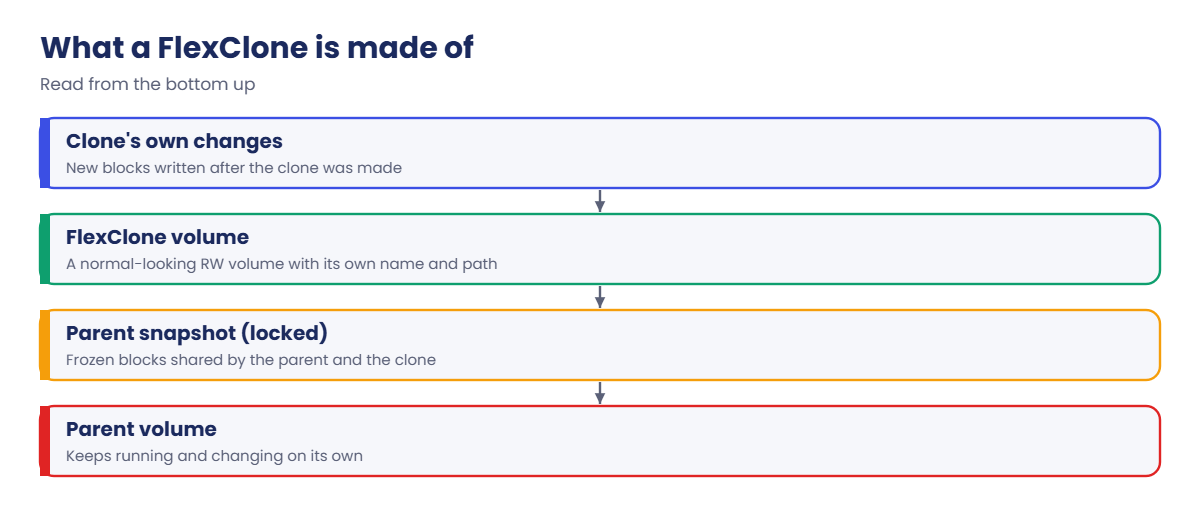
A FlexClone is a writable volume made from a snapshot of another volume in seconds, sharing all of that snapshot’s blocks and storing only the changes made to it afterwards.
In Simple Words
Tracing paper over the master drawing
An architect has one master drawing of a house. When a client asks “what if the kitchen were bigger?”, she doesn’t redraw the whole house; she lays tracing paper on top and sketches only the new kitchen walls.
Anyone looking through the paper sees a complete house with the new kitchen. The master stays untouched underneath, and it can’t be thrown away while tracing sheets still sit on it, so when a sketch becomes the real plan, she copies it onto its own fresh sheet.
Engineer's View
How an engineer describes it
volume clone create builds a new FlexVol volume whose block tree points into a parent snapshot. Reads of unchanged data come from the shared blocks; writes to the clone go to new blocks owned by the clone only. Creation is a metadata operation, so it takes seconds whatever the size.
The parent snapshot is locked while the clone exists: volume snapshot show lists it as busy and it can’t be deleted. A clone can live for days or months, but every block the parent changes afterwards is still held by that snapshot, so long-lived clones slowly cost space on the parent side too.
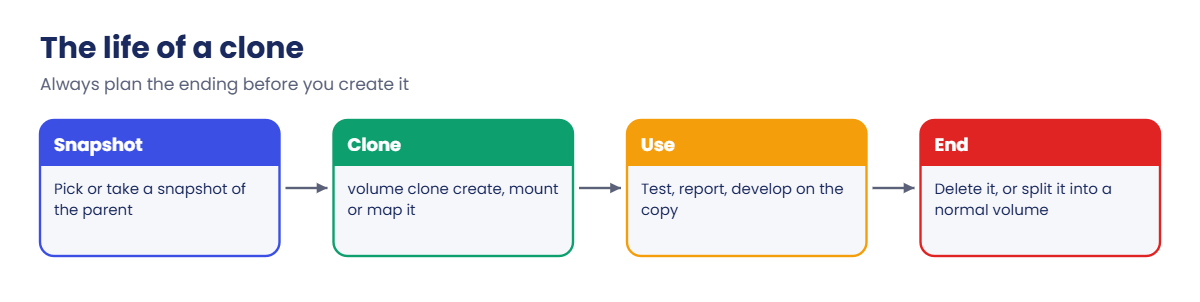
A clone ends in one of two ways. volume delete removes it (unmount and offline first). volume clone split start copies the shared blocks into the clone so it becomes an independent volume, which uses real space and runs in the background; check the cost first with volume clone split estimate. FlexClone is part of ONTAP One on current systems, and LUN-level and file-level clones exist too (volume file clone create), which VMware and SnapCenter use behind the scenes.
How it works, step by step
1Choose the point in time
Use an existing snapshot or take one now. For a database, take it while the application is quiesced or through SnapCenter, otherwise the clone is only crash-consistent.
2Create the clone
Give it a name, the parent volume, the parent snapshot and a junction path. If you leave out -parent-snapshot, ONTAP takes a new snapshot for you and names it after the clone.
3Use it like any other volume
Mount it over NFS, share it over SMB, or map the LUNs inside it to a test host. Because the clone keeps the parent’s LUN serial numbers inside, map clone LUNs to a different host than the parent, never the same one.
4Watch what it costs
On day one the clone costs almost nothing. Each changed block in the clone, and each block the parent overwrites while the snapshot is locked, adds a little, so check both volumes each week if the clone lives long.
| Command | What it tells you |
|---|---|
volume clone show | Every clone, its parent volume and parent snapshot |
volume clone split estimate | How much space a split would need |
volume clone split show | Progress of a running split |
volume snapshot show -fields owners | Which snapshots are busy and why |
5End it on purpose
Test finished: delete the clone. Test copy became the new production: split it, then delete the old parent snapshot. Put the end date in the clone’s comment field so nobody has to guess later.
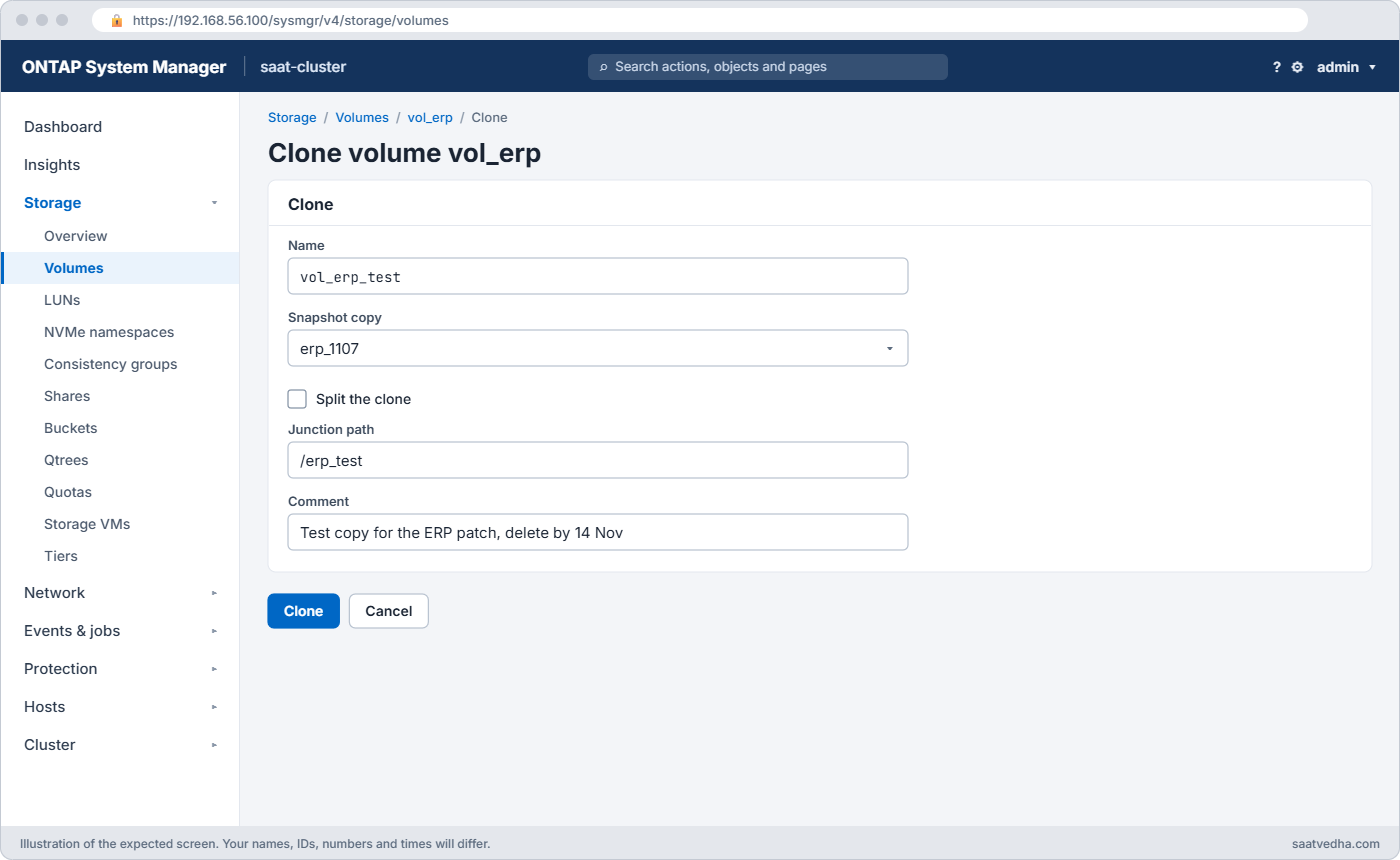
In System Manager go to Storage › Volumes, select the parent and choose Clone from the three-dot menu; you pick the snapshot and the name there. The clone then shows in the volume list, where its own menu has Split clone and Delete.
Hands-on lab: clone a volume for a patch test
Before you run any command, double-check it
Read every command twice before you press Enter. Check the target: the server name, the user, the disk or device name, the path and the sizes. These commands are for learning and were tested in our lab, not on your system. At work, run the read-only commands first, follow your change process, make sure a backup exists, and ask a second person to check anything that changes or deletes data. You run them at your own risk.
This lab uses the SaatVedha ONTAP practice shell, our own learning tool. It is not NetApp software: real ONTAP output looks like this but is not identical.
Use the same starting point as Lesson 35: two data aggregates, svm1 with the NAS LIF 192.168.56.130, NFS and the default export rule.
1Create the production volume and a snapshot
volume create -vserver svm1 -volume vol_erp -aggregate aggr1_01 -size 200g -junction-path /erp
simctl write svm1 vol_erp 80g db
simctl host linux1 mount 192.168.56.130:/erp /mnt/erp vers=3
simctl host linux1 touch /mnt/erp/orders.dbf
volume snapshot create -vserver svm1 -volume vol_erp -snapshot erp_1107You should see this:
[Job 104] Job succeeded: Successful
Client wrote 80GB to svm1:vol_erp.
(mounted 192.168.56.130:/erp on /mnt/erp type nfs)vol_erp stands in for an ERP database with 80 GB of data, and erp_1107 is the point in time the test team asked for.
✅ Checkpoint: vol_erp exists and the snapshot command returned no error.
2Clone it
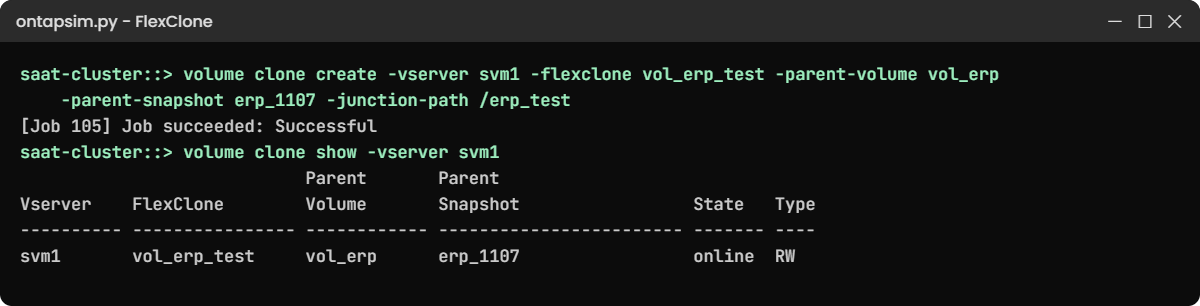
volume clone create -vserver svm1 -flexclone vol_erp_test -parent-volume vol_erp -parent-snapshot erp_1107 -junction-path /erp_test
volume clone show -vserver svm1
volume show -vserver svm1 -volume vol_erp* -fields size,used,junction-pathYou should see this:
[Job 105] Job succeeded: Successful
saat-cluster::> volume clone show -vserver svm1
Parent Parent
Vserver FlexClone Volume Snapshot State Type
---------- ---------------- ------------ ------------------------ ------- ----
svm1 vol_erp_test vol_erp erp_1107 online RW
saat-cluster::> volume show -vserver svm1 -volume vol_erp* -fields size,used,junction-path
vserver volume size used junction-path
------- ------------ ----- ------- -------------
svm1 vol_erp 200GB 80.06GB /erp
svm1 vol_erp_test 200GB 80.06GB /erp_testThe clone reports the same 80 GB used, because from inside it looks like a full copy. Those blocks are shared, though; on a real cluster volume clone split estimate would show you that splitting it now would need about 80 GB more in the aggregate.
✅ Checkpoint: vol_erp_test is listed with parent erp_1107 and its own junction path.
3Use the clone without touching production
simctl host linux1 mount 192.168.56.130:/erp_test /mnt/erp_test vers=3
simctl host linux1 touch /mnt/erp_test/patch_test.log
simctl host linux1 ls /mnt/erpYou should see this:
(mounted 192.168.56.130:/erp_test on /mnt/erp_test type nfs)
saat-cluster::> simctl host linux1 touch /mnt/erp_test/patch_test.log
saat-cluster::> simctl host linux1 ls /mnt/erp
orders.dbfThe test team writes to the clone, and production doesn’t see patch_test.log. On a real client the clone would also show orders.dbf, because it starts with all of the parent’s files; the practice shell only lists files written through each mount.
✅ Checkpoint: The parent still lists only orders.dbf.
4Make the clone independent
The patched copy passed testing and the team wants to keep it. Split it so it no longer depends on the parent snapshot, then remove that snapshot.
volume clone split start -vserver svm1 -flexclone vol_erp_test
simctl tick 3
volume clone show -vserver svm1
volume snapshot delete -vserver svm1 -volume vol_erp -snapshot erp_1107
volume snapshot show -vserver svm1 -volume vol_erpYou should see this:
[Job 106] Job is queued: Split vol_erp_test.
saat-cluster::> simctl tick 3
simctl: time moved forward (3 steps).
saat-cluster::> volume clone show -vserver svm1
There are no entries matching your query.
saat-cluster::> volume snapshot delete -vserver svm1 -volume vol_erp -snapshot erp_1107
saat-cluster::> volume snapshot show -vserver svm1 -volume vol_erp
There are no entries matching your query.After the split, vol_erp_test is a normal volume and no longer appears in volume clone show, so the snapshot can go. Real ONTAP asks you to confirm the split and the job can take hours on large volumes; check volume clone split show while it runs.
✅ Checkpoint: volume clone show is empty and erp_1107 is deleted.
Try it yourself: Build a FlexClone command in the Command Builder.
Break It, Then Fix It
Run these before step 4 of the lab (or reset and repeat steps 1 and 2 first).
1Reuse the clone name
volume clone create -vserver svm1 -flexclone vol_erp_test -parent-volume vol_erpYou’ll get this:
Error: command failed: Duplicate volume name vol_erp_test.A clone is a volume, so it needs a name that no other volume in the SVM uses. Add the date or ticket number, like vol_erp_test_1107, when teams ask for clones often.
✅ Checkpoint: You can name a free clone name and create it.
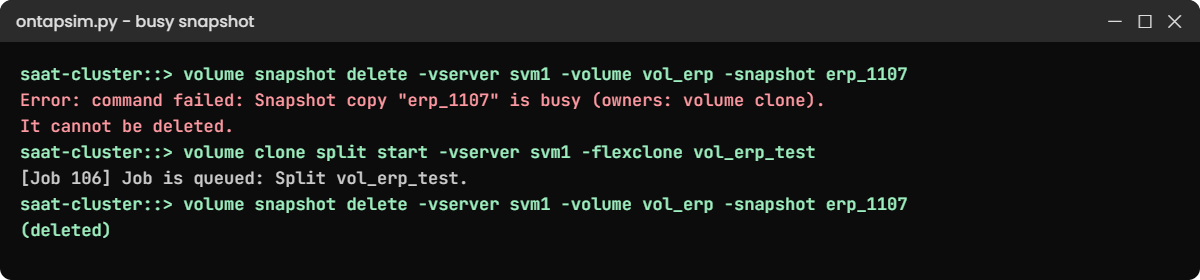
2Delete a snapshot that a clone is using
volume snapshot delete -vserver svm1 -volume vol_erp -snapshot erp_1107You’ll get this:
Error: command failed: Snapshot copy "erp_1107" is busy (owners: volume clone). It cannot be deleted.This is the error that turns up at 2 a.m. when a snapshot schedule or a cleanup script can’t remove an old copy and the volume keeps filling. Find who holds it with volume clone show, then either delete the clone (if the test is over) or split it (if someone still needs it). After that the delete works, as you saw in lab step 4.
✅ Checkpoint: You know the two ways to free a busy snapshot.
This happened at work
Fourteen clones nobody owned
A stock-broking firm in Mumbai gave its developers self-service clones of the trading database through a script. It worked so well that nobody deleted anything, and after eight months there were fourteen clones, some of them for people who had left the company.
The trouble showed up on the production side. The parent volume kept growing even though the database size was flat, because each clone locked a different old snapshot and every overwrite in production was being kept for those snapshots. The aggregate crossed 90% on a results day and the on-call engineer had to add disks in a hurry.
The fix took one afternoon: they listed clones with volume clone show, asked each owner, deleted eleven and split the three that had become long-term test systems. The script now writes the requester and an expiry date into the volume comment, and a weekly report flags any clone older than thirty days.
Common mistakes and troubleshooting
| Mistake | What happens | Do this instead |
|---|---|---|
| Keeping clones for months | Parent snapshots stay locked and the parent volume and aggregate grow | Give every clone an owner and an end date; delete or split on time |
| Splitting without checking space | The split fills the aggregate halfway through | Run volume clone split estimate and check aggregate free space first |
| Mapping clone LUNs to the same host as the parent | The host sees two disks with the same signature and can mount the wrong one | Map clone LUNs to a separate test host, or resignature them on the host |
| Cloning a database without quiescing it | The copy needs crash recovery or won’t open | Quiesce the application or use SnapCenter to take the snapshot |
| Deleting the parent volume first | ONTAP refuses while clones depend on it | Delete or split the clones, then the parent |
Interview questions
Click a question to open it. Each one is written the way an interviewer would ask it. Under it you will see why they ask it and one way you could answer, in your own words.
Fresher level
1. What is a FlexClone, in simple words?
Why they ask this: They want to see that you know it’s writable and shares blocks, not a full copy.
How you might answer: It’s a writable copy of a volume made from a snapshot in a few seconds. It shares all the snapshot’s blocks with the parent and only stores the changes made to it, so it costs almost no space at first.
2. A developer asks for a copy of a 2 TB production volume for testing. What would you do?
Why they ask this: They’re checking that you’d reach for a clone and think about where it’s used.
How you might answer: I’d take a snapshot, ideally application-consistent, and create a FlexClone from it with its own junction path or map its LUNs to the test host only. I’d agree an end date with the developer and write it in the volume comment so the clone doesn’t live forever.
2–5 years experience
3. A snapshot on a production volume can’t be deleted and says it’s busy. What’s going on and what do you do?
Why they ask this: They want to know you can connect a busy snapshot to a clone or another owner.
How you might answer: Usually a FlexClone is built on it. I’d run volume clone show to find the clone and its owner. If the clone is no longer needed I delete it; if it is, I split it after checking the estimate, and then the snapshot can be removed.
4. What’s the difference between deleting a clone and splitting it?
Why they ask this: They want to see you understand the space and dependency trade-off.
How you might answer: Deleting throws away the clone and its changes and frees the parent snapshot at once. Splitting copies all the shared blocks into the clone so it becomes a normal volume; it keeps the data but uses the full space and takes time, so I check volume clone split estimate first.
Senior level
5. How would you build a self-service test-data process for developers on ONTAP?
Why they ask this: They want design thinking: automation, guard rails, cost control.
How you might answer: I’d script it through the REST API or Ansible: take a consistent snapshot on a schedule, create clones on request with a naming rule, and record the owner and expiry in the comment field.
A weekly job would report and then delete expired clones, and I’d put the clones on a QoS limit so tests can’t hurt production.
6. Your aggregate is growing fast but no volume’s data has grown. How would you investigate?
Why they ask this: They’re testing whether you can see hidden consumers like locked snapshots and clones.
How you might answer: I’d compare volume used with snapshot sizes using volume show-space and volume snapshot show. Large old snapshots that are busy usually point to clones or SnapMirror. Then I’d list clones, find owners, and clean up or split the ones that are still needed.
Quick quiz
Q1. What does a FlexClone share with its parent?
- Nothing; it is a full copy
- The blocks of the parent snapshot
- Only the junction path
- The parent’s QoS policy
Show answer
B — the clone is built on the parent snapshot’s blocks.
Q2. Why can’t the parent snapshot be deleted while a clone exists?
- It is locked by SnapMirror
- The clone still reads its shared blocks
- Snapshots can never be deleted
- The volume is offline
Show answer
B — the clone depends on those blocks.
Q3. What does volume clone split start do?
- Deletes the clone
- Copies shared blocks into the clone so it becomes independent
- Moves the clone to another node
- Takes a new snapshot
Show answer
B — a split makes the clone a normal volume with its own blocks.
Q4. What should you run before splitting a large clone?
- volume clone split estimate
- volume offline
- snapmirror break
- storage disk show
Show answer
A — the estimate shows how much aggregate space the split needs.
Q5. Where should clone LUNs be mapped?
- To the same host as the parent
- To a separate test host
- Nowhere
- To every host
Show answer
B — the same host would see two disks with the same signature.
Quick recap
- A FlexClone is a writable volume built on a parent snapshot in seconds.
- It shares blocks and stores only its own changes.
- The parent snapshot is busy for as long as the clone exists.
- End every clone: delete it, or split it after checking the estimate.
- Give clones an owner and an expiry, and keep clone LUNs off the parent’s host.
Next lesson
Lesson 37: Takeover, giveback, RDB, quorum and epsilon → You’ll run a planned takeover and giveback, see what happens to LIFs, and learn how the cluster stays in quorum.
Further reading: ONTAP FlexClone
Want to go deeper into ONTAP FlexClone? Read NetApp’s ONTAP concepts guide for how FlexClone volumes relate to Snapshot copies and WAFL. You can also see the full plan for this course on the NetApp ONTAP Storage Administration course page.
