LUN offline or not visible on the host
-
Phase 0: Start here
-
Phase 1: Architecture and foundation
-
Phase 2: Protocols and day-to-day administration
-
Phase 3: Data protection and enterprise integrations
-
Phase 4: Troubleshooting blueprint
-
Phase 5: Final project and career
“The database server can’t see its disk” is the call every SAN admin gets sooner or later, usually right after someone rebuilt a server or changed a switch.
The disk could be missing for six or seven different reasons, and they sit in different places: on the host, in the network or fabric, in the igroup, in the mapping, or on the LUN and its volume. Guessing wastes hours, so you’ll walk them in order.
You’ll build a LUN for linux1, watch it work, then break it two ways and find each cause from the ONTAP side.
Where this lesson fits
Lesson 48 of 56 in NetApp ONTAP Storage Administration · Phase 4: Troubleshooting blueprint · Before this: Lesson 47, the troubleshooting workflow · Next: Lesson 49, NFS stale file handle
| Time | You need | By the end you can |
|---|---|---|
| 60 minutes | The practice shell with setup-p4.txt from Lesson 47 | Check every link between a host and its LUN in order, and fix an offline LUN and a wrong IQN |
What it is, in one line
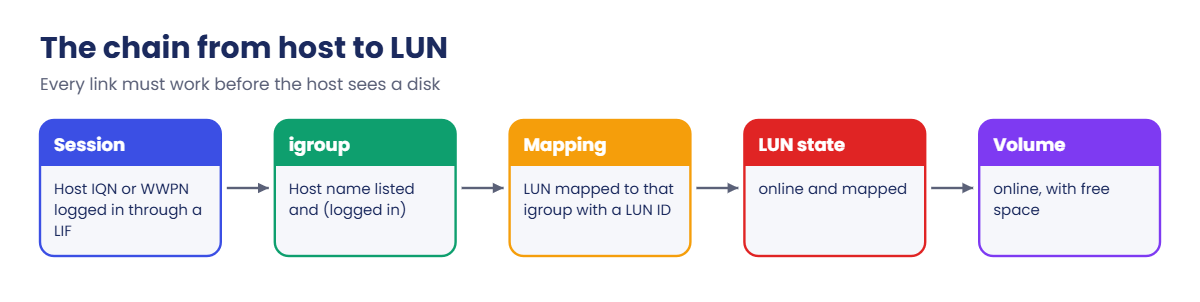
A host sees a LUN only when every link in the chain works: the host’s initiator logs in through a LIF, its name is in an igroup, the LUN is mapped to that igroup, and the LUN and its volume are online.
In Simple Words
A parcel that never arrives
You order a parcel and it doesn’t come. It could be sitting in the warehouse, the courier might have the wrong flat number, the security guard might not have your name on the list, or the shop never packed it at all.
Shouting at the courier doesn’t help if the shop never packed it. You check each step, starting with the one easiest to see.
A missing LUN is the same: the guard’s list is the igroup, the flat number is the LUN mapping, and the parcel itself is the LUN.
Engineer's View
How an engineer describes it
For iSCSI, the host’s initiator (its IQN) must open a session to a LIF that serves default-data-iscsi. For FC, the host’s HBA WWPNs must be zoned to the FC LIF WWPNs and logged in.
In both cases ONTAP then checks the initiator against the igroup, and only LUNs mapped to that igroup are reported. With Selective LUN Map, only the node that owns the LUN and its HA partner report paths.
A LUN can also be there but unusable. It goes offline if an admin runs lun offline, if its volume goes offline, or if the volume or aggregate runs out of space while the LUN has space allocation disabled. With -space-allocation enabled, ONTAP tells the host the space has run out (the SCSI thin provisioning messages) instead of taking the LUN offline.
Two ONTAP signs answer most cases quickly: lun show gives State and Mapped, and lun igroup show -instance marks every initiator as logged in or not logged in.
How it works, step by step
1What the user sees
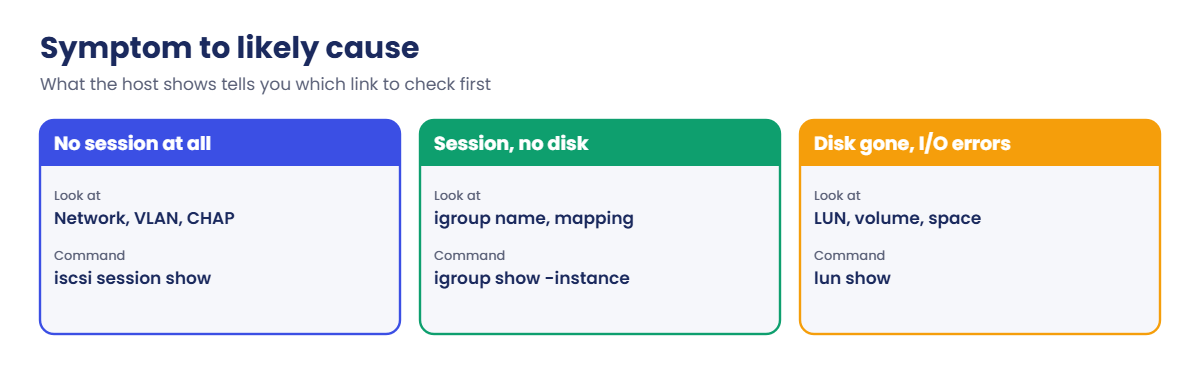
No new disk after a rescan, a disk that vanished after a reboot, I/O errors on an existing disk, or only one path where there should be two. Write down which one, because each points to a different link.
2Where to look, in order
| Check | Command | Healthy answer |
|---|---|---|
| Is the host logged in? | vserver iscsi session show or vserver fcp initiator show | A session or login from the host on both nodes |
| Is it in the igroup? | lun igroup show -instance | The host name followed by (logged in) |
| Is the LUN mapped? | lun mapping show | The LUN listed with this igroup and a LUN ID |
| Is the LUN online? | lun show | State online, Mapped mapped |
| Is the volume online with space? | volume show -fields state,available,percent-used | online, space left |
| Do the right nodes report paths? | lun mapping show -fields reporting-nodes | The LUN’s node and its HA partner |
3How to check the host side
On Linux: iscsiadm -m session, rescan-scsi-bus.sh and multipath -ll; with NetApp Host Utilities installed, sanlun lun show -p prints the ONTAP path for each disk. On Windows: the iSCSI Initiator Targets tab, Disk Management › Rescan Disks, and mpclaim -s -d.
4How to read the result
No session at all is a network, CHAP or target problem. A session that’s logged in but shows (not logged in) in the igroup means the igroup has the wrong name. Logged in and mapped but still nothing means the LUN or volume is offline, or the host simply needs a rescan.
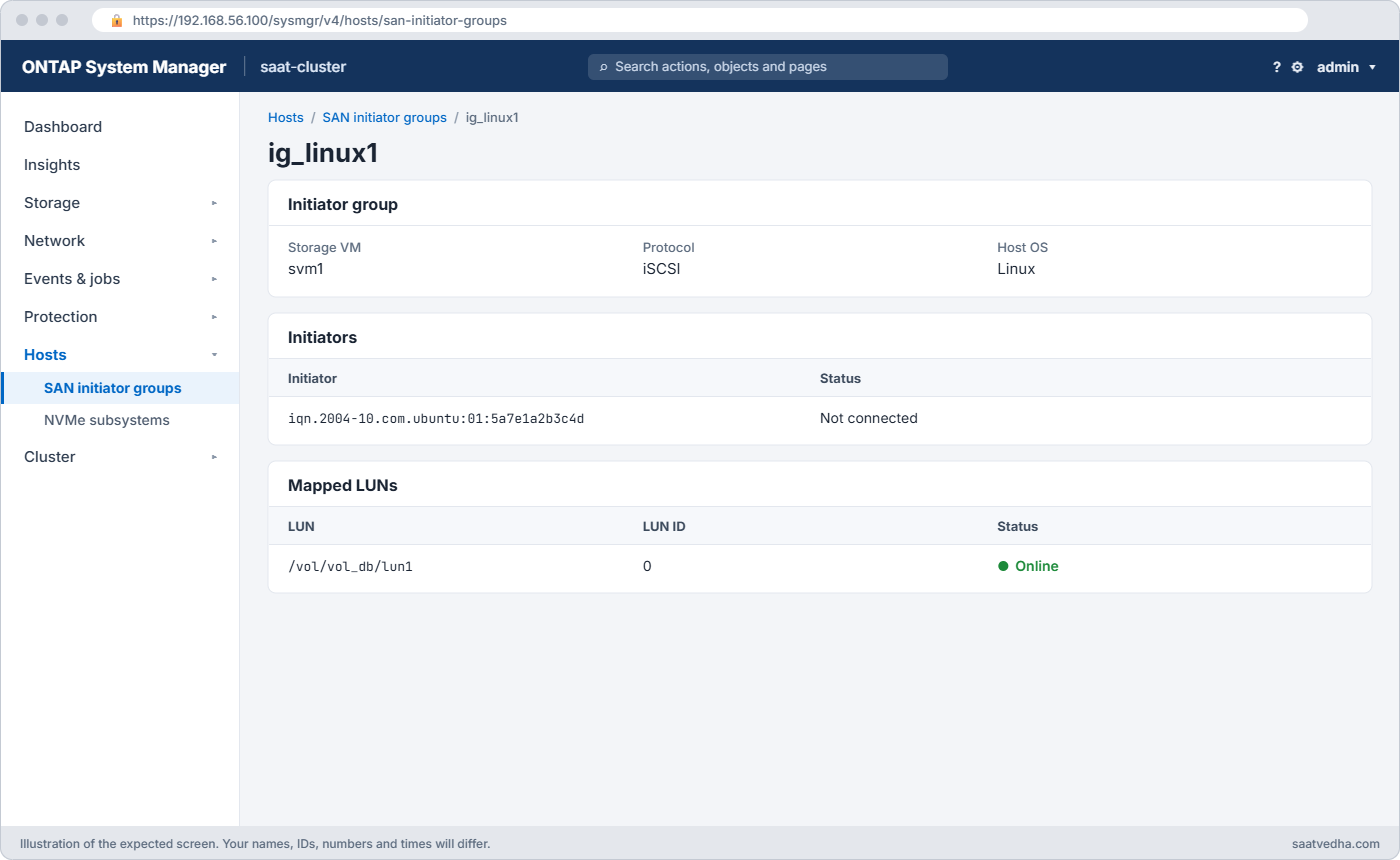
In System Manager, Storage › LUNs shows status and mapping, and Hosts › SAN Initiator Groups shows each initiator with a connected or not connected mark.
Hands-on lab: lose a LUN and get it back
Before you run any command, double-check it
Read every command twice before you press Enter. Check the target: the server name, the user, the disk or device name, the path and the sizes. These commands are for learning and were tested in our lab, not on your system. At work, run the read-only commands first, follow your change process, make sure a backup exists, and ask a second person to check anything that changes or deletes data. You run them at your own risk.
This lab uses the SaatVedha ONTAP practice shell, our own learning tool. It is not NetApp software: real ONTAP output looks like this but is not identical.
1Build the lab and give linux1 a LUN
Reset and run setup-p4.txt from Lesson 47, log in, and create a thin LUN for linux1:
volume create -vserver svm1 -volume vol_db1 -aggregate aggr1_01 -size 60g -space-guarantee none -snapshot-policy none
lun create -vserver svm1 -path /vol/vol_db1/lun1 -size 50g -ostype linux -space-reserve disabled
lun igroup create -vserver svm1 -igroup ig_linux1 -protocol iscsi -ostype linux -initiator iqn.2004-10.com.ubuntu:01:5a7e1a2b3c4d
lun mapping create -vserver svm1 -path /vol/vol_db1/lun1 -igroup ig_linux1The LUN create line prints:
Created a LUN of size 50GB (53687091200)✅ Checkpoint: Four commands ran with no Error line.
2Connect the host and see two paths
simctl host linux1 iscsi-discover 192.168.56.131
simctl host linux1 iscsi-login
simctl host linux1 rescan
simctl host linux1 multipathYou should see this at the end:
3600a098073553356315353595551707 dm-2 NETAPP,LUN C-Mode
size=50G features='3 queue_if_no_path pg_init_retries 50' hwhandler='1 alua' wp=rw
|-+- policy='service-time 0' prio=50 status=active
| `- 30:0:0:0 sdj 8:16 active ready running
`-+- policy='service-time 0' prio=10 status=enabled
`- 32:0:0:0 sdl 8:48 active ready runningTwo paths: the active one (prio=50) goes through node 01, which owns the LUN, and the enabled one (prio=10) through node 02. That’s ALUA doing its job.
✅ Checkpoint: multipath shows a 50G NETAPP LUN with two paths.
3Scenario 1: the disk disappears
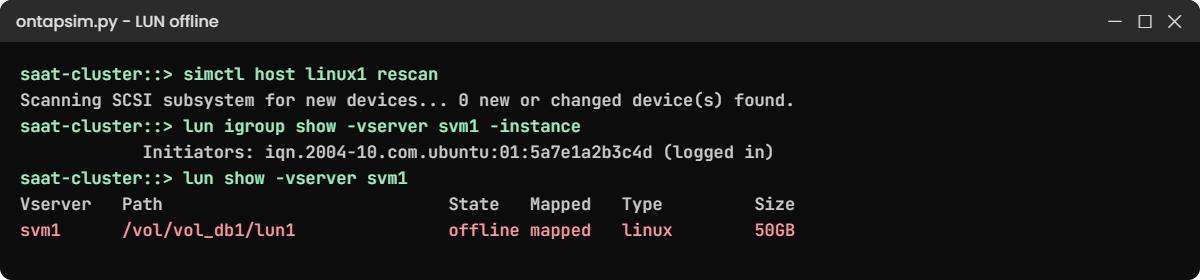
Someone runs a clean-up script with the wrong path. Play it, then look from the host first:
lun offline -vserver svm1 -path /vol/vol_db1/lun1
simctl host linux1 rescanThe host says:
Scanning SCSI subsystem for new devices... 0 new or changed device(s) found.
(No LUN paths. Check: sessions or FC logins, igroup initiators, LUN mapping, LUN/volume online, reporting nodes.)✅ Checkpoint: The host finds no LUN paths.
4Walk the chain on ONTAP
vserver iscsi session show -vserver svm1
lun igroup show -vserver svm1 -instance
lun show -vserver svm1You should see this:
saat-cluster::> vserver iscsi session show -vserver svm1
Tpgroup Initiator Initiator
Vserver Name TSIH Name Alias
---------- ------------- ---- ---------------------------------------------- ----------
svm1 svm1_iscsi1 1 iqn.2004-10.com.ubuntu:01:5a7e1a2b3c4d linux1
svm1 svm1_iscsi2 2 iqn.2004-10.com.ubuntu:01:5a7e1a2b3c4d linux1
2 entries were displayed.
...
Initiators: iqn.2004-10.com.ubuntu:01:5a7e1a2b3c4d (logged in)
saat-cluster::> lun show -vserver svm1
Vserver Path State Mapped Type Size
--------- ------------------------------- ------- -------- -------- --------
svm1 /vol/vol_db1/lun1 offline mapped linux 50GBSessions fine, igroup fine, mapping fine, but State is offline. Before you bring it back, check the volume has space and the event log for why it went offline, because a LUN that ran out of space will go offline again.
✅ Checkpoint: You found State offline while everything above it is healthy.
5Fix and confirm from the host
lun online -vserver svm1 -path /vol/vol_db1/lun1
simctl host linux1 rescan
simctl host linux1 multipathYou should see:
Scanning SCSI subsystem for new devices... 2 new or changed device(s) found.
3600a098073553356315353595551707 dm-2 NETAPP,LUN C-Mode
size=50G features='3 queue_if_no_path pg_init_retries 50' hwhandler='1 alua' wp=rw
|-+- policy='service-time 0' prio=50 status=active
| `- 30:0:0:0 sdj 8:16 active ready running
`-+- policy='service-time 0' prio=10 status=enabled
`- 32:0:0:0 sdl 8:48 active ready running✅ Checkpoint: Both paths are back.
Try it yourself: Open the LUN, igroup and path check in the Command Builder.
Break It, Then Fix It
The most common real cause: the host’s initiator name doesn’t match the igroup, usually after a server rebuild.
1Break the igroup
simctl break iqn-typo svm1 ig_linux1
simctl tick 1
simctl host linux1 rescanThe host says:
Scanning SCSI subsystem for new devices... 0 new or changed device(s) found.
(No LUN paths. Check: sessions or FC logins, igroup initiators, LUN mapping, LUN/volume online, reporting nodes.)✅ Checkpoint: No LUN paths on the host.
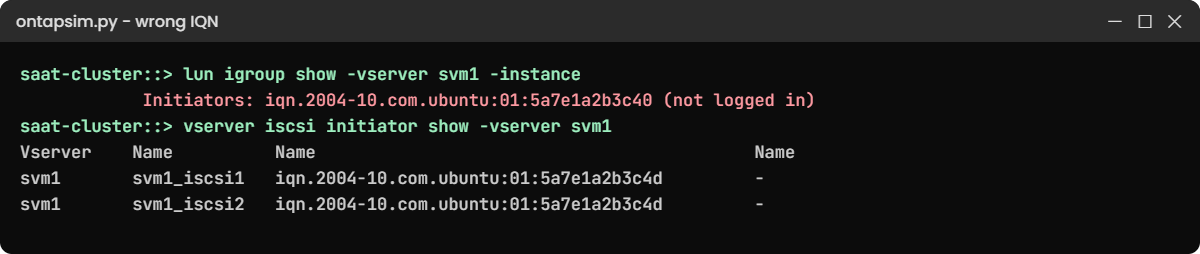
2Find it from ONTAP
lun show -vserver svm1
lun igroup show -vserver svm1 -instance
vserver iscsi initiator show -vserver svm1You’ll get this:
svm1 /vol/vol_db1/lun1 online mapped linux 50GB
...
Initiators: iqn.2004-10.com.ubuntu:01:5a7e1a2b3c40 (not logged in)
saat-cluster::> vserver iscsi initiator show -vserver svm1
Tpgroup Initiator Igroup
Vserver Name Name Name
---------- ------------- ---------------------------------------------- ------------
svm1 svm1_iscsi1 iqn.2004-10.com.ubuntu:01:5a7e1a2b3c4d -
svm1 svm1_iscsi2 iqn.2004-10.com.ubuntu:01:5a7e1a2b3c4d -
2 entries were displayed.The LUN is online and mapped. The host is logged in on both LIFs, but its IQN ends in 3c4d and belongs to no igroup (Igroup Name is a dash), while the igroup holds a name ending in 3c40 that nobody uses.
✅ Checkpoint: You can point to the one character that differs.
3Fix the igroup
lun igroup remove -vserver svm1 -igroup ig_linux1 -initiator iqn.2004-10.com.ubuntu:01:5a7e1a2b3c40
lun igroup add -vserver svm1 -igroup ig_linux1 -initiator iqn.2004-10.com.ubuntu:01:5a7e1a2b3c4d
simctl host linux1 rescanYou should see:
Scanning SCSI subsystem for new devices... 2 new or changed device(s) found.Copy IQNs and WWPNs from vserver iscsi initiator show or vserver fcp initiator show instead of typing them. If you remove the wrong one by mistake, ONTAP says the initiator is not in the igroup and changes nothing.
✅ Checkpoint: The host finds 2 devices again.
This happened at work
The server that came back with a new name
A textile exporter in Jodhpur rebuilt its ERP database server on a Saturday after a failed OS patch. The Linux admin reinstalled Ubuntu, set the same hostname and IP address, installed open-iscsi and ran discovery and login, which both worked.
The LUN never showed up. The team spent two hours with the network vendor checking VLANs and jumbo frames, because “login works, so it must be the network”. Then the storage engineer ran lun igroup show -instance and saw the old IQN marked not logged in: the reinstall had created a new initiator name in /etc/iscsi/initiatorname.iscsi.
Adding the new IQN to the igroup brought the disk back in a minute. The team now copies the old initiatorname.iscsi file into the server’s rebuild notes, and their SAN runbook checks the igroup before anyone calls the network team.
Common mistakes and troubleshooting
| Mistake | What happens | Do this instead |
|---|---|---|
| Blaming the network because the disk is missing | Hours lost on switches while the igroup is wrong | If the session is up, check the igroup and mapping first |
| Typing an IQN or WWPN by hand | One wrong character and the host sees nothing | Copy from vserver iscsi initiator show or the switch |
| Bringing a LUN online without asking why it went offline | It goes offline again when the volume fills | Check volume space and the event log first |
| Forgetting the host rescan | ONTAP is fixed but the host still shows nothing | Rescan on Linux or in Disk Management after every change |
| Checking only one path | A missing path stays hidden until the other node fails | Expect a path through the LUN’s node and its partner |
Interview questions
Click a question to open it. Each one is written the way an interviewer would ask it. Under it you will see why they ask it and one way you could answer, in your own words.
Fresher level
1. A Linux admin says they can’t see the new LUN you created. What do you check first?
Why they ask this: They want to see that you have an order for SAN checks instead of guessing.
How you might answer: I’d check that the host has a session with vserver iscsi session show, then lun igroup show -instance to see if its IQN is there and logged in. Then lun mapping show and lun show for mapping and state, and finally I’d ask them to rescan.
2. What’s an igroup, in simple words?
Why they ask this: They’re checking the basic idea behind LUN masking.
How you might answer: An igroup is the guest list for a LUN. It holds the IQNs or WWPNs of the hosts allowed to see it, and a LUN is only shown to hosts whose igroup it’s mapped to.
2–5 years experience
3. The host has an iSCSI session but still sees no disk. What does that tell you?
Why they ask this: They want to know you can narrow the problem down from one fact.
How you might answer: The network and the target are fine, so I’d look above that: is the host’s IQN in the right igroup, is the LUN mapped to it, and is the LUN online. In my experience it’s usually a changed IQN after a rebuild or a missing mapping.
4. A thin LUN went offline overnight. What’s your likely cause, and how do you stop it happening again?
Why they ask this: They’re testing whether you connect LUN state with space management.
How you might answer: Most likely the volume or the aggregate ran out of space and ONTAP took the LUN offline to protect it. I’d add space or move the volume, bring the LUN online, then turn on volume autosize, watch aggregate free space, and consider -space-allocation enabled so the host gets told about the shortage instead.
Senior level
5. How would you design LUN provisioning so that “host can’t see LUN” tickets become rare?
Why they ask this: They want to see you prevent problems with process and naming, not just fix them.
How you might answer: I’d build it from a template or the Command Builder style of fixed steps, with igroup names that match the host name and IQNs pulled from the host, never typed. Every new LUN would be checked from the host with multipath before the ticket closes, and rebuild runbooks would save the old initiator name.
6. After moving a LUN’s volume to another HA pair, the host shows only non-optimized paths. Why, and what would you do?
Why they ask this: They’re checking that you understand Selective LUN Map and reporting nodes.
How you might answer: With Selective LUN Map only the owning node and its partner report paths, so after the move the new pair may not be reporting. I’d add the new nodes with lun mapping add-reporting-nodes, ideally before the move, rescan the host, and remove the old ones once the optimized paths show.
Quick quiz
Q1. lun igroup show -instance shows the host’s IQN as (not logged in). What is the most likely cause?
- The LUN is offline
- The IQN in the igroup is wrong or the host isn’t connected
- The aggregate is full
- The volume has no snapshot
Show answer
B — ONTAP can’t match a logged-in session to that name.
Q2. Which command shows whether a LUN is online and mapped?
- lun show
- volume show-space
- network port show
- event log show
Show answer
A — lun show lists State and Mapped for every LUN.
Q3. What can take a LUN offline by itself?
- A host rescan
- The volume running out of space with space allocation disabled
- Adding an igroup
- Turning on dedupe
Show answer
B — ONTAP protects the LUN when writes can’t be completed.
Q4. Why should you rescan the host after fixing a mapping?
- To reset the cluster
- The host only finds new or changed LUNs when it scans
- To delete old paths on ONTAP
- It is never needed
Show answer
B — ONTAP fixes the target side; the host still has to look again.
Q5. Where in System Manager can you see if an initiator is connected?
- Hosts › SAN Initiator Groups
- Storage › Tiers
- Protection › Overview
- Cluster › Disks
Show answer
A — it lists each initiator and its connection status.
Quick recap
- A host needs a session, a matching igroup, a mapping and an online LUN in an online volume with space.
- Session up but no disk: check the igroup and mapping before the network.
- lun igroup show -instance marks each initiator logged in or not logged in.
- A LUN can go offline when its volume runs out of space; fix the space first.
- Always rescan the host and check both paths before you close the ticket.
Next lesson
Lesson 49: NFS stale file handle on Linux clients → You’ll find out why a Linux mount suddenly says Stale file handle, and how to clear it.
Further reading: ONTAP LUN not visible
Want to go deeper into ONTAP LUN not visible? NetApp’s ONTAP concepts guide explains SVMs, LIFs and SAN protocols, and the NetApp Knowledge Base article “LUN offline due to lack of space” covers space-related outages. You can also see the full plan for this course on the NetApp ONTAP Storage Administration course page.
