NAS and SAN load balancing: LIF placement and DNS load balancing

Lesson 21 gave each SVM its LIFs. This page is about where you put them and how clients pick one, because a cluster with four healthy nodes can still feel slow if every client is talking to the same port.

SAN and NAS solve this in very different ways, so we take them one at a time and finish with ONTAP’s own DNS load balancing.

Where this page fits

Deep dive in NetApp ONTAP Storage Administration · Phase 1, Architecture and foundation · Before this: Lesson 21, Data LIFs, home ports and failover · Next: Lesson 22, SVM admin delegation and RBAC

TimeYou needBy the end you can
45 minutesThe practice shell (version 1.1) and Lessons 19 to 21Place LIFs so traffic spreads across nodes, explain direct and indirect access, and set up an on-box DNS load balancing zone

What it is, in one line

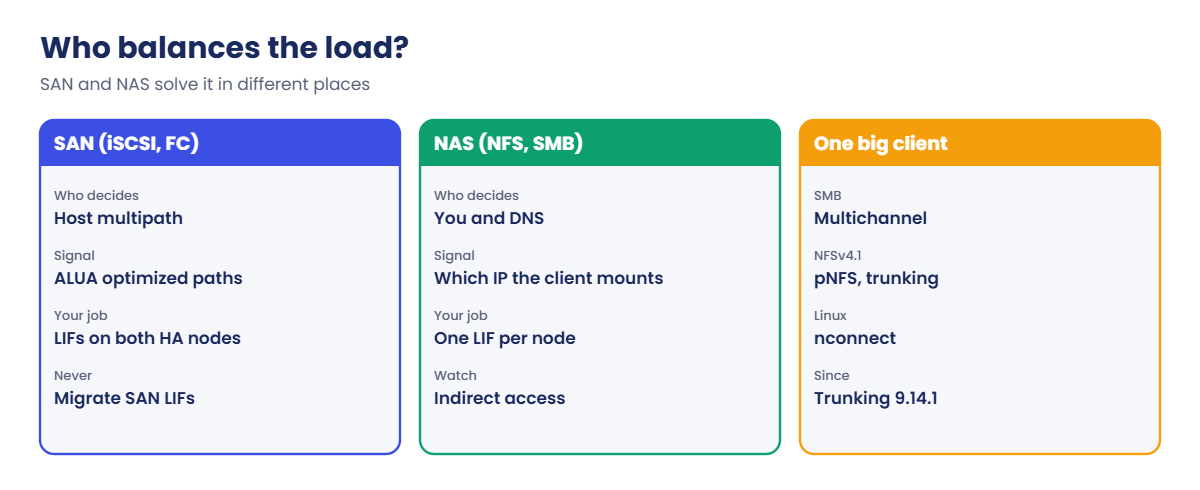
ONTAP load balancing is the job of spreading client connections across nodes and ports: SAN hosts do it themselves with multipathing, and for NAS you do it by placing LIFs well and handing clients the right address.

In Simple Words

The bank with four counters

A bank opens four counters, but everyone queues at counter 1 because it’s nearest the door. Three cashiers sit idle while the queue grows.

The fix is a token machine at the entrance that looks at the queues and sends you to the shortest one. In ONTAP, SAN hosts carry their own token machine (multipath software), while NAS clients need you, or DNS, to point them to a counter.

Engineer's View

Two different problems

SAN: a LUN is reachable through many LIFs at once. ALUA tells the host which paths are optimized (through the node that owns the LUN’s aggregate) and which are not, and the host’s multipath driver spreads I/O over the optimized ones. Selective LUN Map (SLM) limits the paths to the owning node and its HA partner, so hosts don’t see a sprawl of paths through every node.

NAS: an NFS mount or SMB session uses one IP address, which means one LIF on one port of one node. If the volume lives on another node, the request crosses the cluster network first. That is called indirect access, and it works, but it adds a little latency and uses cluster bandwidth.

Spreading NAS clients is done with LIF placement (at least one data LIF per node), with DNS (site-wide round robin, or ONTAP’s on-box DNS load balancing zone), and with protocol features: SMB 3 multichannel, pNFS for NFSv4.1, and NFSv4.1 session trunking, which arrived in ONTAP 9.14.1. Older 8.x releases could also move NFSv3 LIFs between ports automatically; that feature is not part of ONTAP 9, so placement is now a design task.

How it works, step by step

1SAN: let multipathing do the work

Create iSCSI or FC LIFs on both nodes of the HA pair that owns the LUN, and make sure every host has paths through both. The host then sends I/O over the optimized paths and keeps the others as standby.

SettingWhat to aim for
Paths per LUNTwo to four optimized and the same number non-optimized is plenty. More paths do not mean more speed, and very high counts slow down rescans and failover.
LIFsAt least one per node per fabric or network, on the owning HA pair
SLMLeave the default: reporting nodes are the owning node and its partner. Add reporting nodes before you move a LUN volume to another HA pair
Host sidedm-multipath or MPIO with the NetApp Host Utilities settings (Lesson 24)

SAN LIFs don’t fail over and you never “load balance” them by migrating. If one path is busy, you look at the host’s path policy and the port speed, not at the LIF.

ONTAP load balancing for SAN, NAS and single large clients

2NAS: one LIF per node, close to the data

Give every node that hosts data at least one NAS LIF in the SVM. Then a client can reach any volume either directly (LIF and volume on the same node) or indirectly (LIF on another node), and you can steer heavy clients to the direct path.

The checks you’ll use all the time are volume show -fields aggregate,node for where the data is, and network interface show -fields home-node,curr-node for where the address is. After a volume move, the volume may sit on a new node while its clients still come in through the old LIF; that’s when you move the LIF too, or give heavy clients the address of the closer LIF.

network interface migrate moves a NAS LIF to another port now, and network interface revert sends it home. Clients keep their mount because the IP address moves with the LIF.

3DNS: off-box round robin or an on-box zone

With off-box DNS you create several A records for one name, one per LIF, and the DNS server hands them out in turn. It’s simple, but DNS has no idea which LIF is busy, so a few heavy clients can still land on the same node.

With an on-box DNS load balancing zone, the LIFs themselves answer DNS queries for a name such as nas.saatvedha.lab. ONTAP gives each LIF a weight based on the load on its port and the CPU of its home node, and answers with a lightly loaded LIF. You put LIFs in the zone with -dns-zone on network interface create or modify.

The site DNS server must send queries for that zone to the LIF addresses, using a delegation (NS records) or a conditional forwarder. The zone name must be unique in the cluster and contain at least one dot.

ONTAP on-box DNS load balancing zone lookup flow

4Protocol features that spread one client

FeatureProtocolWhat it does
SMB multichannelSMB 3One Windows client opens several connections over several NICs or LIFs to the same server
pNFSNFSv4.1The client is told which node holds the data and goes straight there, even after a volume move
Session trunkingNFSv4.1 (ONTAP 9.14.1 and later)One client uses several LIFs on the same node in one session; up to 16 connections per node
nconnectNFS on LinuxSeveral TCP connections over one LIF; simpler than trunking but tied to one address

These help one big client. DNS and LIF placement help many small ones, and a busy cluster usually needs both. In System Manager, NAS LIFs live under Network > Overview > Network interfaces; the DNS zone is a CLI setting.

Hands-on lab: spread NFS clients with a DNS load balancing zone

Before you run any command, double-check it

Read every command twice before you press Enter. Check the target: the server name, the user, the disk or device name, the path and the sizes. These commands are for learning and were tested in our lab, not on your system. At work, run the read-only commands first, follow your change process, make sure a backup exists, and ask a second person to check anything that changes or deletes data. You run them at your own risk.

This lab uses the SaatVedha ONTAP practice shell, our own learning tool. It is not NetApp software: real ONTAP output looks like this but is not identical.

You need practice shell 1.1 or later (version shows it). The lab builds an SVM with one NAS LIF on each node, then adds a DNS zone so clients spread themselves.

1Build the lab

Save these lines as setup-lb.txt in your lab folder:

storage aggregate create -aggregate aggr1_01 -node saat-cluster-01 -diskcount 8 -disktype SAS
storage aggregate create -aggregate aggr1_02 -node saat-cluster-02 -diskcount 8 -disktype SAS
vserver create -vserver svm1 -aggregate aggr1_01 -rootvolume-security-style unix
network interface create -vserver svm1 -lif svm1_nas1 -service-policy default-data-files -home-node saat-cluster-01 -home-port e0c -address 192.168.56.130 -netmask 255.255.255.0
network interface create -vserver svm1 -lif svm1_nas2 -service-policy default-data-files -home-node saat-cluster-02 -home-port e0c -address 192.168.56.131 -netmask 255.255.255.0
vserver nfs create -vserver svm1 -v3 enabled -v4.1 enabled
vserver export-policy rule create -vserver svm1 -policyname default -clientmatch 192.168.56.0/24 -rorule sys -rwrule sys -superuser sys
volume create -vserver svm1 -volume vol_web -aggregate aggr1_02 -size 50g -junction-path /web
python ontapsim.py -c "simctl reset"
python ontapsim.py --run setup-lb.txt

✅ Checkpoint: The last line of the run says Job succeeded and no line starts with Error.

2Find the data and the addresses

network interface show -vserver svm1
volume show -vserver svm1 -volume vol_web -fields aggregate,node

You should see this:

            Logical    Status     Network            Current         Current Is
Vserver     Interface  Admin/Oper Address/Mask       Node            Port    Home
----------- ---------- ---------- ------------------ --------------- ------- ----
svm1
            svm1_nas1  up/up      192.168.56.130/24  saat-cluster-01 e0c     true
            svm1_nas2  up/up      192.168.56.131/24  saat-cluster-02 e0c     true
2 entries were displayed.
saat-cluster::> volume show -vserver svm1 -volume vol_web -fields aggregate,node
vserver volume  aggregate node
------- ------- --------- ---------------
svm1    vol_web aggr1_02  saat-cluster-02

vol_web lives on node 02. A client that mounts through 192.168.56.131 gets direct access, and one that uses 192.168.56.130 goes through node 01 and across the cluster network.

✅ Checkpoint: You can say which LIF gives direct access to vol_web.

3Put both LIFs in a DNS zone

network interface modify -vserver svm1 -lif svm1_nas1 -dns-zone nas.saatvedha.lab
network interface modify -vserver svm1 -lif svm1_nas2 -dns-zone nas.saatvedha.lab
network interface show -vserver svm1 -fields dns-zone,listen-for-dns-query

You should see this:

vserver lif       dns-zone          listen-for-dns-query
------- --------- ----------------- --------------------
svm1    svm1_nas1 nas.saatvedha.lab true
svm1    svm1_nas2 nas.saatvedha.lab true
2 entries were displayed.

✅ Checkpoint: Both LIFs show nas.saatvedha.lab and listen-for-dns-query true.

4Ask DNS, then delegate the zone

simctl host linux1 nslookup nas.saatvedha.lab
simctl dns delegate nas.saatvedha.lab 192.168.56.130,192.168.56.131
simctl host linux1 nslookup nas.saatvedha.lab

You should see this:

Server:         192.168.56.10
Address:        192.168.56.10#53

** server can't find nas.saatvedha.lab: NXDOMAIN
saat-cluster::> simctl dns delegate nas.saatvedha.lab 192.168.56.130,192.168.56.131
simctl: lab DNS server dc1 (192.168.56.10) now delegates nas.saatvedha.lab to 192.168.56.130,192.168.56.131.
saat-cluster::> simctl host linux1 nslookup nas.saatvedha.lab
Server:         192.168.56.10
Address:        192.168.56.10#53

Non-authoritative answer:
Name:   nas.saatvedha.lab
Address: 192.168.56.130

The first query fails because the company DNS server (dc1) doesn’t know who answers for the zone. simctl dns delegate plays the part of the DNS admin adding a delegation; on a real Windows DNS server you’d create a new delegation for nas under saatvedha.lab with the two LIF addresses as name servers.

✅ Checkpoint: The second nslookup returns one of the two LIF addresses.

5Watch two clients get different LIFs

simctl host linux1 mount 192.168.56.130:/web /mnt/web vers=3
simctl host rhel1 nslookup nas.saatvedha.lab
simctl host rhel1 mount 192.168.56.131:/web /mnt/web vers=3

You should see this:

(mounted 192.168.56.130:/web on /mnt/web type nfs)
saat-cluster::> simctl host rhel1 nslookup nas.saatvedha.lab
Server:         192.168.56.10
Address:        192.168.56.10#53

Non-authoritative answer:
Name:   nas.saatvedha.lab
Address: 192.168.56.131

Once linux1 is using svm1_nas1, the zone answers rhel1 with svm1_nas2. On real clients you’d simply mount nas.saatvedha.lab:/web and the name lookup happens inside mount; the practice shell’s client view needs the IP, so you copy it from nslookup.

✅ Checkpoint: linux1 and rhel1 are mounted through different LIFs.
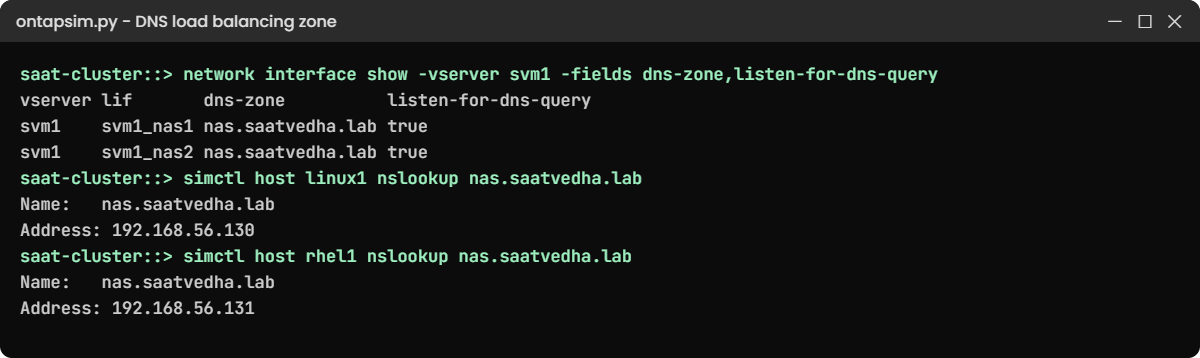
Practice shell: two clients get different LIFs from the DNS zone
The zone hands linux1 and rhel1 different LIFs.

6Move a LIF and send it home

network interface migrate -vserver svm1 -lif svm1_nas2 -destination-node saat-cluster-01 -destination-port e0d
network interface show -vserver svm1 -fields home-node,curr-node,is-home
network interface revert -vserver svm1 -lif svm1_nas2
network interface show -vserver svm1 -fields home-node,curr-node,is-home

You should see this:

vserver lif       home-node       curr-node       is-home
------- --------- --------------- --------------- -------
svm1    svm1_nas1 saat-cluster-01 saat-cluster-01 true
svm1    svm1_nas2 saat-cluster-02 saat-cluster-01 false
2 entries were displayed.
saat-cluster::> network interface revert -vserver svm1 -lif svm1_nas2
saat-cluster::> network interface show -vserver svm1 -fields home-node,curr-node,is-home
vserver lif       home-node       curr-node       is-home
------- --------- --------------- --------------- -------
svm1    svm1_nas1 saat-cluster-01 saat-cluster-01 true
svm1    svm1_nas2 saat-cluster-02 saat-cluster-02 true
2 entries were displayed.

While svm1_nas2 sat on node 01, both NAS addresses lived on one node and node 02 served nothing directly. That’s the same picture you get after a takeover or a bad migrate, and it’s why -is-home false is part of every health check.

✅ Checkpoint: Both LIFs are back home with is-home true.

Break It, Then Fix It

A one-letter typo in a zone name is easy to make and hard to spot, because nothing fails. Clients still mount; they just all go to the same place.

1Put one LIF in the wrong zone

network interface modify -vserver svm1 -lif svm1_nas2 -dns-zone nas.saatveda.lab
simctl host linux1 nslookup nas.saatvedha.lab
simctl host linux1 mount 192.168.56.130:/web /mnt/reports vers=3
simctl host rhel1 nslookup nas.saatvedha.lab

You’ll get this:

Server:         192.168.56.10
Address:        192.168.56.10#53

Non-authoritative answer:
Name:   nas.saatvedha.lab
Address: 192.168.56.130
saat-cluster::> simctl host linux1 mount 192.168.56.130:/web /mnt/reports vers=3
(mounted 192.168.56.130:/web on /mnt/reports type nfs)
saat-cluster::> simctl host rhel1 nslookup nas.saatvedha.lab
Server:         192.168.56.10
Address:        192.168.56.10#53

Non-authoritative answer:
Name:   nas.saatvedha.lab
Address: 192.168.56.130

svm1_nas1 now carries two mounts and svm1_nas2 one, yet DNS still answers 192.168.56.130. With only one LIF left in the zone, every new client lands on node 01.

✅ Checkpoint: Every lookup returns 192.168.56.130.
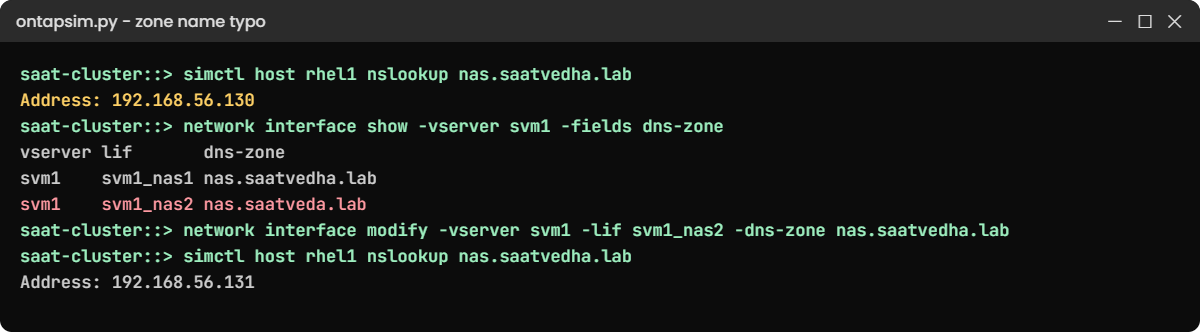
Practice shell: a dns-zone typo sends every client to one LIF
One missing letter keeps svm1_nas2 out of the zone.

2Find it and fix it

network interface show -vserver svm1 -fields dns-zone
network interface modify -vserver svm1 -lif svm1_nas2 -dns-zone nas.saatvedha.lab
simctl host rhel1 nslookup nas.saatvedha.lab

You should see this:

vserver lif       dns-zone
------- --------- -----------------
svm1    svm1_nas1 nas.saatvedha.lab
svm1    svm1_nas2 nas.saatveda.lab
2 entries were displayed.
saat-cluster::> network interface modify -vserver svm1 -lif svm1_nas2 -dns-zone nas.saatvedha.lab
saat-cluster::> simctl host rhel1 nslookup nas.saatvedha.lab
Server:         192.168.56.10
Address:        192.168.56.10#53

Non-authoritative answer:
Name:   nas.saatvedha.lab
Address: 192.168.56.131

The dns-zone column shows the missing “h” at once. With svm1_nas2 back in the zone, DNS sends the next client to the less busy LIF. Clients that already mounted keep their address, so after a fix like this, remount the heavy ones at a quiet time.

✅ Checkpoint: rhel1 now gets 192.168.56.131.

This happened at work

The render farm that used one node

An animation studio in Kolhapur rendered every night on 40 Linux servers that mounted their project share from a four-node cluster. The storage team had created a LIF on every node, but the render scripts had one IP address hard-coded from the day the share was set up.

So every render node mounted through node 1, and node 1’s two 10GbE ports ran flat out while the other three nodes were almost idle. The artists saw frames taking longer each month and someone asked for a faster array.

The storage engineer found it with network interface show and statistics on the ports. The team created a DNS load balancing zone with all four LIFs, changed the scripts to mount the zone name, and remounted the farm over a weekend. Render times dropped back to normal, and the purchase request was withdrawn.

Common mistakes and troubleshooting

MistakeWhat happensDo this instead
Hard-coding one LIF IP in every clientAll NAS traffic lands on one nodeUse a DNS name: round robin or an on-box zone
Adding more SAN paths to “go faster”Slower rescans and failovers, no extra speedKeep a few optimized paths per LUN; check the host path policy
Forgetting the delegation or forwarderThe zone name doesn’t resolve (NXDOMAIN)Ask the DNS team to delegate or forward the zone to the LIF IPs
Typo in -dns-zone on one LIFThat LIF never gets new clientsCheck network interface show -fields dns-zone after every change
Leaving LIFs on the partner after a takeoverOne node carries all NAS trafficCheck -is-home false and revert after giveback

Interview questions

Click a question to open it. Each one is written the way an interviewer would ask it. Under it you will see why they ask it and one way you could answer, in your own words.

Fresher level

1. What’s the difference between direct and indirect access for an NFS client on ONTAP?

Why they ask this: They want to know you understand how a NAS request travels inside a cluster.

How you might answer: Direct access means the client’s LIF is on the same node as the volume, so the node serves it straight away. Indirect access means the LIF is on another node, so the request crosses the cluster network first. Both work, but heavy clients should use a LIF on the node that owns the volume.

2. How does a SAN host spread its I/O over an ONTAP cluster?

Why they ask this: They’re checking that you know SAN load balancing lives in the host, not in the LIFs.

How you might answer: The host’s multipath driver sees several paths to the LUN, and ALUA marks the ones through the owning node as optimized. It sends I/O over those and keeps the others as standby, so I make sure there are LIFs on both nodes of the HA pair and the host has the right multipath settings.

2–5 years experience

3. After a volume move, a team says their NFS share got a bit slower. What would you check?

Why they ask this: They want to see that you connect volume placement with LIF placement.

How you might answer: I’d compare volume show -fields node with the LIF the clients mount through. If the volume moved to another node, the clients now go indirect, so I’d give them the LIF on the new node or migrate a LIF there. I’d also check the cluster ports aren’t busy.

4. How does ONTAP’s on-box DNS load balancing decide which address to return?

Why they ask this: They’re testing whether you know it’s smarter than round robin and what it needs to work.

How you might answer: Each LIF in the zone gets a weight from its port load and its home node’s CPU, and the LIF answers with a lightly loaded address. It only works if the company DNS delegates or forwards the zone name to the LIF addresses, so I always test it with nslookup from a client.

Senior level

5. A customer wants one Linux server to push more NFS throughput than one 25GbE port allows. What options would you discuss?

Why they ask this: They want to see you know the protocol features and their limits, not just “add more LIFs”.

How you might answer: I’d look at NFSv4.1 session trunking, which ONTAP supports from 9.14.1, so the client uses several LIFs on the same node in one session. nconnect is simpler but stays on one LIF, and pNFS helps the client reach the node that owns the data.

I’d also check the client and switch ports, because the bottleneck is often there.

6. How would you design LIF placement for a new eight-node NAS cluster?

Why they ask this: They want a structured design answer that covers failure and growth.

How you might answer: At least one data LIF per node per SVM, with failover groups that cover ports on other nodes, and a DNS name for clients, either round robin or an on-box zone. Heavy applications get the address of the node that holds their volumes.

After any volume move or takeover I’d check placement again, because ONTAP 9 doesn’t rebalance LIFs by itself.

Quick quiz

Q1. What does a SAN host use to spread I/O across paths?

  1. DNS round robin
  2. Its multipath driver with ALUA
  3. LIF migrate
  4. SMB multichannel
Show answer

B — the host multipath software uses ALUA to pick optimized paths.

Q2. An NFS client mounts through a LIF on node 1, and the volume lives on node 2. What is this called?

  1. Direct access
  2. Indirect access
  3. Takeover
  4. Session trunking
Show answer

B — the request crosses the cluster network, which is indirect access.

Q3. Which option puts a LIF into an on-box DNS load balancing zone?

  1. -dns-zone
  2. -failover-group
  3. -service-policy
  4. -auto-revert
Show answer

A — -dns-zone on network interface create or modify adds the LIF to the zone.

Q4. Why does nslookup return NXDOMAIN for a new zone?

  1. The LIFs are down
  2. The site DNS doesn’t delegate or forward the zone
  3. NFS is off
  4. The volume is not mounted
Show answer

B — the company DNS must send queries for the zone to the LIF addresses.

Q5. Which ONTAP release added NFSv4.1 session trunking?

  1. 9.1
  2. 9.8
  3. 9.14.1
  4. 8.3
Show answer

C — NFS trunking arrived in ONTAP 9.14.1.

Quick recap

  • SAN load balancing happens in the host: multipath plus ALUA over a few good paths.
  • For NAS, give every node a LIF and keep heavy clients on the node that owns their volume.
  • Off-box DNS round robin is simple; an on-box zone answers with the least loaded LIF.
  • A zone needs a delegation or forwarder, and every LIF needs the exact zone name.
  • SMB multichannel, pNFS and NFS session trunking help a single big client.

Next lesson

Lesson 22: SVM admin delegation and RBAC → You’ll give an application team their own SVM login and a role that lets them do only what they need.

Further reading: ONTAP load balancing

Want to go deeper into ONTAP load balancing? NetApp explains the weights behind on-box zones in How DNS load balancing works, and the client side of trunking in NFS trunking. You can also see the full plan for this course on the NetApp ONTAP Storage Administration course page.

Scroll to Top

This website uses cookies

We use a few cookies to keep this site working. If you allow it, we also use Google Analytics to count visits so we can improve our lessons. You can accept all, deny the optional ones, or choose what to allow.