AFF, FAS and ASA hardware, shelves and cabling

Sooner or later someone will hand you a rack diagram, a box of SAS cables and a new disk shelf, and ask you to “just add it”. Knowing the hardware families and how shelves are cabled keeps that job boring, which is exactly how it should be.

This lesson walks through the AFF, FAS and ASA families, the disk shelves you’ll meet, how disks get their names, and why every shelf is cabled to both controllers. In the lab you’ll read the hardware from the CLI and deal with a failed drive.

Where this lesson fits

Lesson 6 of 56 in NetApp ONTAP Storage Administration · Phase 1: Architecture and foundation · Before this: Lesson 5, the three networks · Next: Lesson 7, cluster setup

TimeYou needBy the end you can
45 minutesThe practice shellTell AFF, FAS and ASA apart, read shelf and disk names, check FC ports and the SP, and find a failed disk by its bay

What it is, in one line

NetApp ONTAP hardware comes in three families (AFF all-flash, ASA all-flash SAN, FAS hybrid and disk), and every model is a pair of controllers cabled to disk shelves so that both controllers can reach every disk.

In Simple Words

Shelves in a library

Think of a library with tall shelves of books. Each shelf has a number, each slot on the shelf has a number, so a book’s address is “row 1, shelf 0, slot 5” and anybody can walk straight to it.

The library has two librarians, and every shelf has a path from both of their desks. If one aisle is blocked, the librarian walks round the other way. When a book is damaged, you go to its slot, swap it for a new copy and the catalogue updates itself.

Disk shelves work the same way: every disk has an address like 1.0.5, and each shelf is cabled so both controllers can reach it by two paths.

Engineer's View

How an engineer describes it

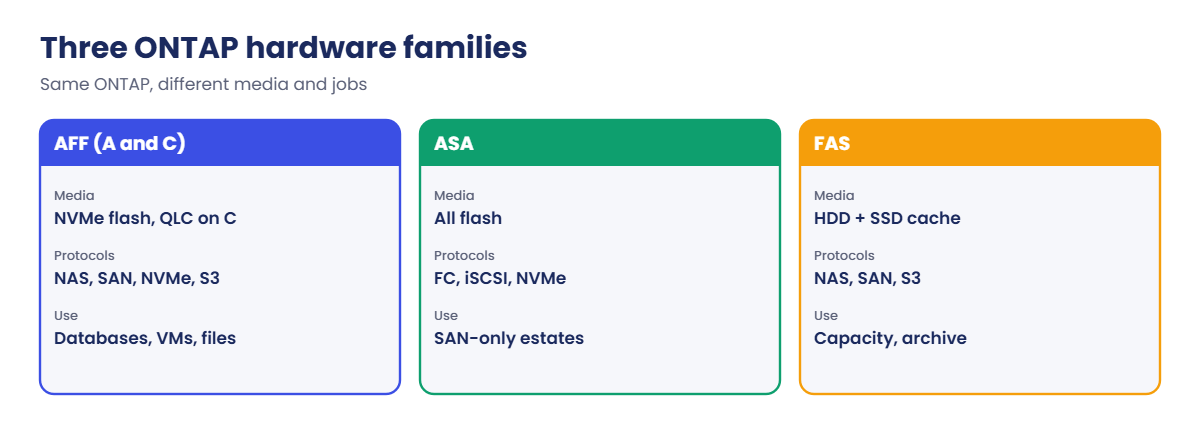
AFF systems are all-flash and run every protocol (NFS, SMB, iSCSI, FC, NVMe, S3). The A-Series uses performance flash for databases and virtualisation; the C-Series uses high-capacity QLC flash for large file and backup workloads. ASA systems are all-flash too, but built only for SAN, with symmetric active-active paths from both controllers.

FAS systems use hard disks, often with SSDs as cache, for capacity at a lower price per TB. Model names change every few years, so always check NetApp’s Hardware Universe for what a model supports.

Disks sit in the controller chassis (on some models) or in external shelves. Common ones are the DS224C (24 small SAS drives, IOM12 modules), DS212C (12 large drives), DS460C (60 large HDDs) and NS224 (24 NVMe SSDs for AFF). Each disk is named stack.shelf.bay, so 1.0.5 is stack 1, shelf ID 0, bay 5.

You set the shelf ID on the shelf’s front panel, and it must be unique.

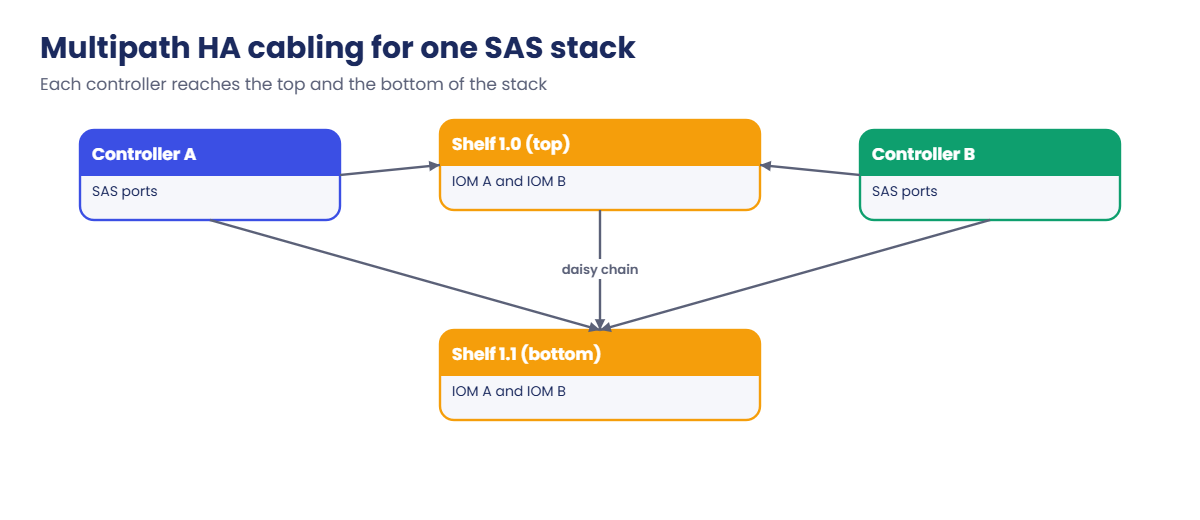
SAS shelves are cabled in stacks with multipath HA: each controller connects to the top and the bottom of the stack, so each controller has two paths to every disk. NVMe shelves connect over Ethernet-based storage ports, also to both controllers. NetApp’s Config Advisor tool checks cabling against best practice, and you should run it after every hardware change.

How it works, step by step

1Pick the family for the job

Fast mixed workloads go on AFF A-Series, big file and backup data on AFF C-Series or FAS, and SAN-only estates often on ASA. The ONTAP commands are the same on all of them.

2Rack the controllers and shelves

Most current models hold both controllers of an HA pair in one chassis. Shelves go above or below, and you set each shelf ID before you power it on.

NetApp AFF FAS hardware: AFF, ASA and FAS compared by media, protocols and use

3Cable for two paths

Each controller connects to both ends of each SAS stack (or to both NVMe shelf modules). Lose one cable, one IOM or one port, and both controllers still see every disk.

4Assign and check the disks

New disks are usually assigned to a node automatically. You check them with storage disk show and confirm both paths with Config Advisor.

NetApp AFF FAS hardware: multipath HA cabling of one SAS stack to two controllers

5Replace parts while running

Disks, shelf modules, power supplies and fans are hot-swappable. A failed disk shows as broken, RAID rebuilds onto a spare, and you swap the drive in the bay ONTAP tells you.

In System Manager, Cluster › Overview shows the controllers, and Cluster › Disks lists every disk with its shelf, bay and state. Some releases also show a picture of the shelves under Cluster › Hardware.
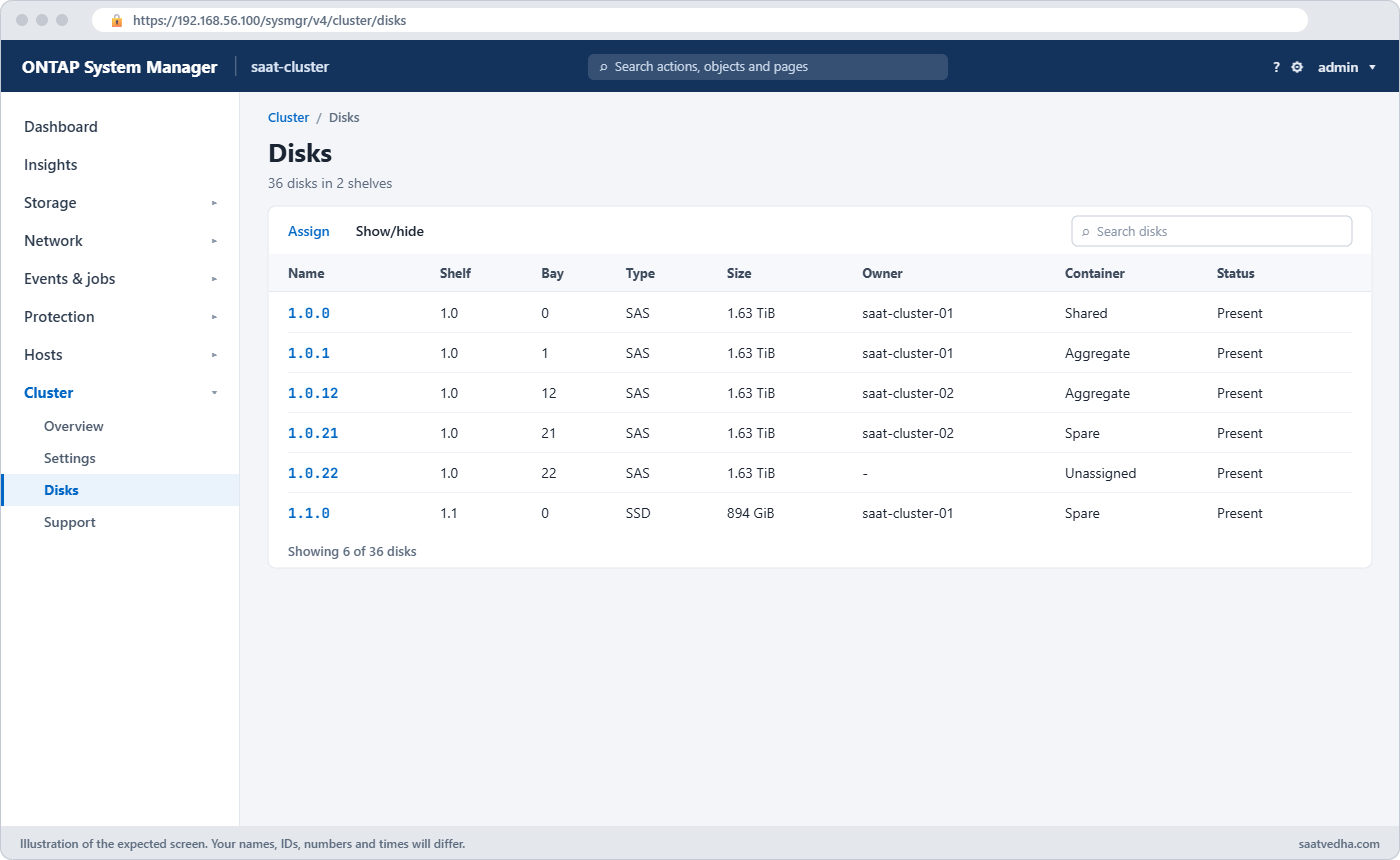
NetApp AFF FAS hardware: System Manager Disks page with shelf and bay for each disk
Cluster › Disks lists every disk with its shelf, bay, type, owner and state.
FamilyMediaProtocolsTypical use
AFF A-SeriesPerformance flash (NVMe)NAS, SAN, NVMe, S3Databases, VMware, mixed workloads
AFF C-SeriesCapacity flash (QLC)NAS, SAN, NVMe, S3Big file shares, backup that still needs flash
ASAAll flashSAN only (FC, iSCSI, NVMe)Block storage with symmetric paths
FASHDD, optional SSD cacheNAS, SAN, S3Home shares, archive, backup copies

Good to know: shelf control paths and mixing rules

Older SAS shelves with IOM3 or IOM6 modules (DS2246, DS4246, DS4486) had a separate Alternate Control Path (ACP): an Ethernet cable that carried shelf management traffic apart from the SAS data cables. IOM12 shelves (DS212C, DS224C, DS460C) carry that control traffic in-band over SAS, so there are no ACP ports to cable.

Some mixing rules come up on every expansion. IOM12 shelves can’t share a stack with IOM3 or IOM6 shelves, and DS4486 shelves only stack with other DS4486 shelves.

Keep each stack to one media type where you can, so SSDs and hard disks don’t share a stack. The maximum number of shelves per stack depends on the platform and shelf type, so check Hardware Universe before you add one.

Hands-on lab: read the hardware from the CLI

Before you run any command, double-check it

Read every command twice before you press Enter. Check the target: the server name, the user, the disk or device name, the path and the sizes. These commands are for learning and were tested in our lab, not on your system. At work, run the read-only commands first, follow your change process, make sure a backup exists, and ask a second person to check anything that changes or deletes data. You run them at your own risk.

This lab uses the SaatVedha ONTAP practice shell, our own learning tool. It is not NetApp software: real ONTAP output looks like this but is not identical.

The lab cluster is two FAS8300 nodes in one HA pair, with two DS224C shelves.

1Reset and log in

python ontapsim.py -c "simctl reset"
python ontapsim.py

✅ Checkpoint: Your prompt reads saat-cluster::>

2Controllers and serial numbers

system node show -fields model,serialnumber,location

You should see this:

node            model   serialnumber location
--------------- ------- ------------ --------
saat-cluster-01 FAS8300 721500001001 Rack A1
saat-cluster-02 FAS8300 721500001002 Rack A2
2 entries were displayed.

Write the serial numbers down; NetApp support asks for them on every case.

✅ Checkpoint: You can read both serial numbers.

3Shelves

storage shelf show
storage shelf show -instance

You should see this:

Shelf Name Shelf ID Serial Number    Model     Type   Status
---------- -------- ---------------- --------- ------ --------
1.0               0 SHFMS100110      DS224C    IOM12  Normal
1.1               1 SHFMS100111      DS224C    IOM12  Normal
2 entries were displayed.
saat-cluster::> storage shelf show -instance
          shelf: 1.0
...
     disk-count: 24
          state: online
connection-type: sas
       stack-id: 1
...
          shelf: 1.1
...
     disk-count: 12

Both shelves are in stack 1. Shelf 1.0 is full with 24 drives; shelf 1.1 has 12.

✅ Checkpoint: Both shelves show Status Normal.

4Disks by address

storage disk show -fields type,usable-size,shelf,bay,owner -shelf 1

You should see this:

disk   type usable-size shelf bay owner
------ ---- ----------- ----- --- ---------------
1.1.0  SSD  894.0GB     1     0   saat-cluster-01
1.1.1  SSD  894.0GB     1     1   saat-cluster-01
...
1.1.6  SSD  894.0GB     1     6   saat-cluster-02
...
1.1.11 SSD  894.0GB     1     11  saat-cluster-02
12 entries were displayed.

Shelf 1 holds SSDs, split half and half between the nodes. The disk name already tells you where it sits: 1.1.6 is stack 1, shelf 1, bay 6.

✅ Checkpoint: You can say which bay disk 1.1.10 is in.

5FC ports and the Service Processor

network fcp adapter show
system node service-processor show

You should see this:

Node             Adapter Established Address WWPN                    Rate (Gbit)
---------------- ------- ----------- ------- ----------------------- -----------
                                     0x0f00100
saat-cluster-01  0e      ptp                 50:0a:09:81:00:ec:00:0e 32
...
saat-cluster::> system node service-processor show
                                IP         Firmware
Node          Type Status       Configured Version   IP Address
------------- ---- ------------ ---------- --------- -------------------------
saat-cluster-01
              SP   online       true       13.4      192.168.56.111
saat-cluster-02
              SP   online       true       13.4      192.168.56.112

Each node has two 32 Gb FC target ports (0e, 0f) for SAN hosts, and an SP you can reach even when ONTAP is down. You’ll use both in later lessons.

✅ Checkpoint: Both SPs are online.
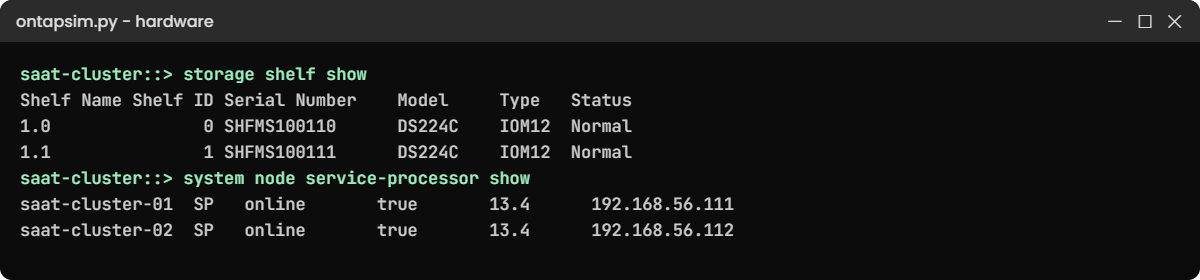
NetApp AFF FAS hardware lab: shelves and Service Processors in the practice shell
Shelf IDs, models and both Service Processors.

Break It, Then Fix It

A drive dies. Find it, “replace” it and check the spare is back.

1Fail a disk

simctl break disk-fail 1.0.5
storage disk show -broken
event log show -severity <=ERROR

You'll get this:

Disk                   Size Shelf Bay Type  Type        Name                  Owner
---------------- ---------- ----- --- ----- ----------- --------------------- ----------------
1.0.5                1.63TB     0   5 SAS   broken      -                     saat-cluster-01
saat-cluster::> event log show -severity <=ERROR
Time                Node             Severity      Event
------------------- ---------------- ------------- ------------------------
11/7/2026 06:46:25  saat-cluster-01  ERROR         raid.disk.fail: Disk 1.0.5 failed (SV8543E249)

The disk was a spare, so no data was at risk; if it had been in a RAID group, ONTAP would rebuild onto a spare (Lesson 12). The address says shelf 0, bay 5, and on real hardware the drive's fault LED is amber. AutoSupport also sends NetApp a case so a replacement gets shipped.

2Replace it

On real hardware you pull the drive from shelf 0, bay 5 and slide in the new one. In the shell:

simctl fix disk-fail
storage disk show -broken
storage aggregate show-spare-disks -original-owner saat-cluster-01

You'll get this:

simctl: failed disk 1.0.5 replaced with a new drive. It is now a spare.
saat-cluster::> storage disk show -broken
There are no entries matching your query.
saat-cluster::> storage aggregate show-spare-disks -original-owner saat-cluster-01
...
 1.0.5            SAS   performance  10000 block            1.63TB   1.64TB zeroed

✅ Checkpoint: No broken disks, and 1.0.5 is back in the spare list.

NetApp AFF FAS hardware error: a broken disk in bay 5 found and replaced
Find the failed disk by its bay, replace it, and it returns as a spare.

This happened at work

One cable short

A port logistics company in Kochi added a new DS224C shelf to a FAS pair on a busy Thursday. The engineer was short of one SAS cable, so he cabled the shelf from both controllers to the top module only and planned to finish “next visit”. Everything came up and the aggregate grew.

Three months later the top IOM module on that shelf failed. With no path through the bottom module, both controllers lost the shelf at once, the aggregate went offline, and the container-tracking app was down for nearly two hours while a new module came from the depot.

Config Advisor would have flagged the single path on day one. The team now runs it after every hardware change and doesn’t close the job until it’s clean.

Common mistakes and troubleshooting

MistakeWhat happensDo this instead
Cabling a shelf with one pathOne cable or IOM failure takes the shelf offlineCable multipath HA and run Config Advisor
Duplicate shelf IDs in a stackDisks show wrong names or the shelf is not seenSet a unique shelf ID before power-on
Pulling the wrong diskA healthy disk leaves a degraded RAID groupMatch the bay from storage disk show -broken and the amber LED
Buying parts from memoryUnsupported mixes of shelves and drivesCheck Hardware Universe first
Ignoring AutoSupport for hardwareNo replacement part gets shippedKeep AutoSupport working (Lesson 10)

Interview questions

Click a question to open it. Each one is written the way an interviewer would ask it. Under it you will see why they ask it and one way you could answer, in your own words.

Fresher level

1. What’s the difference between AFF, ASA and FAS?

Why they ask this: They want to know you can place a system in its family.

How you might answer: AFF is all-flash and runs both NAS and SAN. ASA is all-flash but only for SAN, with active paths from both controllers. FAS uses hard disks, sometimes with SSD cache, and is cheaper per TB for capacity data.

2. A disk is called 1.0.5. What does that tell you?

Why they ask this: They’re checking you can read the naming that every disk task uses.

How you might answer: It’s stack 1, shelf ID 0, bay 5. So I’d go to the shelf with ID 0 in that stack and look at bay 5, and I’d confirm with storage disk show before touching anything.

2–5 years experience

3. You’ve just added a disk shelf to a running pair. What do you check before you call it done?

Why they ask this: They want to see a safe post-change habit.

How you might answer: I’d check storage shelf show for the new shelf with status normal, storage disk show for disk ownership, and run Config Advisor to prove both controllers have two paths. Then I’d check the event log and send an AutoSupport so NetApp has the new configuration.

4. A drive failed overnight. Walk me through the replacement.

Why they ask this: They’re checking a real day-two task end to end.

How you might answer: I’d find it with storage disk show -broken and the event log, and check RAID has started rebuilding onto a spare. When the replacement arrives I’d pull the drive in that bay, insert the new one, and confirm it shows up as a spare and is zeroed.

Senior level

5. A customer wants to cut cost by moving file shares from AFF to FAS. What would you consider?

Why they ask this: They want trade-off thinking about performance, capacity and cost.

How you might answer: I’d look at the actual latency and IOPS the shares need from the performance history. If it’s mostly cold file data, FAS or an AFF C-Series is fine and cheaper per TB. If there are latency-sensitive apps on those shares, I’d keep them on flash or use tiering instead.

6. How would you explain multipath HA cabling to a new engineer who thinks one cable per shelf is enough?

Why they ask this: They want to see you can teach a design rule and the reason behind it.

How you might answer: I’d say each controller needs two independent ways to reach every disk, so one cable, port or shelf module can fail without the shelf going offline. Then I’d show them Config Advisor flagging a single path in the lab.

Quick quiz

Q1. Which family is built only for SAN?

  1. FAS
  2. AFF C-Series
  3. ASA
  4. ONTAP Select
Show answer

C — ASA systems serve block protocols only.

Q2. What does the disk name 1.1.6 mean?

  1. Node 1, aggregate 1, disk 6
  2. Stack 1, shelf 1, bay 6
  3. Shelf 11, bay 6
  4. RAID group 1, disk 16
Show answer

B — disk names are stack.shelf.bay.

Q3. Why is each shelf cabled to both ends of the stack from each controller?

  1. To double the speed
  2. So one cable or module failure doesn’t cut access
  3. Because ONTAP needs four cables per disk
  4. To share power
Show answer

B — multipath HA keeps two paths to every disk.

Q4. Which tool checks cabling against best practice?

  1. System Manager
  2. Config Advisor
  3. Unified Manager
  4. SnapCenter
Show answer

B — Config Advisor validates cabling and configuration.

Q5. Which command lists failed disks?

  1. storage disk show -broken
  2. storage shelf show
  3. system node show
  4. storage failover show
Show answer

A — -broken lists disks ONTAP has failed.

Quick recap

  • AFF is all-flash for any protocol, ASA all-flash for SAN, FAS disk-based for capacity.
  • Shelves hold disks named stack.shelf.bay, like 1.0.5.
  • Multipath HA cabling gives each controller two paths to every disk.
  • Run Config Advisor after every hardware change.
  • A broken disk is found with storage disk show -broken and swapped in its bay.

Next lesson

Lesson 7: Cluster setup: setup wizard and guided setup → You’ll build a cluster from factory state with the setup wizard.

Further reading: NetApp AFF FAS hardware

Want to go deeper into NetApp AFF FAS hardware? Read NetApp’s ONTAP concepts guide for how the platforms, shelves and HA pairs fit together, and check NetApp’s Hardware Universe before you order or mix parts. You can also see the full plan for this course on the NetApp ONTAP Storage Administration course page.

Scroll to Top

This website uses cookies

We use a few cookies to keep this site working. If you allow it, we also use Google Analytics to count visits so we can improve our lessons. You can accept all, deny the optional ones, or choose what to allow.