Storage Virtual Machines (SVMs)
-
Phase 0: Start here
-
Phase 1: Architecture and foundation
-
Phase 2: Protocols and day-to-day administration
-
Phase 3: Data protection and enterprise integrations
-
Phase 4: Troubleshooting blueprint
-
Phase 5: Final project and career
Clients never talk to “the cluster”. A Linux server mounting an NFS export, a Windows user opening a share, a database logging in over iSCSI: each one talks to a storage virtual machine, or SVM.
You’ve built aggregates on the nodes. Now you’ll create the thing that sits on top of them and serves data. Most of what you do day to day in ONTAP, from volumes to shares to LUNs, happens inside an SVM, so it’s worth getting the idea right before you add network addresses in Lessons 19 to 21.
Where this lesson fits
Lesson 16 of 56 in NetApp ONTAP Storage Administration · Phase 1: Architecture and foundation · Before this: Lesson 15, Flash Cache and Flash Pool · Next: Lesson 17, FlexVol volumes
| Time | You need | By the end you can |
|---|---|---|
| 40 minutes | The practice shell from Lesson 2 | Explain what an SVM owns, create one, limit its protocols and aggregates, and stop or delete it safely |
What it is, in one line
An SVM is a virtual storage server inside the cluster: it owns its own volumes, network addresses (LIFs), protocols and security settings, and clients see it as one file or block server.
In Simple Words
Shops in a shopping mall
A shopping mall has one building, one power supply and one security team, but each shop inside has its own name board, its own door, its own staff and its own billing counter. Customers walk into “the shoe shop”, not into “the mall’s electricity”.
A shop can use space on any floor the mall gives it, and the mall can close one shop for the day without closing the others.
The mall is the ONTAP cluster and each shop is an SVM.
Engineer's View
How an engineer describes it
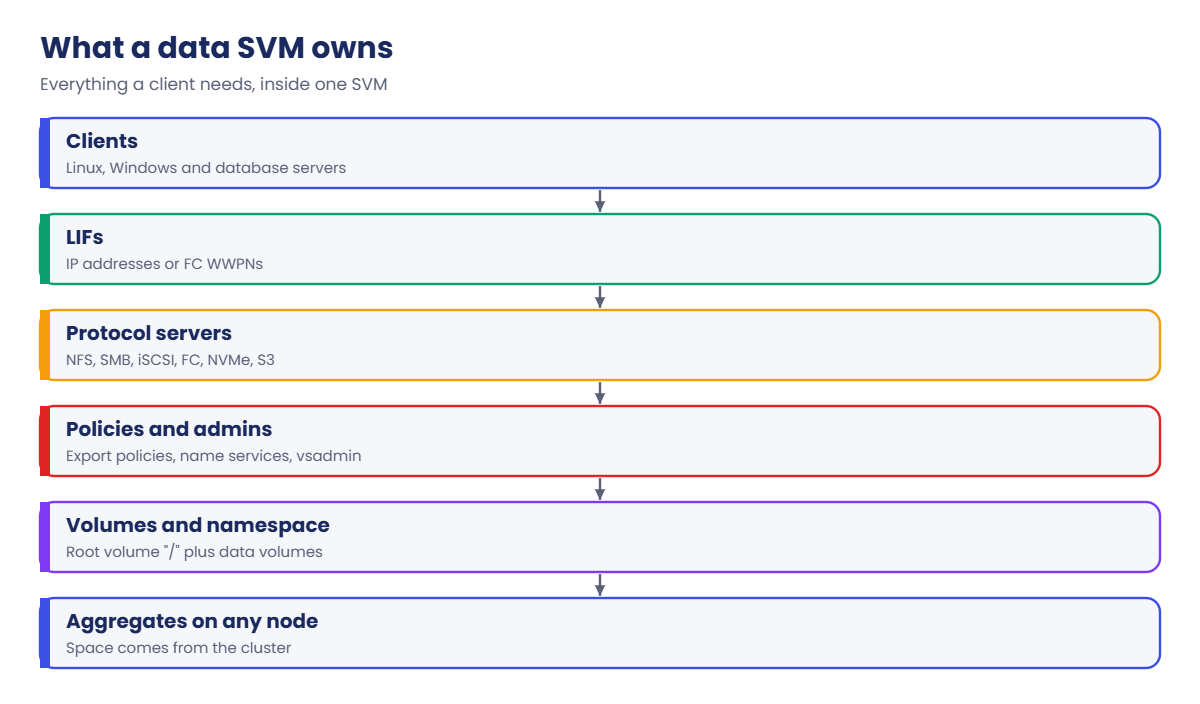
A storage virtual machine (SVM, called a Vserver in the CLI and in older documents) is a logical server that serves data. A data SVM has a root volume (the top of its namespace, “/”), data volumes that can sit on any aggregate on any node, LIFs that clients connect to, and its own protocol servers (NFS, SMB, iSCSI, FC, NVMe, S3), name services, export policies and administrators.
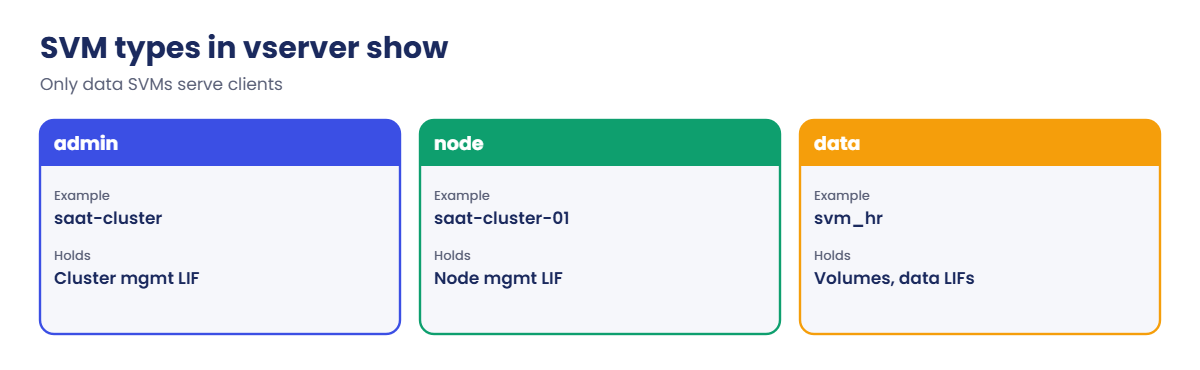
The cluster also has SVMs you don’t serve data from: one admin SVM named after the cluster, and one node SVM per node. Each data SVM belongs to one IPspace and can be limited with -allowed-protocols, and -aggr-list sets which aggregates an SVM administrator may create volumes on.
Because each SVM keeps its own network and security settings, one cluster can safely serve several departments or customers. That’s what NetApp calls secure multi-tenancy, and it’s also why SVM DR (Lesson 41) can fail over a whole SVM at once.
How it works, step by step
1Pick an aggregate for the root volume
When you create an SVM, ONTAP builds a small root volume on the aggregate you name. Never use a node’s aggr0 root aggregate; it’s only for vol0.
2Create the SVM
vserver create gives the SVM a name, a root volume, a security style for that root (unix for NFS, ntfs for SMB) and a default language. In System Manager: Storage › Storage VMs › + Add, where the wizard also offers to set up protocols and LIFs.

3Limit what it can do
Use vserver modify -allowed-protocols so only the protocols this tenant needs can be turned on, and -aggr-list to fix which aggregates its admins may use.
4Add volumes, LIFs and protocols
Data volumes are created inside the SVM and mounted in its namespace (Lesson 17). LIFs give it IP addresses or FC WWPNs (Lesson 21), and protocol servers like NFS or SMB are created per SVM.
5Run, stop or remove it
vserver stop cuts off every client of that SVM at once, which is useful for a planned shutdown and dangerous by mistake. To delete an SVM you first remove its data volumes, so ONTAP won’t throw away data by accident.
| SVM type | Example in the lab | Used for |
|---|---|---|
| admin | saat-cluster | Managing the whole cluster, cluster management LIF |
| node | saat-cluster-01, saat-cluster-02 | Node management LIFs, node-level settings |
| data | svm_hr, svm_fin | Serving NFS, SMB, iSCSI, FC, NVMe or S3 to clients |
Hands-on lab: create, limit and stop SVMs
Before you run any command, double-check it
Read every command twice before you press Enter. Check the target: the server name, the user, the disk or device name, the path and the sizes. These commands are for learning and were tested in our lab, not on your system. At work, run the read-only commands first, follow your change process, make sure a backup exists, and ask a second person to check anything that changes or deletes data. You run them at your own risk.
This lab uses the SaatVedha ONTAP practice shell, our own learning tool. It is not NetApp software: real ONTAP output looks like this but is not identical.
You’ll create two SVMs for two departments, put limits on one, and stop and start the other. There are no LIFs yet, so no client can connect; that comes later in Phase 1.
1Build two data aggregates
Create setup-16.txt with these lines, then reset and run it:
storage aggregate create -aggregate aggr1_01 -node saat-cluster-01 -diskcount 8 -disktype SAS
storage aggregate create -aggregate aggr1_02 -node saat-cluster-02 -diskcount 8 -disktype SASpython ontapsim.py -c "simctl reset"
python ontapsim.py --run setup-16.txt✅ Checkpoint: Both aggregates report “Job succeeded”.
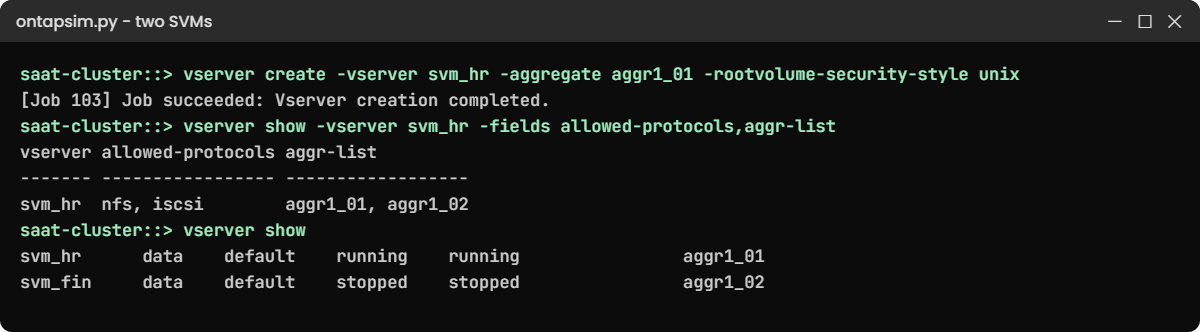
2Create an SVM for HR
Log in and run:
vserver create -vserver svm_hr -aggregate aggr1_01 -rootvolume-security-style unix
vserver show -vserver svm_hr -instance
volume show -vserver svm_hrYou should see this:
[Job 103] Job succeeded: Vserver creation completed.
saat-cluster::> vserver show -vserver svm_hr -instance
Vserver: svm_hr
Vserver Type: data
Vserver Subtype: default
Vserver UUID: c0e9e146-bb09-8e06-e118-ed25be62c6d6
Root Volume: svm_hr_root
Aggregate: aggr1_01
Root Volume Security Style: unix
Language: c.utf_8
Snapshot Policy: default
Comment: -
Vserver Admin State: running
Vserver Operational State: running
Allowed Protocols: nfs, cifs, fcp, iscsi, ndmp, s3, nvme
List of Aggregates Assigned: -
IPspace Name: Default
saat-cluster::> volume show -vserver svm_hr
Vserver Volume Aggregate State Type Size Available Used%
--------- ------------ ------------ ---------- ---- ---------- ---------- -----
svm_hr svm_hr_root aggr1_01 online RW 1GB 972.2MB 0%The SVM is a data SVM in the Default IPspace with a 1 GB root volume on aggr1_01. Every protocol is allowed and no aggregate list is set yet. Your UUID will be different.
✅ Checkpoint: svm_hr is running and owns svm_hr_root.
3Limit HR to NFS and iSCSI
vserver modify -vserver svm_hr -allowed-protocols nfs,iscsi -aggr-list aggr1_01,aggr1_02
vserver show -vserver svm_hr -fields allowed-protocols,aggr-listYou should see this:
vserver allowed-protocols aggr-list
------- ----------------- ------------------
svm_hr nfs, iscsi aggr1_01, aggr1_02Now nobody can switch on SMB or FC in this SVM by mistake, and its admins can only place volumes on the two data aggregates.
✅ Checkpoint: allowed-protocols shows nfs, iscsi.
4Create a second SVM on the other node
vserver create -vserver svm_fin -aggregate aggr1_02 -rootvolume-security-style ntfs
vserver stop -vserver svm_fin
vserver showYou should see this:
[Job 104] Job succeeded: Vserver creation completed.
saat-cluster::> vserver stop -vserver svm_fin
[Job 105] Job succeeded: SUCCESS
saat-cluster::> vserver show
Admin Operational Root
Vserver Type Subtype State State Volume Aggregate
----------- ------- ---------- ---------- ----------- ---------- ----------
saat-cluster
admin - - - - -
saat-cluster-01
node - - - - -
saat-cluster-02
node - - - - -
svm_hr_root
svm_hr data default running running aggr1_01
svm_fin_root
svm_fin data default stopped stopped aggr1_02
5 entries were displayed.svm_fin uses ntfs for its root because Finance will use Windows shares. It’s stopped now, so if it had clients they would all lose access, while svm_hr keeps running. Start it again:
vserver start -vserver svm_fin[Job 106] Job succeeded: SUCCESS✅ Checkpoint: vserver show lists svm_fin as running again.
Try it yourself: Open “Create an SVM” in the Command Builder.
Break It, Then Fix It
Three mistakes ONTAP stops you from making. Run each one on purpose.
1Reuse an SVM name
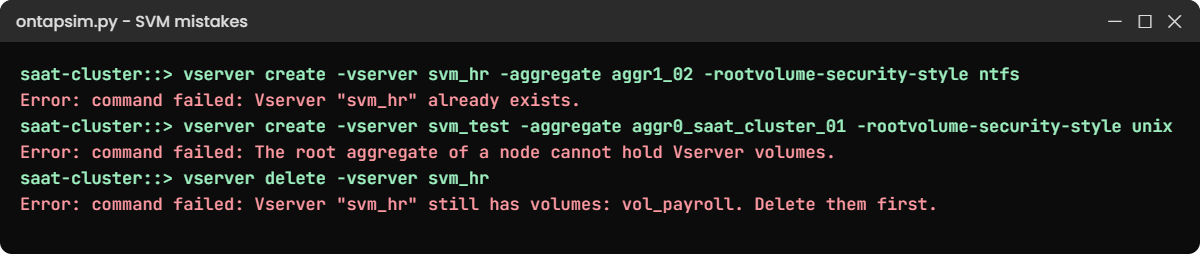
vserver create -vserver svm_hr -aggregate aggr1_02 -rootvolume-security-style ntfsYou’ll get this:
Error: command failed: Vserver "svm_hr" already exists.SVM names are unique across the cluster. Agree a naming standard such as svm_<department> before you build.
✅ Checkpoint: You picked a new name for any extra SVM.
2Put the SVM root on a node root aggregate
vserver create -vserver svm_test -aggregate aggr0_saat_cluster_01 -rootvolume-security-style unixYou’ll get this:
Error: command failed: The root aggregate of a node cannot hold Vserver volumes.Use a data aggregate such as aggr1_01. The wording here is the practice shell’s; real ONTAP refuses as well.
✅ Checkpoint: You know which aggregates are data aggregates.
3Delete an SVM that still holds data
volume create -vserver svm_hr -volume vol_payroll -aggregate aggr1_01 -size 20g -junction-path /payroll
vserver delete -vserver svm_hrYou’ll get this:
[Job 107] Job succeeded: Successful
saat-cluster::> vserver delete -vserver svm_hr
Error: command failed: Vserver "svm_hr" still has volumes: vol_payroll. Delete them first.Good: ONTAP protects the payroll data. You meant to remove the test SVM svm_fin, which has nothing but its root volume:
vserver delete -vserver svm_fin
vserver show[Job 108] Job succeeded: SUCCESS
saat-cluster::> vserver show
Admin Operational Root
Vserver Type Subtype State State Volume Aggregate
----------- ------- ---------- ---------- ----------- ---------- ----------
saat-cluster
admin - - - - -
saat-cluster-01
node - - - - -
saat-cluster-02
node - - - - -
svm_hr_root
svm_hr data default running running aggr1_01
4 entries were displayed.✅ Checkpoint: Only svm_hr is left, still running with its volume.
This happened at work
The SVM that was stopped by mistake
A textile manufacturer in Surat had two SVMs whose names started the same way: svm_test, built for a trial, and svm_textile, which served the SAP and design file shares. On a Saturday afternoon a junior admin was told to stop the test SVM before it was removed.
He typed the first few letters, picked the wrong name from his command history and ran vserver stop. Within a minute the design team’s shares disappeared and SAP batch jobs failed. A senior engineer saw svm_textile as stopped in vserver show, started it again, and everything came back after about twelve minutes, though two batch jobs had to be rerun.
The team renamed the trial SVM to something nobody could confuse, started using the SVM -comment field to note the owner, and added a rule: before stopping any SVM, run volume show and network interface show for it and read the list out loud on the call.
Common mistakes and troubleshooting
| Mistake | What happens | Do this instead |
|---|---|---|
| One SVM for every department | One mistake or one name-service problem hits everyone | Use one SVM per tenant or security boundary |
| An SVM for every application | Dozens of SVMs, LIFs and IPs to manage | Group applications that share owners, network and security |
| Leaving all protocols allowed | Someone enables SMB or FC where it doesn’t belong | Set -allowed-protocols to what the tenant needs |
| Wrong root security style | Permission problems on the namespace root later | unix for NFS-first SVMs, ntfs for SMB-first SVMs |
| Stopping an SVM without checking | Every client of that SVM loses access at once | Check its volumes and LIFs, confirm the name, then stop it |
Interview questions
Click a question to open it. Each one is written the way an interviewer would ask it. Under it you will see why they ask it and one way you could answer, in your own words.
Fresher level
1. Can you explain in simple words what an SVM is?
Why they ask this: They want to check you understand the basic building block clients connect to.
How you might answer: An SVM is a virtual storage server inside the ONTAP cluster. It has its own volumes, IP addresses or WWPNs, protocols like NFS or SMB, and its own security settings, so clients see it as one server even though it runs across the cluster’s nodes.
2. What’s the difference between the admin SVM, node SVMs and data SVMs?
Why they ask this: They’re checking you can read vserver show output correctly.
How you might answer: The admin SVM is the cluster itself and holds the cluster management LIF. Each node has a node SVM for node-level things like node management LIFs. Data SVMs are the ones I create to serve NFS, SMB, iSCSI, FC, NVMe or S3 to clients.
2–5 years experience
3. How would you stop the HR team’s SVM from ever serving SMB or FC?
Why they ask this: They want to see you know how to put guard rails on an SVM, not just build it.
How you might answer: I’d set vserver modify -vserver svm_hr -allowed-protocols nfs,iscsi. After that, nobody can create an SMB server or FC service in that SVM until the allowed list is changed.
I’d also set -aggr-list so its admins can only place volumes on the aggregates I picked.
4. Someone asks you to delete an old SVM. What do you check before you do it?
Why they ask this: They want to see a careful, step-by-step habit around destructive changes.
How you might answer: First I’d confirm the exact name and owner, then list its volumes, LIFs and any SnapMirror relationships. ONTAP won’t delete an SVM that still has data volumes, but I’d still get written approval, stop the SVM for an agreed period to catch anyone still using it, and only then remove the volumes and the SVM.
Senior level
5. A hosting company wants to put twenty customers on one ONTAP cluster. How would you design the SVMs?
Why they ask this: They want to see design thinking about isolation, networking and admin delegation.
How you might answer: I’d give each customer their own SVM, so each has its own volumes, LIFs, protocols and admins. Customers with overlapping IP ranges would go in separate IPspaces.
Then I’d delegate a vsadmin account per SVM, set allowed protocols and aggregate lists, and use QoS so one customer can’t slow the others.
6. When would you choose one shared SVM over several smaller ones?
Why they ask this: They’re checking that you balance isolation against operational overhead.
How you might answer: If the teams share the same owners, the same Active Directory and the same network, one SVM is simpler: fewer LIFs, one SMB server, one set of name services. I’d split into separate SVMs when there’s a real boundary, like a different security domain, a separate admin team, or a need to fail them over to DR separately.
Quick quiz
Q1. What do clients connect to in ONTAP?
- An aggregate
- A node’s root volume
- A data SVM through its LIFs
- A RAID group
Show answer
C — clients reach a data SVM through the SVM’s LIFs and protocol servers.
Q2. What is created automatically when you run vserver create?
- An SMB server
- The SVM root volume
- An iSCSI LIF
- A new aggregate
Show answer
B — ONTAP builds the SVM’s root volume (the top of its namespace) on the aggregate you name.
Q3. Which option stops an SVM from ever enabling SMB?
- -aggr-list
- -allowed-protocols
- -rootvolume-security-style
- -language
Show answer
B — -allowed-protocols limits which protocols can be set up in the SVM.
Q4. What happens to clients when you run vserver stop?
- Nothing, only admins are logged out
- They lose access to that SVM
- They move to another SVM
- They switch to read-only
Show answer
B — stopping an SVM stops all its data access.
Q5. Why did vserver delete fail on svm_hr in the lab?
- The SVM was stopped
- It still had a data volume
- It was in the wrong IPspace
- It had no LIFs
Show answer
B — ONTAP refuses to delete an SVM that still has data volumes.
Quick recap
- An SVM is a virtual storage server; clients connect to SVMs, not to nodes or aggregates.
- Each data SVM has a root volume, data volumes, LIFs, protocols and its own admins.
- The cluster also has an admin SVM and one node SVM per node.
- Limit SVMs with -allowed-protocols and -aggr-list.
- vserver stop cuts off all clients; vserver delete needs the data volumes removed first.
Next lesson
Lesson 17: FlexVol volumes → You’ll create, grow and tune the volumes that hold your data inside an SVM.
Further reading: ONTAP SVM
Want to go deeper into ONTAP SVM? Read the ONTAP concepts guide for how SVMs, volumes and LIFs fit together across the cluster. You can also see the full plan for this course on the NetApp ONTAP Storage Administration course page.