

Before you run any command, double-check it
Read every command twice before you press Enter. Check the target: the server name, the user, the disk or device name, the path and the sizes. These commands are for learning and were tested in our lab, not on your system. At work, run the read-only commands first, follow your change process, make sure a backup exists, and ask a second person to check anything that changes or deletes data. You run them at your own risk.
This lab uses the SaatVedha ONTAP practice shell, our own learning tool. It is not NetApp software: real ONTAP output looks like this but is not identical.
1Reset and build
Reset the lab, create fp-build.txt with these lines, and run it:
storage aggregate create -aggregate aggr1_01 -node saat-cluster-01 -diskcount 8 -disktype SAS
storage aggregate create -aggregate aggr1_02 -node saat-cluster-02 -diskcount 8 -disktype SAS
vserver create -vserver svm_fp -aggregate aggr1_01 -rootvolume-security-style unix
network interface create -vserver svm_fp -lif fp_nas1 -service-policy default-data-files -home-node saat-cluster-01 -home-port e0c -address 192.168.56.150 -netmask 255.255.255.0 -auto-revert true
network interface create -vserver svm_fp -lif fp_iscsi1 -service-policy default-data-iscsi -home-node saat-cluster-01 -home-port e0d -address 192.168.56.151 -netmask 255.255.255.0
network interface create -vserver svm_fp -lif fp_iscsi2 -service-policy default-data-iscsi -home-node saat-cluster-02 -home-port e0d -address 192.168.56.152 -netmask 255.255.255.0
vserver nfs create -vserver svm_fp -v3 enabled -v4.1 enabled
vserver export-policy rule create -vserver svm_fp -policyname default -clientmatch 192.168.56.0/24 -rorule sys -rwrule never -superuser none
vserver export-policy create -vserver svm_fp -policyname web_hosts
vserver export-policy rule create -vserver svm_fp -policyname web_hosts -clientmatch 192.168.56.21 -rorule sys -rwrule sys -superuser sys -protocol nfs
volume create -vserver svm_fp -volume vol_web -aggregate aggr1_01 -size 50g -junction-path /web -policy web_hosts -security-style unix
vserver iscsi create -vserver svm_fp
volume create -vserver svm_fp -volume vol_db -aggregate aggr1_02 -size 60g -space-guarantee none -snapshot-policy none
lun create -vserver svm_fp -path /vol/vol_db/lun_db -size 50g -ostype linux -space-reserve disabled
lun igroup create -vserver svm_fp -igroup ig_rhel1 -protocol iscsi -ostype linux -initiator iqn.1994-05.com.redhat:8f3d2c1b9a7e
lun mapping create -vserver svm_fp -path /vol/vol_db/lun_db -igroup ig_rhel1
python ontapsim.py -c "simctl reset"
python ontapsim.py --run fp-build.txtThe only warnings should be that each node has no spare SAS disks left, which is expected in this small lab.
✅ Checkpoint: No line starts with Error.
2Prove both clients work
Log in and run:
simctl host linux1 mount 192.168.56.150:/web /mnt/web vers=4.1
simctl host linux1 touch /mnt/web/index.html
simctl host linux1 ls /mnt/web
simctl host rhel1 iscsi-discover 192.168.56.151
simctl host rhel1 iscsi-login
simctl host rhel1 rescan
simctl host rhel1 multipath
You should see the share and two paths:
(mounted 192.168.56.150:/web on /mnt/web type nfs4)
...
index.html
...
Scanning SCSI subsystem for new devices... 2 new or changed device(s) found.
saat-cluster::> simctl host rhel1 multipath
3600a0980337a4868374d525946676d4 dm-2 NETAPP,LUN C-Mode
size=50G features='3 queue_if_no_path pg_init_retries 50' hwhandler='1 alua' wp=rw
|-+- policy='service-time 0' prio=50 status=active
| `- 30:0:0:0 sdj 8:16 active ready running
`-+- policy='service-time 0' prio=10 status=enabled
  `- 32:0:0:0 sdl 8:48 active ready running
✅ Checkpoint: linux1 lists index.html and rhel1 shows a 50G LUN with two paths.
3Save your baseline
cluster show
storage failover show
network interface show -vserver svm_fp
vserver export-policy rule show -vserver svm_fp
lun igroup show -vserver svm_fp -instance
Copy the output into a text file. You’ll compare against it in a few minutes.
✅ Checkpoint: You have the baseline saved.
4Let the faults loose
Run these lines without thinking about them too much, then pretend three different teams have just called you:
simctl break export-drop svm_fp web_hosts
simctl break iqn-typo svm_fp ig_rhel1
simctl break lif-down svm_fp fp_iscsi2
simctl tick 1
The web team says their server can’t read its files. The database team says their disk is gone after a reboot.
A third person says “one of the storage paths alerted last night”. Now find and fix everything, using only ONTAP and the host views. Stop here and try it yourself before reading on.
✅ Checkpoint: You have written down three symptoms.
5Answers: what the clients see
simctl host linux1 ls /mnt/web
simctl host rhel1 rescan
You’ll see:
ls: cannot open directory '/mnt/web': Permission denied
saat-cluster::> simctl host rhel1 rescan
Scanning SCSI subsystem for new devices... 0 new or changed device(s) found.
(No LUN paths. Check: sessions or FC logins, igroup initiators, LUN mapping, LUN/volume online, reporting nodes.)
✅ Checkpoint: You see Permission denied and no LUN paths.
6Answers: health first, then the layers
cluster show
event log show -severity <=ERROR
network interface show -vserver svm_fp
vserver export-policy rule show -vserver svm_fp -policyname web_hosts
vserver export-policy check-access -vserver svm_fp -volume vol_web -client-ip 192.168.56.21 -authentication-method sys -protocol nfs4 -access-type read-write
lun igroup show -vserver svm_fp -instance
vserver iscsi initiator show -vserver svm_fp
The important lines:
saat-cluster::> event log show -severity <=ERROR
There are no entries matching your query.
...
            fp_iscsi2  down/down  192.168.56.152/24  saat-cluster-02 e0d     true
saat-cluster::> vserver export-policy rule show -vserver svm_fp -policyname web_hosts
There are no entries matching your query.
saat-cluster::> vserver export-policy check-access -vserver svm_fp -volume vol_web -client-ip 192.168.56.21 -authentication-method sys -protocol nfs4 -access-type read-write
                                    Policy       Policy       Rule
Path                   Policy       Owner        Owner Type  Index Access
---------------------- ------------ ------------ ---------- ------ ----------
/                      default      svm_fp_root  volume          1 read
/web                   web_hosts    vol_web      volume          0 denied
2 entries were displayed.
...
            Initiators: iqn.1994-05.com.redhat:8f3d2c1b9a70 (not logged in)
saat-cluster::> vserver iscsi initiator show -vserver svm_fp
           Tpgroup       Initiator                                      Igroup
Vserver    Name          Name                                           Name
---------- ------------- ---------------------------------------------- ------------
svm_fp     fp_iscsi1     iqn.1994-05.com.redhat:8f3d2c1b9a7e            -
svm_fp     fp_iscsi2     iqn.1994-05.com.redhat:8f3d2c1b9a7e            -
2 entries were displayed.
The cluster is healthy and the event log is empty, so these are configuration changes, not hardware.
Fault 1: web_hosts has no rules, so /web is denied. Fault 2: the igroup holds an IQN ending in 9a70 while rhel1 really is 9a7e. Fault 3: fp_iscsi2 is administratively down.
✅ Checkpoint: You found all three faults, or know which one you missed.
7Answers: fix one at a time and check
lun igroup remove -vserver svm_fp -igroup ig_rhel1 -initiator iqn.1994-05.com.redhat:8f3d2c1b9a70
lun igroup add -vserver svm_fp -igroup ig_rhel1 -initiator iqn.1994-05.com.redhat:8f3d2c1b9a7e
simctl host rhel1 rescan
simctl host rhel1 multipath
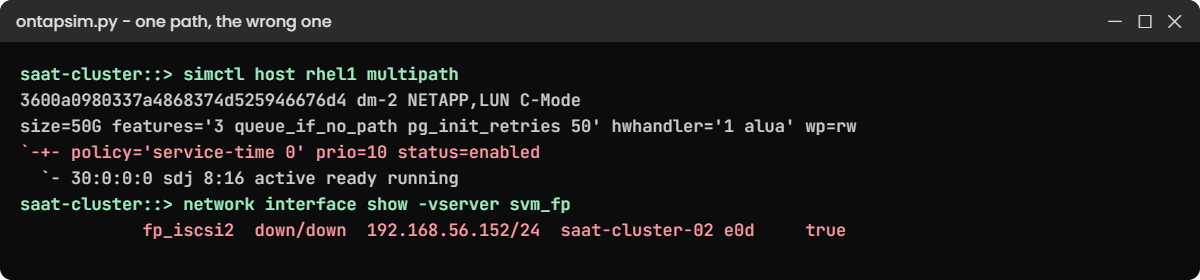
After the igroup fix you get one path only:
Scanning SCSI subsystem for new devices... 1 new or changed device(s) found.
saat-cluster::> simctl host rhel1 multipath
3600a0980337a4868374d525946676d4 dm-2 NETAPP,LUN C-Mode
size=50G features='3 queue_if_no_path pg_init_retries 50' hwhandler='1 alua' wp=rw
`-+- policy='service-time 0' prio=10 status=enabled
  `- 30:0:0:0 sdj 8:16 active ready running
Look closely: the only path has prio=10, the non-optimized one through node 01. The LUN lives on node 02, and node 02’s iSCSI LIF is the one that’s down. The database works, but every I/O takes the long way.
network interface modify -vserver svm_fp -lif fp_iscsi2 -status-admin up
simctl host rhel1 rescan
simctl host rhel1 multipath
vserver export-policy rule create -vserver svm_fp -policyname web_hosts -clientmatch 192.168.56.21 -rorule sys -rwrule sys -superuser sys -protocol nfs
simctl host linux1 ls /mnt/web
You should see both paths back and the web files:
3600a0980337a4868374d525946676d4 dm-2 NETAPP,LUN C-Mode
size=50G features='3 queue_if_no_path pg_init_retries 50' hwhandler='1 alua' wp=rw
|-+- policy='service-time 0' prio=50 status=active
| `- 30:0:0:0 sdj 8:16 active ready running
`-+- policy='service-time 0' prio=10 status=enabled
  `- 32:0:0:0 sdl 8:48 active ready running
saat-cluster::> vserver export-policy rule create -vserver svm_fp -policyname web_hosts -clientmatch 192.168.56.21 -rorule sys -rwrule sys -superuser sys -protocol nfs
saat-cluster::> simctl host linux1 ls /mnt/web
index.html
✅ Checkpoint: rhel1 has two paths again and linux1 lists index.html.
8Close it out
Run the baseline commands again and compare. Then write three short lines, one per fault: what the user saw, the cause, the fix. That’s your incident note, and it’s the habit interviewers ask about.
✅ Checkpoint: Your new output matches the baseline.
Try it yourself: Open the cluster health check in the Command Builder.
A classic mistake made while fixing: you re-create the export rule in a hurry and copy the safe-looking “superuser none” from the default policy.
1Re-create the rule the wrong way
From the fixed state, delete rule 1 and add it back with -superuser none:
vserver export-policy rule delete -vserver svm_fp -policyname web_hosts -ruleindex 1
vserver export-policy rule create -vserver svm_fp -policyname web_hosts -clientmatch 192.168.56.21 -rorule sys -rwrule sys -superuser none -protocol nfs
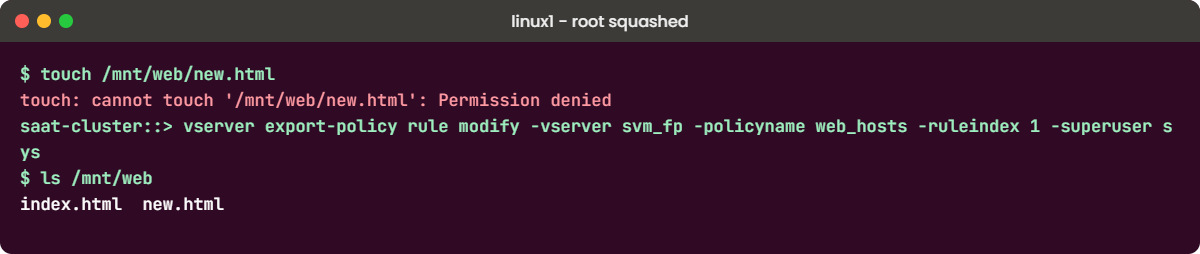
simctl host linux1 touch /mnt/web/new.html
You’ll get this:
touch: cannot touch '/mnt/web/new.html': Permission denied
(you are root on the client, but superuser is "none" in export rule 1, so root is mapped to the anonymous user 65534, which cannot write here)
Reading works, but root on linux1 can’t write. With -superuser none, ONTAP maps the client’s root user to the anonymous user (65534 here), which has no write permission on the volume. The practice shell explains this in brackets; a real client just says Permission denied.
✅ Checkpoint: Root on linux1 gets Permission denied when writing.
2Fix it the right way
Decide what the web server needs. If its application runs as root and must write, set superuser to sys for that one host. Better still, run the application as a normal user who owns the files, and keep root squashed.
vserver export-policy rule modify -vserver svm_fp -policyname web_hosts -ruleindex 1 -superuser sys
simctl host linux1 touch /mnt/web/new.html
simctl host linux1 ls /mnt/web
You should see:
index.html new.html✅ Checkpoint: linux1 can write again.
Try it yourself: Build an export rule in the Command Builder.